
Everything New in iOS 27 Beta 5
Unveiling the Latest Enhancements: A Deep Dive into iOS 27 Beta 5
As the highly anticipated launch of iOS 27 draws closer, with just a little over a month left until its official debut, Apple continues to fine-tune and perfect its next-generation mobile operating system. The release of the fifth beta version of iOS 27 showcases a series of thoughtful adjustments and exciting new features designed to make your iPhone experience even more intuitive, personalized, and efficient. This latest beta focuses on aesthetic refinements, deeper personalization options, and subtle yet significant improvements to core functionalities, demonstrating Apple's commitment to detail and user satisfaction. From revamped app icons that add a fresh visual flair to advanced Siri AI voice customizations and practical enhancements in areas like Contacts and Search, iOS 27 Beta 5 is packed with changes that promise to elevate your daily interaction with your iPhone.
Let's explore each of these updates in detail, understanding how they contribute to a smoother, more powerful, and genuinely nicer iPhone experience.
App Icons: A Fresh Look with Liquid Glass
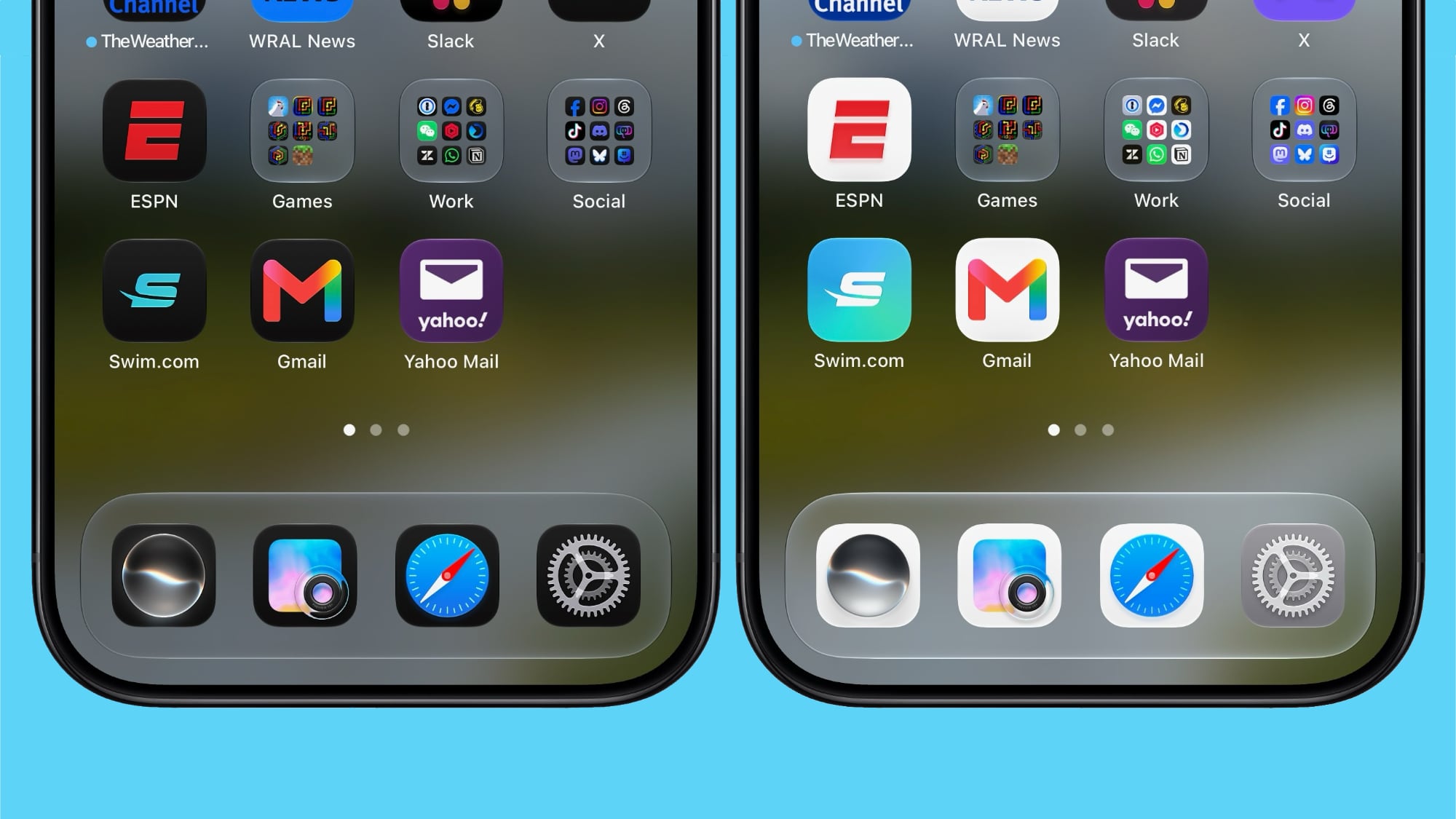
One of the first things users often notice when a new operating system or update arrives is a change in its visual presentation. iOS 27 Beta 5 brings a refreshing new look to several key app icons, integrating Apple's distinctive Liquid Glass aesthetic more prominently. This update isn't just about superficial changes; it's about refining the visual language of iOS to create a more cohesive, modern, and engaging interface. The Liquid Glass effect, known for its translucent and depth-rich qualities, now graces the icons for essential apps such as Safari, Siri, Settings, Remote, App Store, and Preview.
For some of these applications, the redesign is quite comprehensive, offering an entirely new visual identity that feels both familiar and forward-looking. For others, the update is more about adding intricate details and enhancing the existing design, bringing them more in line with the overall iOS 27 aesthetic. This careful attention to detail ensures that while the icons feel fresh, they remain instantly recognizable to long-time iPhone users. The goal here is to improve visual consistency across the operating system, making the interface feel more polished and integrated. When every app icon reflects a unified design philosophy, navigating your iPhone becomes a more visually harmonious experience. These refreshed icons contribute to the overall premium feel of iOS 27, signaling a new chapter in Apple's design evolution and making everyday interactions with your most frequently used apps a little more delightful.
Siri AI Voice Customization: More Control Over Your Digital Assistant
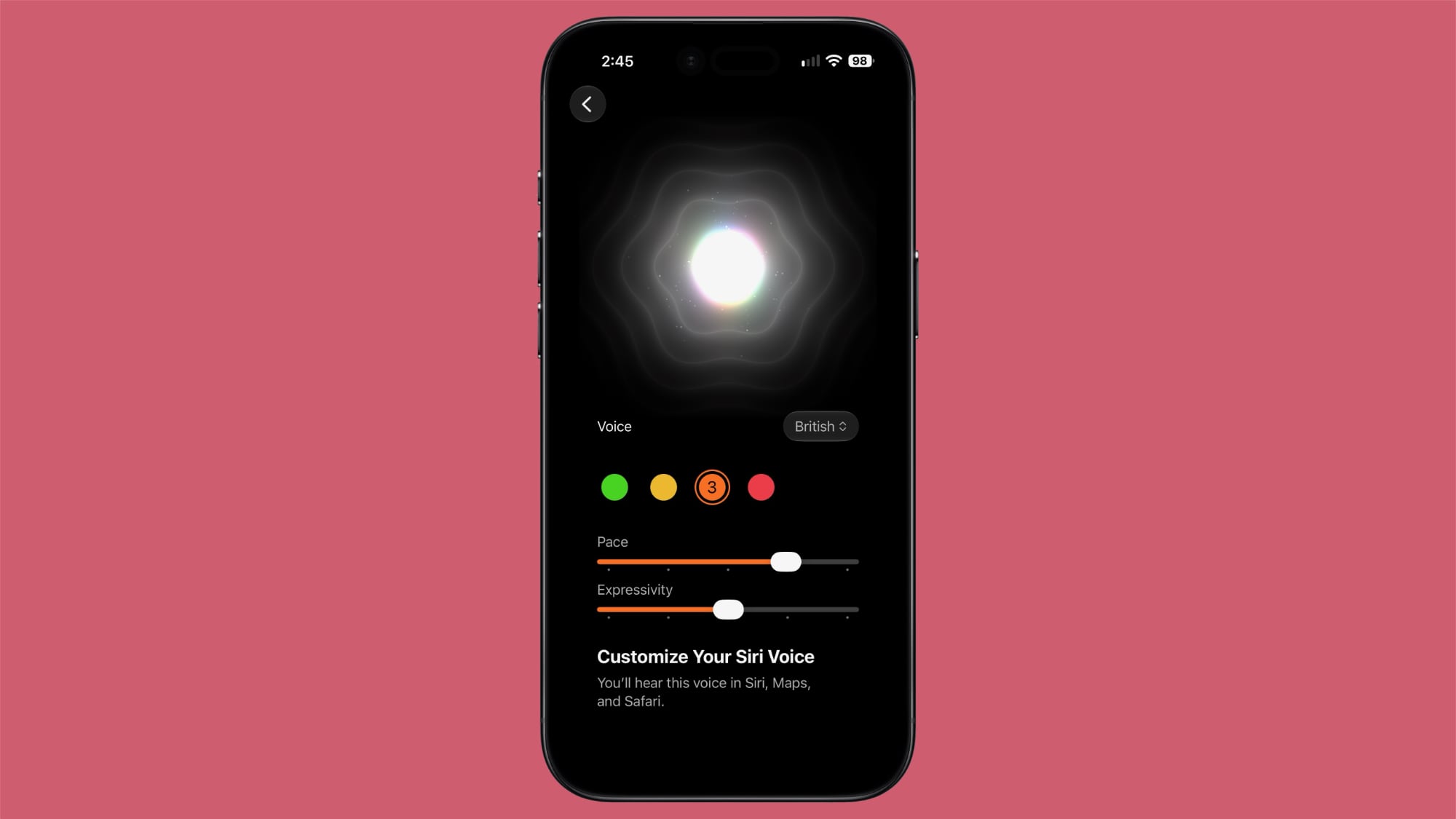
Siri, Apple's intelligent assistant, is a cornerstone of the iPhone experience, helping users with everything from setting reminders to answering complex questions. With iOS 27 Beta 5, Siri's capabilities for voice customization have taken a significant leap forward, offering users unprecedented control over how their digital assistant sounds. This update expands the personalization options, allowing you to adjust both the "Pace" and "Expressivity" for all seven American voices and the four British voices available in Siri AI.
What does this mean for you? "Pace" refers to the speed at which Siri speaks. If you find Siri's default speed too fast or too slow, you can now fine-tune it to a cadence that is most comfortable and understandable for you. This is a crucial accessibility feature, benefiting users with varying auditory processing speeds or those who simply prefer a different pace of interaction. "Expressivity," on the other hand, allows you to adjust the emotional tone and naturalness of Siri's voice. A more expressive voice might sound more human and engaging, while a less expressive one might be preferred for a more direct, functional interaction. These granular controls empower you to tailor Siri's voice to match your personal preference or specific needs, making interactions feel more natural and less robotic.
This enhanced customization is a testament to the advancements in AI voice technology, aiming to create a more personal and intuitive connection between the user and their device. Imagine a Siri that not only understands your commands but also speaks to you in a voice that feels just right, adapting to your preferences. However, it's important to note a key technical aspect of this feature: Siri AI voice customization is processed entirely on-device. This on-device processing ensures maximum privacy and responsiveness, as your voice preferences don't need to be sent to Apple's servers. Due to the intensive computational requirements for real-time voice modification, this advanced feature is currently limited to Apple's latest and most powerful hardware: the iPhone 17 Pro, the iPhone 17 Pro Max, and the iPhone Air. This limitation highlights the cutting-edge nature of the technology and the hardware required to deliver such sophisticated AI capabilities directly on your device, prioritizing both performance and user privacy.
Contacts: Enhanced Information at a Glance
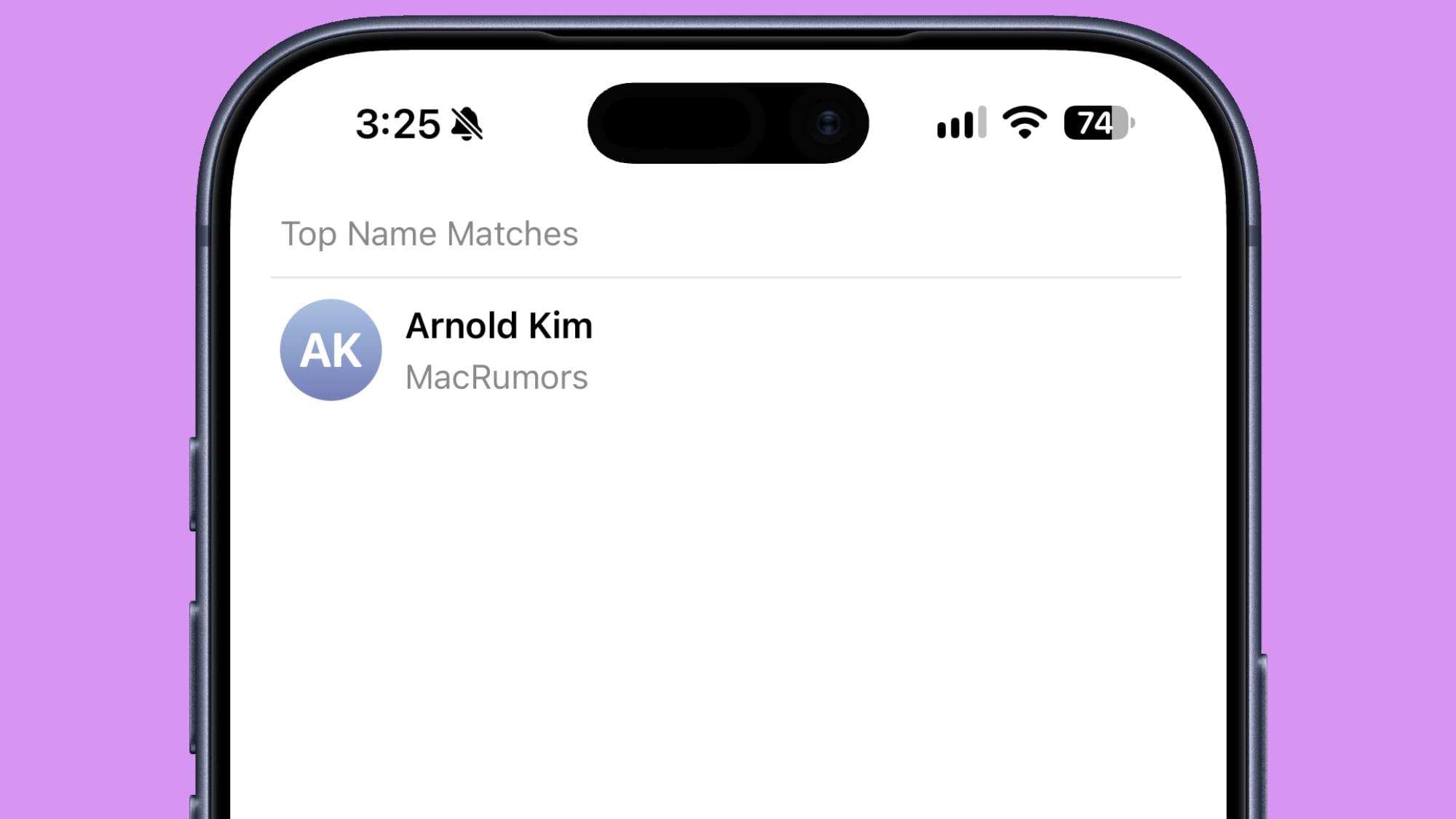
Managing your contacts effectively is vital, whether for personal connections or professional networking. iOS 27 Beta 5 introduces a practical enhancement to the Contacts app that streamlines how you view and access information. If you've created a contact entry that includes an associated company name, this information will now be visibly displayed directly within your main contact list. This means that under the contact's name, you'll see the company they work for, alongside their name, without needing to tap into the individual contact card.
This seemingly minor change offers significant convenience, especially for users who maintain extensive professional contacts or interact frequently with individuals from various organizations. In a glance, you can identify not just the person, but also their professional affiliation. This is incredibly useful when you're quickly scanning your contacts to find someone from a specific company, or when you simply need that additional context before making a call or sending a message. Imagine sifting through a long list of contacts; having the company name immediately visible saves you the time and effort of opening multiple contact cards to find the right person. This feature extends its utility to search results as well, ensuring that when you search for a contact, the company name is also presented, further enhancing the speed and accuracy of your search. It's a thoughtful improvement that reduces friction in a core productivity app, making your iPhone even more effective as a communication tool.
Create a Pass: Apple Wallet Goes Global
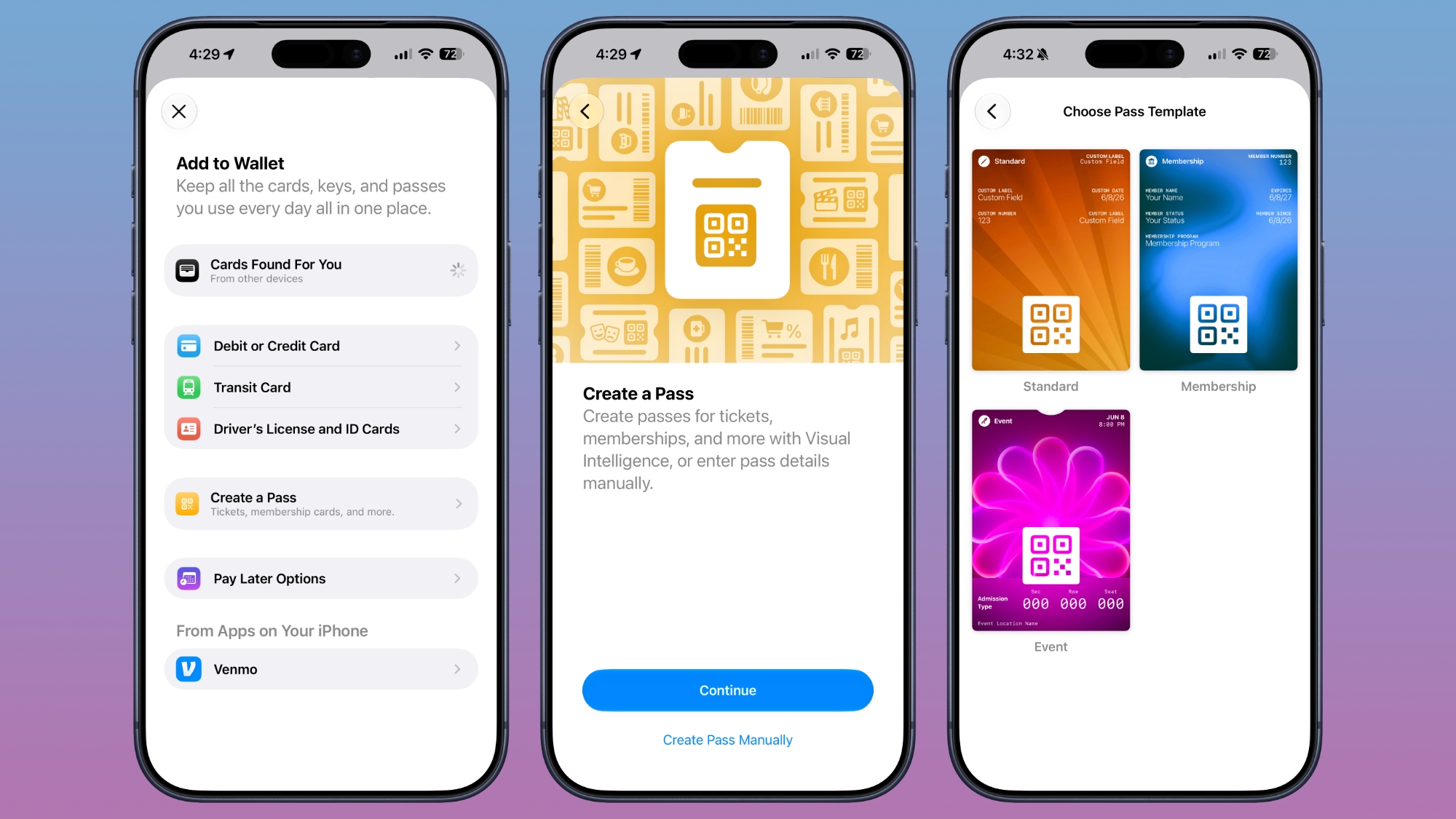
Apple Wallet has become an indispensable tool for many iPhone users, allowing them to conveniently store credit cards, loyalty cards, tickets, and more. One of its powerful features, "Create a Pass," previously had regional limitations. With iOS 27 Beta 5, Apple is expanding the availability of this feature, making it accessible outside of the U.S. This global expansion is a significant step forward, unlocking new levels of convenience and functionality for iPhone users around the world.
The "Create a Pass" feature allows users to generate and add various types of passes to their Apple Wallet directly from their iPhone, even if the pass wasn't originally provided by a specific app or vendor. This could include creating custom loyalty cards, general membership passes, or even simple tickets for personal use or small events. For example, if you have a physical loyalty card for a local coffee shop that doesn't offer a digital version, or a custom entry ticket for an event, you might be able to digitize it and add it to your Wallet. By making this feature available to a wider international audience, Apple is empowering more users to consolidate their physical cards and tickets into their digital wallet, reducing clutter and ensuring important items are always at hand with their iPhone. This move reinforces Apple Wallet's position as a comprehensive digital hub for all your passes, promoting a more streamlined and paperless lifestyle for a global user base. It demonstrates Apple's commitment to delivering a consistent and rich user experience across different geographical regions.
Splash Screens: Guiding You Through New Features
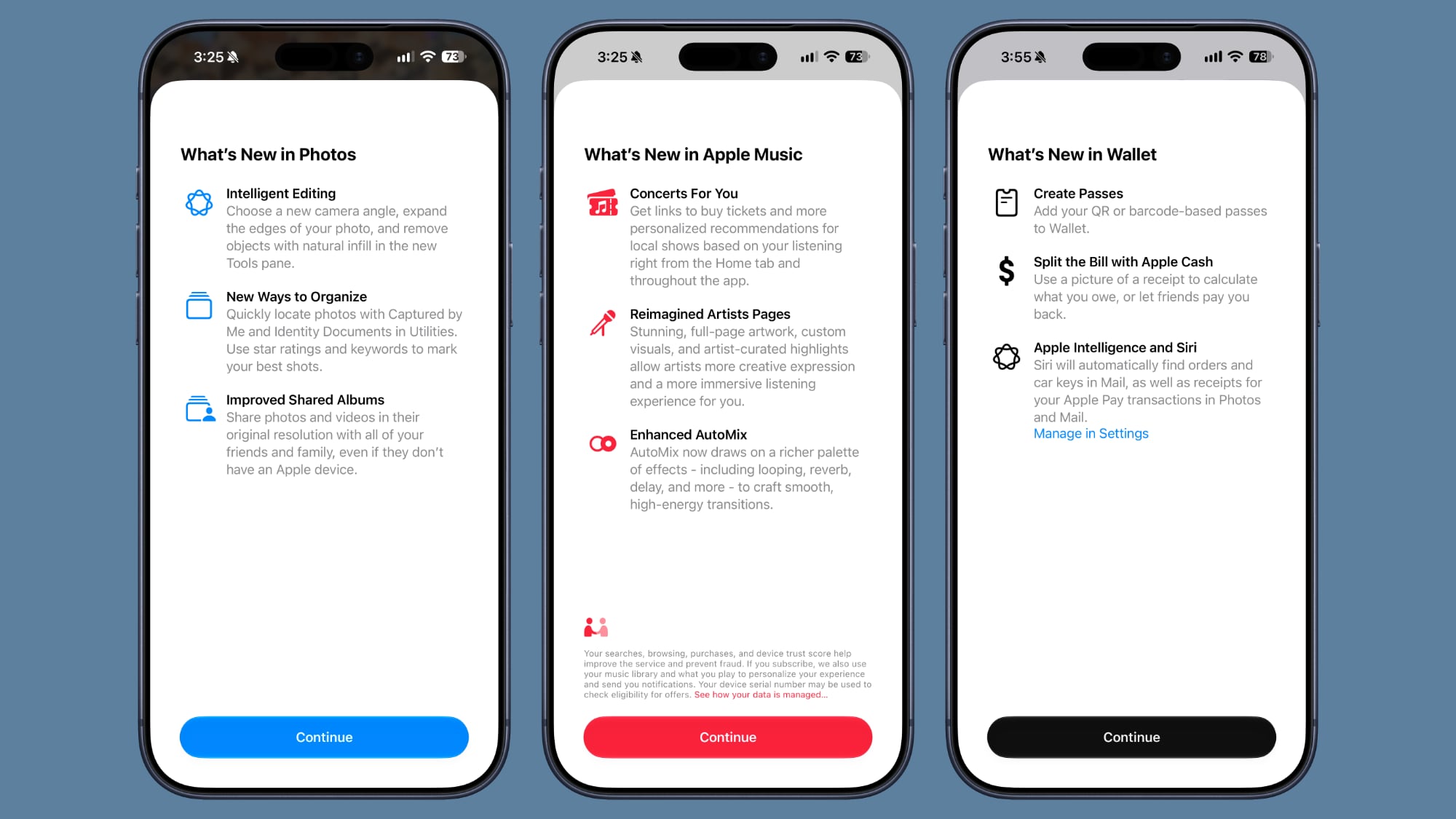
Whenever a major software update rolls out, users are often greeted with a host of new features and improvements. However, without proper guidance, it can sometimes be challenging to discover and understand all the changes. iOS 27 Beta 5 addresses this by introducing helpful splash screens for key applications: Photos, Wallet, and Music. These splash screens serve as welcoming introductions, appearing the first time you open these apps after updating to iOS 27, and clearly explaining what's new and how to utilize the latest functionalities.
Splash screens are an excellent way to onboard users to new experiences. Instead of requiring you to delve into settings or read lengthy release notes, these concise, visually appealing screens highlight the most impactful changes directly within the app itself. For instance, when you open the Photos app, a splash screen might point out new organization tools or editing capabilities. In Wallet, it could highlight new pass creation options or enhanced security features. For Music, it might showcase new playback controls, personalized recommendations, or integration with other services. This approach makes new features more discoverable and encourages users to explore and adopt them immediately. It minimizes the learning curve and ensures that users can quickly grasp and benefit from the latest innovations in iOS 27. By proactively informing users, Apple helps maximize the utility of its software updates and enhances the overall user experience, making the transition to new versions smooth and enjoyable.
Search and Ask: A Smoother, More Comprehensive Search Experience
The ability to quickly find information on your iPhone, whether it's an app, a contact, a file, or information from the web, is fundamental to its utility. iOS 27 Beta 5 brings subtle but impactful changes to the "Search or Ask" interface, designed to make your search experience faster and more intuitive. Apple has refined the animation that occurs when you bring up Search or Ask. Previously, there might have been a slight delay between the appearance of the search bar and the suggestions interface popping up. Now, the suggestions interface appears seamlessly and simultaneously with the search bar, creating a more fluid and responsive animation. This minor aesthetic tweak contributes significantly to a feeling of speed and polish, making the interaction feel more instantaneous and less disjointed.
Beyond the visual refinements, a major functional enhancement has been added to the search interface: a prominent "Search the Web" option at the bottom of the results. This feature was not present in previous beta versions, and its inclusion significantly expands the utility of the universal search function. Now, if your local device search doesn't yield the desired results, or if you're specifically looking for information online, you don't need to open a separate web browser. You can simply tap the "Search the Web" option directly from the search interface, instantly initiating a web query. This integration saves time and reduces friction, making the iPhone's search capabilities even more comprehensive and versatile. Whether you're looking for an app on your phone or a fact on the internet, the unified "Search or Ask" experience in iOS 27 Beta 5 acts as a more powerful gateway to information, both on and off your device.
Apps in Search: Tailor Your Search Results
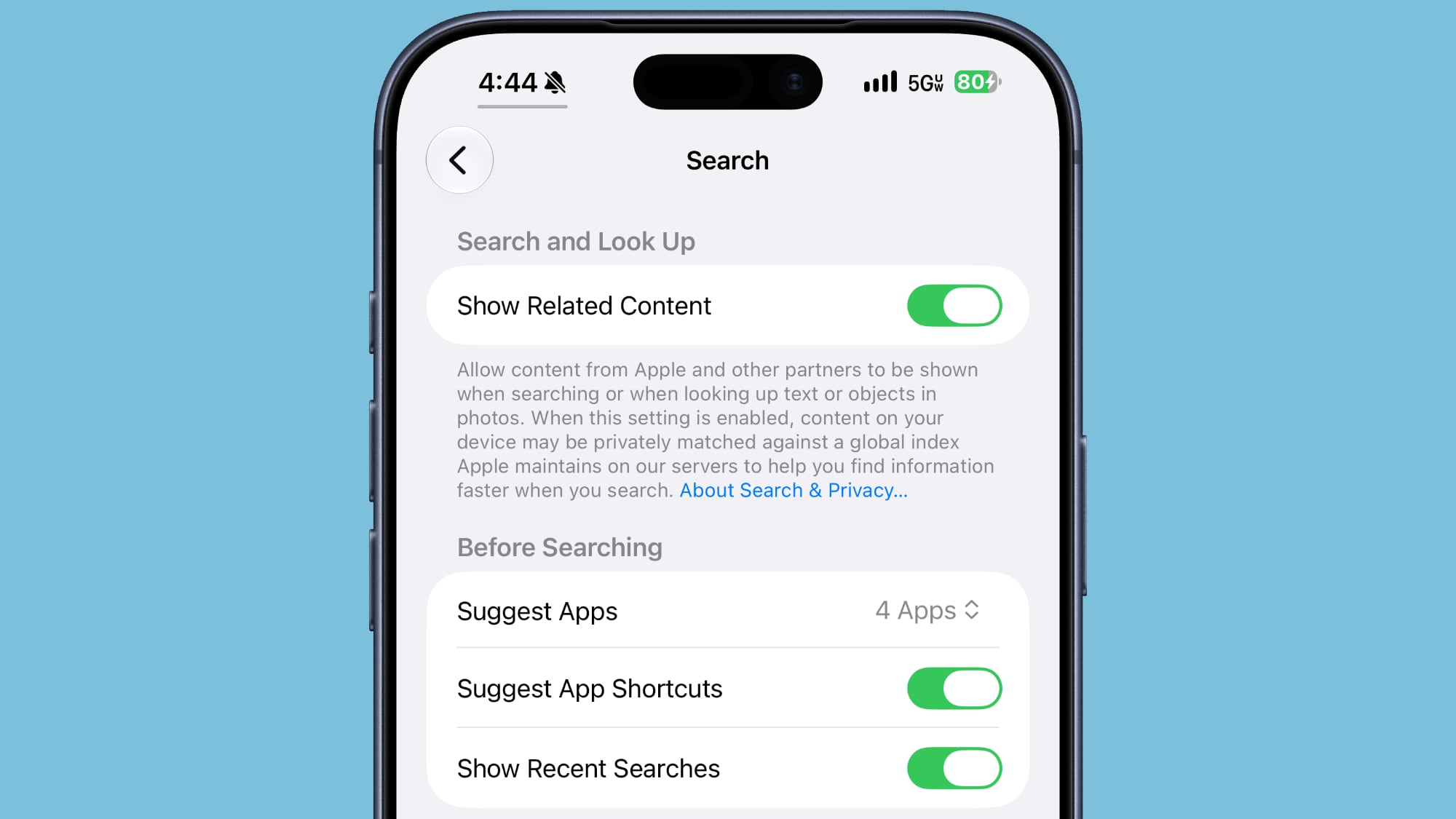
Building on the enhancements to the overall search experience, iOS 27 Beta 5 introduces new controls that allow users to customize how app results appear within the search interface. This update grants you more power to decide exactly what you see when you initiate a search, helping to declutter results and focus on what's most relevant to you. You can now choose whether search should show app results at all, and if so, to what extent. The options provided are flexible:
- Turn off app results completely: If you prefer a search experience that focuses purely on content, files, or web results, you can disable app suggestions altogether. This is particularly useful for users who know exactly where their apps are and don't want them appearing in search.
- Show four apps: For those who appreciate seeing some app suggestions but don't want an overwhelming list, this option provides a curated set of four relevant apps.
- Show eight apps: If you frequently use search to launch apps or rediscover less-used applications, you can opt for a more extensive display of up to eight app results.
Furthermore, there's an additional toggle specifically for showing "app shortcuts." App shortcuts are direct actions you can take within an app, often accessible by long-pressing an app icon or through search. For example, a Mail app shortcut might let you compose a new email, or a Maps app shortcut might let you quickly search for directions home. By being able to toggle these shortcuts on or off, you can further refine your search experience. This level of granular control is significant because it empowers users to personalize their iPhone's behavior to match their individual workflow and preferences. Whether you want a minimalist search experience or one that's rich with app-related options, iOS 27 Beta 5 gives you the tools to configure it precisely, making the search feature truly your own.
Control Center: Smarter Connectivity Display
The Control Center on iPhone offers quick access to essential settings and features like Wi-Fi, Bluetooth, brightness, and volume. With iOS 27 Beta 5, Apple has made a small but logical adjustment to how connectivity information is displayed within the Control Center, leading to a cleaner and more relevant user interface. Previously, even when connected to Wi-Fi, the Control Center might have shown information related to your cellular connection, such as your signal strength or 5G status. In this latest beta, when your iPhone is actively connected to a Wi-Fi network, the Control Center will no longer display information regarding your cellular connection.
This change is an example of intelligent interface design. When you're using Wi-Fi, your cellular network is typically a secondary or fallback connection for data. By removing the cellular connection details, the Control Center focuses on the most relevant information for your current internet access method. This declutters the interface, making it easier to quickly scan and understand your device's connectivity status. It ensures that the information presented is pertinent to your immediate usage, improving clarity and reducing visual noise. This thoughtful refinement demonstrates Apple's continuous effort to optimize the user interface, making every element serve a clear purpose and contribute to an overall more efficient and less distracting user experience. It’s a subtle touch that reflects a deeper understanding of how users interact with their devices in various network environments.
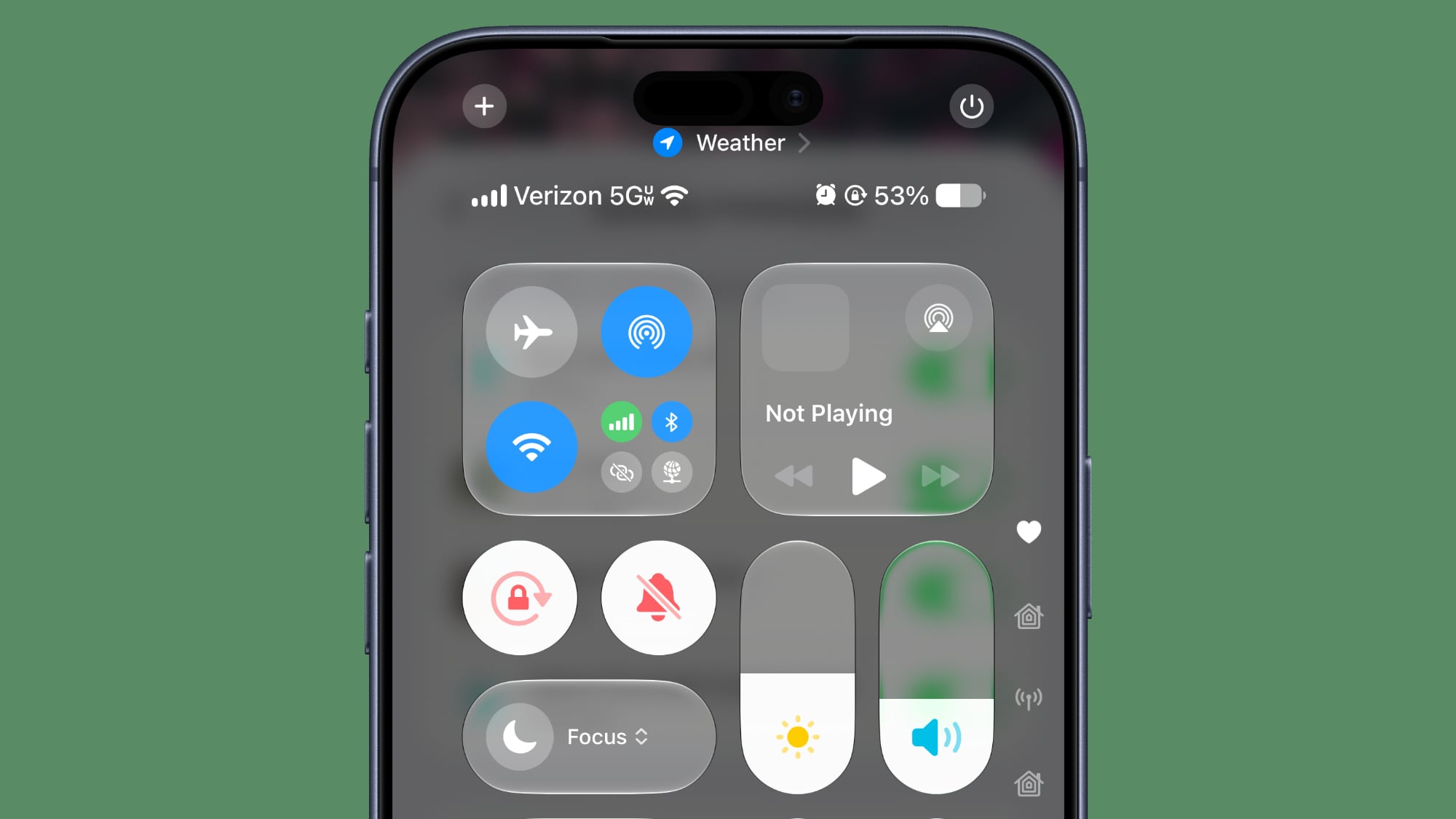 The iOS 27 Control Center in beta 4, showing cellular connection even when on Wi-Fi (this will change in Beta 5 when connected to Wi-Fi).
5G: Expanding High-Speed Connectivity
The rollout of 5G technology continues to transform how we connect to the internet on our mobile devices, offering significantly faster speeds, lower latency, and greater capacity compared to previous generations of cellular networks. iOS 27 Beta 5 brings exciting news for users in Spain, as the enhanced version of 5G, known as 5G+, is now officially available in the country. This expansion marks a crucial step in bringing cutting-edge mobile connectivity to more regions globally.
What exactly is 5G+? It typically refers to advanced implementations of 5G that leverage technologies like millimeter wave (mmWave) or carrier aggregation to deliver peak speeds and performance that go beyond standard 5G. For users in Spain, the availability of 5G+ means a tangible improvement in their mobile internet experience. This translates to incredibly fast download and upload speeds, allowing for near-instantaneous streaming of high-definition video, rapid file transfers, and a smoother experience with demanding online applications, including cloud gaming and augmented reality. The lower latency offered by 5G+ also means more responsive interactions, which is vital for real-time applications and critical communications. This expansion is not just about speed; it's about enabling new possibilities for how individuals and businesses can utilize mobile technology. As more regions gain access to advanced 5G networks, the potential for innovation and enhanced digital experiences continues to grow, making the iPhone an even more powerful tool for connectivity and productivity.
Software Updates: Clarity on Your Device's Status
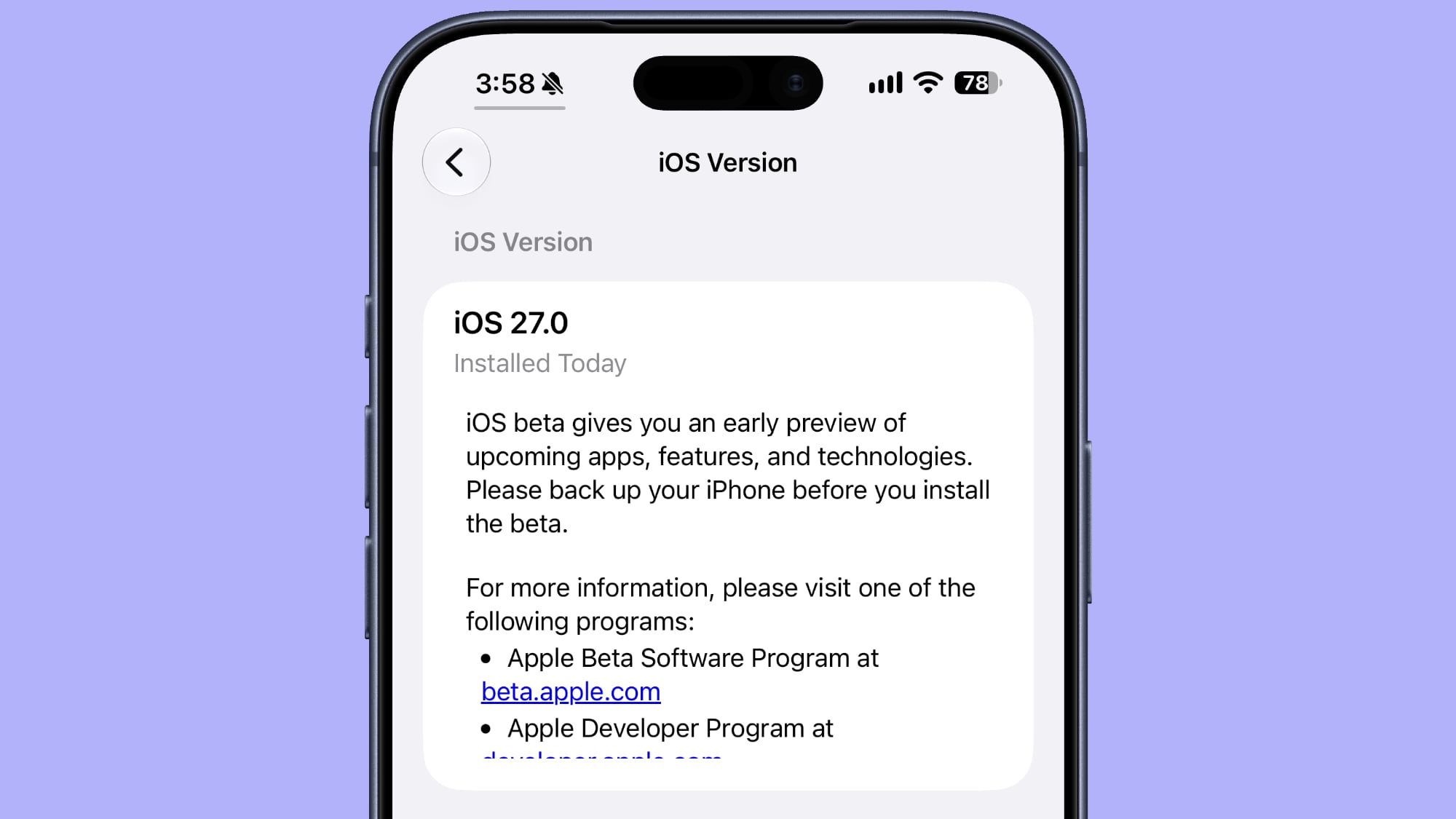
Keeping your iPhone's software up to date is essential for security, performance, and access to the latest features. iOS 27 Beta 5 introduces a small but very useful detail in the Settings app that provides greater clarity about your device's software status. When you navigate to Settings > General > About, a section where you typically find information like your model number, serial number, and storage capacity, you will now see an additional piece of information: the exact date and time when your last software update was installed.
This simple addition resolves a common point of ambiguity for many users. Previously, you might have known that an update was installed, but remembering the precise date could be difficult. This information is valuable for several reasons. For everyday users, it offers peace of mind, confirming that their device is indeed running the latest version and when it was last brought up to date. For troubleshooting purposes, knowing the exact installation date can be crucial. If you encounter a new issue after an update, this information helps you correlate problems with specific software changes. Furthermore, for businesses or individuals managing multiple devices, this detail provides an easy way to verify compliance with software update policies, ensuring all devices are on a consistent and secure footing. It's a prime example of how a small informational detail can significantly enhance user confidence and device management, contributing to a more transparent and user-friendly operating system.
Clock App: Improved Readability for Alarms and Timers
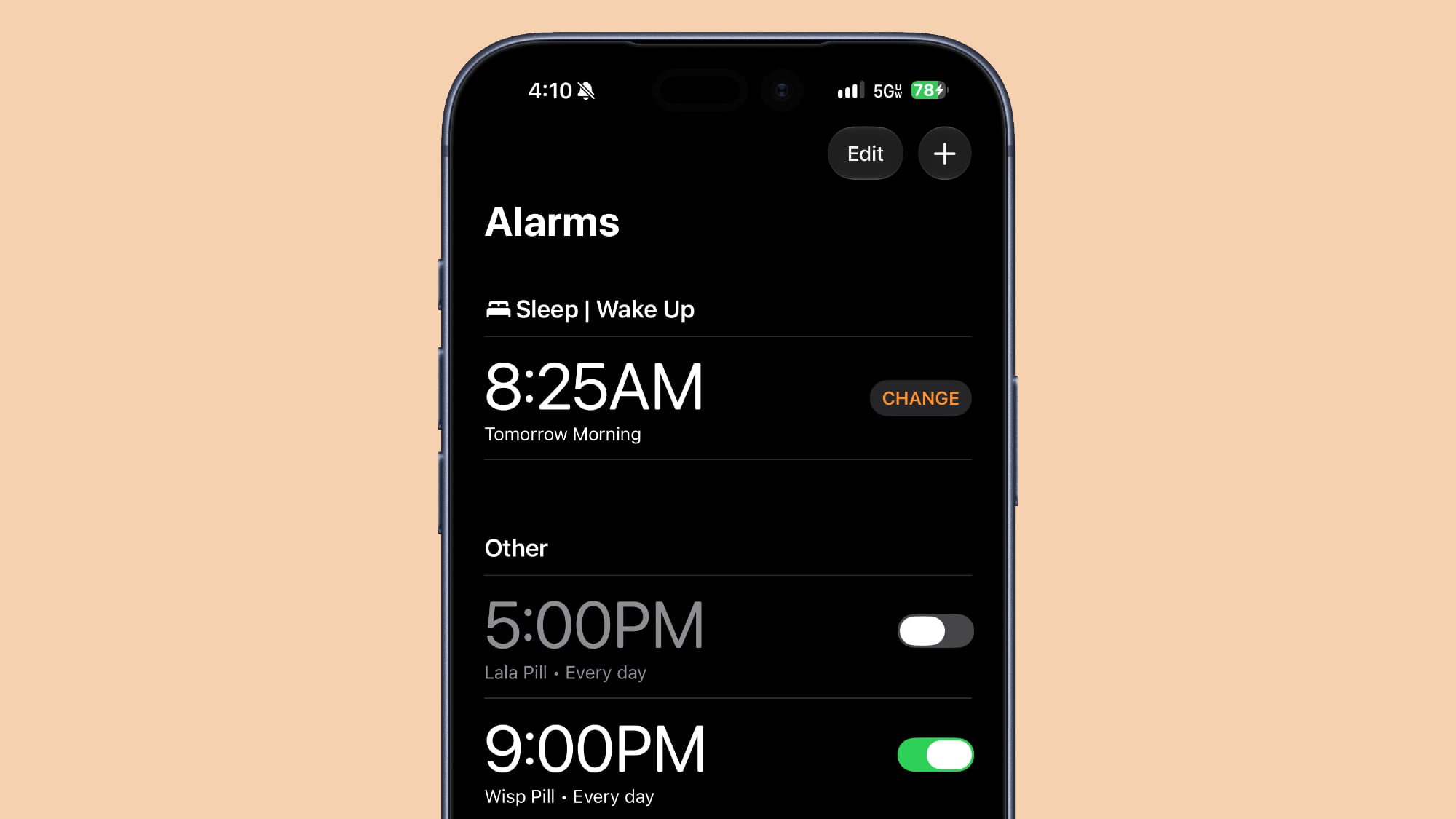
The Clock app is a utility that many iPhone users rely on daily, whether for waking up with alarms, timing tasks, or using the stopwatch function. iOS 27 Beta 5 brings a subtle but significant visual improvement to the Clock app, focusing on enhancing readability and user experience. Specifically, the font used for the Alarms and Timers sections within the app has been made thicker.
While this might seem like a minor aesthetic change, it has practical benefits for daily usability and accessibility. A thicker font is inherently easier to read, especially at a glance or in challenging viewing conditions. Imagine quickly checking your alarm in the morning when you're still half-asleep, or trying to confirm a timer countdown in a dimly lit room. The bolder text makes the crucial information—the alarm time or the remaining timer duration—stand out more prominently. This improvement contributes to better accessibility for users with visual impairments, ensuring that important information is clear and legible for a wider range of individuals. Apple's continuous refinement of typography across its operating system underscores its commitment to creating an interface that is not only beautiful but also highly functional and accessible. This small change in the Clock app makes a big difference in the clarity and usability of one of your iPhone's most fundamental tools.
Liquid Glass: Enhanced Visual Clarity
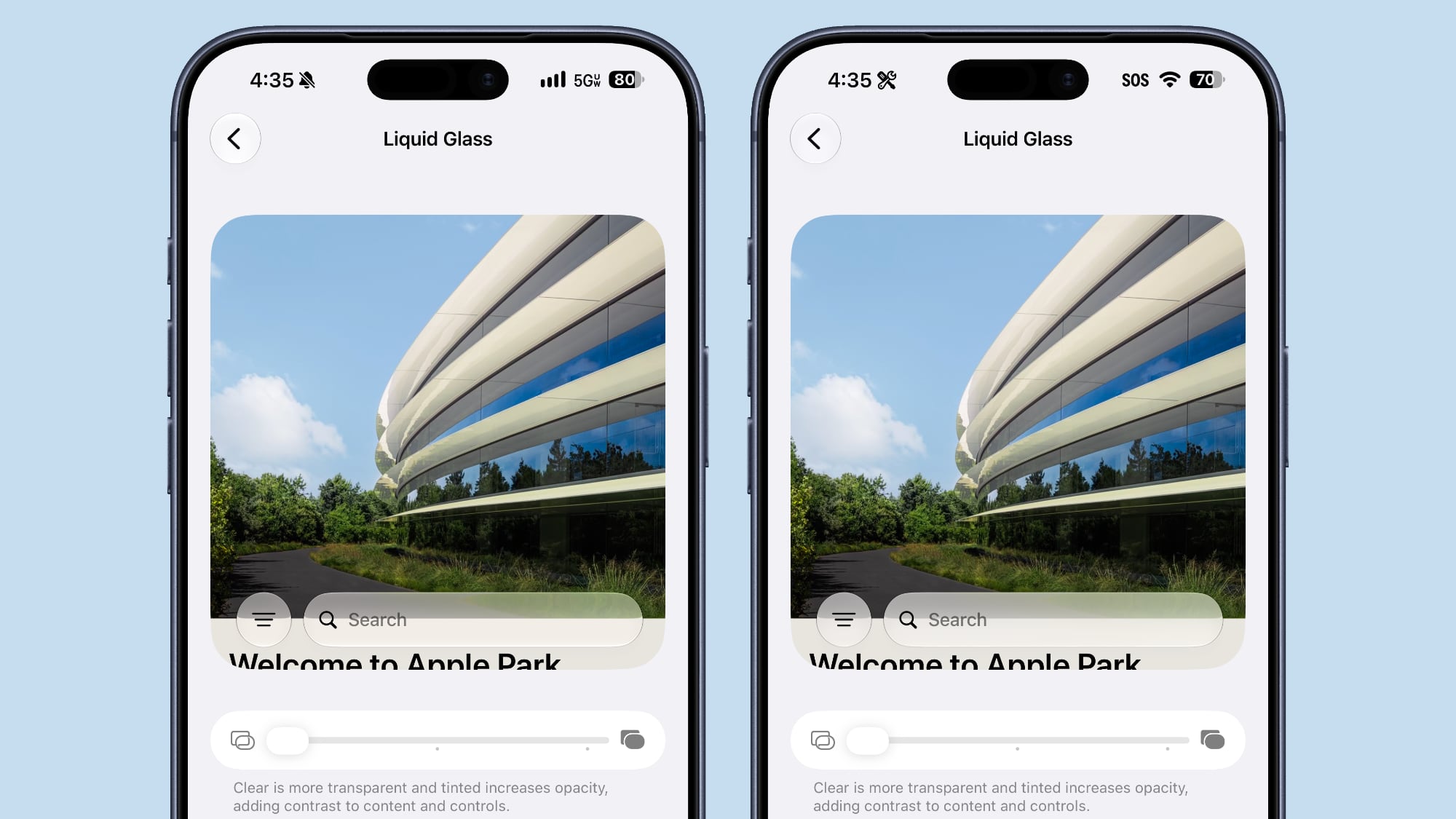
The "Liquid Glass" effect is a signature visual element in Apple's design language, used to create a sense of depth, transparency, and fluidity across the iOS interface. It's what gives certain UI elements a slightly frosted, glass-like appearance, allowing background content to subtly show through while maintaining focus on the foreground. In iOS 27 Beta 5, Apple has further refined this effect, specifically making the "clearest Liquid Glass setting" even more transparent than it was in the prior beta.
This enhancement to the Liquid Glass effect means that elements like certain menus, notification banners, or Control Center panels will now offer a more pronounced sense of translucency. The background content will be even more discernible through these semi-transparent layers, creating a greater illusion of depth and a more immersive visual experience. This refinement contributes to the overall modern and sophisticated aesthetic of iOS 27. A clearer Liquid Glass effect can make the interface feel lighter, more open, and less intrusive, allowing your wallpaper and app content to shine through without being overly distracting. It's a testament to Apple's meticulous attention to detail in visual design, continuously pushing the boundaries to make the iPhone's user interface not just functional, but also beautiful and engaging. This subtle tweak helps create a more harmonious visual flow throughout the operating system, making every interaction feel polished and elegant.
Mail App: Personalize Smart Replies
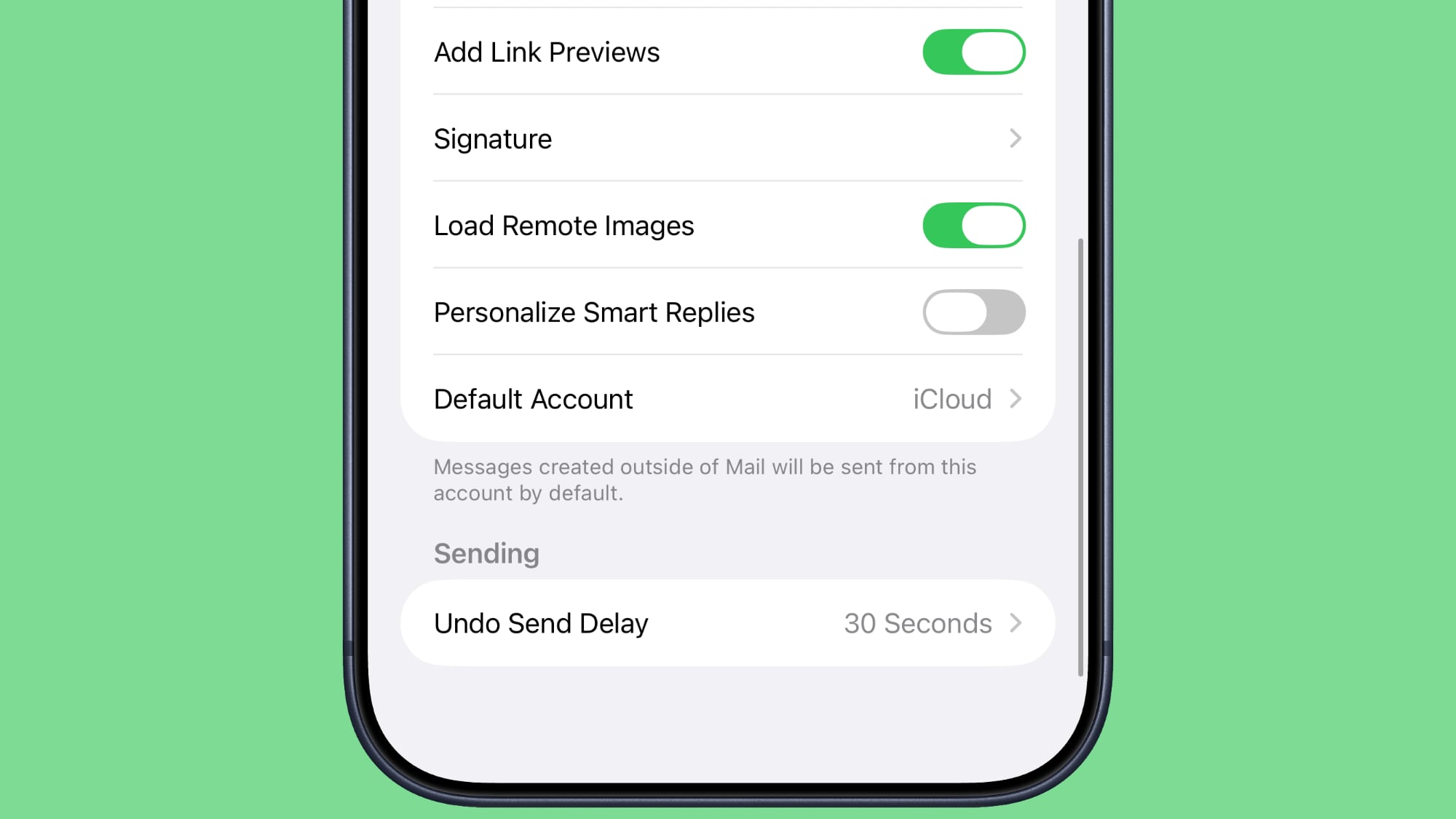
Email communication is a daily necessity for many, and Apple's Mail app continues to evolve to make it more efficient. One such feature is "Smart Replies," which uses AI to suggest short, relevant responses to incoming emails, helping you reply quickly without typing out a full message. In iOS 27 Beta 5, Apple has introduced a new toggle for the "Personalize Smart Replies" feature within the Mail app, giving users more control over this intelligent function.
This personalization toggle is found in the Mail section of the Settings app, and by default, it is turned off. When enabled, "Personalize Smart Replies" allows the Mail app's AI to learn from your individual writing style, vocabulary, and common phrases. Over time, the Smart Replies it generates will become more aligned with your personal tone and typical responses, making them much more useful and accurate for your specific communication habits. For instance, if you often use a specific closing or phrase, the personalized Smart Replies might start suggesting it. However, Apple understands that users have different preferences regarding AI personalization and data usage. By having the feature off by default, Apple prioritizes user privacy and choice, allowing individuals to consciously decide if they want their Smart Replies to adapt to their personal style. This approach ensures that users who value a more generic or standardized set of replies can maintain that, while those who desire a more tailored and efficient email experience can opt-in to personalization. It's a thoughtful balance between advanced AI convenience and individual control over personal data and preferences, enhancing the Mail app's utility while respecting user autonomy.
Battery: Intelligent Alerts for Cellular Drain
Battery life is a constant concern for smartphone users, and understanding what factors might be causing excessive drain is crucial for managing your device's power efficiently. iOS 27 Beta 5 introduces a highly practical and intelligent feature in the Battery section of the Settings app: your iPhone will now proactively inform you if a poor cellular connection is causing battery drain. This new alert provides valuable insight that empowers you to take action and optimize your battery usage.
Here's how this works and why it's so beneficial: when your iPhone is in an area with weak cellular signal, it has to work much harder to maintain a connection to the network. This constant effort to search for and hold onto a signal consumes significantly more power than operating in an area with strong reception. Previously, users might notice their battery draining faster but wouldn't necessarily know the exact cause. With this new notification, your iPhone intelligently identifies when a poor cellular connection is a primary culprit behind increased battery consumption. This information is displayed directly in the Battery settings, alongside other usage statistics.
By providing this specific diagnostic, Apple helps you understand and address the issue. For example, if you see this alert, you might choose to move to an area with better signal, switch to Wi-Fi if available, or even enable Airplane Mode temporarily if you're in a consistently low-signal zone and don't need cellular connectivity. This feature is a prime example of Apple leveraging software intelligence to provide actionable insights to users, helping them extend their device's battery life and troubleshoot common power-related issues. It transforms a vague problem into a clear, understandable situation, giving you the power to make informed decisions about your iPhone's battery management.
Conclusion: Refinements for a Superior iOS Experience
The fifth beta release of iOS 27 offers a compelling glimpse into the future of Apple's mobile operating system, highlighting a strong focus on refinement, personalization, and user-centric enhancements. While there are no single groundbreaking features that steal the show, the cumulative effect of these updates is significant. From the visual refresh of app icons with the elegant Liquid Glass effect to the deep customization options for Siri AI voices, Apple is consistently working to make the iPhone experience more aesthetically pleasing and intimately personal.
Beyond the surface, functional improvements like clearer contact information, global expansion of Wallet's "Create a Pass" feature, and smarter search capabilities demonstrate Apple's commitment to enhancing daily productivity and convenience. Even subtle changes, such as clearer splash screens for onboarding to new features, improved font readability in the Clock app, and intelligent battery drain alerts, contribute to a more intuitive and efficient user journey. The expansion of 5G+ connectivity further solidifies the iPhone's role as a leading device for global, high-speed mobile communication.
Each adjustment in iOS 27 Beta 5, no matter how small, underscores Apple's meticulous attention to detail and its dedication to delivering a robust, user-friendly, and highly polished operating system. These beta releases are crucial steps in collecting feedback and fine-tuning the software, ensuring that the final public version of iOS 27 will be the most stable and feature-rich yet. As we move closer to the official launch, these updates paint a picture of an iOS that is not only powerful but also more delightful and personal to use than ever before. iPhone users can look forward to a more streamlined, visually refined, and intelligently enhanced experience when iOS 27 officially rolls out.
This article, "Everything New in iOS 27 Beta 5" first appeared on MacRumors.com
Discuss this article in our forums
from MacRumors
-via DynaSage
