
You Can Now Recover Your Google Account With a Selfie Video
Unlock Your Google Account with a Selfie: A New Era of Secure Recovery
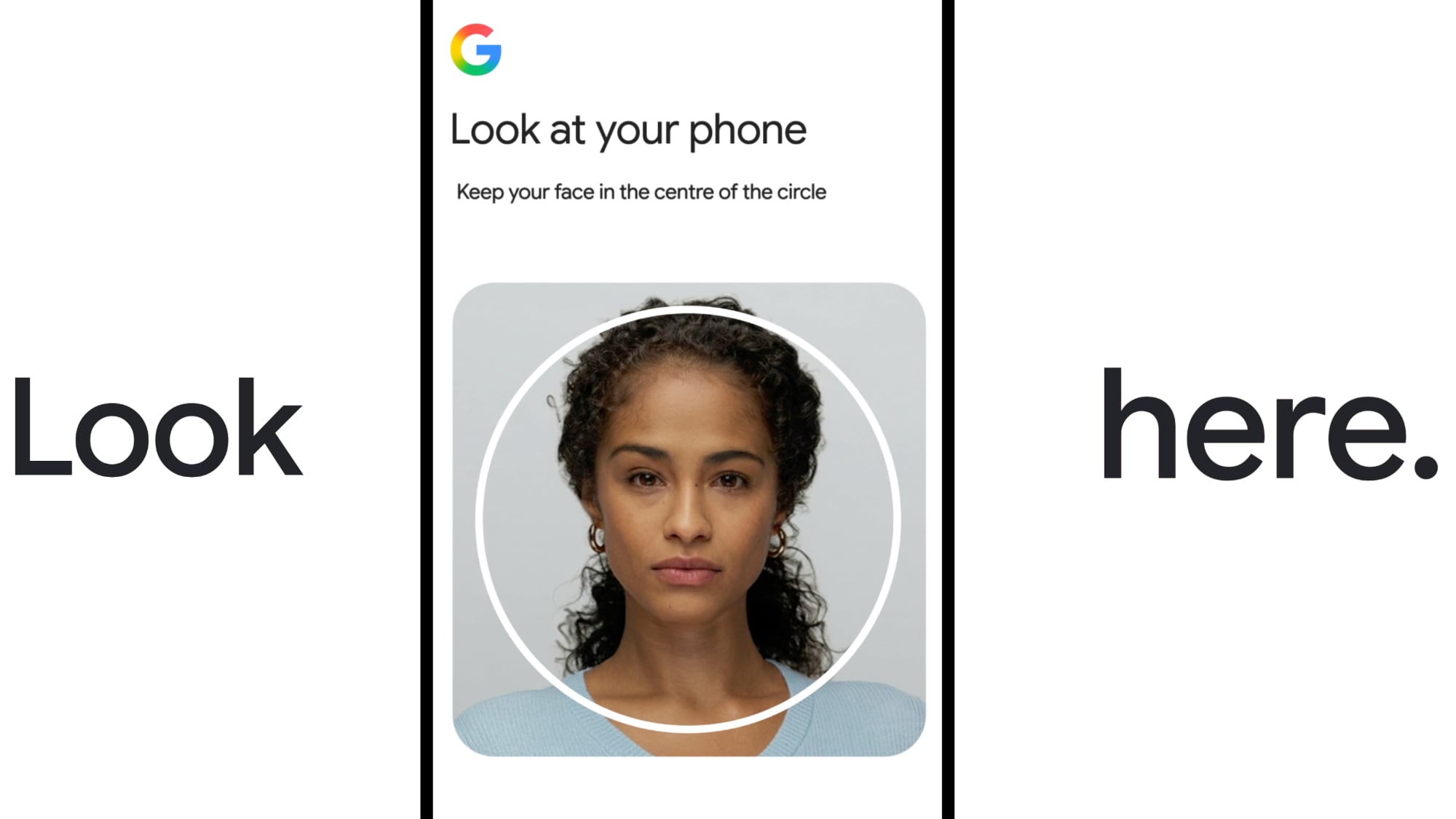
In an age where digital identity is paramount, losing access to your online accounts can be a significant source of stress and frustration. For many, a Google Account is the central hub of their digital life, connecting everything from email and documents to photos, calendars, and smart home devices. Recognizing the critical importance of seamless and secure account access, Google has recently introduced an innovative new feature: a selfie sign-in option for Google Account recovery. This groundbreaking addition provides an alternative and highly intuitive way for users to regain access to their accounts, complementing existing robust security measures like passkeys, recovery contacts, and traditional password methods.
This new selfie video recovery method isn't just a convenience; it represents Google's continuous commitment to enhancing user security and simplifying the recovery process. It addresses a common pain point: what happens when you've forgotten your password, lost your phone, or can't access your primary recovery email? In such scenarios, traditional recovery methods can become challenging. The selfie video offers a fresh, biometric-based solution designed to be both user-friendly and highly secure.
Understanding the Challenge of Account Recovery
Before diving deeper into how this new selfie recovery works, it's essential to understand why account recovery is such a critical component of online security. Your Google Account is likely the gateway to a wealth of personal and sensitive information. Losing access can mean being locked out of your professional communications, unable to access important documents, missing out on family photos, or even being unable to control your smart home devices. The implications are vast and can range from minor inconvenience to significant disruption.
Common reasons for needing account recovery include:
- Forgetting a complex password.
- Having your device (phone, laptop) lost, stolen, or damaged.
- Experiencing a compromised email account or phone number used for recovery.
- Falling victim to phishing attacks that steal your credentials.
- Unusual account activity triggering a security lockout.
Google has always offered various ways to regain access, understanding that no single method works for everyone or every situation. These methods typically include security questions, verification codes sent to a recovery email or phone, or even physical security keys. The introduction of selfie video recovery adds another powerful tool to this arsenal, especially potent in situations where traditional methods might fall short.
How Google's Selfie Video Recovery Works
The concept behind selfie video recovery is elegantly simple yet technologically sophisticated. It leverages the power of biometrics – specifically, facial recognition and liveness detection – to verify your identity.
Setting Up Your Selfie Video for Recovery
To benefit from this feature, you first need to create and save a secure selfie video to your Google Account. The process is straightforward and designed for ease of use:
- Access Your Google Account Settings: Navigate to your Google Account security settings.
- Locate the Selfie Video Option: Look for the new selfie video recovery option under the account recovery or sign-in methods section.
- Initiate Video Capture: When prompted, you'll need to grant your device's camera access to Google.
- Follow On-Screen Instructions: Google will guide you through a series of head movements. This isn't just a static photo; you'll be asked to move your head in different directions (e.g., turn left, right, up, down). These movements are crucial for capturing multiple angles of your face and, more importantly, for performing "liveness detection."
- Completion and Secure Storage: Once the sequence is complete, the video is encrypted and securely saved to your Google Account. This initial video acts as your secure "template" for future recovery needs.
Google emphasizes that this video is saved to your account and is only used later if you specifically need to access your account using this method. It's a proactive step you take to fortify your account security, giving you peace of mind that you have a reliable backup recovery option.
Using Your Selfie Video to Regain Access
When you find yourself locked out of your Google Account and need to use the selfie video option, the process mirrors the setup, but with a crucial comparison step:
- Attempt Account Recovery: On the Google sign-in page, if you can't remember your password or use other methods, select the "Try another way" option until the selfie video recovery prompt appears.
- Initiate New Video Capture: You'll be asked to record a new selfie video on your current device, again following Google's instructions for head movements.
- Secure Comparison: Google's advanced systems will then compare this newly captured selfie video to the one you previously saved to your account. This comparison involves sophisticated facial recognition algorithms and liveness detection to ensure that the person attempting to recover the account is indeed you.
- Access Granted: If the comparison is successful and your identity is verified, you will be granted access to your account.
This comparison process is at the heart of the feature's security. It's designed to be highly resistant to impersonation attempts, including sophisticated tactics like AI-generated photos and videos (deepfakes). The "liveness detection" component, which involves dynamic head movements, is particularly effective at distinguishing a real, live person from a static image, a printed photo, or a digital fabrication.
Key Benefits of Selfie Video Account Recovery
The introduction of selfie video recovery brings several compelling advantages for Google users:
1. Enhanced Convenience and Accessibility
Imagine a scenario where you're traveling, lose your phone, and can't access your recovery email on another device. Traditional recovery can become a multi-step, sometimes frustrating process. With selfie video recovery, if you have access to *any* device with a camera and internet connection, you can potentially regain access quickly. It eliminates the need to remember obscure answers to security questions or wait for SMS codes that might not reach you.
2. A Powerful Layer of Security Against Impersonation
In an era where AI-generated content is becoming increasingly sophisticated, the threat of deepfakes and advanced impersonation attempts is a real concern. Google specifically designed the selfie video feature with "multiple layers of security" to combat these threats. The combination of facial recognition with liveness detection makes it incredibly difficult for an attacker to fake their way into your account using a photograph, a video recording, or even an AI-generated likeness. It adds a robust biometric gate that's harder to circumvent than a stolen password.
3. An Indispensable Backup Method
Google has always recommended having multiple sign-in methods set up, and the selfie video perfectly embodies this philosophy. It serves as a crucial alternative when your primary methods fail. If your recovery email is compromised, or your phone number changes unexpectedly, your pre-recorded selfie video can be a lifesaver, ensuring you don't lose access to your digital life.
4. Speed and Efficiency in Crisis
When you're locked out, time is often of the essence. Waiting for support or going through a lengthy verification process can be agonizing. Selfie video recovery offers the potential for faster verification, allowing you to get back into your account and resume your activities with minimal delay. This quick resolution is particularly valuable in urgent situations.
5. Empowerment Through Choice
By offering diverse recovery options, Google empowers users to choose the method that best suits their needs and circumstances. Some users might prefer biometric methods for their speed and security, while others might stick to traditional codes. The selfie video option expands this choice, putting more control directly into the hands of the user.
Security and Privacy: Google's Commitment
Whenever biometric data is involved, security and privacy are paramount concerns. Google has proactively addressed these aspects, providing clear assurances about how your selfie videos are handled:
Encryption and Secure Storage
Google states that selfie videos are "encrypted and stored securely." This means that your video data is scrambled and protected, making it unreadable to unauthorized parties. The storage infrastructure itself is built with Google's world-leading security expertise, employing robust safeguards against data breaches and unauthorized access. This commitment to encryption ensures that even if an attacker were to somehow gain access to Google's servers, your video data would remain protected and unusable.
Purpose-Limited Use
A crucial privacy assurance is that these videos are "only used for helping you sign in to your account." This explicit statement limits the scope of how your biometric data can be utilized. It's not for general identification, not for advertising, and not for any other purpose beyond verifying your identity during the account recovery process. This "purpose limitation" is a fundamental principle of data privacy, ensuring that personal data is collected and used only for the specific, stated reason.
User Control and Deletion
Google further empowers users by stating that "Videos can be deleted anytime." This gives you complete control over your biometric data. If you decide you no longer wish to use this recovery method or simply want to remove your video, you have the freedom to do so directly from your Google Account settings. This commitment to user control is a cornerstone of responsible data handling.
"Unless you opt to 'share it for additional purposes'"
This specific phrasing requires a bit more clarification. While the primary use is strictly for account recovery, Google provides the option for users to "share it for additional purposes" should they choose. While the exact "additional purposes" are not detailed in the initial announcement, such options typically relate to future identity verification services or participation in beta programs that require enhanced biometric authentication. It's critical to understand that this is an *opt-in* choice, meaning you must actively consent to any extended use beyond account recovery. Your data will not be used for anything else without your explicit permission.
Who Can Use It and Who Can't
While the selfie video recovery feature is a significant step forward, it's important to understand its current scope and limitations:
- Google Accounts Only: This feature is specifically designed for standard personal Google Accounts. This is where most users store their personal data and rely on Google's suite of services.
- Not for Workspace Accounts: Google Workspace accounts (formerly G Suite) are typically used by businesses and educational institutions. These accounts often have different administrative controls, security policies, and compliance requirements managed by the organization. As such, the selfie video recovery feature does not apply to Workspace accounts, which rely on their specific recovery protocols.
- Not for Children's Accounts: Accounts for children, particularly those managed through Google Family Link, have enhanced privacy protections and parental controls. The introduction of biometric recovery methods for children's accounts would involve complex considerations regarding consent and data handling, leading to their exclusion from this initial rollout.
- Not for Accounts Enrolled in the Advanced Protection Program: The Advanced Protection Program (APP) is Google's strongest security offering, designed for individuals at heightened risk of targeted online attacks (e.g., journalists, activists, government officials). APP accounts have very stringent security requirements, often mandating physical security keys for authentication. While highly secure, the selfie video method is not currently integrated into APP due to its unique security architecture and risk profile.
Google previously tested selfie videos in Brazil, which often serves as a testing ground for new features before a broader global rollout. The successful trial paved the way for its wider release, making this advanced recovery option available to more users worldwide.
Best Practices for Comprehensive Google Account Security
While the selfie video recovery is an excellent new tool, it's just one piece of a comprehensive security strategy. Google consistently advises users to adopt multiple layers of protection. Here are essential best practices to keep your Google Account as secure as possible:
1. Embrace Multiple Recovery Options
This is Google's golden rule. Don't rely on just one method. Set up a recovery phone number, a recovery email, and now, consider adding a selfie video. The more options you have, the better your chances of regaining access if one method becomes unavailable.
2. Use Strong, Unique Passwords
The foundation of all online security. Create long, complex passwords that combine letters, numbers, and symbols. Crucially, use a unique password for every account. A password manager can help you manage these securely.
3. Enable Two-Factor Authentication (2FA) / Two-Step Verification (2SV)
This is arguably the most critical security step after a strong password. 2FA adds an extra layer of security by requiring a second form of verification (something you have) in addition to your password (something you know). Options include:
- Authenticator Apps: Apps like Google Authenticator generate time-sensitive codes.
- Security Keys: Physical devices that offer the strongest protection against phishing.
- SMS Codes: While convenient, these are generally considered less secure than authenticator apps or security keys due to potential SIM swap attacks.
4. Explore Passkeys
Passkeys are the future of passwordless sign-in. They are a simpler, more secure replacement for passwords, allowing you to sign in using biometrics (like your fingerprint or face scan) on your device. They are resistant to phishing and much easier to use than traditional passwords. Google is heavily investing in passkeys, and they offer a superior user experience with enhanced security.
5. Keep Recovery Information Up-to-Date
Regularly check and update your recovery phone numbers and email addresses in your Google Account settings. If these become outdated, they are useless in a recovery scenario.
6. Conduct Regular Security Checkups
Google provides a Security Checkup tool that guides you through a review of your account settings, connected devices, third-party app access, and recovery options. Make it a habit to perform this checkup periodically.
7. Be Vigilant Against Phishing and Scams
Always be suspicious of unexpected emails, messages, or pop-ups asking for your login credentials. Google will never ask you for your password via email. Verify the sender and the URL before entering any sensitive information.
The Future of Identity Verification and Biometrics
Google's selfie video recovery is part of a broader industry trend towards more sophisticated and user-friendly identity verification methods. Biometrics, when implemented securely and with strong privacy safeguards, offer a powerful way to authenticate users without relying solely on fallible human memory or easily phished credentials.
The emphasis on "liveness detection" is particularly significant in today's digital landscape. As AI technology advances, creating convincing deepfakes becomes easier. Robust liveness detection, which verifies that a real, live person is present, is crucial for protecting against these advanced forms of impersonation. This technology ensures that only you, the living, breathing owner of the account, can use your biometric data for verification.
Google's continuous innovation in security features, from Advanced Protection Program to passkeys and now selfie video recovery, underscores its commitment to staying ahead of evolving cyber threats. By balancing convenience with robust security, Google aims to make the digital experience safer and more accessible for everyone.
Conclusion: A Smarter, More Secure Way to Access Your Google Account
The introduction of the selfie sign-in option for Google Account recovery marks a significant step forward in making digital security both stronger and more user-friendly. By leveraging advanced biometric technology and integrating it seamlessly into the recovery process, Google provides a powerful new alternative for users facing the daunting challenge of being locked out of their accounts.
This feature not only offers unparalleled convenience, especially when traditional recovery methods are unavailable, but also provides a formidable defense against increasingly sophisticated impersonation attempts, including AI-generated deepfakes. Google's strong commitment to privacy and user control ensures that your biometric data is handled with the utmost care, encrypted, stored securely, and used only for its intended purpose, with the power to delete it always remaining in your hands.
For anyone who relies on their Google Account – which is most of us – setting up this new selfie video recovery option is a highly recommended step. It adds a critical layer of protection and peace of mind, ensuring that you always have a secure and reliable path back to your digital life. Take a few moments today to explore this new feature in your Google Account security settings and reinforce your digital fortress.
Discuss this article in our forums
from MacRumors
-via DynaSage
