
WhatsApp Rolls Out Web Calling, Call Transfer Across Devices, and More
WhatsApp Elevates Group Calling with Seamless Web Access and Enhanced Features
WhatsApp, the world's leading encrypted messaging platform, has recently unveiled a suite of powerful updates designed to transform the group calling experience. These enhancements aim to provide users with greater flexibility, convenience, and control over their conversations, whether they are connecting with family, friends, or colleagues. From effortless device switching to robust web-based calling, these new features mark a significant step forward in making WhatsApp a more comprehensive and versatile communication tool for everyone.
In an increasingly connected world where remote work, virtual social gatherings, and instant communication are the norm, the demand for reliable, high-quality, and secure calling features has never been higher. WhatsApp has responded to this need by introducing innovations that simplify how we initiate, manage, and participate in group calls. The focus remains on end-to-end encryption, ensuring that every interaction stays private and secure, regardless of the device or feature being used. These updates are not just about adding new functionalities; they are about refining the entire calling ecosystem within WhatsApp to be more intuitive and powerful, ensuring that your digital conversations are as clear and protected as possible.
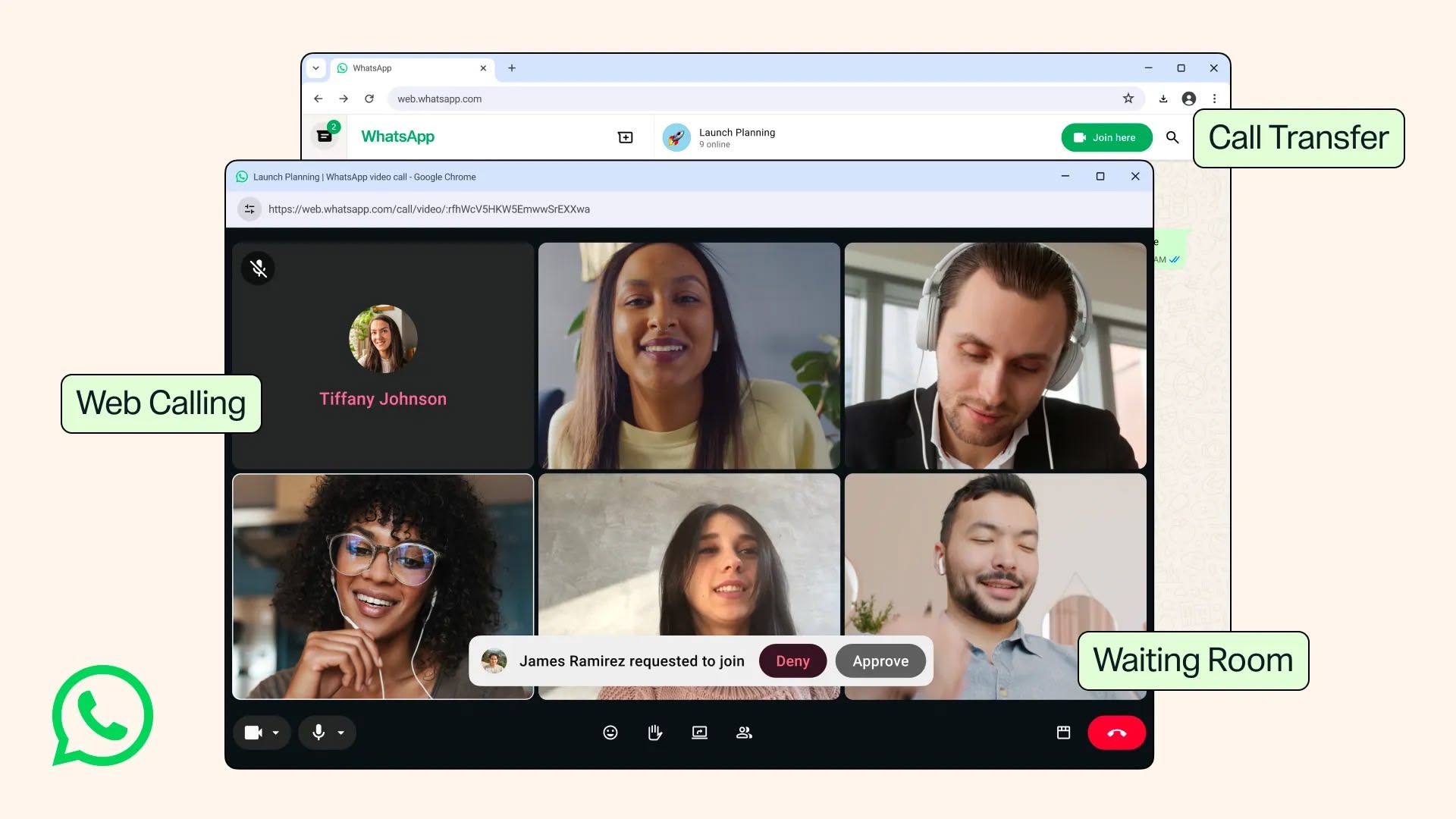
Experience the Power of WhatsApp Web Calling: Connect from Your Browser
One of the most anticipated and impactful additions is the new web calling feature. It's now seamlessly possible to make and receive both audio and video calls, including individual one-on-one chats and dynamic group calls, directly from your web browser via WhatsApp Web. This groundbreaking feature brings the full power of WhatsApp's calling capabilities to your desktop or laptop without the need to download or install a dedicated application. For millions of users who rely on WhatsApp for daily communication, this offers unprecedented convenience and flexibility, allowing them to integrate their calls directly into their computer-based workflow.
Why Web Calling Matters: Unlocking New Possibilities
The introduction of web calling addresses several key user needs and preferences, fundamentally changing how many people interact on the platform. Firstly, it eliminates the friction associated with switching between devices. Imagine you're deeply engrossed in work or study on your computer, and an important group call starts on WhatsApp. Previously, you'd have to interrupt your task, grab your phone, ensuring it's charged and within reach, and then manage the call on a smaller screen. Now, you can simply answer or initiate the call directly from your browser, keeping your workflow uninterrupted. This seamless integration into your desktop environment can significantly boost productivity for those who spend much of their day in front of a computer, making multitasking a breeze.
Secondly, for professionals or students who use work or school laptops that often restrict app downloads, WhatsApp Web calling is a genuine game-changer. These restrictions can make it incredibly difficult to participate in calls or access necessary communication tools, forcing users to rely solely on their personal devices or less secure alternatives. With browser-based calling, you can effortlessly bypass these limitations, allowing you to join important meetings, collaborate with teammates, or simply connect with friends and family without any installation hurdles. This broadens the accessibility of WhatsApp calls, making it a viable option even in environments with strict IT policies, ensuring everyone can stay connected without compromising security or compliance.
Furthermore, the convenience of not having to rely solely on your mobile device for calls offers greater flexibility in various situations. If your phone battery is critically low, or if you simply prefer using a larger screen and a physical keyboard for note-taking or screen sharing during a call, WhatsApp Web provides that essential option. It transforms your desktop into a fully capable communication hub, complementing your mobile experience rather than replacing it entirely. This dual-device capability ensures that you can always choose the most comfortable and efficient way to communicate, adapting to your environment and personal preferences at any given moment. This level of adaptability solidifies WhatsApp’s position as a truly versatile communication platform.
Full-Featured Calling, Right in Your Browser
The new browser-based service isn't just a stripped-down version of mobile calling; it provides access to a comprehensive set of common features that users have come to expect and rely on from WhatsApp. This includes intuitive screen sharing, a particularly powerful tool for collaboration. With screen sharing, you can present documents, share designs, walk colleagues through a presentation, or even help a family member troubleshoot a computer issue, all directly from your desktop. Screen sharing is particularly vital for collaborative work, virtual tutoring, remote support, or even just sharing fun content like photos or videos with friends and family during a call, making interactions much richer and more informative.
Call reactions, a popular feature that allows users to express themselves quickly and non-verbally with emojis during a call, are also fully supported on WhatsApp Web. These reactions can add a layer of engagement, immediacy, and personality to conversations, making them more dynamic and interactive without interrupting the speaker. Imagine reacting with a 'thumbs up' to acknowledge a point, a 'clapping hands' emoji to show appreciation, or a 'laughing emoji' to a funny comment, all while remaining focused on the ongoing discussion. These subtle visual cues can greatly enhance the flow and emotional connection of a group call.
Moreover, the dedicated Calls tab within WhatsApp Web provides a complete overview of your call history. This means you can easily see who you've called, when, and for how long, making it simple to track past conversations, quickly redial a contact, or review your communication patterns. This centralized history ensures that your communication records are consistent and accessible across all your devices, whether mobile or desktop, offering a holistic and convenient view of your interactions within the platform. This makes managing your communication much more efficient, especially for frequent users of voice and video calls.
Unwavering Security: End-to-End Encryption Extends to the Web
A cornerstone of WhatsApp's appeal, and a primary reason for its global trust, is its unwavering commitment to user privacy and security through end-to-end encryption. This critical security measure means that only the sender and recipient can read messages or listen to calls, and no one in between—not even WhatsApp itself—has access to the content. The good news, and a point of reassurance for users, is that this robust end-to-end encryption extends fully and automatically to the new web calling service.
When you make or receive an audio or video call through WhatsApp Web, you can rest assured that your conversations are protected with the exact same high level of security as calls made on your mobile device. This means your private discussions, sensitive work conversations, and personal family moments remain entirely confidential and secure from potential eavesdropping or data breaches. This unwavering commitment to privacy is particularly important in an era where digital security breaches are a constant concern, and users are increasingly vigilant about their online data. For sensitive work discussions, confidential personal matters, or any private conversation, the secure nature of WhatsApp Web calling provides invaluable peace of mind. This emphasis on privacy is a core differentiator, positioning WhatsApp as a trusted and reliable platform for all forms of communication, regardless of the device you choose to use.
Seamless Transitions: Call Transfer Across Devices
Beyond introducing an entirely new avenue for calling via the web, WhatsApp has significantly enhanced the fluidity of your communication experience with the new Call Transfer feature. This innovative capability allows users to effortlessly move an active group call from one device to another without the need to hang up and redial. Imagine the scenario: you're engrossed in an important group call on your mobile phone, perhaps walking around your house, and suddenly realize you need to sit down at your desk to access some files, or perhaps your phone battery is rapidly running low. With Call Transfer, you can simply shift the call to your desktop via WhatsApp Web, or vice versa, ensuring an absolutely uninterrupted conversation and preventing any awkward disconnections.
Enhancing Convenience and Flexibility in a Dynamic World
The convenience offered by Call Transfer is immense and directly responds to the realities of modern multi-device usage. It provides unparalleled flexibility, adapting seamlessly to your movements and changing technological needs throughout the day. If you start a call on your phone while commuting or moving between rooms, and then arrive at your office or home desk, you can transfer it to your computer for a more comfortable, stable experience with a larger screen, a better audio setup, and the ability to type freely. Similarly, if you're on a call at your desk and suddenly need to step away for a quick break, move to another room, or leave the house, transferring the call back to your phone keeps the conversation flowing without any disruption or the need to reconnect and explain yourself.
This feature is a testament to WhatsApp's deep understanding of modern communication patterns. People are constantly moving between different devices and environments, and their communication tools need to be just as agile. The ability to seamlessly hand off a call from a mobile device to a desktop, or from a desktop back to a mobile device, eliminates the frustration of having to explain a momentary disconnection or the need to laboriously reconnect. It ensures continuity and maintains the momentum of the conversation, which is particularly valuable in fast-paced professional settings, critical discussions, or even just long, engaging social calls.
For users who often find themselves juggling multiple tasks or moving between different workspaces throughout their day, Call Transfer becomes an indispensable tool. It empowers them to manage their calls more effectively, ensuring they can participate fully and comfortably regardless of their current device or physical location. This thoughtful focus on user experience and flexibility truly sets these updates apart, making WhatsApp an even more adaptable and user-centric platform for diverse communication needs. It bridges the gap between different devices, creating a truly unified calling experience.
Enhanced Control with the New Waiting Room Feature
For those who frequently organize group calls, manage larger virtual gatherings, or simply wish for more control over who joins their conversations, the new Waiting Room feature introduces a crucial layer of security and order. This feature becomes active when you create a WhatsApp call link and consciously enable the "Require approval to join" option. When this setting is activated, participants who click on the shared call link will no longer immediately join the ongoing conversation. Instead, they will first enter a virtual "waiting room," where they calmly await approval from the designated call host before being admitted into the main call.
Ensuring Privacy and Order in Your Digital Conversations
The Waiting Room serves several important purposes, primarily focused on enhancing security and maintaining decorum in your calls. Firstly, it effectively prevents uninvited guests from inadvertently or intentionally joining your private calls. In today's digital landscape, where "Zoom bombing" and similar security breaches have highlighted the importance of controlled access, the security of online meetings and conversations is paramount. A carelessly shared call link could potentially fall into the wrong hands, or someone might attempt to join a meeting they weren't intended for. The Waiting Room feature acts as a robust gatekeeper, giving the host explicit, real-time control over precisely who enters the call, thereby significantly enhancing privacy and preventing disruptive intrusions.
Secondly, it greatly helps manage the flow and timing of participants, particularly in larger group calls or more structured discussions. A host might want to admit participants in a staggered manner, ensure everyone is ready and settled before the main discussion begins, or simply verify the identity of each person joining before allowing them access. This level of granular control is particularly beneficial for professional meetings, online classes, formal presentations, or sensitive family discussions where maintaining order, ensuring the right audience is present, and starting on time are all crucial. Imagine hosting an important webinar or a critical team meeting; the Waiting Room allows you to make sure all expected attendees are present and accounted for before you officially kick off the discussion, avoiding any awkward late joiners or interruptions later on.
The host will receive clear notifications when participants are in the waiting room and can then choose to admit them one by one, verifying each person, or admit them all at once, based on their preference and the specific nature of the call. This sophisticated control over entry makes group calls more secure, organized, and ultimately, more productive. It brings a level of professionalism and sophistication to WhatsApp group calls that was previously associated primarily with dedicated, often costly, video conferencing platforms, further solidifying WhatsApp's position as a robust and versatile communication solution for both personal and professional use.
Crystal Clear Communication: QuickHD and Noise Suppression
WhatsApp's latest updates aren't just about how you connect, but also, crucially, about the quality of that connection. Two significant additions, QuickHD and Noise Suppression, focus intently on enhancing the audio and video clarity of your calls, making every interaction more engaging, professional, and easier to understand. These features address common frustrations users face with digital communication quality, striving for a superior experience.
QuickHD: Instant High-Definition Video for a Flawless Start
Have you ever started a video call only for the picture to be frustratingly blurry, pixelated, or slow to load for the first few seconds? This common and often irritating issue can be particularly detrimental, especially when you want to make a good first impression, clearly convey visual information, or simply enjoy a high-quality interaction from the outset. QuickHD directly and effectively addresses this problem head-on. It allows users to enjoy high-definition video almost immediately, right from the very first few seconds of the call, drastically improving the initial visual experience.
This means no more annoying waiting for the video quality to "catch up" or clarify itself. From the very moment you connect to a video call, your video feed will be crisp, clear, and rich in detail, provided your internet connection can support the higher bandwidth. For calls where visual details are of paramount importance—whether it's seeing a loved one's nuanced expressions, sharing a new product design, demonstrating a complicated process, or simply maintaining a professional and polished appearance in a work meeting—QuickHD ensures that the visual experience is top-notch and immediate. This instant high-quality video contributes significantly to a more professional, immersive, and less fatiguing calling experience, reducing visual strain and enhancing overall communication effectiveness, ensuring your message is conveyed clearly and visually.
Noise Suppression: Focus on What Matters, Not Distractions
Background noise is a pervasive and often significant challenge in modern digital communication, severely impacting clarity and comprehension. Whether you're trying to have a conversation in a bustling coffee shop, a busy open-plan office, a noisy public space, or at home with active children or demanding pets, unwanted ambient sounds can often drown out voices, making conversations incredibly difficult to follow, leading to repeated requests for clarification, and ultimately causing significant listener fatigue. WhatsApp's new Noise Suppression feature is specifically designed to combat this very issue, ensuring your voice stands out.
This intelligent and advanced technology actively works to remove distracting background noise, ensuring that the human voices come through much more clearly and intelligibly. It intelligently identifies and distinguishes human speech patterns from other ambient sounds like traffic rumbling by, the clatter of keyboard clicks, the low hum of air conditioning, the chatter from others nearby, or even the barking of a dog. The result is a dramatically cleaner and clearer audio stream where speakers are much easier to hear and understand, even when operating in inherently loud or busy environments. This intelligent filtering helps to create a bubble of clarity around the speaker's voice.
The benefits of Noise Suppression are profound and far-reaching. For personal calls, it means you can have meaningful, uninterrupted conversations with loved ones without constantly asking them to repeat themselves or struggling to hear over the din of their environment. For professional calls, it drastically improves clarity, reduces misunderstandings, and allows all participants to focus solely on the crucial content of the discussion rather than straining to hear or being distracted by background commotion. This feature transforms potentially frustrating and unproductive calling scenarios into smooth, clear, and highly productive interactions, further establishing WhatsApp as a reliable and high-quality platform for critical communications, truly enhancing the user's ability to connect effectively.
The Broader Impact: WhatsApp's Evolution in Communication
These recent updates from WhatsApp are far more than just a simple list of new features; they represent a significant strategic evolution for the platform. By introducing sophisticated and highly demanded capabilities like robust web calling, seamless call transfer, secure waiting rooms, and advanced audio/video enhancements, WhatsApp is actively solidifying its position not just as a leading messaging app, but as a comprehensive, multi-faceted communication hub capable of directly competing with established, dedicated video conferencing services. This expansion of capabilities underscores WhatsApp's ambition to be an all-encompassing communication solution for its global user base.
Empowering Users with Unprecedented Flexibility and Choice
The core philosophy behind these thoughtful enhancements appears to be user empowerment, placing control and adaptability firmly in the hands of the consumer. WhatsApp is giving its vast user base greater flexibility and more choices in how they connect and communicate. Whether you prefer the mobility and immediacy of a smartphone, the comfort and larger screen real estate of a desktop browser, or the dynamic ability to effortlessly switch between both, these features meticulously cater to a diverse range of preferences, work styles, and use cases. This remarkable adaptability is crucial in today's dynamic digital landscape, where individuals often fluidly move between personal and professional contexts, and seamlessly transition between various devices throughout their day.
The strategic move to provide robust web calling, especially while maintaining its hallmark end-to-end encryption, acknowledges the rapidly growing importance of browser-based tools for productivity and connectivity in an increasingly digital world. Many users spend their entire workday within a web browser, and integrating high-quality calling directly into that existing workflow removes significant friction and inherently enhances overall efficiency. Similarly, the introduction of Call Transfer wisely recognizes that life happens on the go, and modern communication tools should be agile and responsive enough to keep up with the continuous movement and changing environments of its users, ensuring uninterrupted conversations.
Raising the Bar for Quality, Control, and Unwavering Security
Features like QuickHD and Noise Suppression are direct and intelligent responses to persistent user demand for higher quality and more reliable communication experiences. In a world saturated with digital interactions, the clarity, stability, and overall quality of audio and video can genuinely make or break an experience, affecting understanding and engagement. By proactively investing in these crucial enhancements, WhatsApp is ensuring that its calls are not only supremely secure but also consistently clear, enjoyable, and free from common digital annoyances. This steadfast commitment to quality directly reinforces its standing as a premium and trustworthy communication platform for billions.
Crucially, WhatsApp has meticulously maintained its steadfast dedication to end-to-end encryption across all these newly introduced features and platforms. In an era of heightened awareness and legitimate concerns about data privacy and digital surveillance, knowing that your conversations—whether they are simple texts, personal audio calls, or complex group video conferences—are fully protected from prying eyes is a significant and invaluable advantage. This unshakeable security foundation underpins all the convenience, flexibility, and quality improvements, making WhatsApp an unequivocally trustworthy choice for even the most sensitive and private discussions, setting a high standard for secure communication.
Looking Ahead: A Glimpse into the Future of Digital Communication
These comprehensive updates strategically position WhatsApp not just as a follower of existing communication trends but as an innovative force actively shaping them. As the traditional lines between personal and professional communication continue to blur and merge, platforms that offer a comprehensive, secure, and incredibly flexible suite of communication tools will undoubtedly thrive. WhatsApp's continuous evolution suggests a future where users can confidently rely on a single, powerful, and universally accessible application for virtually all their communication needs, from quick text messages to complex multi-participant group video conferences, all while consistently maintaining the highest possible standards of privacy and security.
The company stated that this entire slate of new features are rolling out gradually to users worldwide and will be "available to everyone soon." This carefully phased rollout ensures optimal stability, allows for robust testing, and provides opportunities for continuous improvement based on early user feedback and performance metrics. As these powerful features become universally accessible, they are set to significantly enhance how millions of people connect, collaborate, and share cherished moments every single day, fundamentally transforming their digital communication experience for the better.
In conclusion, WhatsApp's latest enhancements for group calling represent a thoughtful, powerful, and truly user-centric upgrade, meticulously designed to meet the evolving and increasingly demanding needs of its vast global user base. By intensely focusing on accessibility, unparalleled flexibility, enhanced control, and superior quality, while steadfastly maintaining its unwavering commitment to end-to-end security, WhatsApp continues to firmly cement its pivotal role as an indispensable and reliable tool in our daily digital lives. These significant improvements empower users to communicate more effectively, more efficiently, and more securely than ever before, truly making every call a better, clearer, and more connected experience.
This article, "WhatsApp Rolls Out Web Calling, Call Transfer Across Devices, and More" first appeared on MacRumors.com
Discuss this article in our forums
from MacRumors
-via DynaSage
