
macOS 27 Beta Reworks Mail's Compose Window Around Siri AI
Exciting Changes Coming to Mail in macOS 27 Golden Gate: Siri AI Takes Center Stage
Get ready for a significant update to your Mail app experience! With the upcoming macOS 27 Golden Gate, expected this fall, Apple is reportedly testing a brand-new design for the Mail app’s writing window. This redesign aims to put Apple Intelligence's powerful Writing Tools and Siri AI right at your fingertips, making email composition smarter and more efficient than ever before.
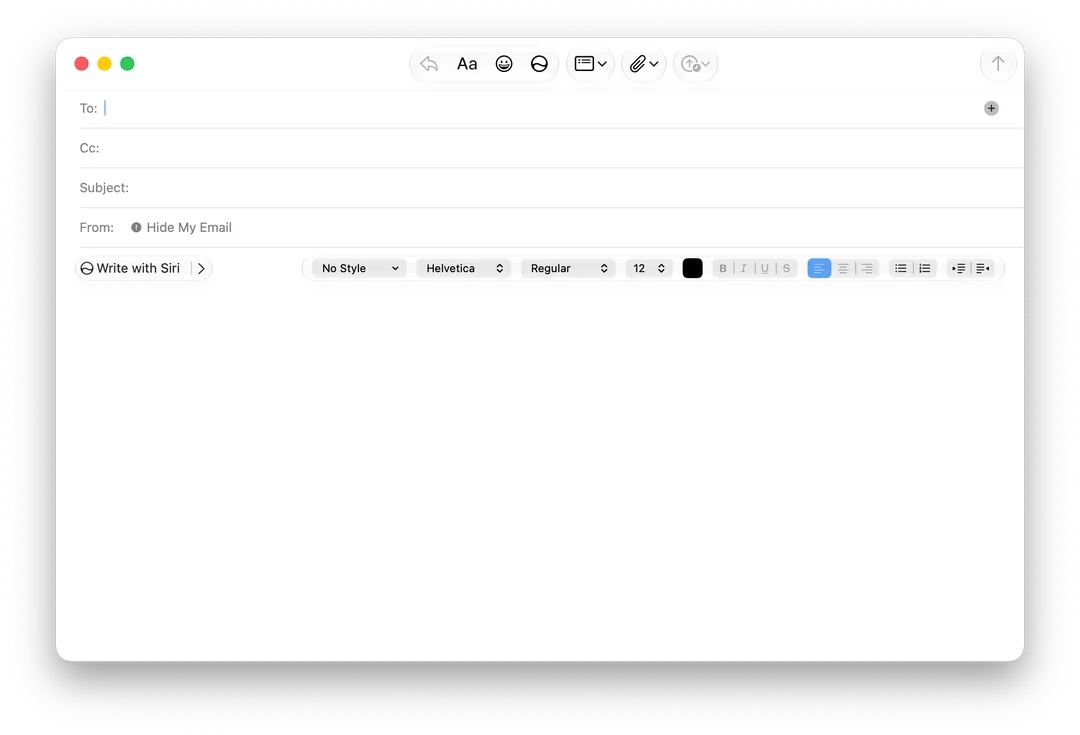
Siri Front and Center: A New Look for Your Mail Composer
Recent discoveries within the latest beta version of macOS 27 reveal exciting changes. A member of the MacRumors forum, known as "mactracker," uncovered hidden settings that show this revamped bar in Mail's message composer. Interestingly, this same individual also recently brought to light the secret Siri "voice pad" interface in beta 4.
The most striking change? "Write with Siri" now holds the most important and visible spot on the formatting bar. This signifies Apple's strong push to integrate its intelligent AI capabilities directly into your daily communication tools.
How the New Design Works
In its current testing phase, when you're writing an email, the familiar formatting controls (like bold, italics, font size, etc.) automatically move to the far right side of the writing window. They even disappear completely once you choose "Write with Siri" and begin typing out a command or question for the AI.

Smart Reply Gets Smarter: Preview Before You Commit
This redesigned bar also brings an improved way to use Siri AI's Smart Reply suggestions. Even if you don't intend to use them immediately, the system can now show you these helpful reply options. For those who have been using Apple Intelligence features, you'll know that Smart Reply itself isn't entirely new; it arrived with the initial rollout of Apple Intelligence. However, this new design makes it much more user-friendly. You can now hover your mouse over a suggested reply to see a preview of what it entails before you decide to insert it into your email. This is a significant improvement over the previous design, which didn't offer this convenient preview option.
Advanced Writing Tools at Your Fingertips
When you select a suggested piece of writing from Siri, the formatting bar transforms again. It will then show options like "Edit with Siri," "Proofread," and "Rewrite," alongside a helpful prompt asking, "How does this sound?" During this time, the traditional formatting controls remain minimized, keeping the focus on refining your message with AI assistance.
Still in Development: A Glimpse into the Future
It's important to remember that this new formatting bar isn't active by default for most testers. It's currently hidden behind an internal "feature flag," meaning Apple is still actively working on it. Furthermore, it's a bit buggy in its current state. For example, in Beta 4, this new design only appears when you are replying to an email. If you start a brand-new email, the old formatting bar still pops up. This tells us that Apple is still refining and perfecting this feature before its public release.

What Does This Mean for macOS 27 Golden Gate?
At this point, whether this specific Mail app redesign will make it into the final public version of macOS 27 is still uncertain. However, it perfectly aligns with Apple's broader strategy of weaving its new, context-aware Siri AI throughout the entire operating system. This move reflects a clear vision for a more integrated and intelligent user experience across all Apple devices.
macOS 27 Golden Gate is anticipated to be officially released in September, coinciding with the launch of the new iPhone 18 Pro models and Apple's very first foldable iPhone. This fall promises to be a time of significant innovation for Apple users, with AI playing a central role in how we interact with our technology.
For more details on Siri and its capabilities, check out our Siri guide.
This article, "macOS 27 Beta Reworks Mail's Compose Window Around Siri AI" first appeared on MacRumors.com.
Discuss this article in our forums.
from MacRumors
-via DynaSage
