
Everything New in iOS 27 Beta 4
Unpacking iOS 27 Beta 4: A Closer Look at Apple's Latest Refinements
As the much-anticipated September launch of iOS 27 draws nearer, Apple continues its meticulous process of fine-tuning its next-generation mobile operating system. The release of the fourth developer beta marks another significant step in this journey, bringing a fresh wave of updates, even if the sheer volume of changes is slightly less dramatic than in previous beta iterations. This phase is crucial for ironing out kinks, optimizing performance, and integrating user feedback, ensuring that the final product delivers a seamless and intuitive experience for millions of iPhone users worldwide. While many core functionalities are now locked in, these smaller, targeted adjustments often have a profound impact on daily usability and specific feature sets.
Developers and tech enthusiasts eagerly await each beta release, treating it as an exclusive preview of what's to come. These early versions provide valuable insights into Apple's priorities and the direction of future iPhone capabilities. From subtle UI tweaks to enhancements in accessibility and professional-grade tools, iOS 27 Beta 4 continues to build upon the robust foundation laid by its predecessors, promising a more refined and capable platform. Let's dive into the details of what's new and improved in this latest developer preview, exploring how these changes are designed to enhance your iPhone experience.
Enhancements to the TV App: Seamless Binge-Watching
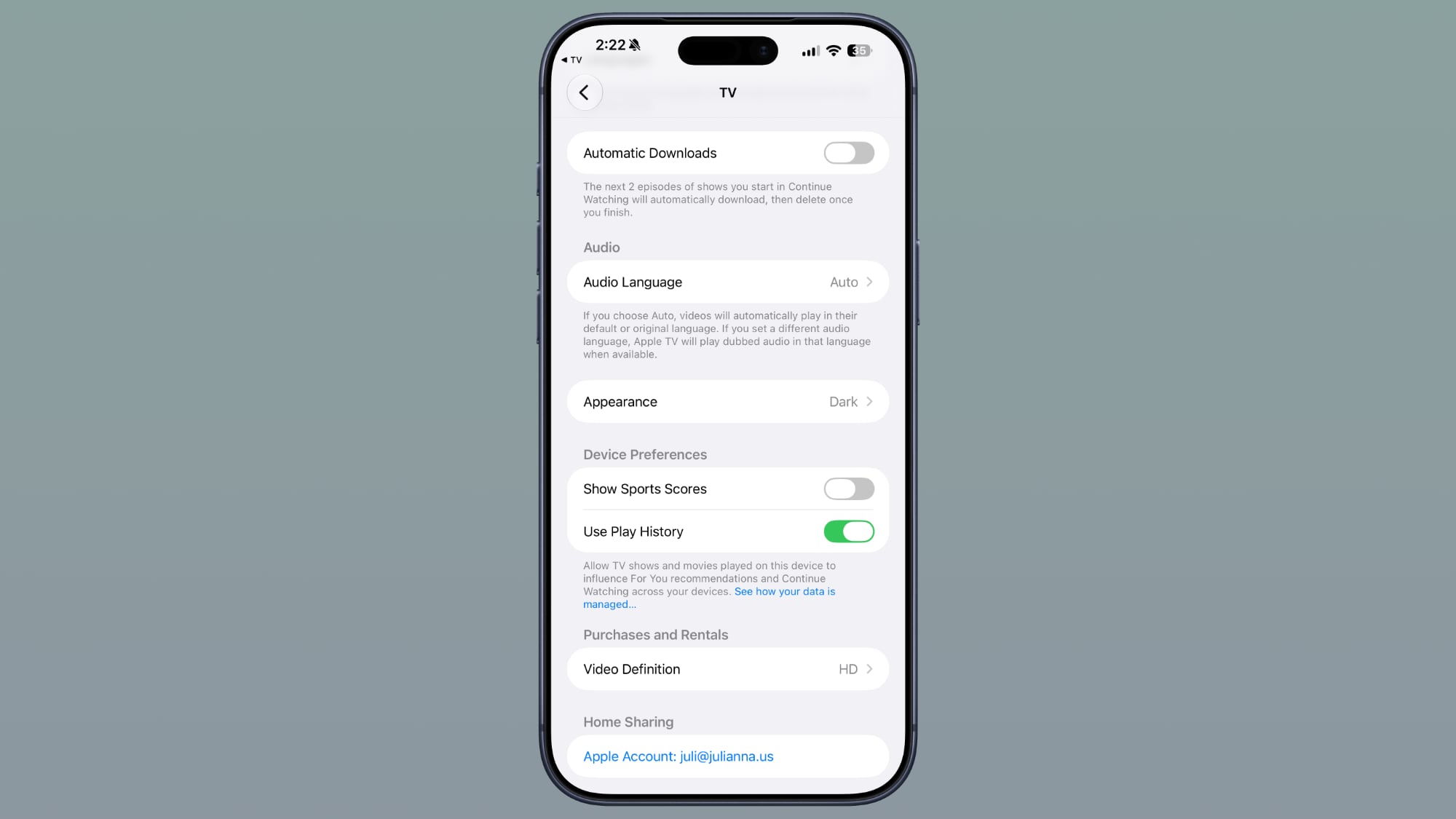
One of the most user-friendly additions in iOS 27 Beta 4 can be found within the Settings section of the Apple TV app. Here, Apple introduces a new feature designed to streamline your viewing experience: an "Automatic Downloads" toggle. For anyone who enjoys diving deep into a new series or catching up on ongoing shows, this feature promises a significant boost in convenience and continuity.
When you activate this toggle, your iPhone will intelligently anticipate your viewing habits. Specifically, it will automatically download the next two episodes of any show you've started and are currently tracking in your "Continue Watching" list. This means less waiting for episodes to buffer or download manually, especially when you're on the go or have an unreliable internet connection. Imagine being on a long commute or in an area with spotty Wi-Fi; your next episodes will already be queued up and ready for uninterrupted viewing.
What makes this feature even smarter is its built-in storage management. Once you finish watching the downloaded episodes, they are automatically deleted from your device. This prevents your storage from being unnecessarily cluttered with watched content, striking a perfect balance between convenience and efficiency. This intelligent management ensures that while you get the benefit of pre-downloaded content, your iPhone's storage remains optimized. It's a thoughtful touch that enhances the overall user experience, particularly for those who frequently use their iPhone for entertainment on the move. This small but impactful change truly highlights Apple's commitment to making the user experience as smooth and hands-off as possible, allowing you to focus on enjoying your content rather than managing it.
Refining Your Photo Viewing Experience
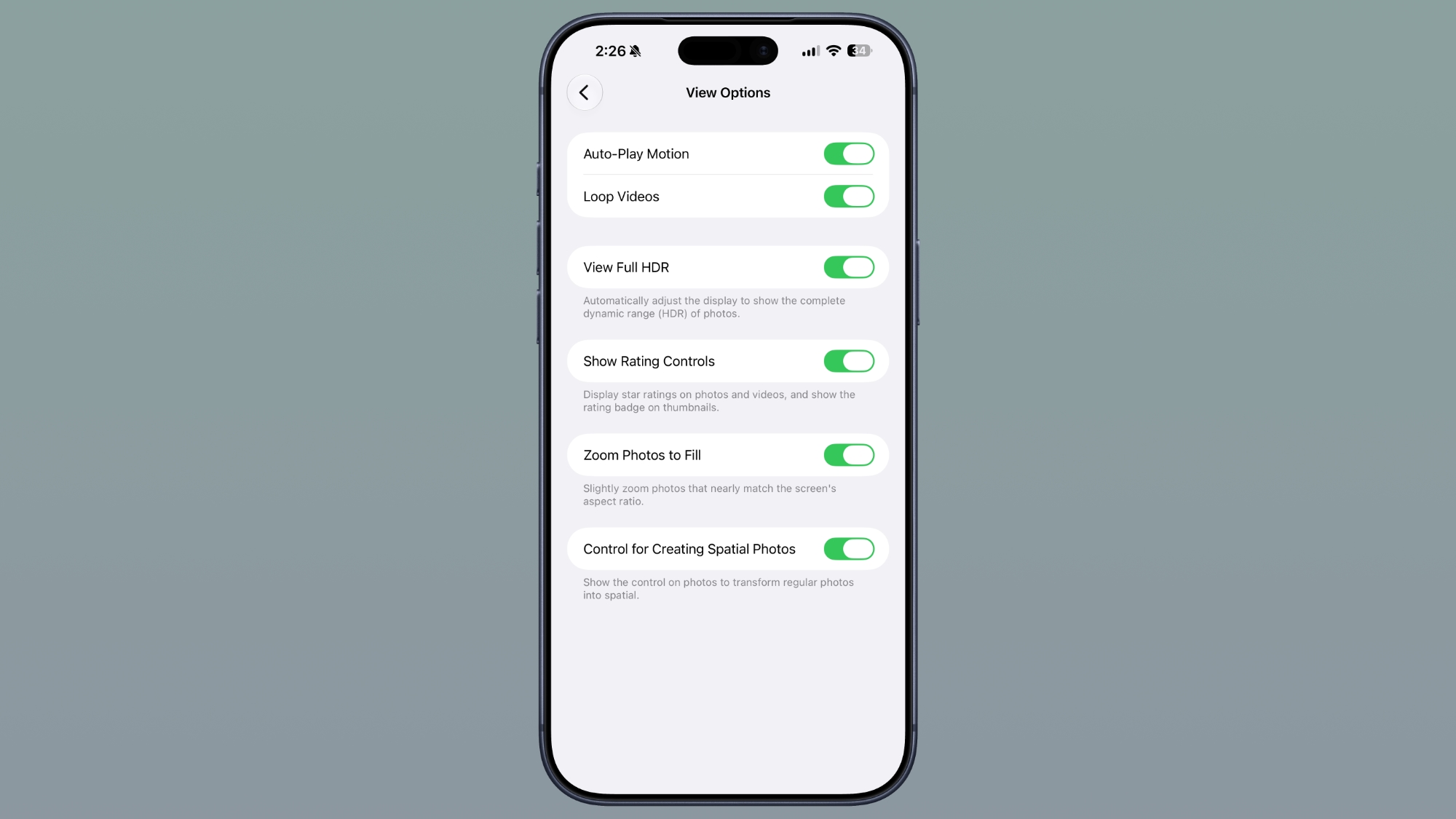
The Photos app, a cornerstone of the iPhone experience, also receives a subtle yet meaningful update in iOS 27 Beta 4. Within the Photos section of the Settings app, you'll now find a new "Zoom Photos to Fill" toggle. This feature addresses a common visual quirk where photos might not perfectly fill the entire screen, particularly if their aspect ratio differs slightly from your iPhone's display. While the iPhone's screen has a fixed aspect ratio, photos can come in various shapes and sizes depending on how they were taken, whether they were cropped, or the specific camera settings used.
When enabled, "Zoom Photos to Fill" intelligently applies a slight zoom to images that are close to matching the screen's aspect ratio. The goal here is to eliminate those small, sometimes distracting, black bars that can appear on the sides or top and bottom of a photo. By subtly zooming in, the photo takes up the maximum possible screen real estate, creating a more immersive and visually satisfying viewing experience. This is especially beneficial for those who appreciate their photos being displayed without any distracting borders, making the image truly pop on the vibrant iPhone display.
Interestingly, this feature is turned on by default, suggesting Apple believes it enhances the viewing experience for most users without requiring manual intervention. However, the presence of a toggle means users who prefer to see the photo in its exact original dimensions, even with slight borders, retain the control to disable it. This commitment to user choice, even for a seemingly minor visual adjustment, is characteristic of Apple's design philosophy. It ensures that while the default experience is optimized for broad appeal, individual preferences can still be accommodated, making the Photos app even more personalized and enjoyable for everyone.
Wallpaper Animation: A Feature's Brief Appearance and Disappearance
Beta releases are not just about adding new features; they also involve the iterative process of testing, refining, and sometimes, even removing functionalities that don't quite hit the mark or require further development. iOS 27 Beta 4 sees the removal of a distinctive wallpaper feature that had made its debut in beta 3. This particular animation was quite unique and caught the attention of many users and developers alike.
In Beta 3, when you swiped to access the Notification Center, you would observe an interesting visual effect: a cutout of the primary subject from your chosen wallpaper would appear over your Home Screen. This created a dynamic, almost three-dimensional effect, adding a layer of visual sophistication and personalization to the user interface. It was a subtle yet engaging animation that contributed to the overall fluidity and modern aesthetic of iOS. The animated visual was highlighted by various tech observers, demonstrating its novel appeal as showcased in a popular tweet:
iOS 27 beta 3 adds a new wallpaper animation which is so smooth pic.twitter.com/8LzBOx3HMD
— Aaron (@aaronp613) July 6, 2026
However, with the release of Beta 4, this specific wallpaper animation has been removed. The reasons for such removals during a beta cycle can be varied. It could be due to performance concerns, where the animation might have consumed too many system resources or caused minor lag on certain devices. Alternatively, user feedback might have indicated that the feature wasn't as universally loved as initially thought, or perhaps it didn't align perfectly with the overall design language Apple is aiming for in the final release. It's also possible that the feature is not entirely scrapped but has been temporarily pulled for further refinement and might reappear in a future beta or a later iOS update, perhaps in an improved or optimized form. This iterative process is a normal part of software development, where features are introduced, tested, and sometimes withdrawn to ensure the highest quality and most cohesive user experience in the stable release.
Evolving Siri: More Voices and Greater Personalization
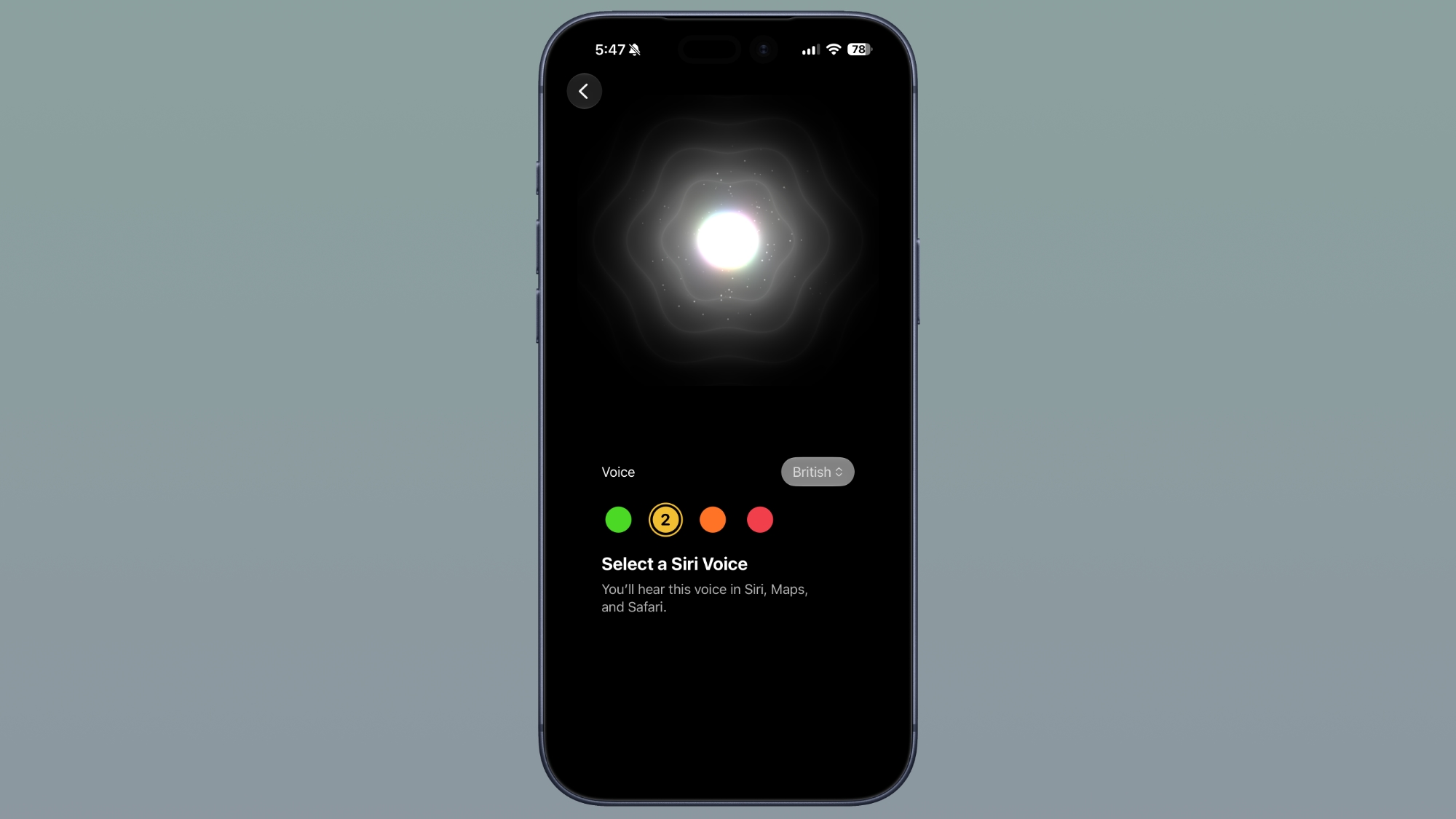
Siri, Apple's intelligent virtual assistant, receives a significant overhaul in its voice selection interface in iOS 27 Beta 4, indicating a strong push towards greater personalization and accessibility. This update streamlines how users choose their preferred Siri voice, making the experience more intuitive and offering a wider array of options.
For devices that do not yet support the advanced customizable voice feature, the interface has been updated to mirror the look and feel of the custom voice selection. This means a more organized and visually appealing layout, allowing users to easily browse and select from various voices and accents. This consistency in design ensures a familiar experience across different device tiers, making the voice selection process straightforward for everyone.
Where the update truly shines is for devices that support custom Siri selections. These high-end models, currently limited to the iPhone 17 Pro, iPhone 17 Pro Max, and iPhone Air, will find even more voice options available. Apple has indicated that these additional voices are "coming soon," suggesting that while the interface is ready, the full complement of new custom voices will be rolled out progressively. This expansion of voice choices is not just about variety; it’s about making Siri feel more personal and natural to interact with. A wider range of voices can cater to diverse linguistic backgrounds, preferences, and even accessibility needs, making Siri a more inclusive and adaptable assistant for a global user base. The ability to choose a voice that resonates more with an individual can significantly enhance the comfort and engagement users feel when interacting with their device, moving Siri closer to being a truly personalized digital companion.
Refining Siri's Settings and Accessibility
Beyond voice selection, iOS 27 Beta 4 introduces several new options within the Siri section of the Settings app, focusing on enhancing user control over how Siri communicates and transcribes interactions. These granular controls underscore Apple's commitment to making Siri more flexible and adaptable to individual preferences and accessibility needs.
Adjusting Siri Preview Length
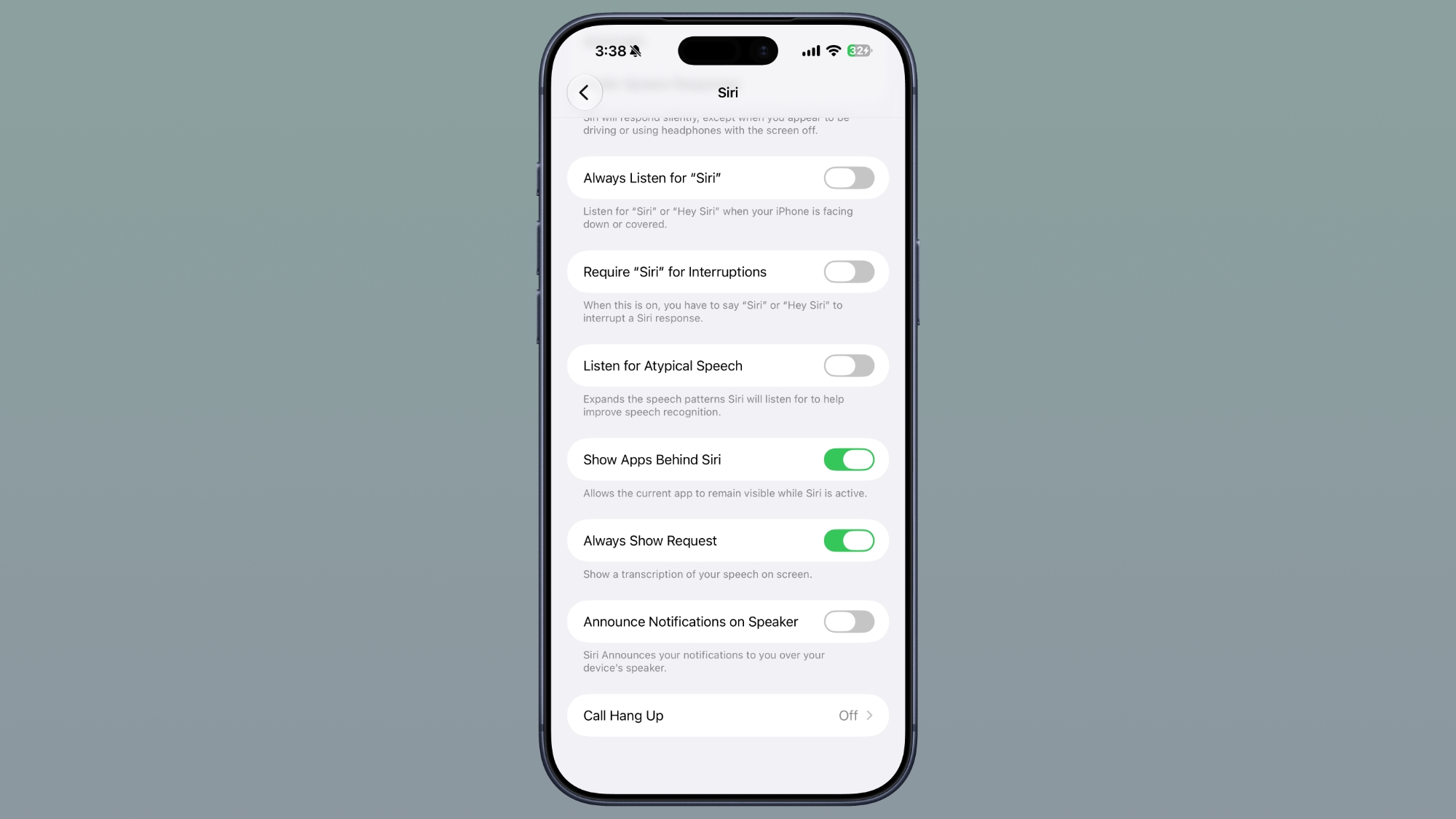
A notable addition is the option to adjust the length of previews displayed in the Siri app. Users can now choose to see up to five lines of text as a preview or opt for no preview at all. This feature is particularly useful for tailoring Siri's verbosity to your specific context. For instance, if you're in a public place and prefer minimal on-screen information, choosing fewer lines or no preview can maintain your privacy. Conversely, if you're asking Siri complex questions or need to quickly review the context of a previous interaction, seeing up to five lines can provide a more comprehensive overview without having to delve deeper into the app. This level of control empowers users to customize their Siri experience, making it as concise or as detailed as they desire, thereby improving efficiency and personal comfort.
"Always Show Request" for Enhanced Accessibility
In the Accessibility settings, a new "Always Show Request" toggle has been introduced for Siri. When activated, this feature ensures that a transcription of what you say to Siri is always displayed on the screen. This is a significant enhancement for accessibility, especially for individuals who are deaf or hard of hearing, or for those in environments where it's difficult to hear Siri's responses. By providing a visual representation of your spoken commands, users can confirm that Siri has accurately understood their request, reducing potential misunderstandings and frustration. It also serves as a helpful visual cue for anyone who simply prefers to see their commands in text form, offering an additional layer of confirmation and clarity. This option makes Siri more robust and reliable across various situations, truly embodying an inclusive design philosophy.
Siri Search or Ask: A Welcoming Splash Screen
For new users, or even existing ones who might not fully utilize all of Siri's capabilities, discovering and understanding the full potential of the voice assistant can sometimes be a challenge. iOS 27 Beta 4 addresses this by introducing a helpful splash screen when you swipe down to access the Siri Search or Ask interface. This small but impactful change aims to improve user onboarding and overall feature discoverability.
The new splash screen will likely offer a brief explanation or quick tips on how to effectively use Siri for search queries and various commands. This could include examples of questions to ask, types of tasks Siri can perform, or even a summary of key features. By providing this immediate context, Apple helps users quickly grasp what they can achieve through the Siri interface, encouraging greater engagement and utilization of the assistant's capabilities. It's a thoughtful design choice that reduces the learning curve and ensures users can leverage Siri to its fullest potential right from the moment they access the search bar, making the experience more inviting and productive.
ProRes Log Format: Empowering Professional Videography
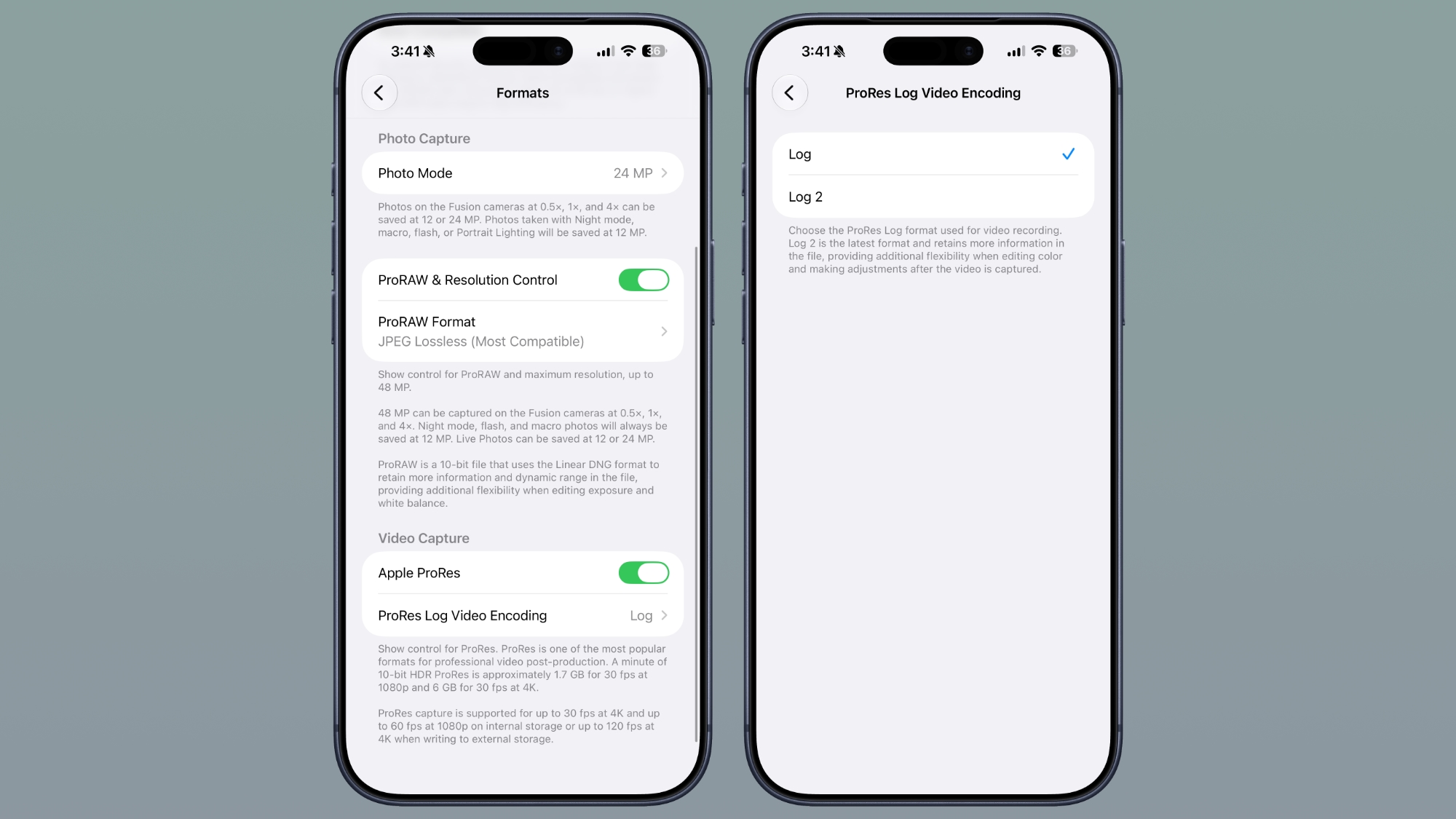
For the growing number of filmmakers and professional videographers who rely on their iPhone for high-quality video capture, iOS 27 Beta 4 delivers a powerful new tool: expanded ProRes log format options. Found within the Camera section of the Settings app, this feature significantly enhances the iPhone's capabilities as a serious video production device.
Once you toggle Apple ProRes on (which enables Apple's high-quality video codec), you'll now find an option to choose a specific ProRes log format. Tapping on "ProRes Log Video Encoding" reveals a choice between "Log" and "Log 2." For those unfamiliar with videography, a log format is a specialized way of recording video that captures a much wider dynamic range compared to standard video formats. Instead of compressing the image's tonal values, log gamma curves retain more detail in both the brightest highlights and the deepest shadows. This results in a flatter, less saturated image straight out of the camera, but it provides significantly more flexibility during the post-production color grading process.
The introduction of "Log 2" is particularly exciting. Log 2 is the latest iteration of this professional format, designed to retain even more information within the video file. This means that when you're editing your footage, you have a much larger canvas of color and luminance data to work with. Colorists and editors can push and pull the colors, adjust exposure, and fine-tune contrast with greater precision and less risk of introducing artifacts or breaking the image. For professional workflows, this translates to more creative control and the ability to achieve a highly polished, cinematic look that can be seamlessly integrated with footage shot on dedicated professional cameras. This feature firmly establishes the iPhone as a formidable tool for serious video content creation, bridging the gap between mobile convenience and professional-grade quality.
Enhanced Control Over Wi-Fi Assist
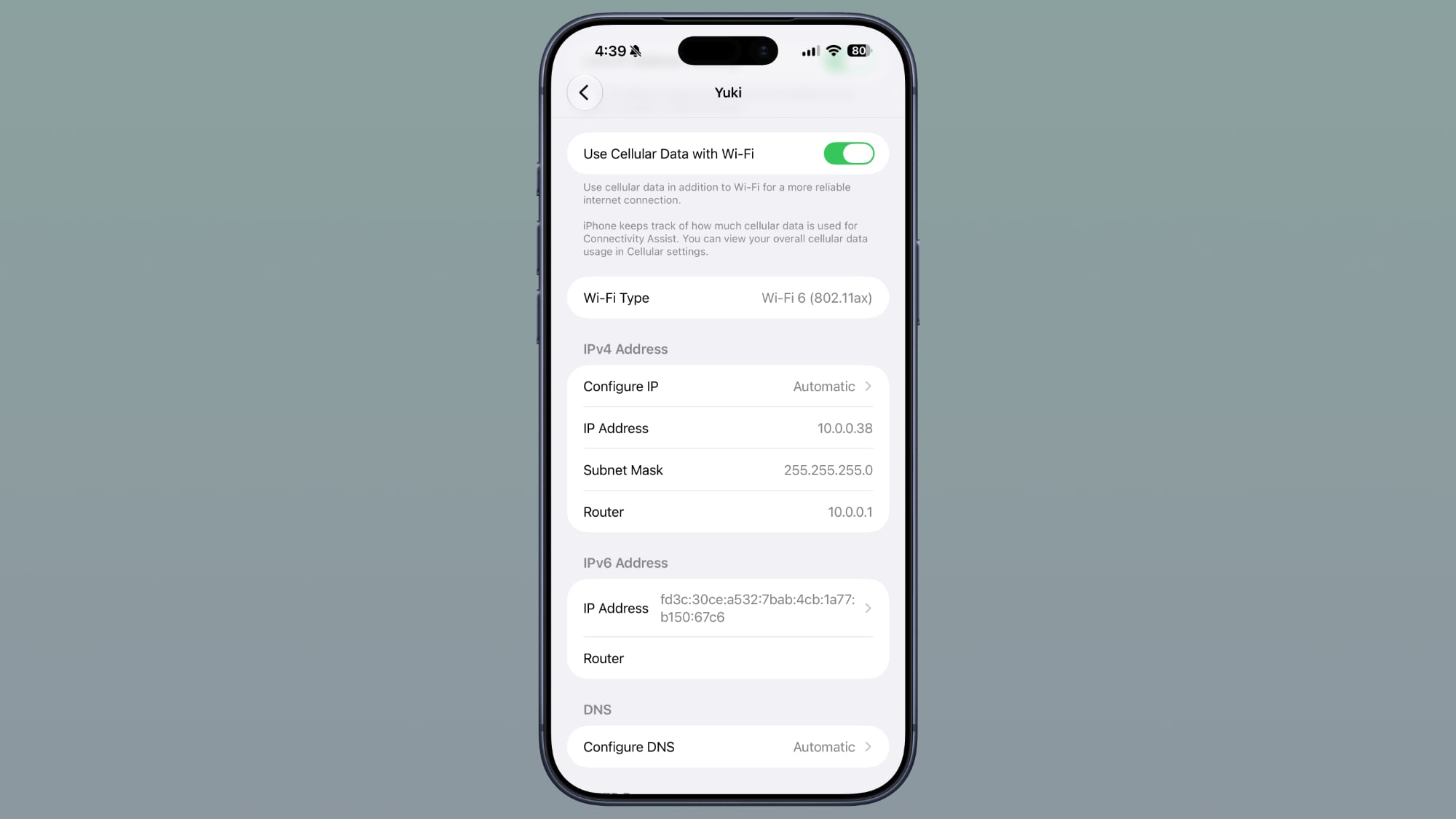
Connectivity Assist, a feature designed to seamlessly switch your iPhone to cellular data when your Wi-Fi signal becomes weak or unstable, has been a boon for maintaining internet access. However, in previous iOS versions, the control over this feature was somewhat all-or-nothing: either it was on for all Wi-Fi networks, or it was off. iOS 27 Beta 4 introduces a significant improvement by offering more granular control over Connectivity Assist.
Now, users have the option to enable or disable Connectivity Assist for each individual Wi-Fi network. This means that regardless of whether the main Connectivity Assist toggle in the general settings is switched on, you can still make specific exceptions. This level of per-network control is incredibly useful in various real-world scenarios. For example, you might have a home Wi-Fi network that is generally stable but occasionally experiences brief drops where you'd want Connectivity Assist to kick in. However, you might also frequently connect to a public Wi-Fi network at a coffee shop that is notoriously unreliable and drains your cellular data unnecessarily if Connectivity Assist is always active. With this new setting, you can keep Connectivity Assist enabled for your home network but disable it specifically for that problematic public Wi-Fi.
This increased flexibility empowers users to manage their data usage more intelligently and ensures a smoother online experience tailored to the specific characteristics of each network they encounter. It prevents unnecessary cellular data consumption on unreliable public Wi-Fi, while still allowing the convenience of automatic switching on networks where it's truly beneficial. It's a thoughtful improvement that gives users more power over their connectivity, ensuring they are always online when needed, without surprise data charges.
Refined AirPods Experience in Control Center
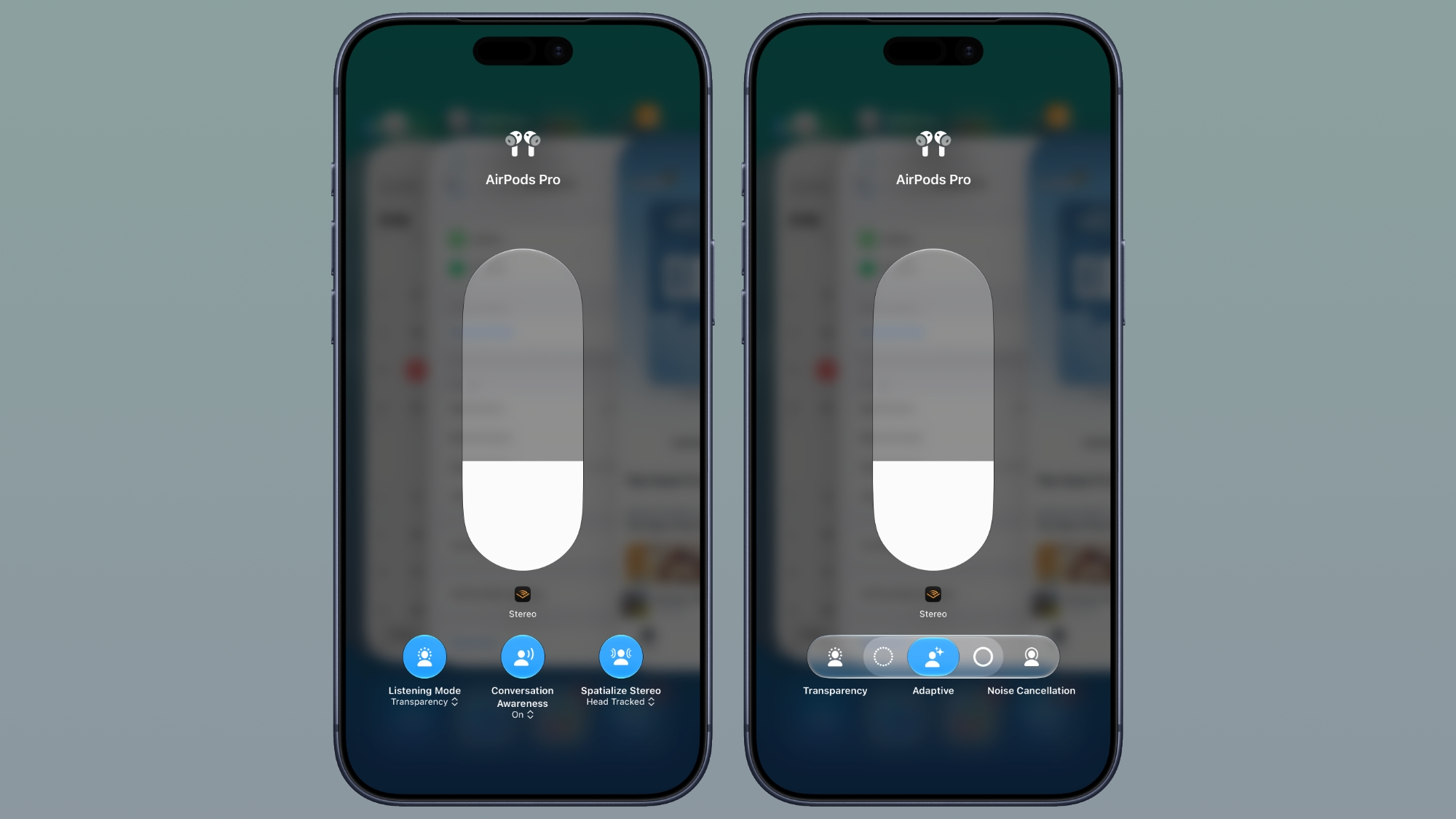
Apple continues to refine the integration of its popular AirPods lineup with iOS, and iOS 27 Beta 4 brings visual and functional updates to AirPods options within the Control Center. These changes are designed to make managing your AirPods settings more intuitive and accessible, especially when utilizing advanced features like Adaptive Mode.
The updated look of the AirPods options in Control Center offers a cleaner, more streamlined interface. This redesign ensures that users can quickly identify and adjust their audio settings without navigating through multiple menus. A key part of this enhancement involves adding more options specifically for Adaptive mode. Adaptive mode, a standout feature in newer AirPods models, intelligently blends Active Noise Cancellation with Transparency mode, dynamically adjusting the level of environmental sound based on your surroundings and interactions. For instance, it can reduce loud noises while still allowing you to hear important announcements or conversations.
By providing more explicit options for Adaptive mode directly within Control Center, Apple is making it easier for users to fine-tune this sophisticated audio experience on the fly. This could include sliders or presets that allow users to customize how aggressively Adaptive mode filters external sounds, or to quickly switch between different adaptive profiles. This level of immediate control enhances the versatility of AirPods, enabling users to optimize their listening experience whether they are in a bustling city, a quiet office, or engaging in a conversation. The focus here is on putting powerful audio controls at the user's fingertips, making the AirPods experience even more personalized and responsive to different environments and needs.
Intriguing Clues: Dual Battery iPhone References
Beyond the immediate user-facing features, developer betas often contain intriguing snippets of code that hint at future hardware developments. iOS 27 Beta 4 is no exception, as it includes references to an iPhone with two batteries. Code strings such as "The batteries in this iPhone are performing as expected" explicitly mention multiple power sources within the device. While this doesn't confirm an immediate release, it strongly suggests that Apple is actively developing or at least testing iPhone models that incorporate a dual-battery design.

The most compelling speculation surrounding these references points towards the much-rumored foldable iPhone Ultra. Foldable devices inherently present unique engineering challenges, particularly regarding space management and power delivery. A dual-battery design could be a practical solution to these challenges. In a foldable phone, the device's internal components might be split across two halves, making a single, large battery difficult to integrate without compromising the folding mechanism or the device's slim profile. By distributing the power source into two smaller batteries, Apple could optimize space, balance the device, and potentially even offer better thermal management. Furthermore, foldable screens and their accompanying complex hinge mechanisms often demand more power than traditional displays, making increased battery capacity a necessity for maintaining Apple's expected all-day battery life standards. These code references, therefore, provide exciting glimpses into Apple's potential future hardware innovations, hinting at a foldable iPhone Ultra that not only pushes boundaries in design but also incorporates intelligent power solutions to support its advanced capabilities.
The Bigger Picture: What Beta 4 Tells Us About iOS 27
The release of iOS 27 Beta 4, with its blend of new features, refinements, and even a temporary removal, offers valuable insights into Apple's strategy for its next major operating system. It reinforces the idea that the beta cycle is a dynamic period of intense development and user feedback integration. While the major tentpole features are often announced at WWDC, these subsequent betas are where the real work of polish and optimization takes place, addressing edge cases, improving performance, and making the user experience truly seamless.
The focus on personalized Siri interactions, enhanced photo viewing, smarter TV app downloads, and professional camera controls demonstrates Apple's commitment to delivering a well-rounded and versatile operating system. The granular control over Wi-Fi Assist and refined AirPods settings highlight a drive towards empowering users with more control over their device's behavior, adapting iOS to individual needs and preferences. Even the removal of the wallpaper animation, though initially disappointing for some, underscores Apple's willingness to iterate and prioritize a polished, stable final product over untested or resource-intensive features.
Perhaps most exciting are the subtle hints at future hardware, particularly the dual-battery iPhone references. These small details in the code can ignite fervent speculation about upcoming devices, keeping the tech community engaged and excited about what's next. It's a testament to Apple's long-term vision, where software development often precedes and paves the way for groundbreaking hardware innovations.
Looking Ahead to the Official Launch
As the final weeks before the official September launch of iOS 27 tick away, each beta release brings us closer to the definitive version. These developer previews are not just for developers to adapt their apps; they are a critical phase for Apple to gather real-world data, identify any remaining bugs, and fine-tune the operating system to ensure it's ready for prime time. The meticulous attention to detail seen in Beta 4, from minor UI adjustments to significant feature enhancements and strategic removals, speaks volumes about Apple's dedication to quality.
The continuous evolution of features like Siri, the Camera app's professional capabilities, and the seamless integration with accessories like AirPods, all point towards an iOS 27 that is more intelligent, more capable, and more personalized than ever before. Users can anticipate a stable, efficient, and feature-rich experience that enhances their daily interactions with their iPhone, whether for productivity, creativity, or entertainment.
Conclusion: A Polished Future with iOS 27
In conclusion, iOS 27 Beta 4 showcases Apple's unwavering dedication to refining its mobile operating system. While the changes might appear subtle on the surface, they collectively contribute to a more polished, intuitive, and powerful user experience. From intelligently managing your TV show downloads to offering professional-grade video recording options, and from making Siri more adaptable to hinting at revolutionary hardware, this beta is a clear indication of Apple's forward-thinking approach.
The journey from an initial concept to a final, stable operating system is complex, involving countless iterations and a constant pursuit of perfection. iOS 27 Beta 4 is a crucial waypoint on this journey, demonstrating Apple's commitment to listening to feedback, optimizing performance, and delivering innovations that truly matter to its users. As September approaches, the anticipation for iOS 27 continues to build, promising an exciting new chapter for iPhone users around the globe. Stay tuned for the official release, which is set to bring all these carefully crafted enhancements and more to your fingertips.
This article, "Everything New in iOS 27 Beta 4" first appeared on MacRumors.com
Discuss this article in our forums
from MacRumors
-via DynaSage
