
Apple's Secret Siri Interface Buried in macOS 27 Beta: How to Enable
Unveiling the Future: Apple's Secret Siri AI Popover Emerges in macOS 27 Golden Gate Beta
The digital world is constantly evolving, and at the forefront of this transformation is Artificial Intelligence (AI). Apple, a company synonymous with innovation, appears to be making significant strides in integrating advanced AI capabilities directly into its core operating system. Recent observations within the developer and public betas of macOS 27 Golden Gate suggest a groundbreaking new interface for Siri AI. This hidden popover, when enabled, promises to revolutionize how users interact with text and leverage intelligent assistance on their Macs.
Imagine effortlessly refining your writing, instantly summarizing lengthy documents, or taking context-aware actions—all with a simple click after selecting text. This is the promise of the new Siri AI popover. While still in its early testing phases, this feature hints at a more intuitive, powerful, and deeply integrated AI experience within macOS, moving Siri beyond a simple voice assistant to an indispensable productivity companion. It represents a potential shift towards on-device intelligence that empowers users without interrupting their workflow, embedding powerful tools directly where they are needed most.
A Glimpse into the Future: The Hidden Siri AI Popover
Deep within the beta versions of macOS 27 Golden Gate, observant users have uncovered what could be one of the most exciting new features: a discreet yet powerful popover interface for Siri AI. This innovative design allows Siri to offer intelligent assistance not just through voice commands, but directly as you work with text on your screen. It’s a seamless blend of artificial intelligence and user interface, designed to make your Mac even smarter and more responsive to your immediate needs.
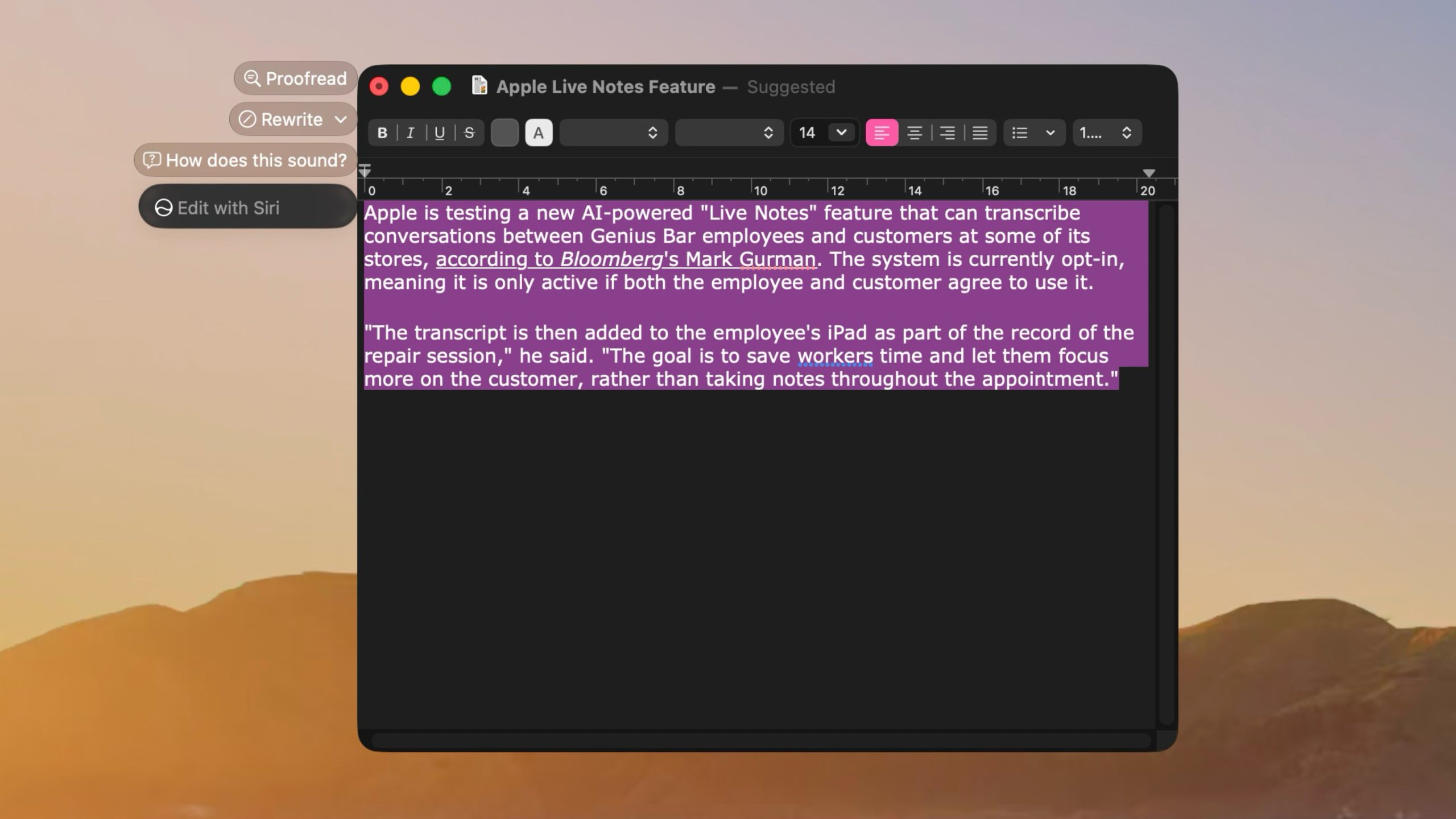
The discovery of this feature was first brought to light by a member of Reddit's r/MacOSBeta community, a testament to the vigilance and curiosity of Apple's dedicated beta testers. What they found was an elegant, lightweight user interface (UI) that manifests as a floating icon. This icon conveniently appears at the top-left of any selected text on your screen. When your mouse pointer hovers over this subtle indicator, it expands into a compact popover, revealing a suite of "Writing Tools" and "contextual actions" tailored to the content you've highlighted. This intelligent placement ensures that the tools are right where your attention is, minimizing distraction and maximizing efficiency.
This approach marks a significant evolution for Siri. Historically, Siri has been primarily a voice-activated assistant, responding to commands and queries spoken aloud. While incredibly useful for hands-free operations, integrating Siri directly into the text selection workflow opens up new avenues for productivity and creative tasks. It means that the power of AI is no longer just a command away, but an inherent part of your interaction with text, offering immediate and relevant suggestions without requiring you to switch applications or even move your hands from the keyboard and mouse significantly.
Enhancing Your Writing: The New Siri AI Writing Tools
One of the most exciting aspects of this new Siri popover is the collection of "Writing Tools" it provides. These tools are designed to assist users in crafting, refining, and understanding text with greater ease and efficiency, leveraging the power of advanced AI algorithms. For anyone who regularly works with written content—from students to professionals, creative writers to business communicators—these features could prove to be invaluable assets.
Rewrite: Transform Your Text Effortlessly
The "Rewrite" tool is a game-changer for anyone looking to adapt their text for different contexts or simply improve its flow and clarity. With a single click, Siri AI can take your selected text and rephrase it, offering alternative ways to express your ideas. This goes beyond simple synonym replacement; it's about understanding the core message and presenting it in a new light. For instance, you could use it to:
- Change Tone: Instantly shift a formal business email into a more casual message, or vice-versa, making your communication more appropriate for its audience.
- Simplify Complex Sentences: Break down jargon-filled paragraphs into easily digestible prose, ensuring your message is understood by a wider readership.
- Expand or Condense: Turn a short sentence into a more descriptive paragraph, or summarize a lengthy passage into a concise statement, depending on your needs.
- Vary Sentence Structure: Avoid repetitive phrasing and make your writing more engaging and dynamic.
This capability dramatically speeds up the editing process, allowing users to experiment with different styles and voicings without having to manually craft each alternative. It's like having a dedicated copy editor available instantly, ready to offer suggestions to enhance your writing quality.
Proofread: Precision and Polish for Flawless Communication
Few things undermine credibility faster than grammatical errors or typos. The "Proofread" tool is designed to catch these mistakes before they ever reach your audience. Leveraging sophisticated natural language processing, Siri AI can meticulously scan your selected text for a wide array of errors:
- Grammar Mistakes: Identifying incorrect verb tenses, subject-verb agreement issues, pronoun discrepancies, and more.
- Spelling Errors: Catching misspellings that might slip past traditional spell-checkers, especially homophones (words that sound alike but are spelled differently).
- Punctuation Errors: Ensuring correct usage of commas, periods, semicolons, apostrophes, and other punctuation marks.
- Style Suggestions: Beyond just errors, the tool might also offer suggestions for improving clarity, conciseness, and overall readability, such as flagging overly long sentences or redundant phrases.
While human proofreading remains invaluable for nuance, an AI-powered proofreader offers an immediate, always-available first line of defense against common errors, helping users present polished and professional written work every time.
"How does this sound?": Gauging Tone and Impact
Effective communication isn't just about what you say, but also how it comes across. The "How does this sound?" tool is a fascinating addition, indicating Siri's growing ability to analyze the subtleties of human language. This feature aims to provide feedback on the tone, sentiment, and overall impact of your selected text. It could potentially help you to:
- Assess Emotional Tone: Determine if your message comes across as professional, friendly, urgent, empathetic, or even aggressive.
- Avoid Misinterpretation: Identify phrases that might be unintentionally ambiguous or could be perceived negatively by the reader.
- Tailor Messages for Impact: Ensure your writing resonates with your intended audience and achieves the desired effect, whether it's to persuade, inform, or motivate.
This feature could be particularly useful in sensitive communications, negotiations, or marketing copy, where the emotional resonance of your words is paramount. It gives you an objective, AI-driven perspective on your writing's emotional intelligence.
"Edit with Siri": Advanced AI-Powered Text Manipulation
The broad category of "Edit with Siri" suggests a more open-ended and powerful set of AI-driven text manipulation capabilities. This could encompass a wide range of actions that go beyond simple rewriting or proofreading, allowing users to issue more complex commands to Siri regarding their selected text. Potential functionalities might include:
- Content Generation: Asking Siri to elaborate on a point, add an introduction or conclusion, or even generate related content based on the selected text.
- Structural Changes: Instructing Siri to reorder paragraphs, convert bullet points to prose, or vice-versa.
- Factual Integration: Potentially querying Siri to verify facts within the text or integrate information from external sources directly into the document.
- Custom Commands: As the feature develops, users might be able to define custom editing workflows or preferences that Siri can then apply.
This tool positions Siri not just as an editor, but as a co-creator, capable of actively participating in the writing and editing process in a more dynamic way.
Key Points and Summarization: Extracting Core Information
In an age of information overload, the ability to quickly grasp the essence of a document is invaluable. The Siri popover offers tools for "creating key points" and "summarizing text," two functions that are incredibly useful for productivity and learning. These AI capabilities can:
- Generate Key Points: Automatically extract the most crucial facts, arguments, or conclusions from a lengthy piece of text, presenting them in an easy-to-read, bulleted format. This is perfect for meeting minutes, research notes, or preparing for presentations.
- Summarize Text: Condense entire articles, reports, or emails into a concise summary that retains the main ideas without requiring you to read the full original. This saves significant time when reviewing documents, catching up on emails, or conducting research.
These tools are powered by advanced extractive and abstractive summarization techniques, allowing Siri to intelligently identify and articulate the core message, making it easier for users to digest information efficiently.
Seamless Productivity with Contextual Actions
Beyond the impressive writing tools, the Siri AI popover truly shines with its "contextual actions." This category of features exemplifies true intelligent assistance, where Siri doesn't just process text, but understands its meaning and relevance to various applications and tasks on your Mac. The power lies in Siri's ability to infer intent from selected data and offer logical next steps, turning static text into actionable information across your entire Apple ecosystem.
These contextual actions are a hallmark of a deeply integrated operating system, where different applications communicate seamlessly thanks to an intelligent assistant. They are designed to minimize manual input, reduce friction between apps, and help users accomplish everyday tasks with remarkable speed and efficiency.
Smart Contact Management: Adding Details Instantly
Imagine receiving an email with a new colleague's name, phone number, and email address embedded in the text. Instead of manually copying and pasting each piece of information into the Contacts app, Siri can now do it for you. By simply selecting the relevant contact details:
- Add Contact Details: Siri will recognize names, phone numbers, email addresses, and even physical addresses. It can then offer to create a new contact card or update an existing one with the selected information, pre-filling the fields for you.
- Quick Access: If the selected text contains an existing contact's name, Siri might offer quick actions like calling, messaging, or emailing that person directly from the popover.
This eliminates tedious data entry, ensuring your address book is always up-to-date with minimal effort, making networking and communication smoother than ever.
Effortless Communication: Composing Messages and Emails
When you select text that looks like it needs to be shared or acted upon in a communication app, Siri springs into action. This feature aims to streamline your messaging and emailing workflows:
- Compose a Message or Email: If you select a sentence or paragraph, Siri can offer to compose a new message (via Messages app) or email (via Mail app), pre-populating the body with the selected text.
- Intelligent Recipient Suggestion: If the selected text includes a name or email address, Siri might intelligently suggest that person as a recipient, further speeding up the process.
This is particularly useful when you're drafting notes, extracting a quote for an email, or quickly sharing information with a colleague without leaving your current application.
Streamlined Scheduling: Creating Calendar Events
Organizing your schedule often involves transcribing details from various sources into your calendar. Siri's contextual actions aim to simplify this process considerably:
- Create a Calendar Event: If you select text containing a date, time, location, or event description (e.g., "Meeting with John next Tuesday at 3 PM in Conference Room A"), Siri can intelligently parse this information. It will then offer to create a new calendar event, pre-filling the date, time, title, and location fields.
- Smart Reminders: Beyond events, Siri might also offer to set reminders based on deadlines or tasks mentioned in the selected text.
This drastically reduces the time spent on administrative tasks, allowing you to quickly add appointments and ensure you never miss an important engagement.
Location-Aware Assistance: Showing a Location in Maps
Whenever an address, landmark, or point of interest is selected, Siri intelligently recognizes it as a potential location. This allows for immediate integration with Apple Maps:
- Show a Location in Maps: Select an address (e.g., "1 Infinite Loop, Cupertino, CA") or a place name (e.g., "Golden Gate Bridge"), and Siri will offer to open it directly in the Maps application.
- Get Directions: Beyond just viewing the location, Siri could also offer to instantly provide directions from your current location, saving you multiple clicks and searches.
This is incredibly convenient for planning trips, finding meeting spots, or simply exploring places mentioned in documents or web pages, seamlessly bridging your text with geographical information.
Intelligent Tracking: Flights or Packages
Tracking services have become an essential part of modern life, and Siri is stepping up to make it even easier:
- Track Flights or Packages: If you select a flight number (e.g., "UA2345") or a package tracking number (from major carriers like FedEx, UPS, USPS), Siri can recognize the format. It will then offer to provide real-time tracking information directly from the popover or by opening a relevant app/website.
This eliminates the need to manually copy and paste tracking numbers into various websites, providing instant updates on the status of your deliveries or travel plans. It's a small but significant detail that enhances overall convenience and reduces anxiety about waiting for important items or catching flights.
The Beta Experience: Why It's Hidden and Unfinished
It's important to remember that this exciting Siri popover interface is currently available only in the macOS 27 Golden Gate developer beta 3 and public beta 1. Furthermore, it's disabled by default, signaling that Apple is very much in the early stages of testing and development. The nature of beta software, especially features that are hidden and require manual activation, comes with inherent caveats.
The fact that it's "disabled by default" is a common practice for features that are experimental, highly complex, or not yet ready for broad user exposure. Apple often uses feature flags—internal switches that control whether a particular feature is active or not—to manage these experimental capabilities. This allows their engineering teams to work on new functionalities in parallel with the stable parts of the operating system without impacting the general beta user experience.
Beta testers who have managed to activate this feature through private feature flags have reported that the interface is "clearly unfinished." This means users should expect inconsistent behavior. Some of the actions might not respond as expected, or they might crash, freeze, or simply do nothing when clicked. This is entirely normal for a feature in active development. It suggests that Apple is still "building out the underlying functionality," meaning the AI models, system integrations, and user interface elements are still being designed, coded, and debugged.
- Inconsistent UI behavior: The visual elements might not always render correctly, or the popover might appear in unexpected places.
- Unresponsive actions: Clicking on "Rewrite" or "Add Contact" might not yield any result, or produce an error message.
- Limited functionality: Even if an action triggers, its output might not be fully featured or robust yet.
- Potential bugs and crashes: Enabling an unfinished feature always carries the risk of system instability.
Apple uses beta periods not just to squash bugs but to gather valuable feedback and data. By making this feature accessible to adventurous beta users, they can observe how it behaves in real-world scenarios, identify areas for improvement, and gauge user interest before committing to a final design and implementation. This iterative process is crucial for refining complex AI-driven features before their public debut.
How to Unlock This Secret Feature (for Adventurous Beta Users)
For those running the macOS 27 developer beta 3 or public beta 1 and feeling adventurous, you can try to enable this hidden Siri popover interface. However, proceed with caution and remember the disclaimers mentioned above: the UI's behavior is inconsistent, and there's no guarantee the interface will make it to the final release of macOS 27 Golden Gate this fall. This process involves using the Terminal, which is a powerful command-line interface, so ensure you type the commands precisely.
Enabling the Siri AI Popover
To switch on the Lightweight UI for Siri AI's Writing Tools, open the Terminal application (you can find it in `Applications > Utilities > Terminal` or by searching with Spotlight). Then, copy and paste the following command and press Enter:
sudo mkdir -p /Library/Preferences/FeatureFlags/Domain && sudo defaults write /Library/Preferences/FeatureFlags/Domain/WritingTools LightweightUI_macOS -dict Enabled -bool trueAfter entering the command, you will be prompted to enter your administrator password. Type it in (you won't see characters appear, which is normal for security reasons) and press Enter. Once the command is executed, you must restart your Mac for the changes to take effect.
After restarting, try selecting some text in an application like Pages, Notes, or Safari. If the feature is successfully enabled, you should see the small floating Siri icon appear near your selection. Hover over it to expand the popover.
Disabling the Siri AI Popover
If you encounter significant issues, find the feature too buggy, or simply wish to revert to the default setting, you can easily disable the interface. Open the Terminal again and execute the following command:
sudo defaults write /Library/Preferences/FeatureFlags/Domain/WritingTools LightweightUI_macOS -dict Enabled -bool falseAgain, enter your administrator password if prompted, and then restart your Mac for the changes to take take effect. This will restore the default behavior, where the Siri popover remains hidden.
Important Note: Modifying system preferences via Terminal commands can sometimes lead to unexpected behavior if not done correctly. Only proceed if you are comfortable with such operations and understand the risks associated with testing unfinished beta features. As stated, this feature is highly experimental, and its inclusion in the final release of macOS 27 Golden Gate is not guaranteed. Its design, functionality, and even its existence could change dramatically or be removed altogether before the official launch.
The Road Ahead: What This Means for macOS Users and Apple's AI Vision
The emergence of this hidden Siri AI popover in macOS 27 Golden Gate is more than just a new feature; it's a strong indicator of Apple's direction in the realm of Artificial Intelligence. For years, there has been speculation about how Apple would deepen its AI integration beyond Siri's basic voice commands. This popover interface provides a tangible answer, suggesting a future where AI actively assists users within their workflows, rather than requiring explicit invocation.
If this feature, or a refined version of it, makes it to the final release of macOS 27 Golden Gate this fall, it could significantly enhance user productivity and creativity. The benefits are clear:
- Contextual Intelligence: Siri moves from being a reactive assistant to a proactive one, offering relevant tools and actions based on what you're actively working on. This reduces cognitive load and saves time.
- Seamless Integration: By appearing directly over selected text, Siri becomes an invisible layer of intelligence integrated deeply into the macOS experience, bridging the gap between various applications without friction.
- Empowering Creativity: Writing tools like Rewrite and Proofread can help users overcome writer's block, refine their prose, and ensure their communications are always polished and effective.
- Streamlined Workflows: Contextual actions for contacts, calendars, maps, and tracking can automate mundane tasks, allowing users to focus on higher-value activities.
- Accessibility: For users who might struggle with traditional editing or task management, these AI-powered tools could provide a significant boost in accessibility and ease of use.
This development also places Apple in closer competition with other tech giants who are heavily investing in AI integration into their operating systems and productivity suites, such as Microsoft with Copilot and Google with Gemini. Apple's unique advantage often lies in its strong commitment to user privacy and its ecosystem-wide integration. It's highly probable that many of these AI features will be processed on-device, leveraging the powerful Apple Silicon chips, thereby minimizing the need to send sensitive user data to cloud servers. This on-device processing approach aligns perfectly with Apple's long-standing privacy philosophy.
The "Golden Gate" codename for macOS 27 itself evokes a sense of crossing into a new era, bridging the past with a future of advanced technology. This Siri AI popover could be one of the key pillars of that bridge, symbolizing Apple's commitment to delivering intelligent, intuitive, and privacy-respecting AI experiences that truly augment the user's capabilities. It promises a future where your Mac doesn't just run software, but intelligently assists you in every task, making computing feel more personal, powerful, and profoundly productive.
Conclusion: A Smarter Mac on the Horizon
The discovery of the hidden Siri AI popover in the macOS 27 Golden Gate beta is an exciting preview of Apple's vision for the future of its desktop operating system. It signals a strategic shift towards a more deeply integrated, contextually aware, and proactive AI assistant that lives directly within your workflow. From refining your writing to orchestrating your daily tasks, the potential for enhanced productivity and a more intuitive user experience is immense.
While the feature is currently in a raw, unfinished state, its very existence offers a tantalizing glimpse into how Siri AI could transform into an indispensable, ever-present digital companion on your Mac. As Apple continues to iterate and refine this powerful interface, users can look forward to a macOS experience that is not only robust and reliable but also intelligently anticipates and responds to their needs, making every interaction more efficient and impactful.
This article, "Apple's Secret Siri Interface Buried in macOS 27 Beta: How to Enable" first appeared on MacRumors.com
Discuss this article in our forums
from MacRumors
-via DynaSage
