
watchOS 27 Improves Apple Watch Performance in Seven Ways
watchOS 27: A Deep Dive into Performance and a Smarter Apple Watch Experience
Every year, Apple's Worldwide Developers Conference (WWDC) gives us a sneak peek into the future of their operating systems. WWDC 2026 was no different, showcasing a clear pattern: a mix of innovative new features and a significant focus on making the underlying software platform stronger and more efficient. For the Apple Watch, this philosophy shines brightly in watchOS 27. While some changes are immediately noticeable, many of the most impactful improvements work quietly behind the scenes, ensuring your Apple Watch runs smoother, lasts longer, and connects more reliably than ever before.
This latest iteration of watchOS isn't about radical reinvention for the sake of it, but rather about thoughtful evolution. Apple continues to refine the core experience of wearing a powerful computer on your wrist, making it more intuitive, more responsive, and ultimately, more indispensable for your daily life, health, and fitness goals. The updates introduced aim to enhance every interaction, from launching your favorite app to tracking your most intense workouts, embodying Apple's commitment to seamless technology.
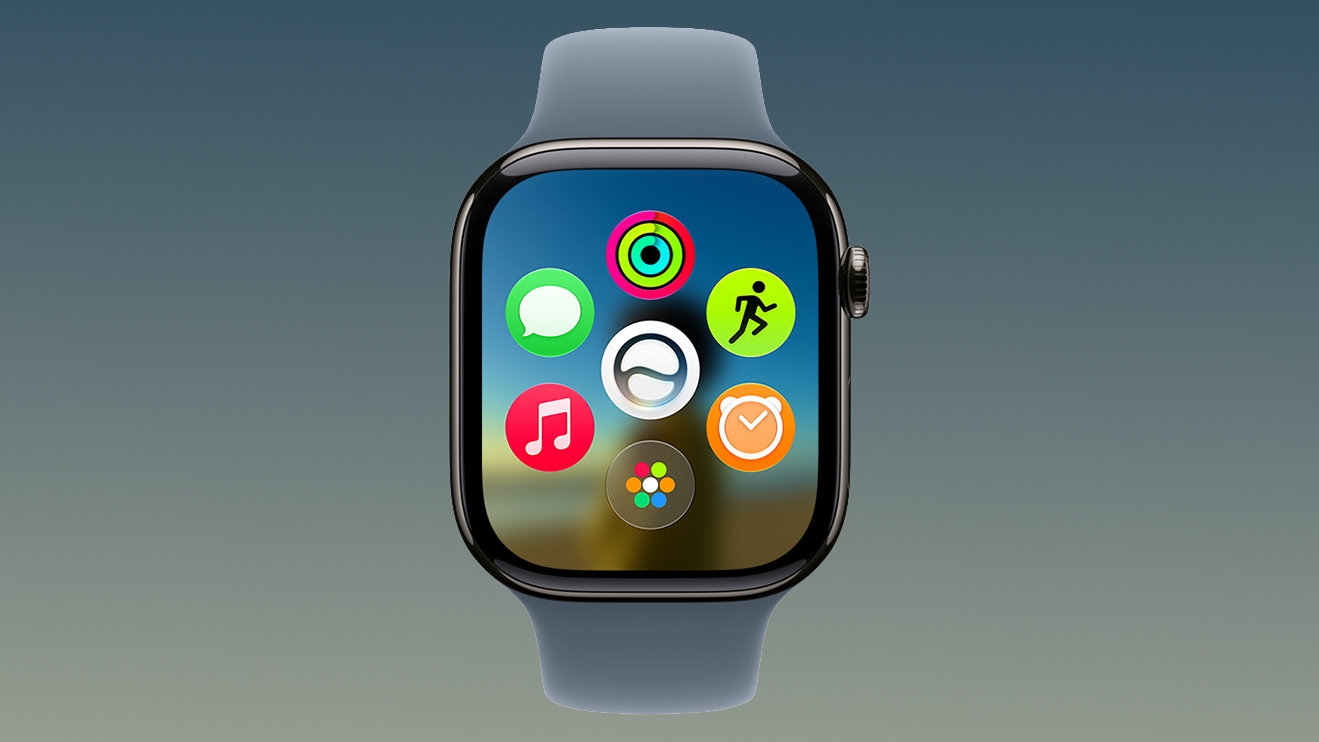
The Dynamic App Grid: Smarter Navigation at Your Fingertips
Perhaps the most visually striking and immediately noticeable change in watchOS 27 is the introduction of a brand-new dynamic app grid. This isn't just a cosmetic refresh; it's a fundamental rethinking of how you interact with your most frequently used applications on your Apple Watch. Gone are the days of endlessly scrolling through a static list or a fixed honeycomb layout to find what you need. Instead, watchOS 27 introduces an intelligent, adaptive interface designed to predict your needs.
At its heart, this dynamic app grid leverages the power of context and your personal usage patterns. Imagine a smart assistant that anticipates which apps you'll need next, arranging them front and center on your watch face. This is precisely what the dynamic app grid aims to do. It surfaces and intelligently rearranges up to five key applications based on your current activity, time of day, location, and even your historical habits. For example, if you typically start a workout in the morning, your fitness app might appear prominently. If it's evening and you often check your sleep tracker, that app could take its prime spot.
Siri as the Central Intelligence
Siri plays a pivotal role in making this dynamic grid truly smart. Apple has positioned Siri as the "centerpiece" of this new navigation system, meaning Siri's advanced on-device intelligence and machine learning capabilities are constantly working to understand your routines and preferences. This allows the watch to learn and adapt, making the app suggestions increasingly accurate and useful over time. It's an intelligent partnership between you and your device, designed to minimize friction and save you precious seconds throughout your day.
Seamless Interaction and Control
Accessing this innovative grid is incredibly intuitive. A simple press of the Digital Crown on your Apple Watch immediately invokes the dynamic grid. This happens regardless of your preferred app viewing method – whether you typically use the traditional app grid view or the list view. The system is designed to seamlessly integrate into your existing workflow, offering a smarter shortcut without forcing a complete change in your habits.
What if the dynamic grid doesn't display the app you're looking for? Apple has thought of that too. A quick turn of the Digital Crown immediately reverts to your preferred default view, allowing you to quickly access your full list or grid of apps. This ensures that while the dynamic grid offers intelligent assistance, you always retain full control over your navigation. It’s a thoughtful balance between proactive assistance and user choice.
The Philosophy Behind the Change
This dynamic app grid truly embodies the dual focus of watchOS 27: redesigned navigation for improved efficiency. On one hand, it’s a fresh, modern take on how to interact with apps on a small screen. On the other, it's deeply rooted in the efficiency-minded development that defines many of the other "under the hood" improvements. The primary goal is simple: to get you to the app you want, just faster. In the fast-paced world of wearables, where every second counts, such an improvement can dramatically enhance the overall user experience, making the Apple Watch feel more responsive and more aligned with your immediate needs.
This intelligent reorganization of apps is more than just a convenience; it’s a step towards a more personalized and predictive computing experience on your wrist. It reflects Apple's ongoing effort to make technology fade into the background, becoming an extension of yourself that anticipates your desires rather than demanding your constant attention.
Under-the-Hood Enhancements: The Invisible Power of watchOS 27
While the dynamic app grid might be the most visible new feature, the true power of watchOS 27 lies in the numerous "out of sight" improvements that enhance the foundational performance and reliability of your Apple Watch. These aren't flashy features you'll highlight to friends, but they are crucial for a device that's with you all day, every day. Apple's commitment to refining the underlying platform architecture ensures that the Apple Watch remains a reliable, powerful, and long-lasting companion. These subtle yet significant changes collectively contribute to a dramatically smoother and more efficient user experience.
Apple has highlighted several key areas where watchOS 27 brings substantial improvements:
- Better battery efficiency
- Improved Wi-Fi connectivity
- More efficient water detection
- More accurate step tracking
- Faster media playback
- Faster app extension launches
Better Battery Efficiency: Powering Your Day and Beyond
Battery life is often the number one concern for users of any portable electronic device, especially a wearable that's expected to last all day and even through the night for sleep tracking. In watchOS 27, Apple has prioritized "Better battery efficiency," meaning your Apple Watch will be able to perform its tasks while consuming less power. This isn't just about making the battery last longer between charges, though that's a significant benefit. It also implies a more optimized use of the device's processor and sensors, ensuring that background tasks are handled intelligently without draining unnecessary power.
These improvements often come from smarter software algorithms that manage how the processor works, how sensors collect data, and how the display is used. It could mean more efficient handling of background app refreshes, optimized power states during inactivity, or even smarter power management for the watch's various radios (Wi-Fi, Bluetooth). For the user, this translates to fewer worries about running out of juice, more consistent all-day performance, and potentially a longer overall lifespan for the battery itself.
Improved Wi-Fi Connectivity: Staying Connected, Seamlessly
For many Apple Watch models, Wi-Fi connectivity is crucial for untethered operations – whether it's streaming music, receiving messages when your iPhone isn't nearby, or updating apps. "Improved Wi-Fi connectivity" in watchOS 27 means a more robust, faster, and more reliable connection to Wi-Fi networks. This can manifest in several ways: quicker connection times, stronger signal reception in challenging environments, and potentially better handoff between Wi-Fi and cellular networks (for cellular-enabled models).
Enhanced Wi-Fi can also lead to faster data transfers, which is beneficial for everything from downloading new watch faces to syncing large amounts of health data. It also contributes to better overall responsiveness when the Watch is operating independently of your iPhone, making it a more capable standalone device. This ensures a smoother experience when you're out for a run without your phone, or simply in another room of your house.
More Efficient Water Detection: Smarter and Safer for Your Adventures
The Apple Watch has long been a champion for water resistance, making it suitable for swimming and accidental splashes. "More efficient water detection" in watchOS 27 suggests advancements in how the Watch identifies when it's submerged and needs to engage its water lock feature. This improvement could lead to faster and more accurate detection, ensuring that the water lock activates precisely when needed, preventing accidental screen touches and automatically ejecting water from the speaker after a swim.
Beyond protection, this efficiency could also contribute to more precise swim tracking, as the watch better understands its environment. It means you can have greater confidence in your device's ability to handle water exposure, whether you're taking a dip in the pool or caught in a sudden downpour during a run. This refinement enhances both the durability of the device and the accuracy of its fitness tracking capabilities in aquatic environments.
More Accurate Step Tracking: Trusting Your Fitness Data
For many, the Apple Watch is a primary tool for health and fitness tracking, and step counting is a fundamental metric. "More accurate step tracking" means the algorithms responsible for detecting and counting your steps have been refined. This improvement ensures that the data you see in the Activity app and Apple Health is a truer representation of your physical movement throughout the day. Factors like arm swings, subtle body movements, and varying gaits can all affect step count accuracy, and these updates likely address those nuances.
Improved accuracy means more reliable daily activity goals, better insights into your overall movement patterns, and more trustworthy data for long-term health trends. It reinforces the Apple Watch's position as a serious fitness companion, allowing users to make more informed decisions about their activity levels and well-being. This precision is vital for anyone relying on their Watch for serious health monitoring or training.
Faster Media Playback: Entertainment On The Go, Seamlessly
Listening to music, podcasts, or audiobooks directly from your Apple Watch, often paired with Bluetooth headphones, is a convenience many users enjoy, especially during workouts or commutes. "Faster media playback" in watchOS 27 translates to a smoother, more responsive, and more reliable audio experience. This could involve optimizations in how audio files are processed, faster loading times for songs or episodes, and improved synchronization with connected Bluetooth devices.
The result is fewer buffering interruptions, quicker track changes, and an overall more enjoyable listening experience. Whether you're streaming directly from Apple Music or playing downloaded content, these improvements ensure that your workout soundtrack or your favorite podcast flows effortlessly, without distracting pauses or glitches. It makes the Apple Watch an even more capable and satisfying device for on-the-go entertainment.
Faster App Extension Launches: Instant Responsiveness
Many Apple Watch apps rely on "app extensions" to display complications, deliver notifications, or provide quick glances at information without fully launching the main app. "Faster app extension launches" is a critical underlying improvement that impacts the perceived speed and responsiveness of the entire Watch experience. This means that when an app needs to update a complication on your watch face, display a quick piece of information, or respond to a shortcut, it will do so much more quickly.
This optimization makes the Apple Watch feel snappier and more fluid. It reduces the slight delays that can sometimes occur when interacting with third-party apps or even some built-in features, making every tap, swipe, and glance feel more immediate. For developers, it means their app experiences on the Watch can be more integrated and seamless, encouraging more sophisticated and useful app interactions. For users, it simply makes the Watch feel faster and more capable in day-to-day use, reinforcing its role as a quick-access device.
Hardware Compatibility: Is Your Apple Watch Ready for watchOS 27?
As with all major software updates from Apple, watchOS 27 introduces a set of hardware requirements. While Apple is renowned for supporting its devices for many years, eventually, older hardware reaches a point where it can no longer keep up with the demands of new features, more complex algorithms, and enhanced performance optimizations. This natural progression ensures that users receive the best possible experience while allowing Apple to push the boundaries of what's possible with their latest software.
To take advantage of all the enhancements that watchOS 27 offers, you'll need a reasonably recent iPhone and Apple Watch model. The new software requires an iPhone 11 or later, or an iPhone SE (2nd generation or later), both running the corresponding iOS 27. This iPhone requirement underscores the tight integration within Apple's ecosystem, as the Apple Watch often relies on its paired iPhone for updates, data syncing, and connectivity when Wi-Fi or cellular isn't available on the Watch itself.
Supported Apple Watch Models
For the Apple Watch itself, watchOS 27 is compatible with the following models:
- Apple Watch SE 3
- Apple Watch Series 9
- Apple Watch Series 10
- Apple Watch Series 11
- Apple Watch Ultra 2
- Apple Watch Ultra 3
Which Models Are No Longer Supported?
Crucially, watchOS 27 marks the end of software support for several older, but still capable, Apple Watch models. Specifically, the new operating system drops support for:
- Apple Watch Series 6
- Apple Watch Series 7
- Apple Watch Series 8
- The original Apple Watch Ultra
- Apple Watch SE 2
If you own one of these models, it means you will not be able to update to watchOS 27. Your device will continue to function on its current watchOS version, and Apple typically provides security updates for older versions for a period, ensuring your data remains secure. However, you will miss out on the new features, performance improvements, and the dynamic app grid introduced in watchOS 27. This is an important consideration for users who are currently using these older models and wish to experience the latest innovations.
Why Do Devices Get Dropped?
The decision to drop support for older hardware is never taken lightly, but it's a necessary step in technological advancement. Newer software versions often leverage advancements in processor power, increased RAM, and specific hardware features (like improved sensors or display technologies) that simply aren't present or capable enough in older models. Continuing to support very old hardware can limit the potential of new features, slow down development, and result in a suboptimal user experience on those older devices.
For users of the dropped models, this might be a sign that it's time to consider upgrading to a newer Apple Watch to continue receiving the latest software features and performance enhancements. The newer generations of Apple Watch offer significant leaps in processing power, brighter and larger displays, and more advanced health sensors, making the upgrade a compelling proposition for those looking to stay at the forefront of Apple's wearable technology.
Getting Ready for the Fall Release
With WWDC 2026 behind us, the developer community will now begin the important work of testing watchOS 27 through various beta cycles, ensuring stability, identifying bugs, and optimizing their own applications for the new platform. A public beta program usually follows, allowing adventurous users to get an early look at the software.
The general public release of watchOS 27 is slated for the fall. This timeline is consistent with Apple's historical release schedule, often coinciding with the launch of new iPhone models. When it arrives, watchOS 27 promises to deliver a noticeably faster, smarter, and more efficient experience for compatible Apple Watch users. It's an update that, while offering a clear new way to interact with your apps, truly shines through its dedication to underlying performance, ensuring that your Apple Watch remains a powerful and seamless extension of your digital life.
Prepare your compatible devices, check your backups, and get ready to experience the next evolution of the Apple Watch operating system. watchOS 27 is set to make your everyday interactions smoother, your health tracking more reliable, and your wearable experience more intuitive than ever before.
This article, "watchOS 27 Improves Apple Watch Performance in Seven Ways" first appeared on MacRumors.com
Discuss this article in our forums
from MacRumors
-via DynaSage
