
American Airlines Now Supports iOS 26's Revamped Wallet Boarding Passes
In an exciting development for modern travelers, American Airlines has officially rolled out support for the advanced boarding pass features introduced with iOS 26. This significant update transforms the humble boarding pass from a simple ticket to a powerful, all-in-one travel companion accessible directly from your iPhone's Wallet app. For passengers flying with American Airlines, this means a dramatically enhanced travel experience, offering unparalleled convenience, real-time information, and peace of mind from check-in to arrival.
The latest update to the American Airlines app brings a suite of intelligent functionalities to the digital boarding pass within Apple Wallet. No longer just a QR code for scanning, your boarding pass now boasts an updated visual design, seamless integration with Apple Maps for airport navigation, insightful destination guides, and robust luggage tracking capabilities. This leap forward is a testament to Apple's ongoing commitment to refining the travel experience and American Airlines' dedication to adopting cutting-edge technology for its customers.
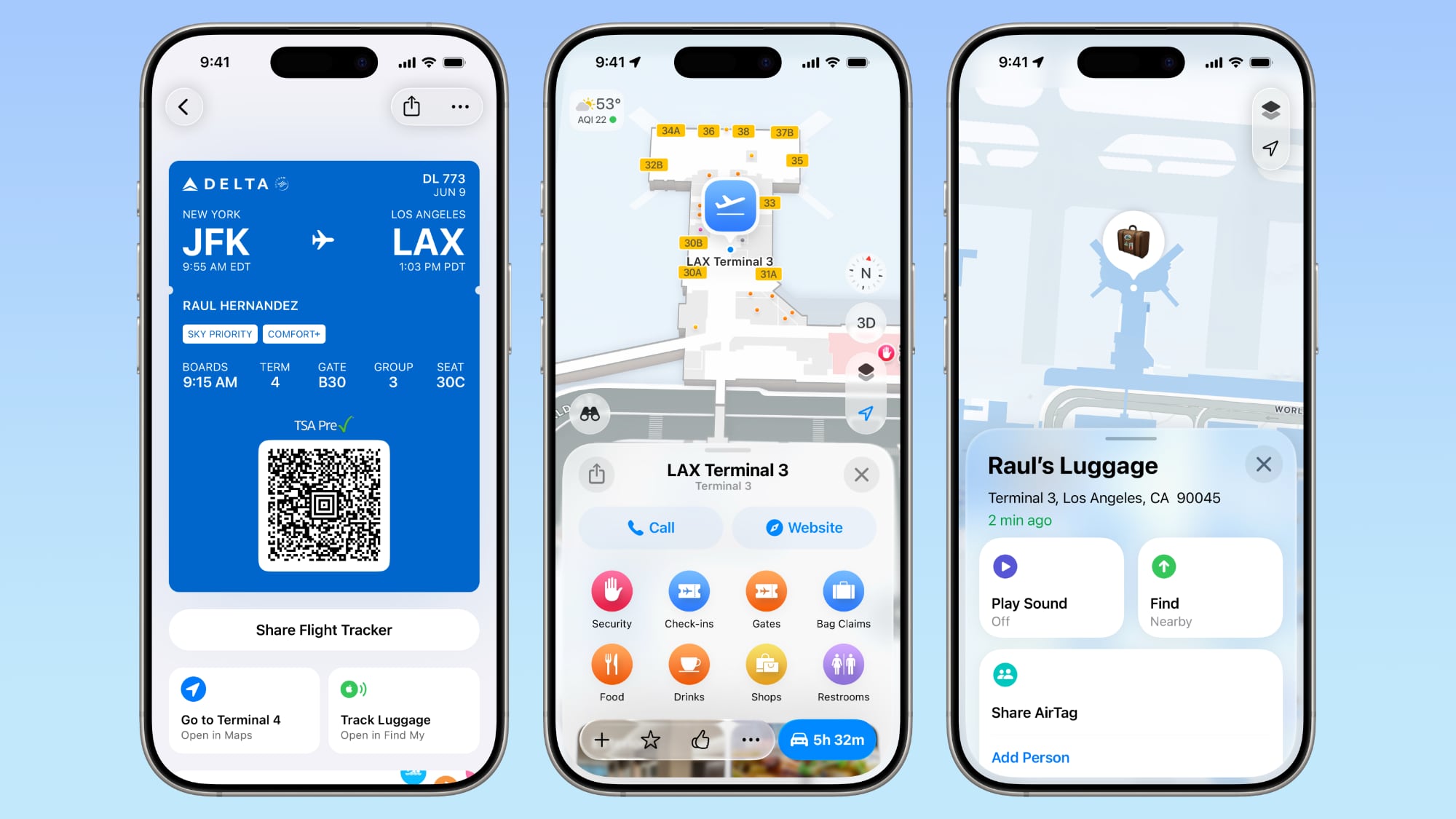
The Evolution of the Boarding Pass: What iOS 26 Brings
Apple completely reimagined the boarding pass experience in iOS 26, aiming to make it far more functional and indispensable for passengers who prefer the convenience of their iPhone over traditional paper tickets. The goal was simple: to make the digital boarding pass a central hub for all essential flight-related information and tools. With this update, American Airlines passengers can now enjoy a host of features designed to streamline their journey and alleviate common travel stresses.
Navigate Airports with Ease Through Apple Maps Integration
One of the standout features of the revamped boarding pass is its deep integration with Apple Maps. Navigating large, often complex airports can be a daunting task, especially for infrequent travelers or those rushing to make a connecting flight. Imagine landing at a massive hub airport, having to find your connecting gate, locate a specific restroom, or grab a quick bite to eat, all while contending with crowds and unfamiliar layouts. Historically, this involved squinting at static airport maps, searching for information screens, or asking busy airport staff for directions.
Now, with Apple Maps built directly into your American Airlines boarding pass in Wallet, those days are largely over. Users can access detailed indoor maps of airports, complete with turn-by-turn directions to their gate, baggage claim, lounges, restaurants, shops, and even ground transportation options. This intelligent mapping capability means you can confidently find your way around, saving valuable time and reducing the stress of getting lost. The boarding pass acts as your personal guide, surfacing relevant airport information precisely when and where you need it.
Discover Your Destination with Integrated Guides
Beyond airport navigation, the new boarding passes also include destination guides. Once you've arrived at your destination, your digital boarding pass doesn't just become obsolete; it transforms into a mini-travel assistant. These guides offer helpful information about the city or region you've flown to, potentially including recommendations for local attractions, public transportation options, weather forecasts, and perhaps even cultural tips or essential phrases. This feature aims to provide a seamless transition from the flight itself to exploring your destination, making your entire travel experience more coherent and enjoyable.
For example, upon landing in a new city, instead of immediately needing to open a separate travel app or search engine, your American Airlines boarding pass could offer quick links or summaries of "things to do," "how to get to downtown," or "local dining spots." This proactive delivery of information within a familiar and easily accessible app like Wallet adds significant value, especially for travelers exploring new places.
Track Your Luggage with Find My Integration and AirTags
The anxiety of lost or delayed luggage is a universal traveler concern. The enhanced boarding pass directly addresses this with robust luggage tracking capabilities. Leveraging Apple's powerful Find My network, passengers can now track items equipped with AirTags directly from their boarding pass. This means if you've placed an AirTag in your checked bag, you no longer need to open the separate Find My app to see its location; the information is readily available where you'd expect to find it – alongside your flight details.
American Airlines has been at the forefront of this particular innovation, having supported the Find My lost luggage tracking feature since February 2025. In iOS 18, Apple actively collaborated with airlines to simplify the process for airline employees to locate lost baggage using AirTags. This dual benefit – personal tracking for the passenger and streamlined recovery for the airline – represents a significant improvement in baggage handling and passenger peace of mind. Knowing exactly where your bag is, whether it's still at the departure airport, on the plane, or at the arrival carousel, eliminates much of the uncertainty and stress associated with checked luggage.
Effortless Reporting of Missing Bags
In the unfortunate event that your luggage does go astray, the new boarding pass offers streamlined tools for reporting missing bags directly to American Airlines. Instead of having to navigate complex airline websites or wait in long lines at baggage claim, you can initiate the reporting process with just a few taps from your iPhone. This integration aims to make a frustrating situation as efficient and manageable as possible, providing a direct channel to communicate with the airline about your misplaced items.
As American Airlines themselves stated regarding these new features: "Your boarding pass has a new look with more at your fingertips, like Apple Maps, destination guides, and quick shortcuts to the app. You can also track your luggage and open Find My right from your pass." This concise summary underscores the comprehensive nature of the update, putting essential tools and information within immediate reach.
The Airline Perspective: Adopting New Technology
Bringing these advanced features to passengers requires a collaborative effort between Apple and the airlines. Airlines need to actively "opt-in" to the new boarding pass system and update their own mobile applications to support these enhancements. This involves significant development work to integrate their existing systems with Apple's Wallet framework and to ensure all the new functionalities work seamlessly.
Early Adopters and Industry Leaders
American Airlines joins a growing list of carriers that have embraced Apple's vision for the future of digital travel. United Airlines, Air Canada, and Southwest Airlines were among the first to roll out support for these enhanced boarding passes, demonstrating their commitment to leveraging technology for improved customer service. Their early adoption has paved the way, proving the viability and value of these integrated features for both airlines and passengers.
Interestingly, Delta Air Lines briefly added support for the new boarding passes but subsequently removed it. While the specific reasons for Delta's decision are not publicly detailed, such occurrences can happen due to various factors, including technical integration challenges, a need for further optimization, or a re-evaluation of their rollout strategy. It highlights that the process of implementing advanced digital features is complex and requires ongoing commitment and refinement.
American Airlines' Journey to Enhanced Digital Travel
American Airlines was identified early on by Apple as a key partner for these refreshed boarding passes. Back in June 2025, Apple announced that American Airlines was one of several major carriers committed to supporting the new features. Other airlines listed at the time included Air Canada, Delta Air Lines, JetBlue, Jetstar, Lufthansa Group, Qantas, Southwest Airlines, United Airlines, and Virgin Australia. This initial announcement signaled a widespread industry interest in adopting these innovations, and American Airlines' official rollout now brings those promised benefits to its vast customer base.
The move by American Airlines builds upon its existing commitment to leveraging Apple's ecosystem for travel. As mentioned, their support for Find My lost luggage tracking since February 2025 demonstrates a consistent strategy to integrate Apple's powerful location services into their operations. This progressive approach ensures that American Airlines passengers are among the first to benefit from cutting-edge digital travel tools.
Beyond the Boarding Pass: Live Activities and the Future
While the enhanced boarding pass is a major leap forward, Apple's iOS 26 also introduced other significant features for air travel, specifically Live Activities support for airlines. Live Activities provide real-time updates directly on a user's iPhone Lock Screen or within the Dynamic Island (on compatible models), allowing for immediate, glanceable information without needing to open an app.
Real-Time Flight Updates with Live Activities
Imagine your flight experiencing a gate change or a slight delay. With Live Activities, this critical information could appear directly on your Lock Screen, showing updated gate numbers, revised departure times, or even a countdown to boarding. This feature significantly enhances the ability for travelers to stay informed, minimizing the need to constantly check airline apps or departure boards.
At present, it's not explicitly clear from American Airlines' app release notes if they are fully supporting the Live Activities feature in addition to the revamped boarding passes. However, given their proactive adoption of other iOS 26 travel enhancements, it's highly probable that this feature is either in development or will be rolled out in due course. The full integration of Live Activities would create an even more dynamic and responsive travel experience, where essential flight information pushes itself to the user in a timely and convenient manner.
The Bigger Picture: Apple's Vision for Connected Travel
These developments underscore Apple's broader vision for creating a seamless and integrated digital travel ecosystem. The Wallet app is transforming into a comprehensive digital hub that extends far beyond just payment cards. With boarding passes, loyalty cards, event tickets, and soon potentially hotel keys and car rental information, the iPhone is becoming the ultimate travel companion. This ecosystem approach, combining Wallet with Apple Maps, Find My, and potentially other services like Apple Pay, aims to make every aspect of travel more efficient and less stressful.
The collaboration with airlines like American Airlines is crucial for realizing this vision. As more carriers opt-in and fully integrate these features, the benefits will become ubiquitous, setting a new standard for air travel convenience. This trend is likely to accelerate, with future enhancements potentially including even more personalized destination recommendations, seamless integration with ground transportation services upon arrival, and further simplification of travel documentation.
Making the Most of Your Enhanced Digital Boarding Pass
To fully enjoy the benefits of American Airlines' new iOS 26 boarding pass features, here are a few simple tips for travelers:
- Update Your iPhone: Ensure your iPhone is running iOS 26 or a later version. This is the foundational requirement for accessing these advanced features.
- Update the American Airlines App: Make sure you have the latest version of the American Airlines mobile application installed. The updates that enable these features are delivered through the airline's app.
- Add Your Boarding Pass to Apple Wallet: After checking in for your flight via the American Airlines app, always choose the option to "Add to Apple Wallet." This is where all the enhanced functionalities reside.
- Utilize Find My for Luggage: If you use AirTags, remember to place one in your checked luggage. This will enable the integrated tracking feature directly from your boarding pass.
- Explore Airport Maps: Before or after landing, tap on the Apple Maps integration within your boarding pass to familiarize yourself with the airport layout or to find specific services.
- Keep Your Phone Charged: As your iPhone becomes an even more critical travel tool, ensure you carry a portable power bank or know where charging stations are located, especially for long travel days.
By following these steps, you can transform your travel experience from potentially stressful to incredibly smooth and organized, all powered by the device you already carry everywhere.
Conclusion: A New Era of Air Travel with American Airlines and Apple
American Airlines' adoption of the enhanced iOS 26 Wallet boarding pass features marks a significant milestone in the ongoing evolution of digital travel. By integrating Apple Maps for seamless airport navigation, offering insightful destination guides, and providing robust luggage tracking through the Find My network, American Airlines is setting a new standard for passenger convenience and peace of mind.
This development is more than just a software update; it represents a fundamental shift in how we interact with air travel. It's about empowering travelers with immediate access to critical information and tools, reducing stress, and making every step of the journey more intuitive. As more airlines follow suit and Apple continues to innovate its travel ecosystem, we can look forward to an even more connected, efficient, and enjoyable future for air travel.
So, the next time you fly with American Airlines, be sure to update your iPhone and the American Airlines app. Your boarding pass isn't just a ticket anymore; it's your smart gateway to a smoother, smarter travel experience.
This article, "American Airlines Now Supports iOS 26's Revamped Wallet Boarding Passes" first appeared on MacRumors.com
Discuss this article in our forums
from MacRumors
-via DynaSage
