
iOS 27 Improves FaceTime in Three Ways
iOS 27 Brings Exciting Upgrades to FaceTime: A Deep Dive into New Features
Apple's upcoming iOS 27 update is set to revolutionize the way we connect, bringing a trio of significant enhancements to FaceTime, its popular video calling service. While all three improvements promise to elevate the user experience, one stands out for its innovative approach to video communication: the brand-new Dual Capture camera feature, available on select newer iPhone models. This isn't just about clearer calls; it's about more immersive, versatile, and accessible conversations for everyone.
Let's explore these exciting additions and how they're poised to transform your FaceTime experience.
Unlocking New Perspectives with FaceTime's Dual Capture Feature
Imagine being able to show your friends or family not just your face, but also the beautiful scenery in front of you, or a new gadget you're excited about, all at the same time, without fumbling between cameras. This is precisely what the groundbreaking Dual Capture feature in iOS 27 brings to FaceTime. Previously a standalone video recording capability on certain iPhone models, this powerful tool is now integrated directly into your video calls, opening up a world of possibilities for richer, more engaging interactions.
What is Dual Capture?
Dual Capture is an innovative camera function that allows your iPhone to record video simultaneously from both its front-facing (selfie) camera and its rear-facing (main) camera. This means your device is capturing two different perspectives at once. Before iOS 27, this was primarily used for creating unique video content, perfect for vloggers, content creators, or anyone wanting to document an event from two angles at once. Now, this dynamic capability makes its debut in FaceTime, turning your video calls into a more interactive and informative experience.
How It Works in FaceTime
The magic of Dual Capture in FaceTime is its seamless integration and ease of use. This feature is specifically designed for the iPhone 17, iPhone 17 Pro, iPhone 17 Pro Max, and iPhone Air. If you own one of these devices, activating Dual Capture during a FaceTime call is remarkably straightforward. As 9to5Mac demonstrated in their testing of the iOS 27 beta, it’s as simple as tapping the familiar camera flip button. Located in the bottom-left corner of your viewfinder during a call, this single tap doesn't just switch cameras; it intelligently activates Dual Capture mode.
Once activated, your screen will display your front camera view, as usual, but it will also simultaneously show a smaller window or split-screen view of what your rear camera is seeing. This dual perspective is then streamed live to the person you're calling. It's an intuitive design choice that ensures you don't miss a beat in your conversation while effortlessly sharing more of your world.
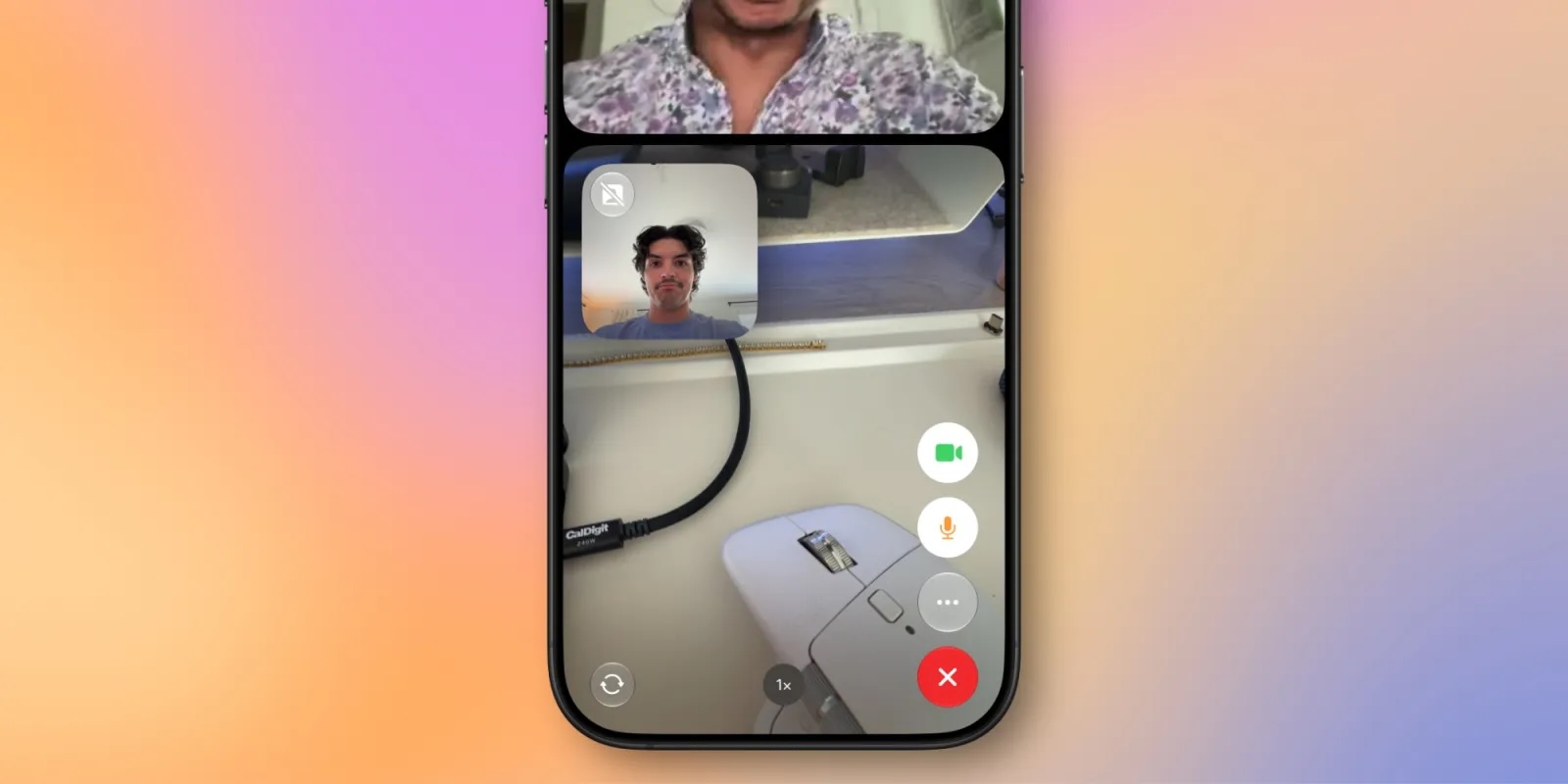
Flexibility is key with this new feature. While Dual Capture is designed to show both views, you retain full control. Should you decide you only want to share your front camera view again, or prefer to temporarily hide the front camera while showcasing something with the rear camera, you can easily turn off the front camera feed at any time during the call. This ensures your communication remains natural and adaptable to your needs.
Who Can See Your Dual Capture Feed?
One of the best aspects of this new FaceTime capability is its broad accessibility for recipients. You might be wondering if the person on the other end needs to have the latest iPhone model to see your dual camera feed. The good news is, they don't! As long as their device is running iOS 27 – regardless of whether it's an older iPhone model – they will be able to fully view and appreciate your Dual Capture feed. This ensures that the innovative communication experience isn't limited by the recipient's hardware, fostering wider adoption and enjoyment of the feature across the Apple ecosystem.
Real-World Benefits and Use Cases
The integration of Dual Capture into FaceTime isn't just a technical marvel; it's a practical enhancement that addresses numerous communication needs. Consider these scenarios where Dual Capture will truly shine:
- Virtual Tours and Show-and-Tell: Planning a virtual tour of your new home, office, or travel destination? Dual Capture allows you to narrate and interact naturally with your audience while simultaneously showcasing your surroundings. Instead of flipping back and forth, interrupting the flow, you can stay on screen, guiding their view.
- Technical Support and Demonstrations: Need to walk someone through fixing a household item or assembling furniture? You can keep your face visible for instruction while using the rear camera to precisely show the steps, angles, and components. This is invaluable for remote assistance or teaching.
- Sharing Experiences Live: Attending a concert, a sporting event, or simply enjoying a beautiful sunset? Dual Capture enables you to share your reaction and comments (front camera) while simultaneously giving your caller a direct view of the event itself (rear camera). It creates a more shared, immersive experience.
- Family Connections: Grandparents can see their grandchild's face while simultaneously watching them play with a new toy or explore a new environment. It adds a layer of depth to family video calls, making distant loved ones feel closer.
- Professional Consultations: For architects, designers, or contractors, showing a client a detail on a blueprint or a feature in a physical space while maintaining eye contact can be incredibly effective.
This feature goes beyond mere convenience; it transforms FaceTime into a more powerful tool for expression, collaboration, and shared experiences. It removes the barrier of having to choose between showing your face and showing what's around you, allowing for more natural, holistic communication.
Enhanced FaceTime Quality on Poor Connections
Beyond the visual spectacle of Dual Capture, iOS 27 tackles a perennial frustration for anyone who relies on video calls: inconsistent call quality due to weak or unstable internet connections. Nothing is more jarring than a choppy video, frozen screen, or garbled audio interrupting an important conversation. Apple's commitment to seamless communication is evident in the second major FaceTime improvement in iOS 27: significantly improved call quality even when your network connection is less than ideal.
The Challenge of Unstable Networks
In today's interconnected world, reliable internet access is often taken for granted. However, the reality is that Wi-Fi can be spotty, cellular data signals can fluctuate, and network congestion can happen anywhere. These factors often lead to a degraded video calling experience: pixelated images, delayed audio, dropped frames, and eventually, disconnected calls. For many users, especially those in rural areas, traveling, or in densely populated spaces, maintaining a clear and consistent video call has been a constant struggle.
Traditional video calling applications often struggle to adapt dynamically to rapidly changing network conditions. They might try to send high-quality video data even when the bandwidth isn't available, leading to buffering and stuttering. The result is a frustrating, broken experience that often forces users to switch to audio-only calls or abandon the conversation altogether.
Apple's Solution: Smarter Adaptive Technology
While Apple hasn't disclosed the intricate technical details of how they've achieved this improvement, such enhancements typically involve a combination of sophisticated technologies:
- Advanced Video Compression: Newer, more efficient video codecs can compress video data more effectively without sacrificing too much visual quality. This means less data needs to be sent over the network, making calls more resilient to bandwidth limitations.
- Dynamic Bitrate Adjustment: FaceTime likely employs a more intelligent system to continuously monitor network conditions in real-time. If the connection weakens, it can rapidly and smoothly reduce the video quality (bitrate) to ensure the call remains active and stable, rather than breaking up. As the connection improves, it can scale the quality back up.
- Packet Loss Concealment (PLC): Even with dynamic adjustments, some data packets can still be lost on a poor connection. Advanced PLC algorithms can intelligently "guess" or reconstruct missing audio and video data, minimizing audible glitches and visual artifacts, making the call feel smoother even when data is missing.
- Improved Jitter Buffering: Jitter refers to the variation in packet delay. Better jitter buffers can smooth out these inconsistencies, ensuring a more fluid playback of audio and video.
- Machine Learning Optimizations: Apple's powerful neural engines in modern iPhones could be utilized to predict network behavior or optimize video streams for specific conditions, further refining the call quality in challenging environments.
The impact of these underlying technical improvements is a dramatically smoother and more reliable FaceTime experience. Conversations will be less prone to interruptions, video feeds will remain clearer, and audio will be more consistent, even when you're connected to a sluggish Wi-Fi network or a weak cellular signal. This means more effective communication, less frustration, and the ability to connect confidently from a wider range of locations.
Expanding Accessibility with Live Captions in Traditional Chinese
Apple has consistently demonstrated a strong commitment to accessibility, ensuring its products and services are usable by as many people as possible. The third significant FaceTime enhancement in iOS 27 continues this tradition by expanding the availability of Live Captions to include Traditional Chinese. This is a crucial step forward for inclusive communication.
The Importance of Live Captions
Live Captions, introduced in previous iOS versions, are a game-changer for accessibility. They provide real-time, automatically generated transcriptions of spoken dialogue during video and audio calls, as well as for media playing on your device. For individuals who are deaf or hard of hearing, Live Captions transform spoken conversations into readable text, enabling them to fully participate in and understand calls. Beyond accessibility for those with hearing impairments, Live Captions also benefit:
- Users in noisy environments: When it's hard to hear the conversation, captions provide clarity.
- Learners of new languages: Seeing the words spoken can aid comprehension and language acquisition.
- Anyone who prefers visual cues: Some individuals simply absorb information better when it's presented visually.
The technology behind Live Captions is incredibly complex, involving advanced speech recognition and natural language processing, all happening in real-time on your device to ensure privacy.
Welcoming Traditional Chinese
The addition of Traditional Chinese to the list of supported languages for Live Captions on FaceTime in iOS 27 is a monumental step. Chinese, in its various forms, is spoken by over a billion people worldwide, with Traditional Chinese specifically used in regions like Taiwan, Hong Kong, and Macau, as well as by many overseas Chinese communities. Providing real-time captions for this complex written system expands FaceTime's accessibility to a vast new demographic.
Developing accurate real-time transcription for a language like Chinese, with its tonal nuances and vast character set, presents unique technical challenges. Apple's success in integrating Traditional Chinese demonstrates their continued investment in global inclusivity. This means that users who communicate in Traditional Chinese can now benefit from the same level of accessibility and clarity that English speakers and others have enjoyed, making FaceTime a truly global communication platform for all.
Availability and What to Expect
For those eager to experience these new FaceTime features, iOS 27 is currently available in developer beta. This early access allows app developers to begin optimizing their applications for the new operating system and provides Apple with valuable feedback. Following the developer beta, a public beta is anticipated to be released in July. This will allow a wider audience of enthusiastic users to test the features and provide further input before the official launch.
The full, stable release of iOS 27 to the general public is expected widely in September, typically coinciding with the launch of new iPhone models. This means that by autumn, you'll be able to update your compatible iPhone and immediately take advantage of the Dual Capture feature, enjoy more reliable calls on weaker connections, and utilize Live Captions in Traditional Chinese on FaceTime.
Conclusion: A Smarter, More Inclusive FaceTime
With iOS 27, Apple is not just incrementally improving FaceTime; it's redefining what a video call can be. The Dual Capture feature fundamentally changes how we share our world, making conversations more dynamic and descriptive. The improvements to call quality on poor connections address a core pain point, ensuring that communication remains reliable no matter the environment. And the expansion of Live Captions to include Traditional Chinese underscores Apple's unwavering dedication to making technology accessible to everyone, fostering global connections.
These three enhancements collectively elevate FaceTime from a simple video calling app to a powerful, versatile, and inclusive communication platform. Prepare to connect in richer, clearer, and more meaningful ways when iOS 27 arrives.
This article, "iOS 27 Improves FaceTime in Three Ways" first appeared on MacRumors.com
Discuss this article in our forums
from MacRumors
-via DynaSage
