
Here's What's New With Visual Intelligence in iOS 27
Imagine a world where your iPhone doesn't just capture moments, but truly understands them. A world where your device sees what you see, processes it, and offers helpful insights, actions, and answers in an instant. This future is rapidly becoming a reality with the massive advancements in Visual Intelligence, a core technology that's getting a monumental upgrade in iOS 27. This isn't just a minor tweak; it's a fundamental reimagining of how your Apple devices interact with the real world around you, making them more intuitive, powerful, and indispensable than ever before.
The most immediate and impactful change is how much easier Visual Intelligence is to find and use. Apple has clearly made a concerted effort to bring this incredibly useful technology out of the shadows and integrate it seamlessly into your daily interactions. No longer a hidden gem requiring specific gestures or deep menu dives, Visual Intelligence is now front and center. Furthermore, its capabilities have been significantly expanded, offering a richer array of smart functions. And for the first time, this powerful intelligence isn't confined to your phone. Apple has thoughtfully broadened its reach, bringing these same advanced features to your iPad and Mac, ensuring a consistent and connected experience across your entire ecosystem of devices. This means whether you're working on your laptop, browsing on your tablet, or out with your phone, the power of Visual Intelligence is always at your fingertips, ready to assist.

A Whole New Way to See: Visual Intelligence in the Camera App
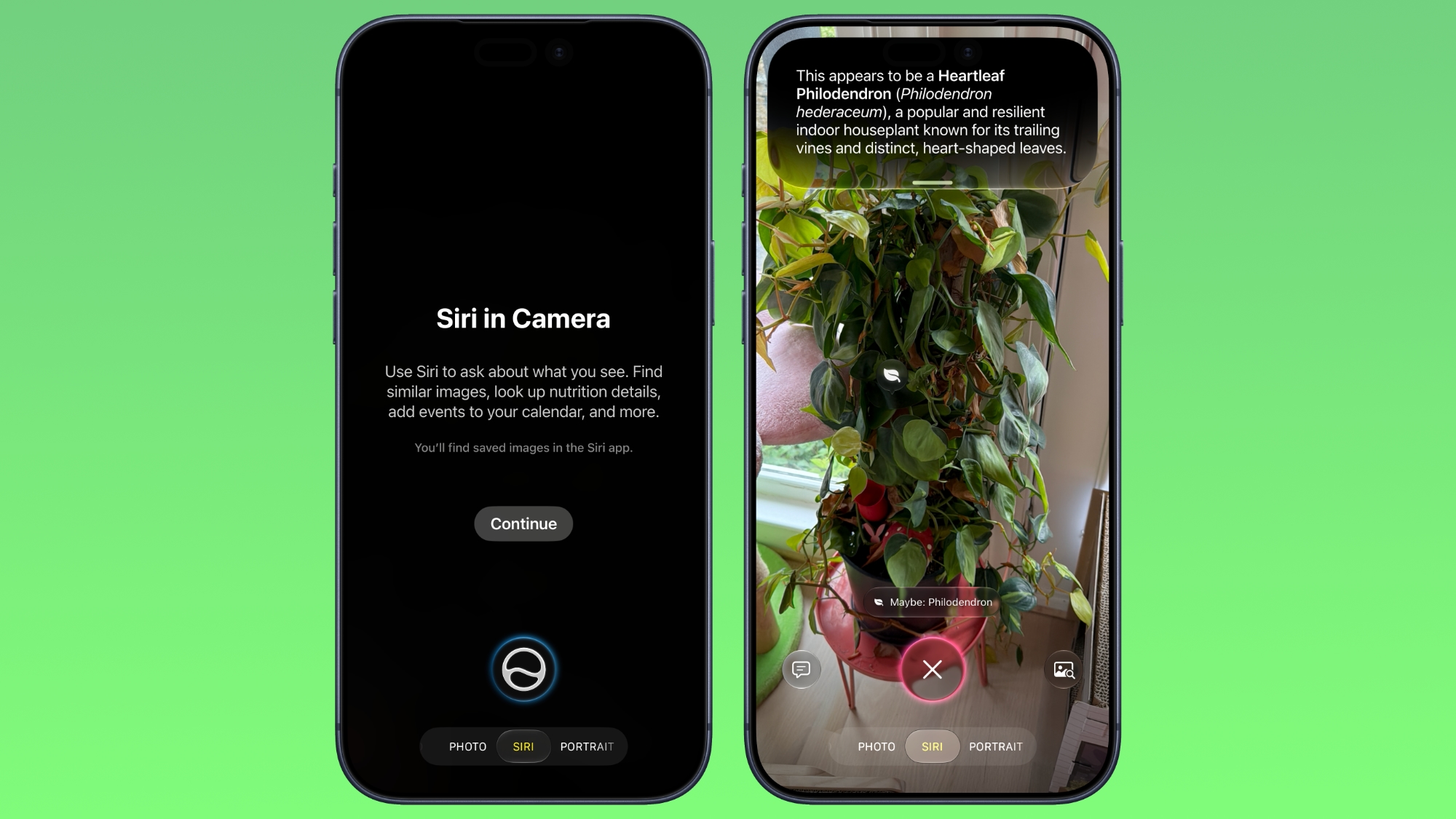
One of the most revolutionary changes in iOS 27's Visual Intelligence overhaul is its prominent placement within the Camera app. This strategic move instantly makes Visual Intelligence a more natural and immediate part of how you capture and interact with the world. Apple has introduced a brand-new Siri Mode, which now lives comfortably alongside familiar options like Photo, Video, and Portrait modes in your Camera interface. This isn't just about taking pictures; it's about asking your camera to understand what it's seeing.
To activate this powerful new feature, all you need to do is swipe over to Siri Mode within the Camera app. Once in this mode, your camera transforms into an intelligent eye for Siri. When you take a picture in Siri Mode, you're not just creating a static image; you're essentially asking Siri to "see" and interpret the scene in front of you. This means Siri actively analyzes the content of your photo, whether it's an object, a plant, a document, or anything else in your view.
The magic truly begins after you've captured the image. With a simple swipe down, Siri will instantly provide you with detailed information about whatever you're looking at. Imagine pointing your camera at a new dish in a restaurant – Siri could tell you about its ingredients, origins, or even potential allergens. Or perhaps you're in an antique shop, and you snap a photo of a unique item – Siri might identify it, provide historical context, or suggest similar items online.
But it doesn't stop there. The true power of this integration lies in its interactivity. After Siri has given you its initial insights, you can engage in a dynamic conversation by asking follow-up questions. For instance, if Siri identifies a plant, you could then ask, "How do I care for this plant?" or "Is this plant safe for pets?" This conversational capability makes Visual Intelligence feel less like a tool and more like an intelligent assistant, ready to delve deeper into your queries based on visual input.
This new Siri Mode effectively replaces the older Camera Control as the primary method for accessing Visual Intelligence features. While Camera Control was functional, it often felt like a secondary option, requiring a specific long-press or extra step. By elevating Siri Mode to a direct camera option, Apple has signaled its importance and made it an integral part of the photography experience. However, for those accustomed to the older method, Apple has ensured a smooth transition: you can still access Visual Intelligence by holding down the Camera Control button, providing familiarity while gently nudging users toward the more intuitive and powerful Siri Mode. This thoughtful design ensures that advanced visual understanding is now just a tap and a glance away for everyone.
Anticipating Your Needs: Intelligent Smart Suggestions
The new Siri Mode takes intelligence a step further by offering "Smart Suggestions." This means Siri doesn't just identify what you're seeing; it anticipates what you might want to do next based on the context of your photo. It’s like having an assistant who not only understands your request but also proactively offers relevant next steps, making your interactions with the real world smoother and more efficient.
Consider this scenario: You're out for a walk and stumble upon a beautiful, unfamiliar plant. You open your Camera app, swipe to Siri Mode, and snap a picture. Instead of just identifying the plant, Siri might instantly suggest, "Identify this plant," as a prominent action. With a tap, you get its name, species, and maybe even a brief description. This saves you the trouble of even having to formulate the question yourself, streamlining the process of curiosity and discovery.
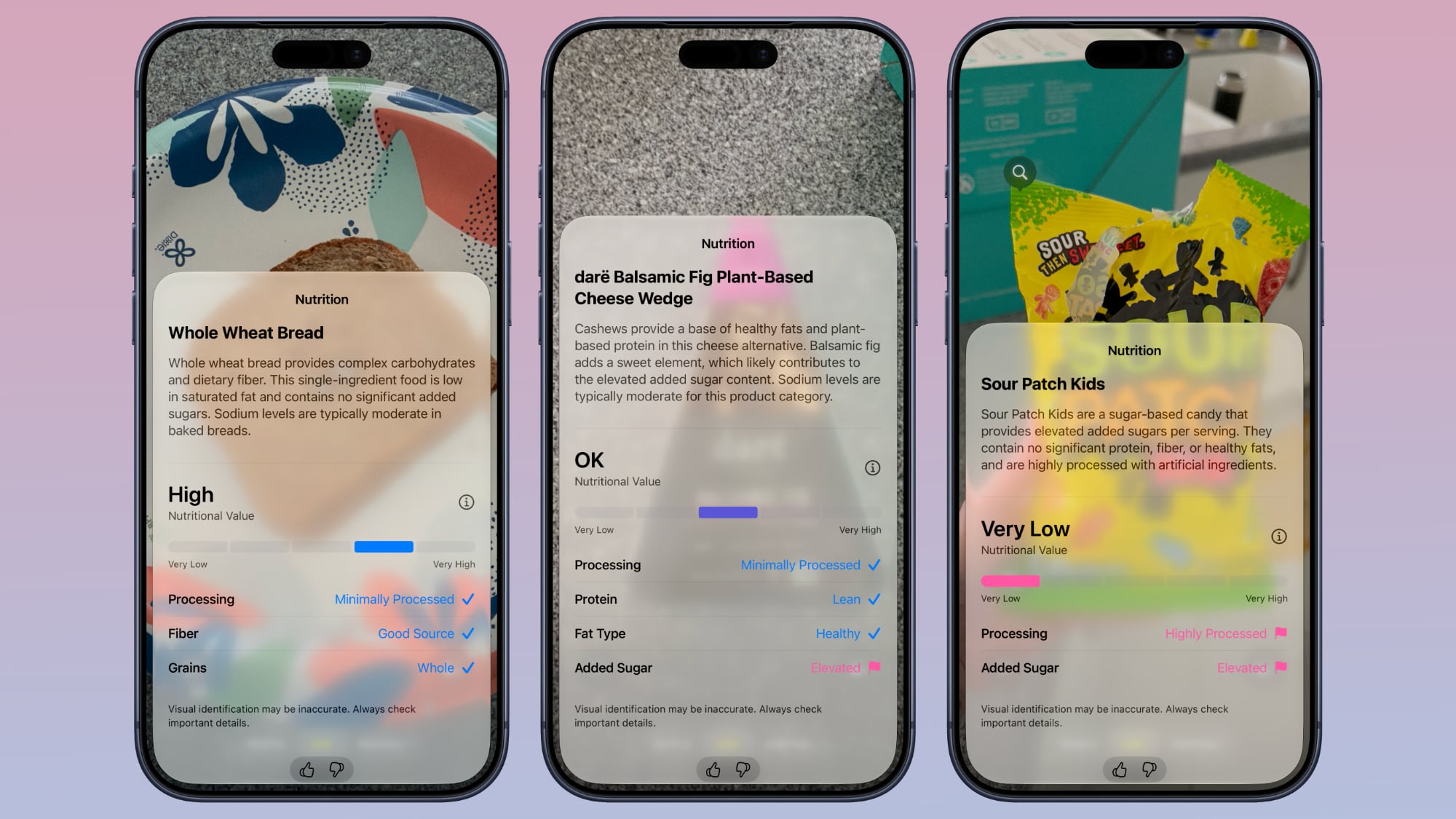
Another practical example involves food. Imagine you’ve just prepared a healthy meal or are pondering ordering something at a restaurant, and you want to be mindful of your diet. You take a photo of the plate of food in Siri Mode. Siri, recognizing the culinary context, will then offer a suggestion like, "Get nutritional information for this dish." With another tap, you could be presented with insights into its general nutritional value, flagging potential high-sugar components or highlighting protein content. This proactive guidance can be incredibly helpful for maintaining dietary goals or simply understanding what you're consuming without needing to manually search for it.
These smart suggestions extend across a multitude of categories. If you photograph a famous landmark, Siri might suggest "Learn more about this landmark" or "Find nearby attractions." If you take a picture of a foreign language sign, it could offer "Translate this text." The system is designed to leverage Apple's advanced AI to understand the intent behind your visual input, offering the most logical and useful next actions. This level of contextual awareness moves beyond simple object recognition and into truly intelligent, proactive assistance, making your iPhone an even more powerful tool for navigating and understanding your environment. It transforms the act of taking a picture from a passive capture into an active gateway for information and action.
The Brain Behind the Brawn: Deep Siri Integration
At the heart of iOS 27's enhanced Visual Intelligence lies a profound and seamless integration with the redesigned Siri AI. This isn't just Siri recognizing a few objects; it's Siri gaining a true "understanding" of your visual world, powered by sophisticated artificial intelligence. This deep connection means that Visual Intelligence is no longer a separate, isolated feature, but rather a core component of Siri's overall intelligence, allowing it to perform tasks and answer questions that were previously impossible for a built-in assistant.
Historically, when users posed complex questions or needed detailed information that went beyond simple on-device knowledge, Siri would often fall short, sometimes suggesting a web search or, in recent times, even handing off the query to external large language models like ChatGPT. While helpful, this handoff created a disjointed experience, breaking the flow and raising questions about data privacy and speed. In iOS 27, this necessity is largely a thing of the past.
The smarter, more capable version of Siri now leverages its own advanced AI capabilities to directly process and respond to visually-driven queries. This means when you ask Siri about something you're looking at, it can pull information directly from the web, synthesize it, and provide a coherent, relevant answer, all within the Apple ecosystem. This integration dramatically enhances Siri's ability to engage in more complex, context-aware conversations.
Think about the implications: You take a picture of a rare bird. Siri identifies it and you ask, "What's its migration pattern?" Previously, this might have stumped Siri or required a web search. Now, Siri can access real-time or extensive encyclopedic knowledge from the internet, process it, and deliver a concise summary. This capability transforms Siri from a simple command-and-control interface into a knowledgeable companion that can truly understand and interpret your visual world, providing rich, contextually relevant information on demand.
The underlying technology likely involves advanced neural engines on Apple's silicon, combined with sophisticated natural language processing and vast datasets. This allows Siri to not only recognize objects in an image but also to understand the broader context and connect it with a massive repository of online information. This internal capability means faster responses, greater privacy (as data is processed more locally or within Apple's secure environment), and a more seamless user experience. By making Siri itself the intelligent agent capable of advanced web retrieval and synthesis, Apple ensures that Visual Intelligence is not just a clever trick, but a deeply integrated, powerful force for unlocking information from the physical world.
Breaking New Ground: Innovative iOS 27 Visual Intelligence Features
Beyond the fundamental improvements in accessibility and core intelligence, iOS 27 introduces a suite of entirely new Visual Intelligence features that tackle everyday challenges with remarkable simplicity and power. These additions are designed to streamline tasks, offer vital insights, and enhance productivity, all by leveraging your device's ability to "see" and interpret the world.
-
Nutritional Insights
In an increasingly health-conscious world, understanding what we eat is paramount. Visual Intelligence in iOS 27 makes this incredibly easy. You can simply take a picture of a meal or a specific food item, and Siri will provide immediate nutritional insights. It’s important to note that Siri doesn't aim to be a calorie-counting app providing precise caloric numbers, which can often be variable and difficult to accurately determine from an image alone. Instead, its strength lies in providing valuable qualitative information.
For example, Siri might analyze your plate of pasta and tell you, "This meal appears to be a good source of carbohydrates, but consider adding more lean protein for a balanced meal." Or, if you photograph a processed snack, it might warn you about "high sugar content" or "presence of artificial additives," while highlighting "fiber benefits" if applicable. This approach offers a practical, quick-glance understanding of your food's nutritional value, helping you make informed decisions without getting bogged down in exact figures. It's about empowering users with general nutritional awareness, guiding them toward healthier choices based on a visual assessment of their food. This feature is particularly useful for those trying to maintain a balanced diet, manage specific health conditions, or simply curious about the composition of their meals while dining out or cooking at home.
-
Bill Splitting (U.S. only)
Dining out with friends often ends with the awkward dance of splitting the bill. Who had the extra appetizer? Who ordered the expensive drink? iOS 27’s Visual Intelligence has a brilliant solution, currently available for users in the U.S. By simply taking a photo of a restaurant bill, Siri can intelligently analyze and parse the line items.
Once the bill is scanned, you can easily select which items each person ordered. Siri then calculates individual totals, including taxes and tips, making the splitting process transparent and fair. Even better, this feature integrates directly with Apple Cash. After determining who owes what, you can instantly send money to each other right from the same interface, or request money from those who owe you. This eliminates the need for manual calculations, separate payment apps, or uncomfortable conversations, turning what was once a chore into a quick, seamless process. It’s a perfect example of how Visual Intelligence streamlines everyday social interactions.
-
Import Multiple Events
Managing a busy schedule often involves transferring information from physical documents or digital images into your calendar or reminder apps. Imagine receiving a detailed event schedule for a conference, a list of tasks for a project, or a packed concert lineup. Previously, this meant manually typing each event or task.
With iOS 27, Visual Intelligence allows you to take a photo of a schedule or list, and it intelligently recognizes multiple events, dates, and times. You can then import all these events into your Calendar or Reminders app at once. Siri intelligently extracts the relevant information, such as event names, start and end times, and locations, and presents them in a format ready for import. This saves an immense amount of time and reduces the chance of errors that can occur with manual data entry, making it an invaluable tool for students, professionals, and anyone with a complex schedule.
-
Import Contacts
Networking often involves exchanging business cards, but manually entering new contacts into your phone can be tedious. iOS 27 simplifies this with Visual Intelligence. By taking a photo of a business card, Siri automatically identifies all the relevant contact details: name, company, job title, phone number, email address, and even physical address.
It then pre-populates these fields into a new contact card, allowing you to review and save it with a single tap. This feature is a massive time-saver for professionals, ensuring that valuable connections are swiftly and accurately added to your address book without the hassle of typing out every detail. It transforms a stack of physical cards into a digital, organized contact list in moments.
-
Wallet Passes
Our digital wallets are becoming increasingly central to our lives, holding everything from credit cards to airline boarding passes. Now, with iOS 27, Visual Intelligence extends this convenience even further. If you have a physical membership card, a loyalty pass, or any other item with a barcode that you’d like to store digitally in your Apple Wallet, you no longer need to rely on specific app integrations or manual inputs.
Simply take a photo of the barcode on the item. Visual Intelligence recognizes the barcode and its associated information, and then offers to convert it into a digital Wallet pass. This means less clutter in your physical wallet and easier access to your membership cards, loyalty programs, and more, all conveniently stored and accessible directly from your iPhone or Apple Watch. It’s a small but significant step towards a truly paperless and streamlined existence.
The enhanced capabilities of Visual Intelligence, powered by Siri's newfound ability to search and synthesize information from the web, make it profoundly more powerful and versatile than ever before. It's no longer just about identifying a single object; it’s about providing comprehensive, actionable insights from virtually any visual input. The possibilities are truly extensive, transforming your iPhone into an all-seeing, all-knowing assistant that can demystify the world around you.
Consider the sheer breadth of tasks it can now handle:
-
Laundry Labels: Ever stared at those cryptic laundry symbols on your clothes, unsure whether to machine wash or hand-wash, tumble dry or line dry? Visual Intelligence can read laundry labels and instantly give you clear, easy-to-understand instructions, saving your favorite garments from accidental damage.
-
Item Lookup & Reviews: Spot an intriguing item in a store, a piece of furniture in a friend's house, or a gadget in a magazine? Take a picture, and Siri can look up the item online, find where to buy it, compare prices, and even pull up user reviews, helping you make informed purchasing decisions.
-
Identify Odd Devices or Cables: We all have those mysterious cables or strange electronic devices lurking in drawers, whose purpose remains a puzzle. Visual Intelligence can identify these oddities and tell you exactly what they are for, helping you organize your tech or repurpose old hardware.
-
Scale Recipes: If you have a recipe written down for four servings but need to cook for two, or eight, Visual Intelligence can read the ingredient list and automatically scale the quantities up or down for you, adapting the recipe to your specific needs.
-
Allergen Check: For those with allergies or dietary restrictions, reading intricate ingredient lists can be a tedious and stressful task. Visual Intelligence can quickly scan ingredient lists on food packaging and highlight the presence of specific allergens or ingredients you want to avoid, offering peace of mind.
-
Transcribe Messy Written Notes or Lists: Whether it's a quickly jotted brainstorm, a handwritten grocery list, or old family recipes, Visual Intelligence can decipher even messy handwriting and transcribe it into digital text, making it editable, searchable, and shareable.
-
Decipher Confusing Parking Signs: Parking signs, especially in unfamiliar cities, can be notoriously complex with their varying times, days, and restrictions. Take a photo, and Visual Intelligence can interpret the sign and tell you clearly whether you can park there and for how long, preventing costly tickets.
-
Offer Plant Care Advice: If you're a budding gardener or just trying to keep your houseplants alive, Visual Intelligence can identify a plant and then provide tailored care advice, including watering schedules, light requirements, and common issues, helping your greenery thrive.
-
Solve Math Problems on a Worksheet: Students can simply point their camera at a math problem on a worksheet, and Visual Intelligence can not only provide the solution but potentially even explain the steps to get there, serving as a powerful study aid.
And these are just a few examples. The deep integration with Siri AI and its access to the vastness of the web means that Visual Intelligence can tackle virtually any visually-driven query you can think to ask, making it an incredibly versatile and powerful tool for daily life, learning, and discovery. It truly embodies the promise of an intelligent assistant that understands and interacts with the physical world.
Foundational Strengths: Other Visual Intelligence Capabilities
While iOS 27 introduces a plethora of groundbreaking new features, it's built upon a solid foundation of Visual Intelligence capabilities that have been available in earlier versions of iOS. These existing features have already proven incredibly useful to millions of users, demonstrating the core power of Apple's visual recognition technology. They continue to be central to the Visual Intelligence experience, and often serve as the basis for the more advanced functionalities.
-
Identify plants, animals, insects, landmarks, art, sculptures, books, and more: This foundational capability allows you to point your camera at virtually anything in the physical world and get instant identification and information. Whether you're curious about a breed of dog, a historical monument, or a painting in a museum, Visual Intelligence can provide immediate details, often with links to learn more. It transforms casual observation into a moment of learning and discovery.
-
Add items to your calendar from a piece of paper like an event poster or flyer: Long before the batch import feature, Visual Intelligence offered the ability to scan a single event from a physical document. See a concert flyer with a date and time? Visual Intelligence could recognize those details and allow you to quickly add the event to your calendar with a few taps, saving manual data entry and ensuring you never miss an important date.
-
Use Google Image Search to find similar images: This feature acts as a powerful visual search engine. If you've ever seen something unique and wanted to find more examples or similar styles, Visual Intelligence could help. By taking a picture, it would perform a reverse image search using Google, showing you visually similar items, which is incredibly useful for inspiration, research, or identifying unknown objects.
-
Search Etsy, Amazon, Anthropologie, and other apps for an item that you capture with the camera: Building on the identification capability, Visual Intelligence could also connect you directly to shopping platforms. Spot a piece of clothing, a home decor item, or a gadget you like? Snap a photo, and Visual Intelligence could suggest where to buy it by searching popular shopping apps like Etsy, Amazon, or Anthropologie, streamlining your shopping experience.
-
Provide details about a business in front of you, like hours of operation: When walking past a storefront, Visual Intelligence could recognize the business and provide useful information, such as its operating hours, contact details, or even customer reviews. This is invaluable when you're exploring a new area or trying to quickly check if a store is open before heading inside.
-
Translate, summarize, and read text aloud: One of the most practical existing features is its ability to interact with text in images. You can capture a foreign language sign and have Visual Intelligence translate it in real-time. For longer passages, it can summarize the key points or, if you prefer, read the text aloud, making information more accessible and breaking down language barriers. This is a cornerstone feature that continues to be incredibly useful for travelers, students, and anyone dealing with text in images.
These established functionalities highlight Visual Intelligence's enduring utility and set the stage for the groundbreaking advancements introduced in iOS 27. They demonstrate Apple's consistent commitment to making devices understand and interact with the visual world, laying the groundwork for an even more intelligent and assistive future.
Your Visual History: Siri App Integration
The enhanced Visual Intelligence experience in iOS 27 is further solidified by its deep integration with the redesigned Siri app. This integration offers a crucial element of continuity and recall, ensuring that your visually-driven queries and the valuable information Siri provides are not lost after a single interaction.
Specifically, all of your Visual Intelligence and Siri requests are now intelligently saved within the Siri app. Think of the Siri app as your personal archive of intelligent conversations and visual queries. This means if you ask Siri to identify a plant, find nutritional information for a meal, or translate a sign, the entire interaction—your visual input, Siri's response, and any follow-up questions—is preserved.
This history is incredibly useful for several reasons. You might need to revisit information you received earlier, such as a plant's care instructions or the name of an artist whose work you admired. Instead of having to recreate the query or try to remember details, you can simply open the Siri app and scroll through your past interactions. It serves as a personal knowledge base, readily accessible whenever you need to recall a piece of information or re-engage with a previous topic.
To give users control over their data and privacy, the Siri app includes settings for how long these conversations and visual requests are retained. You can set the app to retain conversations for a month, a year, or even forever. This flexibility allows individuals to balance the convenience of having a comprehensive history with their personal preferences for data storage and privacy. For those who frequently use Visual Intelligence for research or learning, the "forever" option ensures that valuable insights are always just a tap away. This thoughtful integration transforms transient interactions into a lasting resource, making Visual Intelligence an even more powerful tool for learning, productivity, and memory.
Beyond the iPhone: Visual Intelligence Across Your Apple Devices
A hallmark of the Apple ecosystem is the seamless integration and continuity across devices. In iOS 27, this principle is beautifully applied to Visual Intelligence, extending its power beyond the iPhone to your iPadOS 27, macOS Golden Gate, and even visionOS 27. This multi-platform expansion means you can leverage intelligent visual analysis wherever you are and whatever device you’re using, providing unparalleled convenience and productivity.
On your Mac, accessing Visual Intelligence is intuitive and fast. Apple has introduced a clever keyboard shortcut: Command-Shift-Space. When you press this combination, your cursor transforms, allowing you to select any part of your display. This could be an image within a web browser, a section of a document, a chart, or even a paused video frame. Once you've selected the area, you can then ask Siri a question about it. For example, if you see an unfamiliar building in an online article, you can select it and ask, "What is this landmark?" or if you're looking at a graph, "Summarize the data in this graph." This brings the power of visual understanding directly into your desktop workflow, making research, learning, and content creation significantly more efficient.
The iPad, with its larger screen and versatility, also gains robust Visual Intelligence capabilities. You can access it in a couple of ways designed to integrate with how iPad users typically interact with their devices. Firstly, taking a screenshot will now offer options to analyze the visual content within that screenshot. This is incredibly useful for dissecting an image, a document, or even a webpage you’ve captured. Secondly, for those who use the Apple Pencil, a familiar gesture has been enhanced: swiping up from the lower left corner of the screen. This action, often used for Quick Note, now also brings up Visual Intelligence capabilities, allowing you to select an area with precision and ask Siri to interpret it. Imagine sketching something, then using Visual Intelligence to look up a component, or annotating a diagram and asking for clarification on a specific part. This blend of touch, stylus, and intelligent vision makes the iPad an even more powerful creative and analytical tool.
Perhaps the most futuristic implementation of Visual Intelligence is on Vision Pro. Here, the technology transcends screens and physical interaction in a truly immersive way. With Vision Pro, you can use Visual Intelligence just by *looking* at something. This includes not only digital content displayed within your visionOS environment but also physical items around you in the real world. If you're wearing your Vision Pro and glance at a physical object—a piece of furniture, a book on a shelf, or a painting on the wall—Siri can interpret it and provide information or offer actions based on what your eyes perceive. This hands-free, intuitive interaction represents the pinnacle of spatial computing and visual intelligence working in harmony, blurring the lines between the digital and physical worlds and offering a truly magical way to interact with information. The cross-device expansion ensures that no matter how you choose to interact with Apple's ecosystem, intelligent visual understanding is a core, accessible component of your experience.
The Power Behind the Processing: Device Requirements
The advanced capabilities of Visual Intelligence in iOS 27, especially its deep integration with a more powerful Siri AI, require significant processing horsepower. These features rely heavily on Apple's cutting-edge silicon and neural engine technology, which are designed to handle complex machine learning tasks directly on the device, ensuring speed, efficiency, and enhanced privacy. As such, these groundbreaking features are available on specific, newer Apple devices.
For iPhone users, to experience the full suite of Visual Intelligence enhancements in iOS 27, you will need an iPhone 15 Pro or a later model. This requirement stems from the iPhone 15 Pro's A17 Pro chip, which includes a highly advanced Neural Engine capable of performing billions of operations per second. This dedicated hardware is essential for real-time visual analysis, complex AI model execution, and the seamless integration of Siri's web-enabled intelligence, all while maintaining excellent performance and battery life. Older iPhone models, while still capable of basic Visual Intelligence features from previous iOS versions, do not possess the necessary raw power for these new, more demanding functionalities.
On the Mac, accessing Visual Intelligence capabilities requires an Apple silicon chip. This means any Mac powered by an M-series chip (e.g., M1, M2, M3, and their Pro, Max, or Ultra variants) will support these features. Apple silicon Macs are renowned for their integrated architecture, powerful CPUs, GPUs, and dedicated Neural Engines, which together provide the computational foundation needed for advanced AI tasks like visual analysis and complex query processing on a desktop or laptop. Macs with Intel processors, while still supported by macOS Golden Gate, will not be able to leverage these specific Visual Intelligence enhancements.
For the iPad, the requirements are similarly tied to Apple's in-house processors. You will need an iPad equipped with an Apple silicon chip (such as the M1, M2, or M3 chips found in iPad Air and iPad Pro models) or specifically the A17 Pro chip found in the latest iPad mini. This ensures that the iPad has the necessary processing power to perform on-device AI calculations, handle rich visual data, and deliver a smooth, responsive Visual Intelligence experience. Users with older iPad models that do not feature these advanced chips will not have access to the new iOS 27 Visual Intelligence capabilities.
These specific device requirements underscore Apple's commitment to delivering truly powerful and responsive AI experiences. By tying these features to their most advanced silicon, Apple ensures that users receive the best possible performance and privacy, as much of the intelligent processing can happen directly on the device rather than relying solely on cloud computing. This not only makes the features faster but also inherently more secure.
This article, "Here's What's New With Visual Intelligence in iOS 27" first appeared on MacRumors.com
Discuss this article in our forums
from MacRumors
-via DynaSage
