
14 Ways Apple Is Improving Messages in iOS 27
iOS 27: A New Chapter for Apple's Flagship Operating System
At its core, Apple's vision for iOS 27, unveiled at this year's Worldwide Developers Conference (WWDC), marks a significant shift in its development philosophy. Rather than focusing on introducing a vast array of entirely new functionalities, the company has strategically prioritized an approach centered on enhancing and perfecting the existing features that users interact with daily. This commitment to refinement over revolution aims to create a more stable, intuitive, and ultimately, more satisfying user experience. Across the entire operating system, this deliberate strategy is evident, but perhaps nowhere is it more strikingly showcased than in the comprehensive improvements being rolled out to Apple's ubiquitous messaging platform: Messages.
This refined approach acknowledges that while groundbreaking new features can be exciting, the true measure of an operating system's success often lies in the seamlessness and reliability of its everyday functions. By meticulously polishing the features that millions of people depend on for communication, productivity, and entertainment, Apple aims to elevate the overall quality of life for its users. This isn't just about minor tweaks; it’s about a deep dive into the architecture and user experience of critical applications, ensuring they perform at their absolute best. The result is an iOS 27 that feels more mature, robust, and effortlessly integrated into the fabric of daily digital life.
For many, Messages is the primary gateway to personal connections and professional collaboration. It’s where memories are shared, plans are made, and important information is exchanged. Therefore, dedicating substantial resources to its enhancement demonstrates Apple's understanding of its pivotal role. These improvements, while sometimes subtle individually, collectively promise to transform the messaging experience, making it faster, more reliable, and intelligently responsive to the user's needs. This focus on polishing the essentials is a testament to Apple's dedication to quality, ensuring that even the most taken-for-granted features receive the attention they deserve.
Messages in iOS 27: Blending Innovation with Refinement
While the overarching theme for iOS 27 is indeed refinement, this doesn't mean that the Messages app will lack any original innovations. On the contrary, Apple is leveraging its powerful new Apple Intelligence framework to introduce groundbreaking, context-aware features that promise to make conversations more intuitive and efficient than ever before. These intelligent additions represent a thoughtful integration of advanced AI capabilities, designed to anticipate user needs and provide proactive assistance directly within your chat threads, minimizing friction and streamlining common tasks.
Smart Photo Suggestions: Bringing Context to Conversations
One of the standout new Apple Intelligence features for Messages is its ability to offer content-aware suggestions directly within your conversations. Imagine a scenario where a friend asks, "Hey, can you send me those photos from Sarah's birthday party last month?" Previously, this would involve leaving Messages, opening your Photos app, searching for the specific event, selecting the images, and then returning to Messages to share them. iOS 27 fundamentally changes this workflow.
With Apple Intelligence, Messages can now intelligently recognize the context and intent of the conversation. When it detects a request for photos, the app will proactively suggest relevant images from your photo library. This isn't just a generic photo picker; it uses advanced on-device processing to analyze details like people recognized in photos (e.g., Sarah), places where the photos were taken (e.g., the party venue), and keywords associated with your memories (e.g., "birthday," "party," "last month"). This intelligent indexing and retrieval means that the most pertinent photos are surfaced instantly, right within the chat interface, saving you valuable time and effort. The magic happens seamlessly, allowing you to stay engaged in your conversation without the disruptive process of switching between apps. This feature showcases how Apple Intelligence is designed to be helpful and discreet, enhancing your digital life without feeling intrusive.
Seamless Reminders and Notes Integration
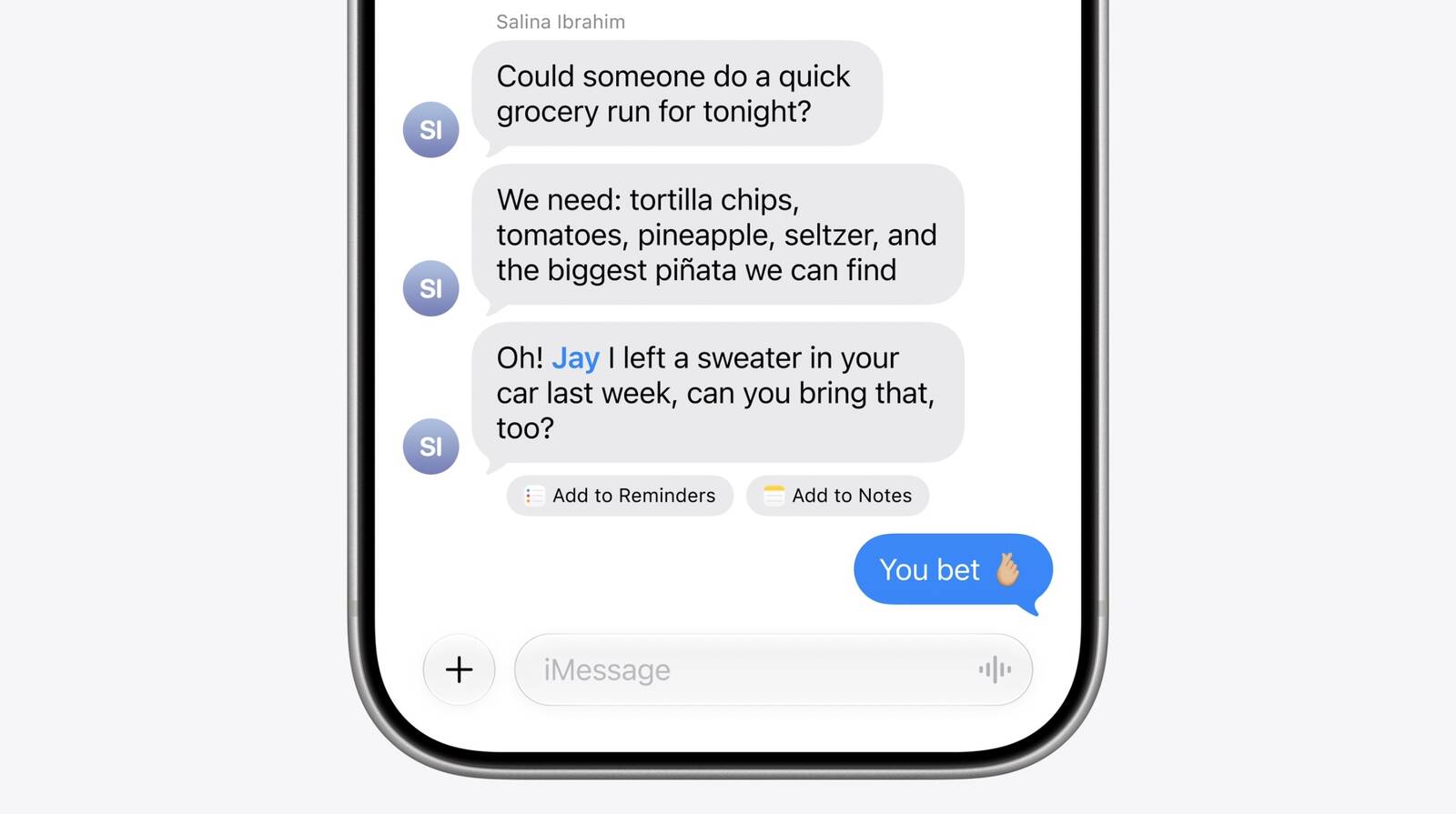
How often have you been in a conversation where an important detail or task arises – "Don't forget to pick up groceries!" or "We need to discuss the project budget on Monday." – only to have to mentally note it, or worse, exit the chat to create a reminder or note? iOS 27's Messages app, powered by Apple Intelligence, now elegantly addresses this common scenario.
The app gains the remarkable ability to detect when a conversation contains information that would benefit from being captured as a reminder or a note. Using its contextual understanding, it can identify key phrases, dates, or action items within your messages. When such an opportunity is recognized, Messages will offer a convenient shortcut, allowing you to create a new reminder or add to an existing note directly within the conversation thread. This means you can jot down that crucial task or detailed thought without interrupting the flow of your chat. This integration doesn't just save time; it ensures that important information is less likely to be forgotten, seamlessly weaving your communication with your productivity tools and creating a more cohesive and efficient digital environment. It’s about making your devices work smarter for you, bridging the gap between communication and action.
Express Yourself with Drawing Tools
Communication is not always purely textual. Sometimes, a quick sketch, a diagram, or a doodle can convey an idea, emotion, or instruction far more effectively than words alone. Recognizing this, Apple is bringing intuitive drawing tools directly into the Messages app in iOS 27. This feature empowers users to create and share hand-drawn sketches and illustrations right within their conversations, adding a rich, visual layer to their interactions.
Whether you want to quickly explain a concept with a simple diagram, add a personal touch to a greeting, or just send a playful doodle to a friend, these integrated drawing tools make it easy. The interface is designed to be user-friendly, offering various brush types, colors, and an eraser, allowing for both precise and expressive creations. This capability enhances the versatility of Messages, moving it beyond a purely text- and media-sharing platform into a more dynamic canvas for personal expression and collaborative visual communication. It’s an accessible way to inject creativity and clarity into your daily chats, making conversations more engaging and fun for everyone involved.
Elevating the Everyday: Core Enhancements to the Messages Platform
Beyond the innovative Apple Intelligence features, the bulk of Apple's effort in Messages for iOS 27 has been dedicated to a series of significant enhancements and improvements to the broader platform. These aren't flashy new functionalities but rather fundamental refinements that address common pain points and elevate the daily messaging experience. By focusing on these core areas, Apple aims to make Messages faster, more reliable, and generally more pleasant to use, ensuring that the features you rely on most perform flawlessly across all your Apple devices.
Blazing Fast Message Loading
One of the most frustrating experiences for long-time Messages users has been the slow loading and scrolling of large, extensive conversations. Threads spanning years, packed with thousands of messages, photos, and videos, could often grind the app to a halt, leaving users waiting for content to appear or struggling with choppy scrolling. iOS 27 tackles this head-on with significant optimizations designed to make these rich conversation histories load and scroll with unprecedented speed and fluidity.
Apple has re-engineered underlying mechanisms for data retrieval and rendering, likely involving more efficient caching, improved indexing of message content, and smarter memory management. This means that whether you're jumping into a chat with years of family memories or quickly searching for a detail in a long-running work project, the entire conversation should now open almost instantly, and scrolling through it will feel smooth and responsive. This improvement is not just about convenience; it's about making your entire messaging history instantly accessible and usable, transforming a previously sluggish experience into one that feels effortless and immediate. It significantly enhances the ability to quickly reference past conversations, find old photos, or simply reminisce without frustrating delays.
Flawless Syncing Across All Your Devices
In today's multi-device world, a seamless experience across all your gadgets is paramount. However, even with previous iterations, users sometimes encountered inconsistencies with Messages syncing – read states might not update across an iPhone and Mac, reactions (Tapbacks) might appear on one device but not another, or attachments could be slow to propagate. iOS 27 brings a dedicated focus to this crucial area, promising more reliable and faster syncing of Messages, read states, reactions, and attachments across your entire Apple ecosystem.
This improved synchronization extends to every device where you use Messages: your iPhone, iPad, Mac, Apple Watch, and even the cutting-edge Vision Pro. The goal is a truly unified experience where starting a conversation on your iPhone, continuing it on your Mac, and checking a notification on your Apple Watch feels like a single, continuous interaction. When you mark a message as read on one device, it should instantly reflect that status everywhere else. When you send a photo from your iPad, it should be immediately available on your Mac. This refinement of iCloud Messages in the Cloud ensures that your communication stream remains perfectly consistent, eliminating confusion and ensuring that you always have the most up-to-date view of your conversations, regardless of which Apple device you're currently using. It's about coherence and reliability, fostering a truly integrated digital life.
Unearthing Offloaded Media with Ease
As our digital lives grow, so do the storage demands of our devices, particularly with an abundance of high-resolution photos and videos. To help manage this, iOS intelligently "offloads" older media content from local storage to iCloud, freeing up space on your device. While this is a valuable feature for storage management, it sometimes made offloaded photos and videos feel inaccessible or difficult to locate within Messages. With iOS 27, Apple has significantly improved the discoverability of this content.
The enhanced search functionality within Messages can now seamlessly surface photos and videos that have been offloaded from your local storage and are securely stored in iCloud. This means that when you search for a specific memory or piece of media, the search results will intelligently include both locally stored and cloud-based items. You no longer have to worry about whether a photo is physically on your device or in the cloud; Messages' search will find it for you. This innovation provides the best of both worlds: efficient local storage management on your device without sacrificing the ability to quickly find and access your entire media history within your conversations. It ensures that your memories are always within reach, regardless of their physical location, enhancing both convenience and peace of mind.
Visual Clarity for Archived Media
Building on the improvements to finding offloaded media, iOS 27 also tackles a related visual annoyance: the generic placeholders that often appeared for offloaded photos and videos. When media was moved to iCloud to save device space, its thumbnail might be replaced by a bland icon, making it difficult to identify the content at a glance. This often required tapping on the placeholder, waiting for the media to download, just to see what it was – a cumbersome process, especially when scrolling through old conversations.
In iOS 27, this issue is resolved with the introduction of visible preview thumbnails for offloaded photos and videos. Instead of generic icons, you'll now see actual miniature previews of the content, even if the full-resolution file resides in iCloud. This makes browsing older media within your conversations significantly more intuitive and efficient. You can quickly scan through a chat, visually identify the specific photo or video you're looking for, and then decide whether to download the full version. This small but impactful change dramatically improves the user experience, transforming a previously frustrating visual barrier into a seamless and informative way to navigate your cherished digital history. It streamlines the process of reminiscing and referencing, making your archived conversations truly vibrant and accessible.
Smart Replies That Sound Like You
Smart Reply suggestions have been a handy feature for quick responses, offering contextually relevant phrases to save time. However, a common critique has been that these suggestions often sound generic or impersonal, potentially clashing with a user's unique writing style. iOS 27 leverages Apple Intelligence to introduce personalized Smart Reply suggestions that can now reflect your own individual writing style, making suggested responses feel far more natural and genuinely personal.
This advanced personalization is achieved through on-device machine learning. Apple Intelligence analyzes your communication patterns, vocabulary, tone, and common phrases within your Messages to understand how you typically express yourself. Based on this learning, it then generates Smart Reply suggestions that align with your unique linguistic footprint. The result is a set of proposed responses that don't just fit the conversation's context but also sound authentically like you. This means you can still benefit from the speed and convenience of Smart Reply without sacrificing your personal voice. The processing happens securely on your device, ensuring your privacy while delivering a highly tailored and intuitive messaging experience that enhances rather than detracts from personal connection. It's about empowering quicker communication without losing your distinct character.
Streamlined Notifications for Tapbacks
Tapbacks – those quick reactions like hearts, thumbs-up, or question marks – are a popular way to acknowledge messages without typing out a full response. While convenient, a flurry of Tapbacks on a single message could often lead to a cascade of individual notifications, cluttering your lock screen and notification center. iOS 27 addresses this common annoyance by consolidating notifications for multiple Tapbacks.
Now, when several people react to a single message with different Tapbacks, these reactions will be intelligently grouped into a single, cohesive notification. Instead of receiving a separate alert for each 'heart,' 'thumbs-up,' and 'laugh,' you'll see one notification summarizing all the reactions to that specific message. For instance, it might say, "3 new reactions to 'Let's meet at 7!'" This change significantly reduces notification overload, making your device's alerts more organized and less intrusive. It allows you to stay informed about reactions without being constantly interrupted, ensuring that your notification center remains a useful hub for important information rather than a cluttered stream of rapid-fire acknowledgments. This small but thoughtful improvement contributes to a calmer and more focused digital experience.
Uninterrupted Sending, Anywhere, Anytime
One of the most frustrating aspects of messaging, especially when in areas with spotty network coverage, has been the interruption of sending large media files or even long text messages. A temporary drop in Wi-Fi or cellular signal would often halt the sending process, requiring manual intervention or restarting the transfer from scratch. iOS 27 introduces a much-needed reliability improvement: Messages will now continue sending in the background and automatically resume when connectivity returns, dramatically reducing interrupted sends.
This means you can initiate sending a batch of photos or a video, walk into an area with poor signal, and your iPhone will intelligently pause the transfer without erroring out. The moment your device re-establishes a stable connection, Messages will pick up exactly where it left off, completing the send without any action required from you. This robust background sending mechanism applies not just to media but also to text messages, ensuring that your communications are far more resilient to network fluctuations. It provides a "set it and forget it" reliability that greatly enhances the user experience, eliminating the frustration of failed sends and giving you confidence that your messages will always reach their destination, even when your connection is less than perfect. This is a vital step towards truly seamless communication, regardless of your immediate network environment.
Smarter Search: By Phone Number or Nickname
Finding old conversations in Messages can sometimes be a challenge, particularly if you don't recall the exact name of the contact or if the conversation involves an unsaved number or a group chat. Previously, search capabilities were often limited to matching formal contact names, which could be restrictive. iOS 27 significantly expands the utility of Messages search by allowing you to find conversations using phone numbers or saved nicknames.
This enhancement means that if you've been chatting with someone whose number isn't formally saved in your contacts, or if you've assigned a personal nickname to a friend (e.g., "Boss," "Cousin Timmy," "Soccer Group"), the Messages search bar will now recognize and find conversations associated with those identifiers. This vastly improves the flexibility and effectiveness of searching through your communication history. For instance, if you need to find a specific message from a delivery driver you chatted with weeks ago, you can simply type their phone number into the search. Or, if you use a unique nickname for a group chat, that nickname can now serve as your search query. This intelligent expansion of search parameters ensures that virtually any conversation, no matter how it's identified in your mind or contacts, is quickly and easily discoverable, streamlining your ability to locate past information and interactions.
Instant Access to Your Latest Shots
In our highly visual communication landscape, quickly sharing recently captured photos and videos is a common daily task. However, sometimes there was a noticeable delay between taking a picture or video with the Camera app and that media appearing in the Messages media picker, requiring a brief wait before it could be attached to a message. iOS 27 addresses this minor but frequently encountered friction point.
With this update, newly captured photos and videos will appear much more quickly and virtually instantaneously in the Messages media picker. The moment you snap a photo or record a video, it will be immediately accessible for selection and sharing within your chat. This optimization streamlines the entire workflow of capturing and sharing visual content, making the process feel more fluid and responsive. It eliminates those small, frustrating pauses, allowing for more immediate and spontaneous sharing of moments as they happen. Whether you're sending a quick selfie, documenting an event, or sharing a funny video, the pathway from camera to conversation is now more direct and seamless, enhancing the overall speed and enjoyment of visual communication within Messages.
Messages That Never Give Up: Automatic Retries
Similar to the continuous sending improvement, iOS 27 also introduces a crucial enhancement for messages that fail to send due to temporary network issues: automatic retries. Previously, if a message failed to transmit because of a momentary signal drop or Wi-Fi glitch, users would often see a "Failed to Send" alert and be prompted to manually tap "Try Again." This added an unnecessary layer of user intervention for transient problems.
Now, Messages in iOS 27 will intelligently detect these temporary network issues and automatically attempt to resend the message without requiring any input from the user. If the network blips for a second, your message might silently retry and successfully send the next moment, all in the background. You'll only be alerted if the message persistently fails to send after multiple automatic attempts over a longer period, indicating a more significant and enduring connectivity problem. This feature significantly enhances the reliability of your communications, reducing the number of "Failed to Send" notifications you encounter and freeing you from the need to constantly monitor message delivery status. It embodies Apple's commitment to making Messages a truly robust and self-correcting communication platform, allowing you to send messages with greater confidence and less worry about underlying network conditions.
Experience It Yourself: Availability of iOS 27
For those eager to dive into these comprehensive improvements, Apple is providing an early opportunity. Enthusiastic users and developers will gain access to the public beta of iOS 27 next month. This period allows early adopters to thoroughly test out all the new features and enhancements discussed, providing valuable feedback that helps Apple further refine the operating system before its wider release. It's a chance to be among the first to experience the faster message loading, smarter AI suggestions, and seamless syncing across devices.
Following this beta phase, Apple is expected to make the general release of iOS 27 available to all compatible iPhone users in the fall. Typically aligning with the launch of new iPhone models, this widespread release will bring the improved Messages app and all its underlying refinements to millions of users worldwide. Prepare for a significantly more polished, intelligent, and reliable messaging experience that makes everyday communication more efficient and enjoyable.
This article, "14 Ways Apple Is Improving Messages in iOS 27" first appeared on MacRumors.com
Discuss this article in our forums
from MacRumors
-via DynaSage
