
Valve’s New Steam Controller Screams When You Drop It
Uncovering the Hidden Depths: The Steam Controller's "Easter Eggs"
When the Steam Controller first launched, it wasn't just another gamepad. It was a bold statement from Valve, a company known for shaking up the gaming world. Many people saw its unusual design and weren't sure what to make of it. Some loved it, some found it challenging, but almost everyone agreed it was different. What many didn't realize, however, was that this unique device wasn't just different on the surface; it was packed with "easter eggs"—hidden features, clever design choices, and deep customization options that revealed themselves over time. These aren't like hidden levels in a game; instead, they are subtle aspects of its design and the powerful software behind it, making the Steam Controller a device that constantly surprised and rewarded those who took the time to explore its true potential.
This deep dive will explore these fascinating elements, from its innovative hardware to the revolutionary software that powers it. We'll uncover why the Steam Controller remains a beloved, albeit niche, piece of PC gaming hardware and how its "easter eggs" shaped the future of Valve's hardware endeavors, most notably the Steam Deck. Get ready to discover the secrets that make this peripheral so much more than just a controller.
The Genesis of a Revolutionary Peripheral: Valve's Vision
To truly appreciate the Steam Controller's "easter eggs," we first need to understand why Valve created it. Valve, the company behind Steam, Half-Life, Portal, and Dota 2, has always been an innovator. They envisioned a future where PC gaming could move from the desk to the living room couch, much like console gaming. However, traditional controllers weren't cutting it for the vast library of PC games, especially those designed for mouse and keyboard. Think about strategy games, first-person shooters, or even intricate role-playing games; a standard gamepad often felt like a compromise.
Valve's goal was ambitious: create an input device that offered the precision of a mouse and keyboard while still providing the comfort and convenience of a controller. This philosophy led to the Steam Controller's groundbreaking design, which prioritized versatility and adaptability. It wasn't about mimicking existing controllers; it was about inventing something new entirely. This commitment to rethinking gaming input from the ground up is arguably the biggest "easter egg" of all—a philosophical one embedded in its very existence.
The controller was part of a larger ecosystem plan, which included SteamOS and Steam Machines, Valve's attempt to bring PC gaming directly to TVs. While Steam Machines didn't achieve widespread success, the Steam Controller, and its underlying software, lived on, becoming a standalone marvel that continues to influence modern gaming hardware.
Beyond the Surface: Unpacking the Hardware "Easter Eggs"
The Steam Controller's most obvious differences are its physical features. Each component was carefully considered to push the boundaries of what a gamepad could do. Many of these features, at first glance, might seem strange, but once understood, they reveal clever "easter eggs" of design and engineering.
The Trackpads: A Precision Revolution
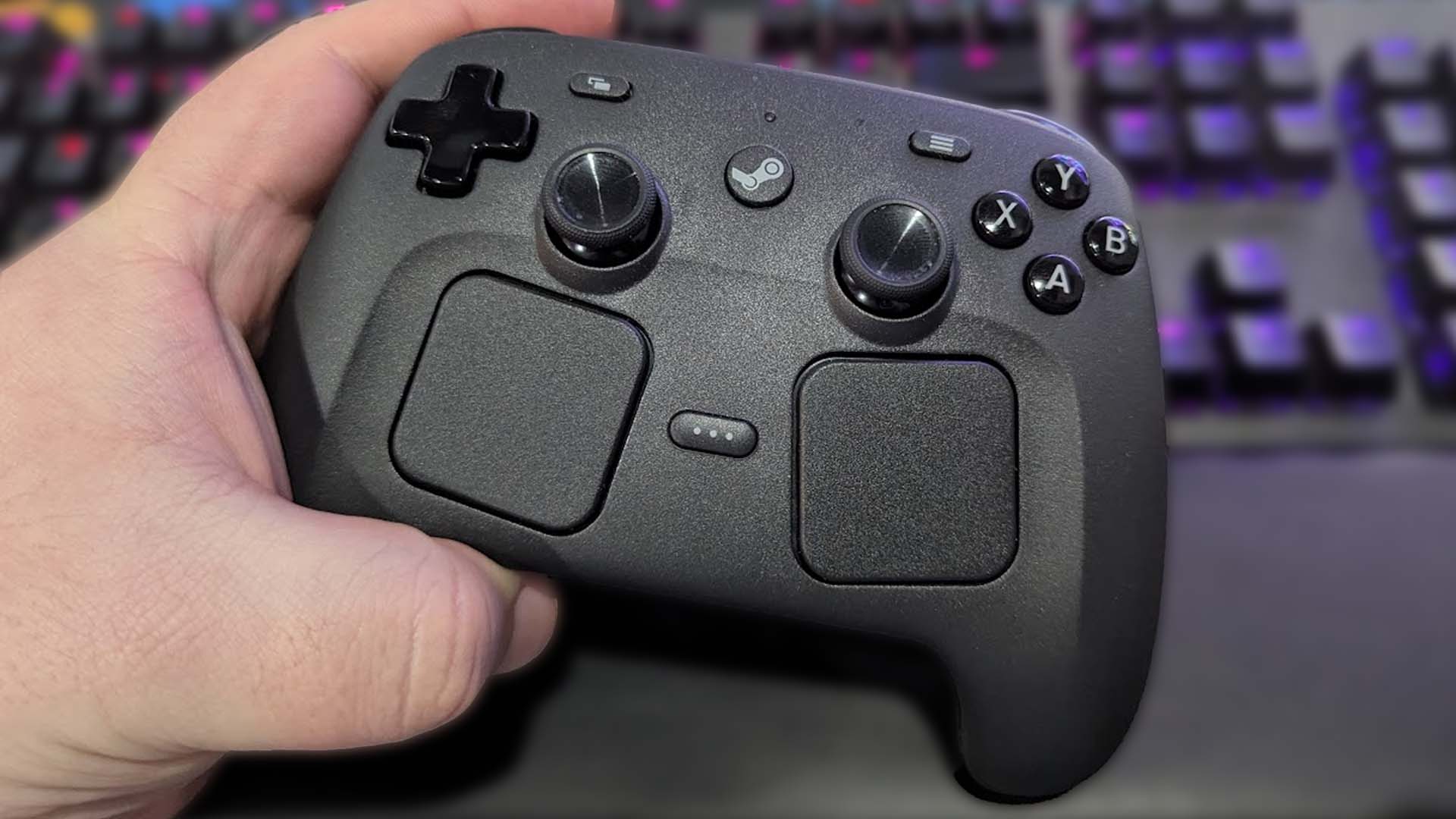
Perhaps the most distinctive feature of the Steam Controller is its pair of large, circular trackpads. Instead of a traditional right analog stick, there's a highly sensitive haptic trackpad, and where a directional pad (D-pad) usually sits, there's another. This choice was deliberate and represents a major design "easter egg" aimed at solving the precision problem.
Unlike simple touchpads, these are haptic. This means they can create the sensation of texture, resistance, and even clicks. When you move your thumb across them, the tiny haptic actuators inside vibrate to simulate the feeling of a mouse ball rolling, a D-pad clicking, or a scroll wheel turning. This tactile feedback is incredibly important because it allows for much finer control and a greater sense of responsiveness than a pure touch surface would. For games requiring precise aiming, the right trackpad, when configured correctly, could emulate a mouse with remarkable accuracy, something no other gamepad could truly achieve.
The left trackpad, meanwhile, could act as a D-pad, a set of four or eight programmable buttons, or even another mouse input. This dual-trackpad setup unlocks incredible versatility, allowing players to tailor the controller's input to almost any game, regardless of whether it was designed for a controller. This depth of customization, built right into the physical design, is a prime example of a hidden "easter egg" waiting to be discovered by the user.
The Haptic Engines: More Than Just Rumble
While many controllers have rumble motors for basic force feedback, the Steam Controller's haptic engines are a whole different beast. These are not just generic vibration motors; they are sophisticated linear resonant actuators that can produce a wide range of highly specific and localized tactile sensations. This advanced haptics system is a significant "easter egg" in itself, offering a level of feedback rarely found in consumer devices.
These haptics are what make the trackpads feel so good. They can simulate the crisp click of a mouse button, the notched feel of a weapon-select wheel, or the subtle resistance when dragging an inventory item. But their use extends beyond the trackpads. The entire controller can provide detailed haptic feedback for in-game actions, giving players a deeper connection to the virtual world. Imagine feeling the individual rounds load into your gun, or the subtle recoil of a sniper rifle, all through precise vibrations rather than just a generic shake.
This precision haptic feedback is a game-changer for accessibility and immersion. It provides non-visual cues that can enhance gameplay, making the controller feel more like an extension of the player. The true power of these haptics is often overlooked, considered just "rumble," but digging into the settings reveals an entire world of customizable tactile experiences.
The Gyroscope: A Secret Weapon for Aim
Nestled within the Steam Controller is a high-precision gyroscope and accelerometer, allowing for motion controls. While motion controls have been around for years, Valve's implementation in the Steam Controller was particularly innovative. This is another subtle "easter egg" that, when utilized, dramatically enhances precision and offers new ways to interact with games.
Many players discover that by activating the gyroscope, often alongside the right trackpad, they can achieve console-level aim-assist precision, or even exceed it for certain types of games. Imagine using the trackpad for broad movements, then subtly tilting the controller for fine-tuning your aim, much like a painter uses their wrist for delicate strokes. This hybrid input method combines the speed of a mouse-like swipe with the accuracy of tilt controls, making it incredibly effective for first-person shooters or even aiming abilities in third-person games.
The gyroscope isn't limited to aiming; it can be mapped to almost any in-game action. Steering vehicles, controlling cameras, or even performing gestures are all possible. It adds an extra dimension of control that feels intuitive and natural once mastered, making it a powerful, yet often underused, feature of the controller.
The Back Paddles: Ergonomic Empowerment
On the underside of the Steam Controller, you'll find two large, tactile paddles. These might seem like a minor addition, but they represent a significant ergonomic "easter egg" that dramatically improves gameplay. Most traditional controllers require you to take your thumb off an analog stick or face button to press a button on the face, which can be disruptive, especially in fast-paced games.
The back paddles solve this problem by providing two additional, easily accessible buttons that can be mapped to any function. This means you can keep your thumbs on the trackpads (or joystick) for aiming and movement while still being able to jump, reload, sprint, or activate abilities with your ring or middle fingers. This small change allows for more complex actions without sacrificing control, giving players a competitive edge and a much more comfortable gaming experience.
Their large size and natural placement make them easy to press without accidental activation, and their functionality is entirely customizable through Steam Input. Whether you use them for often-used actions, special abilities, or even complex button combinations, the back paddles are a testament to Valve's commitment to thoughtful, player-centric design.
The Hidden Dongle Compartment: A Literal Easter Egg
While most of the Steam Controller's "easter eggs" are about its deeper functionality, there's also a literal hidden compartment. If you open the battery door on the back of the controller, you'll find a small slot specifically designed to store the wireless USB dongle. This might seem like a minor detail, but it's a wonderfully practical "easter egg" that prevents you from losing the tiny receiver when transporting the controller or if you switch it between multiple computers.
It shows attention to detail and a practical understanding of how users interact with their peripherals. No more searching for that small USB stick or worrying about it getting lost in a bag. It's a small touch that adds a layer of convenience and speaks to the thoughtful engineering behind the device.
The True Power Source: Steam Input and Unrivaled Customization
While the hardware itself is innovative, the greatest "easter egg" of the Steam Controller, and what truly unlocks its full potential, is the software that powers it: Steam Input. This powerful, flexible configuration tool is not just for the Steam Controller; it's a comprehensive input remapping system that works with almost any gamepad connected to Steam. However, it was designed with the Steam Controller's unique features in mind, allowing for unparalleled levels of personalization.
A Universe of Personalization
Steam Input allows users to customize virtually every aspect of the controller. This goes far beyond simple button remapping. It introduces concepts like:
- Action Sets: These allow you to have different controller layouts depending on what you're doing in a game. For example, you might have one layout for on-foot combat, another for driving a vehicle, and a third for navigating menus. The controller can automatically switch between these sets based on in-game context, offering a seamless and highly adaptive experience.
- Layers: Within an Action Set, you can have multiple layers of input. Holding down a specific button (like a trigger or a paddle) can temporarily activate a new layer of mappings. This effectively doubles or even triples the number of available functions without cluttering the primary layout.
- Activators: These define how a button press behaves. Instead of just a simple "press," you can set an activator to be a "long press," a "double press," a "start press" (action on press down), a "release press" (action on release), or even a "turbo" mode for rapid firing. This adds incredible depth to how each button or trackpad input can be used.
- Input Styles: For each input zone (trackpads, joystick, gyro), you can choose from a vast array of input styles. The trackpads, for example, can emulate a mouse, a joystick, a scroll wheel, a D-pad, or even a sophisticated touch menu. The joystick can be set with different response curves or dead zones. This flexibility ensures that the controller can genuinely adapt to any game genre.
- Mode Shifts: This feature allows you to change the behavior of an entire input zone when another button is held. For instance, holding the left grip paddle could temporarily transform the right trackpad from mouse control into a weapon selection wheel. This allows for incredibly complex yet intuitive control schemes.
This level of deep configuration means that the Steam Controller, when properly configured, can often feel like it was custom-made for every single game you play. This immense power, hidden behind a sometimes intimidating interface, is perhaps the ultimate "easter egg" for tinkerers and power users.
Community-Driven Discovery
Because the customization options are so vast, the Steam community became instrumental in uncovering the Steam Controller's "easter eggs." Players could share their custom controller configurations through Steam, allowing others to download and try them. This created a rich ecosystem of shared knowledge and collective discovery.
New players often found great starting points by downloading highly-rated community configurations for their favorite games. These shared configs often showcased ingenious uses of the trackpads, gyro, and paddles that many might not have thought of on their own. This collaborative process transformed the controller into a living, evolving device, with its "secrets" being constantly explored and optimized by thousands of users worldwide.
Finding a perfect community config for a tricky game felt like unearthing a valuable secret, streamlining gameplay and often making previously unplayable PC titles enjoyable with a gamepad.
Touch Menus and Radial Menus: Bridging the Gap
A particularly clever innovation within Steam Input, especially for the trackpads, is the ability to create "touch menus" and "radial menus." These are another type of "easter egg" that helps bridge the gap between complex PC interfaces and gamepad simplicity.
A touch menu appears as an overlay on the screen when you activate it on a trackpad. You can then tap or swipe to select options, much like interacting with a touch screen or a traditional cursor. A radial menu presents options in a circle around your thumb, allowing for quick, intuitive selection by flicking in a direction. These menus can be extensively customized with multiple layers, icons, and even custom commands.
For games with many hotkeys, inventory management, or complex spells, these menus allowed players to access dozens of commands with just a few thumb movements, without having to memorize obscure button combinations or resort to a keyboard. It was Valve's elegant solution to bringing the functionality of a hotbar or a complex UI onto a controller, something traditional gamepads struggled with.
The Steam Controller's Enduring Legacy
Despite being discontinued in 2019, the Steam Controller's influence and its "easter eggs" continue to resonate in the gaming world. Its bold experimentation and the innovations it introduced were not forgotten; they simply evolved.
Paving the Way for the Steam Deck
The most significant legacy of the Steam Controller is undoubtedly its direct influence on the Steam Deck, Valve's hugely successful handheld PC. The Steam Deck's control scheme is a direct spiritual successor, integrating many of the "easter egg" features pioneered by the Steam Controller.
The Steam Deck features two large, clickable trackpads, highly precise haptic feedback, a robust gyroscope, and four customizable back paddles. Even the underlying Steam Input system, refined and improved, is at the heart of the Steam Deck's incredible versatility. Gamers who were familiar with the Steam Controller found themselves right at home with the Deck, recognizing Valve's commitment to flexible, player-centric input.
This shows that the Steam Controller wasn't a failed experiment but a crucial R&D project that laid the groundwork for Valve's future hardware. Its "easter eggs" weren't just quirky features; they were foundational innovations that proved their worth and became essential components of a highly successful product.
A Niche but Beloved Device
Even years after its discontinuation, the Steam Controller maintains a dedicated cult following. Many players who invested time into understanding its complexities and unlocking its "easter eggs" still swear by it, preferring its unique control scheme over any other gamepad for PC gaming. Its ability to play almost any game, regardless of native controller support, makes it incredibly valuable for those with large Steam libraries.
The passion of its community highlights that while its mass market appeal was limited by its steep learning curve, its potential for innovation and personalized gameplay was immense. The "easter eggs" of its design and software ensured that for a certain segment of gamers, it wasn't just a controller, but a highly adaptable tool that redefined how they interacted with their games.
Conclusion: The Lasting Impact of Hidden Innovation
The Steam Controller truly was a peripheral ahead of its time, a device brimming with "easter eggs" waiting to be uncovered. From its dual haptic trackpads offering mouse-like precision, to its advanced gyroscope, ergonomic back paddles, and the genuinely revolutionary Steam Input software, every aspect of its design encouraged exploration and customization.
These weren't just flashy features; they were thoughtful solutions to real problems in PC gaming, offering unparalleled versatility and a deeply personal gaming experience. While it never achieved the widespread adoption of traditional gamepads, its legacy lives on, most prominently in the Steam Deck, proving that its "easter eggs" were not just novelties but crucial innovations that reshaped Valve's approach to hardware.
For those who took the time to learn its secrets, the Steam Controller wasn't just a way to play games; it was an invitation to rethink controller design, to experiment, and to truly make a peripheral their own. Its hidden depths continue to be a testament to Valve's commitment to pushing boundaries and enriching the PC gaming experience.
from Kotaku
-via DynaSage
