
OpenAI Brings Codex Remote Access to ChatGPT Mobile App
Unlock Your Coding Potential: OpenAI Codex Now Remote on ChatGPT Mobile App
In a significant stride towards making advanced AI more accessible and integrated into our daily workflows, OpenAI has launched a groundbreaking feature: its powerful Codex coding agent can now be accessed remotely through the ChatGPT mobile app. This means that users with iPhones and Android devices can stay connected to their ongoing coding projects and automate tasks on their Mac computers, even when they're away from their desks. This integration promises to revolutionize how developers, and indeed anyone working with code, interact with their projects, offering unparalleled flexibility and continuous productivity.
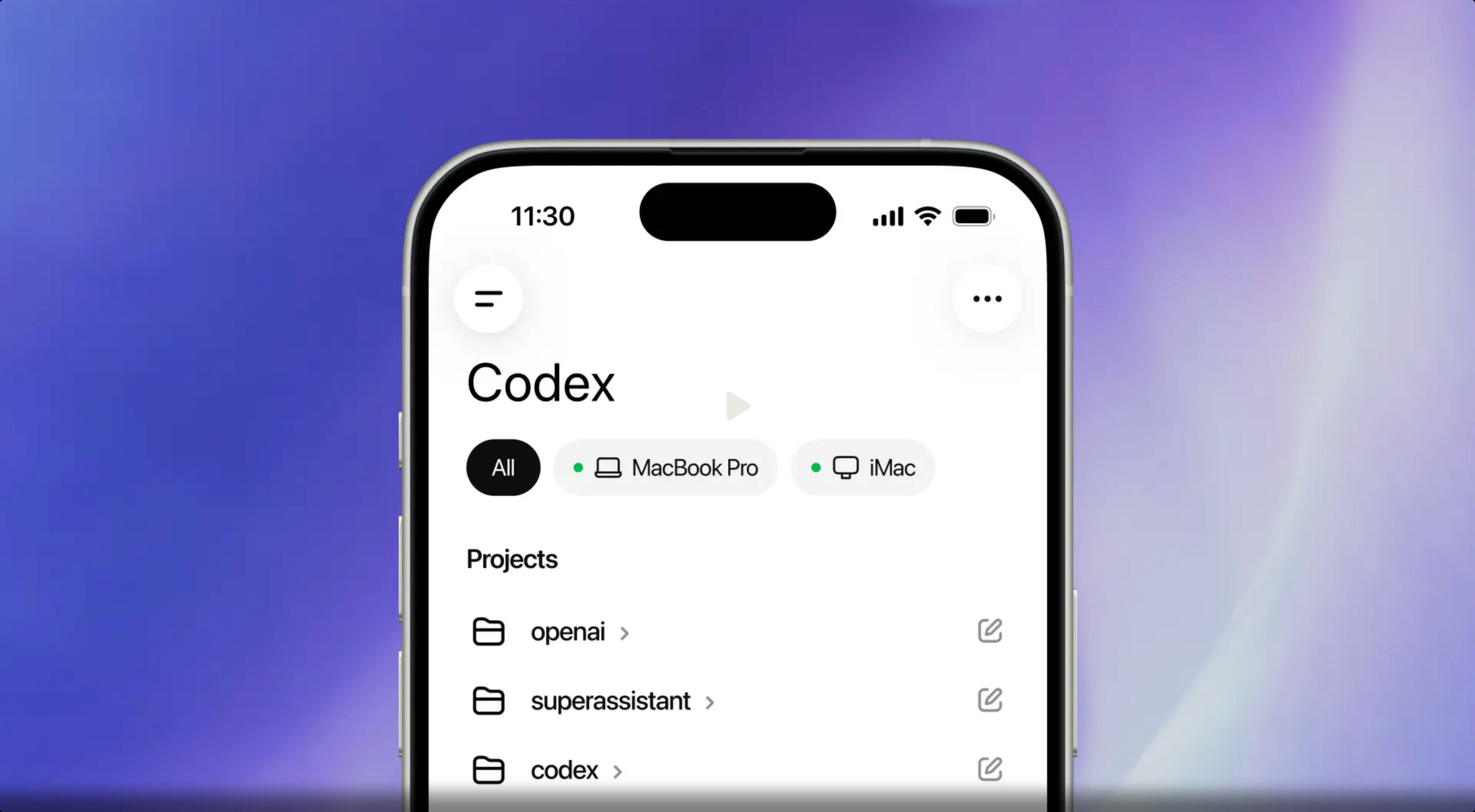
The announcement from OpenAI highlighted the core benefit of this new capability: "Codex is now in the ChatGPT mobile app so you can stay in the loop from anywhere while Codex gets work done across your laptops, devboxes, or remote environments." This statement underscores a shift towards a more fluid, location-agnostic approach to software development and task automation. Imagine initiating a complex code generation task on your Mac, stepping away for a coffee, and then receiving a notification on your phone when Codex has completed the work or needs your input. This is the future OpenAI is building.
What Exactly is OpenAI Codex? A Deeper Dive into the AI Coding Assistant
Before diving into the remote access features, let's clarify what OpenAI Codex is. At its heart, Codex is an artificial intelligence model designed specifically to understand and generate code. It's built upon the same foundation as OpenAI's large language models but has been fine-tuned on an extensive dataset of code and natural language. This unique training allows Codex to translate natural language commands into functional code across numerous programming languages, or conversely, to explain complex code in plain English. For anyone who has ever wrestled with a coding problem or wished they could automate a repetitive digital task, Codex represents a powerful assistant.
Its capabilities extend far beyond simple code generation. Codex can:
- **Generate Code from Natural Language:** Simply describe what you want to build or achieve, and Codex can write the corresponding code. For example, "create a Python script to scrape product prices from this website" or "build a JavaScript function to validate an email address."
- **Debug and Fix Code:** Provide Codex with a piece of code and describe an error, and it can often identify the bug and suggest corrections. This can drastically reduce debugging time, a common bottleneck in software development.
- **Explain Code:** Hand Codex a complex algorithm or a chunk of legacy code, and it can break it down into understandable explanations, making it invaluable for learning new languages, onboarding new team members, or deciphering unfamiliar projects.
- **Refactor and Optimize Code:** It can suggest ways to improve code efficiency, readability, and adherence to best practices.
- **Automate Repetitive Tasks:** Beyond explicit coding, Codex can be used to automate a wide array of desktop interactions, from data entry to report generation, by understanding instructions given in everyday language.
Essentially, Codex acts as an intelligent co-pilot for developers, making coding faster, more efficient, and more accessible. It empowers seasoned professionals to accelerate their work and lowers the barrier to entry for beginners and those looking to leverage automation without deep coding expertise.
The Revolutionary Impact of Remote Access: Unlocking Unprecedented Flexibility
While Codex has been a powerful tool on the desktop, bringing it to the ChatGPT mobile app elevates its utility to an entirely new level. The essence of this feature lies in allowing users to manage and monitor their Codex sessions running on a Mac from anywhere with an internet connection. This isn't just about convenience; it's about fundamentally changing the developer workflow, offering freedom and continuity that were previously unattainable.
Why Remote Access is a Game-Changer:
- **Uninterrupted Workflow:** Developers often have ideas or need to check progress even when away from their primary workstation. With mobile access, a sudden inspiration can be turned into a task for Codex immediately, or critical updates can be reviewed without delay.
- **Enhanced Productivity:** Long-running compilation tasks, extensive test suites, or complex data processing can tie up a developer's machine for hours. Now, these processes can run on a dedicated "devbox" or even a personal Mac, and the developer can monitor or interact with them remotely, freeing up their time for other activities or even stepping away from the desk.
- **Multi-Environment Management:** For professionals who manage multiple development environments, remote servers, or even a personal Mac mini acting as a powerful computing hub, the mobile app provides a centralized dashboard to interact with all these Codex instances.
- **Flexibility for Modern Workstyles:** In an increasingly remote and hybrid work environment, the ability to control and monitor development tasks from a mobile device aligns perfectly with the need for flexibility. Whether you're commuting, at a meeting, or simply relaxing on the couch, your projects remain within reach.
This capability transforms the Mac running Codex into a powerful, always-on AI-powered development server that you can tap into whenever and wherever you need. It’s a testament to OpenAI’s vision of making AI a truly ubiquitous and seamlessly integrated part of our technological landscape.
Getting Started: Connecting Your Mac's Codex to Your ChatGPT Mobile App
One of the most appealing aspects of this new feature is its simplicity. OpenAI has designed the setup process to be straightforward, ensuring users can quickly bridge the gap between their desktop development environment and their mobile devices. Here's a detailed breakdown of how to establish this powerful connection:
Step-by-Step Connection Guide:
- **Update Your Apps:** The very first and crucial step is to ensure both your Codex Mac application and your ChatGPT mobile app (available on iPhone and Android) are updated to their latest versions. OpenAI regularly releases updates that include new features, performance enhancements, and security patches. Running the most current versions guarantees compatibility and access to the new remote control functionality. You can usually check for updates within the respective app stores or directly within the applications themselves.
- **Navigate to "Codex Mobile" on Your Mac:** Once your Codex Mac app is up to date, open it. Within the application's interface, you will find a new section specifically labeled "Codex mobile." This dedicated area is where the magic of linking your devices begins. It's designed to be intuitive, guiding you through the pairing process.
- **Scan the QR Code with Your Phone:** Upon selecting the "Codex mobile" section on your Mac, the screen will display a unique QR code. This QR code acts as a secure, temporary key to establish the connection. Open your ChatGPT mobile app on your smartphone and look for an option to scan a QR code – this might be in a settings menu, a new prompt upon opening the app, or clearly labeled as part of the Codex integration setup. Use your phone's camera to scan the QR code displayed on your Mac.
- **Confirmation and Connection:** After a successful scan, both your Mac and your mobile device will typically display a confirmation message, indicating that the connection has been established. This usually happens within a few seconds. The mobile app will then load the live state from your Mac's Codex session, and you're ready to go!
This QR code-based pairing method is a common and secure way to link devices, ensuring that only devices you explicitly authorize can connect to your Codex sessions. The entire process is designed to be user-friendly, allowing even those less familiar with complex configurations to benefit from this advanced integration quickly.
Unlocking Seamless Workflow: Features and Capabilities from Your Phone
Once your ChatGPT mobile app is connected to your Mac's Codex, a wealth of new capabilities become available right at your fingertips. The integration is designed to provide a comprehensive and intuitive control experience, mirroring many of the functionalities you would typically access directly on your desktop.
Key Features and How They Enhance Your Workflow:
- **Live State Synchronization:** The mobile app loads the live state directly from your Mac where Codex is running. This means you’re not starting fresh but rather picking up exactly where you left off. If Codex was in the middle of generating a complex function, or if you had an active chat thread discussing a project, all that context is immediately available on your phone. This seamless continuity is crucial for maintaining flow and productivity, especially when switching between environments.
- **Continue Active Chats and Projects:** You can effortlessly pick up active coding chats or ongoing projects that you initiated on your desktop. This means reviewing code, asking follow-up questions to Codex, or monitoring the progress of a large task is as simple as opening your phone. It's like having a miniature version of your development environment in your pocket, always updated with the latest progress.
- **Real-Time Notifications for Task Completion and Input Needs:** One of the most significant advantages is the ability to receive notifications. Codex can alert you when it has finished a specific task, such as generating a block of code, running a test suite, or compiling a project. More importantly, it can notify you when it requires your input – perhaps to clarify a prompt, approve a suggested change, or provide additional context for a complex problem. This keeps you "in the loop" without constantly having to check your Mac.
- **Initiate New Tasks from Anywhere:** The power to start new tasks by sending a message from your phone is immensely liberating. Imagine you're in a meeting, and a new requirement comes up. You can immediately send a prompt to Codex, like "Generate a basic API endpoint in Node.js for user authentication," and let it start working on your Mac remotely. By the time you return to your desk, a significant portion of the work might already be done.
- **Comprehensive Command and Control from the ChatGPT App:** The mobile app isn't just for monitoring; it's a full-fledged control center. From within the ChatGPT app, users can:
- **Review Outputs:** Examine generated code snippets, test results, terminal outputs, and other information produced by Codex.
- **Approve Commands:** Many tasks requiring significant system interaction or changes will prompt for human approval. You can grant or deny these commands directly from your phone, ensuring you maintain oversight and control over Codex's actions.
- **Switch Between Models:** If OpenAI offers different versions or specialized models of Codex (e.g., optimized for specific languages or tasks), you might be able to switch between them on the fly, tailoring Codex's behavior to your current needs.
- **Add New Prompts Across Active Threads:** Continue existing conversations or start new ones, providing instructions, questions, or context to Codex, all from your mobile device.
This extensive set of features transforms the mobile app into a powerful extension of your desktop development environment, blurring the lines between stationary and mobile productivity. It's about empowering developers to be responsive and proactive, regardless of their physical location.
Security and Data Flow: Ensuring Your Information Stays Safe
When dealing with a powerful AI agent that has access to your computer's environment, security is paramount. OpenAI has clearly outlined its approach to data handling and security, emphasizing user control and privacy. Understanding how data flows, or doesn't flow, is crucial for trusting this new integration.
OpenAI's Security Protocols:
- **Files, Credentials, and Permissions Stay on the Machine:** This is a critical security assurance. OpenAI explicitly states that "Files, credentials, and permissions stay on the machine where Codex is operating." This means sensitive data like your source code, API keys, database passwords, or system access permissions are not transmitted to OpenAI's servers or stored on your mobile device. Codex accesses these locally on your Mac, processes information, and then only sends back relevant *outputs* (like generated code or test results) to your phone. This localized handling of sensitive data significantly mitigates the risk of data breaches during transmission or storage.
- **Controlled Data Flow to the Phone:** While sensitive input data stays local, certain outputs and feedback mechanisms do flow back to your phone in real time. This includes:
- **Screenshots:** To provide visual context of what Codex is doing on your desktop.
- **Terminal Output:** The results of commands run in the terminal, useful for debugging and monitoring.
- **Diffs (Differences in Code):** To show changes Codex has made or suggested.
- **Test Results:** Output from automated tests run by Codex.
- **Approval Requests:** Prompts for your explicit authorization before Codex executes certain commands.
This selective flow of information ensures you have the necessary feedback to monitor and control Codex without compromising the security of your core data assets.
- **User Responsibility: Only Pair Trusted Devices:** OpenAI provides a clear warning: "Codex will access the desktop's files, apps, and browser to complete tasks sent from a phone, and warns users to only pair devices they own and trust." This is a crucial reminder that while OpenAI implements robust security measures, the user plays a vital role in maintaining the integrity of their system. Pairing with an untrusted or compromised mobile device could potentially expose your Mac to risks. Therefore, always ensure your phone is secure, up-to-date with security patches, and not jailbroken or rooted in a way that compromises its security.
By keeping sensitive data localized and providing a controlled, transparent flow of operational feedback, OpenAI aims to build a secure environment for remote AI-powered development, empowering users while maintaining rigorous data protection standards.
You've been asking for this one...
— OpenAI (@OpenAI) May 14, 2026
Now in preview: Codex in the ChatGPT mobile app.
Start new work, review outputs, steer execution, and approve next steps, all from the ChatGPT mobile app. Codex will keep running on your laptop, Mac mini, or devbox. pic.twitter.com/9i2Jckjt9z
The Bigger Picture: Codex in OpenAI's Expanding Ecosystem
The integration of Codex into the ChatGPT mobile app is not an isolated event; it's a strategic move within OpenAI's broader vision of creating ubiquitous, intelligent assistants that augment human capabilities across various digital domains. This mobile access complements other recent developments, painting a clearer picture of how OpenAI envisions the future of AI-powered development and automation.
Complementary Innovations:
- **Codex Chrome Extension:** This mobile integration follows OpenAI's recent launch of a Codex Chrome extension. This extension allows the AI agent to work directly within your web browser. Imagine instructing Codex to "test this web app's login flow" or "pull context from these five open tabs to summarize the project requirements." The Chrome extension empowers Codex to interact with web environments, automate browser tasks, and gather information directly from web pages. While the mobile app provides remote control over your *desktop environment*, the Chrome extension enables deeper *in-browser* automation and context gathering. Together, they create a formidable suite of tools for web developers and anyone who spends significant time in a browser.
- **Paving the Way for Broader Integration:** These integrations signal OpenAI's commitment to moving AI beyond simple chatbots into actionable agents that can perform complex tasks across different platforms. The mobile app provides a remote control layer, while the Chrome extension offers direct interaction within web applications. This multi-pronged approach indicates a future where AI assistants are deeply embedded in every part of our digital lives, from our operating systems to our browsers and mobile devices.
The consistent theme across these developments is empowerment: empowering users to automate, create, and manage complex tasks with natural language, regardless of their location or the specific digital environment they are in.
Who Benefits Most from Mobile Codex?
This new feature holds immense value for a diverse range of users, extending beyond just professional software developers.
- **Professional Software Developers:** This is the most obvious beneficiary. Front-end, back-end, full-stack, mobile, and game developers can all leverage Codex for code generation, debugging, testing, and automation. Remote access means continuous work, even when away from their primary machine.
- **Freelancers and Consultants:** Managing multiple projects and client demands often means working on the go. Mobile Codex provides the flexibility to monitor progress and respond to project needs from anywhere.
- **Students and Aspiring Coders:** Learning to code can be challenging. Codex can act as a personal tutor, explaining concepts, generating examples, and helping debug code, all accessible from a device they always carry.
- **IT Professionals and System Administrators:** Automating scripts for server management, deployment, or diagnostic tasks can now be initiated and monitored remotely.
- **Tech-Savvy Individuals and Power Users:** Anyone looking to automate repetitive digital tasks, generate custom scripts for personal use, or manage data can benefit. Imagine using natural language to tell Codex to "organize all my downloaded files into category folders" or "create a weekly report from this spreadsheet," all initiated from your phone.
- **Project Managers and Team Leads:** While not directly coding, they can use the mobile app to check project status, review outputs from automated tasks, and stay informed on technical progress, fostering better oversight and communication.
The broad applicability underscores the democratizing potential of AI – making advanced computing power accessible and actionable for a wider audience.
Looking Ahead: The Future of Codex and Ubiquitous AI
The journey for Codex and similar AI agents is just beginning. The remote access feature is a significant milestone, but OpenAI is already looking towards expanding its reach and capabilities.
Future Prospects:
- **Windows Support Coming Soon:** OpenAI has confirmed that "support for remotely accessing Codex for Windows will follow soon." This is a crucial expansion, as Windows remains the dominant operating system for a vast number of developers and general users. Bringing Codex's full capabilities to Windows users, both locally and remotely, will dramatically broaden its impact and user base.
- **Potential for Linux Integration:** While not explicitly mentioned, given the prevalence of Linux in server environments, cloud computing, and among open-source developers, future integration with Linux could further solidify Codex's position as a universal AI coding assistant across all major operating systems.
- **Deeper Integration with IDEs and Development Tools:** Imagine a future where Codex is not just accessed via the ChatGPT app or a browser extension, but deeply integrated into popular Integrated Development Environments (IDEs) like VS Code, IntelliJ, or Xcode, offering contextual assistance and automation directly within the development environment, enhanced by remote capabilities.
- **Advanced Predictive Coding and Self-Healing Code:** As AI models evolve, Codex could move towards not just generating code but intelligently anticipating development needs, suggesting entire features based on project context, and even implementing self-healing code that automatically corrects bugs or optimizes performance without explicit human intervention.
- **End-to-End Project Management with AI:** The ultimate vision might involve Codex evolving into an AI project manager, capable of breaking down high-level requirements, generating code, setting up infrastructure, running tests, and even deploying applications, all orchestrated and monitored from a central mobile interface.
The introduction of mobile remote access for Codex is a powerful step towards a future where AI acts as a truly intelligent partner in all our computational endeavors. It represents not just a new feature but a glimpse into a world where productivity, creativity, and problem-solving are amplified by seamless human-AI collaboration, available anytime, anywhere.
Conclusion: Empowering Developers with AI on the Go
OpenAI's integration of its powerful Codex coding agent into the ChatGPT mobile app for iPhone and Android users marks a pivotal moment in the evolution of AI-powered development. By enabling remote access to Codex sessions running on a Mac, OpenAI has delivered a tool that transcends the traditional boundaries of the desktop workstation. This innovative feature offers developers and tech enthusiasts unprecedented flexibility, allowing them to stay connected to their projects, manage tasks, and leverage AI's capabilities from virtually anywhere.
From simplifying complex setup processes to ensuring robust security with local data handling, every aspect of this integration is designed to empower users. The ability to initiate new tasks, review outputs, approve commands, and receive real-time notifications directly from a smartphone transforms the development workflow, making it more fluid, efficient, and responsive. Coupled with initiatives like the Codex Chrome extension and the promise of Windows support, OpenAI is steadily building a comprehensive ecosystem where AI is not just a tool, but a ubiquitous, intelligent partner in our daily computational lives.
This is more than just an update; it's a testament to a future where artificial intelligence seamlessly augments human creativity and productivity, breaking down barriers and opening up new possibilities for how we interact with technology. As Codex continues to evolve, we can anticipate even more transformative features that will redefine the landscape of software development and beyond. It’s an exciting time to be part of the journey towards truly intelligent automation.
This article, "OpenAI Brings Codex Remote Access to ChatGPT Mobile App" first appeared on MacRumors.com
Discuss this article in our forums
from MacRumors
-via DynaSage
