
iOS 26.5 Features: Everything New in iOS 26.5
Apple iOS 26.5: Important Updates and Features You Need to Know
Apple has officially released iOS 26.5, an important software update for your iPhone, following several months of thorough testing. While many of us were eagerly anticipating major new Siri features, those groundbreaking advancements are being held back for the much-anticipated iOS 27. However, don't let that dampen your spirits! iOS 26.5 still brings a valuable collection of enhancements, security fixes, and thoughtful new capabilities that are certainly worth exploring and integrating into your daily iPhone use.
This update might not introduce flashy, headline-grabbing changes like a completely redesigned interface, but it focuses on improving core functionalities, enhancing privacy, expanding compatibility, and, crucially, strengthening the overall security of your device. These kinds of iterative updates are vital for maintaining a smooth, safe, and efficient user experience, ensuring your iPhone continues to meet modern demands.
Let's dive deeper into everything new and improved in iOS 26.5, breaking down each feature into easy-to-understand explanations.
Enhanced Security for Messages: End-to-End Encryption for RCS
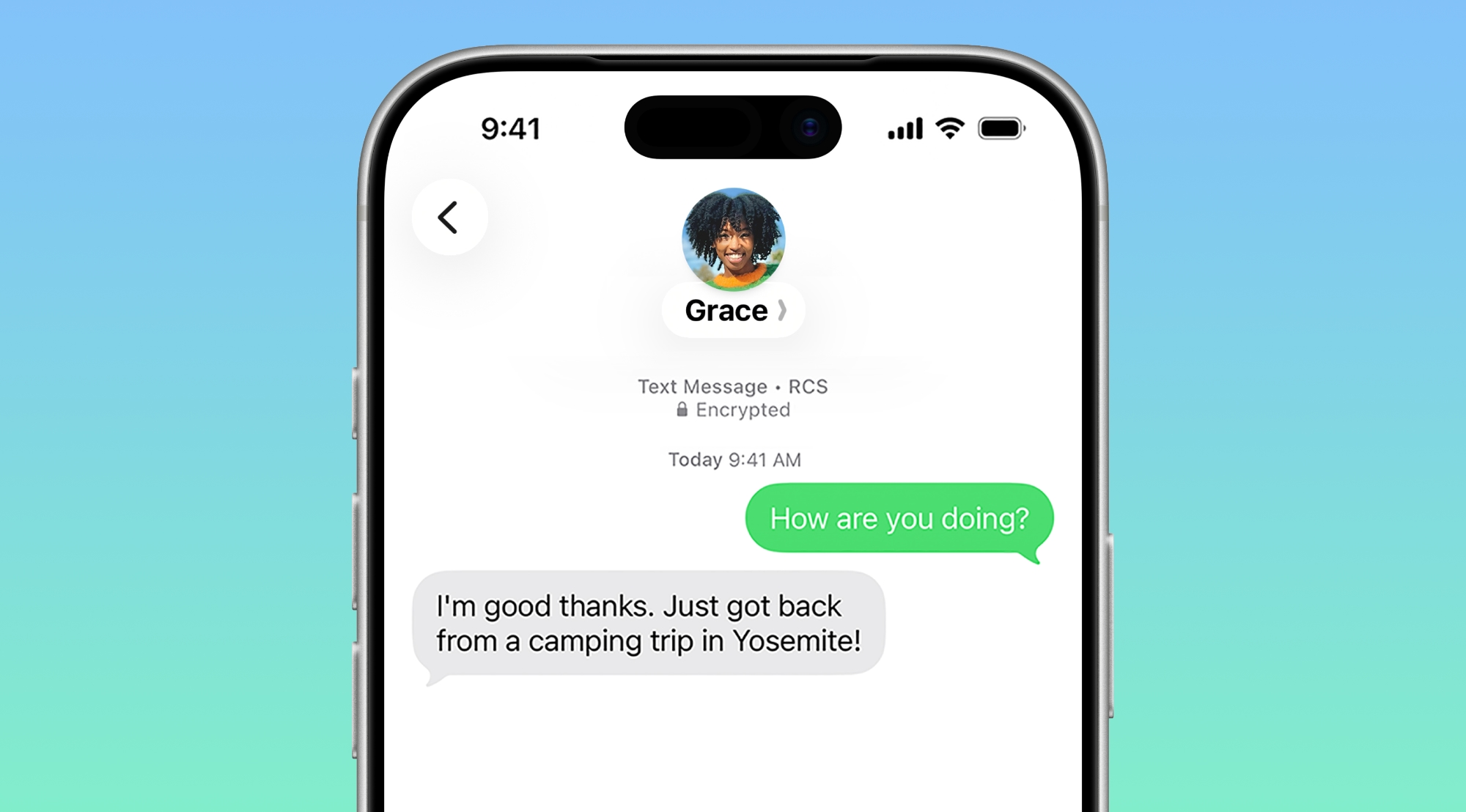
One of the most significant and welcomed changes in iOS 26.5 is the introduction of RCS (Rich Communication Services) support, complete with end-to-end encryption (E2EE) for messages exchanged between iPhones and Android devices. This is a monumental step forward for cross-platform communication.
For years, conversations between an iPhone and an Android phone (often referred to as the "green bubble" experience) were limited to the older, less secure SMS and MMS standards. These legacy protocols lacked many modern features, such as high-quality media sharing, typing indicators, read receipts, and, most importantly, robust encryption. This often led to a fragmented and less private messaging experience when communicating across device ecosystems.
What is RCS?
RCS is essentially the modern standard for text messaging, designed to replace SMS and MMS. Think of it as an upgrade that brings many of the features we've come to expect from apps like iMessage, WhatsApp, or Telegram directly into your default messaging app. With RCS, you can enjoy features like sending larger files and higher-quality photos/videos, seeing when someone is typing, knowing if your message has been read, and improved group chats, all without needing a third-party app.
What is End-to-End Encryption (E2EE)?
End-to-End Encryption is a crucial security feature that ensures only the sender and the intended recipient can read a message. This means that no one in between – not your carrier, not Apple, not Google, and certainly not any potential eavesdroppers – can access the content of your conversations. It's like having a private conversation where only you and the other person hold the key to decode what's being said. This level of privacy is paramount in today's digital world.
The Impact of E2EE for RCS
By bringing E2EE to RCS messages on iPhone, Apple is effectively bridging a significant gap in cross-platform security. Now, when you text your Android-using friends, those conversations can benefit from the same high level of security that iMessages already offer between iPhone users. This means greater peace of mind knowing your personal communications are protected, regardless of the recipient's device.
How it Works in iOS 26.5
For encrypted RCS messages to function, a few conditions must be met:
- Carrier Support: Both the sender and the receiver must be using a mobile carrier that supports the latest version of RCS. While many carriers worldwide have adopted RCS, its full capabilities, including E2EE, depend on their specific implementation.
- Gradual Rollout: This feature will roll out over time, meaning it might not be immediately available to all users simultaneously. Keep your software updated and check for carrier announcements.
- Default On: Importantly, end-to-end encryption for RCS is enabled by default. You won't have to search through settings to turn it on, making it seamless for users.
- Settings Toggle: For those who like control, there is a toggle in the Messages section of your iPhone's Settings app where you can manage this feature.
- Visual Confirmation: Encrypted messages will be clearly denoted with a small lock symbol, providing a visual cue that your conversation is secure.
This update not only enhances the privacy of cross-platform messaging but also improves the overall quality of communication, making the "green bubble" experience significantly better and more aligned with the secure and feature-rich standards of iMessage.
Personalize Your Lock Screen: New Pride Luminance Wallpaper
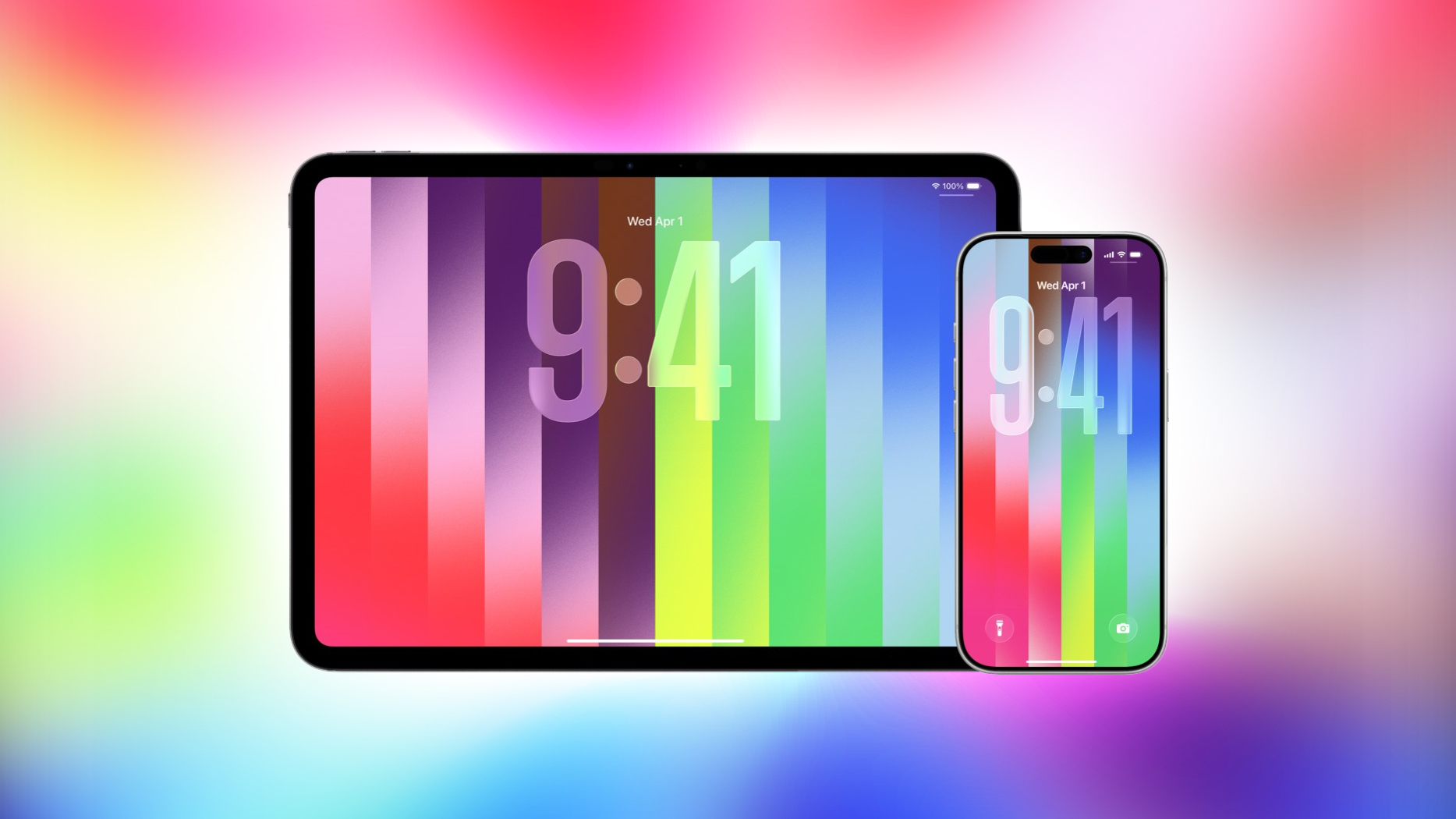
For users who enjoy personalizing their devices, iOS 26.5 introduces a vibrant new addition to the wallpaper collection: the Pride Luminance wallpaper. This colorful and dynamic background allows you to express your support for the LGBTQ+ community and personalize your iPhone with a fresh, meaningful look.
Vibrant Customization Options
The Pride Luminance wallpaper isn't just a static image; it offers multiple color options, allowing you to customize its appearance to your liking. You can experiment with different hues and styles to find the combination that best suits your aesthetic preferences and mood. This level of customization adds a personal touch, making your iPhone truly feel like your own.
Apple's Commitment to Inclusivity
This new wallpaper continues Apple's tradition of releasing Pride-themed digital content and accessories, often coinciding with Pride Month celebrations. It serves as a visual reminder of the company's ongoing commitment to diversity, equity, and inclusion, offering users a way to display their solidarity and support directly on their devices.
How to Set Your New Wallpaper
Applying the new wallpaper is straightforward. Simply navigate to your iPhone's Settings app, tap on "Wallpaper," then select "Add New Wallpaper." You'll find the Pride Luminance option among the various categories, ready for you to customize and set as your Lock Screen or Home Screen background. It's a simple yet impactful way to refresh your device's appearance and show your colors.
Smarter Navigation with Apple Maps Enhancements
The Maps app in iOS 26.5 receives a couple of notable updates, enhancing its utility and laying groundwork for future developments. These changes aim to make your navigation experience more intuitive and potentially introduce new ways to interact with local businesses.
Introducing "Suggested Places"
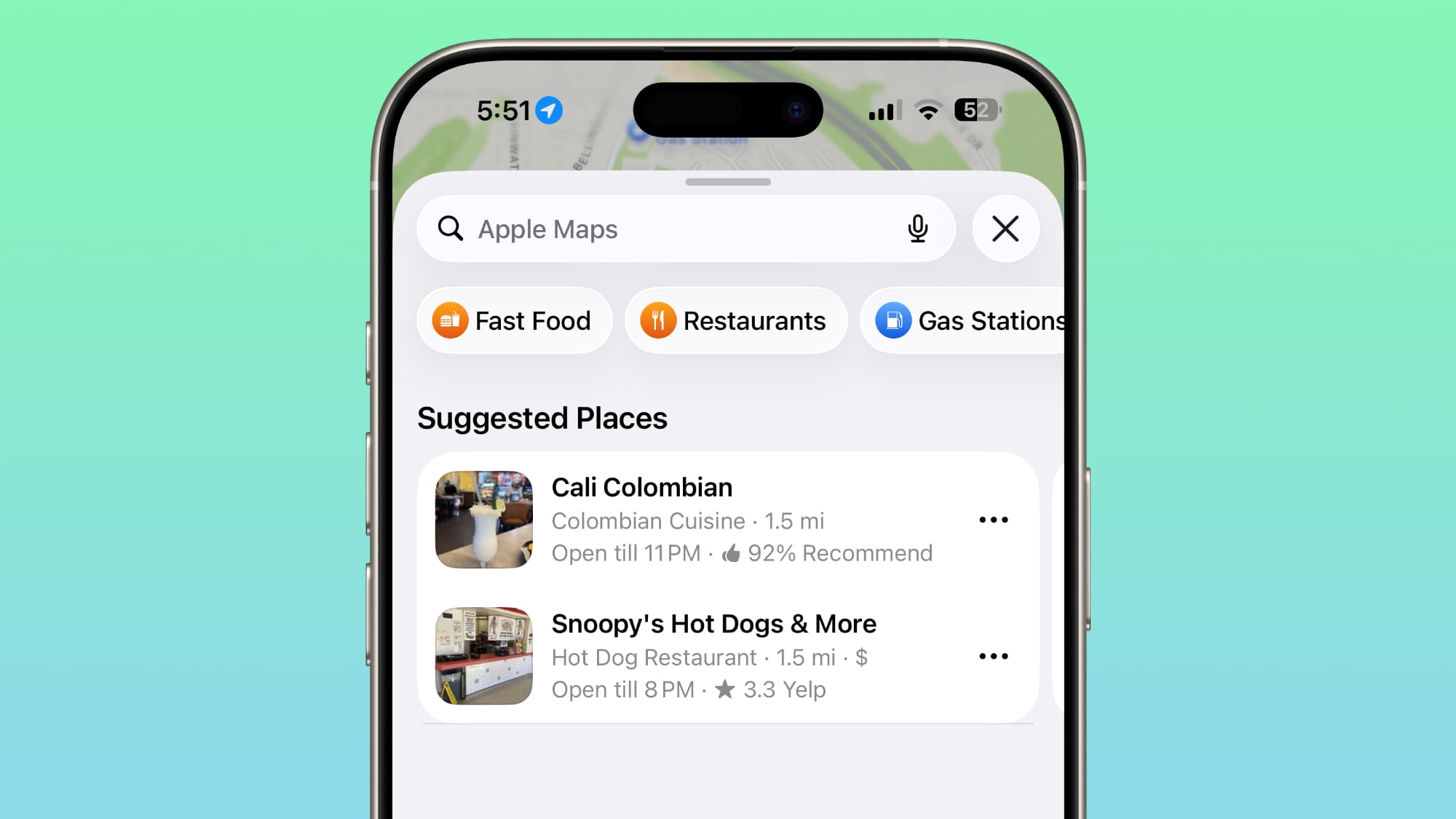
One of the user-facing improvements is the new "Suggested Places" feature. This intelligent addition to Apple Maps is designed to help you discover new locations and points of interest with greater ease.
- Personalized Recommendations: Suggested Places leverages your recent search history within the Maps app, as well as general trends and popular spots in your immediate vicinity. This means the recommendations are tailored to your interests and what's currently happening around you.
- Discover Local Gems: Whether you're looking for a new restaurant, a cozy coffee shop, a hidden park, or a trending tourist attraction, Suggested Places can proactively offer ideas. It acts like a personal local guide, helping you explore your surroundings more effectively.
- Convenience and Efficiency: Instead of having to manually search for things to do or places to visit, the app provides smart suggestions, saving you time and effort. This is particularly useful when you're in an unfamiliar area or simply looking for inspiration for your next outing.
Laying the Groundwork for Ads in Maps
Beyond user-facing features, iOS 26.5 also includes foundational code that lays the groundwork for the future introduction of advertisements within the Maps app. It's crucial to understand that while the groundwork is being set, these ads are not yet live. This means you won't immediately start seeing promotional content when you use Apple Maps after updating.
- What "Groundwork" Means: This typically refers to backend infrastructure, API changes, and other programming elements that would enable advertising features to be integrated seamlessly in the future. Apple is preparing the platform for a potential future monetization strategy.
- Potential Formats: While unconfirmed, ads in a mapping service could take various forms, such as sponsored listings appearing higher in search results for businesses, promoted pins on the map for specific locations, or special offers highlighted when viewing a business's profile.
- Why Ads? Introducing ads could represent a new revenue stream for Apple, similar to how other tech companies monetize their mapping services. Apple typically balances monetization with user experience and privacy, so it will be interesting to see how they approach ads in Maps if and when they become active.
- User Experience Consideration: The eventual introduction of ads will likely be a topic of discussion among users, balancing the potential for useful, relevant information from businesses against concerns about clutter or privacy. For now, users can rest assured that the Maps experience remains ad-free.
These updates collectively aim to make Apple Maps a more intelligent, personalized, and robust navigation and discovery tool, with an eye towards future expansions.
EU-Specific Changes: Expanded Support for Third-Party Wearables
In a significant move to comply with the European Union's Digital Markets Act (DMA), Apple has implemented changes in iOS 26.5 that open up previously exclusive features to third-party wearables within EU countries. The DMA is a law designed to ensure fair competition in the digital sector, preventing large "gatekeeper" companies from unfairly favoring their own products and services.
Historically, certain advanced features and seamless integrations on the iPhone were reserved solely for Apple's own accessories, like the Apple Watch and AirPods. This created a barrier for other wearable manufacturers, limiting the functionality their devices could offer to iPhone users. With iOS 26.5, Apple is now allowing third-party wearables to access some of these features, specifically for users located in the EU.
What's New for Third-Party Wearables in the EU:
- Proximity Pairing
Before: Connecting third-party earbuds or other Bluetooth accessories to an iPhone typically involved a multi-step process: navigating to Bluetooth settings, putting the accessory in pairing mode, selecting it from a list, and then confirming the connection. This was often less intuitive than the Apple-to-Apple experience.
Now: iOS 26.5 introduces proximity pairing for compatible third-party earbuds, mirroring the smooth experience of AirPods. When you bring a set of supported third-party earbuds near an iPhone, a convenient pop-up will appear on your iPhone screen, prompting a one-tap pairing process. This dramatically simplifies the connection process, making it just as quick and effortless to pair non-Apple earbuds as it is to pair AirPods. This enhancement removes a significant point of friction for users who prefer third-party audio solutions.
- iPhone Notifications
Before: While many third-party smartwatches could receive basic notifications from an iPhone, these were often "read-only." Users could view the notification on their wrist but couldn't interact with it – meaning they couldn't reply to messages, dismiss alerts, or perform quick actions directly from the watch. Interactive notifications were largely an exclusive domain of the Apple Watch.
Now: Third-party smartwatches that support this new interoperability can receive and allow users to *react* to iPhone notifications. This means you might be able to reply to text messages, archive emails, accept/decline calls, or interact with app-specific alerts directly from your non-Apple smartwatch. This significantly enhances the utility and integration of third-party wearables.
Important Note: There's a crucial limitation to be aware of. Notifications can only be forwarded to a single connected device at a time. If you enable interactive notifications for a third-party wearable, it will disable notifications on your Apple Watch. This forces users who own both an Apple Watch and a compatible third-party smartwatch to choose which device receives the primary notification stream.
- Live Activities
Before: Live Activities, which provide real-time updates directly on your iPhone's Lock Screen (e.g., sports scores, food delivery tracking, taxi arrival estimates), were a feature that could also be displayed seamlessly on an Apple Watch. However, this functionality was not available for third-party wearables.
Now: With iOS 26.5, Live Activities from the iPhone can be displayed on compatible third-party wearables. This means you can get at-a-glance, real-time updates directly on your non-Apple smartwatch, just as you would on an Apple Watch. This provides a consistent and convenient way to stay informed about events that are actively unfolding.
Implementation and Geographic Scope
It's important to understand that accessory makers will need to add support for these new interoperability updates to their devices. This means that these features may not be available immediately for all existing third-party wearables; firmware updates from manufacturers will likely be required. This initiative is designed to benefit a range of third-party devices, including smartwatches, headphones, and potentially even smart TVs that connect to iPhones.
Crucially, these expanded support features for third-party wearables are strictly limited to iPhone users located within the European Union. Your Apple account must be set to an EU country or region for these changes to take effect. This geographical restriction directly stems from Apple's obligation to comply with the EU's Digital Markets Act.
Easier iPhone to Android Data Transfer
Switching mobile platforms can often be a daunting task, particularly when it comes to migrating your precious data. While tools exist to help with the transition from iPhone to Android, the process of transferring message attachments has received a welcome improvement in iOS 26.5, offering users greater control.
When you decide to move from an iPhone to an Android device, a new setting now provides specific options for which message attachments you wish to transfer over. This granular control helps manage the volume of data being moved and ensures you only take what's most relevant to you.
The New Options for Message Attachment Transfer:
- All: This option will transfer every message attachment from your iPhone to your new Android device, ensuring nothing is left behind. This is ideal if you want a complete archive of your communications.
- 1 year: If you prefer to save storage space or only need more recent data, this choice allows you to transfer only those message attachments that are up to one year old. This is a good balance for many users, capturing recent memories and important documents without overwhelming your new phone.
- 30 days: For those who prioritize minimal data transfer or only need the very latest attachments, this option limits the transfer to attachments from the past 30 days. This can significantly speed up the transfer process and keep your new device lean.
This new setting simplifies the migration process by giving you direct control over your message data. It addresses a common pain point for users switching platforms, making the transition smoother and more user-friendly. By offering these choices, Apple helps reduce the friction often associated with leaving their ecosystem, providing a more thoughtful and considerate user experience.
Engage with Your Reading: Apple Books Awards
Book lovers have something new to look forward to in the Apple Books app. Although not yet fully public, recent analysis of the iOS 26.5 code has revealed mentions of new "awards" within the application. This discovery suggests Apple is planning to introduce a new gamification or achievement system for readers.
What These Awards Might Entail:
- Year-End Wrap-ups: The most likely scenario is that these awards will be part of personalized year-end wrap-ups, similar to popular features like Spotify Wrapped for music listeners or Apple Music Replay. These summaries would celebrate your reading achievements throughout the year, highlighting statistics and milestones.
- Reading Challenges: The awards could also be tied to specific reading challenges within the app, encouraging users to read more, explore new genres, or achieve certain reading goals.
- Achievement Badges: Imagine earning badges for reading a certain number of books, completing a particularly long novel, delving into a new genre, or maintaining a consistent reading streak.
Benefits for Readers:
Introducing awards can significantly enhance the user experience for Apple Books users by:
- Motivation: Providing a sense of accomplishment and encouraging users to read more.
- Engagement: Making the reading experience more interactive and fun.
- Personalization: Offering insights into individual reading habits and preferences.
- Community: Potentially allowing users to share their achievements with friends, fostering a sense of community among readers.
While the exact details and rollout timeline for these awards are still under wraps, their presence in iOS 26.5's code indicates an exciting future for the Apple Books app, aiming to make reading an even more rewarding digital experience.
Linguistic Inclusivity: New Keyboard Layout
Apple continues its commitment to supporting a diverse range of global languages and cultures by adding a new keyboard layout option in iOS 26.5: Inuktitut.
What is Inuktitut?
Inuktitut is one of the principal Inuit languages spoken in the Canadian Arctic, including parts of Nunavut, Quebec, Manitoba, and Newfoundland and Labrador. It is an indigenous language with a rich cultural heritage, and its unique syllabic writing system can be complex for digital input without dedicated support.
The Significance of This Addition
The inclusion of an Inuktitut keyboard layout is more than just a technical update; it's a powerful statement of inclusivity. It allows native Inuktitut speakers to communicate digitally in their mother tongue with greater ease and accuracy on their iPhones. This support helps:
- Preserve Language: By making it easier to use Inuktitut in digital communication, Apple contributes to the preservation and promotion of this indigenous language.
- Empower Users: It empowers Inuktitut speakers to express themselves authentically and connect with others in their native script, fostering a stronger sense of cultural identity in the digital realm.
- Improve Accessibility: It enhances the accessibility of the iPhone for a specific linguistic community, making the device truly global in its reach and utility.
This addition reflects Apple's ongoing efforts to ensure its devices are accessible and functional for as many linguistic communities as possible worldwide, showcasing a dedication to global diversity.
Crucial Protection: Over 50 Security Fixes
Perhaps the most critical, yet often overlooked, aspect of any software update is security. iOS 26.5 addresses more than 50 vulnerabilities, making it an essential update for every iPhone user. While these changes aren't glamorous, they are fundamental to keeping your personal data and device safe from potential threats.
What are Vulnerabilities?
In the world of cybersecurity, a "vulnerability" refers to a weakness or flaw in software that could potentially be exploited by malicious actors (hackers). These flaws could allow unauthorized access to your device, enable data theft, facilitate the installation of malware, or disrupt the normal functioning of your iPhone. Addressing these vulnerabilities is like patching holes in a fortress, making it much harder for intruders to get in.
Why You Should Update Immediately
- Protection Against Exploitation: Each of the 50+ fixed vulnerabilities represents a potential entry point for attackers. By updating, you close these doors, significantly reducing the risk of your device being compromised.
- Safeguarding Personal Data: Your iPhone holds a wealth of personal information, from banking details and photos to private messages and location data. Security updates are crucial for protecting this sensitive information from falling into the wrong hands.
- Preventing Malware: Patches often prevent the installation and execution of malicious software (malware), which can spy on you, slow down your device, or even render it unusable.
- Peace of Mind: Knowing your device is running the latest secure software provides peace of mind, allowing you to use your iPhone confidently for all your daily tasks.
"Not Actively Exploited" Explained
Apple has stated that none of these vulnerabilities are known to have been actively exploited in the wild. This means that, to Apple's knowledge, these specific flaws haven't yet been widely used by hackers in real-world attacks. However, this is not a reason to delay updating. Once a vulnerability is publicly disclosed (as it is in a security update notice), it becomes a target for malicious actors. They will then race to develop exploits based on the information provided, making it even more important to patch your device *before* they can succeed.
How to Update Your iPhone
Updating your iPhone is a simple process:
- Open the Settings app.
- Tap on General.
- Select Software Update.
- Tap Download and Install if the update is available.
Always ensure your iPhone is charged or connected to power and has a stable Wi-Fi connection before beginning the update. Prioritizing these security updates is perhaps the most important action you can take to maintain the integrity and safety of your device and your personal information.
Conclusion: Embrace the Improvements and Stay Secure
While iOS 26.5 may not boast the revolutionary Siri overhaul we're all looking forward to in iOS 27, it delivers a suite of meaningful and impactful enhancements that significantly improve the iPhone experience. From bolstering the privacy of your cross-platform messages with end-to-end encrypted RCS, to offering new ways to personalize your device and explore your surroundings with enhanced Maps features, this update touches on many aspects of daily usage.
For our users in the European Union, the expanded support for third-party wearables marks a significant step towards a more open and integrated ecosystem, bringing previously exclusive features to a wider range of accessories. And for all users, the crucial security fixes addressing over 50 vulnerabilities are an indispensable reason to update without delay. These patches protect your device and your personal information from emerging threats, ensuring your iPhone remains a secure and reliable tool.
We highly recommend updating your iPhone to iOS 26.5 as soon as possible to take advantage of these new features and, most importantly, to ensure your device benefits from the latest security protections. Keeping your software up-to-date is the simplest yet most effective way to safeguard your digital life.
This article, "iOS 26.5 Features: Everything New in iOS 26.5" first appeared on MacRumors.com
Discuss this article in our forums
from MacRumors
-via DynaSage
