
Google Previews Android 17 With 'Gemini Intelligence' a Month Before Apple's iOS 27 Reveal
Android 17: Ushering in the Era of Gemini Intelligence on Your Devices
Google has just given us a sneak peek at Android 17, the upcoming big update for its operating system that powers billions of smartphones and other gadgets worldwide. This new version is packed with exciting artificial intelligence (AI) capabilities, marking a significant step forward for Android. This reveal comes roughly a month before Apple is expected to show off iOS 27, which will also introduce its own set of new AI features.
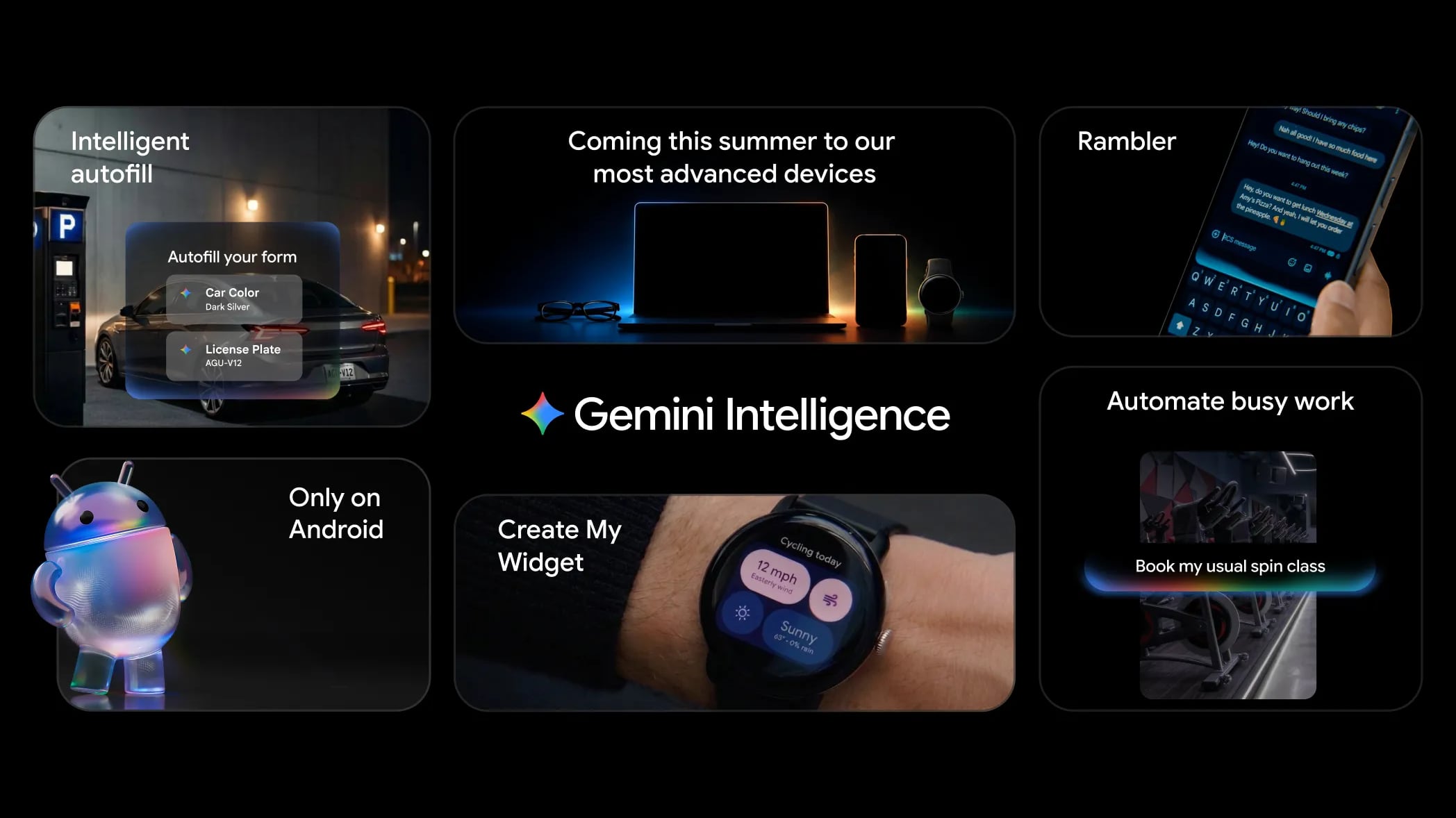
Introducing "Gemini Intelligence": Beyond an Operating System
Google is now formally referring to its AI features across Android as "Gemini Intelligence." This branding feels quite similar to what we've seen from Apple Intelligence, indicating a clear industry trend towards deeply integrated AI. Google explains its vision: Android is no longer just an operating system; it's transforming into an "intelligence system." This means your device will become much smarter, offering proactive help and performing tasks on its own, thanks to powerful AI that works directly on your device rather than relying solely on cloud servers. This "agentic AI" is designed to understand your needs and act on your behalf, making your daily interactions with technology more intuitive and efficient.
The shift from an "operating system" to an "intelligence system" isn't just a change in name; it represents a fundamental rethinking of how users interact with their devices. Traditionally, an operating system provides the tools and environment for apps to run. An intelligence system, however, aims to anticipate user needs, automate complex workflows, and personalize the user experience in ways previously unimaginable. Gemini Intelligence aims to be a constant, helpful presence, learning from your habits and preferences to offer assistance before you even realize you need it. This proactive approach signifies a move towards truly smart devices that can interpret context and execute multi-step tasks autonomously, truly becoming digital assistants in the fullest sense.
Key Pillars of Gemini Intelligence in Android 17
Android 17's Gemini Intelligence brings a suite of powerful new features designed to make your smartphone more capable and responsive than ever before. Let's dive into some of the most impactful additions:
Expanded Gemini Integration: Your Personal AI Agent
-
What it is: Gemini, Google's advanced AI model, will be much more deeply woven into the fabric of Android. This means it can take on a wider range of tasks autonomously, meaning it can complete them without you having to manually guide it through every step.
How it works: Imagine telling your phone, "Book me a spinning class for next Tuesday at 6 PM." With expanded Gemini integration, the AI won't just search for classes; it will understand the intent, check your calendar for conflicts, find available classes at your preferred gym (or suggest new ones), and then proceed to complete the booking, perhaps even adding it to your schedule and setting a reminder. Similarly, for purchases, Gemini could handle everything from finding the right product to adding it to a cart and initiating checkout, all based on a simple voice command or text prompt.
User benefits: This significantly reduces the friction of performing everyday digital tasks. Instead of opening multiple apps (calendar, fitness app, payment app), Gemini streamlines the process into a single interaction. It frees up your time and mental energy, allowing you to focus on the outcome rather than the steps required to get there. It's like having a highly efficient personal assistant living inside your phone, always ready to handle administrative chores.
Examples:
- "Plan a dinner reservation for four at a highly-rated Italian restaurant downtown for Saturday night." Gemini could check availability, make the reservation, and even send calendar invites to your friends.
- "Order my usual groceries for delivery tomorrow morning." Gemini would access your past orders, populate a cart, and schedule the delivery.
Visual Context: Understanding Your Screen
-
What it is: One of the most impressive new capabilities is Gemini's ability to "see" and understand what's displayed on your screen. This means it can draw context directly from the content you're viewing, making its assistance incredibly relevant and timely. This feature is also something Apple is expected to bring to its iPhones soon, highlighting its importance in next-generation AI experiences.
How it works: Google provided a fantastic example: picture yourself looking at a long shopping list in your notes app. Instead of manually copying each item into an online grocery store app, you could simply long-press the power button while viewing the list. Gemini would then instantly analyze the list, identify each item, and automatically build a shopping cart for delivery from a preferred retailer. This on-device processing ensures privacy and speed.
User benefits: This eliminates tedious manual data entry and switching between apps. It makes your phone smarter about what you're doing right now, offering proactive assistance that truly understands your immediate context. Whether you're planning a trip, researching a topic, or managing your day, Gemini can instantly act on the information right in front of you.
Examples:
- You're viewing an email with flight details for a trip. A quick gesture could prompt Gemini to add the flight to your calendar, create a packing list, or search for local attractions at your destination.
- Browsing an article about a new recipe. Gemini could offer to add the ingredients to your shopping list or find the recipe in a cooking app for easier tracking.
- Seeing a specific product in an image on a social media app. Gemini could help you find where to purchase that item online.
Smarter Web Browsing with Gemini in Chrome
-
What it is: Google is enhancing the Chrome browser with deeper Gemini integration, turning it into an even more powerful research and productivity tool. Beyond traditional browsing, Gemini will actively assist you in understanding and acting upon web content.
How it works: Gemini in Chrome will allow users to quickly research topics by asking questions about the content on a page, summarize lengthy articles or complex documents, and compare information from multiple open tabs. Imagine needing to grasp the main points of a detailed report or understand the differences between two competing products. Gemini can do this for you in an instant. Furthermore, "Chrome auto browse" takes automation a step further. It will be able to perform multi-step tasks directly within the browser, such as reserving a specific parking spot at an event or booking an appointment for a service.
User benefits: This feature is a game-changer for anyone who uses the web for research, planning, or decision-making. It drastically cuts down the time spent sifting through information and performing repetitive actions. Students can get quick summaries of academic papers, consumers can make informed purchasing decisions effortlessly, and busy individuals can automate mundane online administrative tasks.
Examples:
- Reading a long news article: "Summarize this article for me in three bullet points."
- Comparing two product pages: "What are the key differences between these two laptops?"
- Browsing a movie theater website: "Book two tickets for the 7 PM showing of 'Dune' in the best available seats."
- On a doctor's office website: "Book a check-up appointment for next month."
Autofill Powered by Personal Intelligence
-
What it is: Android's autofill capabilities are getting a major upgrade, leveraging Gemini's Personal Intelligence. This means your device will be able to intelligently fill in more text fields across various apps, drawing upon a richer, more personalized understanding of your information.
How it works: Gemini's Personal Intelligence will securely access information from across your Google ecosystem, including apps like Gmail and Google Photos. Instead of just remembering usernames and passwords, it can suggest relevant details like your travel dates from a confirmation email, a shipping address from a previous order, or even specific details you might need to provide in a form based on past communications. This processing is done on-device to ensure privacy, with your personal data remaining under your control.
User benefits: This makes filling out forms, signing up for services, or interacting with apps much faster and less error-prone. It's a subtle but powerful improvement to daily interactions, saving you precious seconds and reducing frustration caused by repeatedly typing the same information. The intelligence comes from Gemini understanding the context of the field and matching it with relevant, secure information from your personal data.
Examples:
- Filling out a new account registration: Gemini could automatically suggest your email, phone number, and even a profile picture from Google Photos.
- Booking a flight and needing to enter your passport details: If you have a scanned copy in Google Photos or details in a previous travel confirmation in Gmail, Gemini could suggest filling these fields.
- Ordering food: Beyond just your address, it could pre-fill dietary preferences or common requests gathered from past orders or emails.
Rambler: Intelligent Voice Dictation
-
What it is: Rambler is an innovative AI voice dictation feature designed to make spoken communication clearer and more concise. It intelligently processes your speech, removing common filler words and extracting the most important information to craft a polished message.
How it works: When you speak using Rambler, the AI actively listens for common conversational habits like "um," "ah," "like," and other verbal pauses. It then filters these out, focusing on the core content of your speech. More impressively, Rambler doesn't just clean up your words; it understands the essence of what you're trying to convey and can condense it into a more concise, articulate message. It's also capable of working with multiple languages simultaneously, making it incredibly versatile for multilingual users or international communications.
User benefits: This feature is invaluable for anyone who frequently uses voice input for messages, emails, or notes. It helps you sound more professional and articulate, even if you tend to use filler words in casual speech. For busy professionals, it means quicker, clearer communication without needing to proofread and edit extensively. For multilingual individuals, the ability to switch or blend languages seamlessly within dictation is a huge time-saver and convenience.
Examples:
- Instead of "So, um, I was thinking, like, maybe we could, ah, move the meeting to, like, Wednesday," Rambler would produce: "Let's move the meeting to Wednesday."
- Dictating a complex idea: Rambler would distill the key points into a focused paragraph.
- Speaking a mix of English and Spanish in a message, Rambler accurately transcribes and cleans up both.
Create My Widget: Personalized Home Screens
-
What it is: Android 17 introduces "Create My Widget," a feature that empowers users to design entirely custom widgets for their home screen simply by describing what they want in natural, everyday language. This moves beyond pre-defined widget options to truly personalized data displays.
How it works: Instead of navigating complex settings or downloading third-party apps, you can tell your phone things like, "Create a widget that shows me the weather for my commute and the next three upcoming events from my calendar." Gemini Intelligence will then interpret this request, gather the necessary information from relevant apps (weather, calendar), and generate a unique widget that displays this specific combination of data. Users can describe virtually anything they want to see at a glance, from providing the weather forecast and offering recipe suggestions to counting down to important events, displaying the current time, or showing real-time stock information.
User benefits: This feature transforms the Android home screen into a truly dynamic and personally relevant dashboard. Users no longer have to compromise with generic widgets; they can craft tools that serve their exact needs and preferences. It simplifies access to critical information, enhances productivity, and makes the phone feel more tailored to individual lifestyles. The ability to use natural language democratizes customization, making it accessible to everyone, not just tech-savvy users.
Examples:
- "Make a widget that shows me the current temperature, my most-used recipe, and how many days until my vacation."
- "Give me a widget with stock prices for Google and Apple, and a countdown to my son's birthday."
- "Create a widget that reminds me of my next task, the current air quality, and a motivational quote."
Other Exciting Changes Coming to Android 17
Beyond the groundbreaking Gemini Intelligence features, Android 17 brings a host of other enhancements and innovations that improve the visual experience, extend functionality to cars, and offer new tools for social media and digital well-being.
3D Emoji: Express Yourself in New Dimensions
-
What it is: Google is embracing a fresh, modern aesthetic with the adoption of "Noto 3D," an entirely new collection of three-dimensional emojis. This update moves beyond the flat or subtly shaded emojis we're used to, bringing a more vibrant and expressive look to your digital conversations.
How it works: These new 3D emojis will replace the existing set across Android devices, appearing in messaging apps, keyboards, and anywhere else emojis are used. The shift to 3D designs adds depth, texture, and a more playful quality, making your messages feel more lively and engaging. This is a purely visual update designed to enhance the fun and expressiveness of digital communication.
User benefits: A more visually appealing and expressive way to communicate emotions and ideas. The updated aesthetics make interactions feel more modern and dynamic. It's a small but delightful change that contributes to a more polished overall user experience.
Android Auto: A Smarter Drive
-
What it is: Android Auto, Google's platform for car infotainment systems, is getting a significant overhaul in Android 17. This includes expanded Gemini integration and a refreshed look, making your in-car experience safer, more convenient, and more intelligent.
How it works: The refreshed interface adopts the Material 3 Expressive design, offering a modern and customizable look. Users will gain access to customizable widgets on the car's display, allowing for personalized information at a glance. Google Maps will now offer edge-to-edge display, maximizing screen real estate, and "Immersive Navigation" will provide detailed 3D views to highlight important navigation details like complex intersections or specific lane guidance. Crucially, when your car is parked, Android Auto will support YouTube playback, offering entertainment during waits. Gemini Intelligence is deeply integrated, allowing you to use voice commands to automatically respond to incoming texts, initiate calls, or even order food for pickup at a nearby restaurant, all without touching your phone.
User benefits: A safer and more convenient driving experience. The refreshed design is visually appealing and easier to navigate. Customizable widgets mean drivers can prioritize information relevant to their journey. Immersive Navigation provides clearer guidance in challenging driving scenarios. YouTube playback adds entertainment during downtime. Gemini's integration reduces distractions, allowing drivers to keep their hands on the wheel and eyes on the road while still managing communication and errands.
Examples:
- Driving and receiving a text: "Gemini, reply 'On my way, be there in 10 minutes.'"
- Approaching a lunch break: "Gemini, find the nearest highly-rated coffee shop and order my usual for pickup."
- Stuck in traffic: "Open YouTube and play my driving playlist."
Google Built-in Cars: Deeper Integration
-
What it is: For cars that come with "Google built-in" (meaning Android Automotive OS is the car's native operating system), Android 17 delivers all the Android Auto enhancements plus even deeper levels of integration and functionality.
How it works: These vehicles will benefit from all the Android Auto features, including the new design, customizable widgets, Immersive Navigation, and YouTube playback. In addition, cars with Google built-in will gain access to popular meeting applications like Zoom directly from the infotainment system, making it possible to join calls from your vehicle (presumably only when parked, for safety). Gemini is also rolling out to these built-in systems, but with an added layer of intelligence: it will be able to answer questions specific to the vehicle it's installed in, acting as an intelligent owner's manual or diagnostic assistant.
User benefits: The ultimate connected car experience. Beyond navigation and entertainment, these vehicles become extensions of your digital workspace, allowing for seamless integration of professional tools. The vehicle-specific Gemini intelligence provides instant access to information about your car, from how to operate a specific feature to interpreting warning lights, without needing to consult a physical manual. This offers convenience, safety, and a more informed driving experience.
Examples:
- "Gemini, how do I activate the lane-keeping assist?"
- "What does this dashboard warning light mean?"
- "Join my 10 AM Zoom meeting." (while parked)
Screen Reactions: Dual-Camera Social Content
-
What it is: Screen Reactions is a new feature designed for social media enthusiasts, allowing users to film content using both the front and back cameras of their device simultaneously. This creates dynamic "reaction videos" or dual-perspective content.
How it works: When recording a video, users can activate Screen Reactions to capture footage from both cameras at the same time. This means you can show what you're reacting to (using the back camera) and your live reaction (using the front camera) in a single video. The output typically places your reaction in a smaller, overlaid window on top of the main content, a popular format for online creators.
User benefits: Enhanced creativity and engagement for social media content. It streamlines the process of creating reaction videos, travel vlogs, or instructional content where showing both the subject and the creator's perspective adds significant value. It saves time on editing and allows for more spontaneous, authentic content creation.
Instagram Integration: Elevating Android Visuals
-
What it is: Google has collaborated directly with Meta (the parent company of Instagram) to significantly improve the quality of photos and videos captured on Android devices and uploaded to Instagram. This addresses a long-standing complaint from Android users about their content appearing less polished on Instagram compared to iOS.
How it works: This partnership involves optimizing the underlying camera software on Android and the way Instagram processes media from these devices. The goal is to ensure that photos and videos retain their clarity, color accuracy, and overall quality when uploaded, reducing compression artifacts or loss of detail. Additionally, Google is introducing new tools within its "Edits" app specifically tailored for Instagram content, and improving the overall Instagram experience on Android tablets, providing a better-optimized interface for larger screens.
User benefits: Android users will finally be able to share high-quality visual content on Instagram that truly reflects what their device's camera captured. This levels the playing field with iOS users and enhances the overall visual integrity of the platform. Improved editing tools and tablet optimization further empower content creators and casual users alike.
Pause Point: Mindful Digital Well-being
-
What it is: Pause Point is an innovative digital well-being feature designed to help users manage compulsive app usage and reduce digital distractions. It introduces a mandatory pause before opening apps identified as potentially distracting, encouraging mindfulness.
How it works: Users can designate specific apps as "distracting." When attempting to open one of these apps, Pause Point intervenes with a 10-second breather. During this brief interlude, users are presented with options: they can engage in a short breathing exercise, set a timer to limit their time within the app, look at a curated selection of favorite photos (a positive distraction), or even choose to open an alternative, more productive app, such as an audiobook player. The key design choice here is that to turn off Pause Point for a specific app, users are required to restart their phone. This deliberate inconvenience makes it harder to casually bypass the feature and reinforces the commitment to digital well-being.
User benefits: This feature provides a much-needed moment of reflection before users dive into potentially time-consuming or distracting apps. It empowers individuals to regain control over their digital habits, fostering healthier relationships with their devices. By making it intentionally difficult to disable, Google encourages a more conscious approach to smartphone usage, helping users to be more present and productive.
Examples:
- Opening a social media app: Pause Point appears. You choose to do a quick breathing exercise, then decide to open a journaling app instead.
- Attempting to open a game: Pause Point reminds you of your intention to limit screen time. You set a 15-minute timer before the game launches.
- Feeling overwhelmed: Opening a designated distracting app triggers Pause Point, which then shows you a gallery of calming photos.
Availability and Rollout Timeline for Android 17
The exciting new Gemini Intelligence features, which represent a significant leap forward for Android, will be rolling out in phases. Google plans to begin this rollout over the summer, initially targeting the very latest Samsung Galaxy phones and its own Google Pixel devices. This strategic launch ensures that the most cutting-edge hardware can fully leverage the advanced on-device AI capabilities.
Following this initial wave, the expanded Gemini Intelligence experience will gradually make its way to a broader ecosystem of Android devices later in the year. This includes Android-powered smartwatches, car infotainment systems (both Android Auto and Google built-in), smart glasses, and laptops. This phased approach allows Google to ensure stability and optimize performance across diverse form factors and hardware configurations.
Specific components of Android 17 have more precise timelines. The enhanced Gemini features within the Chrome browser, offering smarter web research and automation, are expected to become available to users in late June. Similarly, many other core Android 17 features, beyond the initial Gemini Intelligence push, are slated to reach a stable, general release stage also in June, meaning users will start seeing these updates on compatible devices very soon.
The Future is Intelligent: Android 17's Vision
Android 17, with its central focus on "Gemini Intelligence," marks a pivotal moment for Google and the broader smartphone industry. By transforming Android from a mere operating system into an intelligent system, Google is setting a new standard for how our devices can proactively assist us, understand our context, and automate complex tasks. From booking classes with a simple command to generating custom widgets with natural language, these features are designed to make technology seamlessly blend into our lives, enhancing productivity and personal well-being. The deep integration of AI across various device categories, from phones to cars and wearables, signifies Google's commitment to creating a cohesive and smart ecosystem. As these features roll out, users can look forward to a more intuitive, efficient, and truly personalized Android experience, reshaping our daily interactions with digital technology.
This article, "Google Previews Android 17 With 'Gemini Intelligence' a Month Before Apple's iOS 27 Reveal" first appeared on MacRumors.com
Discuss this article in our forums
from MacRumors
-via DynaSage
