
Don't Want to Wait for iOS 27? Shortcuts Playground From MacStories Generates Shortcuts Using AI
Unlock Automation Now: Shortcuts Playground Delivers AI-Powered Shortcuts, No Wait for iOS 27
The tech world is buzzing with rumors about Apple's upcoming innovations. One of the most anticipated whispers revolves around iOS 27, specifically the potential integration of an artificial intelligence feature within the beloved Shortcuts app. Imagine simply telling your iPhone what you want a shortcut to do, and having it magically appear, ready to automate your daily tasks. This natural language interaction would revolutionize how users interact with their devices, making powerful automation accessible to everyone, regardless of their technical prowess.
However, for those eager to harness the power of AI-driven automation today, waiting for an unreleased operating system isn't an option. Thankfully, a brilliant mind in the Apple community has already delivered a solution. MacStories' Federico Viticci, a renowned expert in Apple automation and a figure synonymous with the Shortcuts community, has unveiled an ingenious AI tool that allows users to create complex shortcuts with natural language right now. This tool, aptly named Shortcuts Playground, bridges the gap between the desire for advanced automation and the technical knowledge often required to build it.
What Exactly Are Apple Shortcuts, and Why Do They Matter?
Before diving deep into Shortcuts Playground, let's establish a foundational understanding of Apple Shortcuts themselves. For many, Apple Shortcuts might seem like a niche feature, something only for the most tech-savvy users. In reality, Shortcuts are an incredibly powerful, yet often underutilized, tool integrated into iOS, iPadOS, and macOS. At their core, Shortcuts allow you to create custom workflows that automate tasks across your Apple devices and various apps.
Think of a shortcut as a sequence of actions that your device performs automatically with a single tap, a voice command to Siri, or even based on a schedule or location. These actions can range from simple tasks like sending a message to a specific contact, playing a favorite playlist, or getting directions home, to incredibly complex multi-step workflows that interact with multiple apps, adjust settings, and process data. For example, a "Good Morning" shortcut could simultaneously turn off your alarm, tell you the weather, brew your coffee (if you have smart home devices), and open your news app.
The beauty of Shortcuts lies in their ability to personalize your device experience and dramatically improve efficiency. They empower users to tailor their devices to their unique needs and routines, saving precious time and reducing repetitive manual actions. Instead of opening several apps and tapping through menus, a single shortcut can execute an entire sequence of operations, streamlining your digital life.
However, despite their immense utility, creating sophisticated shortcuts often involves a learning curve. The Shortcuts app uses a visual, drag-and-drop interface, but understanding the logic, available actions, variables, and conditional statements can be daunting for beginners. This is where the promise of AI, and specifically Shortcuts Playground, becomes so exciting: it democratizes access to this powerful automation, making it available to anyone who can describe what they want to achieve in plain English.
The Future of Automation: Apple's AI Vision for iOS 27
The rumors surrounding iOS 27 suggest a significant leap forward in Apple's approach to artificial intelligence. Central to these speculations is the idea of deeply integrating AI into core system functionalities, including the Shortcuts app. The vision is compelling: users would no longer need to navigate through a myriad of actions and parameters within the Shortcuts interface. Instead, they could simply articulate their desired outcome using natural language – speaking or typing a request – and the AI would intelligently construct the appropriate shortcut.
For instance, imagine saying, "Create a shortcut that sets my phone to Do Not Disturb, dims the screen, and opens my Kindle app when I get home after 9 PM." The AI, understanding the context, timing, and desired actions, would then generate a ready-to-use shortcut. This capability would drastically lower the barrier to entry for complex automation, inviting a broader user base to experiment with and benefit from Shortcuts.
This rumored feature aligns with a broader industry trend towards more intuitive, AI-driven user interfaces. Companies are striving to make technology more human-centric, allowing users to interact with devices in ways that feel natural and conversational. Apple's potential move into this space with Shortcuts in iOS 27 would cement their commitment to user-friendly innovation and personalized experiences.
While the prospect of Apple's official AI-powered Shortcuts is exciting, it remains in the realm of future updates. Users eager to embrace such capabilities now might feel a sense of impatience. This is precisely the void that Federico Viticci's Shortcuts Playground steps in to fill, offering a cutting-edge solution that's available today.
Introducing Shortcuts Playground: Your AI-Powered Automation Assistant Today
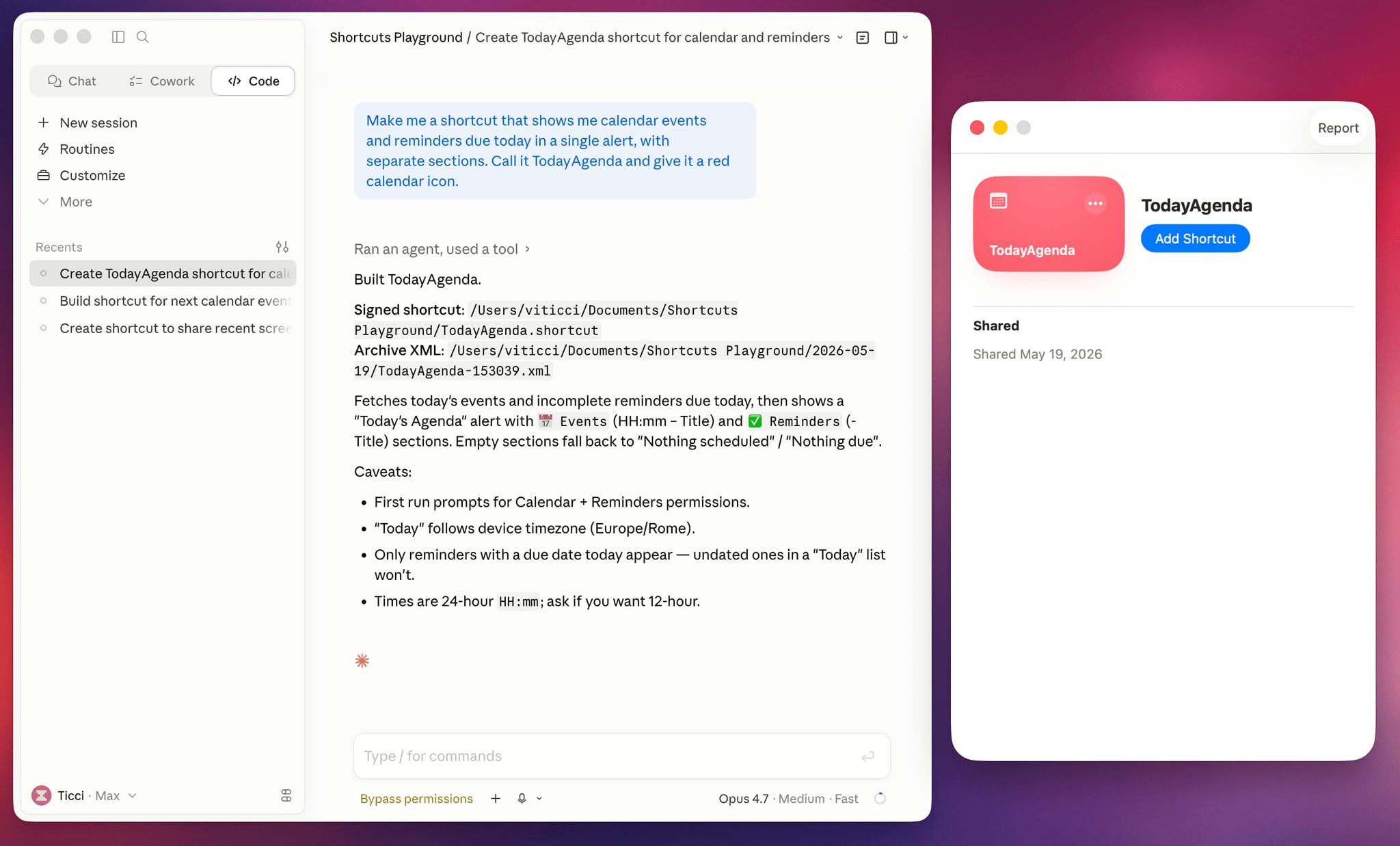
Federico Viticci's Shortcuts Playground isn't just a concept; it's a tangible, working solution that brings the power of AI to your Shortcuts creation process right now. It operates as a sophisticated plugin designed to work with advanced large language models such as Claude Code and OpenAI Codex. These powerful AI engines, known for their code generation and understanding capabilities, are the brains behind Shortcuts Playground, enabling it to translate human language into functional Apple Shortcuts.
The magic of Shortcuts Playground lies in its simplicity. Users are prompted to type in a brief, descriptive sentence outlining the shortcut they wish to create. For example, you might type, "Create a shortcut that reminds me where I parked my car and gives me directions back to it," or "Make a shortcut that adjusts my display settings for nighttime reading and activates my 'Focus' mode."
Once your request is entered, Shortcuts Playground leverages the immense processing power of Claude Code or OpenAI Codex. It interprets your natural language input, understands the various components of your request, and then meticulously constructs the necessary sequence of actions and logic that constitute an Apple Shortcut. This process, which can take mere minutes, culminates in a fully formed shortcut file. This file is then conveniently output to your Finder, ready for you to upload and integrate into your Apple Shortcuts app.
This innovative approach effectively removes the need for users to understand the intricacies of the Shortcuts app's interface, its various actions, or the complex logic required for multi-step automation. Instead, your natural language becomes the interface, transforming a complex task into a straightforward request. It's like having an expert Shortcuts programmer at your fingertips, ready to build whatever you envision, simply by describing it.
Open Source, Accessible, and Community-Driven
One of the most commendable aspects of Shortcuts Playground is Federico Viticci's decision to make it completely free and open source. This commitment to accessibility and transparency is a hallmark of the collaborative spirit often found in the developer community. By making the plugin available on GitHub, Viticci not only allows anyone to download and use the tool but also invites others to inspect its code, understand its mechanics, and potentially contribute to its ongoing development.
The open-source nature of Shortcuts Playground has several significant advantages. Firstly, it fosters trust; users can see exactly how the tool works, eliminating any concerns about hidden functionalities or data privacy. Secondly, it encourages community engagement. Developers and power users can delve into the codebase, propose improvements, identify bugs, and even fork the project to create their own specialized versions. This collaborative environment ensures that Shortcuts Playground can evolve and improve over time, benefiting from collective expertise.
Viticci has also provided detailed documentation on how the plugin operates, a crucial element for any open-source project. This documentation guides users through the setup process and explains the underlying principles, making it easier for even non-developers to get started and understand its capabilities. The transparency offered by the open-source model, combined with comprehensive documentation, underscores Viticci's dedication to empowering the Apple community.
While the AI models (Claude Code or OpenAI Codex) are incredibly powerful and capable of correcting minor errors during the shortcut creation process, Viticci wisely includes an important caveat: shortcuts generated by AI are not guaranteed to be 100 percent accurate. This serves as a vital reminder that while AI is a powerful assistant, human oversight remains essential. Users should always review and test the AI's output to ensure it functions exactly as intended and to make any necessary manual adjustments. This caution highlights a responsible approach to leveraging AI, acknowledging its strengths while recognizing its current limitations, particularly in the nuanced world of automation.
Getting Started with Shortcuts Playground: Bridging AI and Automation
The process of acquiring and utilizing Shortcuts Playground is designed to be as straightforward as possible, leveraging the capabilities of the AI agents themselves. To get started, you don't download an app in the traditional sense. Instead, you instruct your chosen AI agent, either Claude Code or OpenAI Codex, to interact with the plugin's repository. You simply provide the AI with a direct link to the GitHub repo where the Shortcuts Playground plugin resides.
Upon receiving the link, the AI agent, acting as an intelligent intermediary, will autonomously navigate to the specified repository. It will then intelligently identify the plugin within the AI's own "marketplace" or environment and proceed with the installation. This hands-off approach makes the setup remarkably simple for anyone familiar with interacting with these advanced AI models. It removes the need for manual file transfers, complex configurations, or specialized technical knowledge typically associated with installing plugins or developer tools.
Once installed within your AI environment, Shortcuts Playground becomes an integral part of your AI's capabilities. You can then begin crafting your shortcut requests using natural language, just as described previously. The integration is seamless, transforming your AI assistant into a powerful Shortcuts creator. This method of deployment is a testament to the evolving nature of software, where AI not only generates content but also manages its own tooling and extensions.
To help users visualize the potential of this tool, Viticci has thoughtfully provided several example shortcuts that showcase Shortcuts Playground's versatility. These examples serve as excellent starting points and inspiration for users to understand what's possible. Consider the utility of a shortcut that remembers the precise location of a parked car and then guides the driver back to it. This seemingly simple yet incredibly helpful automation could save countless minutes of searching in vast parking lots, leveraging GPS data and mapping applications.
Another powerful example demonstrates how Shortcuts Playground can manage device settings intelligently. Imagine a shortcut that, when activated at night, not only adjusts several display settings (like reducing brightness, enabling Night Shift or True Tone for eye comfort) but also simultaneously turns on a specific Focus mode (e.g., "Sleep Focus" or "Reading Focus"). This instantly transforms your device environment to suit your evening routine, minimizing distractions and preparing you for rest, all with a single command or automation trigger. These examples illustrate the profound impact AI-generated shortcuts can have on personal productivity and convenience, making everyday tasks smoother and more intuitive.
Elevating the Experience: Special Perks for Club MacStories+ and Premier Members
For dedicated followers of Federico Viticci and the MacStories ecosystem, there's an even more streamlined way to access and utilize Shortcuts Playground. Members of Club MacStories+ and Premier tiers receive an enhanced version of the tool, specifically tailored for a more integrated and efficient workflow. These exclusive memberships offer Shortcuts Playground as a generative shortcut itself, adding another layer of convenience and power.
What this means is that once the primary Shortcuts Playground plugin is installed on a Mac (which serves as the central hub for the AI processing), Club MacStories+ and Premier members gain access to an option that allows them to generate even more shortcuts directly through an Apple Shortcut. This "shortcut for creating shortcuts" significantly accelerates the workflow. Instead of having to interact with the AI model directly through its interface each time, members can simply run a pre-configured shortcut on their Mac.
This generative shortcut would prompt them for their desired automation description, feed it to the underlying AI engine (powered by Shortcuts Playground), and then, with an additional layer of automation, facilitate the direct installation of the newly generated shortcut onto their preferred device. This direct installation capability is a game-changer. It means that the output from Shortcuts Playground—the actual shortcut file—can be seamlessly pushed to an iPhone, iPad, or Mac without manual transfer steps. This eliminates the need to manually locate the file in Finder, AirDrop it, or use other transfer methods, making the entire process incredibly fluid and user-friendly.
This specialized integration for MacStories members highlights Viticci's dedication to providing a premium experience for his community. It transforms a powerful AI tool into an even more accessible and integrated part of their Apple device ecosystem, offering unparalleled convenience for power users and automation enthusiasts alike. It's a testament to the continuous innovation within the MacStories community, pushing the boundaries of what's possible with Apple's platforms.
Beyond AI Generation: The Redesigned MacStories Shortcuts Archive
While Shortcuts Playground offers a revolutionary way to create new automations, Federico Viticci understands that sometimes, a pre-built solution is exactly what's needed. Complementing the debut of Shortcuts Playground, Viticci is also launching a comprehensive redesign of the venerable MacStories Shortcuts Archive. This archive is a treasure trove of automation, a testament to years of dedicated work within the Apple Shortcuts community, and an invaluable resource for anyone looking to enhance their device's capabilities.
The redesigned archive now features an impressive collection of over 400 pre-built shortcut options. This extensive library covers a vast array of use cases, from productivity enhancements and system utilities to entertainment controls and creative tools. Whether you're a seasoned Shortcuts user looking for inspiration or a newcomer seeking ready-made solutions, the archive is an indispensable resource. Each shortcut is meticulously crafted, tested, and documented, ensuring reliability and ease of use.
The existence of such a robust archive alongside an innovative AI creation tool provides a comprehensive ecosystem for automation enthusiasts. Users can first browse the archive to see if a ready-made shortcut fits their needs. If not, or if they require something highly specific and custom, they can then turn to Shortcuts Playground to generate a bespoke solution using natural language. This dual approach offers the best of both worlds: a curated library for common needs and an AI engine for unique, on-demand creations.
The redesign not only updates the aesthetics and user experience of the archive but likely also improves discoverability, making it easier for users to search, filter, and find the perfect shortcut for their particular workflow. It's a clear indication of Viticci's ongoing commitment to the Shortcuts community, continuously striving to provide both cutting-edge innovation and reliable, well-documented resources. This combination solidifies MacStories' position as a leading authority and resource in the realm of Apple automation.
The Broader Impact: AI in Personal Automation and Beyond
The introduction of Shortcuts Playground is more than just a new tool; it's a significant marker in the ongoing evolution of personal automation and the role of artificial intelligence in our daily lives. This initiative, spearheaded by Federico Viticci, provides an early glimpse into a future where technology is not just responsive but proactively helpful and intuitively understandable.
By democratizing the creation of complex workflows, AI-powered tools like Shortcuts Playground empower a much wider audience. No longer will advanced automation be the exclusive domain of coders or tech enthusiasts. Anyone with an idea can now articulate it, and the AI can translate that intent into action. This shift has profound implications for productivity, accessibility, and the overall user experience.
Consider the potential for users with specific accessibility needs. Natural language input can remove significant barriers to interacting with complex software, enabling them to customize their devices in ways previously unavailable. For businesses, this could mean faster development of internal automation tools, tailored to specific team needs without extensive programming resources. In education, it could simplify learning about computational thinking and problem-solving through practical application.
Furthermore, Shortcuts Playground serves as an excellent case study for how open-source initiatives can drive innovation. By making the plugin freely available, Viticci not only fosters community collaboration but also accelerates the learning curve for others interested in integrating AI with existing platforms. It demonstrates how individuals and independent developers can build powerful tools that rival or even precede features from major tech companies, pushing the envelope of what's possible.
The ethical considerations surrounding AI are also highlighted. Viticci's caution about checking AI-generated shortcuts is a crucial reminder that while AI is powerful, it is a tool. Human judgment, testing, and refinement remain indispensable, especially when dealing with tasks that can impact device settings, data, or personal routines. This balanced perspective is vital as AI becomes more pervasive.
Ultimately, Shortcuts Playground paves the way for a future where our devices are not just smart but truly intelligent partners in our daily lives. It's a future where the barrier between human intent and technological execution becomes increasingly thin, allowing us to focus more on what we want to achieve and less on how to make the technology do it. It prepares us for the rumored AI features in iOS 27 and beyond, showing that the future of intuitive, AI-driven automation is not just coming, but is already here.
Why You Should Try Shortcuts Playground Today
For anyone who has ever felt frustrated by repetitive tasks on their Apple devices, or who has eyed the power of Shortcuts with a mix of awe and trepidation, Shortcuts Playground offers a compelling reason to jump into the world of automation. You don't have to wait for Apple's rumored iOS 27 AI features to begin transforming your digital workflow with the magic of natural language.
This innovative tool by Federico Viticci provides an immediate, accessible, and powerful solution for crafting custom automations. By leveraging the intelligence of Claude Code or OpenAI Codex, it translates your simple requests into functional Shortcuts, removing the technical hurdles that often deter users from exploring the full potential of Apple's automation capabilities. Whether you're looking to streamline your morning routine, manage your focus during work, or simply make your device more responsive to your daily needs, Shortcuts Playground empowers you to do so with unprecedented ease.
The fact that it's free and open source further enhances its appeal, inviting experimentation, community involvement, and continuous improvement. It's a testament to the ingenuity that thrives within the independent developer community, offering cutting-edge solutions that are both powerful and transparent. The included examples and the comprehensive MacStories Shortcuts Archive ensure that whether you're building from scratch or seeking inspiration, you have ample resources at your disposal.
So, why wait for the future when you can start automating with AI today? Dive into Shortcuts Playground, explore its capabilities, and experience firsthand how natural language can unlock a new level of productivity and personalization on your iPhone, iPad, and Mac. The journey into more intuitive, AI-driven personal automation begins now.
Where to Learn More and Get Started
For comprehensive details on Shortcuts Playground, including setup instructions, examples, and an in-depth explanation of its functionalities, be sure to visit the official page on MacStories. This resource, authored by Federico Viticci himself, provides all the necessary information to get you started on your AI-powered automation journey.
This article, "Don't Want to Wait for iOS 27? Shortcuts Playground From MacStories Generates Shortcuts Using AI" first appeared on MacRumors.com
Discuss this article in our forums
from MacRumors
-via DynaSage
