
Bartender Pro Brings Widgets, Clipboard, and File Storage to the MacBook Notch
Bartender Pro: Transform Your Mac's Notch into a Dynamic Powerhouse
In the evolving landscape of macOS, where every pixel and interaction counts, utility applications play a crucial role in enhancing user experience. One such beloved app, known for decluttering and optimizing the Mac menu bar, is Bartender. Today marks a significant leap forward in Mac productivity with the official launch of Bartender Pro, an eagerly anticipated upgrade that introduces an innovative "Top Shelf" feature. This new addition is designed to breathe new life into your Mac's notch, transforming it from a mere design element into a highly functional hub for your most essential tools and information.
For years, Mac users have relied on Bartender to bring order to their often-cluttered menu bars, providing quick access to applications while keeping the interface clean. Bartender Pro takes this philosophy to an entirely new level, leveraging the unique space of the Mac's notch to offer an experience akin to the iPhone's acclaimed Dynamic Island. It’s not just about managing icons anymore; it’s about creating an active, intelligent zone that anticipates your needs and puts crucial functionalities right where you need them, without demanding extra screen real estate.
The Mac Menu Bar: A History of Utility and Clutter
The Mac menu bar has always been a fundamental part of the macOS experience. It's a place for quick system access, application shortcuts, and status indicators. However, as users install more apps and system utilities, the menu bar can quickly become a chaotic mess, overflowing with icons that compete for space and attention. This clutter not only looks untidy but can also make it harder to find the specific tool you're looking for when you need it most. This is the problem Bartender set out to solve.
By allowing users to hide, organize, and quickly search for menu bar items, Bartender transformed a source of frustration into a model of efficiency. It empowered Mac users to customize their workspace, ensuring that only the most relevant information was visible at any given time. This foundation of intelligent organization and user-centric design is what makes Bartender so indispensable for countless professionals and everyday users alike.
Introducing Bartender Pro: A New Era of Mac Productivity
Building on its acclaimed legacy, Bartender Pro introduces a revolutionary concept that extends beyond simple menu bar management. It's about integrating deeper with the macOS interface, particularly by reimagining the functionality of the notch found on modern MacBooks. The "Top Shelf" feature is the cornerstone of this evolution, offering a suite of powerful utility tools accessible directly from this often-underutilized space. This isn't just an update; it's a redefinition of how we interact with our Macs, making them more dynamic and responsive to our immediate needs.
Bartender Pro isn't just about moving elements around; it's about creating a living, interactive zone that adapts to your workflow. Whether you're juggling multiple tasks, sharing files, or simply want to keep an eye on your system's vital signs, Top Shelf provides a seamless, intuitive experience. It promises to enhance productivity, streamline common tasks, and ultimately make your Mac feel even more personal and powerful.
Unveiling the "Top Shelf": Your Mac's Dynamic Command Center
The "Top Shelf" is more than just a new feature; it's a completely reimagined space on your Mac. Designed to sit within and expand from the MacBook's notch, it brings an unprecedented level of utility to the forefront. Let's dive into the core functionalities that make Top Shelf a game-changer for Mac users.
Clipboard Management Reimagined
Copying and pasting are fundamental actions, yet the standard macOS clipboard is surprisingly basic. Top Shelf elevates clipboard management to an art form, making it an indispensable tool for anyone who frequently handles text, images, or files.
With Top Shelf, you gain instant access to a robust clipboard history, allowing you to retrieve previously copied items with ease. Gone are the days of repeatedly copying and pasting or losing an important snippet because you copied something else. The clipboard can be configured to automatically capture content you copy, building a comprehensive history that you can scroll through and reuse at will. This is a massive time-saver for writers, developers, designers, and anyone engaged in research or data compilation.
Security is paramount, and Bartender Pro understands this. The clipboard feature includes an intelligent option to ignore passwords and other sensitive information, ensuring that your confidential data doesn't accidentally get stored in its history. This peace of mind is invaluable in today's digital landscape. Furthermore, you can customize the duration for which items are stored in your clipboard history, giving you complete control over your data retention.
Imagine you're compiling research for a report. You copy several links, a few quotes, an image, and a numerical value. Instead of pasting each one individually, Bartender Pro's Top Shelf lets you quickly browse your recent copies, selecting exactly what you need when you need it. This ability to temporarily hold a multitude of items transforms the simple act of copying into a powerful organizational tool, significantly boosting your efficiency and reducing context switching.
Effortless File Handling and Instant Sharing
Moving and sharing files quickly is a common need for almost every Mac user. Top Shelf introduces an incredibly intuitive way to manage files temporarily and send them instantly. It turns the notch into a dynamic drop zone, much like a temporary holding bay for your digital assets.
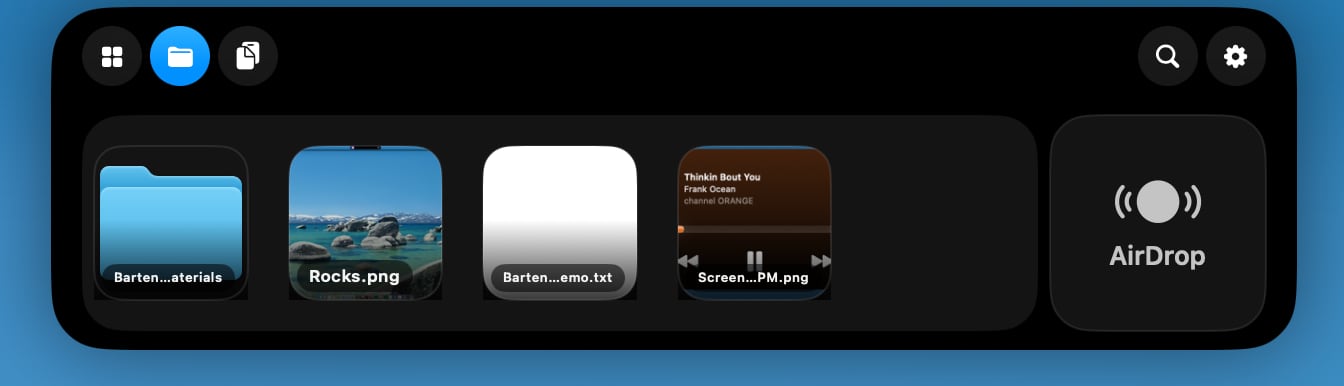
Users can simply drag files directly onto the notch to store them temporarily. This is perfect for when you're moving files between different applications, preparing them for an email, or simply need to hold onto something briefly without cluttering your desktop. For instance, if you're working on a presentation and need to grab several images from various folders, you can drag them all to the Top Shelf for quick access, then pull them into your presentation software one by one.
Beyond temporary storage, Top Shelf integrates seamlessly with AirDrop. Imagine you're sharing photos or documents with a colleague nearby. Instead of navigating through menus, you can drag the files to the notch and instantly initiate an AirDrop transfer. This fluid, drag-and-drop mechanism eliminates unnecessary clicks and menus, streamlining your workflow, especially in fast-paced environments. The customizable duration for file storage also ensures that your temporary files don't linger longer than necessary, maintaining a clean and efficient workspace.
Your Personal Media Hub: Music and Audio Controls
For many, music or podcasts are an essential part of the workday. Juggling media playback controls with other tasks can be distracting, often requiring you to switch applications. Top Shelf brings a full "Now Playing" music controller directly to your notch, ensuring your media is always within reach.
Whether you're immersed in Apple Music, Spotify, or other compatible music apps, Top Shelf provides intuitive controls for playback. You can pause, play, skip tracks, and adjust the volume without ever leaving your current application. This immediate access allows you to maintain focus on your primary task while still enjoying your favorite tunes or staying updated with a podcast. Receiving alerts when scheduled events are approaching means you'll never miss an important meeting or reminder, even if you're deep in a creative flow.
Consider a scenario where you're on a video call and need to quickly mute your system audio or adjust the volume. Instead of fumbling with system preferences or a physical keyboard, a quick tap on the Top Shelf provides instant control. This level of immediate media and audio management significantly enhances the user experience, making your Mac feel more integrated and responsive to your multimedia needs.
Smart Widgets for Smarter Living
Widgets have become a staple of modern operating systems, providing glanceable information without opening full applications. Top Shelf brings the power of customizable widgets to your Mac's notch, further personalizing and empowering your workspace.
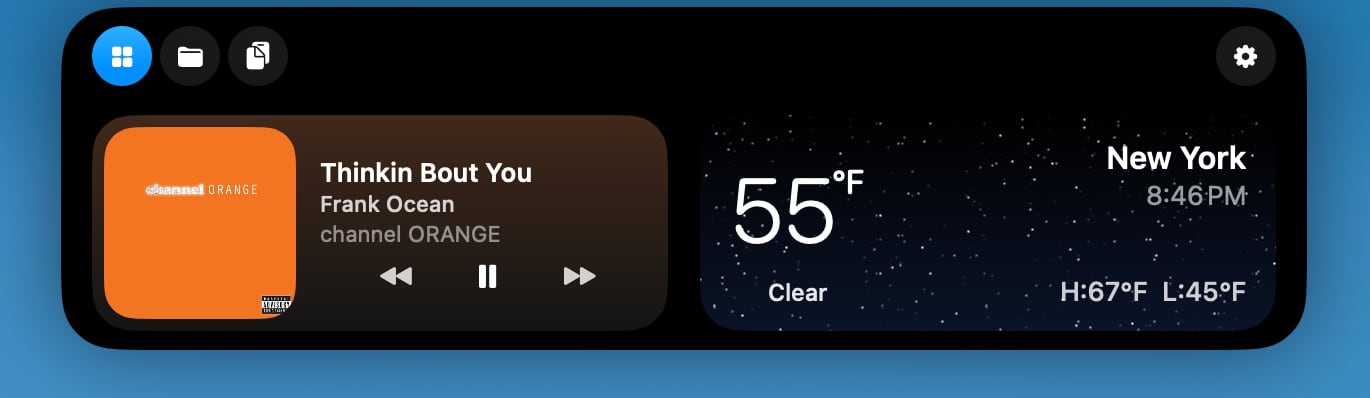
Imagine having your calendar events displayed prominently, reminding you of upcoming meetings or deadlines without needing to open your calendar app. Weather widgets can keep you informed about current conditions and forecasts, helping you plan your day. Music app widgets, like those for Apple Music or Spotify, provide not just playback controls but also album art and track information, enriching your auditory experience.
These widgets are fully customizable, allowing you to choose which information is most relevant to you. This means you can tailor your Top Shelf to reflect your daily routine, your personal interests, or your professional demands. It’s like having a miniature, dynamic dashboard that updates in real-time, providing immediate context and helping you stay organized and on schedule.
Live Activities, AI Insights, and System at a Glance
Drawing inspiration from the iPhone's Live Activities, Top Shelf also introduces a similar tracking feature, particularly for advanced AI agents like Codex and Claude Code. This capability opens up exciting possibilities for developers and power users who interact with AI models, allowing them to monitor processes or receive real-time updates directly in the notch area.
While the full scope of AI agent integration will evolve, the potential is immense: imagine tracking the progress of a complex code generation, a large language model's response, or the status of an ongoing AI-driven task without needing to switch to a dedicated application. This real-time feedback loop can significantly accelerate development workflows and enhance productivity for those working at the cutting edge of AI.
Beyond specialized AI tracking, Top Shelf also provides quick access to essential system information. You can instantly check your volume levels, adjust display brightness, or monitor your battery level, all from the intuitive interface of the notch. These small but crucial details are often tucked away in system settings, but with Bartender Pro, they are always front and center, empowering you with immediate control over your Mac's core functions. This helps in quick adjustments during presentations, calls, or when managing power consumption.
The Notch Transformed: A Dynamic Island for Your Mac
For many, the notch on modern MacBooks has been a point of contention – a necessary evil for the sake of thinner bezels and improved camera technology. Bartender Pro's Top Shelf fundamentally alters this perception. By expanding the size and functionality of the notch, it truly transforms it into something akin to the iPhone's Dynamic Island. This isn't just a passive design element anymore; it becomes an active, interactive space that adapts to your needs.
When files are dragged to it, or when music is playing, the notch visually expands and provides dynamic information and controls. This intelligent use of space ensures that the notch becomes an integral, useful part of your Mac's display, rather than just an interruption. It creates a fluid, organic user experience where critical information and actions are presented contextually, without intruding on your main workspace. This innovative approach to interface design showcases Bartender Pro's commitment to making the most of every aspect of your Mac.
Beyond the Notch: Universal Utility for Every Mac
While Bartender Pro's Top Shelf is ingeniously designed around the MacBook's notch, its utility isn't limited to these specific models. The developers have ensured that the functionality seamlessly extends to Macs that do not feature a notch. On such machines, Top Shelf gracefully integrates into the existing menu bar area, providing the same powerful features and dynamic interactions without requiring the physical notch space.
This universal compatibility means that all Mac users, regardless of their hardware generation, can benefit from the enhanced productivity and streamlined workflow that Bartender Pro offers. Whether you have a brand-new MacBook Pro with a notch or an older iMac, you can still leverage the advanced clipboard management, file handling, media controls, and smart widgets that Top Shelf provides. This thoughtful design ensures that Bartender Pro is a valuable upgrade for the entire Mac ecosystem.
Integrating Seamlessly with Bartender's Core Functionality
It's important to understand that Top Shelf doesn't replace Bartender; it complements it. All of the standard Bartender features you know and love are fully available with Bartender Pro. This means your menu bar icons will remain neatly organized, searchable, and accessible through Bartender's familiar interface.

When Top Shelf is not actively in use, it remains tucked away, maintaining a discreet presence much like Bartender's hidden menu bar icons. This ensures that your screen remains clutter-free. Furthermore, when you expand Bartender to view your hidden menu bar items, Top Shelf gracefully disappears, avoiding any visual conflict and allowing Bartender to maintain its primary focus. This intelligent interplay between the two features ensures a harmonious and efficient user experience, where each component serves its purpose without interference.
Who is Bartender Pro For?
Bartender Pro, with its powerful Top Shelf feature, caters to a wide range of Mac users who are looking to maximize their productivity and streamline their digital lives. It's particularly beneficial for:
- Power Users: Those who juggle multiple applications, frequently copy and paste complex information, and need instant access to system controls.
- Creatives and Developers: Individuals who often manage numerous files, snippets of code, or design assets, and require quick sharing capabilities or real-time AI process tracking.
- Professionals: Anyone who needs to stay on top of their schedule with smart calendar widgets, control media during calls or focused work, and quickly access essential tools without interruption.
- MacBook Notch Owners: Users of modern MacBooks who want to turn their notch into a functional, dynamic hub, rather than just an aesthetic feature.
- Productivity Enthusiasts: Individuals always looking for new ways to optimize their workflow, reduce friction, and make their Mac experience more efficient and enjoyable.
If you find yourself constantly switching between apps for basic tasks, struggling with a cluttered menu bar, or wishing your Mac was more responsive to your immediate needs, Bartender Pro is designed precisely for you.
Choosing Your Bartender: Pro vs. Bartender 6 vs. Mega Supporter
Bartender Pro offers flexible pricing options to suit different user needs and budgets, ensuring that you can choose the right level of access to this powerful utility.
For those who want the full suite of new features, including the innovative Top Shelf, Bartender Pro is available for $15 per year. This subscription includes not only Bartender Pro but also Bartender 6, all future upgrades for the duration of your subscription, and access to the complete Bartender Pro suite. This is the ideal option for users who want to stay at the forefront of Mac productivity and consistently receive the latest enhancements and features.
If your primary need is robust menu bar management without the advanced Top Shelf features, Bartender 6 is still available as a one-time purchase for $20. This is perfect for users who are satisfied with Bartender's core functionality of decluttering and organizing their menu bar icons. It offers lifetime access to Bartender 6 and its updates, representing excellent value for a stable and mature application.
For the ultimate Bartender experience and long-term commitment, the $80 "Mega Supporter" option continues to be available. This premium tier provides lifetime Bartender access, and crucially, it includes Bartender Pro. This is the best choice for dedicated Bartender fans who want to support its ongoing development and never worry about future upgrade costs, while also gaining access to all the cutting-edge features of Bartender Pro. It's a single investment for endless productivity.
All versions of Bartender Pro and Bartender 6 are conveniently available directly from the Bartender website. The flexibility in pricing ensures that whether you're a casual user seeking organization or a power user demanding the latest innovations, there's a Bartender option that fits your workflow and budget.
Getting Started with Bartender Pro
Adopting Bartender Pro is a straightforward process designed for ease of use. Once you’ve made your purchase on the Bartender website, you’ll receive a download link and activation instructions. The installation typically involves dragging the application to your Applications folder and then launching it. Bartender Pro will then guide you through initial setup steps, including granting necessary permissions (like accessibility access for its full functionality) and configuring your preferences for both menu bar organization and the exciting new Top Shelf features.
The intuitive interface makes it easy to customize your Top Shelf experience – selecting which widgets you want to display, setting up clipboard preferences, and defining your desired file storage durations. You’ll be able to see the immediate impact of Top Shelf as it comes to life within your Mac’s notch, ready to streamline your daily tasks from the moment you begin using it.
The Future of Mac Productivity is Here
Bartender Pro represents more than just an update to a popular app; it signifies a thoughtful evolution in how we interact with our Mac. By transforming the previously passive notch into a dynamic, interactive "Top Shelf," it addresses long-standing needs for quick access to tools, efficient file management, and seamless media control. The comparison to the iPhone's Dynamic Island is apt, as Bartender Pro similarly makes a physical design element an integral and valuable part of the user interface.
This innovative approach not only declutters your digital workspace but also empowers you with unparalleled control and efficiency. Whether you're a creative professional, a busy developer, or simply someone who appreciates a highly optimized computing experience, Bartender Pro offers tangible benefits that will reshape your daily interactions with your Mac. It’s a powerful testament to the ongoing innovation within the macOS utility landscape, proving that even the smallest spaces on our screens can be transformed into mighty productivity hubs. Embrace the future of Mac productivity – it's dynamic, intelligent, and begins with Bartender Pro.
This article, "Bartender Pro Brings Widgets, Clipboard, and File Storage to the MacBook Notch" first appeared on MacRumors.com
Discuss this article in our forums
from MacRumors
-via DynaSage
