
Valve’s New Steam Controller: The Kotaku Review
Valve's New Gamepad: A Deep Dive into a Premium PC Gaming Revolution
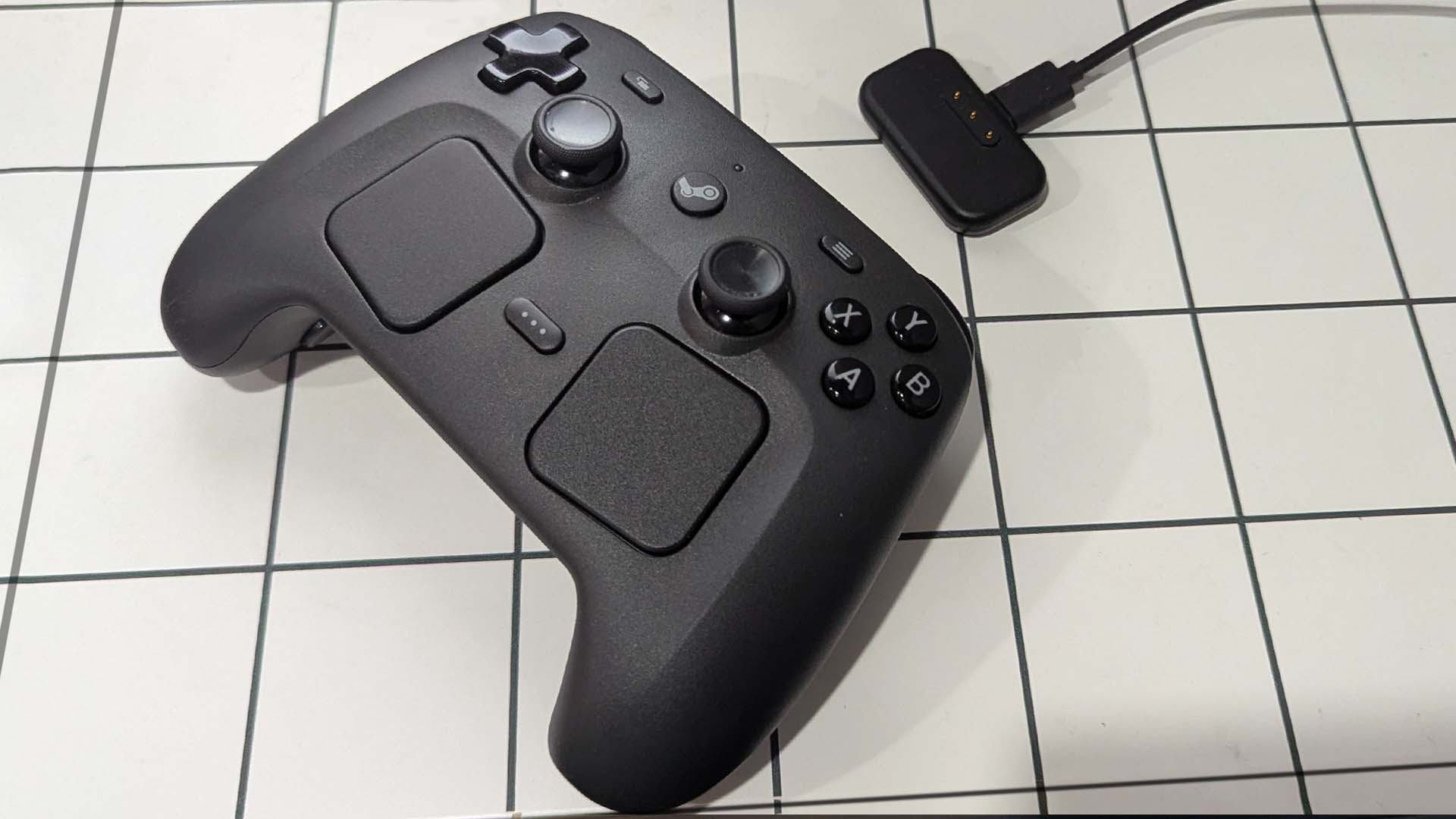
Introduction: A New Era for PC Gaming Controllers
From the creators of legendary games like Half-Life and innovators behind platforms like Steam, comes a brand-new piece of gaming hardware poised to shake up the controller landscape. This isn't just another gamepad; it's a meticulously crafted device designed to bridge the gap between traditional console-style gaming and the precision demands of PC titles. While its premium price tag might raise an eyebrow, a closer look reveals a "fantastic gamepad" that justifies its cost through unparalleled customization, innovative design, and a dedication to enhancing the entire PC gaming experience. Let's delve deep into what makes Valve's latest offering a potential game-changer for enthusiasts and casual players alike.
For years, PC gamers have navigated a unique challenge: how to comfortably enjoy a vast library of games with diverse control schemes. Traditional controllers excel for action games and platformers but often fall short for genres like real-time strategy, complex simulations, or first-person shooters, where a mouse and keyboard reign supreme. Valve's new gamepad aims to resolve this dilemma, offering a versatile solution that doesn't compromise on precision or comfort. It represents Valve's continued commitment to hardware innovation, following in the footsteps of their groundbreaking Steam Deck and the original Steam Controller. This device isn't just an accessory; it's an extension of the Steam ecosystem, meticulously engineered to unlock new ways to play your entire Steam library.
The Vision Behind Valve's Gamepad: Redefining Control
Valve has never been content with simply replicating existing hardware. Their approach has always been about identifying unmet needs in the PC gaming space and creating novel solutions. This new gamepad is a testament to that philosophy. Its core vision is to provide a single, highly adaptable input device that can confidently tackle any game, from fast-paced competitive shooters to intricate grand strategies, all from the comfort of your couch. It’s about empowering players with control previously limited to a mouse and keyboard, but in a handheld, ergonomic form factor. This isn't just about playing controller-friendly games; it's about making *any* PC game controller-friendly.
The device’s design clearly prioritizes flexibility and user empowerment. Valve understands that no two gamers are alike, and no two games demand the exact same control scheme. Therefore, rather than dictating how you play, the gamepad offers an unprecedented level of configuration, allowing users to tailor every input to their personal preferences and the specific demands of each game. This user-centric design philosophy is what truly sets it apart from more conventional gamepads. It’s a tool for exploration, enabling gamers to experiment with new ways to interact with their favorite titles and even discover new genres they might have previously avoided due to control limitations. This commitment to player agency is a hallmark of Valve's hardware endeavors, making their new gamepad more than just a peripheral – it's an experience enhancer.
Design Revolution: Trackpads, Gyro, and Haptics
At first glance, Valve's new gamepad might look familiar, but upon closer inspection, its innovative features quickly become apparent. It eschews a traditional second analog stick in favor of a pair of high-precision haptic trackpads, combined with a powerful gyroscope and customizable grip buttons. These elements, working in concert, form the backbone of its versatility and precision.
The Trackpads: Precision Redefined
The most distinctive feature of Valve's gamepad is its dual haptic trackpads. Unlike the limited movement of a thumbstick, these trackpads offer a vast surface area for input, mimicking the precise, sweeping movements of a mouse. This is a game-changer for genres that traditionally struggle with controllers, such as first-person shooters, real-time strategy games, and even desktop navigation. The right trackpad, in particular, often replaces the mouse, providing incredibly accurate aiming and camera control. Its configurable sensitivity allows for fine-tuning, from quick turns to pixel-perfect adjustments.
What elevates these trackpads beyond simple touchpads is the integrated haptic feedback. This technology uses tiny, powerful actuators to create a wide range of tactile sensations. When you move your thumb across a trackpad configured as a mouse, you don't just see the cursor move; you *feel* the friction, the inertia, and even the "click" of discrete steps if configured that way. This tactile feedback is crucial for muscle memory and immersion, providing physical cues that enhance precision and make the trackpads feel more substantial and responsive than a mere flat surface. For instance, in a shooting game, you might feel a subtle rumble as you cross a target, or a "ratcheting" sensation as you scroll through weapon options. This blend of visual, auditory, and tactile feedback creates an unparalleled control experience that is both precise and deeply engaging.
Gyroscopic Control: A New Dimension of Aiming
Complementing the trackpads is the gamepad's integrated gyroscope. This sophisticated sensor detects the physical rotation and tilt of the controller itself. When activated, the gyro allows for incredibly fine aiming adjustments by simply rotating the gamepad in your hands. Imagine lining up a shot in an FPS game with the right trackpad, then making small, precise corrections by slightly tilting the controller – much like physically aiming a laser pointer. This combination, often called "gyro aiming," provides a level of accuracy that rivals a mouse, far surpassing what's possible with a conventional analog stick alone.
The beauty of gyro control lies in its intuitive nature and its ability to act as a secondary, fine-tuning input. It doesn't replace the broader movements of the trackpad but augments them, providing an extra layer of precision for critical moments. This synergy allows players to execute complex maneuvers with greater ease and confidence, making headshots more achievable and navigating intricate interfaces less cumbersome. Furthermore, the gyro can be configured for various purposes, from steering vehicles to manipulating in-game objects, showcasing its versatility beyond just aiming.
Immersive Haptics: Feel Every Action
Beyond the trackpads, the advanced haptic feedback system permeates the entire gamepad experience. High-definition haptics go beyond simple rumbling; they can simulate a wide array of textures, impacts, and sensations. This means that a subtle vibration might indicate a successful reload, a distinct "thump" could signal a powerful melee attack, or a rapid pulse could warn of an approaching enemy. These nuanced tactile cues enhance immersion significantly, providing feedback that is often more immediate and informative than visual or auditory signals alone.
The haptics are deeply integrated with Steam Input, allowing for highly customizable feedback profiles. This means developers can design specific haptic experiences for their games, or players can create their own to suit their preferences. For instance, pressing a button could generate a distinct click sensation, making the membrane buttons feel more mechanical. The precise nature of these haptics also helps in navigating menus or feeling out virtual D-pads on the trackpads, offering a crucial layer of feedback when direct visual confirmation isn't instantaneous. This attention to tactile detail elevates the gaming experience, making interactions feel more physical and responsive.
Unrivaled Customization: The Power of Steam Input
What truly unlocks the potential of Valve's new gamepad is its deep integration with Steam Input. This powerful, free tool built into the Steam client allows users to remap every single button, trigger, trackpad, and gyroscope input on the controller. This isn't just basic button remapping; it's an entire universe of configuration options that can turn the gamepad into virtually any input device you can imagine. This level of adaptability is what transforms it from a mere controller into a truly personal gaming instrument.
Community Configurations: A Starting Point for Everyone
Recognizing that not everyone wants to spend hours fine-tuning settings, Valve has fostered a vibrant community around Steam Input. For virtually any game in your Steam library, you can browse and download configurations created and shared by other players. These community profiles range from simple, well-optimized setups to highly specialized configurations designed for specific playstyles or accessibility needs. This means you can often download a well-regarded configuration for a new game, jump straight in, and have an excellent experience with minimal effort. It's an invaluable resource for both newcomers and seasoned users, providing a diverse library of proven setups for almost any title.
The community aspect also promotes experimentation and iteration. Users can take an existing configuration, tweak it to their liking, and then share their improved version. This iterative process continually refines the available options, ensuring that there's usually a fantastic starting point for any game. This collective intelligence significantly lowers the barrier to entry for what might otherwise seem like a dauntingly complex device, ensuring that even those hesitant to delve into advanced settings can still reap the benefits of the gamepad's flexibility. It transforms individual customization into a shared, evolving resource.
Deep Dive into Personalization: Layers, Action Sets, and More
For those who love to tinker, Steam Input offers an incredible array of advanced features. You can create multiple "Action Sets" for a single game, allowing the entire controller layout to change dynamically based on the in-game context. For example, one Action Set could be for on-foot exploration, another for driving a vehicle, and a third for navigating menus. Each set can have its own unique mapping for every input. Furthermore, "Action Layers" allow you to temporarily modify parts of a configuration by holding down a specific button, adding even more depth and functionality without cluttering the primary layout. This means a single button can have different functions depending on what other buttons are pressed or what layer is active.
Beyond these structural elements, Steam Input provides granular control over individual inputs. You can adjust sensitivity curves, add dead zones, enable "soft pulls" and "full pulls" for triggers (mimicking a two-stage button), create complex macro commands, and even assign entire keyboard and mouse combinations to a single button press. The trackpads can be configured as a mouse, a joystick, a scroll wheel, a D-pad, or even a radial menu. The gyroscope can be set to activate only when a specific button is held, or always on with varying sensitivities. Every aspect, from rumble intensity to LED brightness, can be tailored. This level of detail ensures that players can truly make the gamepad their own, crafting bespoke control schemes that perfectly match their playstyle and the specific demands of any game, offering a level of personalization simply unmatched by any other mainstream controller. It’s this intricate web of options that allows the gamepad to excel across such a diverse range of genres and user preferences, making it a powerful tool for accessibility as well as competitive play.
The Price Tag: Is It Worth the Investment?
Valve's new gamepad, like many premium gaming peripherals, comes with a price tag that positions it above standard controllers. This might be a sticking point for some, especially those accustomed to the more affordable entry-level options from console manufacturers. However, when evaluating its cost, it's crucial to consider the device's feature set, build quality, and unparalleled versatility. This isn't merely a slightly upgraded version of a common design; it's a fundamentally different approach to controller input, packed with advanced technology.
Beyond the Cost: Value in Versatility and Innovation
Comparing Valve's gamepad solely on price to a standard Xbox or PlayStation controller misses the point. It's more akin to high-end "elite" controllers like the Xbox Elite Wireless Controller or Scuf controllers, which also command premium prices. These controllers justify their cost through superior build materials, additional paddles, and advanced customization. Valve's gamepad offers all of this and more, with its unique trackpad and gyro system providing a level of control and adaptability that even these elite controllers cannot match for PC-specific genres. It essentially combines the functions of a traditional gamepad, a mouse, and often a mini-keyboard into one ergonomic device.
The value proposition extends beyond its hardware features to its software ecosystem. The power of Steam Input, which is constantly updated and refined by Valve, adds immense long-term value. This software not only allows for infinite customization but also ensures the controller remains relevant and functional with new games and evolving control paradigms. Furthermore, the ability to play virtually *any* game in your Steam library with a controller – even those designed exclusively for mouse and keyboard – unlocks a new dimension of gaming enjoyment. For a dedicated PC gamer, the investment in Valve's gamepad could mean avoiding the need for separate peripherals for different genres, consolidating their setup, and experiencing a truly unified gaming experience. It's an investment in a highly capable, future-proof, and deeply personal gaming tool.
Ergonomics and Build Quality: Designed for Comfort and Durability
Comfort during long gaming sessions is paramount, and Valve has paid careful attention to the ergonomics of their new gamepad. It features a sculpted design that feels natural in the hands, with textured grips that prevent slipping. The weight distribution is balanced, reducing fatigue, and all primary controls are easily accessible without awkward stretches. The placement of the trackpads, face buttons, and especially the rear grip buttons, has been optimized for intuitive use, minimizing the learning curve for physical interaction even as you adapt to new input methods.
In terms of build quality, the gamepad feels robust and durable. High-quality plastics, precise button mechanisms, and responsive triggers indicate a product designed to withstand the rigors of enthusiastic gaming. The haptic actuators, a critical component, are engineered for reliability and consistent performance. This premium construction ensures that the investment in the gamepad translates into a long-lasting and reliable piece of hardware, capable of enduring countless hours of intense gameplay. Valve’s reputation for solid hardware, as demonstrated by the Steam Deck, further reinforces confidence in the gamepad’s robust construction and attention to detail.
Overcoming the Learning Curve: A Rewarding Journey
It’s important to acknowledge that Valve's new gamepad does present a learning curve. Unlike traditional controllers that are immediately familiar, the trackpads and the depth of Steam Input require some time and patience to master. For new users, the initial experience can feel a bit awkward or less precise than a mouse and keyboard, especially in fast-paced games. The muscle memory developed over years with analog sticks or mice doesn't immediately transfer, and learning to effectively combine trackpad, gyro, and grip button inputs takes practice.
However, those who commit to this learning process often find it incredibly rewarding. The journey involves experimenting with different community configurations, tweaking settings in Steam Input, and gradually developing a feel for the unique input methods. Many users describe a "lightbulb moment" where everything clicks, and they suddenly unlock a level of control they never thought possible with a gamepad. The initial investment of time pays dividends in the form of unparalleled versatility and precision across your entire game library, making the gamepad a truly empowering tool for PC gamers willing to push beyond conventional control schemes. The satisfaction of mastering such a flexible device is a significant part of its appeal, transforming a mere accessory into an extension of your gaming prowess.
Who Will Love Valve's New Gamepad?
This gamepad isn't for everyone, but for a specific segment of the PC gaming community, it could be the ultimate input device. It's ideal for:
- Dedicated PC Gamers: Especially those who play a wide variety of genres, from FPS to RTS, and want a single solution for comfortable couch gaming without sacrificing precision.
- Mouse and Keyboard Enthusiasts: Gamers who love the precision of a mouse but want the comfort and portability of a controller for certain games or relaxed play.
- Experimenters and Tinkers: Those who enjoy diving into settings, customizing controls, and finding optimal solutions for every game will find endless satisfaction.
- Accessibility-Conscious Players: The deep remapping capabilities can be invaluable for players with specific accessibility needs, allowing them to tailor controls in ways standard controllers cannot.
- Steam Deck Users: While the Steam Deck has built-in controls, this standalone gamepad offers a similar philosophy of control and a potentially more ergonomic solution for extended play or when docked.
If you prioritize flexibility, precision, and customization over immediate familiarity and budget, Valve's new gamepad offers a compelling value proposition that stands alone in the market. It represents a commitment to diverse control options, allowing every player to find their perfect way to interact with their digital worlds.
Seamless Integration with the Steam Ecosystem
As a Valve product, the new gamepad enjoys seamless and deep integration with the Steam ecosystem. This means an out-of-the-box experience that is smooth and intuitive for anyone already using Steam. Configuration profiles are stored in the cloud, so your personalized settings follow you from one PC to another. The gamepad works flawlessly with Steam Big Picture Mode, turning your PC into a console-like experience, perfect for living room gaming setups. Updates to Steam Input and controller firmware are handled automatically through the Steam client, ensuring you always have the latest features and improvements.
This deep integration isn't just about convenience; it's about synergy. The gamepad isn't just a peripheral; it's an integral part of the Steam experience, designed to enhance how you discover, play, and interact with your entire game library. Its capabilities truly shine when paired with Valve's commitment to supporting diverse input methods, making it a powerful tool within an already robust gaming platform. For users of the Steam Deck, the philosophy of control and customization will feel instantly familiar, making this new gamepad a natural extension for docked play or as a dedicated external controller.
The Future of PC Gaming Controllers
Valve’s new gamepad is more than just a product; it’s a statement about the future of PC gaming. By championing flexibility, advanced input methods like trackpads and gyros, and deep software customization, Valve is pushing the boundaries of what a controller can be. It suggests a future where no game is truly "unplayable" with a gamepad, and where players have the ultimate freedom to tailor their gaming experience to their exact preferences. This innovative approach could inspire other manufacturers to explore more diverse input methods, moving beyond the traditional dual-analog stick design that has dominated the market for decades.
The success of this gamepad will likely influence future iterations of Valve hardware and the broader PC gaming peripheral market. It highlights a growing demand for devices that are not just controllers but highly adaptable gaming tools. As virtual reality and augmented reality continue to evolve, the principles of precise, customizable, and intuitive input, as demonstrated by this new gamepad, will become even more critical. Valve is not just selling a device; they are offering a glimpse into a more versatile, personal, and exciting future for how we interact with our favorite digital worlds.
Conclusion: A Premium, Powerful, and Personal Experience
Valve's latest piece of gaming hardware is indeed a "fantastic gamepad that ain't cheap," but its premium price is a reflection of its ambition, innovation, and unparalleled feature set. It’s a device meticulously engineered to solve a fundamental problem in PC gaming: how to achieve console-like comfort without sacrificing the precision and versatility of a mouse and keyboard. With its revolutionary trackpads, precise gyroscopic control, immersive haptics, and the boundless customization offered by Steam Input, it stands as a unique and powerful entry in the controller market.
While it demands a willingness to learn and adapt, the rewards for investing that time are immense. For the dedicated PC gamer, the enthusiast, and anyone seeking the ultimate in control and flexibility, Valve’s new gamepad isn't just an accessory; it’s an essential upgrade that redefines what’s possible in PC gaming. It’s a bold step forward, cementing Valve’s position not just as a game developer and platform owner, but as a true innovator in the hardware space, pushing us towards a more versatile and personal gaming future. Get ready to experience your Steam library in a whole new way.
from Kotaku
-via DynaSage
