
Review: Alogic's Edge 5K Display Offers an Ultrawide Big-Screen Experience
Elevate Your Workspace: A Deep Dive into Alogic's Edge 5K Ultrawide Display
In today's fast-paced digital world, a spacious and efficient workspace is paramount for productivity. Accessory company Alogic has been consistently expanding its range of high-quality displays, and their latest offering truly stands out. Introducing the Alogic Edge 5K, a remarkable 40-inch 5K2K ultrawide monitor designed to transform your desktop experience. This new model joins Alogic's popular Edge family, which already includes impressive 34-inch and 40-inch 4K models. After spending several months testing the new 40-inch 5K2K version, it's clear this display is a powerful tool, providing an enormous amount of screen real estate that productivity users will undoubtedly appreciate. Its expansive canvas makes multitasking a breeze, allowing you to manage multiple applications and windows with unparalleled ease, fostering an environment where efficiency thrives.
This review will delve into every aspect of the Alogic Edge 5K, from its sophisticated design and effortless setup to its stunning display quality and extensive connectivity options. We'll explore how this ultrawide powerhouse can enhance your daily workflow, making it an indispensable asset for professionals, creatives, and anyone seeking to maximize their digital workspace. Prepare to discover how the Edge 5K sets a new standard for high-performance ultrawide displays.
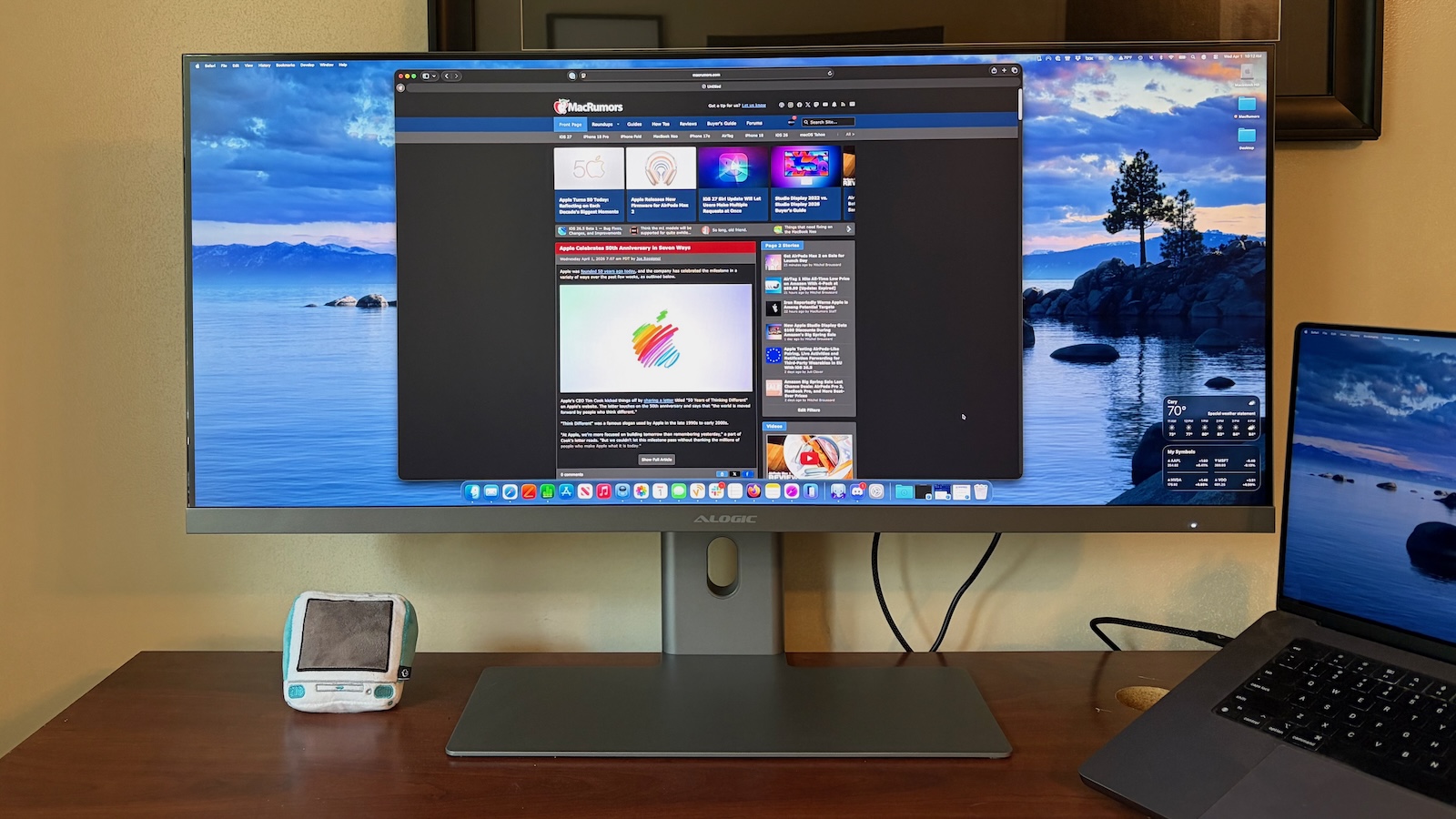
Unboxing the Alogic Edge 5K: A Grand Arrival
The Edge 5K ultrawide display is, by its very nature, a grand piece of technology. Measuring a substantial 40 inches diagonally, it naturally arrives in a generously sized box. However, Alogic has done an excellent job with its packaging efficiency. Despite the monitor's imposing size, the packaging is thoughtfully designed to minimize wasted space while ensuring maximum protection. Inside, you'll find the massive display carefully nestled amidst sturdy styrofoam padding, accompanied by all the necessary stand components and a selection of useful accessories.
Setting up your new Alogic Edge 5K is surprisingly straightforward, a welcome relief considering its large footprint. The monitor is available in two elegant finishes: classic silver or the ever-popular space gray, allowing you to choose the option that best complements your existing office decor. The stand itself comprises two main pieces: a large, attractively thin metal foot that provides robust stability, and a solid arm. This arm features a clever cable passthrough channel, a small but significant detail that helps keep your desk tidy and free from cable clutter, contributing to a cleaner, more organized workspace.
Assembly is quick and tool-free for the most part. The two stand pieces connect effortlessly to each other using a single screw, which can be easily tightened by hand for convenience or with a screwdriver for extra security. Once the stand is assembled, it snaps securely into the back of the display with minimal effort. This intuitive design means you can have your new ultrawide monitor up and running in just a few minutes, ready to transform your computing experience.
For those who prefer a more personalized setup, or if you already have a specific desk arm or wall mount in mind, the Edge 5K also supports universal VESA mounting standards. You can easily attach it to any sturdy 100x100mm VESA mount, giving you the flexibility to position the display exactly where you need it for optimal ergonomics and viewing comfort. This adaptability ensures that the Edge 5K can seamlessly integrate into virtually any professional workspace, whether it's a traditional office desk or a more dynamic standing setup.
Powering this impressive display and any connected accessories is a robust 180-watt power brick. Beyond simply powering the monitor, this intelligent power supply can deliver up to 90 watts of power upstream to your connected computer via a single USB-C cable. This feature is particularly useful for modern laptops, as it means you can charge your device while simultaneously transmitting video and data, simplifying your cable management and reducing the need for multiple power adapters. It’s a testament to Alogic’s commitment to thoughtful design and practical functionality, making the Edge 5K a true hub for your digital life.
Stand Stability and Thoughtful Design Choices
Given the sheer size of the 40-inch ultrawide panel, it's worth noting that the display does exhibit a minor degree of wobble. This characteristic is partly attributable to the extensive range of adjustments offered by the stand, which includes height, tilt, swivel, and even rotation. While some displays might prioritize absolute rigidity, Alogic chose to maximize adjustability, offering users a greater degree of flexibility in positioning their screen for optimal comfort and ergonomics. This means you can easily adjust the monitor to your preferred height, angle, and orientation, which is crucial for long work sessions and maintaining good posture.
In practice, on a stable desk, the Edge 5K remains perfectly steady during typical use, such as typing or minor desk movements. However, if you accidentally bump the monitor or place it on a surface that isn't entirely solid, you might notice a slight sway. Alogic has openly stated that this subtle wobble is a deliberate trade-off made to ensure the highest possible level of adjustability. For most users, this won't be a deal-breaker, as the benefits of comprehensive adjustability far outweigh this minor characteristic. It’s a design decision aimed at enhancing user comfort and versatility, ensuring that you can always find the perfect viewing position.
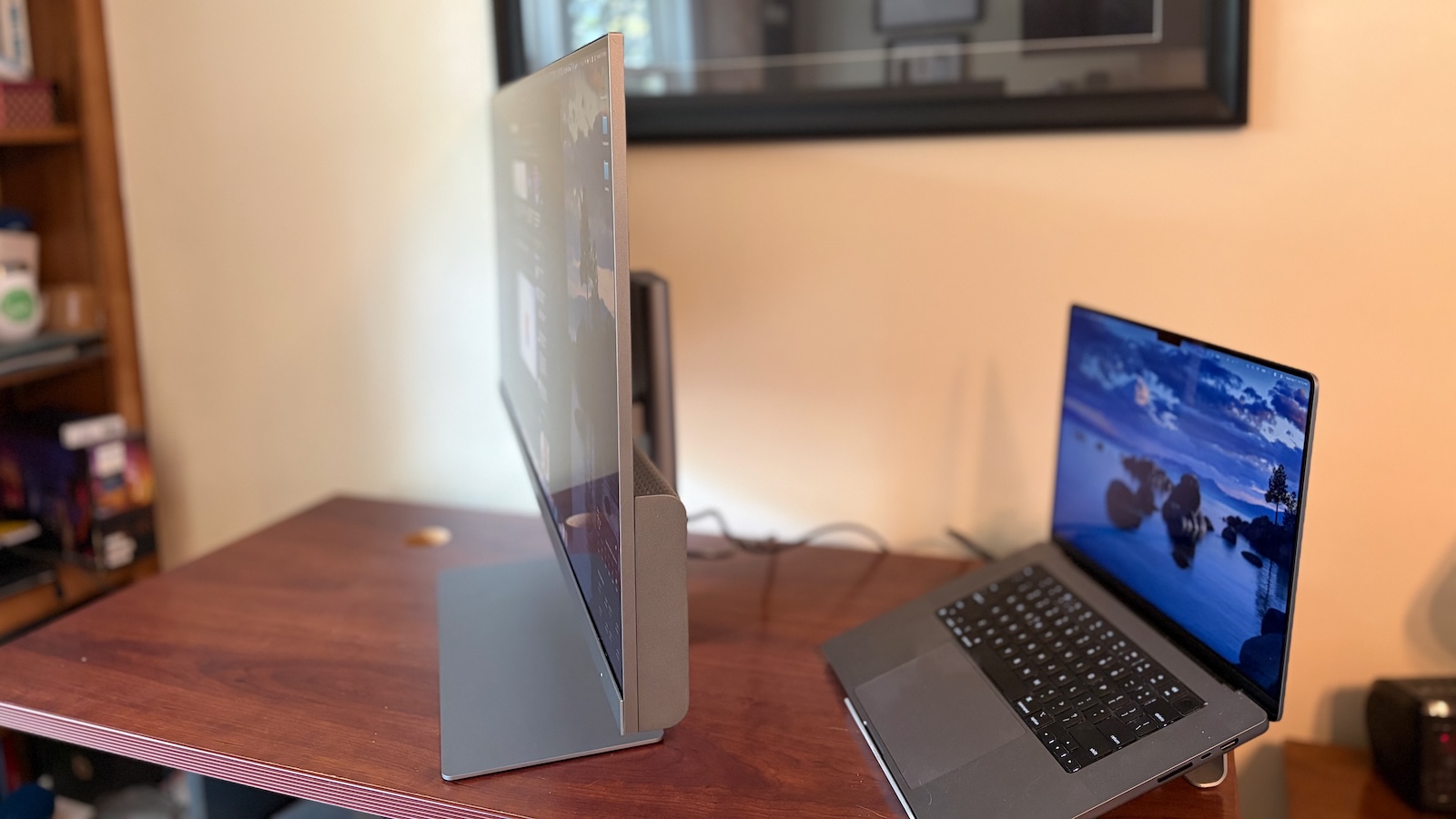
Beyond its functionality, the Edge 5K boasts a truly sleek and modern aesthetic. The display features incredibly thin black bezels along the top and sides, which contributes to a more immersive viewing experience, making the screen feel even larger. Below the main panel, a thicker silver aluminum chin adds a touch of premium sophistication. This chin subtly incorporates Alogic branding and a small power status light. One minor detail to be aware of: the power status light can pulse quite brightly when the display is in sleep mode. If you plan to use this monitor in a bedroom or a dimly lit environment, this might be something to consider, though it's easily remedied with a small piece of tape if it becomes distracting.
From a side profile, the display housing is remarkably thin across its upper two-thirds, showcasing a minimalist and elegant design. The lower third, where the stand attaches and all the essential ports and electronics are housed, features a slightly thicker bulge. This intelligent design keeps the monitor’s profile as slender as possible while efficiently accommodating all the necessary internal components without compromising aesthetics.
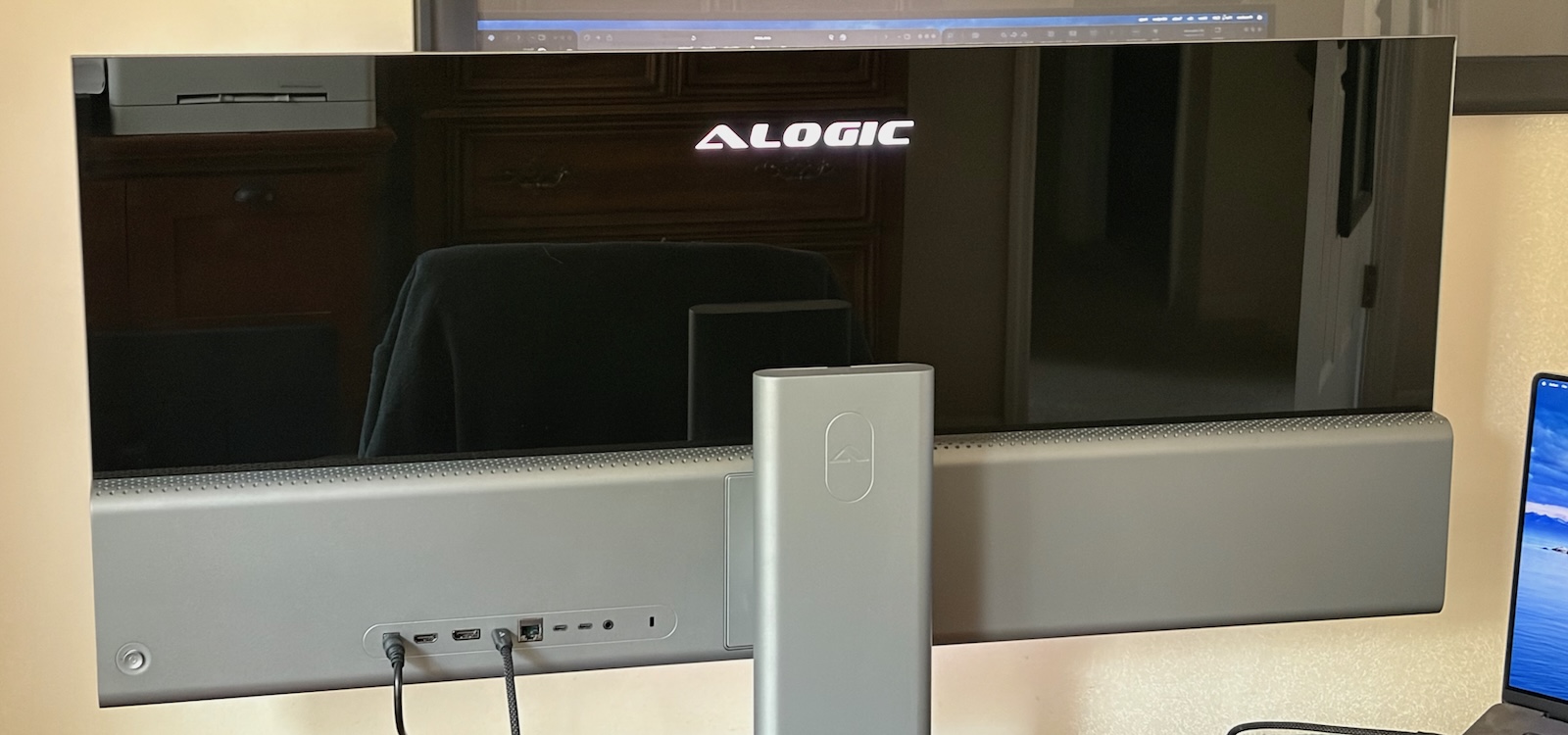
A particularly striking design element is the rear of the display. The upper two-thirds of the back panel are crafted from glass, lending a touch of refined class and sophistication. This feature is especially impactful if your workspace is set up so that the rear of the monitor is visible, perhaps in an open-plan office or a collaborative environment. Alogic has clearly put extra thought into this aspect of the design, based on valuable feedback from users who often place their monitors in positions where the back is frequently seen by others. This attention to detail elevates the overall premium feel of the Edge 5K, making it a stylish addition to any professional setting.
Further enhancing its unique aesthetic, the design cleverly utilizes the display's backlight to illuminate the Alogic logo on the rear. This glowing logo can be a definite positive for those who appreciate subtle branding and a modern flair, especially in environments where the monitor's back is visible. It adds a futuristic touch that can make your setup stand out. Of course, personal preferences vary, so whether this is a pro or con will depend on your individual taste. Regardless, it underscores Alogic's commitment to creating a display that looks as good from behind as it does from the front, a detail often overlooked by other manufacturers but highly valued by discerning users.
Unmatched Display Quality and Visual Experience
From the moment you power on the Alogic Edge 5K, you're greeted with an impressive visual experience. The display quality right out of the box is truly excellent. For many users, myself included, there will be little to no need for immediate adjustments in macOS or through the monitor's on-screen menus. The colors are vibrant, text is sharp, and images are clear, indicating superb factory calibration. However, for those who love to fine-tune their settings, I did explore the extensive range of adjustments available, confirming that the Edge 5K offers deep customization options to perfectly suit individual preferences and specific workflows.
This 40-inch ultrawide display boasts a stunning 5K2K resolution, meaning it packs 5,120 by 2,160 pixels into its expansive screen. This translates to a pixel density of 138 pixels per inch (PPI). While this doesn't quite match the "true Retina" pixel density found in an iMac or smaller 4K/5K displays, I was genuinely surprised by how incredibly sharp everything looked. Even coming from a setup that typically features a pair of high-density LG UltraFine 5K displays, the Edge 5K delivered a remarkably crisp and detailed image. The sheer size combined with this high resolution creates an immersive canvas that makes text, images, and video content come alive.
For creative professionals and anyone who demands accurate color representation, the Edge 5K shines. It offers 100% coverage of the sRGB color spectrum, which is the standard for most web content and everyday computing. Furthermore, it achieves an impressive 99% coverage of the DCI-P3 wide color gamut, essential for video editing and modern content creation, particularly for those working with HDR (High Dynamic Range) content. It also covers 94% of the Adobe RGB spectrum, making it a strong contender for photographers and graphic designers who work with print media and need a broader color palette. This comprehensive color support ensures that your work looks exactly as intended, with rich, true-to-life hues.
Beyond static images, the Edge 5K also performs admirably in terms of fluidity. It supports refresh rates up to 100Hz. While this isn't as high as some specialized gaming displays that can reach 144Hz or even 240Hz, it's an excellent refresh rate for a display of this resolution. The demanding bandwidth required to push such a high pixel count limits the ability to achieve super-high refresh rates. Nonetheless, 100Hz provides a noticeably smoother experience compared to standard 60Hz monitors, making scrolling, window animations, and general desktop interactions feel incredibly fluid. This makes it perfect for a productivity-focused setup and more than capable for many casual and even some competitive gaming scenarios.
The display panel itself features a matte finish. This is a crucial detail to consider, as matte displays excel at reducing glare and reflections from ambient light sources. Working near a window, I often encounter issues with reflections on glossy screens. The matte finish on the Edge 5K effectively minimizes these distractions, allowing me to focus on my work without combating unwanted glare, making it a strong preference for my specific workspace. This is an In-Plane Switching (IPS) panel, known for its excellent viewing angles and accurate color reproduction. It offers a typical brightness of up to 400 nits, which is perfectly adequate for most indoor office environments. While there are brighter displays on the market, 400 nits provides ample illumination for comfortable viewing throughout the day, ensuring content remains clear and readable even in well-lit rooms.
Optimizing Your Workspace with Resolution and Scaling
The beauty of a 5K2K ultrawide display like the Alogic Edge 5K lies not just in its raw pixel count but in the flexibility it offers for screen real estate. While you can certainly run the display at its native, full resolution of 5,120 × 2,160 pixels, I found that, for my typical viewing distance, this made on-screen content appear too small. Text became tiny, and UI elements were minuscule, requiring me to lean in to read comfortably, which is not ideal for long periods of work.
On the other end of the spectrum, some users might consider running the display at a "true Retina" scaled resolution, which would be 2,560 × 1,080 on an ultrawide. However, this setting made content far too large, essentially wasting much of the display's potential and negating the benefits of an ultrawide canvas. It would be akin to having a massive screen showing relatively few, oversized elements, which isn't efficient for multitasking.
Through experimentation, I discovered that the sweet spot for this display in my setup was the scaled resolution of 3,840 × 1,620. This particular setting provided the perfect balance. It delivers an incredibly large canvas, allowing me to comfortably place multiple applications and windows side-by-side without feeling cramped. Text and other on-screen elements appeared at a perfectly legible size, striking an ideal compromise between maximizing screen space and maintaining readability. macOS handles scaled resolutions exceptionally well, ensuring that despite not being native, the display quality remained sharp and crisp, without any noticeable blurriness or artifacts.
Transitioning from a dual-monitor setup, specifically a pair of 27-inch 5K displays, required a slight adjustment to my workflow. While the Edge 5K offers a vast horizontal canvas, the vertical screen real estate is marginally less than two individual 5K monitors. However, the benefits of having all my content on a single, seamless display quickly became apparent. Managing window sizes and tiling them across the ultrawide desktop felt much more intuitive and efficient. There's no longer a bezel breaking up the view, and moving windows from one "screen" to another is a smooth, continuous motion. This unified workspace approach ultimately streamlined my multitasking efforts, allowing for a more fluid and organized desktop environment.
Comprehensive Connectivity and Smart Hub Features
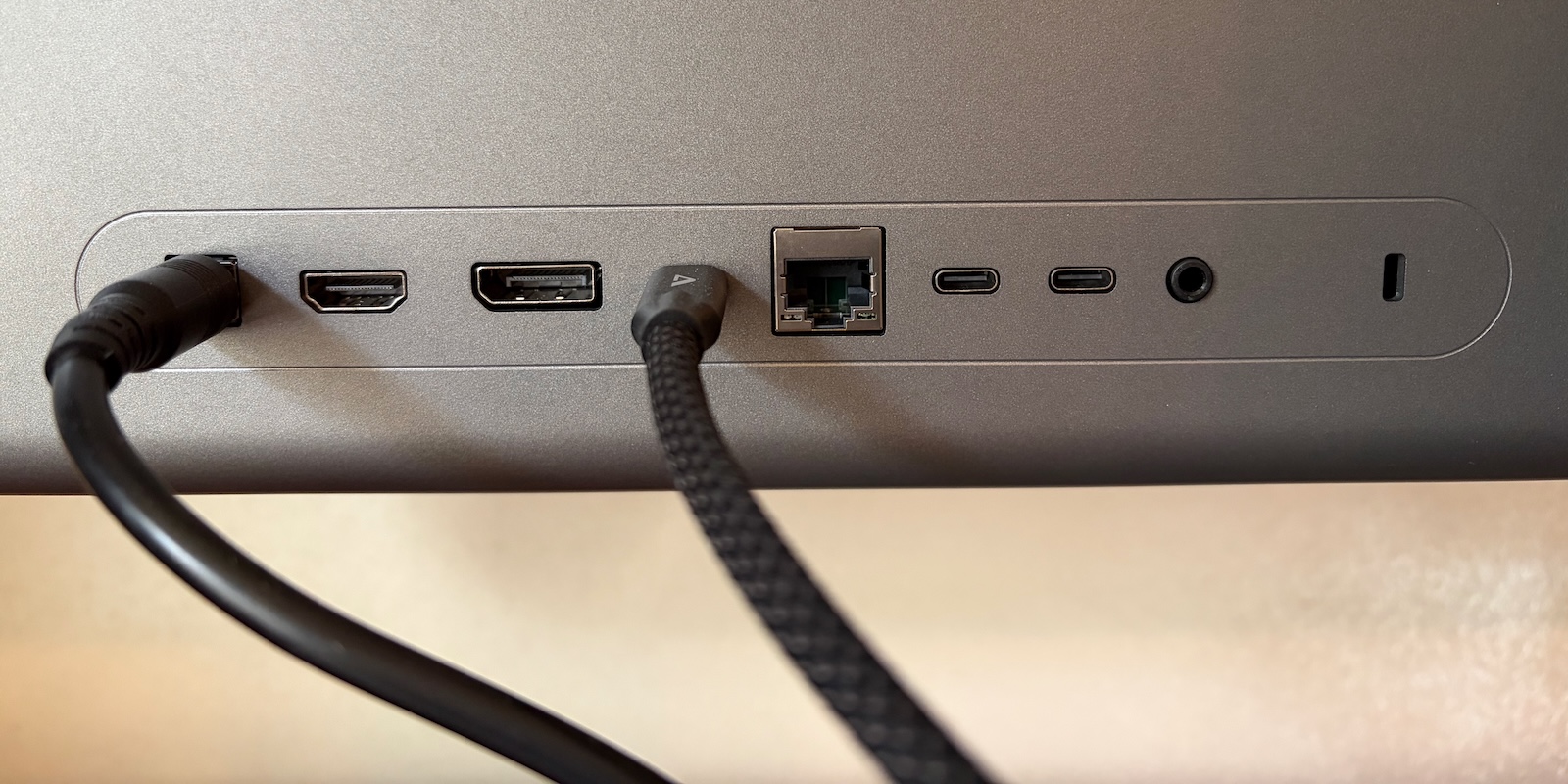
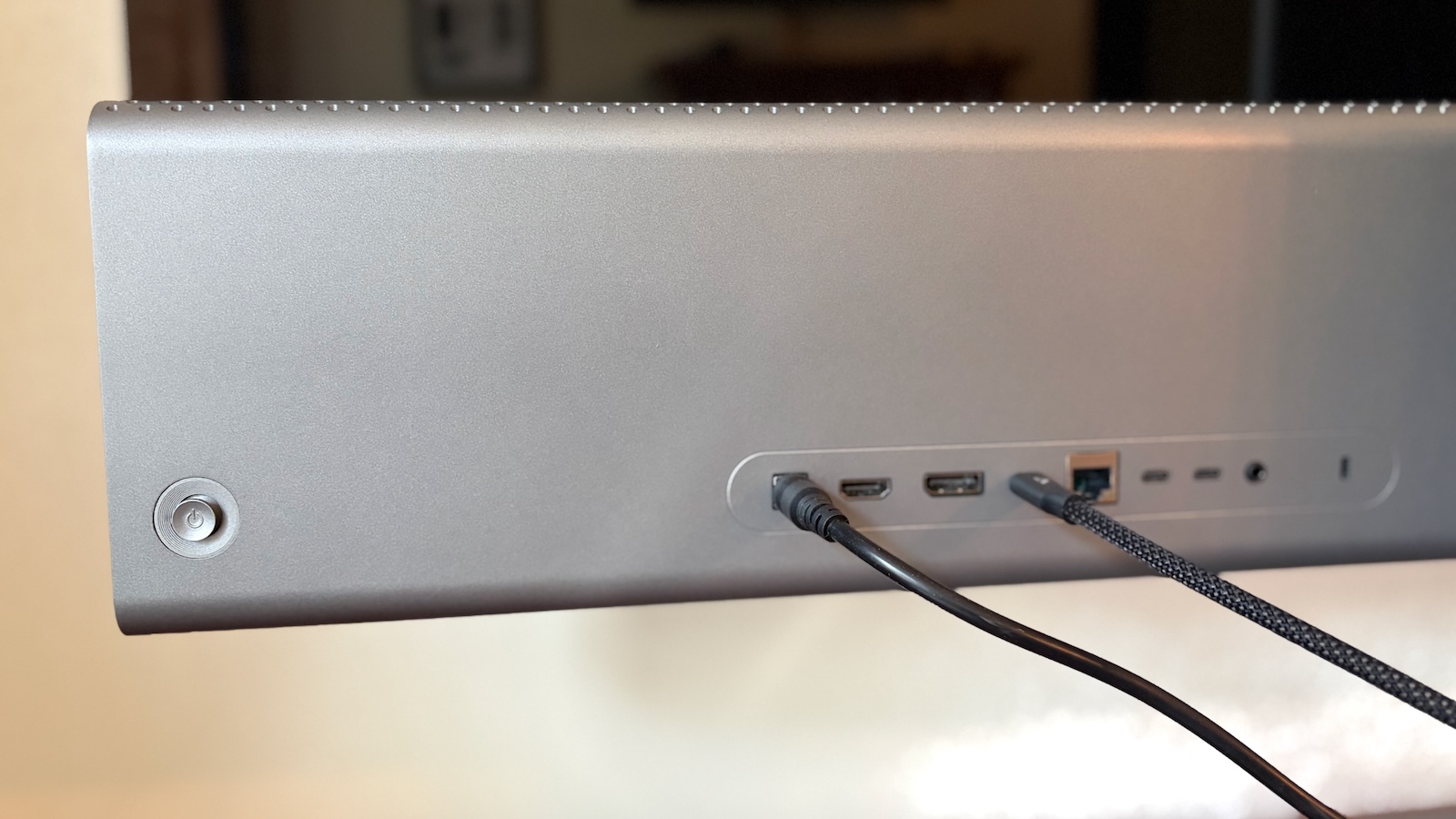
The Alogic Edge 5K isn't just a stunning display; it's also a powerful connectivity hub designed to simplify your workspace. Located conveniently on the rear of the monitor, you'll find a comprehensive array of ports to meet various needs. For display connectivity, you have multiple options: a versatile USB-C port, which supports both video data and power delivery to your connected computer, a DisplayPort 1.4, and an HDMI 2.0 port. It's important to note that when using HDMI 2.0 at the full 5K resolution, the refresh rate will be limited to 30Hz, so for the best experience, especially at 100Hz, DisplayPort or USB-C is recommended.
The USB-C port is a standout feature, transforming the Edge 5K into a robust docking station for your laptop or other USB-C enabled devices. When connected via USB-C, the monitor acts as a hub, significantly expanding your peripheral options. This includes two additional downstream USB-C ports, perfect for connecting external drives, mobile devices, or other accessories, though these operate at USB 2.0 speeds. For reliable wired internet, there's a built-in Gigabit Ethernet port, ensuring stable and fast network access without needing a separate adapter for your laptop. Additionally, a 3.5mm audio jack is present for connecting headphones or externally powered speakers, offering convenient audio output (it does not, however, support microphone input).
To provide a complete multimedia experience, the Edge 5K incorporates two 3-watt speakers. As is common with built-in monitor speakers, they offer basic audio output, suitable for system sounds or casual listening, but they won't replace dedicated external speakers for high-fidelity audio. For critical listening or an immersive experience, it's always recommended to use headphones or external speakers connected via the audio jack or a separate audio interface. One current limitation is that these built-in speakers, along with the display brightness, do not integrate with Mac keyboard shortcut keys for volume control. However, Alogic has confirmed that they are planning a firmware update around the middle of the year to add this much-requested functionality, which will further enhance the Mac user experience.
Intuitive On-Screen Menus and Advanced Customization
Navigating the various settings and options on the Alogic Edge 5K is made simple and intuitive thanks to a joystick button located on the rear of the display. This single control allows for quick and easy access to the monitor's on-screen menus (OSD), making adjustments effortless without fumbling for multiple buttons.
With a simple flick of the joystick, you can quickly adjust essential settings like volume and brightness. It also provides immediate access to display presets, allowing you to switch between optimized modes for different tasks, such as reading, gaming, or movie watching. Cycling through connected video sources is equally straightforward, letting you seamlessly switch between your computer, a gaming console, or another input device with ease.
For users who desire deeper control, diving further into the OSD reveals a comprehensive array of advanced adjustments. You can fine-tune parameters such as backlight intensity, contrast levels, and even apply a blue light shift to reduce eye strain during extended use. The monitor also supports Adaptive Sync, which helps eliminate screen tearing and stuttering for a smoother visual experience, particularly beneficial for gaming. Further options include sharpness adjustments, Picture-by-Picture (PBP) and Picture-in-Picture (PIP) mode settings (allowing you to display multiple sources simultaneously), color temperature controls for precise color calibration, HDR (High Dynamic Range) settings for enhanced contrast and color, and much more. This extensive range of options ensures that you can truly customize the Edge 5K to perfectly match your specific needs and preferences, extracting the absolute best performance from this exceptional ultrawide display.
Pricing, Warranty, and Exceptional Value
The Alogic Edge 5K ultrawide display is a premium product offering an impressive suite of features, stunning visuals, and extensive connectivity. Its normal retail price is set at $1,699.99, positioning it as a significant investment for serious productivity users and creative professionals. However, Alogic frequently provides special offers, and at the time of this review, they are offering a compelling 10% discount, bringing the price down to a more accessible $1,529.99. This discount makes an already attractive display an even more compelling proposition for those looking to upgrade their workspace.
Prospective buyers have the choice between two elegant color options: classic silver and sophisticated space gray, allowing them to select the finish that best complements their existing setup and personal aesthetic. Beyond the initial purchase, Alogic stands behind the quality and durability of the Edge 5K with a solid two-year warranty. This warranty provides peace of mind, ensuring that your investment is protected against any potential manufacturing defects or issues that might arise during the initial period of ownership. This commitment to customer satisfaction further solidifies the Edge 5K's position as a reliable and high-value choice in the premium ultrawide monitor market.
Comparison to Apple's Studio Display: A Tale of Two Screens
When considering a monitor in this price bracket, it's natural to draw comparisons with other premium options, particularly Apple's recently upgraded Studio Display. However, it's crucial to understand that while both are high-end displays, the Alogic Edge 5K and the Studio Display are designed to serve very different purposes and cater to distinct user needs.
The Studio Display measures 27 inches diagonally and features a traditional 16:9 aspect ratio. For most users, especially those deeply integrated into the Apple ecosystem, it performs best when running in its true Retina mode, which provides a desktop size of 2,560 × 1,440 pixels from its native 5,120 × 2,880-pixel resolution. This setup delivers unparalleled text sharpness and image clarity, making it ideal for graphic designers, photographers, and anyone prioritizing pixel-perfect detail on a standard aspect ratio screen.
In contrast, the Alogic Edge 5K, while also offering an impressive 5,120 horizontal pixels, distinguishes itself with its ultrawide 21:9 aspect ratio and much larger 40-inch physical size. This ultrawide format means it has fewer pixels in the vertical dimension compared to the Studio Display (2,160 vs. 2,880). However, the significantly larger physical size of the Edge 5K translates into a dramatically expanded horizontal workspace. When run at a comfortably scaled resolution, such as the 3,840 × 1,620 setting I found ideal, the Edge 5K effectively provides far more usable screen real estate than the Studio Display. This makes it superior for multitasking, having multiple applications open side-by-side, or immersing yourself in expansive timelines for video editing or music production.
The Studio Display undoubtedly boasts Apple's signature design aesthetic and exceptional build quality, seamlessly integrating with macOS for a cohesive user experience. It also features a built-in webcam, studio-quality microphones, and a six-speaker sound system, which are significant advantages for video conferencing and media consumption within the Apple ecosystem. The tight integration with macOS allows for features like True Tone and seamless brightness control, which the Edge 5K currently cannot match. Furthermore, the Studio Display offers more robust downstream USB-C connectivity, providing higher speeds than the Edge 5K's USB 2.0 downstream ports.
However, the Alogic Edge 5K offers its own set of distinct advantages. Its comprehensive array of connectivity options, including DisplayPort 1.4 and HDMI 2.0 in addition to USB-C, makes it far more versatile for users who might connect various devices, including PCs, gaming consoles, or other video sources, without needing adapters. This multi-input flexibility is a huge plus, allowing for easy switching between different sources or even utilizing both simultaneously with its Picture-in-Picture (PIP) or Picture-by-Picture (PBP) modes. These features are invaluable for professionals who work across multiple platforms or need to monitor several inputs at once.
Ultimately, both the Alogic Edge 5K and Apple's Studio Display represent premium investments in the display market. Your choice will depend heavily on your specific needs and priorities. If you are an avid Apple user who prioritizes seamless macOS integration, a built-in webcam, and a traditional aspect ratio for pixel-perfect detail on a slightly smaller screen, the Studio Display is an excellent choice. If, however, your workflow demands vast horizontal screen real estate for intensive multitasking, versatility in connectivity for multiple device types (including PCs), and the immersive experience of an ultrawide display, then the Alogic Edge 5K stands out as the superior option. Carefully weighing factors like physical display size, desired aspect ratio, connectivity requirements, and ecosystem integration will guide you to the display that best meets your unique professional and personal demands.
Conclusion: Is the Alogic Edge 5K Your Next Productivity Powerhouse?
The Alogic Edge 5K ultrawide display is a formidable contender in the high-end monitor market, particularly for users seeking to maximize their productivity and immerse themselves in a vast digital canvas. Its stunning 40-inch 5K2K panel offers an incredible amount of screen real estate, making it ideal for professionals who juggle multiple applications, manage complex data, or work with expansive timelines in creative fields. The impressive color accuracy, smooth 100Hz refresh rate, and glare-reducing matte finish contribute to an excellent visual experience that can significantly enhance your daily workflow.
Beyond its visual prowess, the Edge 5K shines as a central hub for your workspace. Its comprehensive connectivity, including a powerful USB-C port that doubles as a docking station with power delivery, Gigabit Ethernet, and multiple display inputs, simplifies cable management and expands your peripheral options. While the built-in speakers are basic, and some Mac integration features are still pending firmware updates, these are minor points when considering the overall package. The thoughtful design, including the VESA mount compatibility and the elegant glass back, adds a premium touch that elevates any desktop environment.
While the slight stand wobble is a trade-off for its exceptional adjustability, it doesn't detract from the monitor's stability during normal use. And in comparison to displays like Apple's Studio Display, the Edge 5K carves out its own niche by prioritizing sheer screen size and multi-platform connectivity over exclusive ecosystem integration. For those who need to spread out across a massive, continuous workspace, connect various devices, and appreciate the efficiency of an ultrawide format, the Edge 5K offers tremendous value.
Ultimately, if you're a professional, a creative, or a power user who prioritizes expansive screen real estate, versatile connectivity, and a premium visual experience for an enhanced productivity setup, the Alogic Edge 5K is an outstanding investment. It’s a monitor designed to transform the way you work, providing a fluid, immersive, and highly efficient digital workspace that few other displays can match. Consider the current discount, and you have an even more compelling reason to make the Alogic Edge 5K the centerpiece of your desktop.
Note: Alogic provided MacRumors with the Edge 5K display for the purposes of this review. No other compensation was received. MacRumors is an affiliate partner with Alogic. When you click a link and make a purchase, we may receive a small payment, which helps us keep the site running.This article, "Review: Alogic's Edge 5K Display Offers an Ultrawide Big-Screen Experience" first appeared on MacRumors.com
Discuss this article in our forums
from MacRumors
-via DynaSage
