
iOS 26.4 Features: Everything New in iOS 26.4
Unveiling iOS 26.4: A Deep Dive into the Latest Features and Enhancements
The highly anticipated iOS 26.4 update has officially arrived, bringing a wealth of new features and improvements to your iPhone. While many users were eagerly awaiting a significant overhaul to Siri, this update focuses on enhancing existing applications, boosting security, and introducing innovative new ways to interact with your device. From AI-powered music creation to strengthened device protection and a host of user interface refinements, iOS 26.4 is designed to make your iPhone experience smoother, more personal, and even more secure. Let's explore everything new in this exciting release.
Playlist Playground: Your AI Music Curator
One of the most exciting new additions in iOS 26.4 is the "Playlist Playground" feature within Apple Music. This innovative tool leverages artificial intelligence to help you create custom playlists with remarkable ease. Imagine wanting a playlist for a specific mood, activity, or decade – now, your iPhone can help you curate it almost instantly.
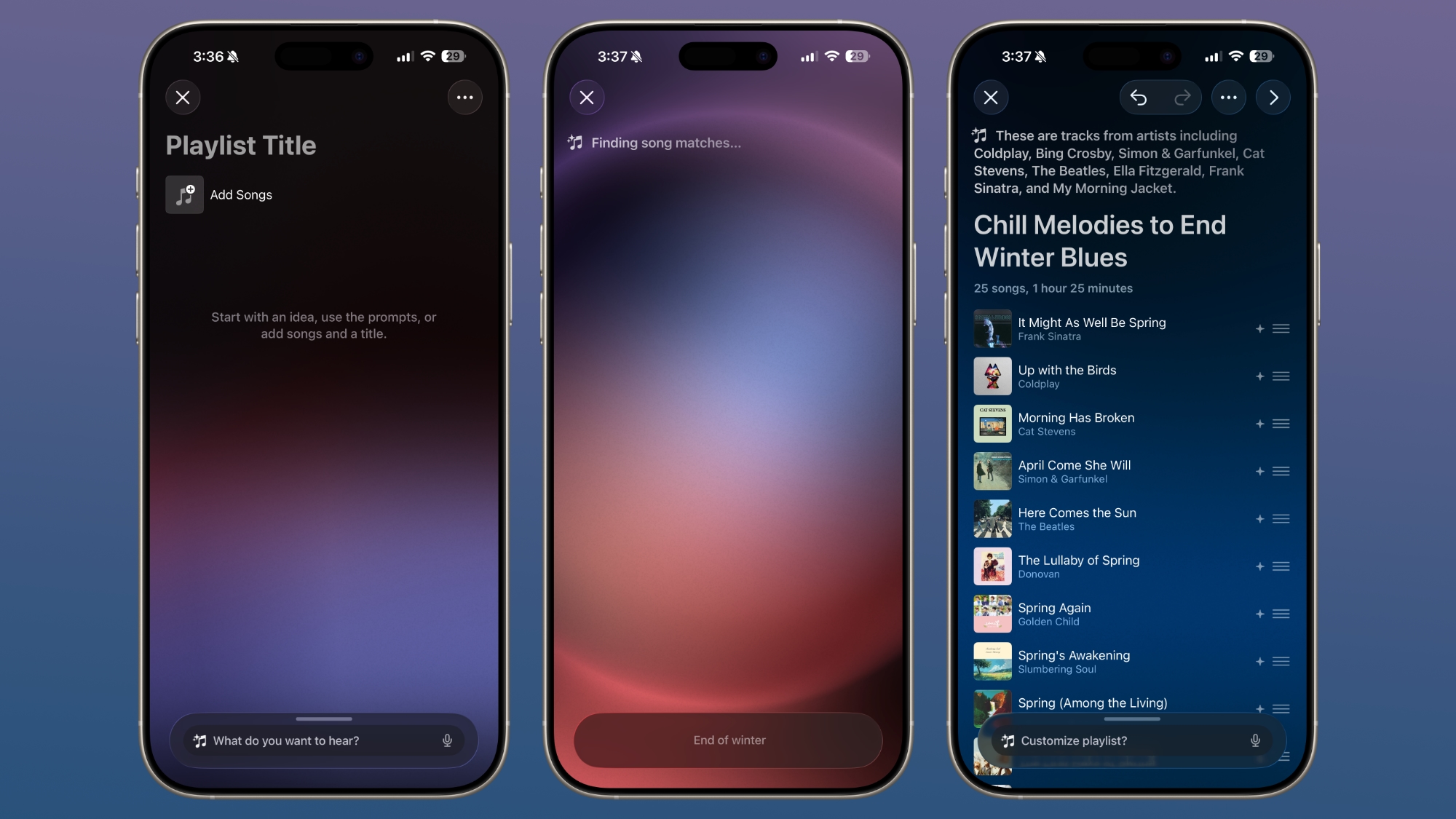
Here's how it works: within the Apple Music app, you'll find a new option to simply type in a text-based idea or concept. This could be anything from "morning coffee music" to "hip-hop party songs" or "disco songs that defined the 1970s." Apple provides some helpful pre-set suggestions to get you started, but the true power lies in your ability to describe any idea, mood, or feeling you can imagine. Want a playlist for a rainy afternoon? Type it in. Need energetic tunes for your workout? Just ask. The possibilities are truly endless.
Once you've entered your prompt, the Playlist Playground feature springs into action, automatically generating a list of 25 songs that perfectly match your description. But it doesn't stop there; it also crafts a custom title for your new playlist, reflecting the essence of your request. This takes the guesswork out of finding the right music and transforms music discovery into a fun, interactive experience.
Beyond the initial generation, you have full control to customize your new playlists even further. You can refine the selection with additional text prompts, ensuring the vibe is just right. You can also choose a unique cover image and add a description, making each playlist truly your own and reflective of its purpose. This level of personalization makes organizing your music library a breeze and allows for instant access to the perfect soundtrack for any moment.
It's important to note that, for now, the Playlist Playground feature is limited to users in the United States. Apple often rolls out new features regionally before a wider global release, so users in other countries may need to wait a little longer to experience this exciting AI music tool.
Express Yourself with New Emoji
Communication in the digital age relies heavily on emoji, and iOS 26.4 expands your expressive toolkit with eight brand new characters. These additions provide more diverse ways to convey emotions, objects, and scenarios in your messages and social media posts, making your conversations richer and more engaging.
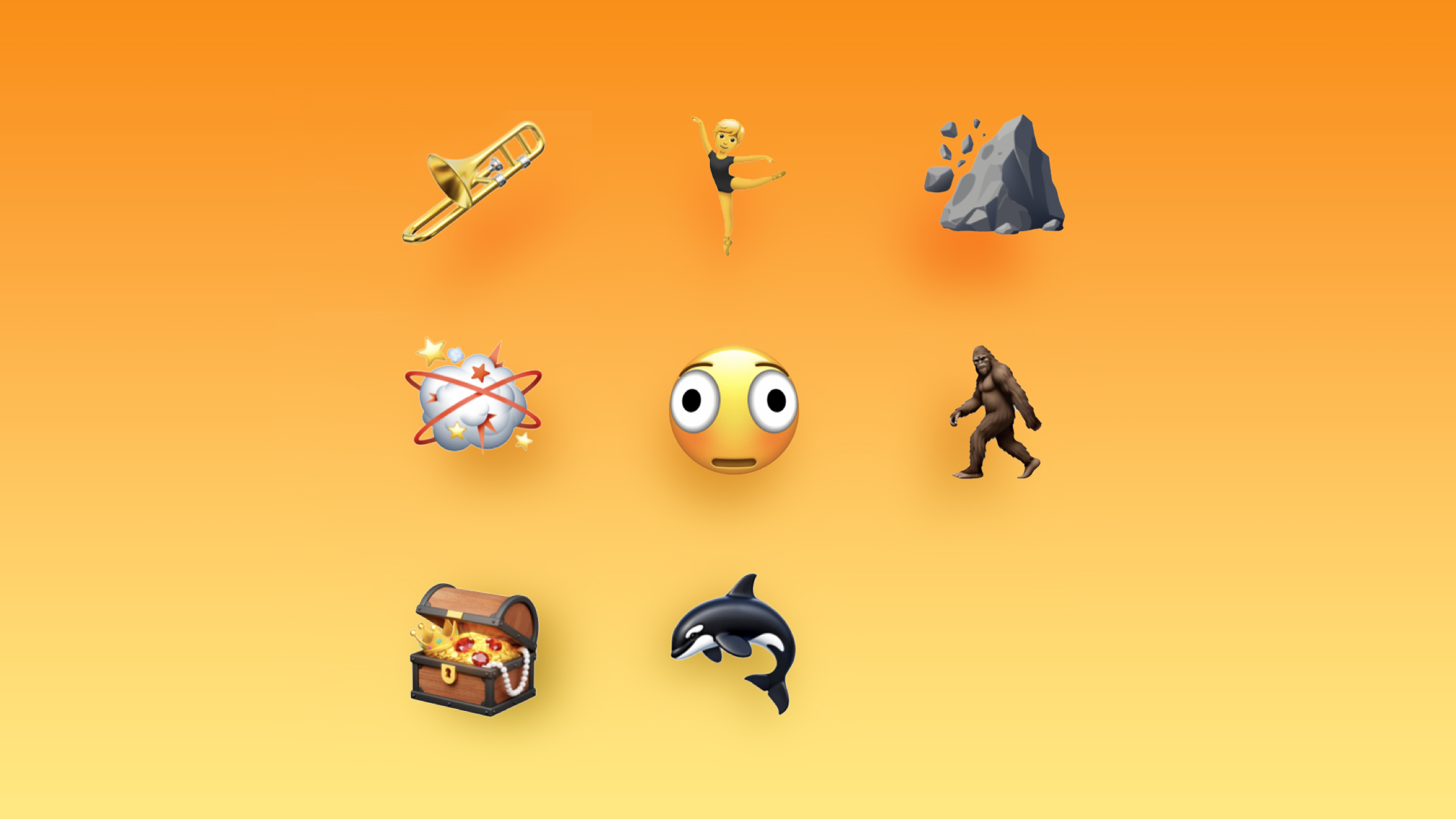
The new emoji include a trombone, perfect for musicians or anyone wanting to convey a triumphant (or perhaps comically disastrous) sound. A treasure chest adds a touch of mystery and excitement, ideal for sharing discoveries or hinting at surprises. The distorted face offers a new way to express bewilderment, silliness, or being overwhelmed.
For those who love folklore and mythical creatures, a hairy creature (affectionately dubbed Sasquatch) makes its debut, allowing for playful references to the elusive Bigfoot. A fight cloud provides a visual shorthand for arguments or intense situations, adding a dynamic element to your chats. The majestic orca joins the animal kingdom, and a landslide emoji offers a powerful visual for chaos or overwhelming situations. Finally, the ballet dancer adds an elegant and graceful option for expressing dance or artistry.
Beyond these entirely new characters, iOS 26.4 also introduces new skin tone modifiers for existing emoji, specifically for people wrestling and dancers with bunny ears. This continues Apple's commitment to inclusivity and ensuring that emoji accurately represent the diversity of its users.
Enhanced Apple Music Experience
Apple Music receives a significant upgrade in iOS 26.4, with features designed to help you discover live music, enjoy a more visually immersive experience, and organize your playlists with greater efficiency.
Concerts Near You: Discover Live Music
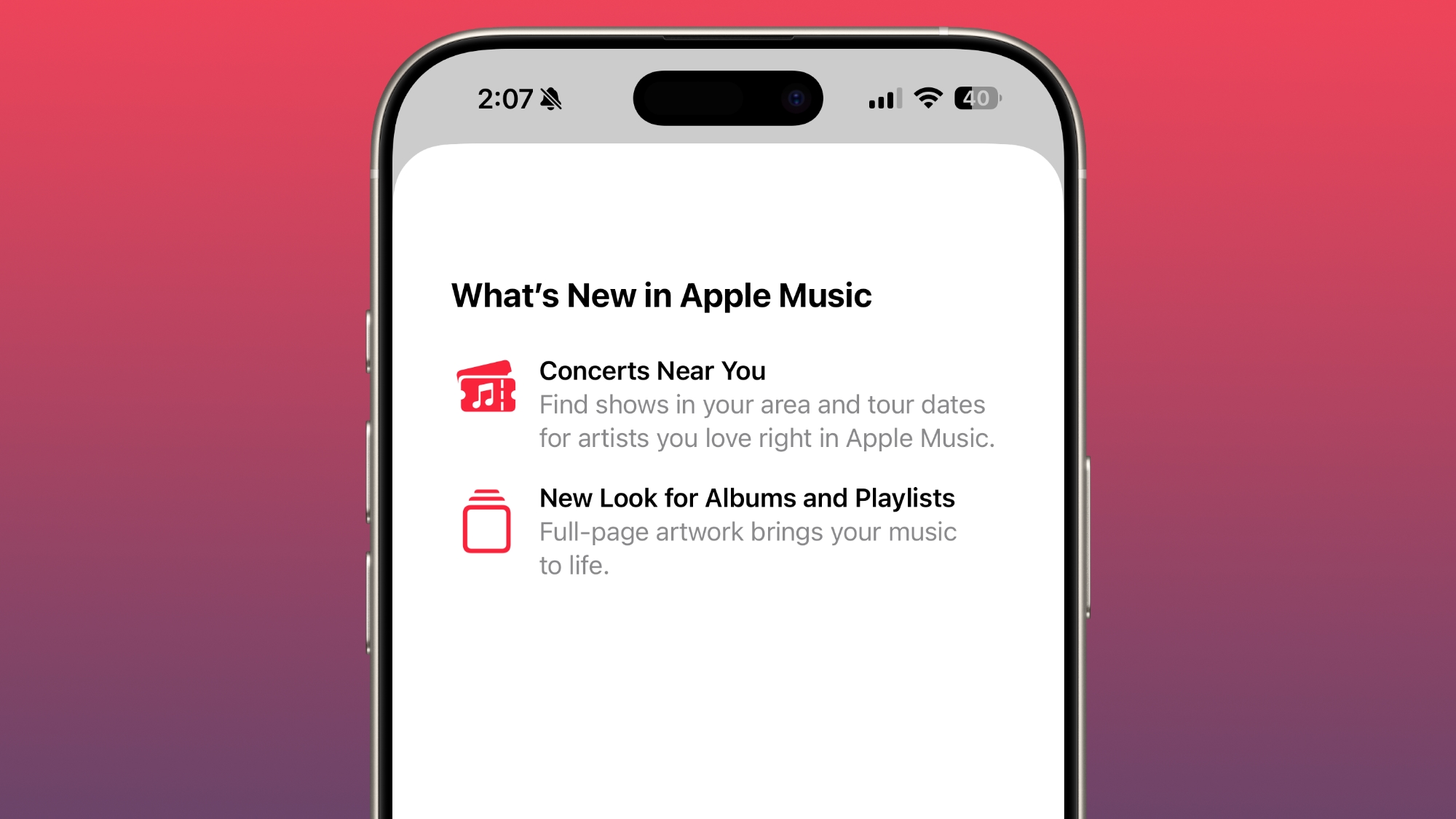
For music enthusiasts, the new "Concerts Near You" feature is a game-changer. Integrated directly into Apple Music, this tool helps you easily find live shows and tour dates for your favorite artists right in your local area. No more missing out on seeing your beloved bands or performers! Apple is collaborating with major ticketing companies, such as Ticketmaster, to pull in comprehensive local concert information. This means you'll have a centralized place to browse upcoming events, buy tickets, and stay up-to-date on your favorite artists' schedules, making it easier than ever to enjoy live music.
Redesigned Albums and Playlists
Visual appeal is a key aspect of the music listening experience, and Apple has recognized this with a beautiful redesign of album and playlist pages. These now feature full-page artwork, allowing the album or playlist cover to dominate the screen. This immersive visual change makes browsing your music library and exploring new artists a more engaging and aesthetically pleasing journey, truly bringing the artwork to life.
Adding Songs to Multiple Playlists Simultaneously
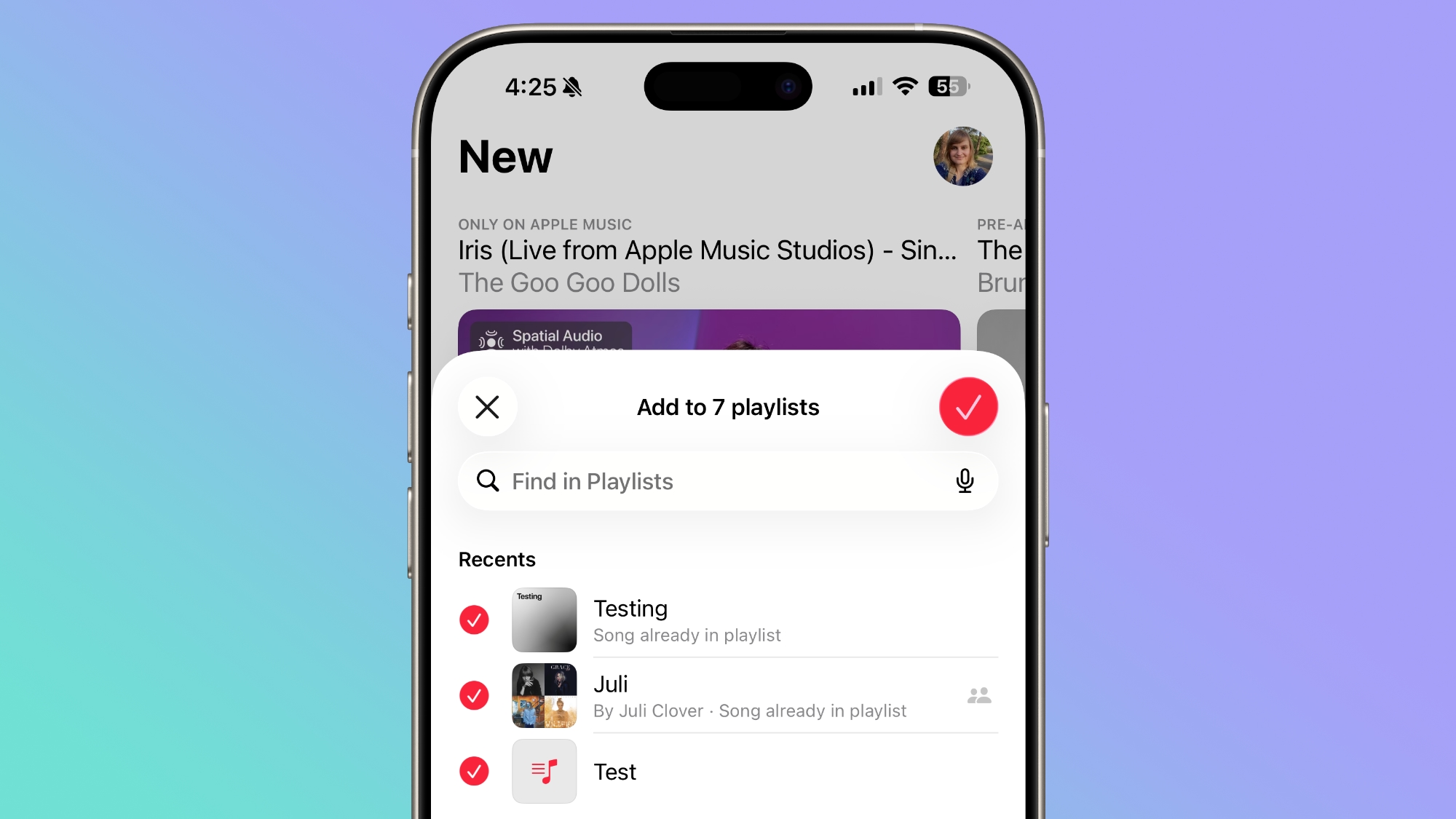
Managing your music library has never been more straightforward. Previously, adding a song to multiple playlists could be a somewhat tedious process, requiring you to repeat the "add to playlist" action for each individual list. iOS 26.4 streamlines this by allowing you to add a single song to multiple playlists at the same time. In the add to playlist interface, you'll now see a handy list button. Tapping this button enables a multi-select mode, letting you tick off all the relevant playlists in one go. This small but impactful change significantly improves workflow for avid playlist creators and organizers, saving time and effort.
Offline Music Recognition: Never Miss a Tune
Have you ever heard a captivating song in a place with no internet connection, only to forget its name by the time you're back online? iOS 26.4 solves this common dilemma with a clever enhancement to the music recognition feature in Control Center. Previously, identifying a song required an active internet connection, which wasn't always available.
Now, the song recognition feature is capable of listening and identifying songs even when your iPhone is offline. It won't give you the result immediately, but it will cleverly store the identified song's information. The moment your device reconnects to the internet, whether via Wi-Fi or cellular data, it will automatically retrieve and display the recognition results. This means you can confidently identify music in underground venues, remote locations, or during flights without worrying about connectivity, ensuring you never miss the chance to add that catchy tune to your library.
Flexible Purchase Sharing for Families
Family Sharing has always been a convenient way for households to share app purchases, subscriptions, and other Apple services. However, a common pain point was the requirement for all family members to use a single, shared payment method for purchases, which could lead to complications or a lack of financial privacy for adult members. iOS 26.4 addresses this directly with a welcome change.
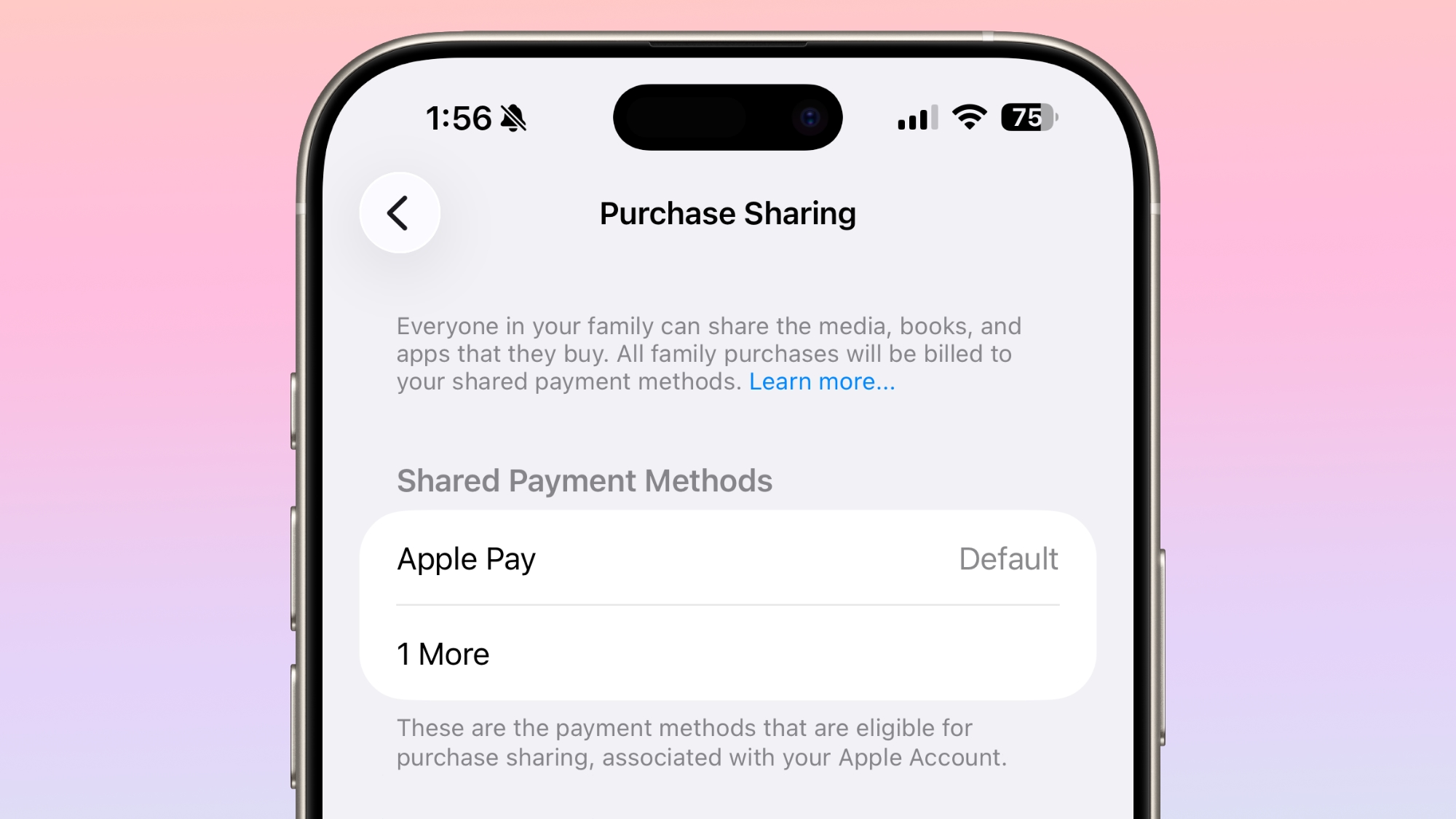
With this update, adult members within a Family Sharing group are now empowered to use their own separate payment methods for purchases. This means that while families can still benefit from shared access to apps and media, individual adults can maintain their financial independence and privacy when making their own purchases. This change simplifies billing, reduces potential conflicts over shared accounts, and provides a more equitable and flexible system for managing family finances within the Apple ecosystem, making Family Sharing even more practical and user-friendly.
Video Podcasts Arrive in Apple Podcasts
The Apple Podcasts app is no longer just for audio. With iOS 26.4, Apple introduces robust video podcast capabilities, transforming the platform into a comprehensive hub for both listening and watching your favorite shows. This marks a significant evolution for podcasting, offering creators new avenues for expression and monetization, and providing listeners with a richer, more dynamic experience.
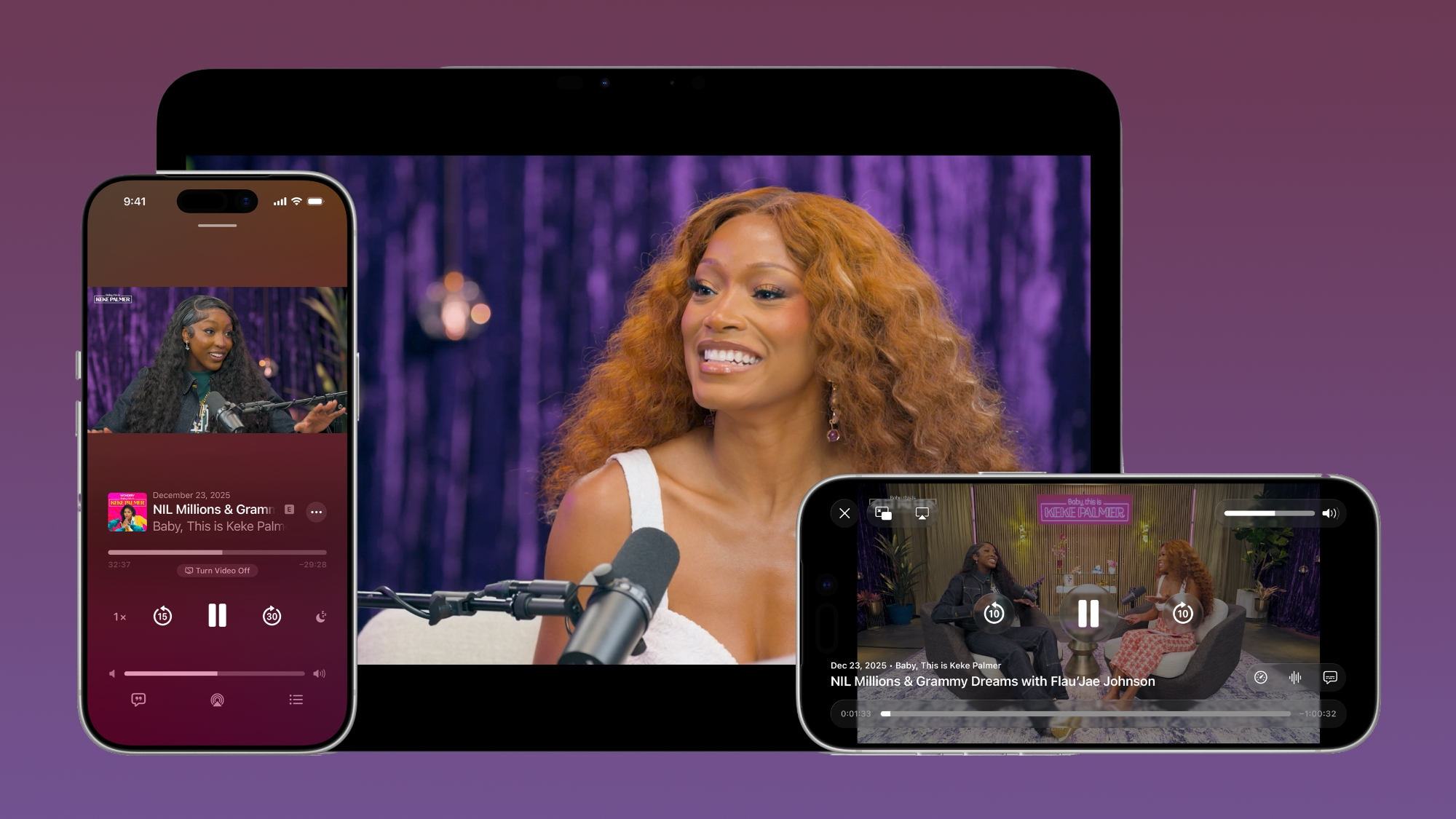
The feature is powered by HTTP Live Streaming (HLS) technology, a standard known for its reliability and quality. For podcast creators, HLS offers "unprecedented control and monetization opportunities," enabling them to produce and distribute high-quality video content with flexible options. For viewers, this means a superior viewing experience with smooth playback and excellent visual fidelity.
Users of the iOS 26.4 Podcasts app will appreciate the seamless integration. You can effortlessly switch between watching and listening to shows, depending on your preference or situation. For instance, you might start watching a video podcast at home and then switch to listening to the audio version when you're on the go. Furthermore, videos can be downloaded for offline viewing, perfect for commutes or travel where internet access might be spotty. HLS ensures smooth playback regardless of your network connection, dynamically adjusting quality for optimal viewing on both Wi-Fi and cellular data.
Apple emphasizes that these new video episodes will integrate perfectly with existing Apple Podcasts features, including personalized recommendations and editorial suggestions found in the New and Category sections. This ensures that even with the addition of video, the core discovery experience remains intuitive and helpful, guiding you to new content you'll love.
Stolen Device Protection Now Enabled by Default
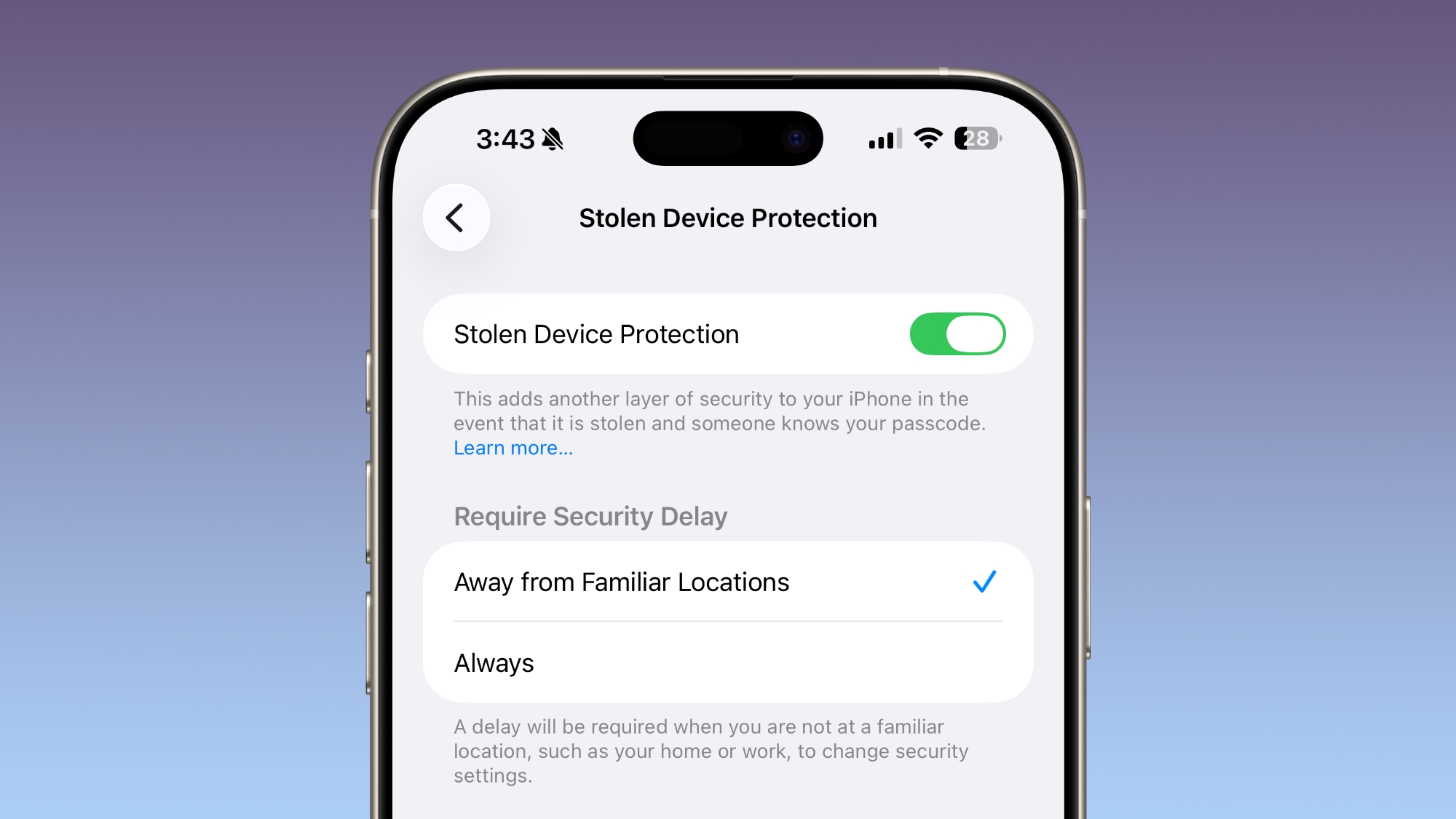
Security is paramount, and iOS 26.4 significantly strengthens your iPhone's defenses against theft. The "Stolen Device Protection" feature, initially introduced in iOS 17.3, is now enabled by default for all iPhone users. This is a critical change, moving from an opt-in setting to a universal safeguard, offering peace of mind to a wider audience.
Apple developed Stolen Device Protection in response to alarming reports of a sophisticated iPhone theft method. Criminals would spy on unsuspecting victims to learn their passcode, then steal their iPhone. With the passcode in hand, these thieves could then swiftly empty bank accounts, access sensitive passwords stored on the device, and even disable critical security features like Find My, making it nearly impossible to recover the stolen device.
Stolen Device Protection counters this by requiring additional authentication – specifically, Face ID or Touch ID – to access certain highly sensitive iPhone features. This means even if a thief knows your passcode, they won't be able to immediately access your Passwords app, change your Apple ID password, turn off Lost mode in Find My, or make Safari purchases without your biometric verification.
For some features, the protection goes even further. Certain critical actions are entirely disabled without Face ID or Touch ID authentication. Others, like changing your Apple ID security settings, have a one-hour security delay. After this delay, a second Face ID or Touch ID scan is required. This ingenious two-step process provides a crucial window of opportunity for victims to mark their device as lost or take other protective measures, significantly hindering a thief's ability to exploit a stolen iPhone.
By making this feature mandatory, Apple ensures that a fundamental layer of security is active for everyone, protecting your personal data and financial information from sophisticated theft techniques.
Subtle Enhancements to the Messages App
The Messages app, a core communication tool for iPhone users, receives a small but noticeable update in iOS 26.4. While not a dramatic redesign, Apple has introduced new animations for certain actions, such as launching a new conversation. These subtle visual tweaks aim to make the overall messaging experience feel more dynamic and polished.
The new animations contribute to a more fluid and engaging user interface, adding a touch of liveliness to everyday interactions within the app. While it might seem like a minor change, these types of refinements often contribute to a more enjoyable and seamless user experience, making the app feel more responsive and modern.
Unified Apple Account Experience
Managing your Apple Account settings across different applications has been streamlined in iOS 26.4 with the introduction of a new unified Apple Account hub. This redesigned interface replaces the individual profile features that were previously found in apps like the App Store, Apple Music, and others, providing a more consistent and intuitive experience.
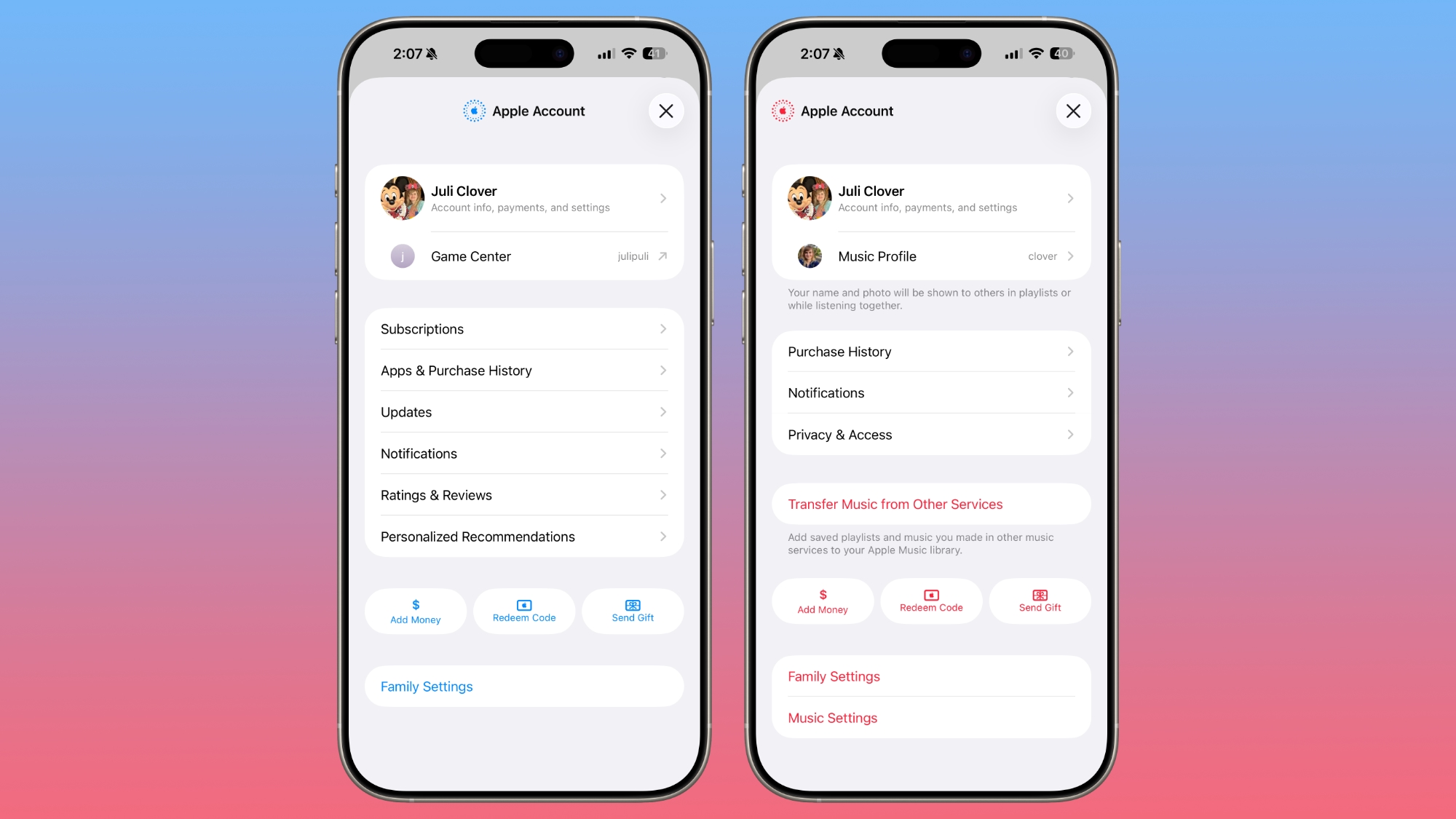
While the new hub largely offers the same core functionality as the previous, separate profile settings for each app, the key benefit is the new unified design. This means a consistent look, feel, and navigation flow regardless of which Apple app you're in when accessing your account details. This consistency reduces confusion and makes it easier to manage your subscriptions, payment methods, personal information, and more.
The App Store, in particular, sees some notable changes under this new unified design. It now merges your apps and purchase history into a single, cohesive section, making it simpler to track your past downloads and acquisitions. There's also a dedicated section specifically for app updates, which is a structural change. Previously, app updates might have been readily accessible at the bottom of the profile page. Now, it takes two taps to navigate to the app updates section, which might require a slight adjustment for some users.
Further changes in the App Store include the navigation bar no longer featuring "Search" as a separate, distinct button. Instead, the search bar itself is now positioned at the top of the screen when tapped, rather than appearing at the bottom. These navigational shifts aim to create a cleaner interface and potentially improve usability for some, though habituated users may find a brief period of adaptation necessary.
New Ambient Music Widget for Home and Lock Screen
For users who appreciate calming sounds and a touch of personalization, iOS 26.4 introduces a brand new Ambient Music widget. This widget can be added to both your Home Screen and Lock Screen, providing quick and easy access to a selection of soothing audio experiences.
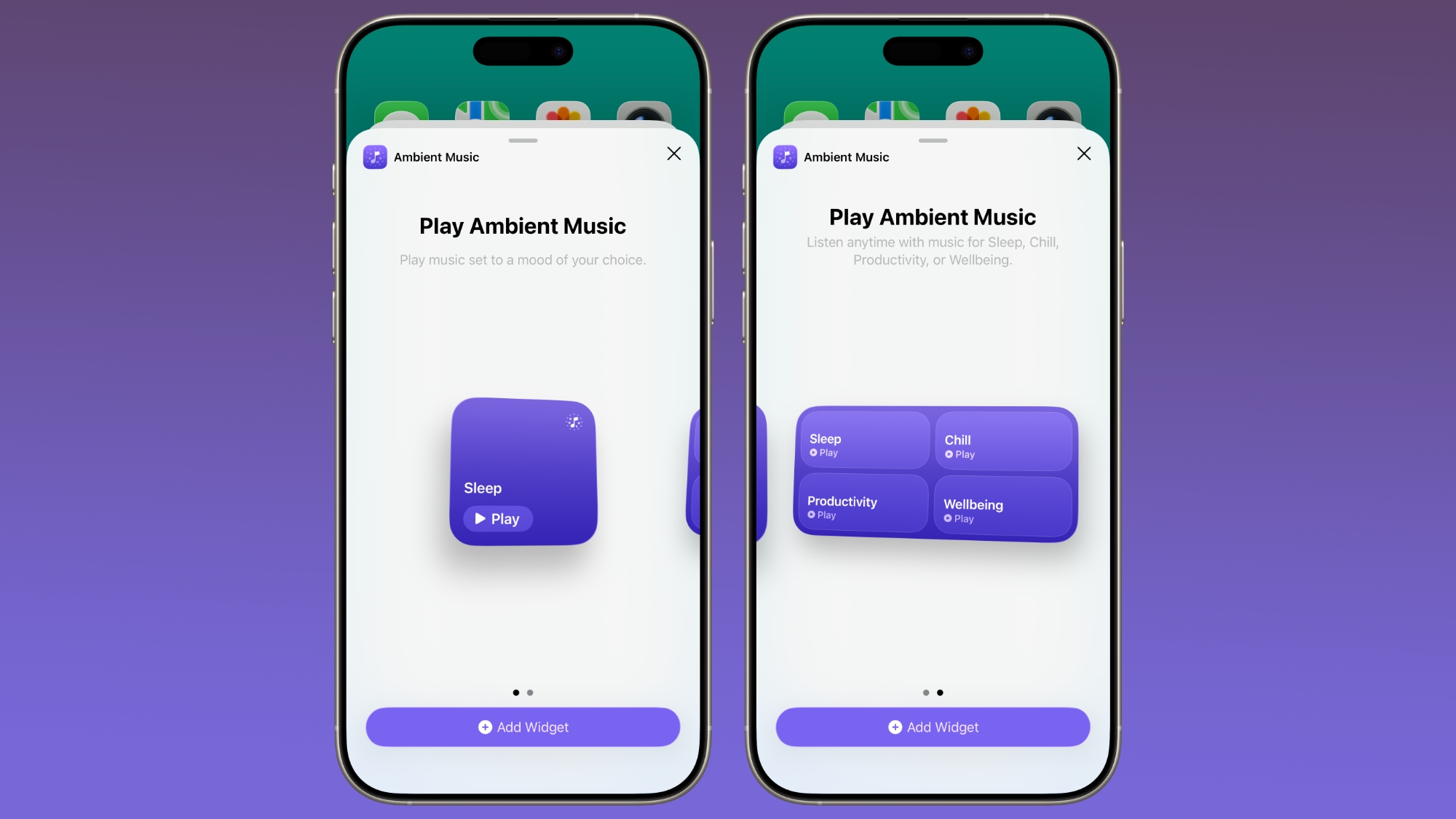
The Ambient Music widget supports playing various built-in ambient music options. These are carefully crafted soundscapes designed for different purposes, such as aiding sleep, enhancing productivity during work sessions, promoting general wellbeing, and more. Imagine needing a moment of calm during a busy day; with this widget, a simple tap can envelop you in a peaceful soundscape directly from your Lock Screen.
This feature offers a convenient way to integrate mindfulness and focus-enhancing audio into your daily routine without needing to open a specific app. It's a small but thoughtful addition that underscores Apple's commitment to user wellbeing and personalization, allowing you to tailor your iPhone's interface to better support your lifestyle and mood.
Refreshed Wallpaper and Watch Face Galleries
Customizing the look of your devices is a key part of the Apple experience, and iOS 26.4 brings a fresh new look to the Wallpaper Gallery on iPhone and the Watch Face Gallery in the Apple Watch app. Both galleries have received an updated design that enhances the browsing and selection process.
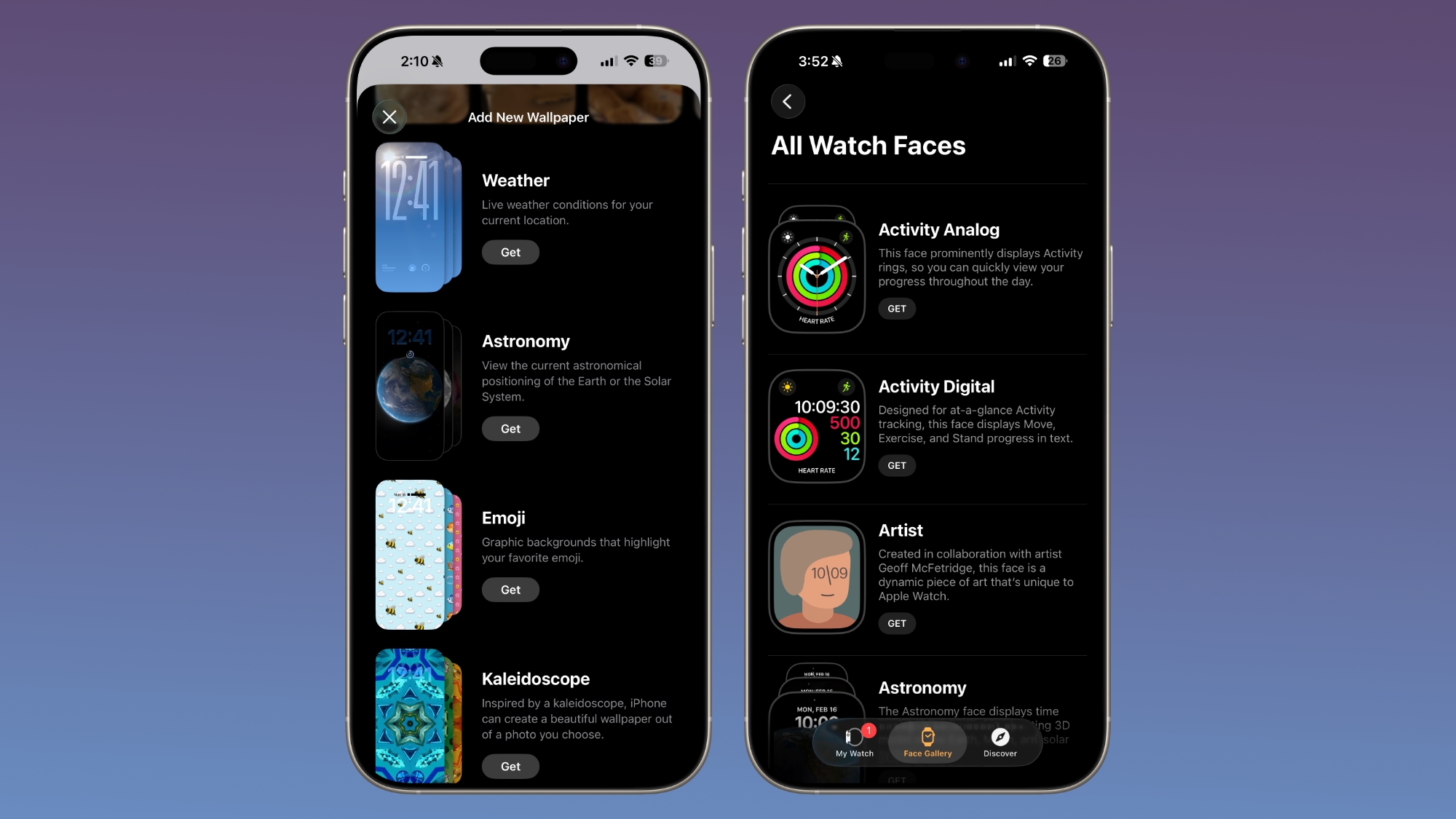
The redesigned Wallpaper Gallery now allows wallpapers from each category – such as Weather, Astronomy, Emoji, Colors, and More – to be downloaded directly to your iPhone. This means you can more easily explore the extensive collection, preview options, and apply new backgrounds that perfectly match your style or current mood. The streamlined interface makes navigating through the myriad of choices a more enjoyable and efficient process.
Similarly, the Watch Face Gallery within the Apple Watch app features the same design transformation. This consistency ensures that the experience of customizing both your iPhone and Apple Watch is cohesive and user-friendly. Whether you're looking to update your phone's background or personalize your watch face, these refreshed galleries offer an improved visual and functional experience, making customization more intuitive and fun.
Easier Access to Caption Settings
Accessibility and convenience go hand-in-hand in iOS 26.4, with a small but significant improvement to how you manage subtitles and captions. When you are viewing any form of media on your iPhone that supports captions, the settings for subtitle and caption customization are now directly accessible from the captions icon.
This means you no longer have to dig through multiple layers of system settings to adjust text size, font, color, or background for your captions. With a simple tap on the dedicated captions icon, you can quickly and easily modify these settings on the fly. This enhancement is particularly beneficial for users who rely on captions for accessibility reasons, as well as anyone who prefers to customize their viewing experience. It streamlines the process, ensuring that adjusting captions is a seamless and frustration-free part of consuming media.
Freeform Gets a Creative Boost with Creator Studio
The Freeform app, Apple's digital whiteboard for creative collaboration, gets a significant upgrade with the live launch of Freeform Creator Studio in iOS 26.4. This new offering is specifically for Creator Studio subscribers, granting them access to a suite of powerful new features designed to enhance their creative workflow and content creation capabilities.
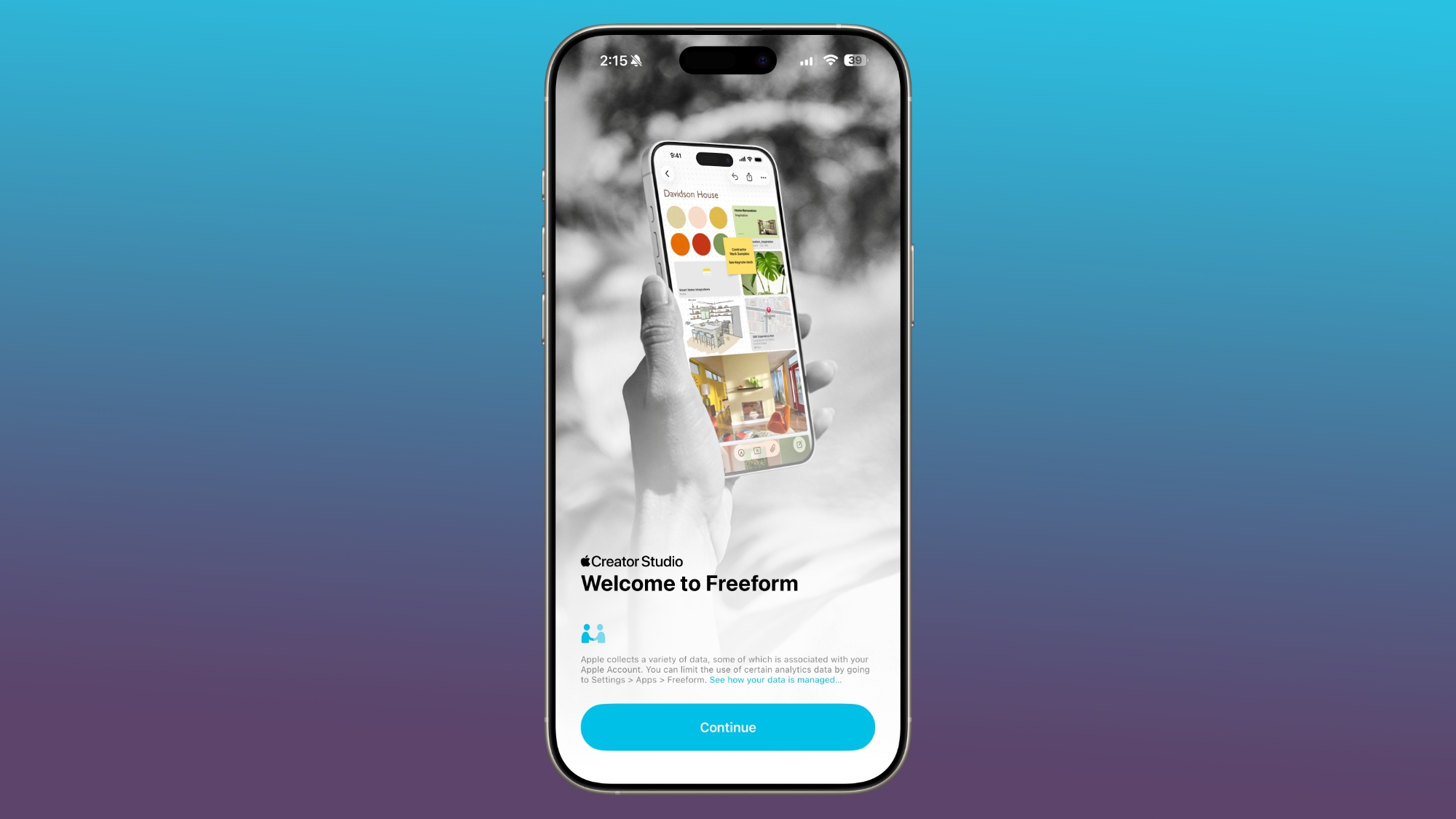
A key component of Creator Studio for Freeform is the dedicated Content Hub. This hub serves as a centralized location for all the Freeform shape options, making it easier and quicker to find and use the exact elements you need for your boards. No more searching; everything is neatly organized for efficient access.
Subscribers to Creator Studio will also unlock a wealth of premium content that is unavailable to non-subscribers. This includes access to a vast library of free, high-quality graphics, photos, and illustrations. These assets provide professional-grade elements to elevate any Freeform project, whether for brainstorming, design, or presentation. Furthermore, the Creator Studio introduces powerful AI capabilities specifically designed for creating and editing images directly within Freeform, opening up new creative possibilities and accelerating the design process.
Apple had previously announced that these premium content and advanced features for Freeform would be integrated into the Apple Creator Studio subscription later in the year, and with iOS 26.4, that promise is fulfilled. Additionally, as part of this update, the Freeform app itself sports a new icon, reflecting its refreshed capabilities and expanded role as a creative powerhouse.
Reminders App Gets an "Urgent" Section
For those critical tasks that simply cannot be missed, the Reminders app in iOS 26.4 introduces a vital new "Urgent" section. This enhancement is designed to ensure that your most important reminders always grab your attention and are prioritized, preventing vital deadlines or commitments from slipping through the cracks.
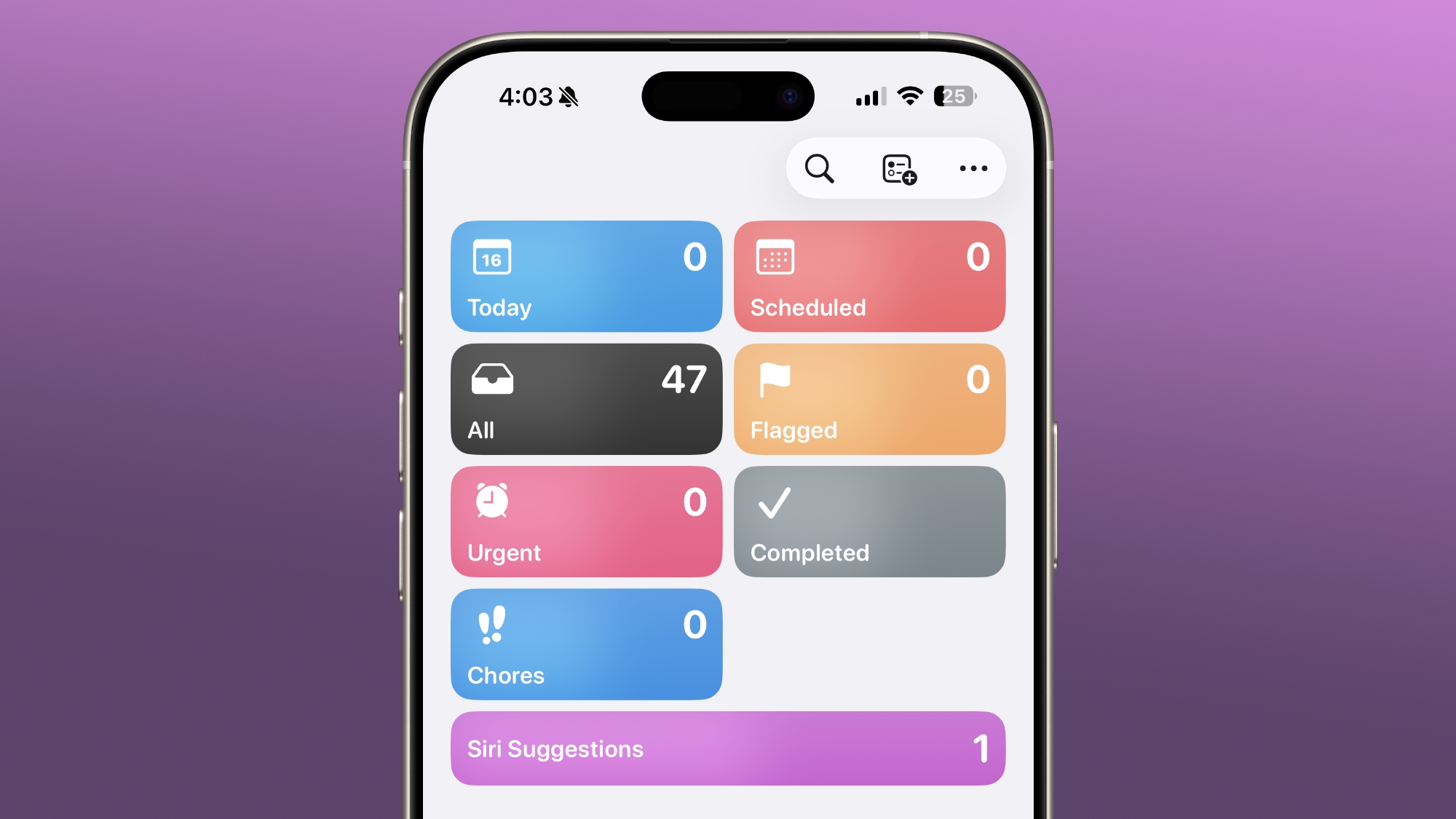
When you create a new reminder, you now have the option to toggle on the "Urgent" setting. Any reminder marked as urgent will automatically appear in this new, dedicated section within the Reminders app. The defining characteristic of an urgent reminder is its accompanying alarm. Unlike standard reminders which might only show a notification, urgent reminders will trigger a distinct alarm, providing a clear and unmistakable warning when they are due. This auditory cue ensures that even if your phone is in silent mode, you'll still be alerted to the most pressing tasks.
Marking a reminder as urgent is also made convenient. You can do so directly from the Quick Toolbar while creating or editing a reminder, or by simply touching and holding an existing reminder and selecting the "Urgent" option. This flexibility makes it easy to designate high-priority tasks with minimal effort, transforming the Reminders app into an even more reliable assistant for managing your personal and professional life.
Enhanced iCloud Web Settings
Managing your iCloud settings and privacy controls becomes more explicit in iOS 26.4. Within the iCloud section of the Settings app, scrolling all the way to the bottom of the interface will now reveal a distinct "iCloud.com" option. This replaces the previous, simpler "Access iCloud Data on the Web" toggle, offering more granular control and clarity.
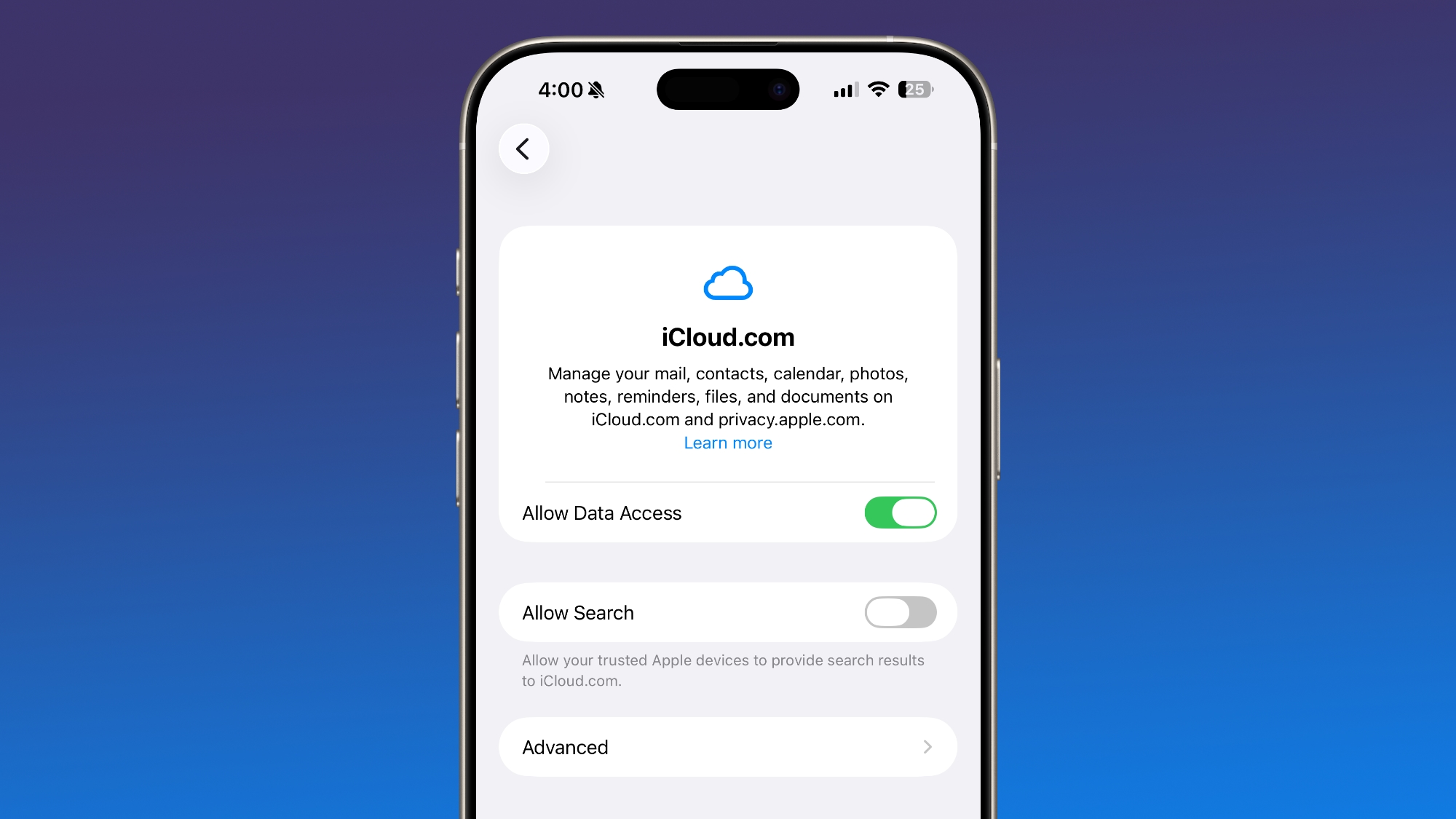
The new "iCloud.com" section includes a specific "Allow Search" toggle. This innovative feature gives you control over whether trusted Apple devices are permitted to provide search results to iCloud.com. This means that when you perform a search on iCloud.com, the results can be enhanced by information from your connected Apple devices, potentially offering a more comprehensive and personalized search experience. However, by providing a toggle, Apple ensures you have the power to decide if you want to enable this integration, giving you greater privacy and data control over how your iCloud data is accessed and utilized on the web.
Deeper Health Insights in the Health App
The Health app continues to evolve as a comprehensive hub for your personal wellbeing, and iOS 26.4 introduces valuable new metrics and improved data visualization to help you understand your health better.
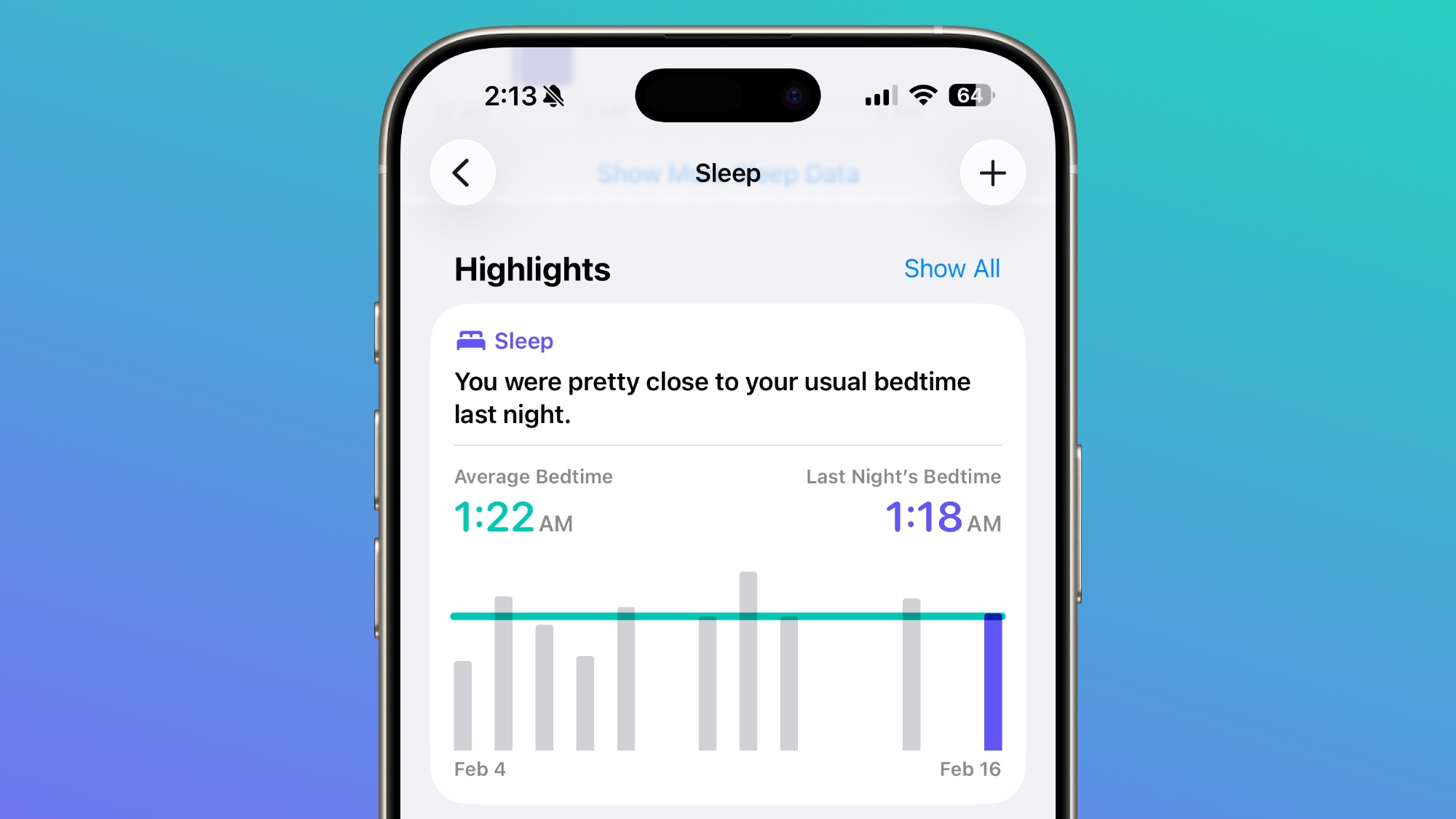
Average Bedtime Metric for Sleep
Understanding your sleep patterns is crucial for overall health, and the sleep section of the Health app now includes a new "Average Bedtime" metric. This feature provides a clearer, at-a-glance idea of your typical bedtime over a period. By tracking your average bedtime, you can gain better insights into how your sleep schedule consistency (or lack thereof) might be impacting your overall sleep quality and readiness for the day. This simple yet effective addition empowers you to make more informed choices about your routines to improve your rest.
Enhanced Vitals Section with Blood Oxygen
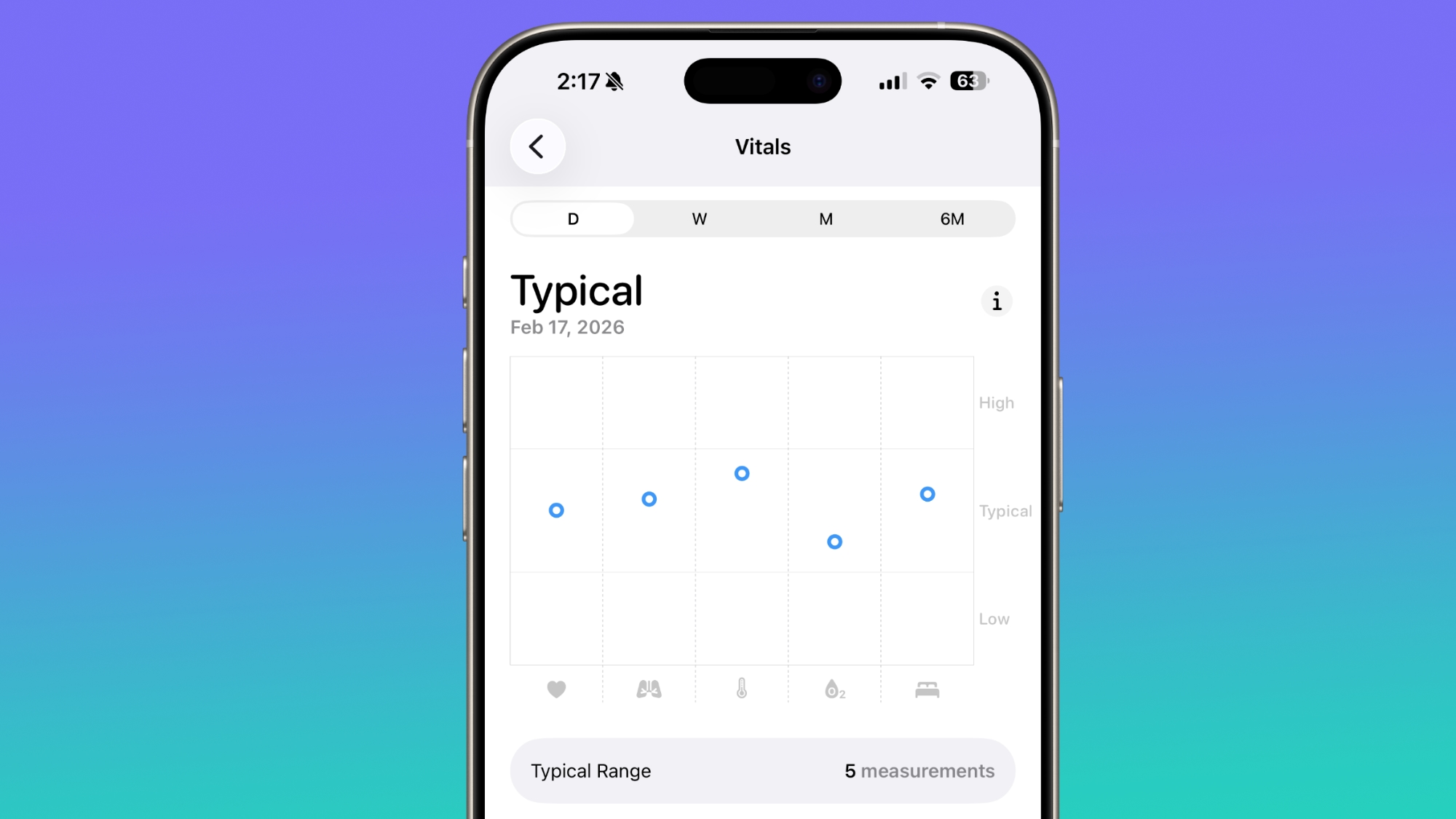
For users in the U.S., the Vitals section of the Health app has received a crucial update. It now includes your blood oxygen level directly on the line graph overview that's available each day. In previous versions (iOS 26.3 and earlier), while there was a section dedicated to blood oxygen level, the graphical representation of your daily vitals did not include this important measurement. The integration of blood oxygen levels directly into the daily line graph provides a more holistic and immediate overview of key physiological metrics. This makes it easier to track trends, identify potential changes, and maintain a comprehensive understanding of your vital signs, all within a single, intuitive interface.
Accessibility Enhancements: Reduce Motion and Bright Effects
Apple continues to refine its accessibility features, making the iPhone experience more comfortable for all users. iOS 26.4 introduces two key improvements related to visual effects and motion, addressing potential discomfort for sensitive individuals.
Firstly, there's a new "Reduce Bright Effects" option. This setting is designed to minimize bright flashes that can occur when you tap on various interface elements, such as buttons. For users sensitive to sudden bright lights or rapid visual changes, this feature can significantly improve the comfort and usability of their iPhone, reducing eye strain and potential triggers.
Secondly, the existing "Reduce Motion" setting has been enhanced. It now more reliably reduces the animations associated with "Liquid Glass," a visual effect used in various parts of the iOS interface. For those who prefer a more static and less animated experience due to motion sensitivity or simply personal preference, this improvement ensures that the Reduce Motion setting works more effectively across the system, providing a consistently calmer visual environment.
Smart Audio with Audio Zoom in Camera
The Camera app in iOS 26.4 gains a clever new feature called "Audio Zoom," designed to significantly improve the audio quality of your videos, especially when you're zooming in on a subject. This intelligent setting can be found in the Settings section of the Camera app.
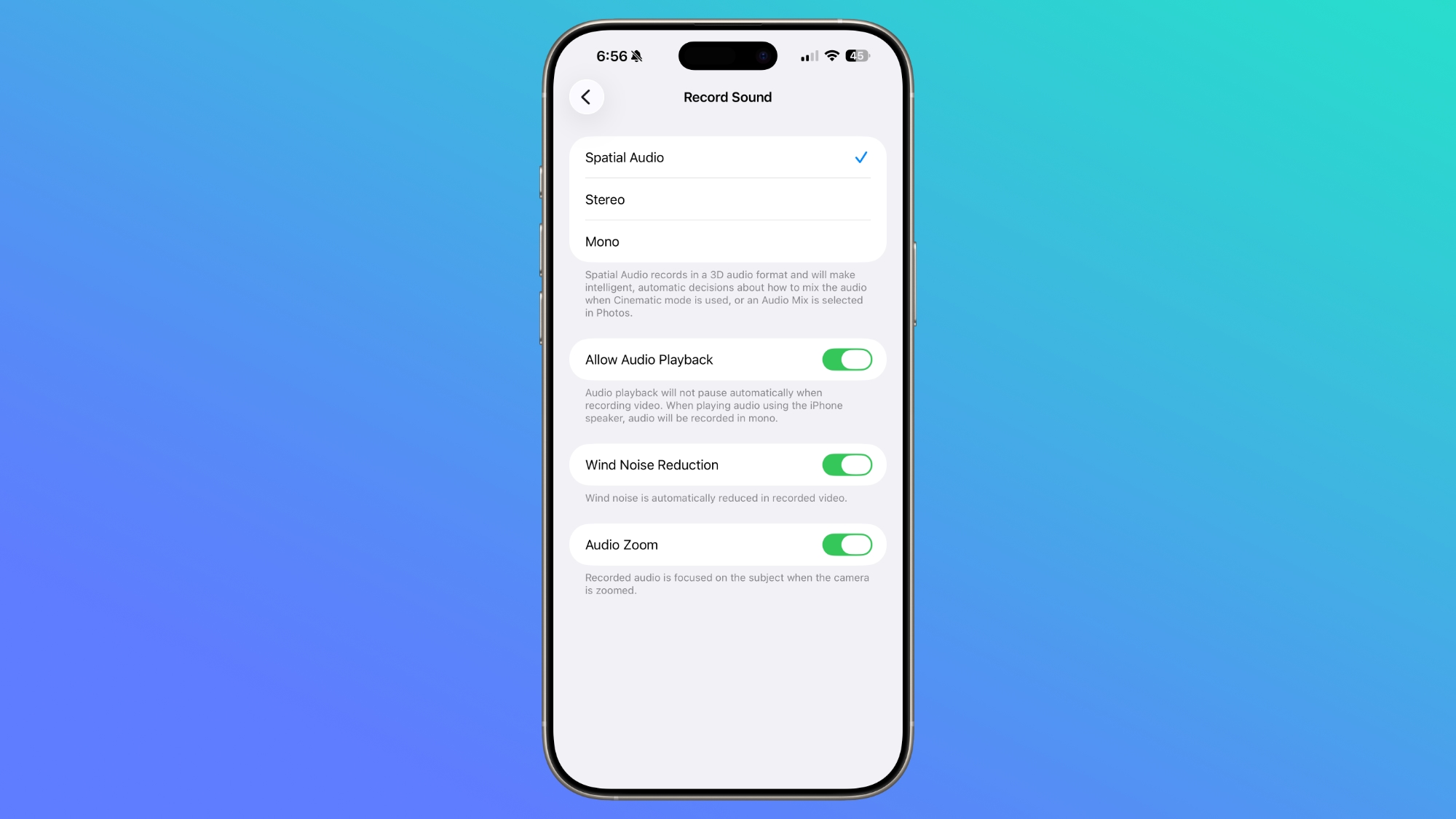
When "Audio Zoom" is enabled, your iPhone's microphones will automatically focus on the subject that you're zooming in on while recording a video. This means that as you zoom closer to a person speaking or a specific sound source, the camera will intelligently prioritize and amplify the audio coming from that direction, while simultaneously reducing background noise. The result is clearer, more focused audio that truly complements your zoomed-in video footage, making your recordings sound more professional and impactful.
You have full control over this feature, as it can be easily turned on or off depending on your preference and the specific audio settings you desire for your videos. Whether you're recording a distant speaker, a specific instrument in a band, or a child's laughter from across a park, Audio Zoom helps ensure that the sounds you want to capture are crisp and prominent.
CarPlay Gets Smarter with AI and Entertainment
CarPlay is evolving beyond navigation and music control, becoming a more intelligent and entertaining extension of your iPhone in your vehicle. With iOS 26.4, significant new capabilities are being introduced, bringing advanced AI services and even the potential for video entertainment to your car's dashboard.
AI Services Integration
For the first time, leading AI services like Claude, Gemini, and ChatGPT are accessible through the CarPlay system. This marks a major step forward in bringing sophisticated voice-based intelligence directly into your car. The new integration allows CarPlay users to access these AI chatbots to ask questions hands-free, making it incredibly convenient to get information, brainstorm ideas, or simply engage in conversation while keeping your focus on the road.
However, there are important distinctions to note. These AI apps will not be able to control vehicle functions or even core iPhone features, ensuring that safety remains the top priority. Additionally, there won't be a "wake word" option to activate a third-party AI app directly. This means users will still need to manually open the specific AI app within CarPlay to begin using the chatbot. Once an app is launched, a customizable voice control screen will provide users with vehicle-optimized chatbot experiences, simplifying interaction in the car environment.
It's also crucial to remember that third-party apps need to implement support for this feature. Therefore, while the capability is present in iOS 26.4, it may take some time for all your favorite AI applications to fully integrate and become available within CarPlay.
Apple TV Support for CarPlay (Future)
Beyond AI, iOS 26.4 also hints at exciting future developments for CarPlay entertainment. During the beta period, references and mentions of Apple TV support for CarPlay were discovered. This strongly suggests that Apple plans to allow users to watch Apple TV content directly through their car's dashboard display.
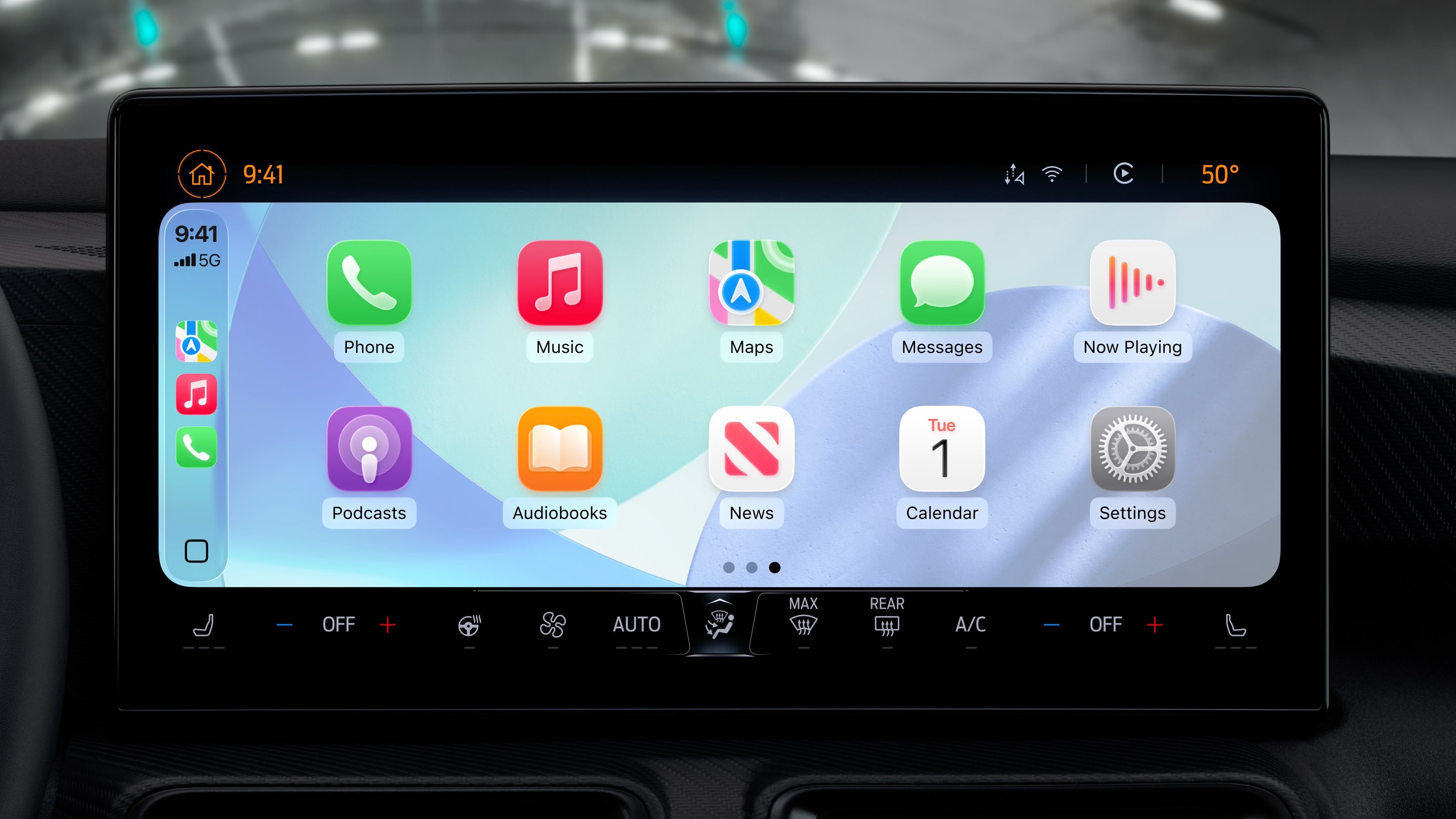
Naturally, for safety reasons, this functionality would only be available when the vehicle is not in motion. Imagine being able to catch up on your favorite shows or movies during a charging stop or while waiting for someone in a parked car. Apple had previously announced at WWDC 2025 that it would add support for AirPlaying video content to a CarPlay display, and this update lays the groundwork for that highly anticipated feature. This promises to make your car an even more versatile and enjoyable space for both productivity and leisure.
Easier Hotspot Data Monitoring
For users who frequently rely on their iPhone's Personal Hotspot to connect other devices to the internet, iOS 26.4 brings a small but meaningful quality-of-life improvement. Apple has relocated the hotspot data usage metrics, making it far more accessible and convenient to monitor your data consumption.
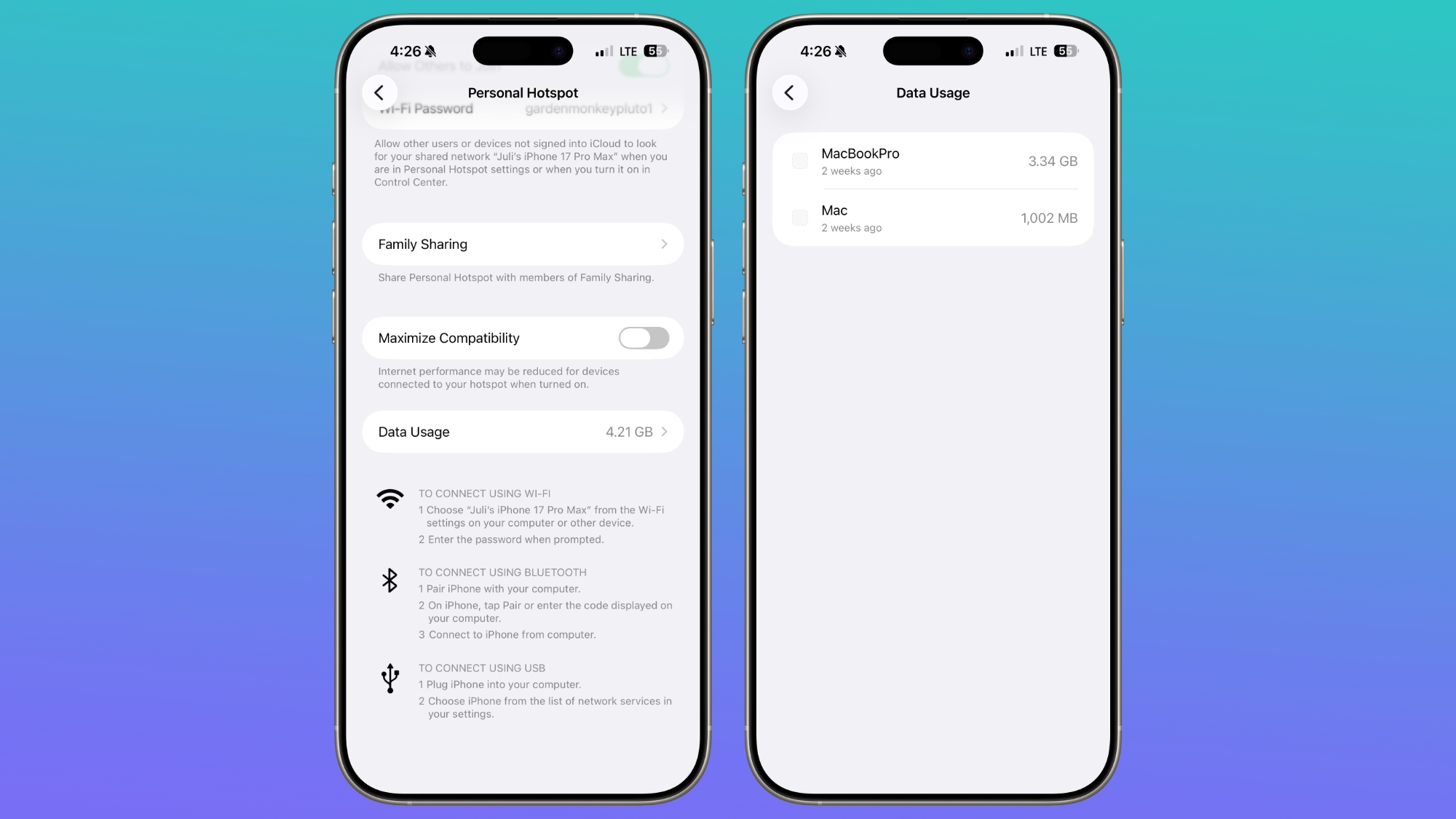
Previously, you would typically have to navigate deep into the Cellular settings to find how much data your hotspot had used. Now, that information is directly available within the Personal Hotspot section itself. This streamlined placement means you can quickly check your data usage without unnecessary clicks or searching through menus. For anyone on a limited data plan, or simply needing to keep an eye on their internet consumption, this change provides immediate access to crucial information, helping you manage your hotspot usage more effectively and avoid unexpected overages.
Expanded Language Support for Live Captions
Accessibility is a continuous focus for Apple, and iOS 26.4 extends the reach of its "Live Captions" feature. This powerful tool provides real-time, on-device captions for any audio playing on your iPhone, benefiting users who are deaf or hard of hearing, or simply prefer visual aids.
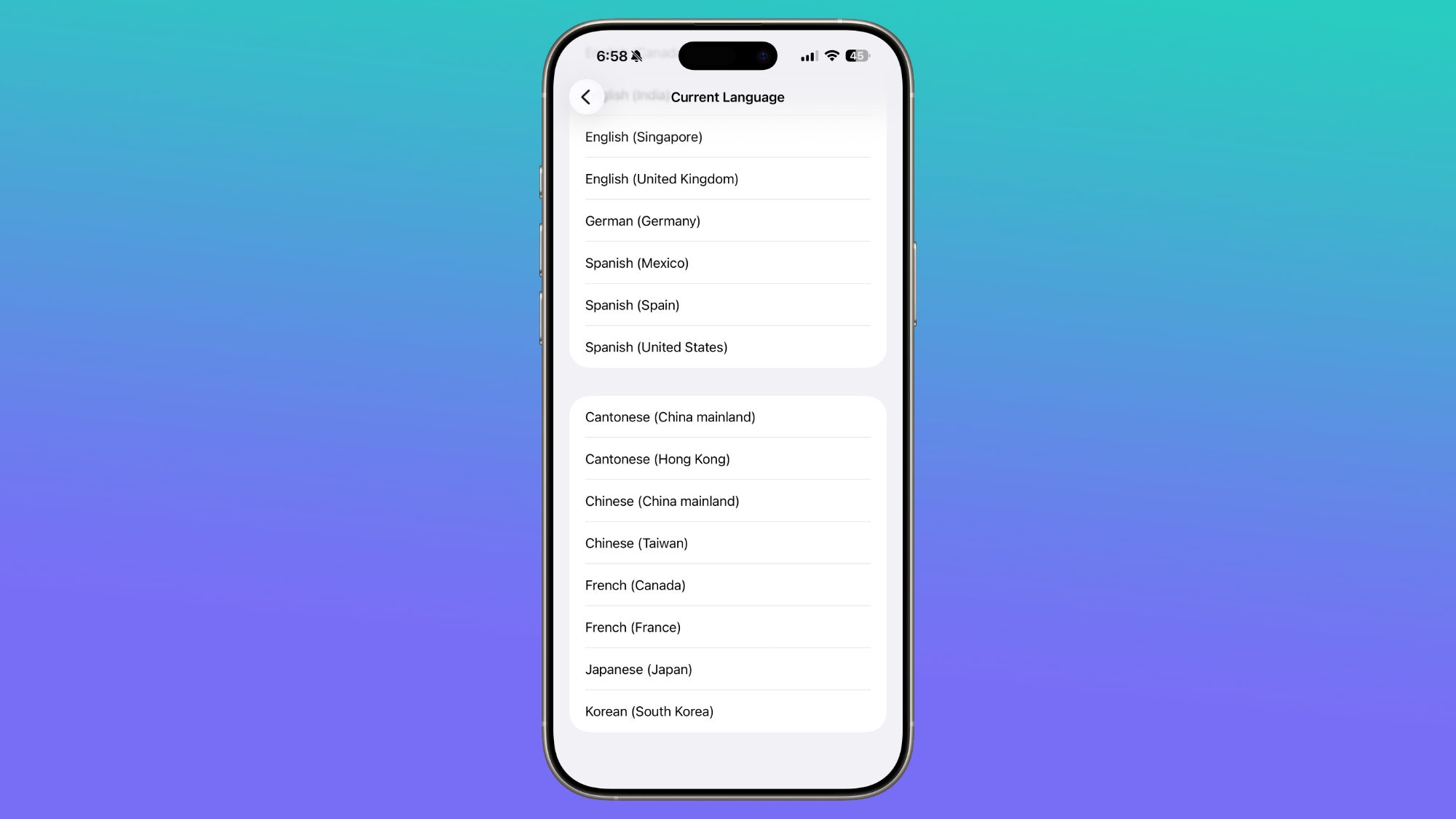
With this update, Chinese (Taiwan) is now available as a new language option for Live Captions within the Accessibility section of your iPhone's settings. This expansion of language support ensures that a broader range of users can take advantage of this fantastic accessibility feature, making audio content more comprehensible and the iPhone more inclusive for different linguistic communities. It underscores Apple's commitment to breaking down communication barriers and making technology accessible to everyone.
Subtle Passcode Settings UI Adjustment
In iOS 26.4, you'll find a minor visual refinement in the Face ID and Passcode section of the Settings app. When you enter your passcode to access the various options and settings within this section, the text you type is now center-aligned instead of being left-aligned.
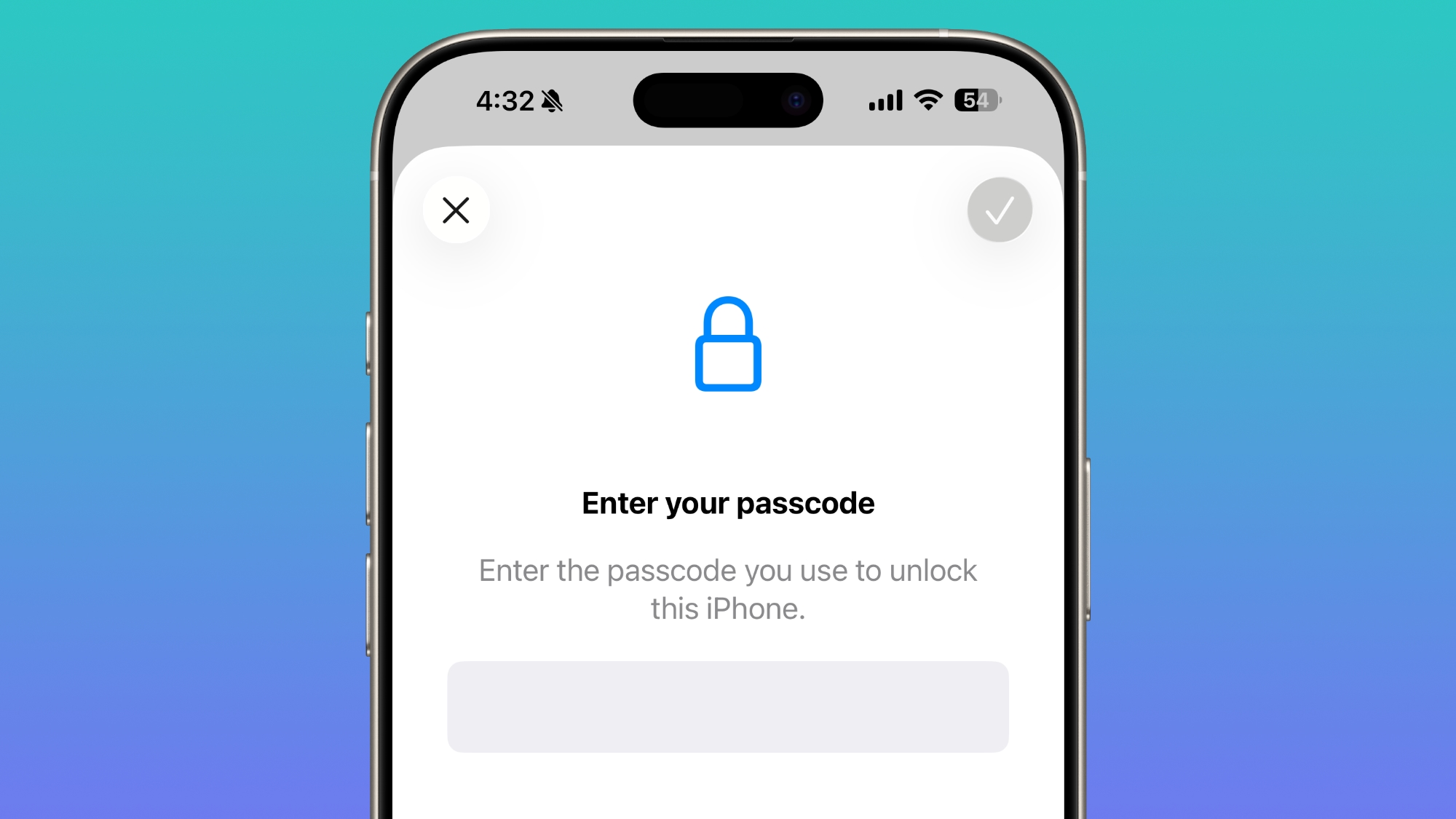
While this is a purely aesthetic change, it contributes to a more polished and visually balanced interface. These small design tweaks are part of Apple's ongoing effort to refine the user experience and ensure that every interaction, no matter how brief, feels modern and well-considered. It's a subtle detail that adds to the overall cohesiveness of iOS's visual design.
New "Set Charge Limit" Action in Shortcuts
The Shortcuts app, a powerful tool for automating tasks and customizing your iPhone experience, gains a useful new action in iOS 26.4: "Set Charge Limit." This addition provides users with greater control over their device's battery health and charging habits.
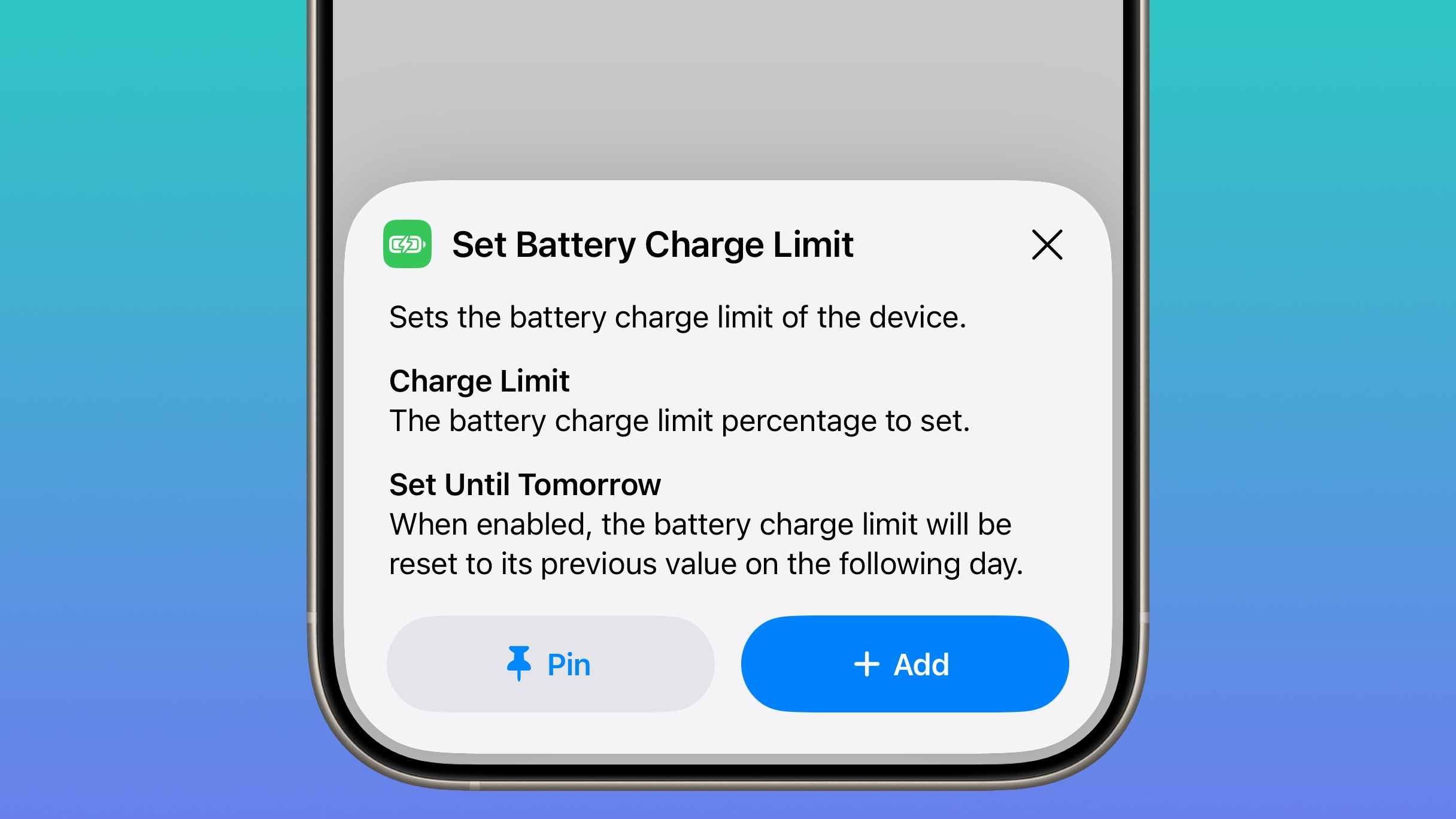
With the "Set Charge Limit" action, you can now create custom shortcuts or automations that define a specific battery charge limit for your iPhone. For example, you might set up an automation that caps your iPhone's charge at 80% when it's plugged in overnight, or adjusts the limit based on the time of day or your location. This is particularly beneficial for extending the long-term lifespan of your iPhone's battery, as keeping a battery consistently charged to 100% can sometimes accelerate degradation.
Power users who leverage Shortcuts for advanced device management will find this new action incredibly valuable. It allows for more sophisticated and personalized battery management strategies, contributing to better battery health and potentially prolonging the time before your battery's capacity significantly decreases. This level of customization empowers users to fine-tune their device's behavior to match their specific needs and priorities.
Improved Keyboard Accuracy and Autocorrect
One of the most welcome improvements in iOS 26.4, especially for fast typists, is a critical bug fix related to keyboard accuracy. Previously, some users experienced an issue in iOS where, when typing rapidly, certain characters would occasionally be missed or ignored by the keyboard. This not only disrupted the typing flow but also severely impacted the effectiveness of autocorrect.
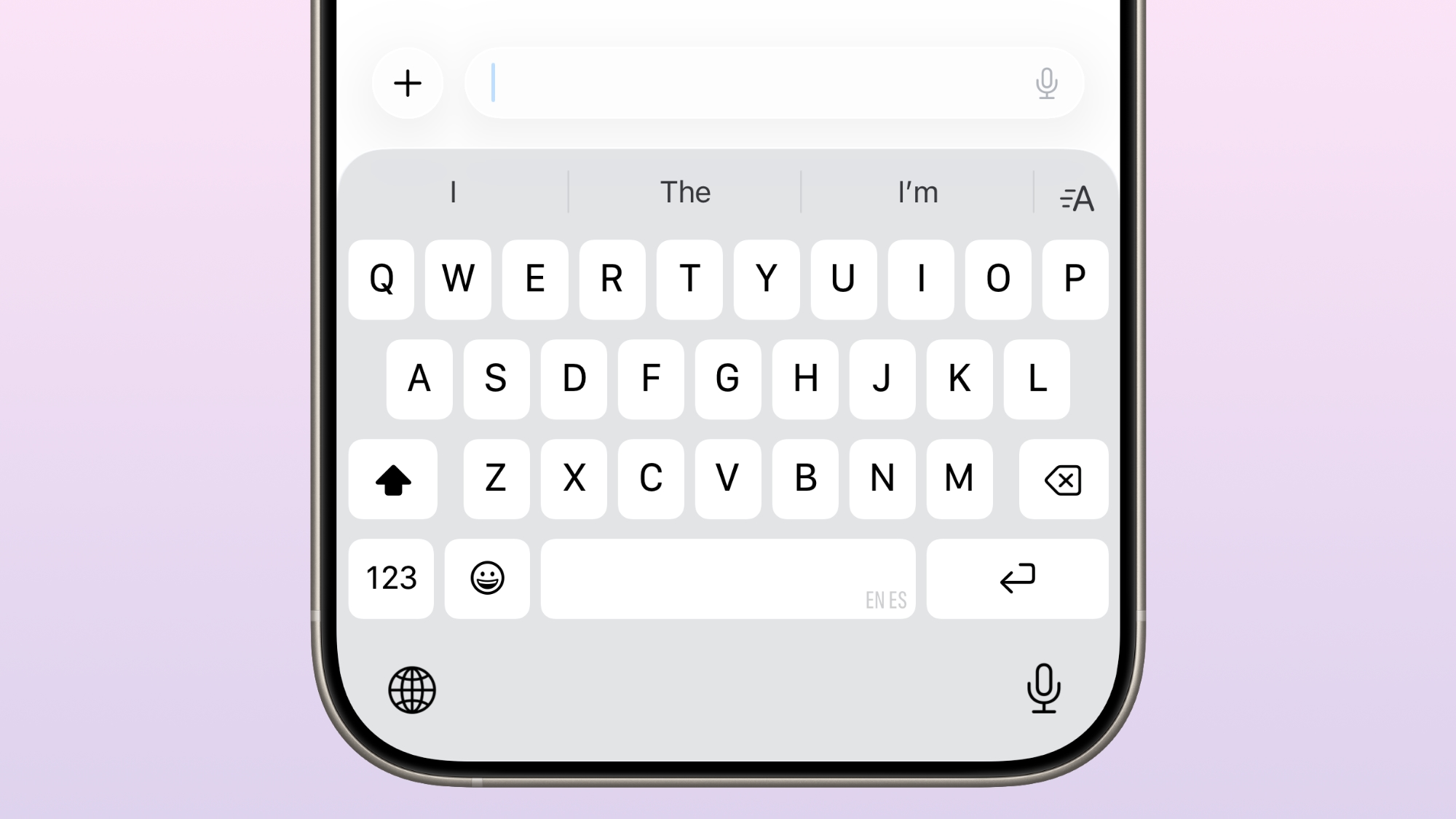
When characters were missed, autocorrect would often fail to accurately predict what the user intended to type, leading to more errors and the need for manual corrections. iOS 26.4 addresses this frustration head-on by offering significantly improved keyboard accuracy. This fix ensures that every rapid tap is registered correctly, leading to fewer missed characters and, consequently, a much more reliable and helpful autocorrect feature.
The result is a smoother, faster, and more enjoyable typing experience across your iPhone. Whether you're sending quick messages, drafting emails, or writing notes, the enhanced keyboard responsiveness means you can type with confidence, knowing that your words will be accurately captured and intelligently corrected, saving you time and reducing errors.
VoNR for Telus iPhone Users
iOS 26.4 also brings specific carrier-related enhancements, impacting how certain users experience their mobile network. For Telus iPhone users in particular, the update introduces a Voice Over New Radio (VoNR) feature, which promises a noticeable improvement in call quality and network performance.
VoNR allows compatible devices to remain connected to the 5G Standalone network during voice calls, rather than dropping down to 4G LTE. Previously, even if you were on a 5G network, your phone might switch to 4G LTE for the duration of a voice call. With VoNR, your device can leverage the advanced capabilities of 5G Standalone for voice, potentially leading to clearer call quality, faster call setup times, and a more consistent network experience overall. This represents an important step in fully utilizing the potential of 5G technology for all aspects of mobile communication, offering Telus iPhone users a superior calling experience.
Critical Security Updates for Your Protection
Beyond the exciting new features and user experience enhancements, one of the most crucial aspects of any iOS update is security. iOS 26.4 delivers on this front by fixing more than 35 security vulnerabilities. These vulnerabilities impacted a wide range of areas within iOS, from popular apps like Safari and Messages to various underlying system services.
While Apple stated that it did not encounter any actively exploited vulnerabilities at the time of the update's release, it is always a highly recommended practice to update to the latest version. Security researchers constantly discover new flaws, and even if a vulnerability isn't actively being exploited today, it could be tomorrow. These patches close potential loopholes that malicious actors could otherwise exploit to gain unauthorized access to your device or data.
Now that Apple has publicly documented and acknowledged these vulnerabilities, they might become targets for those with harmful intentions. Therefore, updating your iPhone to iOS 26.4 as soon as possible is the best way to ensure your device is protected against the latest threats, safeguarding your personal information, privacy, and overall digital security.
How to Get iOS 26.4
Updating your iPhone to the latest version of iOS is a straightforward process. To install iOS 26.4 and benefit from all the new features and security enhancements, simply follow these steps:
- Open the Settings app on your iPhone.
- Tap on the General section.
- Navigate to Software Update.
Your iPhone will then check for available updates. Once iOS 26.4 appears, follow the on-screen prompts to download and install it. Make sure your device is connected to Wi-Fi and has sufficient battery life (or is plugged into power) before starting the update process.
Is Your iPhone Compatible with iOS 26.4?
Ensuring your device can run the latest software is important. iOS 26.4 is compatible with all iPhones that support the broader iOS 26 operating system. This includes the iPhone 11 and all subsequent models released thereafter. If you own an iPhone 11, iPhone SE (2nd generation or later), or any newer iPhone model, you will be able to update to iOS 26.4 and enjoy all its new features and improvements.
Users with older iPhone models (e.g., iPhone X or earlier) will not be able to update to iOS 26.4, as their hardware is no longer supported for the latest software releases.
What's Coming Next for iOS?
With the public release of iOS 26.4 now complete, Apple's development efforts will shift towards the next iteration of the operating system. We can anticipate the first beta of iOS 26.5 to potentially be released as soon as this week, following the stable launch of 26.4. These beta releases will provide developers and public testers with a glimpse into what new features, refinements, and bug fixes Apple has planned for the future, continuing the cycle of innovation and improvement for the iPhone platform.
This article, "iOS 26.4 Features: Everything New in iOS 26.4" first appeared on MacRumors.com
Discuss this article in our forums
from MacRumors
-via DynaSage
