
Apple Releases tvOS 26.4 With Genius Browse
Elevate Your Entertainment: Discovering the Power of tvOS 26.4 on Apple TV
In the rapidly evolving landscape of home entertainment, staying updated is key to unlocking the best possible viewing experience. Apple continues to demonstrate its commitment to this principle with regular enhancements to its tvOS operating system, the powerhouse behind the Apple TV. Today marks another significant stride forward with the release of tvOS 26.4, the fourth major update to the system that debuted last fall. This update is not just a routine patch; it introduces compelling new features and refines existing functionalities, promising to transform how you interact with your beloved Apple TV 4K and Apple TV HD devices.
As streaming services proliferate and our digital libraries expand, the need for intelligent content discovery and a seamless user experience has never been more critical. tvOS 26.4 addresses these modern challenges head-on, offering users smarter ways to find content, enhanced control over accessibility features, and refined audio capabilities. Whether you're a casual viewer or a dedicated home theater enthusiast, this update is designed to make your Apple TV experience more intuitive, enjoyable, and personalized than ever before. Join us as we delve into the specifics of tvOS 26.4, exploring its key features and what they mean for you.
Understanding tvOS: The Heart of Your Apple TV Experience
Before we dive into the specifics of tvOS 26.4, it’s beneficial to understand what tvOS is and its pivotal role in the Apple ecosystem. tvOS is Apple's dedicated operating system for the Apple TV, specifically designed to bring a sophisticated, app-centric experience to your television screen. Think of it as the brain of your Apple TV device, managing everything from navigating menus and launching apps to streaming high-definition video and playing games.
Unlike traditional cable boxes or basic smart TV interfaces, tvOS is built upon the robust foundation of iOS, Apple's operating system for iPhones and iPads. This shared heritage means that tvOS benefits from Apple's long-standing expertise in user-friendly design, powerful performance, and stringent security. It allows for deep integration with other Apple services and devices, creating a cohesive experience across your digital life. For example, your Apple TV can effortlessly connect to your iPhone for text input, serve as a HomeKit hub for smart home devices, or stream content via AirPlay from any Apple device.
The primary purpose of tvOS is to serve as a comprehensive entertainment hub. It aggregates content from a vast array of streaming services—Netflix, Disney+, Hulu, HBO Max, and countless others—alongside Apple's own offerings like Apple TV+, Apple Music, and Apple Arcade. Through the App Store on tvOS, users can download thousands of applications, turning their television into much more than just a passive display. From fitness apps and interactive games to news channels and educational platforms, tvOS transforms your TV into a dynamic, personalized portal to the digital world.
Regular updates, like tvOS 26.4, are crucial for several reasons. They not only introduce exciting new features that enhance functionality and user engagement but also provide vital security patches and performance improvements. These updates ensure that your Apple TV remains fast, responsive, and secure against emerging threats, guaranteeing a smooth and enjoyable experience for years to come. By keeping your tvOS updated, you ensure you're always getting the best out of your Apple TV, leveraging the latest innovations and keeping pace with the ever-changing landscape of digital entertainment.
The Arrival of tvOS 26.4: What's New and Why It Matters
Apple's latest software release, tvOS 26.4, marks the fourth update since the major tvOS operating system launched last fall. This continuous stream of updates underscores Apple's commitment to refining and expanding the capabilities of its popular streaming devices. tvOS 26.4 is now available for both the premium Apple TV 4K and the versatile Apple TV HD, ensuring that a broad range of users can benefit from the newest enhancements.
Released just over a month after its predecessor, tvOS 26.3, this update demonstrates Apple's agile development cycle, pushing out improvements and new features regularly. Such consistent updates are vital in the fast-paced world of streaming, where user expectations for functionality, performance, and content discovery are constantly evolving. For users, this means a continuously improving experience, ensuring their Apple TV remains a cutting-edge entertainment device.
The significance of tvOS 26.4 extends beyond mere version numbering. Each update brings a suite of refinements that contribute to a more polished and user-friendly platform. From under-the-hood performance optimizations that make navigation smoother to critical security patches that safeguard your data, these updates are foundational to a robust digital experience. Moreover, they lay the groundwork for future innovations, ensuring the Apple TV ecosystem remains dynamic and responsive to user needs and technological advancements.
For Apple TV 4K owners, tvOS 26.4 continues to leverage the device's powerful hardware, delivering stunning visual fidelity and immersive audio experiences. Apple TV HD users will also find their devices invigorated, benefiting from the software's efficiency improvements and new features, extending the lifespan and utility of their hardware. This inclusive approach ensures that a wider audience can enjoy the enhancements, making the Apple TV a compelling choice for any living room setup. Staying current with these updates isn't just about getting new features; it's about maintaining optimal performance, enhancing security, and ensuring compatibility with the latest apps and services.
Seamless Upgrade: How to Update Your Apple TV to tvOS 26.4
Keeping your Apple TV updated to the latest tvOS version is crucial for enjoying new features, benefiting from performance improvements, and ensuring the security of your device. Updating to tvOS 26.4 is a straightforward process that can be completed in just a few steps. Whether you prefer to manage updates manually or let your Apple TV handle it automatically, Apple provides convenient options for everyone.
Manual Update Process:
- Open Settings: From your Apple TV's Home Screen, navigate to and select the "Settings" app. This app is usually represented by a gray gear icon.
- Access System Options: Within the Settings menu, scroll down and choose "System." This section contains various device-level configurations, including software updates.
- Initiate Software Update: Under the System menu, select "Software Updates." Here, you'll see information about your current tvOS version and the option to check for new updates.
- Download and Install: Your Apple TV will then check for available updates. If tvOS 26.4 is found, select "Download and Install" or "Update Software." Follow any on-screen prompts to confirm the installation. Your Apple TV may need to restart during this process, and it's essential not to unplug it until the update is complete.
The download and installation time can vary depending on your internet connection speed and the size of the update. It’s a good idea to perform updates when your Apple TV is not actively in use, perhaps overnight or during a time when you won't be needing it for entertainment.
Automatic Software Updates:
For those who prefer a hands-off approach, Apple TV offers the convenience of automatic software updates. If you have this feature activated, your device will proactively download and install new tvOS versions, including tvOS 26.4, in the background or during off-peak hours, ensuring you're always running the latest software without any manual intervention.
To check if automatic updates are enabled or to turn them on:
- Go to "Settings" > "System" > "Software Updates."
- Look for the "Automatically Update" option. If it's off, select it to toggle it on.
Enabling automatic updates is highly recommended as it ensures you consistently benefit from the latest features, performance enhancements, and crucial security patches without having to remember to check for them yourself. This convenience not only keeps your device optimized but also helps maintain its security against evolving digital threats.
In rare cases, if an update doesn't appear or you encounter issues, ensure your Apple TV is connected to a stable Wi-Fi network and has sufficient storage space. A simple restart of the Apple TV can also sometimes resolve minor update glitches. With these simple steps, you'll have tvOS 26.4 up and running, ready to explore all its new offerings.
Introducing Genius Browse: Your Personalized Content Navigator
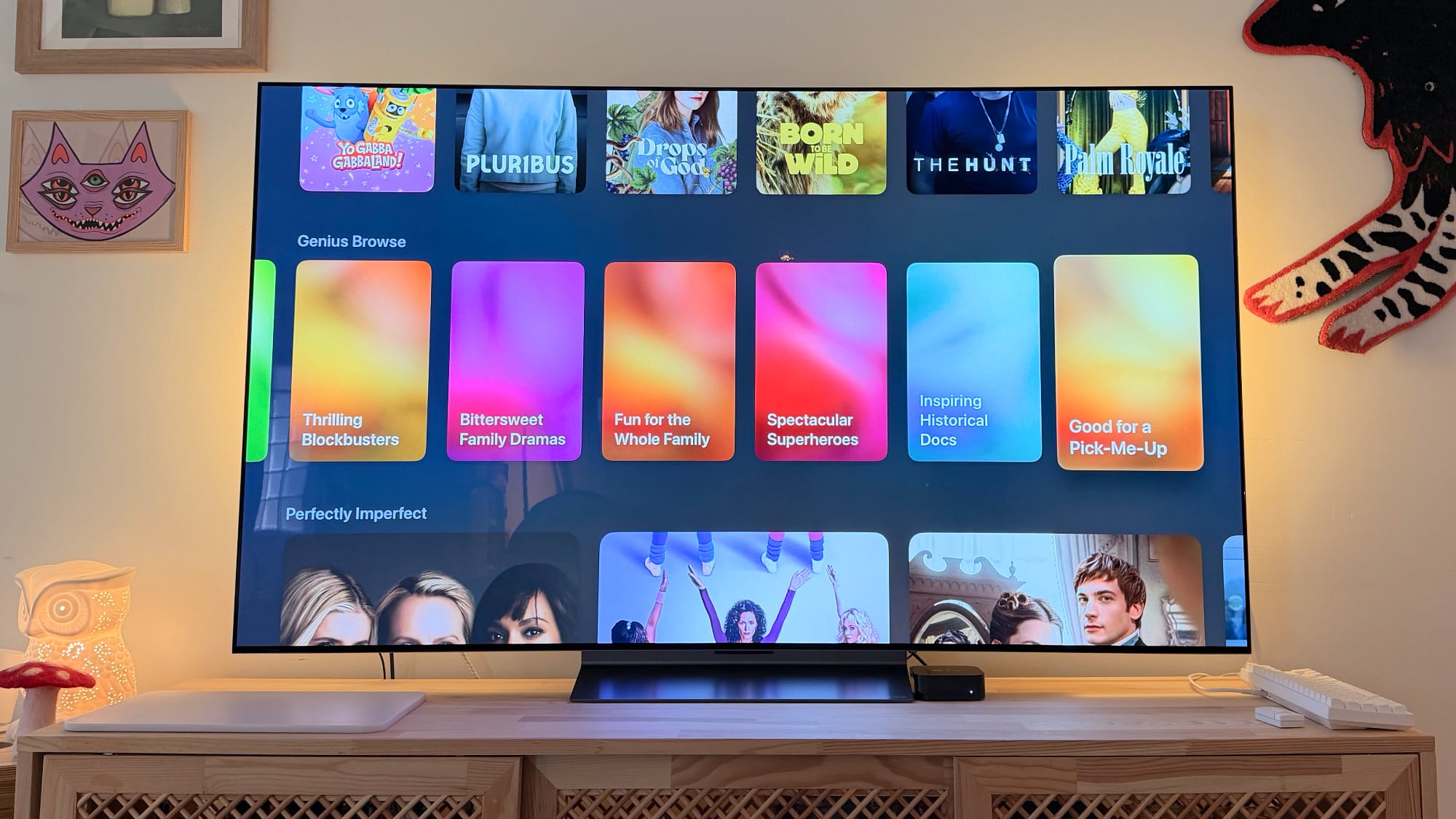
One of the standout features of tvOS 26.4 is the introduction of "Genius Browse" within the Apple TV app. In an age where content choices can be overwhelming, Genius Browse emerges as a sophisticated content discovery tool designed to cut through the noise and present you with highly relevant and engaging entertainment options. This feature is a game-changer for anyone who has ever spent more time scrolling through endless menus than actually watching a show or movie.
What is Genius Browse and How Does It Work?
Genius Browse is essentially a smart recommendation engine integrated directly into the Apple TV app. Its core function is to provide personalized suggestions for TV shows and movies, intelligently curated from across your various streaming services and available content. This isn't just a random assortment; it's a feature that leverages advanced algorithms to understand your viewing habits, preferences, and even what’s trending, to offer suggestions that genuinely align with your tastes.
When you access Genius Browse within the Apple TV app, you'll find recommendations organized across "multiple suggested categories." These categories are dynamic and go beyond generic genres like "Action" or "Comedy." Instead, they might include nuanced themes such as "Critically Acclaimed Dramas," "Family Adventures for a Cozy Night," "Mind-Bending Sci-Fi Thrillers," "Feel-Good Romances," or "Documentaries to Spark Your Curiosity." The specificity of these categories makes it much easier to find something that fits your mood or interest at a particular moment.
The Power of Personalization:
The true strength of Genius Browse lies in its personalization. Apple states that "suggestions vary based on content preferences," meaning the more you use your Apple TV and engage with content, the smarter Genius Browse becomes. It learns from:
- Your Viewing History: What shows and movies have you watched? What genres do you frequent?
- Your Interactions: Do you frequently add items to your Up Next queue? Do you buy or rent specific types of content?
- Implicit Feedback: Even how long you hover over a title before moving on can provide data points.
- Broader Trends: It also considers popular content and critical acclaim to ensure you’re not missing out on significant releases.
Dynamic and Regularly Updated Options:
Another key aspect is that "the options are updated regularly." This means Genius Browse is not a static list of suggestions. New content is constantly being added to streaming services, and your preferences can shift. Genius Browse keeps pace with these changes, ensuring that the recommendations are always current, featuring new releases, timely content, and rediscovered gems that might pique your interest. This dynamic nature helps combat content fatigue and keeps your entertainment discovery exciting.
Benefits for the User:
- Combatting Decision Fatigue: In an era of content overload, Genius Browse acts as a powerful filter, presenting manageable and relevant choices, reducing the time spent searching and increasing the time spent enjoying.
- Discovering Hidden Gems: It helps users discover shows and movies they might never have found otherwise, expanding their viewing horizons beyond their usual comfort zones.
- Streamlined Experience: By integrating directly into the Apple TV app, it provides a unified discovery experience, regardless of which streaming service hosts the content.
- Personalized and Relevant: No more generic lists. Genius Browse offers recommendations tailored specifically to you, making the Apple TV feel even more personal.
Genius Browse is more than just a recommendation feature; it's Apple's answer to the modern dilemma of content discovery, making your Apple TV a smarter and more engaging entertainment hub. It underscores Apple's commitment to creating intuitive and powerful tools that enhance the user experience, making it easier than ever to find exactly what you want to watch, or something new you didn't even know you needed.
The End of an Era: iTunes Movies and TV Shows Apps Retire
With tvOS 26.4, Apple continues its strategic consolidation of entertainment content, signaling the complete removal of the dedicated iTunes Movies and iTunes TV Shows apps. This move is not a sudden decision; it represents the final phase of a transition that Apple began in 2023, aiming to create a more unified and streamlined content experience within the overarching Apple TV app. While this change brings clarity to content access, it also means a notable shift for users, particularly concerning wishlists.
Why the Consolidation?
Apple's long-term vision is to centralize all video content—whether purchased, rented, subscribed to, or free—within the single, powerful Apple TV app. This approach offers several advantages:
- Unified Experience: Users no longer need to jump between multiple apps to find their content. Everything, from their personal iTunes library to their Apple TV+ subscriptions and third-party streaming services, resides in one place.
- Simplified Navigation: A single app reduces complexity and makes it easier for users to browse, search, and discover content across their entire entertainment universe.
- Future-Proofing: As the streaming landscape continues to evolve, a centralized app provides a more flexible platform for integrating new services and features, like the new Genius Browse.
Impact on Users: Goodbye Wishlists (from separate apps)
The most direct impact of this removal for many users will be the discontinuation of the wishlist feature within the old iTunes Movies and iTunes TV Shows apps. For years, these wishlists served as personal queues where users could save movies and TV shows they intended to purchase or rent later. With the retirement of these dedicated apps, these specific wishlists are no longer available in their original form.
Recognizing the importance of these wishlists to its customers, Apple took proactive steps to assist with this transition. Before the tvOS 26.4 update, Apple sent emails to affected customers, providing clear instructions on how to transfer their existing wishlist content. The recommended process typically involved migrating these items to the "Up Next" queue or a similar watchlist feature within the main Apple TV app. This ensures that users don't lose track of the content they've been eyeing, simply moving their preferences to the new central hub.
It's crucial to reassure users that the removal of these apps does not affect their purchased content. Any movies or TV shows previously bought through iTunes are still fully accessible within the Apple TV app under the "Library" tab. Your digital purchases are tied to your Apple ID, not to a specific app, meaning your valuable collection remains secure and available for viewing at any time.
User Experience Implications:
While some users might initially miss the dedicated iTunes apps due to muscle memory or a preference for their specific interface, the long-term benefits of consolidation are significant. The Apple TV app offers a more comprehensive and intelligent way to manage and discover content, especially with new features like Genius Browse. It streamlines the experience, reducing fragmentation and making the Apple TV an even more powerful and intuitive entertainment platform.
The transition underscores Apple's commitment to evolving its services for a modern streaming world. By bringing everything under one roof, Apple aims to deliver a superior, integrated, and forward-looking entertainment experience for all its Apple TV users.
Enhanced Control: Deeper Customization for Subtitles and Audio
Accessibility and a premium viewing experience are cornerstones of Apple's design philosophy, and tvOS 26.4 reinforces this commitment with significant improvements to subtitle customization and audio format settings. These enhancements cater to a broader audience, from those with specific accessibility needs to audiophiles seeking the perfect sound experience.
More Accessible Subtitle Customization:
For many users, subtitles are not just an option but a necessity. Whether it's for individuals who are hearing impaired, those learning a new language, or simply viewers in a noisy environment, clear and customizable subtitles are essential. tvOS 26.4 brings "more easily accessible customization options for subtitles," which translates to a more intuitive and quick way to tailor subtitles to your preferences.
Previously, making detailed adjustments to subtitles might have required diving deep into the Apple TV's general settings. With tvOS 26.4, Apple has likely streamlined this process, potentially allowing users to access customization options more directly during playback or within fewer steps in the settings menu. This could include options to:
- Adjust Font Size: Making text larger or smaller to suit individual vision needs.
- Change Font Style: Selecting different typefaces for better readability.
- Modify Colors: Customizing text and background colors for optimal contrast.
- Add Background or Edge Styles: Enhancing visibility against varying on-screen content.
Improved Apple TV Audio Format Settings: Continuous Audio Connection for HDMI Output
Audio quality is paramount for an immersive home theater experience, and tvOS 26.4 introduces a noteworthy improvement in this area: an option for "Continuous Audio Connection for HDMI output." This feature is particularly beneficial for users with sophisticated home theater setups, including AV receivers, soundbars, or external audio systems connected via HDMI.
Historically, some Apple TV users might have experienced slight audio delays, brief dropouts, or momentary silences when switching between different types of content, apps, or even refresh rates. This often occurs because the HDMI connection might briefly re-negotiate the audio signal, leading to a small disruption. The "Continuous Audio Connection" option aims to address this by maintaining a stable and uninterrupted audio stream over the HDMI connection.
What this means for users:
- Seamless Content Switching: Enjoy smoother transitions between different apps or video content without annoying audio glitches.
- Enhanced Stability: A more reliable audio connection, potentially reducing instances of audio dropouts or desynchronization, especially for complex audio formats.
- Improved AV Receiver Compatibility: For those with AV receivers, this feature can help maintain a consistent audio handshake, leading to a more stable and predictable sound experience.
- Optimized for Audiophiles: Users who prioritize pristine audio will appreciate the effort to minimize any potential interruptions to the sound signal, contributing to a truly immersive auditory environment.
Unpacking the Details: Full Release Notes and Further Resources
While we've covered the most significant new features and improvements in tvOS 26.4, Apple often includes a myriad of smaller bug fixes, performance enhancements, and security updates that contribute to the overall stability and reliability of the operating system. For users who wish to delve into every single detail, Apple provides comprehensive release notes.
The full release notes for tvOS 26.4 are officially available through Apple's tvOS support document. This document is the definitive source for all the specific changes, fixes, and new functionalities implemented in the update. It's an invaluable resource for developers, power users, or anyone interested in the granular technical details behind the latest tvOS version. Reviewing these notes can provide deeper insights into how the update might impact specific workflows or integrations, especially for those utilizing their Apple TV in advanced smart home setups or for app development.
Keeping an eye on these support documents is also important for security-conscious users. Apple frequently includes security updates in its software releases, patching vulnerabilities to protect user data and device integrity. The release notes often detail these security improvements, providing transparency and helping users understand the protective measures being implemented.
Conclusion: The Evolving Apple TV Experience with tvOS 26.4
The release of tvOS 26.4 is another clear indication of Apple's ongoing commitment to enhancing the user experience on its Apple TV platform. This update brings a thoughtful blend of innovative features and essential refinements, solidifying the Apple TV's position as a premier entertainment hub in the modern home. From streamlining content discovery to improving accessibility and audio performance, tvOS 26.4 touches upon key aspects that matter most to users.
The introduction of Genius Browse is arguably the most exciting new addition, offering a much-needed intelligent solution to the overwhelming paradox of choice in today's streaming landscape. By providing personalized, dynamically updated content recommendations, Apple is making it easier than ever for users to find their next favorite show or movie. This feature alone promises to save countless hours of browsing, redirecting that time back to pure enjoyment.
Furthermore, the consolidation of iTunes Movies and TV Shows into the main Apple TV app, though a transition, represents a mature strategic move towards a unified and less fragmented content experience. Coupled with enhanced subtitle customization options for greater accessibility and the "Continuous Audio Connection" feature for audiophiles, tvOS 26.4 caters to a wide spectrum of user needs and preferences. These improvements collectively contribute to a more polished, intuitive, and robust operating system that continues to evolve with its users.
As streaming continues to dominate home entertainment, updates like tvOS 26.4 are crucial for keeping the Apple TV at the forefront of technology and user satisfaction. We encourage all Apple TV 4K and Apple TV HD owners to update their devices to tvOS 26.4 to experience these exciting new features and improvements firsthand. Dive in, explore Genius Browse, fine-tune your settings, and rediscover the joy of seamless, personalized entertainment.
This article, "Apple Releases tvOS 26.4 With Genius Browse" first appeared on MacRumors.com
Discuss this article in our forums
from MacRumors
-via DynaSage
