
Apple Adds 'Genius Browse' Movie and TV Recommendations to Apple TV in tvOS 26.4
Unlocking Your Next Favorite Show: Diving Deep into Genius Browse on Apple TV's tvOS 26.4
The world of streaming entertainment is vast, often overwhelming, with an endless sea of movies and TV shows competing for your attention. Finding that perfect something to watch can sometimes feel like a daunting task, a treasure hunt without a map. But what if your Apple TV could not only help you navigate this ocean but also predict your next obsession? With the arrival of tvOS 26.4, Apple is doing just that. Introducing "Genius Browse" – a revolutionary new section within the Apple TV app designed to transform how you discover content, offering personalized recommendations across a spectrum of suggested categories.
This isn't just another recommendation engine; it’s a smart, dynamic system engineered to understand your unique tastes and present you with curated options that truly resonate. Gone are the days of endless scrolling through generic lists. Genius Browse is poised to become your indispensable guide, ushering in an era of intelligent content discovery on your biggest screen. In this comprehensive look, we'll explore every facet of Genius Browse, from its underlying technology to its practical benefits, alongside other significant updates rolled out with tvOS 26.4, ensuring you're fully equipped to maximize your Apple TV experience.
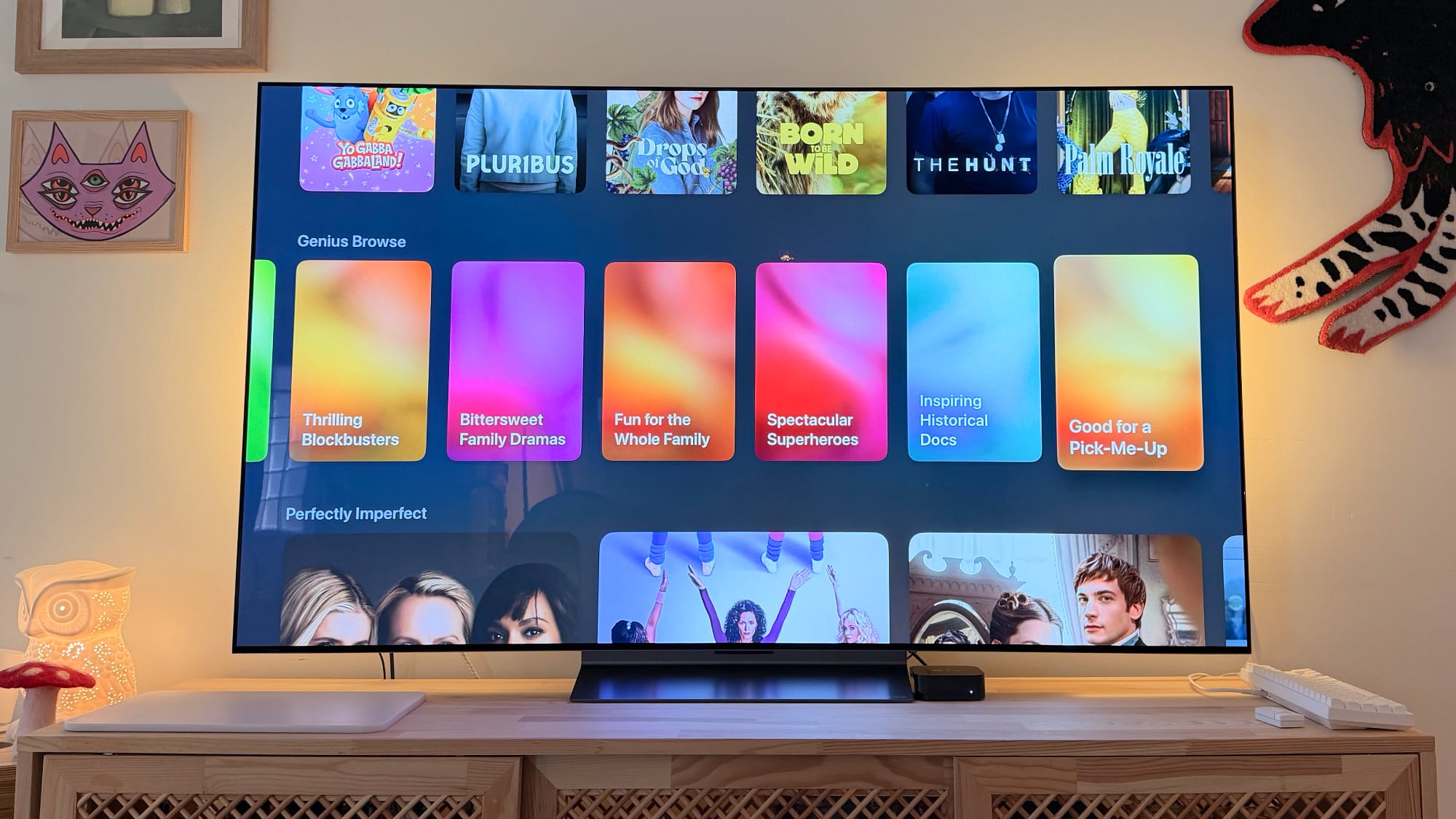
What is Genius Browse? Your Personalized Content Concierge
At its core, Genius Browse is an intelligent recommendation system integrated directly into the Apple TV app. It's designed to cut through the noise of countless streaming options by presenting you with highly relevant suggestions for TV shows and movies. But what makes it "genius"? It's the way it learns, adapts, and presents content not just by broad genres, but by specific, mood-oriented categories that often capture the nuances of human preference better than traditional tags.
Imagine wanting a laugh but not just any comedy – specifically an "Upbeat Workplace Comedy." Or perhaps you're in the mood for suspense, not just any thriller, but a "Tense Psychological Thriller." These are the kinds of precise, evocative categories Genius Browse offers. It moves beyond the simplistic "Action" or "Drama" to dive deeper into the emotional tone and thematic content of films and series. This granular level of categorization, combined with a sophisticated understanding of your viewing habits, makes Genius Browse a powerful tool for discovering content you'll genuinely enjoy.
Unlike static lists, Genius Browse is a living, breathing feature. Its suggestions are not set in stone; they evolve. The categories themselves are updated regularly, ensuring a fresh perspective on what to watch. This dynamic nature means you're always encountering new ways to explore entertainment, preventing the stagnation that can plague less sophisticated recommendation systems. It’s an ongoing conversation between your preferences and Apple's vast content library, constantly refined to serve you better.
How Genius Browse Works: The Intelligence Behind Your Recommendations
The magic of Genius Browse lies in its intricate algorithms and a deep understanding of user behavior. It’s not simply guessing; it's predicting your next favorite show with surprising accuracy by analyzing a multitude of data points.
Personalization & AI: Learning Your Unique Taste Profile
Genius Browse taps into your viewing history within the Apple TV ecosystem. This includes what you’ve watched on Apple TV+, content you’ve rented or purchased through the iTunes Store (now integrated into the TV app), and even what you've started but not finished. It looks at the genres you frequent, the actors and directors you follow, the ratings you've given, and the length of content you typically engage with. This comprehensive data collection forms a unique "taste profile" for each user.
What sets it apart is its ability to interpret subtle cues. If you frequently watch historical dramas with comedic elements, Genius Browse might generate a category like "History Gets Hilarious." If you lean towards poignant narratives with complex family dynamics, "Bittersweet Family Dramas" could appear. This level of personalized curation goes beyond simple genre matching, entering the realm of emotional and thematic resonance, which is where truly great recommendations lie. The system is designed to be self-improving, continually refining its understanding of your preferences as you interact with its suggestions and explore new content.
Dynamic Categories: A New Way to Explore Entertainment
The categories themselves are a cornerstone of Genius Browse. Instead of generic groupings, Apple has crafted specific, descriptive categories that immediately convey a mood or style. Let's break down some of the examples provided and why they are so effective:
- Upbeat Workplace Comedies: This isn't just "comedy." It specifies a setting (workplace) and a tone (upbeat), narrowing down to specific types of humor and narrative.
- Tense Psychological Thrillers: Far more precise than just "thriller," this category targets a very specific subgenre known for mental suspense and complex plots.
- History Gets Hilarious: A fantastic blend, appealing to those who enjoy historical settings but prefer a lighter, comedic approach rather than a dry documentary.
- Breathtaking Nature Docs: Direct and descriptive, perfect for viewers seeking visually stunning factual content about the natural world.
- Thrilling Blockbusters: For those craving high-octane action, big budgets, and widespread appeal.
- Bittersweet Family Dramas: This category speaks to a very specific emotional palette, offering stories that are both moving and poignant, often exploring complex familial relationships.
- Fun for the Whole Family: A crucial category for households, ensuring content is appropriate and enjoyable for all ages.
These categories are not static. Apple's algorithms are constantly analyzing trending content, user feedback, and your evolving preferences to generate new, relevant categories. This ensures that your Genius Browse section always feels fresh and exciting, encouraging continuous exploration rather than repetitive viewing.
Seamless Cross-Service Discovery: Your Content, All in One Place
One of the most significant advantages of Genius Browse is its ability to suggest titles from *multiple* streaming services. This means you’re not limited to just Apple TV+ content, though naturally, those are integrated. Genius Browse aims to be a universal content discovery tool, pulling recommendations from popular platforms like HBO Max and Amazon Prime Video. This cross-platform integration is a game-changer for users who subscribe to multiple services, eliminating the need to jump between apps just to find something new.
However, it's important to note a specific exclusion: Netflix content is not included in Genius Browse recommendations. This is a common pattern across many third-party content aggregators, as Netflix has historically maintained a more closed ecosystem for its vast library. While this might be a minor inconvenience for some, the inclusion of other major players still significantly enhances the discovery experience, making your Apple TV a more central hub for all your streaming needs.
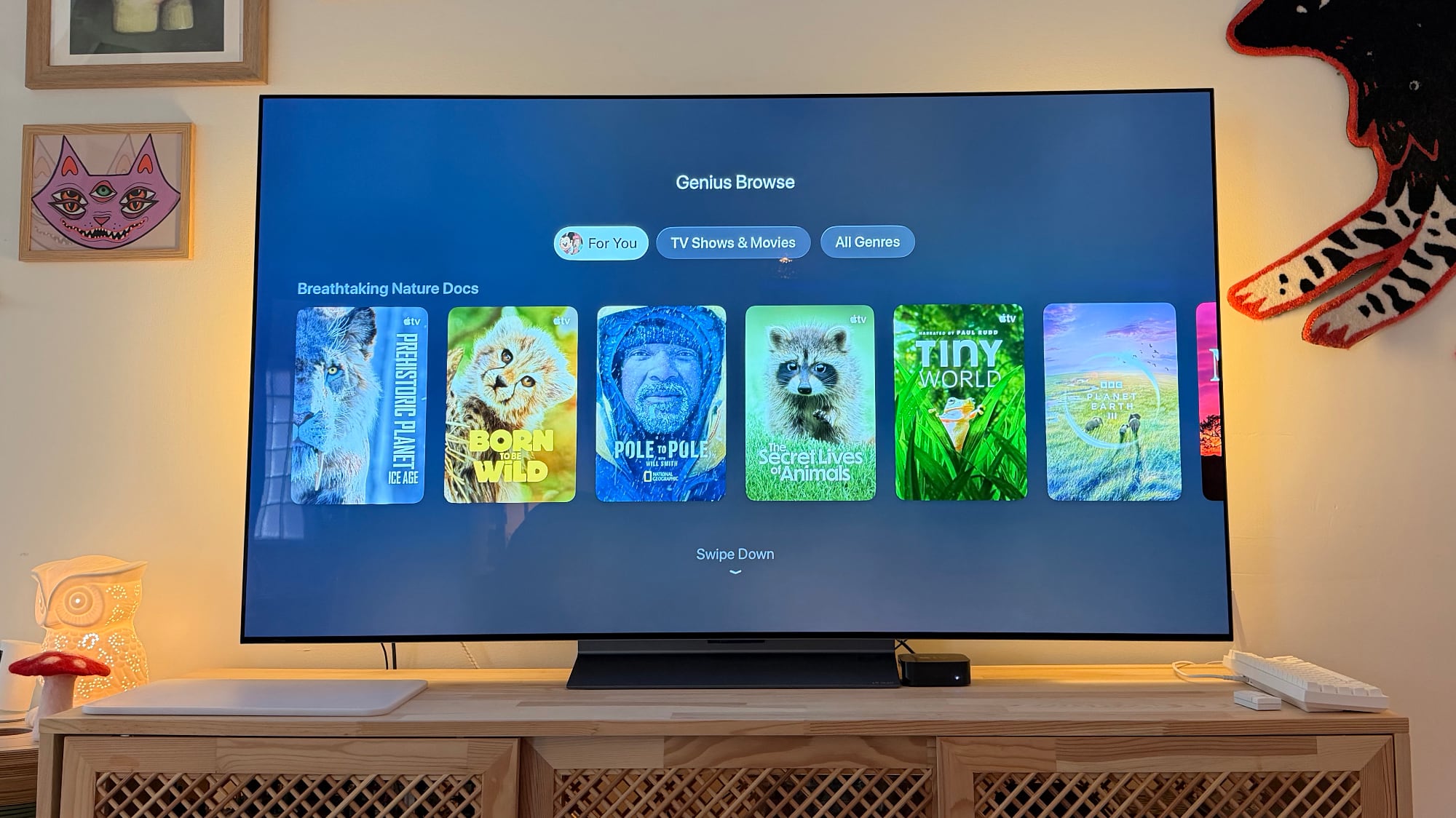
Deeper Exploration: Related Content at Your Fingertips
Beyond the primary categories, Genius Browse offers an additional layer of discovery. When you're browsing through the suggested movies and TV shows within a category and highlight a specific title, tvOS 26.4 intelligently provides *more titles related to the one that's highlighted*. This subtle but powerful feature encourages deeper exploration. If you stumble upon a film that piques your interest, the system immediately presents similar options, allowing you to dive further into a particular style, theme, or actor's work without having to go back to the main categories.
This contextual recommendation ensures that your journey of discovery remains fluid and engaging. It’s like having a knowledgeable friend next to you, always ready with another suggestion based on what you’re currently looking at. This functionality is crucial for extending your viewing pleasure and introducing you to content you might not have found otherwise.
Navigating Genius Browse: A User's Journey to Seamless Discovery
Using Genius Browse is designed to be intuitive and effortless, perfectly aligning with Apple's philosophy of user-friendly interfaces. The experience begins within the familiar Apple TV app, where the new Genius Browse section will be prominently displayed. Upon entering, you'll immediately be greeted by a dynamic array of suggested categories, tailored specifically to your taste profile. This visual feast encourages immediate interaction, drawing you into a personalized world of entertainment options.
Let's walk through a hypothetical user journey. Imagine you settle down after a long day, uncertain of what to watch. You open the Apple TV app and navigate to Genius Browse. You might see categories like "Mind-Bending Sci-Fi," "Heartwarming Animal Stories," or "Gritty Detective Series." Let's say "Mind-Bending Sci-Fi" catches your eye. Selecting this category instantly brings up a curated list of relevant movies and TV shows. These aren't just random sci-fi titles; they're ones chosen because the system believes they align with your specific preferences for that particular subgenre.
Once inside a category, the exploration continues. You’ll notice options to refine your view further, such as "For You," "TV Shows and Movies," and "Genres." The "For You" section within a category might prioritize titles that are even more precisely aligned with your viewing habits, perhaps highlighting a series you've previously shown interest in or an actor you often watch. "TV Shows and Movies" allows you to filter by format if you have a preference. The "Genres" option provides a way to see related subgenres within the broader category, giving you even more control over your search.
As you scroll through the individual titles, hovering over any specific movie or show will activate the "related content" feature, presenting immediate alternatives or complementary suggestions. This fluid navigation prevents decision paralysis and keeps the discovery process engaging. You can easily preview trailers, read synopses, and check where the content is available (e.g., Apple TV+, HBO Max, Prime Video) all within the same interface, streamlining your path from discovery to viewing. This seamless, guided experience is what truly elevates Genius Browse above conventional content libraries.
The Transformative Impact: Why Genius Browse Changes Everything for Apple TV Users
Genius Browse is more than just a new feature; it represents a significant leap forward in how users interact with their entertainment. Its introduction in tvOS 26.4 has several transformative impacts that enhance the overall Apple TV experience.
Conquering Content Overload: The Paradox of Choice
In today's streaming landscape, users often suffer from the "paradox of choice." With hundreds of thousands of titles available across dozens of services, the sheer volume can be paralyzing. Many evenings are spent scrolling endlessly, only to give up and watch something familiar or nothing at all. Genius Browse directly addresses this by significantly reducing the mental load of content discovery. By presenting curated, personalized categories and suggestions, it narrows down the options to a manageable and relevant selection, making the decision-making process much quicker and more enjoyable.
Saving Time and Effort: Maximizing Your Entertainment Time
Time is precious, and few people want to spend a substantial portion of their evening just *searching* for something to watch. Genius Browse optimizes this process, freeing up valuable time that can instead be spent actually enjoying content. The intelligent categorization and cross-service integration mean less bouncing between apps and less wasted time sifting through irrelevant options. It streamlines the path from "I want to watch something" to "I'm watching something I love," enhancing user satisfaction and making the Apple TV a more efficient entertainment device.
Unearthing Hidden Gems: Discovering the Unexpected
Perhaps one of the most exciting aspects of Genius Browse is its potential to introduce users to content they might never have found otherwise. Traditional browsing often keeps users within familiar genres or popular titles. Genius Browse, with its nuanced categories and intelligent algorithms, can surface lesser-known but highly relevant films and series. It can help you break out of your viewing rut, introducing you to independent films, international series, or older classics that perfectly fit a specific mood or thematic preference you didn’t even realize you had. It turns content discovery into an adventure rather than a chore.
Elevating the Apple TV Experience: A Centralized Entertainment Hub
By offering personalized, cross-service recommendations, Genius Browse solidifies the Apple TV's position as a premier entertainment hub. It’s no longer just a device to access individual streaming apps; it's a sophisticated content aggregator and recommender that adds immense value. This move enhances the overall value proposition of the Apple TV, making it an even more indispensable component of a modern home entertainment system. It shows Apple's commitment to not just delivering content, but facilitating its discovery and enjoyment in the most user-friendly way possible.
Beyond Recommendations: Other Key Enhancements in tvOS 26.4
While Genius Browse is undeniably the headline feature, tvOS 26.4 brings several other significant improvements that enhance the user experience and streamline content management. These updates reflect Apple's ongoing commitment to refining its television platform.
The Evolution of Content Access: Phasing Out iTunes Movies and TV Shows Apps
One notable change in tvOS 26.4 is the phasing out of the dedicated iTunes Movies and iTunes TV Show apps. For many years, these apps served as the primary portals for purchasing, renting, and accessing your digital library of films and series acquired through Apple. This move signifies a consolidation strategy, bringing all aspects of content consumption under the umbrella of the main Apple TV app.
For existing users, this transition means that their purchased and rented content will now be seamlessly integrated into the Library section of the primary Apple TV app. This consolidation simplifies the user interface, removing redundant apps and creating a more unified experience. Instead of navigating to a separate app for your owned content versus streaming, everything is now accessible from one central location. While it marks the end of an era for the iconic iTunes branding on Apple TV, it ultimately leads to a less cluttered and more efficient user journey, aligning with Apple's broader strategy of centralizing media experiences within its 'TV' app across all platforms.
Refined Audio Format Settings: A Treat for Audiophiles
For those who value high-fidelity audio, tvOS 26.4 delivers welcome improvements to the Apple TV Audio Format settings. This update offers more precise control and clearer options for how audio is processed and outputted from your Apple TV. While specific details of the improvements were not fully elaborated, such updates typically involve:
- Easier Configuration: Simplifying the setup process for complex audio systems, such as those involving soundbars, AV receivers, and multiple speakers.
- Expanded Format Support: Potentially offering better compatibility or more robust handling of advanced audio formats like Dolby Atmos, DTS:X, or high-resolution lossless audio codecs.
- Enhanced Passthrough Options: Giving users more control over whether audio is decoded by the Apple TV or passed directly to their receiver for processing, which can be crucial for audiophiles seeking the purest signal path.
- Clearer Explanations: Providing better explanations within the settings menu to help users understand the implications of different audio choices, ensuring they can optimize their sound experience whether they have a basic sound setup or a sophisticated home theater.
These refinements mean that users can more easily fine-tune their audio output to match their home theater setup, ensuring they get the best possible sound quality for movies, TV shows, and music. It’s a subtle but important enhancement that caters to a significant segment of the Apple TV user base.
Enhanced Subtitle Customization: Accessibility and Comfort for All
Accessibility has always been a key focus for Apple, and tvOS 26.4 continues this commitment by adding more easily accessible customization options for subtitles. Subtitles and closed captions are vital for users with hearing impairments, those watching content in a foreign language, or even individuals who simply prefer to have text alongside their audio for better comprehension in noisy environments. The new enhancements likely include:
- Quicker Access: Making it faster and simpler to adjust subtitle settings directly from the playback interface, rather than digging through deep settings menus.
- More Customization Choices: Offering a broader range of options for font style, size, color, background, and opacity. This allows users to create a subtitle experience that is not only legible but also aesthetically pleasing and comfortable for their individual viewing preferences. For instance, someone might prefer larger, yellow text with a semi-transparent black background, while another might opt for small, white text with no background.
- Persistent Settings: Ensuring that once a user customizes their subtitle preferences, those settings are remembered across different content and viewing sessions, reducing the need for repeated adjustments.
These improvements make content more accessible and enjoyable for a wider audience, demonstrating Apple's thoughtful approach to inclusive design and user comfort.
The Road Ahead: What's Next for Apple TV and Content Discovery?
The introduction of Genius Browse in tvOS 26.4 is more than just an update; it's a clear indicator of Apple's direction for its entertainment platform. It signals a future where content discovery is highly intelligent, deeply personalized, and seamlessly integrated across services. As artificial intelligence and machine learning continue to advance, we can anticipate even more sophisticated features emerging from this foundation.
Imagine Genius Browse becoming even more proactive, perhaps suggesting content based on the time of day, your current mood (inferred from other Apple device usage, with privacy in mind), or even global events. Future iterations could integrate deeper with Siri, allowing for more natural language requests like, "Siri, show me a sci-fi movie with a strong female lead that's not too dark," leading to instantly curated lists. The ability for the system to learn from subtle cues, such as how long you linger on a title's description or whether you skip certain categories, could further refine its understanding of your taste.
While currently limited to tvOS, the concept of "Genius Browse" might eventually find its way into other Apple ecosystems. Could a similar personalized discovery engine enhance the Books app, Music app, or even the App Store on iOS, iPadOS, and macOS in the future? While Apple explicitly stated its tvOS 26.4 exclusivity for now, the underlying technology and user benefit are universal. This unified approach to content discovery could become a hallmark of the Apple experience across all its devices.
Furthermore, as the streaming landscape continues to evolve, Genius Browse could adapt to include even more third-party services, fostering a truly comprehensive universal guide. The potential for interactive elements, such as giving real-time feedback on recommendations or contributing to community-driven categories, also remains an exciting prospect. Ultimately, Genius Browse is just the beginning of a more intelligent, intuitive, and enjoyable content discovery journey on Apple TV.
Conclusion: A New Era of Entertainment with tvOS 26.4
tvOS 26.4 marks a significant milestone for the Apple TV platform, primarily driven by the groundbreaking introduction of Genius Browse. This intelligent new section within the Apple TV app is poised to revolutionize how users discover and engage with their favorite movies and TV shows. By offering highly personalized, dynamic categories and suggestions that span multiple streaming services, Genius Browse solves the pervasive problem of content overload, making the search for your next binge-worthy series or captivating film an effortless and enjoyable experience.
No longer will you spend precious minutes aimlessly scrolling; instead, Genius Browse will serve as your intuitive guide, learning your preferences and constantly presenting fresh, relevant options tailored just for you. Coupled with other meaningful enhancements like the streamlined content access (phasing out separate iTunes apps), refined audio settings for audiophiles, and more accessible subtitle customization, tvOS 26.4 delivers a holistic upgrade that truly enhances the value and usability of the Apple TV.
These updates reinforce Apple's commitment to delivering a premium, user-centric entertainment experience. As we look ahead, the foundation laid by Genius Browse suggests an exciting future where content discovery becomes even more intelligent, seamless, and integrated across our digital lives. So, get ready to update your Apple TV, dive into Genius Browse, and unlock a whole new world of entertainment discovery that's truly genius.
This article, "Apple Adds 'Genius Browse' Movie and TV Recommendations to Apple TV in tvOS 26.4" first appeared on MacRumors.com
Discuss this article in our forums
from MacRumors
-via DynaSage
