
Everything New in iOS 26.4 Beta 2
The anticipation surrounding Apple's continuous innovation in its iOS operating system is always palpable, and the journey towards the official release of iOS 26.4 is no exception. As developers and eager users delve into the intricacies of its beta versions, each update brings us closer to understanding the full scope of features and refinements Apple intends to deliver. Today marks another significant milestone in this progression, with Apple officially rolling out the second beta of iOS 26.4. This latest release, while building upon the foundation laid by its predecessor, introduces a series of crucial enhancements and adjustments, with a particular spotlight on the expansion of RCS encryption testing. Beyond this pivotal development, users will discover a handful of other nuanced tweaks designed to enhance the overall user experience, solidify system stability, and introduce new layers of functionality across the iPhone ecosystem.
Beta cycles are essential for Apple, serving as a critical period for gathering feedback, identifying bugs, and fine-tuning features before they reach the millions of iPhone users worldwide. This iterative process allows the company to polish its software, ensuring that the final public release is as robust and user-friendly as possible. The second beta of iOS 26.4 demonstrates Apple's commitment to this rigorous testing methodology, specifically by pushing the boundaries of secure communication and refining various elements of the interface and underlying system. While some changes are immediately noticeable, others are subtle yet impactful, reflecting Apple's renowned attention to detail. This update isn't just about adding new bells and whistles; it's about making the iPhone experience more secure, intuitive, and seamlessly integrated into our daily digital lives.
End-to-End Encryption RCS Testing: A Paradigm Shift in Cross-Platform Messaging
Perhaps the most talked-about and significant development in the iOS 26.4 Beta 2 is Apple's continued and expanded testing of end-to-end encryption for text messages exchanged between iPhones and Android devices. This move represents a monumental shift in Apple's long-standing stance on cross-platform messaging, signaling a future where communication between the two dominant mobile operating systems will be more secure and feature-rich than ever before. For years, the stark difference in messaging experience between iPhone users (iMessage) and Android users (SMS/MMS) has been a point of contention, often manifesting in the infamous "green bubble" stigma. Apple's embrace of RCS, and particularly its commitment to encrypting it, aims to bridge this divide, offering a more unified and private communication standard.
To truly appreciate the magnitude of this change, it's essential to understand what RCS (Rich Communication Services) is and why end-to-end encryption is so vital. RCS is essentially a modern evolution of SMS and MMS. While traditional SMS messages are limited to basic text and MMS allows for rudimentary images and videos, RCS brings a suite of advanced features common in modern chat apps. Think typing indicators, read receipts, higher-quality photos and videos, larger file sharing, and more robust group chats. It’s designed to bring the messaging experience on par with platforms like iMessage, WhatsApp, or Telegram, but directly through the carrier network, replacing the antiquated SMS/MMS standard.
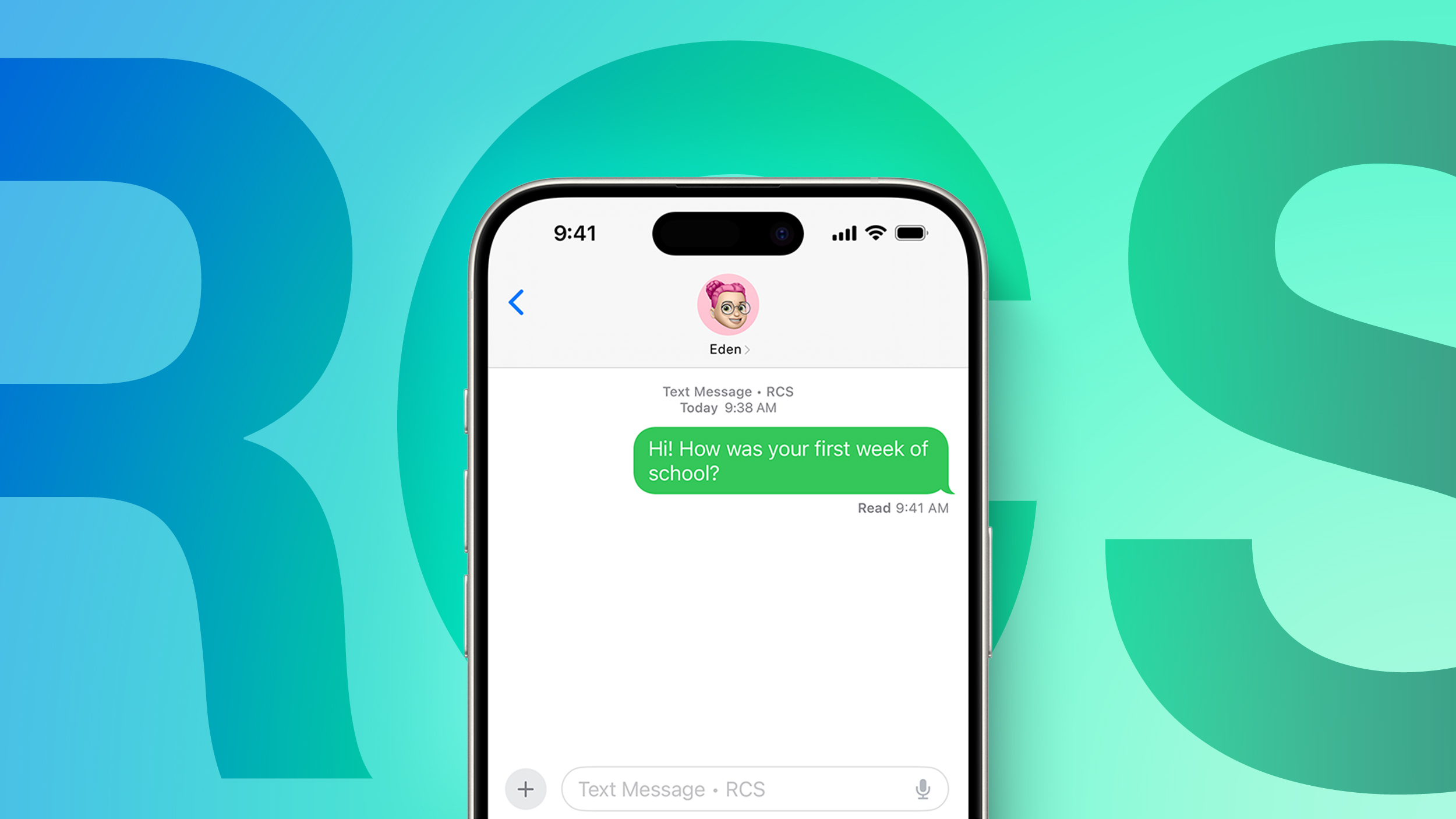
The "end-to-end encryption" aspect takes RCS from merely functional to genuinely secure. End-to-end encryption (E2EE) means that messages are encrypted on the sender's device and can only be decrypted by the recipient's device. No one in between—not the carrier, not Apple, not Google, and certainly not potential eavesdroppers—can read the content of the message. This level of security is paramount in today's digital age, where privacy concerns are at an all-time high. For iPhone users, E2EE has been a cornerstone of iMessage for years, providing a secure sanctuary for conversations within the Apple ecosystem. Extending this robust encryption to RCS messages for Android users means that sensitive conversations, personal photos, and important information shared across platforms will finally receive the same level of protection. This dramatically enhances user privacy and builds trust in cross-platform communication, eliminating a major vulnerability that existed with unencrypted SMS/MMS.
In this second beta of iOS 26.4, Apple is actively working on integrating this enhanced security. The most noticeable indicator for users will be a distinct lock icon displayed on messages that are successfully encrypted and sent to an Android user. This visual cue provides immediate reassurance that the conversation is private and secure. It removes the guesswork and clearly distinguishes between a standard, less secure text and an encrypted one. However, it's crucial to remember that this is a testing phase. Encrypted conversations are not universally available for all devices or carriers just yet. For an encrypted RCS message to work, several conditions must be met: iPhone users need to be running iOS 26.4 (or later beta versions), and Android users must have the latest version of Google Messages, which supports RCS and its encryption protocols. This phased rollout allows Apple and Google to iron out compatibility issues and ensure a smooth transition.
Apple's decision to adopt RCS comes after years of resisting calls to do so, primarily from Google and privacy advocates. The shift can be attributed to a combination of evolving industry standards, growing user demand for a better cross-platform experience, and potentially, regulatory pressures, particularly from regions like the European Union, which are increasingly scrutinizing tech giants' interoperability practices. By embracing RCS, Apple isn't just improving the messaging experience; it's also positioning itself as a more open and collaborative player in the mobile ecosystem, even while maintaining the unique advantages of iMessage for its own users. This move is less about abandoning iMessage and more about elevating the baseline for all smartphone communication.
It's important to manage expectations regarding the immediate availability of this feature. While testing is well underway in iOS 26.4 Beta 2, Apple has explicitly stated that it does not plan to fully implement end-to-end RCS encryption in the final public release of iOS 26.4. Instead, users can anticipate this groundbreaking feature to become broadly available later this year. This timeline suggests that Apple wants ample time to perfect the implementation, ensuring it's robust, reliable, and secure before rolling it out to its massive user base. The ongoing beta testing is a testament to the complexity of integrating such a significant protocol across different operating systems and carrier networks. When it finally arrives, it will undoubtedly mark a new era for cross-platform communication, making the "green bubble" experience significantly better and safer for everyone.
Home Screen Enhancements: A Touch of Liquid Glass
The Home Screen on an iPhone is the user's primary interface, the digital canvas upon which apps, widgets, and wallpapers are arranged. Apple continuously refines this foundational element, and with iOS 26.4 Beta 2, a subtle yet aesthetically pleasing change has been introduced to the "Edit" menu. When users long-press an app icon or an empty space on the Home Screen to enter the editing mode, the background elements that become partially obscured now adopt a more transparent "Liquid Glass" effect. This design choice is not merely cosmetic; it reflects Apple's ongoing commitment to a fluid, visually engaging, and intuitive user interface.
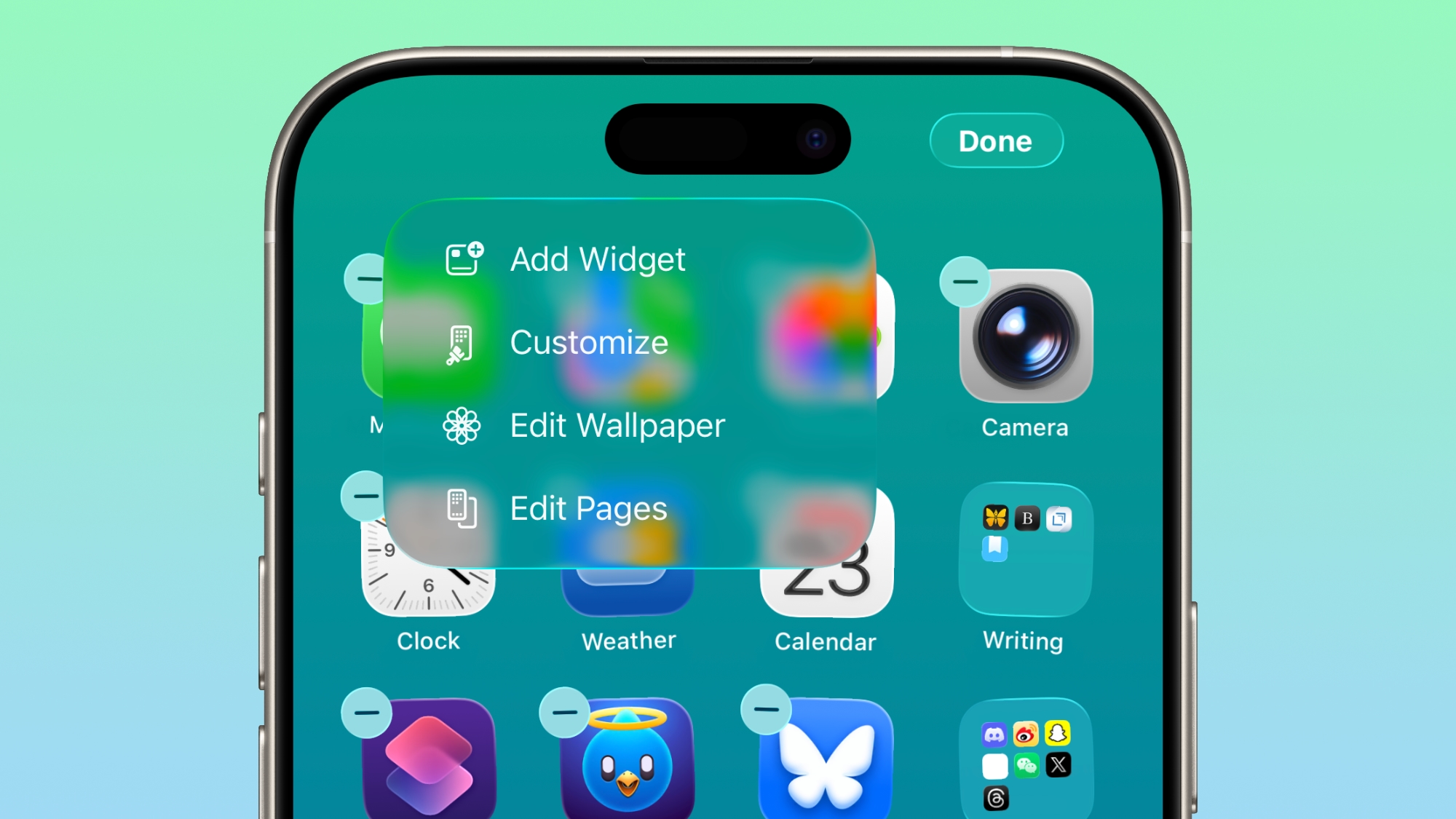
The "Liquid Glass" effect is a testament to Apple's design philosophy, which often prioritizes subtle animations and transparencies to create depth and context within the UI. Rather than a stark, opaque blur, the enhanced transparency allows more of the underlying wallpaper and icons to peek through, creating a sense of continuity and modern elegance. This makes the editing experience feel less jarring and more integrated with the overall aesthetic of the Home Screen. Users might notice that the background elements subtly shift and blend, almost as if viewed through a frosted pane of glass, enhancing the perception of layers and making the interface feel more dynamic and alive.
This refinement, though seemingly minor, contributes to the overall premium feel of iOS. It shows that Apple is continually iterating on even the smallest details to ensure the user experience is polished and enjoyable. For users who value customization and a sleek interface, these types of subtle visual cues can significantly improve daily interactions with their device. It speaks to Apple's understanding that a truly great user experience is built not just on groundbreaking features, but also on the seamless integration of visual and interactive elements that make the software a pleasure to use. Such changes ensure that the Home Screen remains both highly functional and visually appealing, adapting to the ever-evolving standards of modern mobile design.
Games App: A More Intuitive Search Experience
For gamers and those who frequently explore the vast library of titles available on iOS, the Games app serves as a central hub for discovery and management. In iOS 26.4 Beta 2, Apple has implemented a functional change within this app, relocating the search bar from its previous position at the bottom of the display to the top. This seemingly small adjustment holds significant implications for usability and user experience, reflecting a broader trend in mobile interface design.
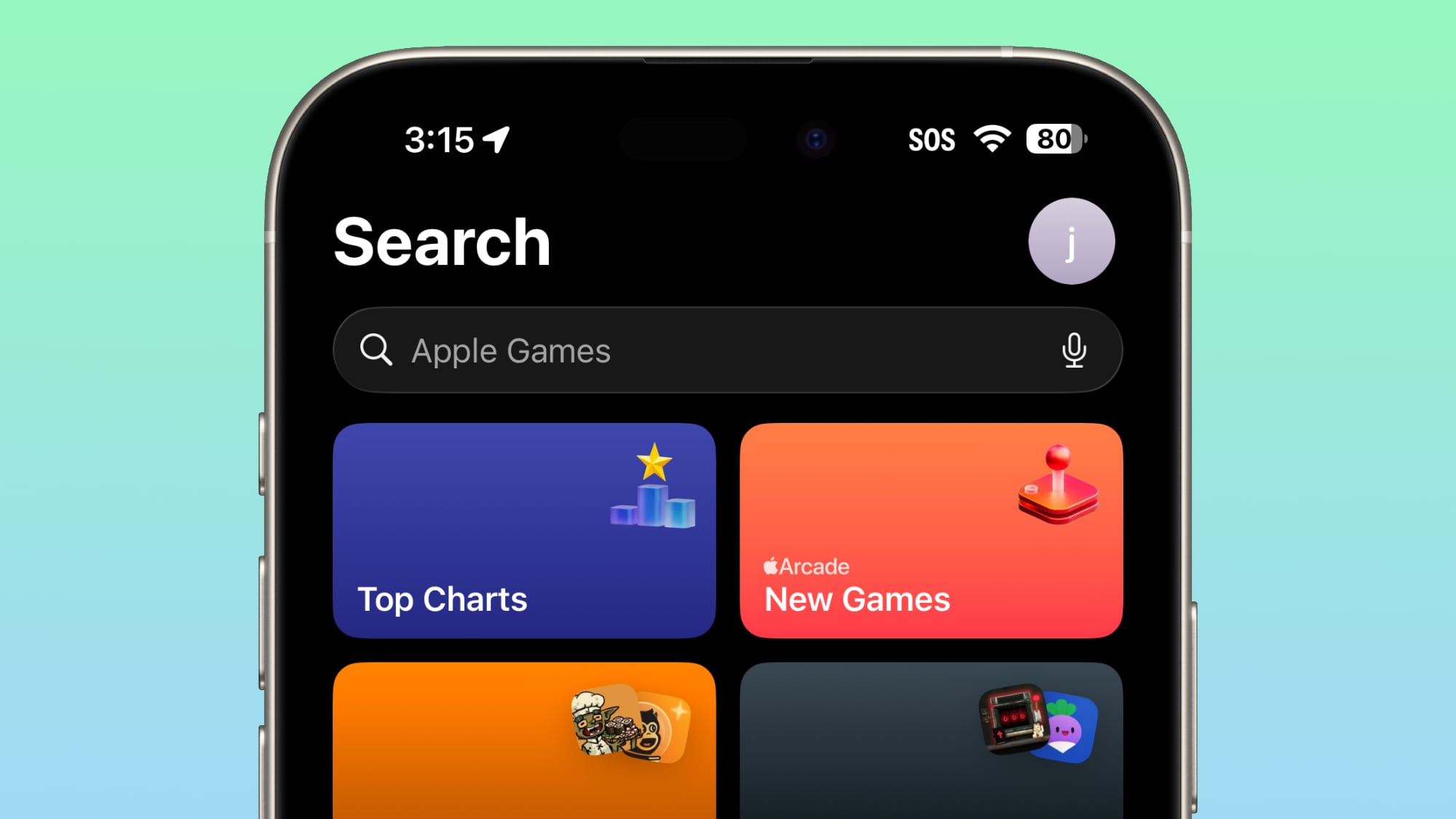
The rationale behind moving the search bar to the top of the display is rooted in established user interface conventions and ergonomic considerations. Most modern applications, both on mobile and desktop platforms, typically place search functionalities at the top, making them immediately accessible and consistent with how users expect to initiate a search. This placement often aligns with the natural flow of reading and scanning information from top to bottom. For users, this means that the search bar is now in a more predictable and familiar location, potentially reducing the cognitive load and making it quicker to find specific games, genres, or developers.
Furthermore, with the increasing screen sizes of iPhones, reaching the bottom of the display with one hand can sometimes be cumbersome, especially for quick interactions. Moving the search bar to the top, while seemingly requiring a stretch for one-handed use, often provides better visibility and a more "always-on" feel for the search function, encouraging more frequent use. It also clears up valuable screen real estate at the bottom, which could potentially be utilized for other navigational elements or content in future updates. This change contributes to a more streamlined and efficient interaction with the Games app, ensuring that users can effortlessly navigate and discover new gaming experiences without unnecessary friction. For an app dedicated to entertainment and discovery, intuitiveness is key, and this relocation is a step towards optimizing that experience.
App Store and Apple Music: Unified Account Branding
Consistency in branding and user interface is a hallmark of Apple's ecosystem, designed to provide a cohesive and predictable experience across its various applications and services. In iOS 26.4 Beta 2, this commitment to uniformity is evident in the App Store and Apple Music applications, specifically concerning their account hub options. The "Apple Account" wording within these hubs has now been standardized: it is left-aligned and features the distinctive rainbow-colored Apple logo, mirroring its appearance in the main Settings app.
App Store and Apple Music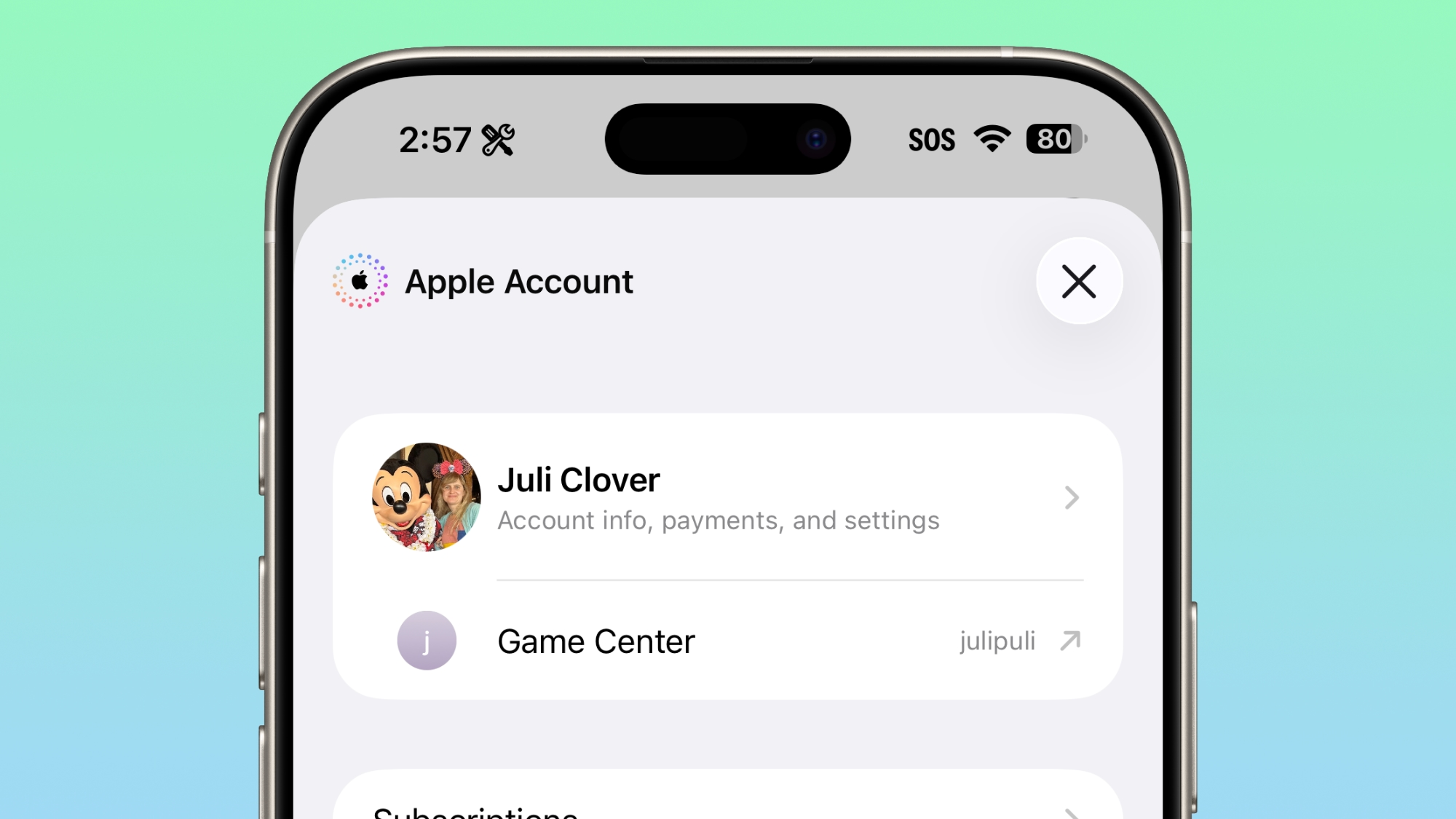
This change, while subtle, serves several important purposes. Firstly, it reinforces brand recognition and trust. By presenting the "Apple Account" with the same visual identity across core applications, Apple ensures that users immediately recognize they are interacting with their central Apple ID, regardless of whether they are managing subscriptions in Apple Music, reviewing purchase history in the App Store, or adjusting privacy settings in the Settings app. This consistency reduces confusion and makes the overall experience of managing one's digital life within the Apple ecosystem much more seamless.
Secondly, left alignment is a common and often preferred text alignment in Western reading cultures, contributing to better readability and a cleaner aesthetic. Coupled with the iconic rainbow logo—a nod to Apple's heritage and a visual symbol of its brand—the updated presentation makes the account hub feel more polished and integrated. These small design details contribute to a feeling of sophistication and intentionality in the software. For users who interact with these apps daily, such a unified visual language helps to create a more harmonious and intuitive digital environment, making it easier to manage their various Apple services with confidence and clarity. It's another example of Apple's meticulous approach to design, ensuring every element, no matter how small, contributes to a superior user experience.
Accessibility: Empowering Users with "Reduce Highlighting Effects"
Accessibility has long been a cornerstone of Apple's product philosophy, with the company consistently introducing features designed to make its technology usable and enjoyable for everyone, regardless of their abilities. iOS 26.4 Beta 2 continues this tradition by introducing a thoughtful new option under the Display and Text Size section of Accessibility settings: "Reduce Highlighting Effects." This addition is a testament to Apple's ongoing commitment to creating a more inclusive digital environment.
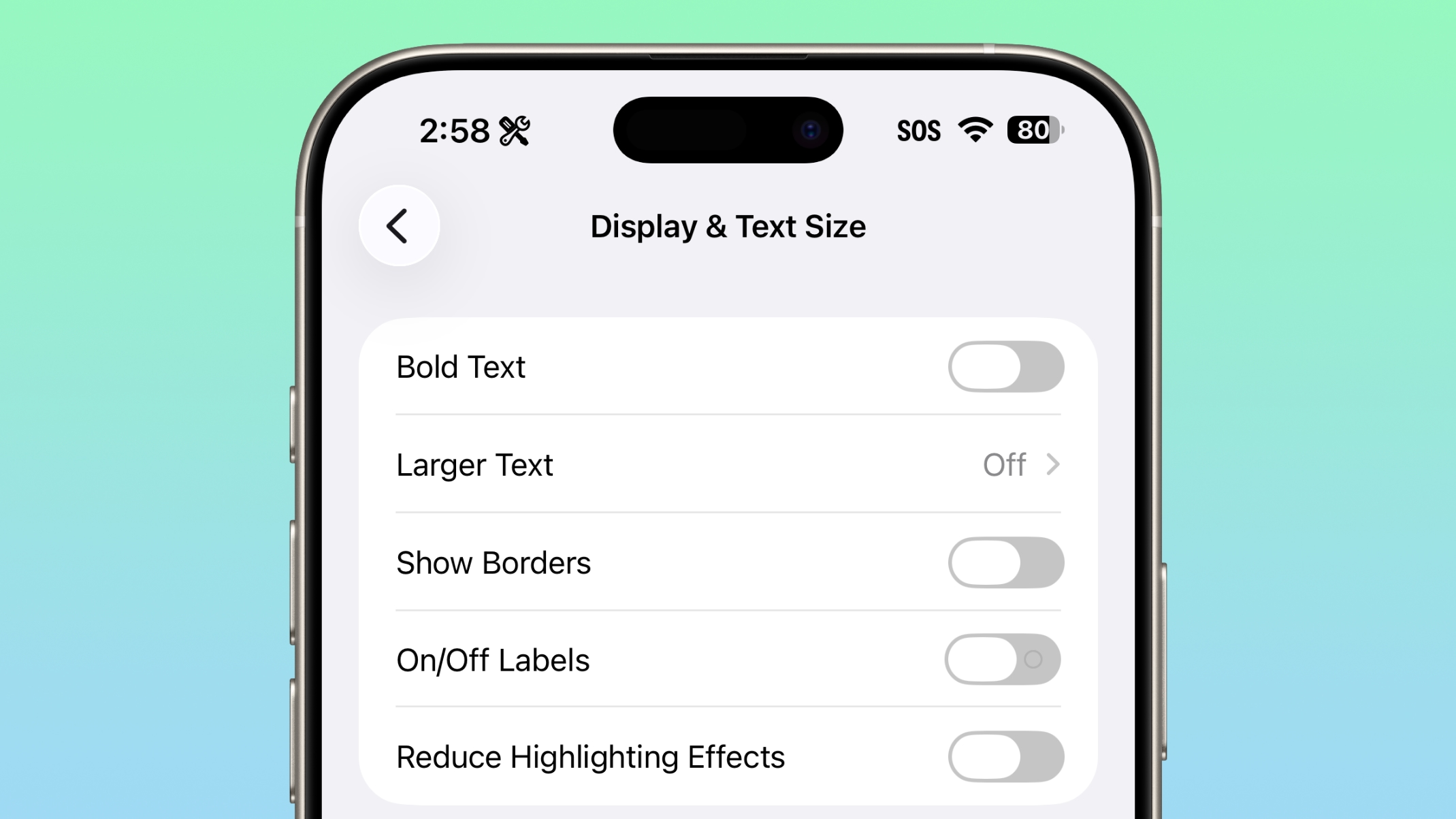
Highlighting effects in an operating system typically refer to the visual cues that appear when users interact with elements—for example, a glow or a subtle animation when an icon is tapped, a button is pressed, or text is selected. While these effects are often designed to provide visual feedback and enhance the interactive experience for most users, they can be distracting, overwhelming, or even problematic for individuals with certain sensory sensitivities, cognitive differences, or visual impairments. For instance, people with attention deficit disorders, certain types of autism, or those who simply prefer a minimalistic visual experience might find excessive highlighting effects disruptive.
The "Reduce Highlighting Effects" option provides users with greater control over their visual environment. By enabling this setting, the system will tone down or entirely remove some of these visual flourishes, resulting in a cleaner, less visually busy interface. This can significantly improve comfort and focus for affected individuals, making navigation and interaction with the iPhone less strenuous and more enjoyable. It demonstrates Apple's understanding that a "one-size-fits-all" approach to user interface design doesn't always serve the diverse needs of its user base. By offering granular control over visual elements, Apple empowers users to tailor their devices to their specific preferences and accessibility needs, further solidifying its reputation as a leader in accessible technology. This feature is another small but meaningful step towards making the iPhone truly accessible to all.
Software Build Numbers: Enhanced Transparency for Power Users
For developers, IT professionals, and technically inclined users, understanding the specific software build number of an iOS update is often crucial. It allows them to track precise versions, identify specific bug fixes or features, and communicate more accurately about the software they are running. In iOS 26.4 Beta 2, Apple has introduced a helpful usability enhancement that makes accessing this information more straightforward: when updating to a new iOS version, users can now simply tap on the update's name to reveal its corresponding build number.
Previously, finding the exact build number often involved navigating to the "About" section within the Settings app after an update had been installed, or relying on external documentation. This new method streamlines the process, making the build number immediately accessible at the point of update. This is particularly valuable during beta cycles, where multiple builds of the same version (e.g., Beta 1, Beta 2, Release Candidate) are released, each with potentially subtle but important differences. Knowing the precise build number helps testers and developers ensure they are running the expected version and can provide more accurate feedback when reporting issues.
This small but significant change reflects Apple's ongoing effort to provide more transparency and detailed information to its users, especially those who require a deeper understanding of the software's intricacies. It caters to a segment of the user base that appreciates granular data and uses it to manage their devices and workflows more effectively. By making this information readily available and easy to access, Apple empowers its power users and developers, fostering a more informed and engaged community around its operating system.
Smarter Beta Updates Management: Automatic Transition to Public Releases
Participating in Apple's beta programs offers an exciting opportunity for users to experience new features ahead of time and contribute to the development process. However, the nature of beta testing also means running pre-release software, which can sometimes be less stable. In iOS 26.4 Beta 2, Apple has implemented a significant and thoughtful change to how beta updates are managed, designed to improve the experience for both active beta testers and those who might have inadvertently left beta profiles enabled. If a user has opted into beta updates but hasn't installed any new beta versions for a period of four months, Apple will now automatically switch their device to the public release audience.
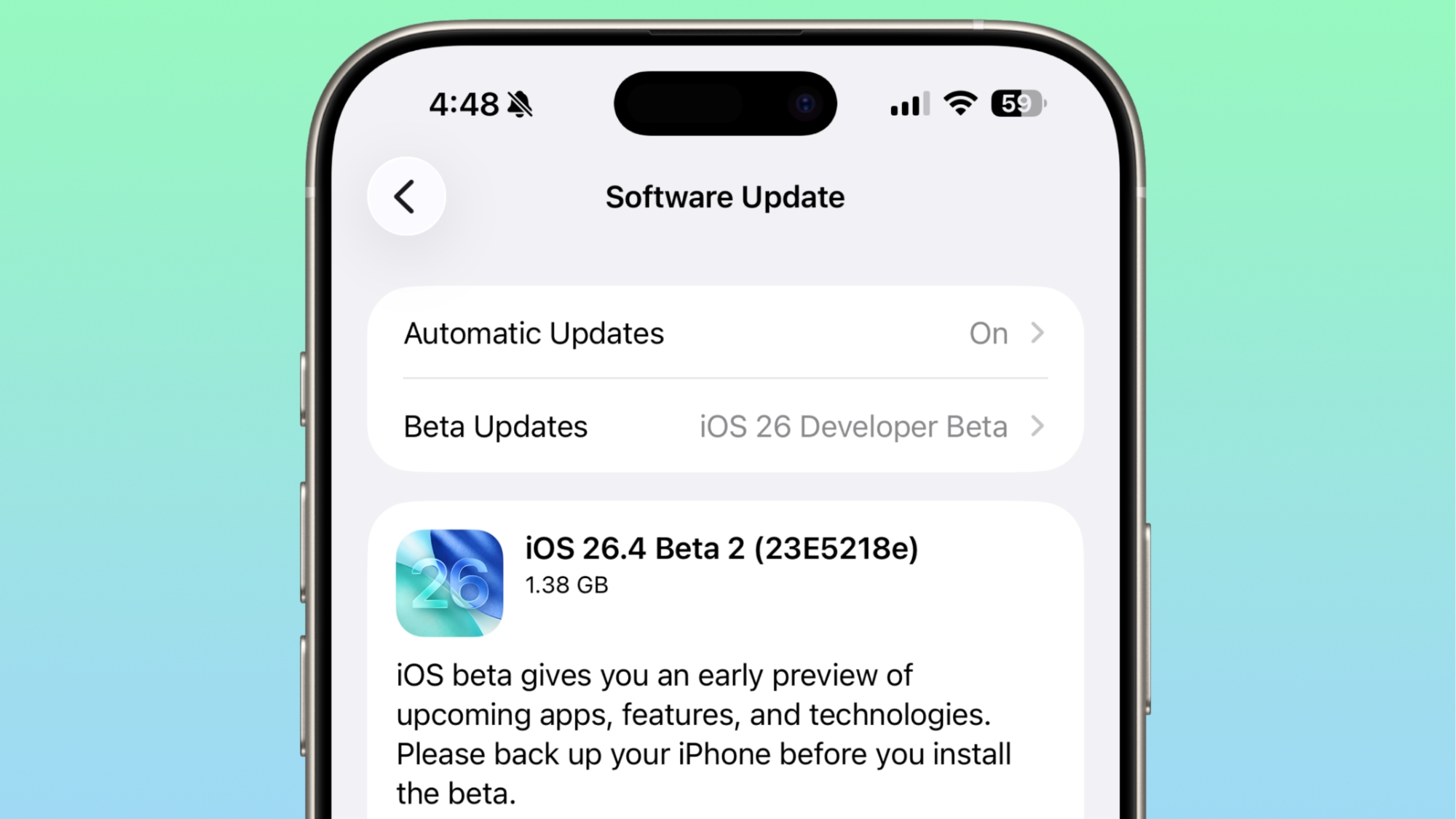
This automatic transition addresses a common scenario: users who initially enroll in a beta program out of curiosity or excitement, but then forget to opt out or simply stop installing subsequent beta updates. Such users might unknowingly remain on an outdated beta build that could be less stable, lack important security patches, or eventually fall significantly behind the public release cycle. This could lead to a suboptimal user experience, encountering bugs that have already been fixed in public versions, or even compatibility issues with apps designed for the latest stable OS.
By automatically switching these inactive beta participants to the public release audience, Apple ensures that more users are running stable, fully supported versions of iOS. This proactive approach benefits the user by guiding them back to a more reliable software experience without requiring manual intervention. It also streamlines the beta program itself, potentially leading to a more focused and engaged group of active testers who genuinely intend to provide feedback on cutting-edge features. This move highlights Apple's commitment to user stability and security, ensuring that even those who are less hands-on with their device settings are kept on the most optimal software path. It’s a smart way to manage the vast and diverse population of iOS users.
No New Emoji (Yet): Anticipation for Future Expressions
For many, emoji have become an indispensable part of digital communication, adding nuance, emotion, and personality to messages that plain text often cannot convey. Each major iOS update typically brings with it a fresh batch of new emoji characters, expanding our lexicon of digital expressions. However, despite earlier indications and the usual cycle of emoji introductions, iOS 26.4 Beta 2, disappointingly for some, does not include any new emoji characters. Signs of new emoji were reportedly found in the code of the first beta of iOS 26.4, which fueled anticipation, making their absence in this second beta a notable point.
The introduction of new emoji is a carefully choreographed process, often tied to the Unicode Consortium's annual updates to the emoji standard. While Apple usually incorporates these new characters into an iOS update sometime after their approval, their absence in this specific beta doesn't necessarily mean they won't arrive at all. It's more likely that their integration is still pending, or they might be slated for a future point release of iOS 26.4, or perhaps even a subsequent major update. The development cycle for emoji can be complex, involving not just the character designs but also their implementation across different languages and keyboard layouts.
The role of emoji in modern communication cannot be overstated. They transcend language barriers, provide context, and inject humor or empathy into our digital interactions. The anticipation for new emoji reflects a desire for more diverse and inclusive ways to express ourselves, from new animals and objects to more representative human figures and cultural symbols. While users will have to wait a little longer, the expectation remains high that Apple will soon deliver an update that expands our digital vocabulary, allowing for even richer and more expressive conversations across the iPhone platform.
Playlist Playground: Still a U.S. Exclusive
For Apple Music subscribers, the "Playlist Playground" feature likely represents an exciting new way to discover and engage with music. This innovative tool, designed to help users create and explore personalized playlists, unfortunately, remains limited in its availability with iOS 26.4 Beta 2. As of this update, Playlist Playground is still exclusive to users in the United States, meaning music lovers in Europe and other international markets are unable to access it.
The regional rollout of new features, especially those related to media services like Apple Music, is a common practice for technology companies. Such limitations are often due to a variety of factors. Licensing agreements with record labels and artists can vary significantly from country to country, impacting what features or content can be made available in different regions. Additionally, localization efforts, including adapting the feature for different languages, cultural nuances, and regulatory compliance standards (such as data privacy laws in the EU), can add considerable complexity and time to a global launch.
While it can be frustrating for international users to see exciting new features remain geographically restricted, these phased rollouts allow Apple to test the feature's stability, gather feedback in a controlled environment, and address any unforeseen issues before a broader deployment. It also ensures that the user experience, when the feature eventually launches globally, is optimized for each specific market. For now, non-U.S. Apple Music users will have to patiently await future updates, hoping that the Playlist Playground will soon become available in their regions, unlocking new avenues for musical discovery and creativity.
A Glimpse into the Full Suite: More New Features from the First Beta
It's important to remember that iOS 26.4 Beta 2 builds upon the foundation established by its predecessor, iOS 26.4 Beta 1. While this latest release highlights significant new changes, especially the expanded RCS encryption testing, it doesn't encompass every single modification or enhancement introduced throughout the entire iOS 26.4 development cycle. For a comprehensive overview of all the advancements that have been discovered so far, including those found in the initial beta, users are encouraged to consult our detailed iOS 26.4 feature guide.
Beta cycles are iterative by nature. Each subsequent beta version refines existing features, squashes bugs, and sometimes introduces entirely new functionalities or removes experimental ones. By keeping track of the changes across all betas, users can gain a complete picture of Apple's direction and priorities for the upcoming public release. This guide serves as an invaluable resource for staying informed about every tweak, update, and new capability that has been uncovered in the journey towards iOS 26.4's final launch, ensuring you don't miss out on any aspect of this exciting update.
This article, "Everything New in iOS 26.4 Beta 2" first appeared on MacRumors.com
Discuss this article in our forums
from MacRumors
-via DynaSage
