
Android-to-iPhone AirDrop Transfers Now Supported on Pixel 9
Breaking Down Barriers: Android and iPhone Users Can Now Share Files Seamlessly!
In a move that’s set to make life much easier for millions, Google is significantly expanding its file-sharing feature, Quick Share, to allow more Android phones to easily send files to iPhones. This exciting development means that owners of various Android devices, including the latest Pixel 9 series, can now transfer photos, videos, documents, and more directly to an iPhone using the familiar AirDrop technology. For years, the inability to directly share files between Android and Apple devices has been a common frustration, often dubbed the "walled garden" problem. Now, that wall is getting a significant door.
The highly anticipated AirDrop support for Quick Share is rolling out to the Pixel 9, Pixel 9 Pro, Pixel 9 Pro XL, and Pixel 9 Pro Fold over the next few days. This means users of these cutting-edge Google phones will soon experience a new level of convenience when interacting with friends, family, or colleagues who use Apple products. No more awkward workarounds, emailing files to yourself, or resorting to third-party apps for simple transfers. A truly seamless experience is finally here.
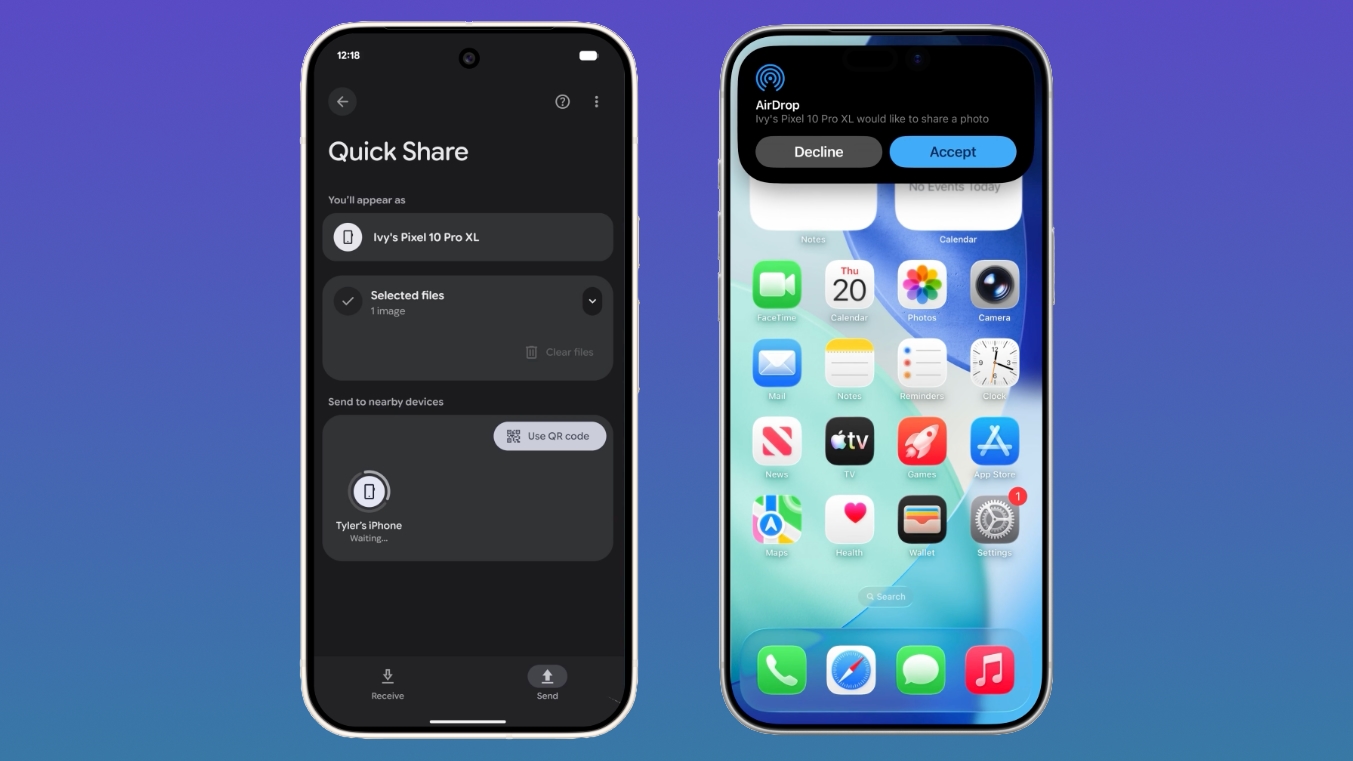
A Long-Awaited Feature: From Pixel 10 to Pixel 9 and Beyond
Google initially announced Quick Share's compatibility with AirDrop back in November. At that time, the groundbreaking feature was exclusive to the very newest Pixel 10 devices. While exciting, this limited availability meant that many Android users were still left waiting. The current expansion to the Pixel 9 lineup is a crucial step in making this interoperability accessible to a broader user base, signifying Google's commitment to breaking down barriers between mobile operating systems.
This rollout isn't just about adding a new feature; it's about addressing a fundamental pain point in the modern digital landscape. In a world where families often use a mix of Android and Apple devices, and workplaces rely on diverse tech ecosystems, efficient file sharing has become essential. The previous fragmentation often led to slower workflows, reduced productivity, and unnecessary friction in daily communication. With this update, Google is leading the charge towards a more connected and less restrictive digital experience for everyone.
Understanding Quick Share: Google's Answer to Seamless Sharing
Before diving into the interoperability, it’s helpful to understand what Quick Share is. Quick Share is Google's native file-sharing feature for Android devices, designed to enable fast and easy transfers of files (like photos, videos, links, and documents) between nearby Android phones, tablets, and even Chromebooks. It operates similarly to Apple's AirDrop, using a combination of Bluetooth for initial discovery and Wi-Fi Direct for high-speed data transfer. This allows for sharing even without an active internet connection, making it incredibly convenient in various situations.
Historically, Android has had various file-sharing solutions, but Quick Share was introduced to unify and simplify this experience across the vast Android ecosystem. Its goal was to provide a consistent, user-friendly way for Android users to share content with each other, much like AirDrop does for Apple users. The strength of Quick Share lies in its simplicity: a few taps, and your files are on their way to a nearby device. Its integration directly into the Android operating system makes it a go-to choice for millions of users worldwide.
The Power of AirDrop: Apple's Effortless Sharing Solution
On the other side of the fence, AirDrop has been a beloved feature for Apple users for many years. It allows users to instantly share photos, videos, documents, website links, and more between iPhone, iPad, and Mac devices that are nearby. Like Quick Share, AirDrop also leverages Bluetooth for discovery and Wi-Fi for actual data transfer, meaning it doesn't require an internet connection or cellular data. This makes it incredibly fast and efficient for sharing large files on the go.
AirDrop's success lies in its ease of use and deep integration within the Apple ecosystem. For Apple users, it's become second nature to "AirDrop" a photo to a friend or send a document to their Mac. The reliability and speed of AirDrop have set a high bar for wireless file sharing, and its ubiquity among Apple users has highlighted the existing gap when trying to share files with non-Apple devices. The ability for Quick Share to now interface with AirDrop truly bridges this gap, offering a similar level of convenience to Android users when sharing with Apple devices.
How AirDrop Interoperability Works: A Bridge Between Ecosystems
With AirDrop interoperability, Pixel 9 and Pixel 10 devices can now transfer files to an iPhone, iPad, or Mac. What’s truly remarkable is that it works in much the same way as Apple device to Apple device AirDrop transfers. This means the user experience is designed to be as familiar and intuitive as possible for both Android and Apple users, reducing any learning curve. Crucially, no internet connection is required, which maintains the core benefit of both Quick Share and AirDrop – fast, direct transfers anywhere, anytime.
This achievement is a testament to significant engineering effort on both sides to ensure compatibility at a fundamental protocol level. While the exact technical details involve complex negotiations and standardized protocols, the end result for the user is pure simplicity. The devices "talk" to each other directly, bypassing the need for cloud uploads or cumbersome workarounds. This direct communication not only ensures speed but also enhances privacy and security, which we will delve into later.
Receiving Files on Your Apple Device from a Pixel Phone: A Step-by-Step Guide
For Apple device users, receiving files from a Pixel smartphone via Quick Share is straightforward and surprisingly similar to receiving a file from another Apple device. The key step involves adjusting your AirDrop visibility settings.
Step 1: Adjust AirDrop Visibility
To accept files from a Pixel smartphone, Apple device users need to temporarily change their AirDrop visibility to "Everyone for 10 Minutes." This setting is a privacy-conscious compromise, allowing non-contacts (including Android users) to discover your device for a limited time, after which it reverts to a more restrictive setting like "Contacts Only" or "Receiving Off."
- On iPhone/iPad:
- Open the Control Center (swipe down from the top-right corner on newer iPhones/iPads, or swipe up from the bottom on older models).
- Press and hold the network settings card (the one with Airplane Mode, Wi-Fi, Bluetooth icons).
- Tap on AirDrop.
- Select Everyone for 10 Minutes.
- On Mac:
- Open a Finder window.
- Click on AirDrop in the sidebar.
- At the bottom of the AirDrop window, click on the dropdown menu next to "Allow me to be discovered by."
- Select Everyone for 10 Minutes.
Step 2: Accepting the File
Once the setting is enabled, a file coming from an Android user will look identical to an AirDrop file from another iPhone. You'll receive the same familiar notification on your screen, indicating that someone is trying to send you a file. This notification will display the sender's device name (e.g., "Pixel 9 Pro wants to send you a photo").
- You will have the option to Accept or Decline the file.
- Tapping Accept will initiate the transfer.
Step 3: File Location
Files are saved in the appropriate location on your Apple device. For instance:
- Photos and videos will automatically go to your Photos app.
- Documents (like PDFs, Word files, spreadsheets) will go to the Files app.
- Links will typically open in your default browser (Safari).
This seamless integration into the existing Apple ecosystem ensures that users don't have to search for their newly received files, making the experience truly intuitive.
Receiving Files on Your Pixel Device from an Apple User: A Step-by-Step Guide
Similarly, for Pixel users to receive files from an Apple device, a simple adjustment to settings is required on their end. The goal is to make the Pixel device discoverable by AirDrop-enabled Apple devices.
Step 1: Enable Discoverability on Your Pixel
To receive files from an Apple user, the Pixel user will also need to turn on the "Everyone for 10 minutes" setting within Quick Share or enter into "Receive mode" on the Quick Share page.
Here's how to typically access this:
- On Pixel Phone:
- Swipe down from the top of your screen to open the Quick Settings panel.
- Look for the Quick Share tile and tap on it. (If you don't see it, you might need to tap the pencil icon to edit your quick settings tiles and add it).
- In the Quick Share settings, you’ll typically find options for who can share with you. Select Everyone for 10 minutes.
- Alternatively, you might see an option to specifically enter Receive mode. Activating this will make your device discoverable for the set duration.
Just like on Apple devices, this "Everyone for 10 minutes" setting is designed with privacy in mind, automatically reverting to a more private setting after the time limit, preventing your device from being continuously discoverable by strangers.
Step 2: Accepting the File
When an Apple user initiates an AirDrop transfer to your Pixel, you will receive a notification on your Pixel device. This notification will inform you that an Apple device is attempting to send you a file.
- You will be prompted to Accept or Decline the incoming transfer.
- Confirming the transfer will then save the file to your device.
Step 3: File Location
Once accepted, files transferred from an Apple device to your Pixel are typically saved in the Files app on your Android phone. From there, you can move them to specific folders, share them further, or open them with appropriate applications. Photos and videos can then be accessed through your Google Photos app as usual once they are in your device's storage.
The Security Behind the Seamlessness: A Multi-Layered Approach
Anytime new interoperability is introduced, especially between previously siloed ecosystems, security is a paramount concern. Google has been transparent about its approach, stating that Quick Share and AirDrop interoperability was designed with a multi-layered security approach to ensure a safe sharing experience regardless of platform. This robust framework addresses potential vulnerabilities and gives users peace of mind.
Secure Sharing Channel
The core of this security is the establishment of a secure sharing channel. This means that all data exchanged between the Android and Apple devices is encrypted. Encryption scrambles the data in such a way that only the intended recipient can unscramble and read it. This prevents eavesdropping and ensures that your files remain private and confidential during transit, even if someone were to intercept the wireless signal.
Built-in Platform Protections
Both Android and iOS have their own robust, built-in security features. This interoperability leverages and respects these existing protections. For example, Android's sandboxing (isolating apps from each other) and iOS's secure enclave (a dedicated secure processor) contribute to the overall security posture. The integration ensures that the file transfer process doesn't bypass or weaken the inherent security mechanisms of either operating system.
Consent Requirement
A critical security and privacy feature is the explicit consent requirement before a file is received. As detailed in the steps above, both Apple and Pixel users must actively tap "Accept" to receive an incoming file. This prevents unwanted or malicious files from being pushed onto your device without your knowledge or permission. It's a fundamental safeguard against unsolicited content and a crucial aspect of user control.
Direct and Peer-to-Peer Connections
Another significant security advantage is that connections between devices are direct and peer-to-peer. This means that data is not routed through a server. When you share a file, it travels directly from the sender's device to the receiver's device over a local wireless connection (typically Wi-Fi Direct). This eliminates the risk of data being stored temporarily on third-party servers, reducing potential points of vulnerability and enhancing privacy. It’s a truly direct communication channel, keeping your data localized and controlled.
Device Name Verification
For file transfers in both directions, either the Apple device or the Pixel device displays the other person's device name for verification purposes. For example, when an Apple user is about to send a file, they will see "Pixel 9 Pro" as an option. Conversely, when a Pixel user is about to receive, they will see "John's iPhone." This visual confirmation is vital for ensuring you are sending or receiving files from the correct person, preventing accidental shares to strangers and adding another layer of security and user confidence.
The combination of these security measures demonstrates a thoughtful and comprehensive approach to enabling secure cross-platform file sharing, prioritizing user privacy and data integrity.
Beyond the Pixel: What This Means for the Future of File Sharing
The expansion of Quick Share's AirDrop compatibility to the Pixel 9 series, building on its initial rollout to Pixel 10 devices, represents more than just a convenient new feature; it symbolizes a significant shift in the broader technology landscape. For years, the major mobile ecosystems—Android and iOS—have operated with a degree of insularity, often referred to as "walled gardens." While this approach has benefits in terms of security and user experience within each ecosystem, it created friction when users needed to bridge these divides.
This collaboration between Google and Apple (even if indirect, leveraging common underlying protocols) demonstrates a growing commitment to interoperability. It acknowledges the reality that users live in a multi-device, multi-platform world. The implications of this development are far-reaching:
Improved User Experience for Everyone
The most immediate and obvious benefit is to the end-user. The frustration of not being able to quickly share a photo with a friend because they use "the other phone" is now largely a thing of the past for Pixel users. This reduces friction in social interactions, professional collaborations, and family life. It simplifies sharing and makes technology feel less restrictive and more helpful.
A Step Towards Open Standards and Collaboration
While AirDrop itself is proprietary to Apple, Google's ability to create a compatible solution within Quick Share showcases the power of open standards and the potential for technological giants to collaborate, even if indirectly. This could pave the way for more cross-platform functionality in other areas, reducing the need for users to choose an ecosystem based solely on connectivity concerns.
Setting a Precedent for Other Android Devices
Currently, this AirDrop interoperability is limited to Pixel 9 and Pixel 10 devices. However, it's reasonable to expect that this feature will eventually make its way to other Android phones. Google's strategy often involves introducing groundbreaking features on its Pixel lineup first, then gradually rolling them out to the wider Android ecosystem. This means that soon, a much larger percentage of Android users could benefit from seamless sharing with iPhones, creating a truly universal local file-sharing standard.
Reduced Reliance on Cloud Services for Quick Transfers
Before this interoperability, a common workaround for sharing files between Android and iPhone was to upload them to a cloud service (like Google Drive or Dropbox) and then share a link, or use messaging apps that compress files. While cloud services have their place, they require an internet connection, can be slower for large files, and sometimes reduce file quality. Direct, peer-to-peer sharing eliminates these downsides for quick, local transfers.
Enhanced Competition and Innovation
By breaking down ecosystem barriers, companies are compelled to compete more on core features, innovation, and user experience, rather than relying on lock-in effects. This pushes all manufacturers to deliver better products and services for their users.
Conclusion: A More Connected Digital World
The arrival of AirDrop compatibility for Quick Share on Google Pixel 9 and Pixel 10 devices marks a significant milestone in the evolution of mobile technology. It’s a powerful testament to the idea that technology should connect us, not divide us. By simplifying cross-platform file sharing, Google is not just adding a new feature; it's fostering a more inclusive and user-friendly digital environment.
This innovation eliminates a long-standing frustration for millions of users, providing an effortless, secure, and fast way to transfer files between Android and Apple devices. Whether you’re sharing holiday photos with family, collaborating on a project with colleagues, or simply sending a link to a friend, the process is now as seamless as if everyone were on the same platform. As this feature expands and potentially becomes a standard across more Android devices, we can look forward to a future where our devices work together more harmoniously, making our digital lives truly more connected and less complicated.
This article, "Android-to-iPhone AirDrop Transfers Now Supported on Pixel 9" first appeared on MacRumors.com
Discuss this article in our forums
from MacRumors
-via DynaSage
