
iOS 26 Adds All-New 'Clear Look' Option Alongside Light and Dark Mode
iOS 26's "Clear Look": A Revolutionary New Display Option
Apple's iOS 26 is bringing a significant visual update to the iPhone with the introduction of "Clear Look," a brand new display appearance option that joins the existing Light and Dark modes. This marks a significant design shift, representing Apple's most substantial software redesign since iOS 7. For years, users have toggled between Light and Dark modes to personalize their iPhone's visual presentation. Now, Clear Look offers a third, distinct aesthetic experience.
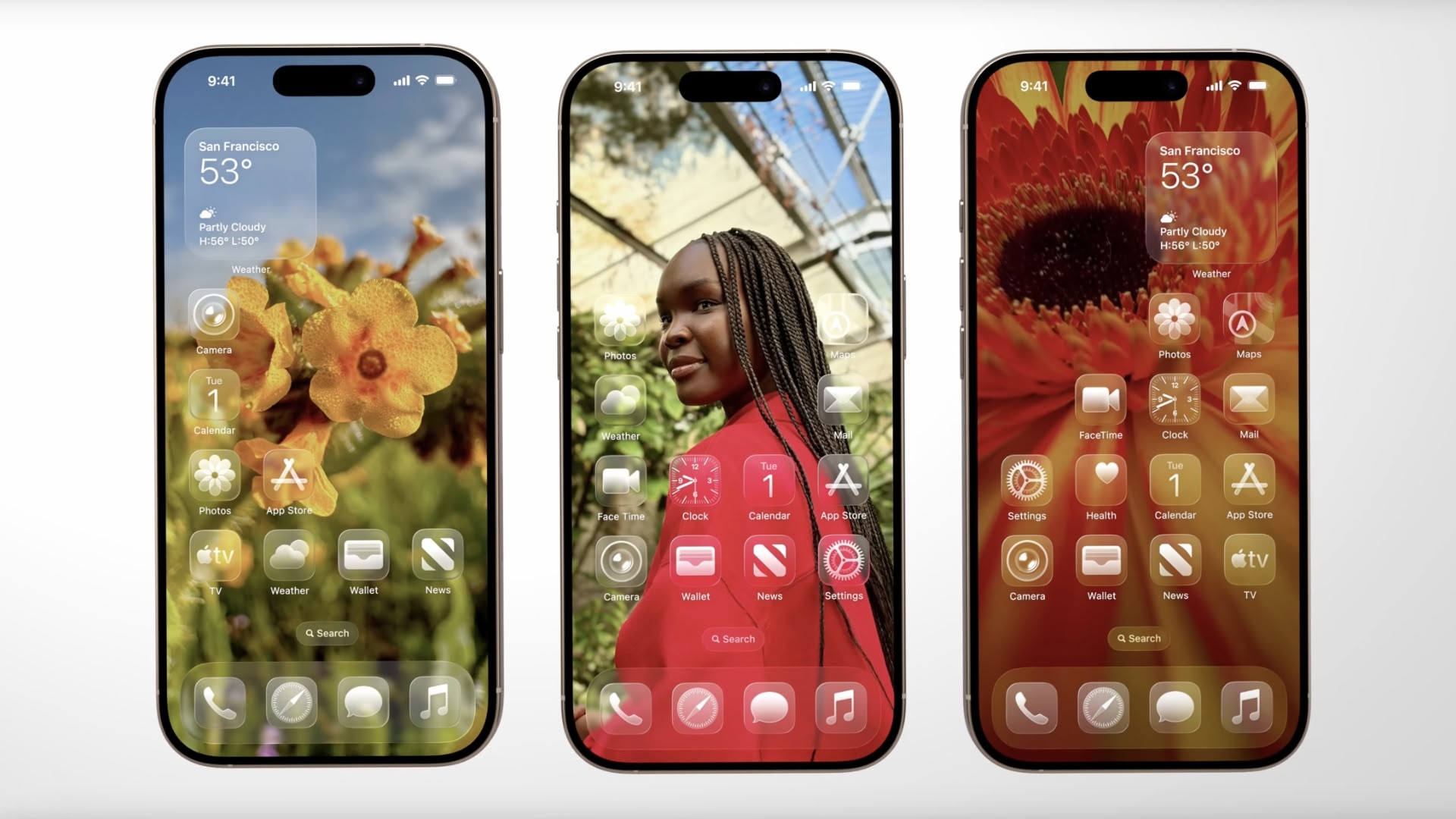
What is "Clear Look"?
Clear Look utilizes Apple's innovative "Liquid Glass" design language. This design approach isn't just a simple color scheme; it's a dynamic system that incorporates translucent layers within app icons and interface elements. These layers react and adapt to the underlying content and the surrounding context, creating a constantly evolving visual experience.
Unlike the stark contrast of Light and Dark modes, Clear Look embraces transparency. Interface elements become partially see-through, allowing underlying content to subtly peek through. This creates a more layered and sophisticated look, offering a fresh take on how information is presented on the iPhone screen.
How Clear Look Works with Apple's Universal Design System
Clear Look isn't operating in isolation. It's tightly integrated with Apple's new universal design system, designed to harmonize the visual experience across all Apple platforms—from iPhones and iPads to Macs and Apple Watches. This system ensures consistency across devices while retaining the unique features and characteristics of each platform. Clear Look is a key component in achieving this cross-platform visual harmony.
Redesigned App Icons and Interface Elements
The impact of Clear Look extends far beyond a simple color change. Apple has completely redesigned app icons to fully support this new mode. These redesigned icons leverage the Liquid Glass design language, intelligently adjusting their appearance based on the ambient lighting conditions. This means the icons will dynamically change their look depending on whether your iPhone is in a bright or dim environment.
The transformation goes beyond app icons. Widgets and other interface elements have also been redesigned to take advantage of the transparency and layering offered by Clear Look. This consistent application of the design language creates a cohesive and immersive user experience.
Customization and User Experience
Clear Look provides users with an entirely new level of personalization for their iPhones. In addition to the already existing options of Light and Dark Mode, Clear Look offers a visually distinct alternative. This expands the scope of user customization, allowing for a more tailored and expressive visual experience. This addition significantly enhances the user’s ability to personalize their device to their specific preferences.
Availability and Beta Access
The Clear Look feature will be officially available to all iPhone users with the launch of iOS 26 this fall. However, those eager to experience the new aesthetic can access it early. Developers can download the iOS 26 beta right now, allowing them to test and optimize their apps for the new design. For public beta testers, access will be available starting next month.
Conclusion: A New Visual Paradigm for iPhone
Apple's introduction of Clear Look in iOS 26 represents a bold step forward in iPhone design. It's more than just a new mode; it's a new visual language that embraces transparency, dynamism, and a deeper integration of content and context. By seamlessly integrating with Apple's universal design system, Clear Look promises a more cohesive and visually appealing experience across all Apple devices.
The combination of Liquid Glass design and the adaptive nature of Clear Look creates a fluid and responsive interface that enhances user interaction. With its launch this fall, Clear Look is poised to redefine the way users interact with and personalize their iPhones.
Related Roundup:
iOS 26Tag:
WWDC 2025This article, "iOS 26 Adds All-New 'Clear Look' Option Alongside Light and Dark Mode" first appeared on MacRumors.com
Discuss this article in our forums
from MacRumors
-via DynaSage
