
Apple to Give You More Control Over When Your Mac Passwords Lock
Apple is updating its desktop operating system to provide users with new customizable Mac Passwords app lock options, allowing for greater control over security timing and convenience. This enhancement gives Mac owners the ability to decide exactly how long the dedicated password management tool remains accessible before securing itself automatically.
For users who rely heavily on iCloud passwords and saved credentials throughout their workday, managing how quickly an application locks is essential. The forthcoming update introduces flexible menu settings that replace the single fixed timeout present in earlier software builds.
What Are the New Mac Passwords App Lock Options?
The upcoming software revision grants Mac owners direct authority over their security preferences through a newly introduced control menu. Instead of forcing every system into the exact same behavior, Apple is expanding the timing parameters to fit varied personal workflows and physical environments.
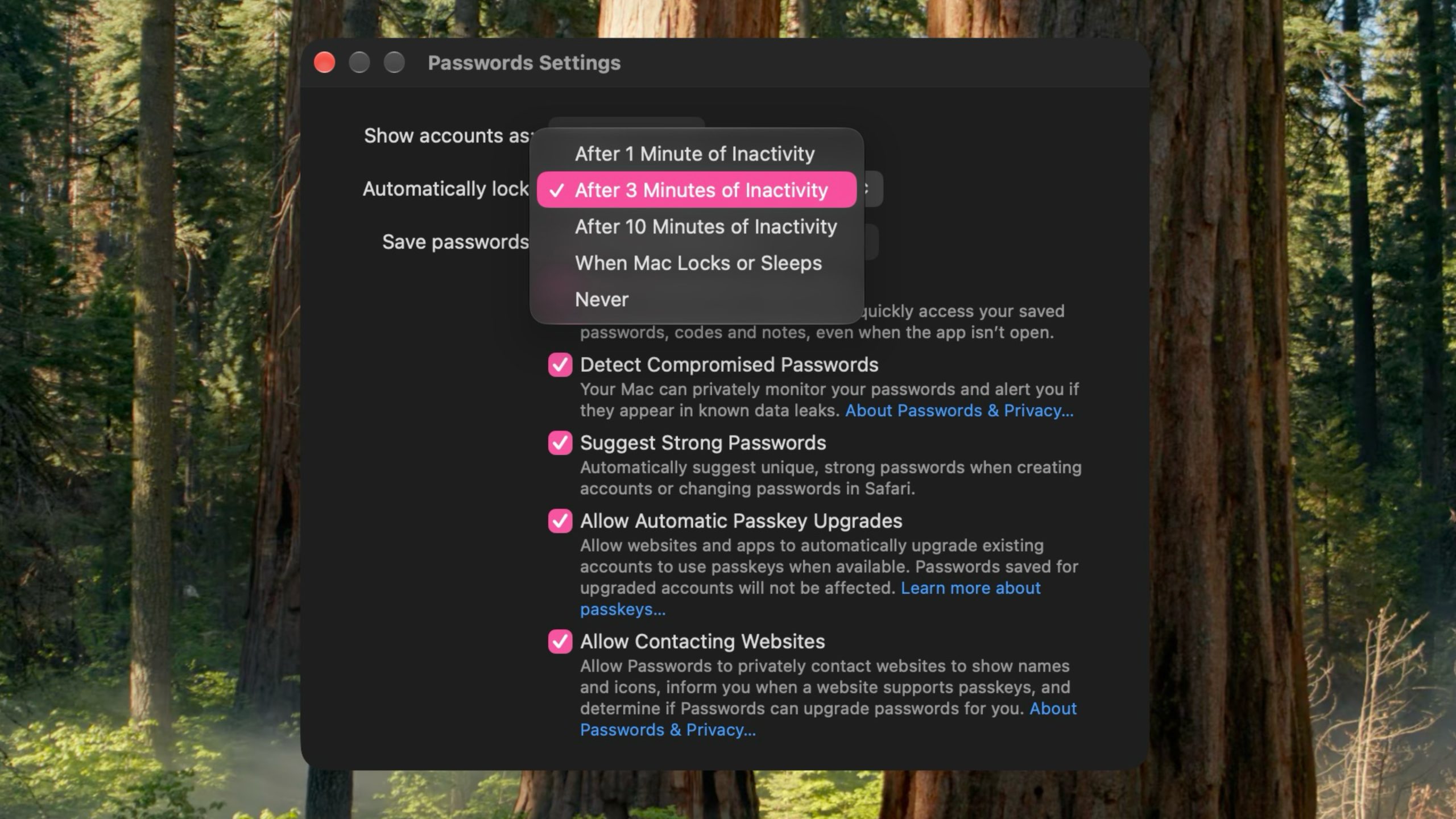
According to findings uncovered in the developer code, users can choose from several distinct timing intervals and system triggers:
- One minute of inactivity: Designed for high-security settings where quick automatic locking is preferred to protect sensitive login details.
- Three minutes of inactivity: Preserves the traditional standard default interval previously enforced across system releases.
- Ten minutes of inactivity: Offers an extended window of convenience for users working in safe, private office spaces.
- Lock when the Mac locks or sleeps: Binds the state of the password manager directly to the overall system power and display state.
- Never automatically lock: Disables the automated countdown timer completely, keeping the application ready until manually closed or locked.
Who Discovered the macOS 27.3 Beta Settings Update?
This upcoming enhancement was initially uncovered inside the macOS 27.3 beta code by reverse engineer and code explorer pdfu. Their examination of the system files revealed the new configuration menu hidden within the application settings.
These discoveries in preview builds often highlight feature refinements that Apple is preparing for broader distribution. The presence of these menu toggles in the beta build indicates that testing is actively underway ahead of the public release schedule.
How Does the Current Inactivity Timeout Work in macOS 27.2?
In the current macOS 27.2 general release, as well as in prior iterations of Apple's desktop operating system, the utility operates under a strict system policy. The application automatically triggers a lock after a fixed three-minute inactivity timeout, without offering any option to adjust the countdown period.
While a three-minute threshold offers a reasonable balance between security and user accessibility, it can present challenges for different operational needs:
- Users engaged in continuous research or multi-app tasks frequently find themselves re-authenticating multiple times per hour.
- Shared or public workstation environments often demand a much shorter window than three minutes to prevent unauthorized access.
- Static desk setups with strong physical access controls can safely accommodate longer intervals without compromising security.
The addition of dedicated configuration controls addresses these varying requirements by giving users direct choice over their security posture.
Understanding the Evolution of Apple's Dedicated Passwords App
Apple officially launched a standalone Passwords app for managing iCloud passwords and logins with the release of macOS Sequoia in September 2024. Prior to that milestone, account credentials, passkeys, multi-factor verification codes, and Wi-Fi network keys were managed primarily within a sub-pane of the System Settings menu.
The transition to a primary, dedicated management application brought several notable benefits to the platform:
- Simplified access to stored login records through a standalone dock icon and menu interface.
- Streamlined generation and management of complex passkeys across personal and shared ecosystem accounts.
- Dedicated end-to-end encryption handling integrated directly into the iCloud Keychain framework.
- Unified credential autofill across system apps, WebKit browsers, and third-party software tools.
As the application matures, Apple has focused on refining user interaction choices, with the customizable Mac Passwords app lock options serving as the latest operational upgrade.
Why Flexible Lock Settings Improve Both Security and Usability
Security features function best when they adapt to the operational context of the person using them. A rigid lock policy can cause user frustration if it forces constant re-authentication during busy work sessions, while a policy that is too loose might leave credentials exposed when a user steps away from their desk.
By providing granular Mac Passwords app lock options, Apple allows users to select the policy that best matches their environment:
- For strict security: Setting the timer to one minute ensures that if a computer is left unattended, access to saved login records is revoked almost immediately.
- For standard protection: Leaving the timer at three minutes maintains the balanced protection level that Mac owners are already familiar with.
- For active multi-tasking: Selecting ten minutes prevents continuous interuption while working across multiple windows and documentation tools.
- For hardware synchronization: Tying the app status to system sleep ensures that whenever the primary display turns off, all password data is secured instantly.
Release Timeline: When Will the New Settings Arrive?
Mac owners will not have to wait long to access these customized timeout features. When the official software update arrives in December, users will gain full access to the updated preferences panel, granting complete control over how long the app stays unlocked rather than having to rely on the default timeout.
This update will roll out via standard software distribution channels for all compatible computers running the latest operating system generation.
Summary of the Upcoming Mac Password Manager Changes
The addition of flexible timing rules marks an important refinement for Apple's built-in credential management utility. Whether you prefer maximum security with a short one-minute timer or maximum convenience with a longer duration, the upcoming update equips Mac owners with practical tools to tailor their security environment.
Keep an eye out for the official system release arriving in December to take advantage of these new customizable Mac Passwords app lock options on your device.
Tag: pdfu
This article, "Apple to Give You More Control Over When Your Mac Passwords Lock" first appeared on MacRumors.com
Discuss this article in our forums
from MacRumors
-via DynaSage
