
GM Says Apple Wallet Car Keys Coming to These Vehicles
General Motors has officially begun rolling out Apple Wallet car key support across select Cadillac, Chevrolet, and GMC vehicles, allowing drivers to unlock, start, and manage their cars using an iPhone or Apple Watch. This major update modernizes the driving experience by transforming your wearable or smartphone into a secure, fully functional digital vehicle key.
In a late September press release, GM announced that it has started deploying digital car key features to initial luxury SUV models, with broader rollout plans scheduled for additional vehicle lines over the coming months. For vehicle owners who prefer to travel light without carrying physical key fobs, this integration brings incredible daily convenience and improved digital flexibility.
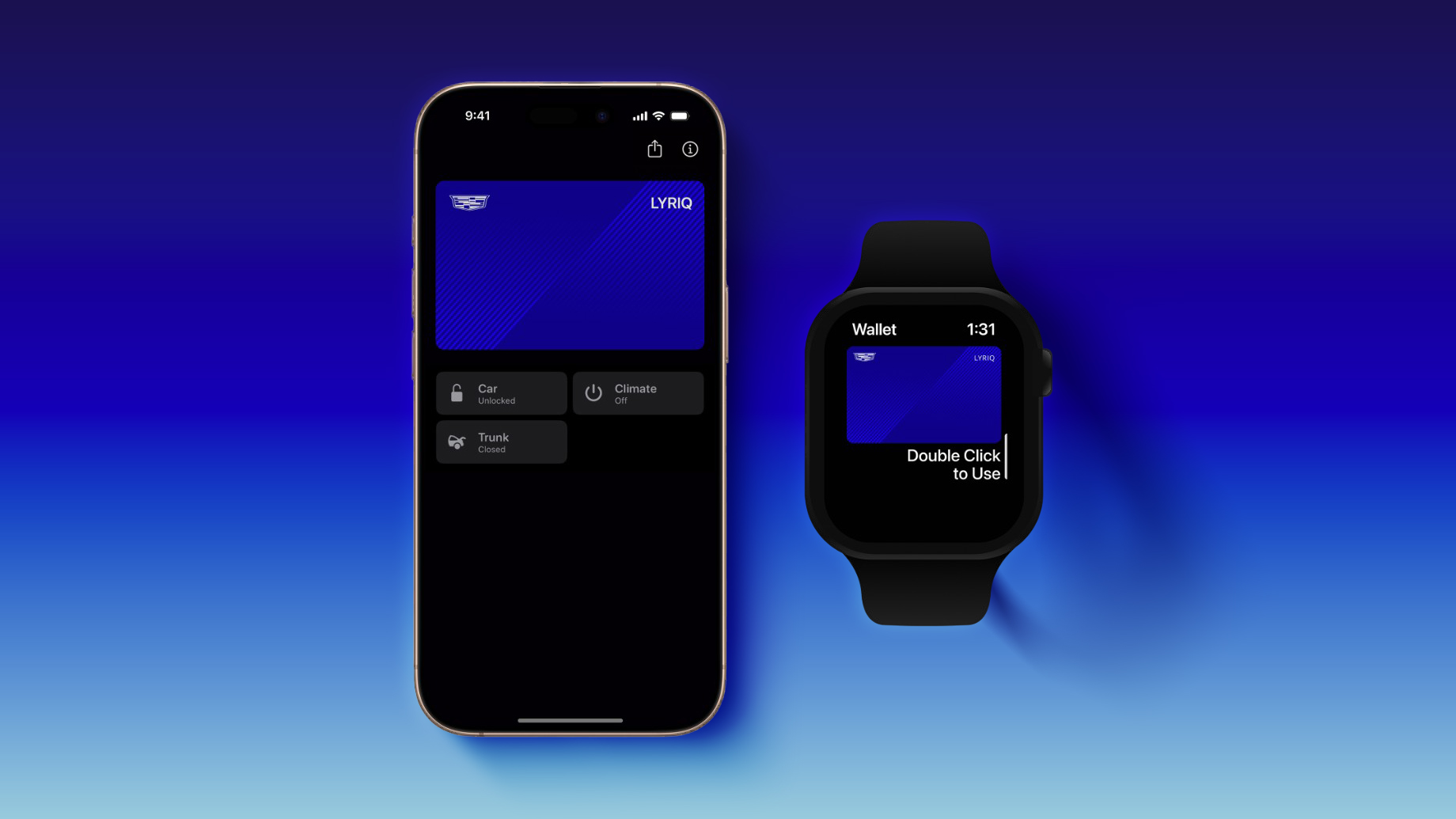
In addition to Apple's platform, drivers using Android devices are not left out of the equation. Google Wallet and Samsung Wallet will also be supported, with a related Samsung press release confirming digital key availability for eligible vehicles in the United States and Canada.
Which GM Vehicles Get Apple Wallet Car Key Support?
General Motors is executing its digital key deployment in phased waves. The initial rollout focuses heavily on premium electric vehicles and full-size luxury SUVs across the Cadillac, Chevrolet, and GMC family lineups. Understanding when your specific automobile receives access depends on the model name and model year of your vehicle.
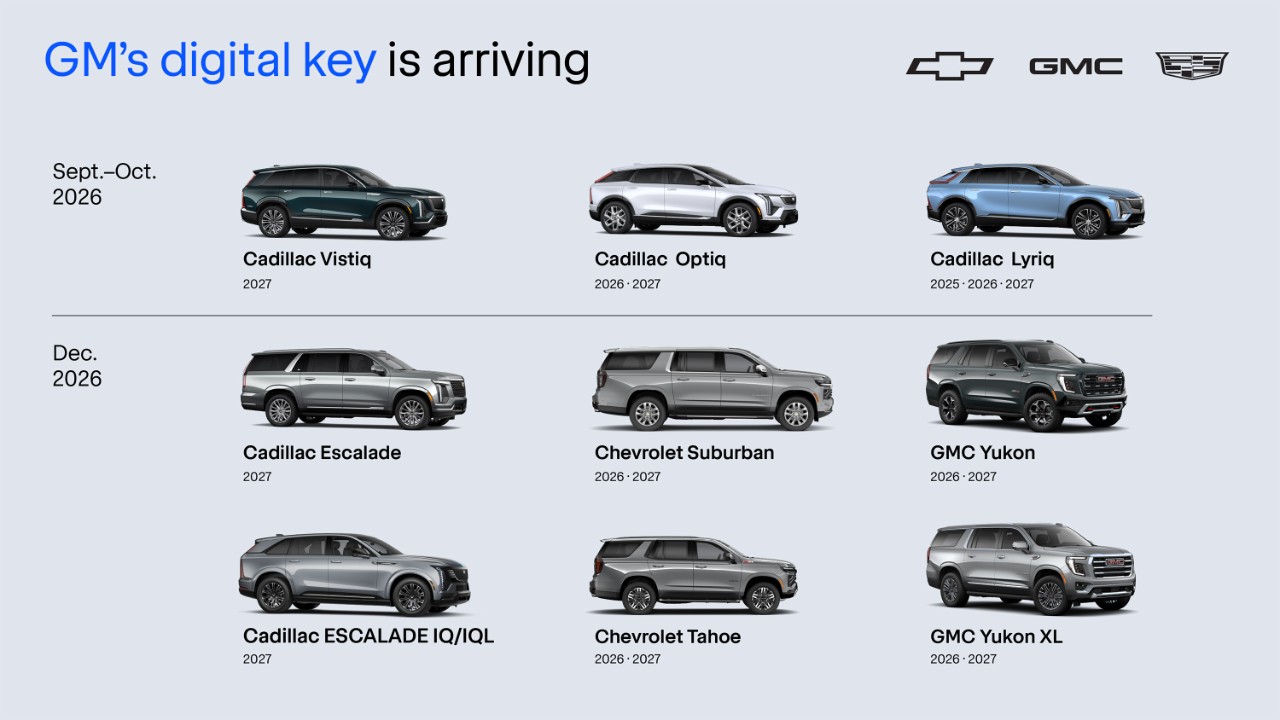
GM explicitly detailed that the feature deployment will adhere to the following targeted timetable:
September to October 2026 Rollout Phase
The first wave of compatibility focuses on Cadillac's luxury lineup, incorporating both brand-new electric crossovers and established luxury models:
- Cadillac Vistiq (2027 model year)
- Cadillac Optiq (2026–2027 model years)
- Cadillac Lyriq (2025–2027 model years)
December 2026 Rollout Phase
The second wave expands keyless digital functionality to popular full-size luxury and flagship utility vehicles across the General Motors brand family:
- Cadillac Escalade (2027 model year)
- Cadillac Escalade IQ and Escalade IQL (2027 model year)
- Chevrolet Suburban (2026–2027 model years)
- Chevrolet Tahoe (2026–2027 model years)
- GMC Yukon (2026–2027 model years)
- GMC Yukon XL (2026–2027 model years)
Vehicle owners do not need to check their dealership manually to see if their car is ready. GM explained that customers will automatically see a notification inside the "What's New" section of their vehicle's official mobile application as soon as digital key functionality becomes active for their specific vehicle.
How Does Apple Wallet Car Key Support Work on GM Vehicles?
Apple Wallet's native car key features offer a hands-free, intuitive entry experience designed to blend seamlessly into your daily routine. By adding a digital key to your Apple Wallet app, your iPhone or Apple Watch acts as a smart, secure transmitter that communicates directly with your vehicle's onboard computer sensors.
With this setup, eligible GM vehicles will automatically unlock as you approach the vehicle with your paired mobile device. Conversely, when you step away from the car, the system detects your departure and automatically locks the doors behind you. You never have to manually pull out your phone, launch an app, or press physical buttons on a standard key fob.
Beyond passive locking and unlocking capabilities, the Apple Wallet integration gives drivers direct control over key vehicle convenience functions directly from their phone screen. You can perform helpful remote tasks straight from the Apple Wallet app, including:
- Opening and closing the vehicle's rear trunk or liftgate effortlessly.
- Turning the interior climate control system on or off to pre-heat or pre-cool the cabin before entering.
- Starting the engine passively once inside the vehicle without inserting a physical key.
The Security and Technology Behind Digital Car Keys
Modern digital automotive keys rely on advanced, layered technology to maintain tight security while offering precise proximity sensing. To ensure that unauthorized users cannot clone signals or access your automobile, GM utilizes a combination of short-range Bluetooth communication and ultra-wideband technology.
Ultra-wideband (UWB) technology plays a critical role in enabling precise spatial awareness. Unlike traditional radio frequencies or basic Bluetooth signals, UWB calculates the exact distance between your mobile device and the vehicle down to the centimeter. This hyper-accurate positioning prevents common security exploits, such as relay attacks, where malicious actors attempt to intercept and extend key fob signals from inside a residence or office.
Because the vehicle precisely measures your physical distance, it will only trigger proximity functions like passive entry or push-button starting when your device is within an immediate, verified radius of the car.
Supported iPhone and Apple Watch Hardware Requirements
To take advantage of Apple Wallet car key support on equipped Cadillac, Chevrolet, and GMC models, you must ensure that your Apple hardware possesses the necessary technical capabilities. Because the digital key relies on specialized wireless chipsets, hardware restrictions apply across older or budget-focused device models.
Compatible iPhone Models
Digital car keys are supported on the following mobile devices running compatible software versions:
- iPhone 11 series (iPhone 11, iPhone 11 Pro, iPhone 11 Pro Max)
- iPhone 12 series (iPhone 12, iPhone 12 mini, iPhone 12 Pro, iPhone 12 Pro Max)
- iPhone 13 series (iPhone 13, iPhone 13 mini, iPhone 13 Pro, iPhone 13 Pro Max)
- iPhone 14 series (iPhone 14, iPhone 14 Plus, iPhone 14 Pro, iPhone 14 Pro Max)
- iPhone 15 series (iPhone 15, iPhone 15 Plus, iPhone 15 Pro, iPhone 15 Pro Max)
- iPhone 16 series (iPhone 16, iPhone 16 Plus, iPhone 16 Pro, iPhone 16 Pro Max)
It is important to note that certain specific models are excluded due to missing internal Ultra-wideband hardware components. The following devices do not support Apple Wallet car keys for GM vehicles:
- iPhone SE (2nd generation)
- iPhone SE (3rd generation)
- iPhone 16e
Compatible Apple Watch Models
If you prefer to leave your phone in your pocket or bag, you can also operate your vehicle directly from your wrist using a compatible smartwatch. Apple Watch models that support car keys include:
- Apple Watch Series 6
- Apple Watch Series 7
- Apple Watch Series 8
- Apple Watch Series 9
- Apple Watch Series 10
- Apple Watch Ultra and Apple Watch Ultra 2
Step-by-Step iPhone Car Key Setup Guide
Setting up a digital car key inside your mobile device is a straightforward process, but it requires a few initial steps to authenticate owner identity and sync hardware securely. GM outlines a clear workflow for registering your digital pass inside your smartphone wallet.
Follow these standard steps to complete your iPhone car key setup:
- Download and install your vehicle's official brand app (such as the myCadillac, myChevrolet, or myGMC mobile app) on your primary smartphone.
- Log in to your active owner account inside the mobile application.
- Ensure your vehicle has an active OnStar connection and park safely inside or near the car.
- Bring your physical vehicle key fob inside the cabin with you during the setup process to verify physical possession of the car.
- Open the vehicle app on your smartphone, navigate to the digital key prompt, and follow the step-by-step onscreen instructions to pair your device.
- Confirm the addition of the digital key inside your Apple Wallet (or alternative compatible wallet app on Android).
Once setup is finalized, your pass is permanently linked to your personal digital wallet. Additional step-by-step guidance on managing setup preferences, sharing keys with trusted family members, or adjusting passive entry settings can be found inside Apple's support document.
Cross-Platform Compatibility: Google Wallet and Samsung Wallet
While Apple Wallet remains a major focus for iOS users, General Motors has ensured Android users enjoy equal access to digital car key conveniences. Drivers using compatible Android hardware can configure digital passes within Google Wallet or Samsung Wallet.
This multi-wallet approach ensures that multi-driver households using different smartphone operating systems can seamlessly share entry access to the family car without requiring separate physical keys. As confirmed in official press statements, Samsung Wallet and Google Wallet integration is active for drivers across the United States and Canadian markets.
Why Digital Keys Represent the Future of Driving
The rollout of digital vehicle access marks an important step forward in connected car technology. Transitioning away from bulky physical key fobs reduces the hassle of carrying excess personal items while enhancing everyday vehicle accessibility.
With precise ultra-wideband tracking, automated hands-free entry, and integrated climate controls, modern digital car keys offer a level of seamless luxury that fits naturally into our smartphone-centric lives. As GM continues expanding software availability across more Chevrolet, GMC, and Cadillac trim levels, keyless digital convenience is rapidly becoming a standard expectation for car owners everywhere.
To stay updated on brand-specific digital features or share your thoughts on vehicle software features, visit these resources: Tags: Apple Wallet, iPhone Car Keys, GM.
This article, "GM Says Apple Wallet Car Keys Coming to These Vehicles" first appeared on MacRumors.com.
Discuss this article in our forums.
Overall, the expansion of official Apple Wallet car key support across General Motors' vehicle fleet provides drivers with unmatched convenience, enhanced safety through ultra-wideband connectivity, and effortless control right from their wrist or pocket.
from MacRumors
-via DynaSage
