
ChatGPT Gets GPT-6 and New Intelligent UI With Visual Answers
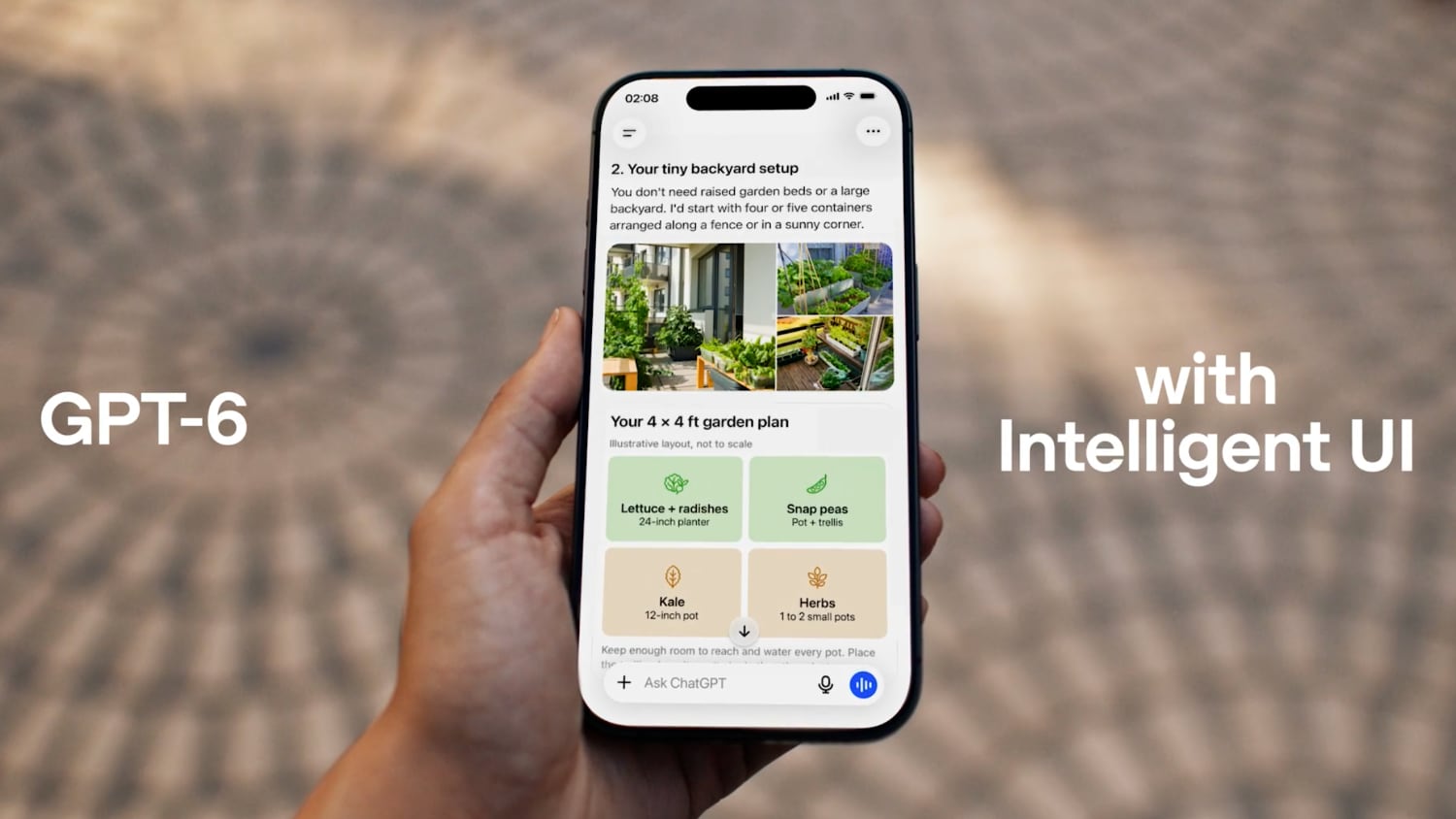
OpenAI has officially unveiled a major shift in how users interact with artificial intelligence, introducing a new feature known as Intelligent UI. By pairing this dynamic user interface with the rollout of GPT-6 models, ChatGPT can now respond to user prompts with fully interactive visual components rather than relying solely on standard blocks of plain text.
This major upgrade is designed to make everyday answers significantly more visual, helping people digest complicated topics and complete everyday tasks much more efficiently. Whether you need a dynamic recipe widget, an interactive map, or an on-the-fly mini app, the new ChatGPT Intelligent UI framework transforms static chat interactions into rich graphical experiences.
What Is the New ChatGPT Intelligent UI Feature?
For a long time, conversational AI models have relied primarily on formatted text, bulleted lists, and basic code snippets to answer questions. While text responses work well for simple inquiries, complex questions often require standard visual aids or structured interfaces to be easily understood.
With the release of Intelligent UI, OpenAI today introduced a system where ChatGPT generates live, clickable interface elements right inside the conversation thread. Instead of simply reading through instructions or manual calculations, users can directly manipulate on-screen elements to get immediate answers.
The feature integrates directly into the chat stream, bringing a broad range of interactive user interfaces into everyday conversations. Key elements included in these visual responses feature:
- Tappable Buttons: Quick action buttons that let users make selections or navigate options with a single click.
- Interactive Forms: Structured input fields that gather necessary information to refine search results or calculations.
- Dynamic Charts and Diagrams: Visual data representations that make understanding complex statistical trends simple.
- Embedded Visual Graphics: Rich images and diagrams tailored directly to the context of your query.
- Interactive Checklists: Structured task lists that allow users to mark progress in real time.
- Integrated Maps: Embedded geographical elements to locate places and explore spatial data directly in the chat.
- Multiple-Choice Follow-Up Questions: Intuitive decision prompts designed to narrow down precise search results without requiring manual typing.
How GPT-6 Visual Answers Compare to GPT-5.6
To highlight the capabilities of this system, sample comparisons published on OpenAI's website show a stark contrast between previous outputs under GPT-5.6 and the newly updated GPT-6 visual outputs. While GPT-5.6 provided thorough written answers, GPT-6 renders interactive tools that streamline real-world decision-making.
One notable demonstration involves cooking and meal preparation. When asking for a recipe, previous models would generate a long text list of ingredients and static step-by-step cooking instructions. If you wanted to scale the recipe for a different group size, you had to ask the AI to recompute the quantities manually.
Under the new system, GPT-6 delivers an interactive recipe widget. If you need to prepare dinner for a different number of people, you can simply adjust an on-screen guest count slider. The widget automatically tweaks component quantities in real time without generating a completely new text message.
Another major improvement comes in decision-making and troubleshooting. Rather than guessing what follow-up information the AI needs, GPT-6 presents multiple-choice follow-up questions directly within the chat interface. Tapping an option immediately narrows down the results, making long back-and-forth prompts a thing of the past.
Instant Application Generation: Bill Splitters, Games, and Calculators
Beyond static visual widgets, ChatGPT can now quickly generate functional mini-applications directly inside the visual layout to help you complete specific tasks. Instead of requiring users to copy text out to third-party tools or spreadsheets, the AI builds custom interfaces instantly.
OpenAI highlighted several key examples of tools that ChatGPT can construct on the fly during a conversation:
- Bill Splitters: Interactive forms that let users input total costs, tip percentages, and individual contributions to split group expenses cleanly.
- Custom Calculators: Specialized calculation widgets built specifically around your specific query, whether analyzing mortgage terms or tracking fitness metrics.
- Small Interactive Games: Casual, lightweight games rendered directly within the chat thread for leisure or educational activities.
Because these applications are built natively during the generation stream, users can interact with them immediately without navigating away from the chat screen or installing external plugins.
How Intelligent UI Works Under the Hood
To understand why this launch represents such a significant leap forward, it helps to examine how the system constructs these interfaces behind the scenes. Delivering complex, interactive visual elements in real time requires a very different approach than standard text stream generation.
According to OpenAI, Intelligent UI uses a specialized library of native, streamable components. Paired with this library is a custom compiler that processes and renders the visual interface in real time as the language model generates the underlying data structure.
Because the interface components are streamable and native, they render progressively on your screen alongside text generation. This technical design keeps latency low and ensures that visual components respond smoothly to touch inputs, mouse clicks, and numerical adjustments.
Faster Responses with Concurrent Thinking
In addition to rendering rich graphics and interactive widgets, GPT-6 brings notable performance gains designed to reduce perceived latency. Waiting for a large AI model to process complex prompts can often slow down user workflows.
To solve this bottleneck, GPT-6 is capable of starting its answer while it is still actively thinking through the full context of the query. By beginning response generation immediately, the model significantly reduces wait times, providing faster responses even when building complex visual interfaces.
This concurrent processing model ensures that users see structural text and dynamic visual elements appear instantly on screen, while deeper calculations finalize seamlessly in the background.
GPT-6 Sol vs. GPT-6 Luna: Understanding Model Allocation Across Tiers
Alongside the rollout of the main interface update, OpenAI is expanding access to its underlying GPT-6 infrastructure across different user tiers. However, access is divided between two distinct model variants: GPT-6 Sol and GPT-6 Luna.
To ensure optimal system allocation and performance, OpenAI is distributing these model variants based on account subscription tiers. The model allocation breaks down as follows:
- GPT-6 Sol: Allocated exclusively to paid tiers, including ChatGPT Plus, ChatGPT Pro, ChatGPT Business, and ChatGPT Enterprise subscribers.
- GPT-6 Luna: Provided to users on the Free tier and the Go subscription tier.
Both model variants support the core features of the visual update, enabling users across all access levels to experience interactive widgets, streamable components, and embedded graphics.
Rollout Timeline and Availability Across Plans
The global rollout of GPT-6 and its updated interface feature is happening rapidly across all supported regions and subscription tiers.
For paying subscribers on ChatGPT Plus, Pro, Business, and Enterprise plans, access to GPT-6 with Intelligent UI begins rolling out today. This allows premium users to immediately test out native streamable widgets, bill splitters, and custom calculators.
For users on the Free and Go access tiers, the expansion starts tomorrow. This quick deployment schedule ensures that the entire user base will have access to visual responses within a very short timeframe.
Current Platform Limitations and Workspace Scope
While this release brings extensive updates to everyday conversational searches, OpenAI has established clear boundaries regarding where these new features operate within the product ecosystem.
Currently, availability for GPT-6 and the visual interface features is strictly limited to the core Chat tab inside the application. Specialized workspaces and dedicated models operate under existing frameworks:
- Chat Tab: Receives full support for GPT-6 Sol, GPT-6 Luna, and all Intelligent UI features.
- Work Models: Remain on existing architecture and are not changing with this update.
- Codex Models: Remain on existing developer architecture and are unaffected by today's release.
Users who rely on dedicated developer setups or enterprise work pipelines will continue using their established setups without unexpected workflow interruptions.
Summary of Key Features in the GPT-6 Intelligent UI Update
To help visualize everything included in this launch, here is a quick overview summarizing how the update changes the platform experience:
- Visual Responses: Plain text answers are replaced with charts, diagrams, forms, and tappable options.
- Interactive Tools: In-line generation of useful utilities like bill splitters, specialized calculators, and lightweight mini games.
- Dynamic Widgets: Smart elements like recipe scaling tools that automatically recompute ingredient quantities based on guest numbers.
- Faster Output: Response generation starts instantly while the model completes background thinking.
- Native Compiler: Real-time streaming interface compiler driven by a library of native components.
- Broad Distribution: Phased launch bringing GPT-6 Sol to paid tiers today and GPT-6 Luna to free tiers tomorrow.
Connecting with the Community
As these new features roll out globally, discussion across technology communities and developer groups is growing quickly. Broad architectural shifts toward graphical AI responses mark an exciting transition in consumer technology.
For related guides and detailed user discussions regarding this latest release, you can check out community coverage on ChatGPT features and broader developments from OpenAI.
This news was detailed in the original article, "ChatGPT Gets GPT-6 and New Intelligent UI With Visual Answers," which first appeared on MacRumors.com. You can also join ongoing reader discussions and share your experiences to discuss this article in the public forums.
Final Thoughts on ChatGPT Intelligent UI
The introduction of the ChatGPT Intelligent UI along with the launch of GPT-6 marks an important step in the evolution of conversational artificial intelligence. By combining native, streamable visual components with instant thinking models like GPT-6 Sol and GPT-6 Luna, OpenAI is making complex information far more accessible, visual, and actionable for users everywhere.
from MacRumors
-via DynaSage
