
Apple HomeView Has These 15 Apps, Some CarPlay Apps and Widgets Also Supported
Apple's new smart home display comes loaded with a dedicated lineup of software features and seamless iPhone integration. Discover all 15 built-in apps available on the Apple HomeView smart home hub, along with supported CarPlay media apps and interactive widgets.
Apple has officially published details regarding the software capabilities for its fresh hardware device on its official tech specs page. The upcoming display is designed to act as a central control station for household management, smart accessories, daily communication, and room-to-room media playback.
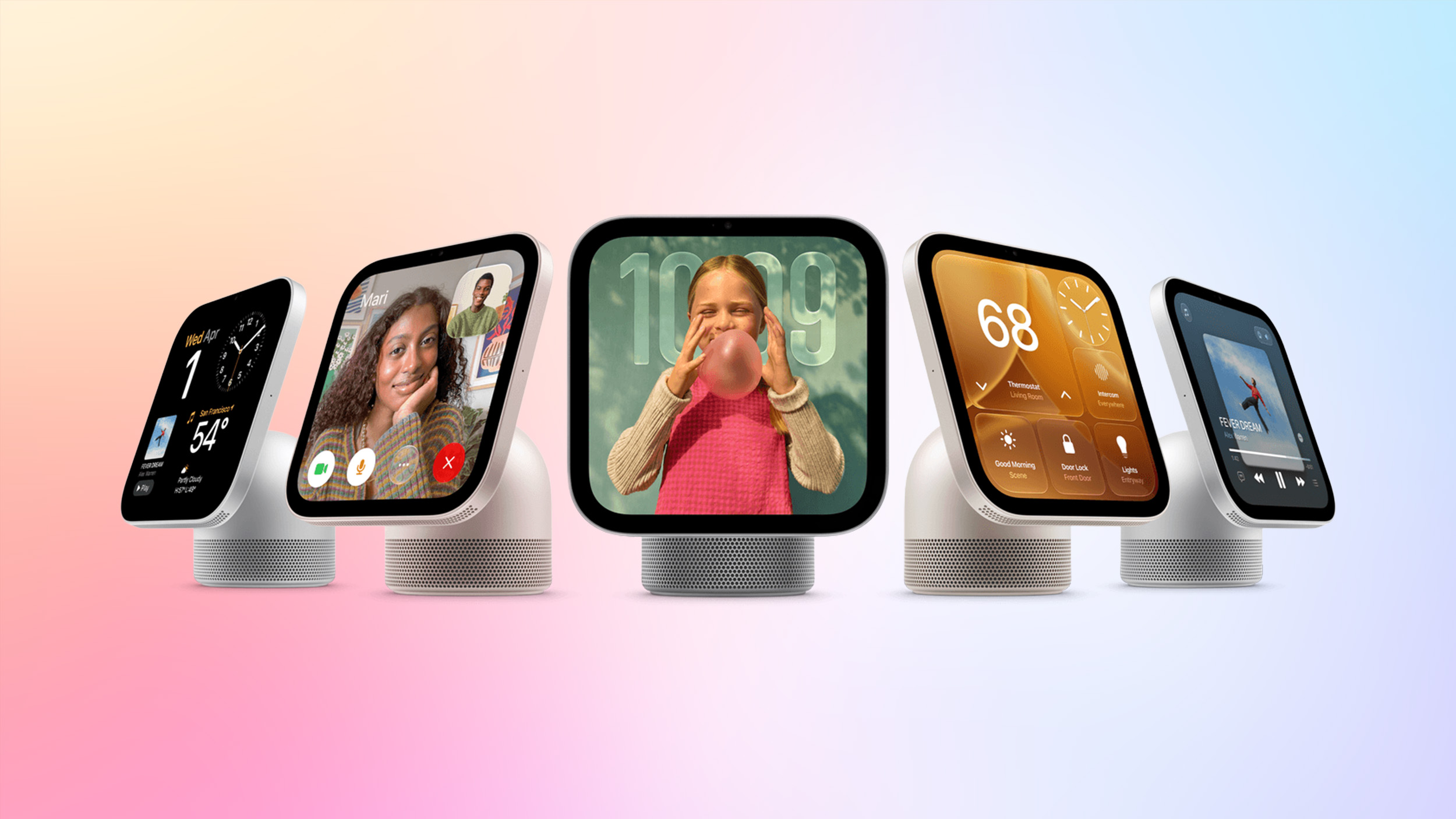
What is the Apple HomeView Smart Home Hub?
The flagship display is Apple's newest entry into dedicated home automation devices. Following the official announcement of the HomeView smart home hub, full technical specifications were made public, detailing how the software ecosystem operates in a home environment.
Unlike an iPad or an iPhone, the device operates without a standalone native App Store. Instead, it features a carefully curated collection of pre-installed system applications designed specifically for quick household interaction. For additional functionality, the hardware links directly with a user's paired iPhone to present extra media features and interactive widget components on its larger display panel.
Pre-orders for the new hardware are currently open, with official retail shipments and store availability scheduled to begin on Friday, November 13.
What Apps Come Built into the Apple HomeView Smart Home Hub?
Every system shipping from the factory includes 15 core applications built directly into its operating system. These applications cover daily tasks, household scheduling, ambient updates, audio listening, and home automation controls.
Here is the complete list of pre-installed apps included out of the box:
- Alarms
- Calendar
- FaceTime
- Find My
- Home
- Intercom
- Messages
- Music
- Podcasts
- Reminders
- Safari
- Settings
- Timers
- Weather
- World Clock
A Closer Look at the 15 Pre-Installed System Applications
Understanding how each built-in app operates on the screen helps illustrate how the device functions within a kitchen, living room, or bedside table setup.
Alarms: The Alarms application provides custom alert scheduling for wake-up times, daily routines, and household reminders. Users can customize ringers, recurring wake-up schedules, and gentle wake alerts tailored to different rooms in the house.
Calendar: Designed for shared family management, the Calendar app displays daily schedules, upcoming appointments, and shared iCloud family events. Seeing daily commitments at a glance makes coordinating household schedules effortless.
FaceTime: Video calling is a primary communication feature of the device. FaceTime allows users to make and receive hands-free video calls across Apple devices, keeping families connected from anywhere in the home.
Find My: Losing misplaced items in the house becomes much easier to handle. The Find My application tracks connected iPhones, iPads, MacBooks, and AirTag items directly from the tabletop interface.
Home: Acting as the central dashboard for Matter and HomeKit accessories, the Home app lets users control smart lights, thermostats, door locks, security cameras, and scene presets with a single tap or voice query.
Intercom: Communication across multiple rooms is handled directly by Intercom. Family members can broadcast quick audio announcements to other connected HomePod speakers or displays throughout the residence.
Messages: The Messages application displays household notifications, family text threads, and incoming incoming notes on screen, allowing quick check-ins without having to retrieve a personal mobile device.
Music: Audio streaming is central to the hardware experience. The built-in Music application provides direct access to full Apple Music personal libraries, curated playlists, live radio stations, and artist releases.
Podcasts: Listeners can browse through subscribed shows, explore top charts, and stream podcast episodes across household rooms using the dedicated Podcasts platform interface.
Reminders: Shared grocery lists, daily chores, project checklists, and time-sensitive tasks stay visible and manageable for all household members using synced Reminders lists.
Safari: Web access is available through a streamlined version of the Safari web browser. It offers quick web searches, recipe lookups, and visual information checking directly from the display.
Settings: System preferences, network connections, Bluetooth accessory pairings, display brightness controls, audio output settings, and accessibility options are managed inside Settings.
Timers: Essential for cooking, study sessions, and household management, the Timers application supports multiple concurrent countdown timers labeled with specific names and alert tones.
Weather: Real-time local forecasts, severe weather warnings, temperature trends, daily precipitation charts, and atmospheric updates are rendered clearly through the Weather app interface.
World Clock: For keeping track of international family members or remote working teams, the World Clock application displays current times across multiple global regions simultaneously.
How Do CarPlay Apps and Widgets Work on HomeView?
While the physical hardware lacks an on-device App Store for downloading standalone third-party software, it expands its software features by pairing directly with a user's primary mobile phone. The display can also display CarPlay-enabled audio and video apps running on a paired iPhone.
This integration brings familiar media platforms directly onto the desktop interface without requiring developers to build entirely separate applications. According to industry reporting from according to WIRED, audio and video applications that already include CarPlay integration are rendered seamlessly on the device interface.
CarPlay-enabled applications available from a paired iPhone include:
- Apple Music Classical
- Apple News
- Apple TV
- Audiobooks
- "Supported third-party audio and video apps" such as Spotify
Through this mirroring and integration protocol, popular streaming platforms like Spotify, third-party audiobook readers, and digital news apps can stream audio and display video content directly on the smart display screen.
Developer Support for CarPlay Extensions and Widgets
Official developer terms further confirm how external software integration functions on the new platform. The latest version of the Apple Developer Program agreement confirms the availability of specific CarPlay apps and interactive widgets on the hardware display platform under section 6.4 of the terms.
This developer confirmation means that creators building apps with CarPlay audio, video, or widget frameworks can extend their user interface directly to the home environment. Glanceable widgets can display home information, live updates, and current playback controls side-by-side with built-in system tools.
Pre-Order Availability and Community Roundups
Customers interested in purchasing the new hardware display can submit orders immediately ahead of the official launch. Pre-orders are currently available through official retail channels, and formal retail availability begins on Friday, November 13.
For more details on compatible software ecosystems and related home technology hardware, explore the following community resources:
- Related Roundups: CarPlay, Apple HomeView
- Tag: Widgets
- Buyer's Guide: HomeView (Buy Now)
- Related Forum: HomePod, HomeView, CarPlay – Home & Auto Tech
This article, "Apple HomeView Has These 15 Apps, Some CarPlay Apps and Widgets Also Supported" first appeared on MacRumors.com.
Discuss this article in our community forums to share your thoughts on the upcoming software integration.
Summary of the Apple HomeView Experience
The release of the Apple HomeView smart home hub represents an exciting shift in how Apple connects software, mobile devices, and smart home automation. By pairing 15 foundational built-in applications with flexible CarPlay audio, video, and widget support from a connected iPhone, the display offers comprehensive utility right out of the box without requiring a cluttered third-party App Store.
from MacRumors
-via DynaSage
