
10 HomeView Features You Might Have Missed
Apple is preparing to official launch the new Apple HomeView smart home display on November 13 for $299, offering tabletop and wall-mounted configurations with deep HomeKit integration and dynamic software features. Here is a comprehensive look at key features, software capabilities, and hidden details you need to know ahead of launch.
What Is the Apple HomeView and When Will It Launch?
The official launch of the Apple HomeView is set for November 13, leaving tech enthusiasts and smart home owners eager to explore its full capabilities. Pre-orders are currently open, allowing prospective buyers to reserve their unit ahead of the release date. Right now, information is limited to official details shared by Apple alongside insights gathered by select media members during restricted hands-on demo sessions.
Priced at $299, this versatile Apple smart home device comes in two distinct hardware configurations to fit different living spaces. Buyers can choose a tabletop version that includes a built-in speaker base, or select a wall-mounted version designed to serve as a sleek central home dashboard. Both hardware designs are engineered to seamlessly integrate with your existing smart home setup.
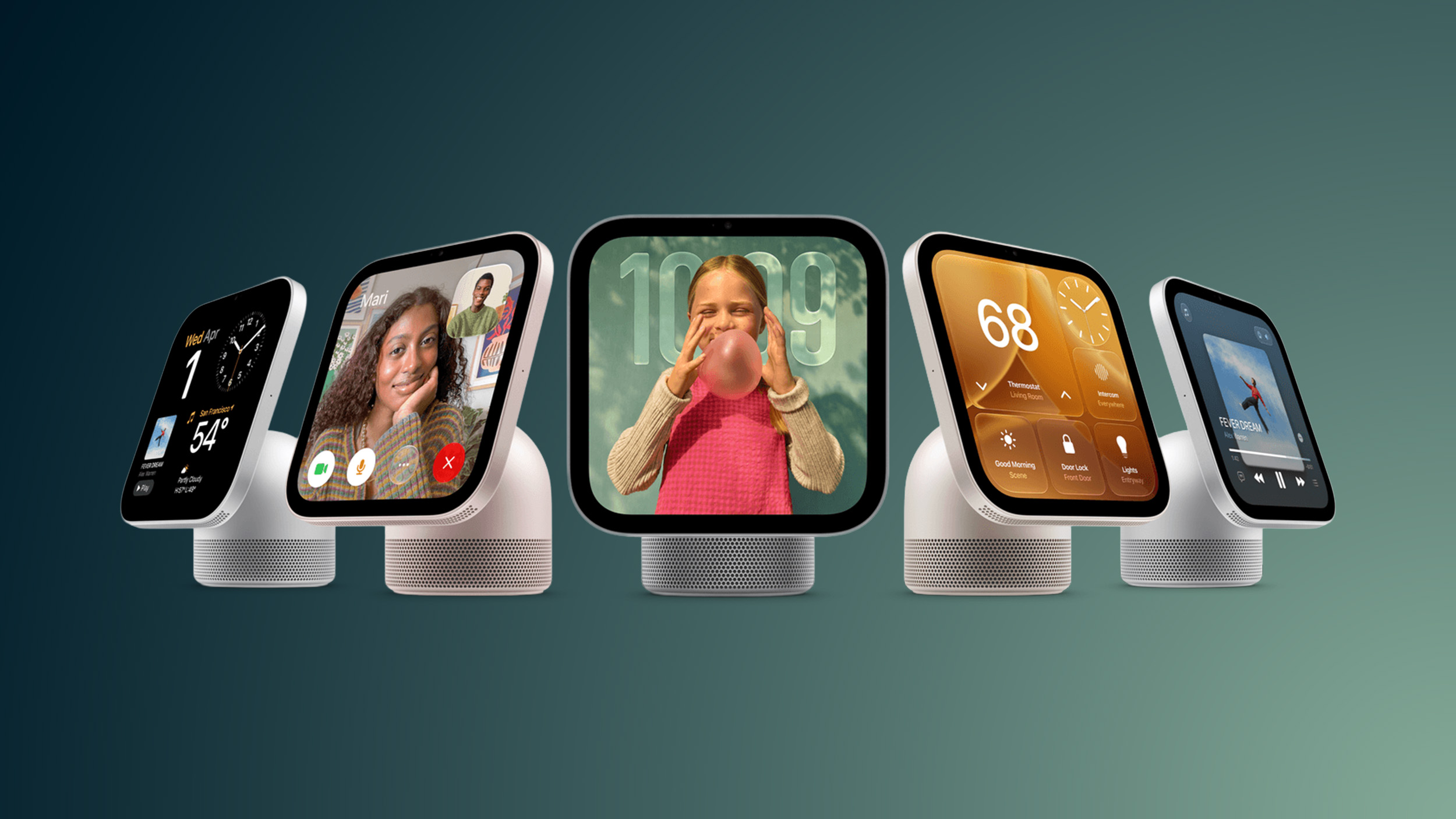
Top Apple HomeView Features You Need to Know
While the basic concept of a smart display is familiar, Apple has included several unique software elements and hardware capabilities that set it apart. Below is an in-depth breakdown of ten interesting features and functional details you might have missed during the initial announcement.
1. Recipe Walkthroughs for Hands-Free Cooking
For kitchen enthusiasts, the Apple HomeView turns online cooking guides into an interactive assistant. When viewing recipes in Safari, the interface automatically extracts ingredients and cooking steps into a clean, readable format. Users can easily tap a dedicated button to get step-by-step instructions tailored for cooking.
To help you manage complex meals, the system supports setting multiple voice-activated timers simultaneously. You can monitor baking, boiling, and simmering times without needing to touch the screen with dirty hands. This makes the display a natural fit for countertop setup near food prep areas.
2. Flexible Siri Access Options
Interacting with your voice assistant on the smart display is designed to be as effortless as possible. Users can simply say "Siri" (available in English) or "Hey Siri" to trigger hands-free voice commands from across the room. This makes controlling media, asking questions, or managing smart lights completely hands-free.
For times when speaking out loud is inconvenient, Apple provides non-verbal interaction choices. You can activate the assistant manually with a simple downward swipe from the top of the display glass. Additionally, the device supports Type to Siri, allowing silent text queries directly on the screen interface.
3. Apple Intelligence and AI Processing
The system comes with built-in Apple Intelligence features to handle household requests intelligent and quickly. Anyone in the home can ask Siri general knowledge questions without needing a connected smartphone nearby. This allows all family members to access quick information smoothly.
However, privacy protection remains a central focus for personal user data. If a request involves personal context, such as pulling up specific personal schedule details, an Apple Intelligence compatible iPhone or iPad must be associated with the system. This balance ensures general helpfulness while keeping personal information secure.
4. Guest Access Controls and AirPlay Sharing
Maintaining privacy in a shared living environment can be tricky, but Apple has addressed this directly. Personal data remains completely private and unreachable for casual users or visitors. However, guests are given controlled permission to interact with helpful shared functions around the house.
Visitors can easily control smart home accessories, check local weather updates, set quick timers, and control audio playback. Furthermore, guests can stream music directly to the display using AirPlay via peer-to-peer discovery without needing complex network access permissions.
5. Distance-Aware Adaptable Interface
One of the most innovative software aspects of the display is its proximity-aware user interface. Built-in proximity detection allows the device to know when a user is walking toward it. The onscreen layout automatically adjusts based on how far away you are standing.
When you are across the room, the display presents larger glanceable graphics with streamlined information so it remains readable from a distance. As you step closer to the device, the screen fluidly transitions to display higher information density, detailed controls, and extra interactive options.
6. Customizable Clock and Status Faces
Much like the customizable screen layouts found on personal wearables, this device includes a variety of decorative display faces. Apple designed these visual faces to reflect different moods, times of day, and routine habits. Some faces are programmed to wake up with you in the morning and automatically wind down as night approaches.
For a touch of personality, playful options like the popular Snoopy face are included. This animated face dynamically changes graphics based on current weather conditions, time of day, and seasonal holidays. It adds a charming visual element when the screen is sitting idle on a desk or wall.
7. App Connectivity via CarPlay Integration Framework
While the hardware does not feature a traditional standalone App Store, it handles external applications using familiar software architecture. The device utilizes CarPlay like software capabilities to connect with software running on a paired iPhone. This framework allows audio and media apps to project smoothly onto the home display screen.
Currently, video streaming options through this interface are limited. Outside of Apple TV, there are no established CarPlay video apps available at launch. Third-party app developers will need to update their software to support this screen interface over time.
8. Device Handoff Capabilities
Ecosystem continuity remains a standout advantage for users with multiple hardware devices. The display fully supports continuous task transfers directly from an iPhone. You can effortlessly push media and active tasks over to the larger station display without interrupting playback.
This transfer capability works across a wide selection of everyday media and communications. Users can smoothly hand off playing songs, podcast episodes, ongoing phone calls, video streams, and active web recipes from their handheld phone directly to the tabletop station.
9. Live Activities for Easy Multitasking
To help users manage multiple tasks simultaneously, the user interface natively supports Live Activities. Important ongoing alerts and status updates stay pinned and visible in real time while you navigate through other screen menus. This prevents key details from being hidden while browsing.
For example, if you have a kitchen timer running while checking the weekly weather, the active timer remains continuously visible on screen. Similarly, incoming Intercom audio messages from other family members appear as active notifications overlaying your current view.
10. Environmental Sensors and HomeKit Hub Features
Beyond being an interactive screen, the device acts as a hardware hub for home automation. Built-in temperature and humidity sensors constantly monitor room conditions. Data collected by these internal sensors can trigger automated routines inside your smart home environment.
Additionally, the unit functions as a central hub for controlling HomeKit and Matter accessories when you are away from home. This ensures remote access, automated routines, and device status monitoring remain reliable even when your personal phone leaves the local Wi-Fi network.
Summary of Apple HomeView Highlights
- Launch Date: Officially releases on November 13 for $299 with pre-orders live now.
- Hardware Options: Available as a tabletop unit with speaker base or wall-mounted display.
- Cooking Assistant: Extracts Safari recipe steps and ingredients with multi-timer voice support.
- Flexible Input: Voice controls via Siri, top swipe gesture, and Type to Siri interface options.
- Guest Convenience: Allows guest control of smart items and AirPlay audio while protecting personal data.
- Dynamic Proximity Screen: Interface automatically resizes text and layout based on distance.
- Ecosystem Handoff: Smoothly transfer calls, audio, video, and active recipe guides from iPhone.
- Smart Hub Capability: Features integrated temperature and humidity sensors alongside full HomeKit hub support.
Related Resources and Information
For additional details regarding hardware updates, pre-order options, and community feedback, check out the following links:
- Related Roundup: Apple HomeView
- Buyer's Guide: HomeView (Buy Now)
- Related Forum: HomePod, HomeView, CarPlay - Home & Auto Tech
This article, "10 HomeView Features You Might Have Missed" first appeared on MacRumors.com.
You can Discuss this article in the community forums to share your thoughts on the upcoming device release.
Final Thoughts on the Apple HomeView
With its launch set for November 13, the Apple HomeView represents an exciting addition to the smart home display market. Combining proximity-aware visual interfaces, built-in environmental sensors, hands-free cooking guides, and central hub functionality, it offers a thoughtful feature set for connected households. Whether mounted on a wall or placed on a kitchen counter, this device provides a centralized command center for your entire smart ecosystem.
from MacRumors
-via DynaSage
