
You Can Now Try Apple's Unreleased Copland OS in Your Browser
You can now test Apple Copland OS directly inside your browser thanks to new emulation work by reverse-engineering researcher Michael Steil. This unreleased 1990s operating system marked a pivotal moment in Mac history, and tech enthusiasts can finally experience it firsthand.
In the mid-1990s, Apple was actively developing a next-generation operating system known as Copland. It was announced publicly with great anticipation, promising to modernize the Macintosh platform and bring advanced capabilities to desktop computing. However, severe project management issues and rampant feature creep prevented the software from ever reaching a official commercial release.
Although Apple ultimately nixed the full project before completion, parts of Copland were eventually integrated into commercial releases such as Mac OS 7.6 and Mac OS 8. For nearly three decades, running a complete build of this missing link in Macintosh history was exceptionally difficult. Today, thanks to open-source software emulation, curious users can explore this rare piece of computer history without needing physical hardware from the 1990s.
In this comprehensive guide, we will look at how this operating system demo was brought to life, why the project failed in 1996, and how its cancellation indirectly paved the way for Steve Jobs to return to Apple and create Mac OS X.
What Was Apple Copland OS and Why Was It Created?
During the mid-1990s, Apple faced increasing pressure from competing desktop operating systems. The core architecture supporting Macintosh computers, known at the time as System 7, was beginning to show its age. Apple needed a modern platform capable of handling multitasking, protected memory, and advanced user interface elements.
To address these challenges, Apple announced a major software initiative known as Copland. The project was designed to be a ground-up overhaul of the Mac software experience. It was intended to establish a firm foundation for PowerPC-based Macintosh hardware, offering superior performance and stability compared to earlier operating systems.
Despite the immense hype and public announcements surrounding Apple Copland OS, the development process quickly ran into systemic problems. Engineering teams struggled to align their goals, leading to delays and architectural instability. As a result, the project was canceled before it could ever hit store shelves as a finished product.
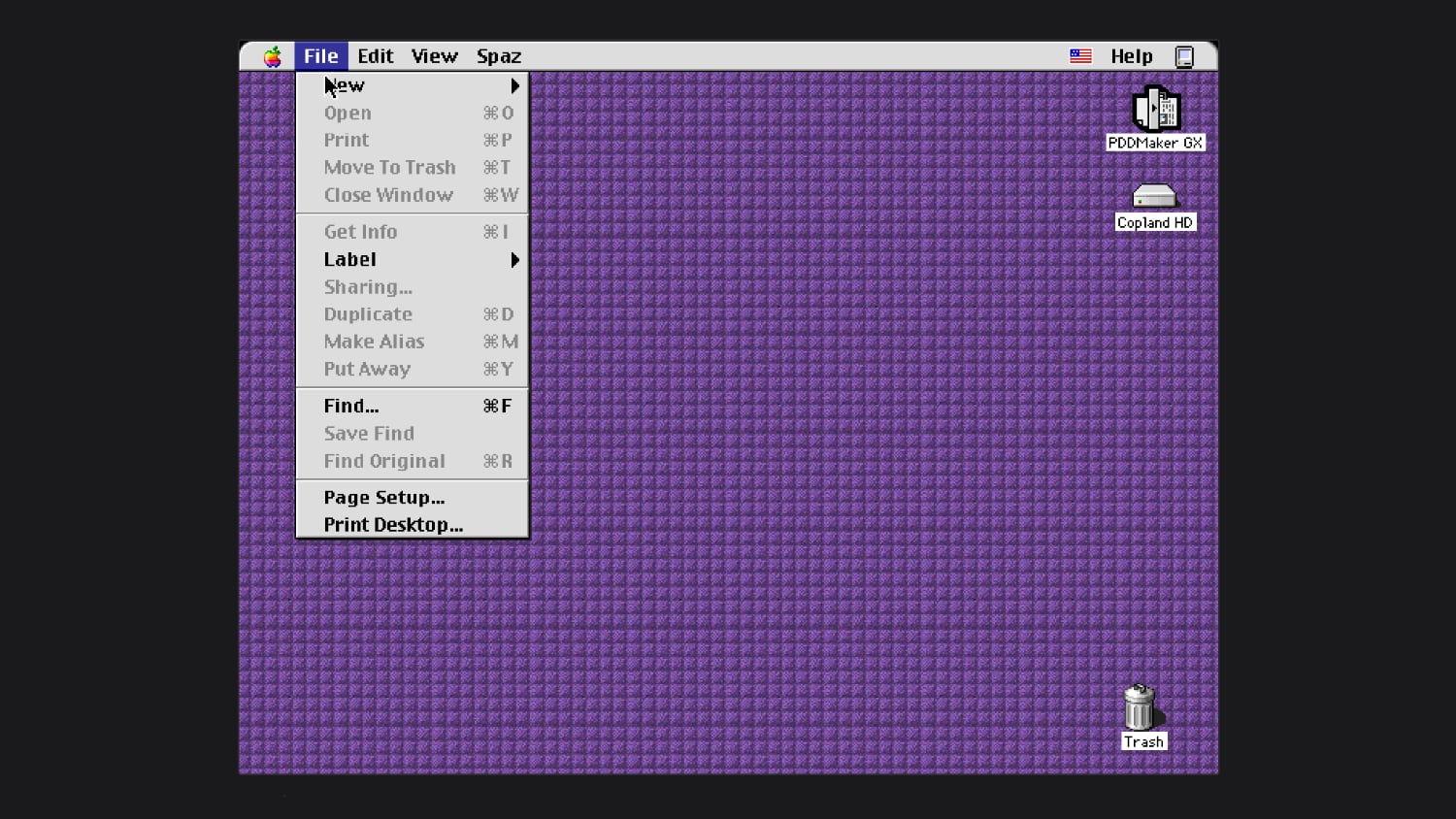
How Michael Steil Got Copland OS Running in Emulation
For decades, tech historians found it nearly impossible to run early test builds of Copland. The operating system was notorious for being extremely finicky and hard to run on real hardware from the era. Furthermore, it was completely unavailable in any virtual machine or software emulator.
That barrier was recently broken by Michael Steil, a developer who specializes in work to reverse engineer vintage hardware and software. Steil focused his efforts on modifying an open-source Power Mac emulator called DingusPPC, tailoring its environment to accommodate the unique code structure of Apple's canceled software.
The technical effort required extensive debugging and fine-tuning. Steil reported that it took a total of 11 targeted code patches to get Copland up and running reliably within the emulator environment. These fixes resolved fundamental boot sequence errors that previously caused the operating system to crash during startup.
Thanks to these fixes, Steil published a browser version of Copland you can try on his website without installing complex software local to your machine. For developers and tech archivists interested in studying the underlying fixes, he also shared the patches necessary to boot the software on modern computers.
The History of Beta Build D11E4
During the active development period of Apple Copland OS, Apple created and distributed three distinct beta versions to developers and internal testing groups. These beta builds provided a glimpse into the feature set and visual styling Apple was targeting for its next generation of desktop software.
The third and final beta release was designated build D11E4. This was the specific build that Michael Steil successfully got to work inside the modified Power Mac emulator. Because D11E4 represents the absolute peak of Copland development before the project was shut down, it offers the most complete look at what Apple engineers had constructed.
Testing build D11E4 is particularly notable because Copland is notoriously hard to run on real hardware. Finding functional Macintosh models from the mid-1990s that can accept the incomplete drivers and unstable kernel of build D11E4 is an extraordinary challenge. Emulating it inside a browser provides a clean window into software that was almost lost to history.
Understanding Feature Creep and Project Management Failures
The story of Apple Copland OS is frequently studied as a classic textbook example of feature creep in software engineering. Feature creep occurs when new features are continuously added to a project's scope without adequate planning, management, or schedule adjustments.
As development progressed in the mid-1990s, various departments within Apple insisted on adding their own requirements to Copland. Rather than focusing on delivering a stable, fundamental operating system kernel, the project scope expanded rapidly to include decorative user interface themes, complex networking protocols, and new filing systems.
This expansion created major technical bottlenecks and organizational friction:
- Unstable Software Foundation: Adding high-level features on top of an incomplete system kernel caused frequent system crashes and memory leaks.
- Missed Deadlines: Constant scope adjustments pushed estimated release dates back repeatedly, frustrating developers and consumers alike.
- Resource Exhaustion: Engineering resources were spread thin across too many features rather than fixing core operating system bugs.
- Fragmented Codebase: Individual components were built independently, making full system integration nearly impossible.
Eventually, Apple management recognized that the operating system was too problematic as a whole to complete within a reasonable timeframe or budget. The decision was made to nix the project before it was finished.
Salvaging the Code: How Copland Influenced Mac OS 7.6 and Mac OS 8
Even though Apple Copland OS was canceled as a standalone operating system, the years of work put into the project were not entirely wasted. Apple engineers extracted functional modules from the Copland codebase and ported them into existing software updates.
When Apple released Mac OS 7.6 in early 1997, it contained underlying stability improvements and system updates derived directly from the Copland project. This release marked the official branding shift from System 7 to the Mac OS moniker that would define Apple computers for years to come.
Later in 1997, Apple launched Mac OS 8, which featured prominent visual and functional elements originally created for Copland. The popular Platinum interface theme, improved contextual menus, and enhanced Finder capabilities were all direct descendants of the design work completed during the Copland era. While the underlying kernel of Copland was abandoned, its visual language helped shape the look and feel of late-1990s Macintosh computers.
The Fall of Copland and the Rise of Mac OS X
The cancellation of Copland in August 1996 created an urgent crisis for Apple leadership. The company was left without a modern, functional operating system strategy to power its hardware lineup into the 21st century. Knowing it could not build a new platform from scratch internally, Apple began looking outside the company for a complete software solution.
This search led Apple to evaluate several third-party operating systems available on the market at the time. The primary contenders were BeOS, developed by former Apple executive Jean-Louis Gassee, and NeXTSTEP, developed by NeXT, the computer company founded by Steve Jobs after his departure from Apple in 1985.
In early 1997, Apple made the monumental decision to purchase NeXT for $429 million. This acquisition brought Steve Jobs back to the company he co-founded and provided Apple with the NeXTSTEP operating system architecture.
NeXTSTEP possessed the core technical attributes that Copland had failed to deliver: robust protected memory, advanced object-oriented development tools, preemptive multitasking, and exceptional stability. NeXTSTEP served as the direct precursor to Mac OS X, which launched in 2001 and became the foundation for modern macOS, iOS, and the entire contemporary Apple software ecosystem.
Why Vintage Operating System Emulation Matters Today
The ability to run vintage operating system emulation directly in a modern web browser represents a major advancement for digital preservation. Without emulator tools like DingusPPC, abandoned software builds like Copland build D11E4 would remain inaccessible to everyone except a handful of private collectors and engineers.
Preserving software history allows developers, researchers, and students to analyze past design choices and engineering failures. By interacting with the actual interface of Copland, users can gain a deeper appreciation for how graphical user interfaces evolved during the 1990s desktop computing boom.
Furthermore, running these historical builds inside WebAssembly-powered browser windows eliminates the technical barriers to entry. Users no longer need to source obscure PowerPC hardware, configure SCSI drives, or mess with low-level kernel extensions just to view historical software interface prototypes.
Summary of the Copland Timeline
To better understand how Apple Copland OS fits into the broader picture of computer history, consider this key chronological progression:
- Mid-1990s: Apple announces project Copland to replace the aging System 7 architecture on PowerPC computers.
- 1995-1996: Development suffers from feature creep and project management issues, leading to multiple delayed beta releases including build D11E4.
- August 1996: Apple officially cancels Copland as an independent operating system project due to severe software instability.
- Late 1996 - Early 1997: Functional components of Copland are salvaged and integrated into commercial releases Mac OS 7.6 and Mac OS 8.
- 1997: Apple purchases NeXT, bringing back Steve Jobs and acquiring NeXTSTEP as the precursor to Mac OS X.
- Present Day: Reverse-engineering developer Michael Steil uses 11 custom patches on the open-source DingusPPC emulator to make Copland playable inside web browsers.
How to Try Apple Copland OS in Your Web Browser
If you want to experience this unreleased piece of Macintosh history yourself, accessing the browser demo is simple and straightforward. Because the emulation runs entirely through modern web standards, you can launch it on almost any laptop or desktop computer with an updated web browser.
To launch the emulation environment, visit the browser version of Copland you can try on his website. Once the page loads, the DingusPPC emulator boots build D11E4 directly within your tab, letting you click around the desktop, explore the Platinum interface prototypes, and observe the experimental features Apple was building nearly thirty years ago.
If you are a programmer or emulator enthusiast who wants to look at the source code changes required to achieve Power Mac emulation for this build, Steil has shared the patches publicly on GitHub. You can examine how the 11 patches bypass specific low-level hardware calls that previously caused physical Power Mac computers to freeze during boot.
Frequently Asked Questions About Apple Copland OS
What made Apple Copland OS different from System 7?
Copland was designed to introduce true preemptive multitasking, protected memory space, and a fully customizable theme engine to Macintosh hardware. System 7 lacked protected memory, meaning a single crashing application could bring down the entire computer. Copland aimed to fix these structural weaknesses completely.
Why was Copland so difficult to run on physical hardware?
Because Copland was canceled before completion, the beta builds distributed by Apple contained incomplete hardware drivers and unstable kernel code. Build D11E4 was notoriously sensitive to specific motherboard configurations, RAM timings, and expansion cards, making successful boots rare even on official Apple hardware from the mid-1990s.
What is DingusPPC?
DingusPPC is an open-source emulator designed to replicate PowerPC-based Macintosh computer hardware. By modifying this emulator with targeted patches, developers like Michael Steil can trick unreleased or unstable software like Copland into believing it is running on a physical PowerPC Macintosh computer.
Did any parts of Copland actually ship to customers?
Yes. While Copland was never released as a unified operating system, Apple ported its user interface elements and minor system updates into commercial operating systems. Mac OS 7.6 incorporated stability upgrades, while Mac OS 8 featured the visual appearance and Finder improvements originally created for Copland.
Final Thoughts on Apple Copland OS
The story of Apple Copland OS serves as both a cautionary tale about software development and a fascinating milestone in computing history. What began as an ambitious attempt to build the ultimate 1990s operating system ended up reshaping Apple completely through its cancellation and the subsequent purchase of NeXT.
Thanks to the meticulous work of reverse engineers like Michael Steil and the power of modern Power Mac emulator projects like DingusPPC, this legendary unreleased operating system is no longer lost to time. Anyone interested in retro computing can now load build D11E4 directly in their browser and explore the missing bridge between System 7 and Mac OS X firsthand.
This article, "You Can Now Try Apple's Unreleased Copland OS in Your Browser" first appeared on MacRumors.com
Discuss this article in our forums
from MacRumors
-via DynaSage
