
Apple Quietly Excludes Older iPhones From New Camera Feature
Apple has updated its camera feature compatibility details, revealing that the new Texture and Grain controls for Photographic Styles will not be available on older iPhone models despite earlier documentation suggesting broad support. Learn which devices actually support these new iOS 27 camera tools, how Apple revised its press materials, and what this decision means for iPhone owners.
What Are Apple Texture and Grain Controls for Photographic Styles?
When custom styling your mobile photography, Apple offers advanced controls within its Camera app to fine-tune visual elements. Photographic Styles are tone presets that adjust the color and warmth of a photo, while preserving skin tones to ensure people look natural in every shot. Unlike standard color filters that apply a uniform layer over the entire image, Photographic Styles modify subtle tonal values and color palettes dynamically.
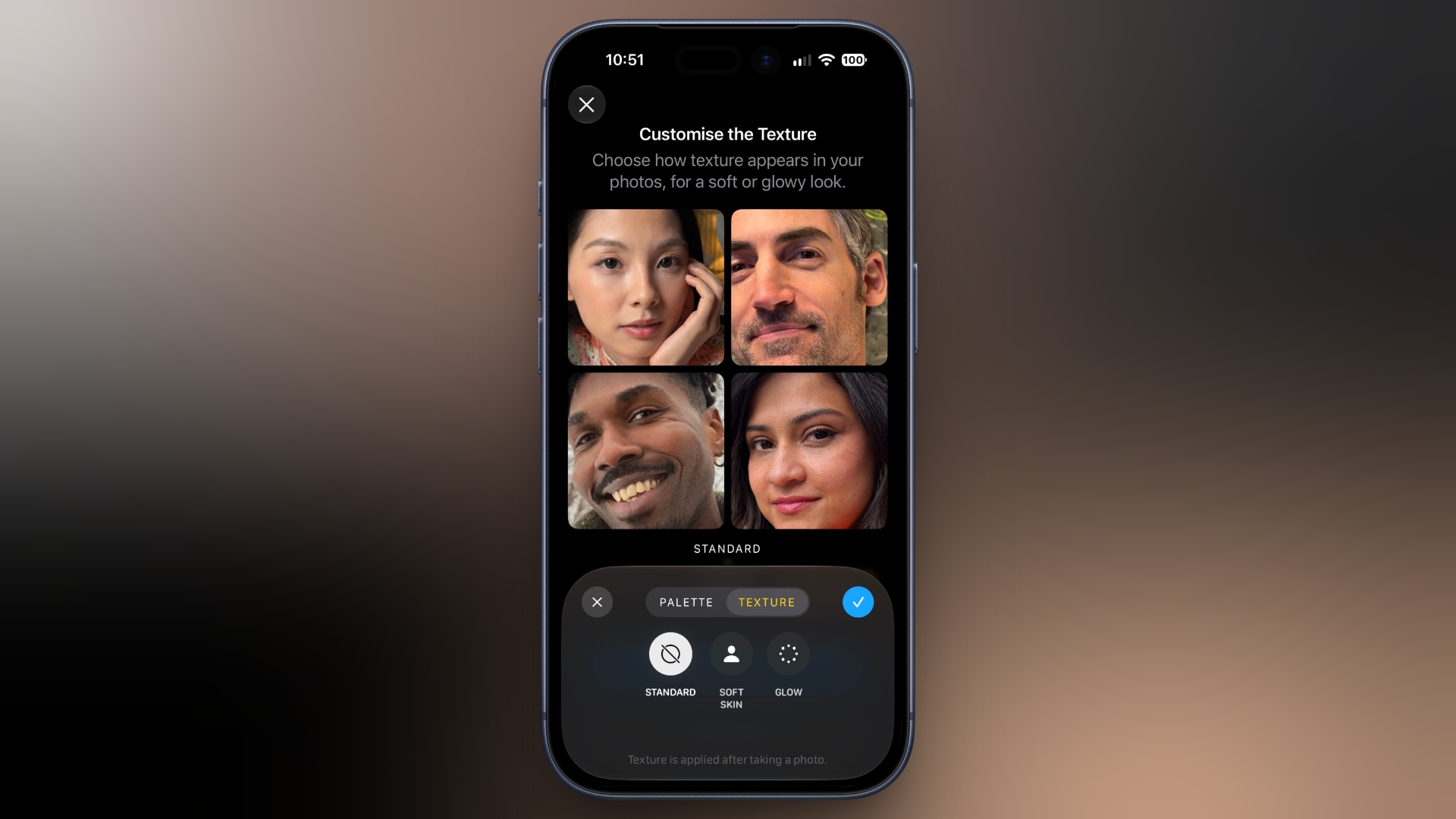
With the release of iOS 27, Apple introduced enhanced controls that allow users to adjust texture and grain directly within the camera interface. These Texture and Grain controls for Photographic Styles give photographers greater artistic influence over image sharpness, surface detail, and film-like warmth. By adjusting texture, users can smooth out surfaces or highlight fine details, while grain adjustments allow for a classic analog aesthetic.
Many iPhone users were eager to try these expanded adjustments on existing hardware, especially since Photographic Styles have been a staple of the iOS camera experience across multiple hardware generations. However, clarification from Apple reveals that access to these new controls is far more limited than initially thought.
How Apple Quietly Backtracked on Older iPhone Compatibility
When Apple announced the iPhone 18 Pro and iPhone 18 Pro Max, initial news materials pointed toward broad feature availability across several recent device generations. In its official launch-day Newsroom press release, Apple stated that the new Texture and Grain controls would be available in iOS 27 on iPhone models that support the latest generation of Photographic Styles.
Because the latest generation of Photographic Styles spans multiple recently released devices, readers and tech analysts reasonably assumed that older models would receive the new texture and grain options through the iOS 27 software update. This original wording was widely distributed across syndication networks and media outlets.
Archived copies of Apple's launch-day press release distributed through Business Wire and Notice Nearby preserve the company's initial claim. Based on those early announcements, users expected the feature to arrive on all smartphones running the current generation of Apple's photo engine.
Furthermore, in Apple's User Guide for iOS 27, devices that support the latest generation Photographic Styles are officially listed as including the iPhone 16 series, iPhone 17 series, iPhone Air, and iPhone 18 Pro models. This listing strongly reinforced the idea that all of these supported models would gain access to Texture and Grain controls for Photographic Styles upon updating to iOS 27.
The Correction: Which iPhones Actually Support Texture and Grain Controls?
Despite the promise of the original announcement, Apple has since revised its documentation to restrict the feature set. Apple has changed the footnote on its iPhone 18 Pro Newsroom announcement, removing the reference to broader device compatibility.
The revised footnote now specifies that Texture and Grain controls are available only for photos captured on iPhone 18 Pro models and with the Ultra Wide, Main, and Center Stage cameras on the iPhone Duo. This confirms that standard iPhone models, as well as previous-generation flagship phones, will not receive these controls despite running iOS 27.
To eliminate any remaining ambiguity, Apple also states definitively in its iOS 27 User Guide that changing the texture of a photo can be achieved on iPhone 18 Pro models. This update makes it clear that software updates alone will not unlock the feature on older hardware.
Whether Apple initially intended to bring the controls to older devices and subsequently changed its plans is unclear, and Apple has not commented on the revision. Either way, the original compatibility information looks like it was published in error during the product launch cycle.
Supported Devices Breakdown for iOS 27 Photographic Styles Features
To clear up confusion regarding iOS 27 camera features and device compatibility, here is how support breaks down across current and recent iPhone models:
- iPhone 18 Pro and iPhone 18 Pro Max: Full support for all Texture and Grain controls for Photographic Styles across all rear and front camera lenses.
- iPhone Duo: Support for Texture and Grain controls specifically for photos captured with the Ultra Wide, Main, and Center Stage cameras.
- iPhone Air: Supports the latest generation of Photographic Styles color and tone adjustments, but excludes Texture and Grain controls.
- iPhone 17 Series: Supports latest generation Photographic Styles tone and warmth adjustments, but lacks Texture and Grain controls.
- iPhone 16 Series: Supports latest generation Photographic Styles presets, but lacks hardware-exclusive Texture and Grain controls.
User Reaction and Community Response to the Camera Limitation
The unexpected restriction of software camera features has sparked widespread discussion across the Apple community. Many users who purchased recent devices like the iPhone 17 Pro or iPhone Air expected software feature parity for post-processing adjustments that appear to rely primarily on software controls.
Social media users quickly highlighted the discrepancy between Apple's initial marketing statements and the updated support documentation. Tech commentators expressed frustration over Apple withholding software-based camera enhancements from devices that are only one or two generations old.
wtf? Apple now says that the texture and grain will NOT be coming to older iPhones
-- Noah Cat (@Cartidise) September 22, 2026
there's no reason why this shouldn't be coming to older iPhones
this is what i despise about Apple. new software camera features almost never make it to older iPhones, even though those are... https://t.co/8FM6MQV01F pic.twitter.com/yiO1nDiuFF
Critics argue that image processing tools like texture tuning and grain application should technically run on the Neural Engine and image signal processors found in recent chips such as the A18 Pro or A19 series. However, Apple frequently ties advanced camera rendering features directly to specific camera sensor pipelines, ISP architectures, or processing memory bandwidth present only in its newest Pro hardware.
While Apple has not offered an official statement regarding why older models are excluded, the practice of reserving top-tier camera customization tools for flagship devices remains a core part of its product differentiation strategy.
How to Use Texture and Grain Controls on Compatible Devices
For users who own an iPhone 18 Pro, iPhone 18 Pro Max, or compatible lenses on the iPhone Duo, accessing the new Texture and Grain controls for Photographic Styles is integrated directly into the iOS 27 Camera application and Photos app editing suite.
To customize texture and grain levels on supported hardware:
- Open the Camera app on your iPhone 18 Pro or iPhone Duo.
- Swipe up or tap the camera control menu to open Photographic Styles options.
- Select your preferred Photographic Style preset (such as Rich Contrast, Vibrant, Warm, or Cool).
- Use the on-screen control pad to adjust tone and color balance.
- Locate the new slider adjustments for Texture and Grain to increase sharpness or add analog photographic grain.
- Capture your photograph, or adjust these parameters retroactively in the Photos app post-capture editing view.
If you have an iPhone 18 Pro, check out our how-to guide to make the most out of the feature for a detailed walk-through on creating custom photographic styles.
Why Hardware Differentiation Matters for Apple's Camera Strategy
Apple's decision to limit Texture and Grain controls for Photographic Styles underscores a long-standing pattern in the company's smartphone release strategy. New camera features often serve as the primary marketing driver for upgrading to Pro-level hardware.
While general operating system features in iOS 27 roll out to a wide variety of older devices, high-end photography capabilities regularly remain exclusive to the latest Pro tier. Features like ProRes video recording, ProRAW capture, custom action modes, and now advanced texture and grain manipulation are systematically gated by device generation.
Even though the initial press release wording created confusion among consumers, the final documentation aligns with Apple's traditional approach of keeping top-tier creative tools exclusive to flagship models like the iPhone 18 Pro and innovative forms like the iPhone Duo.
This article, "Apple Quietly Excludes Older iPhones From New Camera Feature" first appeared on MacRumors.com
Discuss this article in our forums
Understanding device compatibility for new iOS features helps users set realistic expectations for software updates. While iOS 27 brings numerous improvements across all supported devices, advanced camera customization like Texture and Grain controls for Photographic Styles remains exclusive to Apple's latest top-tier hardware.
from MacRumors
-via DynaSage
