
This New App Brings 1990s 'After Dark' Screen Savers to Modern macOS
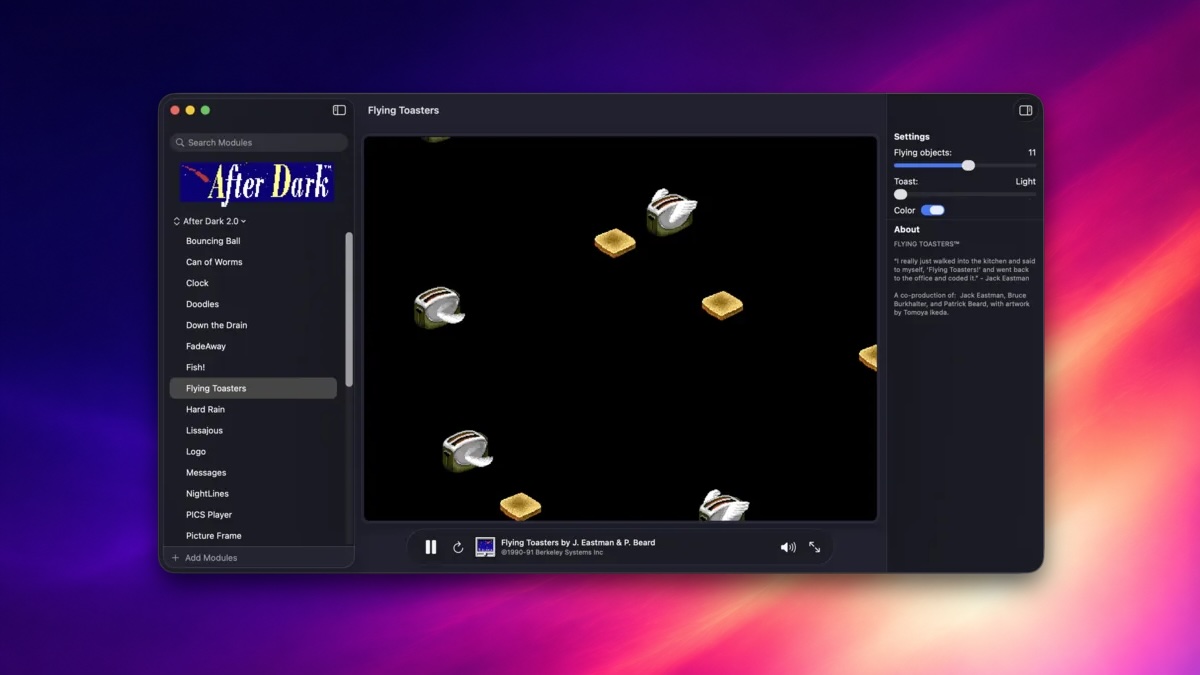
The new Afterglow app lets Mac users run classic After Dark screen savers on modern macOS without needing vintage hardware, system ROMs, or complex virtual machines. Created by developer Jeff Halter, this specialized emulator executes original 1990s 68k module code natively on contemporary Apple operating systems.
How to Run Classic After Dark Screen Savers on Modern macOS
For computer enthusiasts who lived through the desktop revolution of the 1990s, few software releases carry as much warmth and nostalgia as vintage screen savers. Now, Mac owners can bring these iconic graphic displays back to life on current Apple hardware thanks to an innovative modern application created by independent developer Jeff Halter.
As highlighted by Daring Fireball's John Gruber, Halter has officially launched the new Afterglow app. This dedicated utility allows users to load and enjoy classic After Dark screen saver modules directly on current versions of modern macOS software.
Rather than recreating modern animations that merely resemble old graphics, Afterglow takes a remarkably accurate engineering route. It acts as a specialized binary execution host built specifically to run authentic vintage code on contemporary operating systems.
This approach allows tech history enthusiasts, designers, and long-time Apple fans to experience genuine retro computing software without managing obsolete computers, fragile hardware monitors, or cumbersome system emulators. It provides a simple, direct bridge between early Macintosh computing history and contemporary Apple Silicon computers.
Understanding Afterglow: Specialized 68k Emulation Without Classic Mac OS
To fully appreciate what makes Afterglow such an impressive accomplishment, it helps to review how software was constructed during the early era of Apple personal computers. Throughout the late 1980s and mid-1990s, classic Macintosh computers relied on Motorola 68000 series microprocessors, commonly referred to as 68k architecture.
Software utilities, including screen saver expansion modules, were compiled directly into machine code for these 68k chips. Over the decades, Apple transitioned its hardware architecture through PowerPC processors, Intel chips, and ultimately modern Apple Silicon microprocessors. With each architecture shift, running original 68k binary files on newer operating systems became increasingly difficult.
Most projects that attempt to revive classic software choose one of two traditional methods. They either rewrite the visual animations from scratch using modern graphics APIs, or they require users to run full system emulators that load entire vintage operating system installations.
In contrast, developer Jeff Halter built Afterglow as an emulator designed specifically for executing After Dark modules directly. The program runs the original 68k module code native to the original files, rather than relying on modern remakes, recreations, or partial ports.
As Halter explained, Afterglow is an emulator built specifically for running After Dark modules -- the original 68k module code, not a remake or port -- with no dependencies on ROMs or classic Mac OS. This design removes the technical hurdles that typically prevent users from enjoying retro software today.
By eliminating dependencies on proprietary Apple system ROMs or legacy system installs, Afterglow offers a clean and self-contained solution. Users can simply launch the app and enjoy historic computer art immediately without sourcing copyrighted firmware or configuring complex storage images.
The Evolution and Legacy of After Dark Screen Savers
During the early days of personal desktop computing, screen savers were essential utility tools rather than decorative desktop novelties. Early CRT (Cathode Ray Tube) computer screens were highly susceptible to physical phosphor burn-in if left displaying static windows, desktop icons, or menu bars for extended periods.
If a computer was left unattended while displaying the same static screen, permanent ghost images could become permanently burned into the monitor glass. To prevent screen degradation, software engineers developed automated utilities that took over the monitor when the computer went idle, displaying dynamic, continuously moving graphics.
The After Dark software package emerged as the undisputed leader in screen saver customization throughout the 1990s. Developed originally for the Macintosh platform, it transformed a simple utility requirement into a vibrant cultural phenomenon that captured the imagination of millions of computer users worldwide.
After Dark introduced users to unforgettable visual computer art modules, playful sound effects, and interactive computer graphics. These modules provided users with their first real tastes of personal computing customization long before custom desktop themes or widget dashboards were available.
As display technology advanced from heavy CRT monitors to modern flat-panel LCD, LED, and OLED displays, screen burn-in became far less of a daily physical concern. Consequently, screen savers transitioned from critical hardware protection tools into beloved symbols of early personal computing culture.
Through projects like Afterglow, these creative visual displays remain accessible to modern audiences. Instead of fading away into obscure tech archives, vintage software animations can continue to entertain and inspire modern Mac users.
Exploring Developer Jeff Halter's Retro Software Projects
Afterglow is part of a broader software restoration effort led by developer Jeff Halter. Halter has created several fun nostalgic projects aimed at recreating and preserving iconic interactive experiences from early personal computer history.
Halter's development work focuses on making early desktop computing art, interactive software environments, and early desktop gaming modules usable on current digital platforms. His projects highlight the technical ingenuity and unique charm of early personal computer software.
Retro Gaming Fun with Lunacy
One of Halter's standout projects is Lunacy, a retro space shooter inspired by vintage desktop gaming modules. During the peak popularity of screen saver software in the 1990s, developers began adding interactive elements, easter eggs, and mini-games directly into screen saver packages.
Lunacy captures the fast-paced arcade gameplay and distinct visual aesthetic characteristic of early computer games. It stands as a fun tribute to the era when desktop customization software offered surprising depth and unexpected entertainment features.
Preserving Interactive Multimedia with Stacks
Another fascinating project created by Halter is Stacks, an environment built to run classic HyperCard content on modern displays. Originally released by Apple in 1987, HyperCard was a groundbreaking software application that democratized software design and multimedia creation.
HyperCard allowed everyday users, educators, and creative artists to construct interactive stacks containing text, graphics, sound, and clickable navigation links. It served as a vital precursor to modern hyperlinked websites and digital applications long before the World Wide Web became mainstream.
With the Stacks project, Halter helps keep this rich library of historical user-created media readable and interactive today. By building modern host environments for vintage software formats, Halter ensures that pioneering user-generated content remains accessible to future generations.
Key Features and Advantages of the Afterglow App
The Afterglow utility offers a straightforward, modern solution for running 1990s screen saver modules without historical friction. The software focuses on accuracy, user convenience, and high performance on contemporary Mac hardware.
- Authentic 68k Binary Execution: Runs original vintage module files directly, preserving exact timing, pixel layouts, and original coding logic.
- No System ROM Requirements: Operates entirely without copyrighted Apple Macintosh system ROMs, firmware downloads, or legal complications.
- No Classic Mac OS Dependency: Eliminates the need to install or maintain full legacy operating systems like System 7 or Mac OS 9 inside heavy virtual machines.
- Lightweight Modern Performance: Designed specifically as a targeted module host, minimizing CPU consumption and preserving laptop battery life.
- Seamless macOS Integration: Runs natively on modern macOS installations, offering a simple and accessible software environment for vintage screen savers.
- Preservation of Computer History: Delivers authentic 1990s desktop aesthetics directly to crisp modern Apple Retina displays.
Why Direct Module Emulation Beats Code Remakes and Ports
When developers attempt to preserve historic software for modern operating systems, they typically choose between full machine emulation, modern code ports, or specialized binary module hosts. Understanding these differences highlights why Afterglow is such a notable tool for Mac users.
Modern code ports involve rewriting an old application from scratch using modern programming languages like Swift, C++, or Rust. While ported applications run easily on new operating systems, they often miss subtle rendering behaviors, visual details, and unique timing quirks that gave the original software its distinct personality.
Full system emulators -- such as those simulating complete 68k Macintosh hardware -- achieve high historical accuracy by recreating an entire vintage computer in software. However, running a full virtual machine requires substantial memory, CPU overhead, complex disk image setups, and proprietary operating system software files.
Afterglow bypasses these limitations by utilizing a targeted binary emulation architecture. By focusing specifically on interpreting the 68k instructions contained within screen saver module files, Afterglow provides 100% authentic visual execution without requiring a full operating system or unnecessary hardware overhead.
Bringing Nostalgic Desktop Culture to Contemporary Mac Displays
Modern desktop operating systems prioritize clean minimalism, sleek translucent windows, dark modes, and subtle visual design choices. While efficient and modern, today's interfaces can sometimes feel uniform and muted compared to early personal computing environments.
In contrast, 1990s software development was defined by bold creativity, experimental visual animations, and vibrant pixel art. Computer screens of that era were filled with humor, playful animations, and distinct personal artistic touches.
Running classic screen savers on high-resolution modern screens creates a fascinating contrast. Sharp modern Apple displays allow the detailed pixel art, clever animations, and retro visual styling of vintage software modules to shine with unmatched clarity.
Whether you are an Apple enthusiast who remembers using original Macintosh computers in the 1990s, or a younger tech fan interested in personal computing history, Afterglow provides an easy way to explore vintage desktop software culture.
Where to Discuss Afterglow and Learn More About Retro Mac Software
The launch of Afterglow has re-ignited passion across vintage computing forums, retro software preservation communities, and online Mac groups.
This article, "This New App Brings 1990s 'After Dark' Screen Savers to Modern macOS" first appeared on MacRumors.com.
If you would like to participate in the conversation, share your favorite retro screen saver memories, or learn more about developer Jeff Halter's work, you can Discuss this article in our forums.
Conclusion: Enjoy Classic After Dark Screen Savers on Modern macOS Today
The release of Afterglow brings welcome news to everyone who loves vintage software restoration and Macintosh history. By creating a lightweight emulator designed specifically to execute 68k binary modules without system ROMs or classic operating system installs, Jeff Halter has made retro software exploration more accessible than ever before. If you want to experience the charm, art, and humor of early desktop computing, Afterglow offers the perfect way to run classic After Dark screen savers on modern macOS today.
from MacRumors
-via DynaSage
