
iOS 27 Finally Fixes Replying to Android Texts
iOS 27 Brings a Major Change: Say Goodbye to Green Bubble Frustrations with Android Texts
For years, iPhone users and Android users have navigated a peculiar divide in the world of mobile messaging. It's a divide often characterized by the color of chat bubbles: the friendly blue for iPhone-to-iPhone conversations and the somewhat less-loved green for messages exchanged with Android devices. This distinction, while seemingly minor, has led to a host of frustrations, from blurry photos to misinterpreted reactions. But that's all about to change with the arrival of iOS 27 next month.
Prepare for a significant upgrade in how you communicate across platforms. With iOS 27, your iPhone will finally be able to handle messages from Android users with a level of sophistication previously reserved only for iMessage chats. The days of feeling like a second-class citizen when texting someone on an Android phone are quickly coming to an end. This update is more than just a cosmetic tweak; it's a fundamental improvement to cross-platform communication, bringing long-awaited features like threaded replies and proper emoji reactions to your "green bubble" conversations.
Understanding the "Green Bubble" Dilemma: A History of Messaging Frustration
Before we dive into the exciting changes iOS 27 brings, it's essential to understand the problem it aims to solve. For a long time, when an iPhone user sent a message to an Android user, or vice versa, the communication defaulted to a technology called SMS (Short Message Service) or MMS (Multimedia Messaging Service). These are older, more basic communication protocols, remnants of a bygone era of flip phones and rudimentary texting.
While SMS and MMS were revolutionary in their time, they simply haven't kept pace with modern messaging expectations. The most visible symptom of this outdated technology on an iPhone is the dreaded "green bubble." This visual cue signaled a host of limitations that often made conversations between iPhones and Androids feel clunky and incomplete. Here's a breakdown of the key frustrations that many users have experienced:
-
No Inline Replies: A Jumbled Conversation
One of the most significant drawbacks was the inability to reply directly to a specific message within a conversation. In iMessage, you could long-press a message and hit "Reply" to create a clear, threaded response, keeping complex conversations organized. With green bubbles, if you wanted to reference an earlier point, you often had to quote it manually or hope the recipient understood what you were referring to, leading to confusion and disjointed chats.
-
Broken Reactions: The Annoying "Liked an Image" Text
Another major annoyance was how reactions were handled. On iMessage, if you liked a photo or a funny comment, you could simply tap and hold to add an emoji reaction (a heart, a thumbs-up, etc.). Android users could also send emoji reactions within their modern messaging apps. However, when these reactions crossed the iPhone-Android barrier, they would often translate into a standalone text message that read something like "John liked an image" or "Sarah laughed at 'That's funny!'" This cluttered chat histories and often felt impersonal and clunky, especially in group chats.
-
Poor Media Quality: Blurry Photos and Videos
Sending photos and videos via SMS/MMS was notoriously frustrating. Due to the limitations of these older protocols, media files were heavily compressed, often resulting in blurry, pixelated images and low-resolution videos. Sharing precious memories or important visuals between an iPhone and Android often meant compromising on quality, forcing users to resort to third-party apps or email for clearer transfers.
-
Lack of Modern Features: No Typing Indicators, No Read Receipts
Beyond the core frustrations, the green bubble experience lacked many of the quality-of-life features that users have come to expect from modern messaging. There were no typing indicators to show when someone was composing a response, no read receipts to confirm if a message had been seen, and generally, a less robust group chat experience. These omissions made cross-platform conversations feel less dynamic and interactive compared to their iMessage counterparts.
-
The Social Stigma: A Digital Divide
Beyond the technical limitations, the green bubble often carried a social stigma, particularly in certain demographics. It inadvertently created a "digital divide" where some users felt excluded or looked down upon for not being part of the "blue bubble club." While superficial, this social aspect was a real experience for many, highlighting the need for a more inclusive messaging standard.
For years, iPhone users have yearned for a solution that would bridge this gap, allowing for seamless and feature-rich communication with their Android-using friends and family. And finally, with iOS 27, that solution is here.
The Breakthrough: Apple Embraces RCS Universal Profile 3.0
The monumental shift coming to your iPhone next month is all thanks to Apple's decision to embrace Rich Communication Services (RCS). Specifically, iOS 27 will adopt RCS Universal Profile 3.0, a globally recognized standard developed by the GSMA (GSM Association), an organization representing the interests of mobile operators worldwide. Think of RCS as the modern successor to SMS and MMS, designed from the ground up to bring smartphone-level features to standard carrier-based messaging.
For a long time, Apple resisted adopting RCS, choosing instead to focus on its proprietary iMessage platform, which offered a superior experience for iPhone users. However, increasing pressure from consumers, regulatory bodies, and industry peers (particularly Google, a major proponent of RCS) likely contributed to Apple's change of heart. By adopting RCS, Apple is not abandoning iMessage; rather, it's enhancing the experience when iMessage is not available, specifically for communications with Android users.
What is RCS and Why Does it Matter?
RCS messaging brings many of the features iPhone users have enjoyed with iMessage to the green bubble world. Here’s a quick overview of what RCS typically enables:
- High-Quality Media: Send and receive high-resolution photos and videos without the annoying compression.
- Read Receipts: See when your messages have been delivered and read.
- Typing Indicators: Know when someone on the other end is typing a reply.
- Larger File Sharing: Share bigger files than SMS/MMS allows.
- Improved Group Chats: More robust group messaging features, including the ability to name groups and add/remove participants more easily.
- Enhanced Security (Potential): While not part of Apple's initial rollout with Android for all chats, RCS has the capability for end-to-end encryption, which is a significant step up from the unencrypted nature of SMS. Apple's iMessage already offers end-to-end encryption, and it remains to be seen how they might integrate this with RCS in the future for cross-platform chats, but its adoption is a foundational step towards modernizing the entire messaging ecosystem.
Apple has been adopting the RCS standard in stages. Universal Profile 2.4, an earlier version of the standard, first made its appearance in iOS 18 in September 2024. This initial step improved some aspects of cross-platform messaging, but critically, it didn't support inline replies or the seamless handling of emoji reactions that users desired. It was a step in the right direction, but not the full leap. Come this September, with the release of iOS 27, and on supporting iPhones, that final piece of the puzzle will slot into place, bringing the full suite of enhancements that Universal Profile 3.0 offers.
How It Works: Seamless Replies and Expressive Reactions
The beauty of this update lies in its simplicity and how it integrates into the existing Messages app on your iPhone. You won't need to download a new app or learn a complicated new interface. The new RCS features will simply enhance the functionality of your current messaging experience, making those green bubbles behave much more like their blue counterparts.
Replying to Specific Android Messages (Green Bubbles)
One of the most anticipated features arriving with iOS 27 is the ability to reply directly to a specific "green bubble" message. This means no more guessing games in group chats or trying to remember which point in a long conversation you're addressing. Here’s how effortlessly it will work:
- Press and Hold: When you receive a message from an Android user that you want to specifically respond to, simply press and hold down on that particular message bubble. This is the same intuitive gesture you're already familiar with for iMessage actions like copying or reacting.
- Tap 'Reply': A small menu will pop up, and among the options, you will now see a clear "Reply" button. Tap on this.
- Type Your Response: Your iPhone will then initiate a threaded reply, visually linking your new message directly to the original "green bubble" message. You can then type your response as usual.
When the recipient on the Android side receives your reply, it will appear as a genuine threaded response – an inline reply. This means their messaging app, which likely already supports RCS, will correctly tie your message directly to the specific comment or question you were addressing. This dramatically improves clarity and keeps conversations organized, especially in fast-paced or multi-topic discussions. It’s a fundamental enhancement that brings order and context to cross-platform chats.
Expressing Yourself with Proper Reactions
Beyond inline replies, iOS 27 also solves the long-standing problem of broken emoji reactions. Remember those clunky text messages like "So-and-so liked a photo" that would clutter your chat history? Those are now a thing of the past when communicating with Android users via RCS.
Now, when you want to react to a shared photo, a funny joke, or an important update from an Android contact, you can do so just as you would in an iMessage conversation:
- Press and Hold: Simply press and hold the message or photo you wish to react to.
- Select an Emoji: A small selection of common emoji reactions (like a heart, thumbs up, laugh, etc.) will appear.
- Tap Your Chosen Emoji: Select the emoji that best expresses your sentiment.
The magic happens on the receiving end. Your Android contact will now see the actual emoji you intended, subtly appearing on the message or photo itself, rather than a separate, awkward text notification. This makes conversations feel far more natural, expressive, and visually clean. It's a small but incredibly impactful change that finally brings parity to how reactions are handled across the iPhone-Android divide.
This image perfectly illustrates how these new features will look in action:
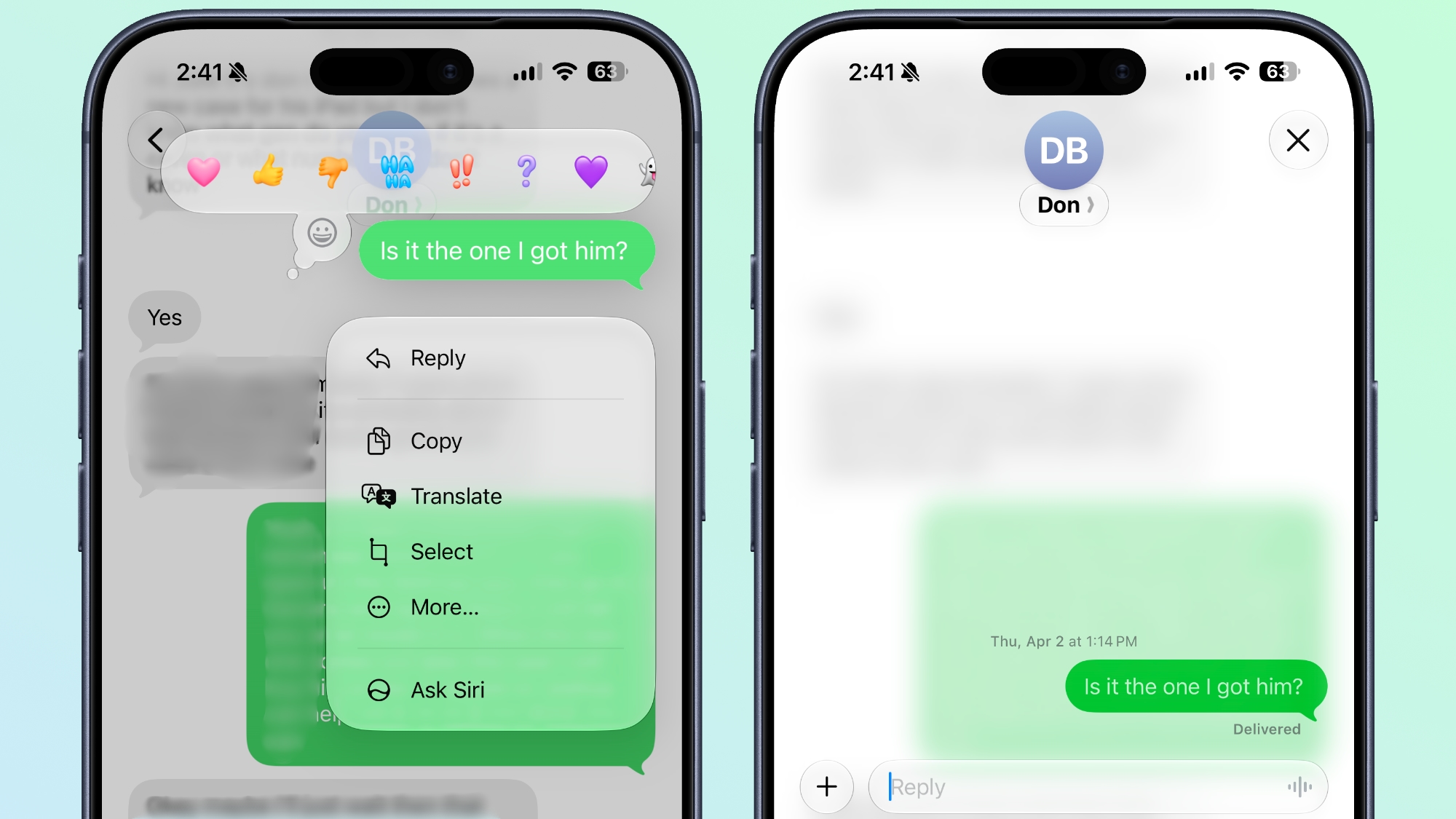
As you can see, the ability to directly reply to a green bubble and have reactions appear as actual emojis instead of descriptive texts drastically streamlines the communication flow. This visual consistency is a game-changer for anyone who regularly communicates with both iPhone and Android users.
Getting Ready for iOS 27: Prerequisites and Carrier Support
While the arrival of iOS 27 promises a significant upgrade, there are a couple of crucial factors to bear in mind to ensure you can take full advantage of these new RCS features. It's not just about updating your iPhone; it's also about ensuring your device and your mobile carrier are ready for the change.
When Does iOS 27 Arrive?
The article mentions that iOS 27 "arrives next month," which, given the publication date context, points to a release sometime in September. Apple typically rolls out its major iOS updates in September, coinciding with the launch of new iPhone models. So, keep an eye out for official announcements from Apple regarding the exact release date. Once available, you'll be able to update your iPhone wirelessly through the Settings app.
Will Your iPhone Support iOS 27?
Not all iPhones will be compatible with iOS 27. Apple generally discontinues support for older devices with each new major iOS version. According to related information, these new RCS features, and likely iOS 27 itself, will be available on iPhone 11 or newer models. If you have an iPhone XR, iPhone XS, or an older model, you might not be able to update to iOS 27 and thus won't benefit from these specific RCS enhancements. It's always a good idea to check Apple's official compatibility list when the update is formally announced.
The Crucial Role of Carrier Support
Perhaps the most important, and sometimes overlooked, aspect of RCS implementation is carrier support. Unlike iMessage, which is an Apple-controlled service that runs over Wi-Fi or cellular data, RCS relies on your mobile carrier's infrastructure. This means that for the features to work seamlessly, both your carrier *and* the recipient's carrier (if they are also using an Android phone with RCS) need to have enabled RCS on their networks.
The text explicitly states: "Bear in mind that the feature also depends on carrier support at both ends." This is a critical detail. While many major carriers worldwide have already embraced RCS for Android devices, there can be regional differences or variations in how quickly smaller carriers adopt the latest Universal Profile. If one carrier involved in the communication hasn't fully enabled RCS, the conversation might still fall back to the older SMS/MMS protocols, leading to a less-than-optimal experience.
How to Check If Your Device is Ready
Even before iOS 27 lands, you can take a proactive step to see if your carrier is ready for the change. Here’s how to check:
- Go to Settings: Open the "Settings" app on your iPhone.
- Navigate to Apps ➝ Messages: Scroll down and tap on "Apps," then find and tap "Messages."
- Look for 'RCS Messaging': Within the Messages settings, search for an option labeled "RCS Messaging."
- Check the Toggle: If this setting is displayed, you should see an "RCS Messaging" toggle. Ensure it is enabled.
What if the setting isn't there? If the "RCS Messaging" setting isn't displayed in your Messages menu, it means your carrier has yet to enable the feature on their network for iPhones. In this scenario, even after you update to iOS 27, you won't be able to utilize the new RCS features for green bubbles until your carrier rolls out support. It's advisable to check with your specific mobile provider for their RCS rollout plans if you find this setting missing.
While the eventual goal is for universal RCS adoption, this carrier-dependent aspect highlights that the full benefits might roll out gradually for some users depending on their location and network provider. Patience and proactive checking of your settings will be key.
The Broader Impact: A More Harmonious Messaging Future
Apple's adoption of RCS Universal Profile 3.0 in iOS 27 is more than just a software update; it represents a significant shift in the mobile messaging landscape. For years, the divide between iMessage and Android's default messaging app (Google Messages, powered by RCS) has been a source of frustration, leading to fragmented conversations and an often-inferior experience for cross-platform communication. With this change, Apple is not just improving its own product but actively contributing to a more open and interoperable future for everyone.
Elevating the User Experience for Millions
The most immediate and tangible impact will be on the daily lives of millions of users. Families, friend groups, and colleagues who use a mix of iPhones and Android devices will finally experience a smoother, more coherent messaging environment. No longer will conversations be hampered by blurry photos, ambiguous reactions, or the inability to keep track of specific points. This translates to:
- Reduced Frustration: Less head-scratching over what a fragmented text meant or why a photo looked so poor.
- Improved Clarity: Threaded replies ensure context is never lost, making complex discussions far easier to follow.
- Richer Expression: Proper emoji reactions allow for more nuanced and immediate feedback, making conversations more dynamic and personal.
- Enhanced Group Dynamics: Group chats with mixed devices will become far more functional and enjoyable, resembling the seamless experience previously limited to all-iPhone groups.
- Elimination of the "Digital Class System": The social stigma associated with the "green bubble" is significantly lessened, promoting a more inclusive and less judgmental communication environment.
For many, this update will simply make texting feel like it should in the 21st century, regardless of the phone brand on the other end.
Apple's Strategic Move: Why Now?
Apple's decision to embrace RCS comes after years of maintaining a firm stance on iMessage as its primary messaging solution. While the company has always cited user experience and privacy as reasons for its stance, the growing pressure from various fronts likely played a role:
- Consumer Demand: Users have consistently voiced their desire for better cross-platform messaging. Addressing this major pain point improves customer satisfaction and loyalty.
- Industry Pressure and Standards: Google has been a relentless advocate for RCS adoption, pushing for universal support. By joining the movement, Apple aligns itself with an industry-standard that is becoming increasingly ubiquitous. This prevents further isolation of its messaging platform for non-iMessage interactions.
- Regulatory Scrutiny: While not explicitly stated as the reason by Apple, the increasing global regulatory focus on interoperability, particularly in regions like the European Union with its Digital Markets Act, may have contributed. Adopting an open standard like RCS can preemptively address concerns about anti-competitive practices or platform lock-in.
Ultimately, this move benefits Apple by removing a significant point of friction for its users, making the iPhone a more attractive device for those who communicate extensively with Android users, without compromising the superior features of iMessage when communicating with other iPhones.
The Future of Messaging Interoperability
The adoption of RCS by Apple opens exciting possibilities for the future of mobile messaging. While iMessage will undoubtedly remain a premium experience for Apple users, this step towards an open standard demonstrates a willingness to engage with the broader ecosystem. It begs the question: What's next?
- Enhanced Security for Green Bubbles? Currently, Apple's RCS implementation for Android messages does not include end-to-end encryption, unlike iMessage. However, RCS itself has the capability for E2EE. Could Apple and Google collaborate further to bring end-to-end encryption to cross-platform RCS chats in the future? This would be a monumental step for privacy and security.
- More Advanced Features? As RCS continues to evolve, could we see even more advanced features like larger file transfers, higher-quality voice messages, or even read receipts for group chats with Android users become standard?
- Broader Adoption: Apple's endorsement will likely accelerate RCS adoption globally, pushing more carriers and device manufacturers to fully implement and support the latest profiles, creating a truly universal modern messaging experience for everyone.
In essence, iOS 27 marks a pivotal moment. It signals an end to a long-standing messaging inconvenience and paves the way for a more integrated, user-friendly, and harmonious communication future between iPhones and Android devices. It's a win for users on both sides of the "blue versus green" divide.
Conclusion: A New Era of Cross-Platform Communication Begins
The arrival of iOS 27 next month signals a truly significant milestone for iPhone users and, by extension, for anyone who communicates regularly across the Apple-Android divide. The long-standing frustrations associated with "green bubble" texts are finally being addressed with the embrace of RCS Universal Profile 3.0. This isn't just a minor update; it's a fundamental reimagining of how iPhones handle messages from Android devices.
The ability to reply to specific green chat bubbles, allowing for clear, threaded conversations, and the seamless display of emoji reactions, replacing the clunky text notifications, will transform your messaging experience. High-quality media sharing, typing indicators, and read receipts will further bridge the gap, bringing a level of sophistication to cross-platform communication that has been sorely missed.
As you prepare for the iOS 27 update, remember to check your iPhone's compatibility (iPhone 11 or newer) and, crucially, verify that your mobile carrier supports RCS messaging. While the rollout of these features also depends on carrier readiness, the groundwork has been laid for a much more unified and pleasant messaging future.
Say goodbye to the awkwardness and hello to a new era of effortless communication between iPhones and Androids. iOS 27 isn't just an update; it's a promise of a more connected and less fragmented digital world for everyone.
This article, "iOS 27 Finally Fixes Replying to Android Texts" first appeared on MacRumors.com
Discuss this article in our forums
from MacRumors
-via DynaSage
