
Everything New in iOS 27 Beta 3
Unveiling iOS 27 Beta 3: A Deeper Dive into Apple's Latest Innovations
Apple is continuously working to perfect iOS 27, its next major software update, as it gets ready for its big launch in September. The third beta version, released recently, brings a host of exciting new features and thoughtful improvements that give us a clearer picture of what to expect. From a more personalized Siri experience to helpful upgrades in Photos and Shortcuts, and even a playful new wallpaper animation, this beta shows Apple's commitment to enhancing user interaction, accessibility, and overall system polish.
This update isn't just about flashy new tools; it’s about refining the core iPhone experience, making it more intuitive, powerful, and uniquely yours. Let's explore the standout additions in iOS 27 Beta 3 and understand how these changes will impact your daily use, making your iPhone feel even more essential.
Siri Voice: Making Your Digital Assistant More Personal
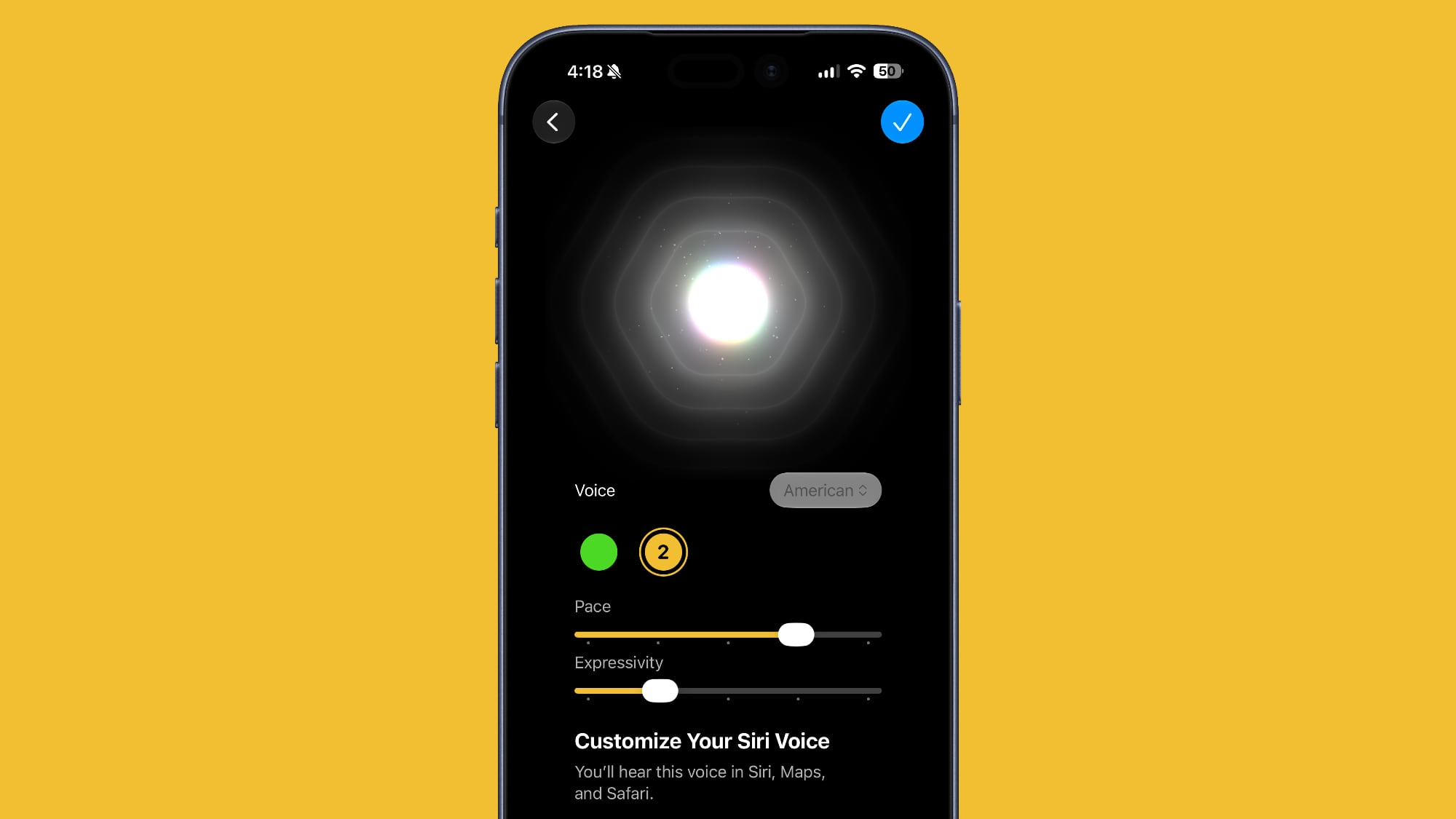
One of the most significant and exciting changes in iOS 27 Beta 3 is the ability to customize Siri's voice. While this option was seen in earlier beta versions, it wasn't fully functional until now. With this update, you can truly make Siri your own by adjusting its speaking pace and expressiveness. Currently, there are two primary voice options to choose from, offering a starting point for deeper personalization.
Imagine Siri speaking to you at a speed that feels most natural, or with a tone that better suits your preferences. This isn't just a cosmetic change; it's a step towards making your interaction with your digital assistant feel more human and less robotic. For users who might have found Siri's default voice or pace a bit off-putting, this customization opens up new avenues for comfort and engagement. It allows you to tailor your auditory experience, ensuring that receiving information or commands from Siri is as pleasant and clear as possible.
This enhanced Siri voice customization isn't available on all devices, though. It specifically requires an iPhone 17 Pro or an iPhone Air. The reason for this specific requirement lies in the technology powering it: on-device processing. Instead of sending your voice customization preferences to Apple's servers for processing, the iPhone itself handles these adjustments. This approach brings several key benefits, including improved privacy, as your preferences stay on your device, and faster, more responsive performance, as there's no internet delay. It also highlights Apple's growing focus on bringing advanced artificial intelligence and machine learning capabilities directly to its devices, making them smarter and more independent. This on-device processing capability is crucial for delivering a truly instantaneous and secure personalized experience.
The ability to fine-tune Siri's pace and expressivity also has considerable implications for accessibility. Users with varying auditory processing speeds or those who prefer a particular vocal delivery will find this feature invaluable. It allows for a more inclusive experience, ensuring that Siri can communicate effectively with a broader range of individuals. This thoughtful addition underscores Apple's dedication to making its technology accessible and comfortable for everyone, proving that even subtle changes can make a profound difference in daily interactions.
Live Recognition: Your iPhone's Eyes and Brain for the World Around You
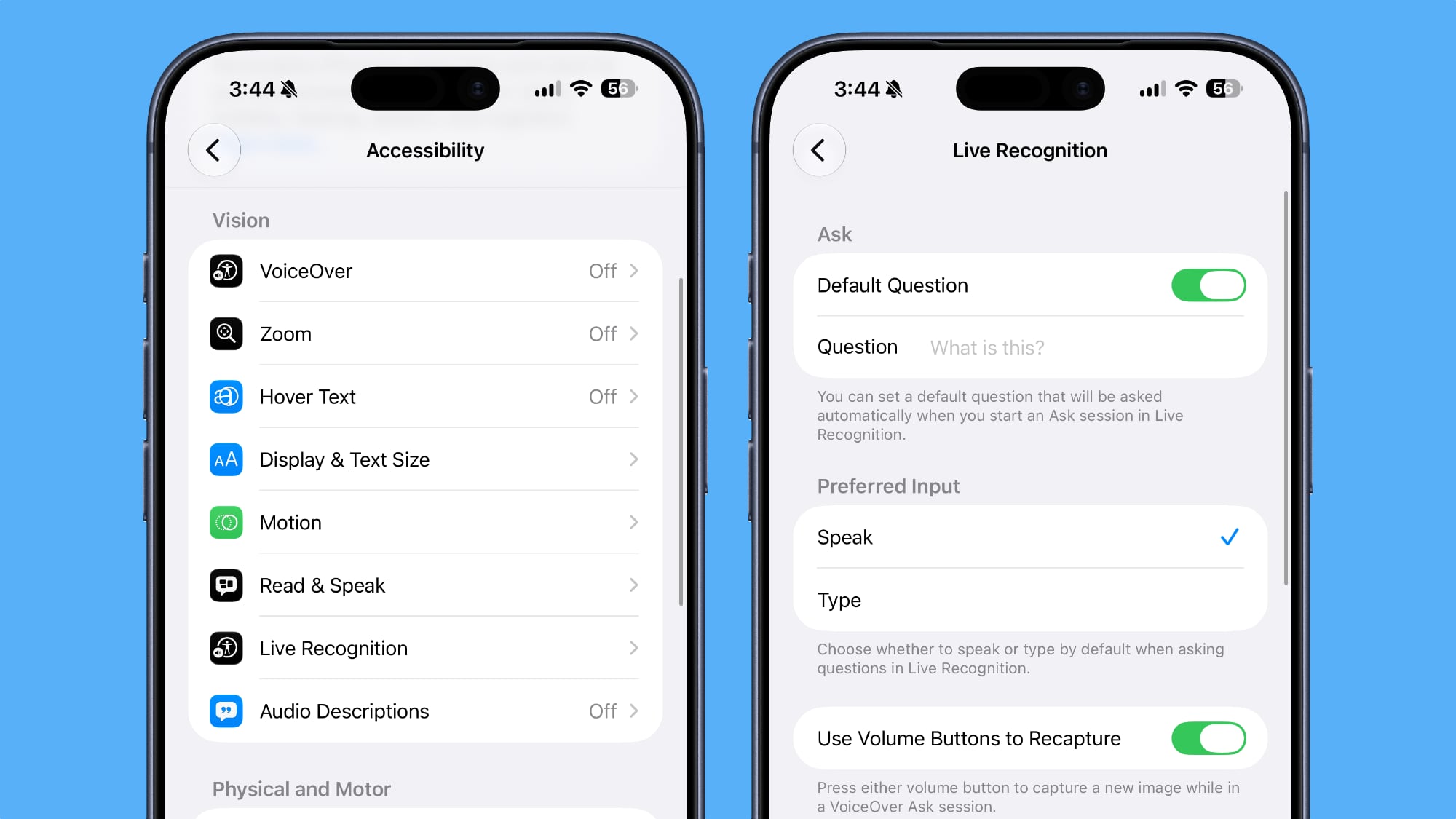
Nestled within the Accessibility settings, Apple has introduced an innovative new section called Live Recognition. This groundbreaking feature transforms your iPhone's camera into a powerful tool that uses on-device intelligence to detect, understand, and describe objects and scenes around you in real-time. Imagine pointing your camera at a new environment and having your iPhone intelligently explain what it sees, answering your questions about the surroundings.
Live Recognition is designed to be a profound aid, particularly for individuals who are blind or have low vision, but its potential utility extends to anyone curious about their environment. By leveraging advanced artificial intelligence directly on your device, it can identify a wide array of items, from everyday objects like a cup or a plant to more complex scenes, such as describing a bustling street or the layout of a room. This isn't just about simple object identification; the feature is smart enough to answer specific questions you might have about what it's observing. For instance, you could ask, "What color is that shirt?" or "How many people are in this room?" and your iPhone would provide an intelligent response based on its visual analysis.
The feature also allows you to set a default question, meaning you can configure Live Recognition to always focus on a particular type of information, such as always identifying text or currency, streamlining your interaction. Furthermore, it supports custom activities. This means users can train the system or create specific recognition tasks tailored to their personal needs. For example, you might create a custom activity to recognize specific product brands in a grocery store, or to identify unique landmarks on a daily commute. This level of customization makes Live Recognition an incredibly adaptable and powerful tool, moving beyond generic object detection to provide truly personalized and actionable insights.
The emphasis on "on-device intelligence" is critical here. Like Siri voice customization, processing happens locally on your iPhone, ensuring immediate results and robust privacy. Your visual data isn't sent to cloud servers, which means your personal environment remains private. This commitment to privacy, combined with cutting-edge AI, positions Live Recognition as a transformative accessibility feature, empowering users with a deeper, more independent understanding of their physical world. It's a testament to how technology can bridge gaps and enhance everyday living in meaningful ways.
Reminders: A Fresh Look for Your To-Do List
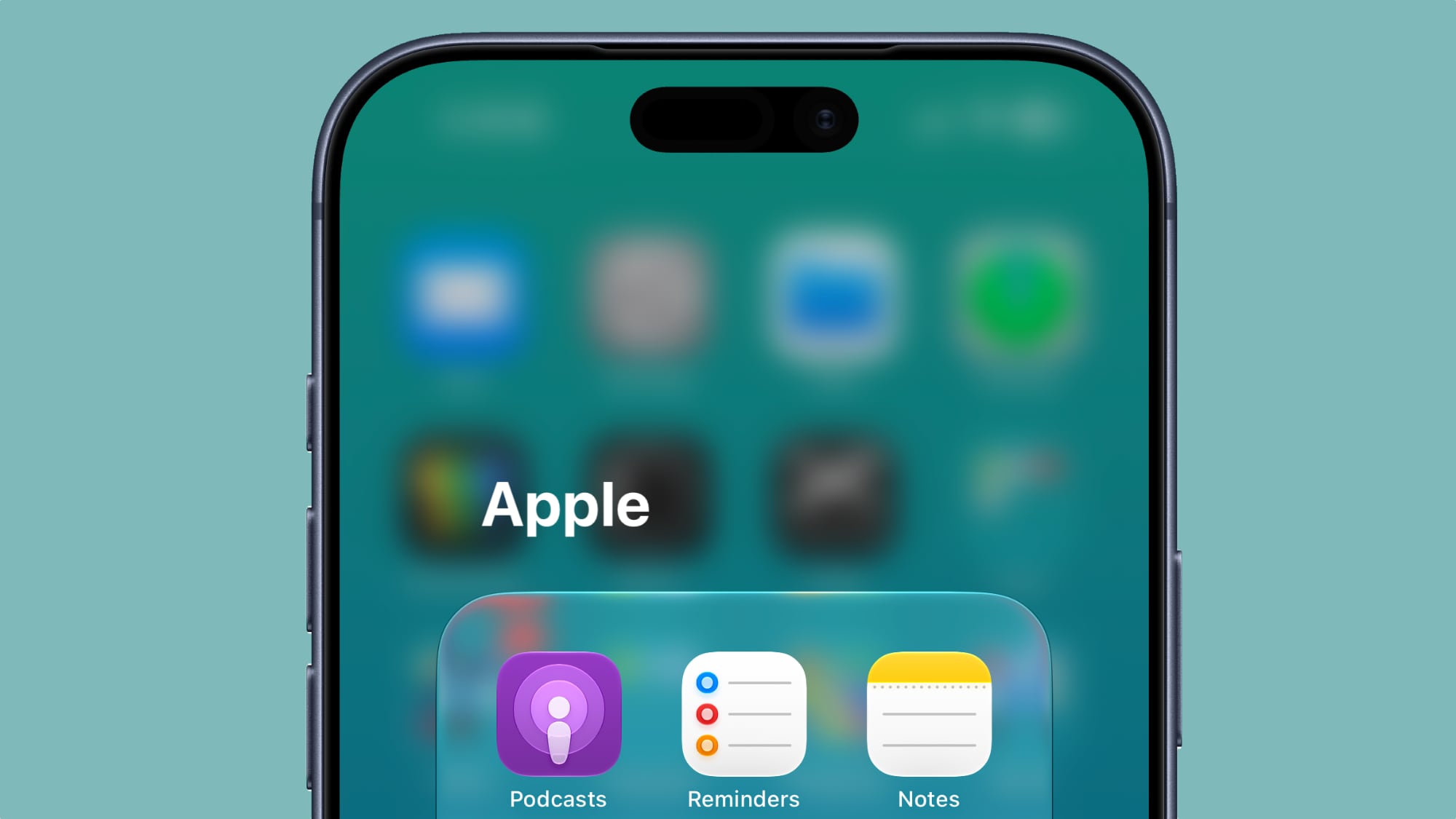
Even seemingly small visual updates can significantly contribute to the overall user experience, and iOS 27 Beta 3 brings one such subtle refinement to the Reminders app. The app's icon has been refreshed, now featuring "Liquid Glass" to-do list bullets. This design change is more than just aesthetic; it’s about maintaining a consistent and modern look across iOS.
The "Liquid Glass" aesthetic refers to a design trend characterized by smooth, translucent, and often slightly animated elements that give a sense of depth and fluidity. For the Reminders app, this translates into bullets that appear more vibrant, tactile, and visually appealing, moving away from a flatter, more static design. This makes checking off tasks feel a bit more satisfying and contributes to a more engaging interface.
Why do these small design tweaks matter? In apps we interact with daily, like Reminders, consistency in design and subtle visual delights can enhance the perceived quality and enjoyment of using the software. It reflects Apple's meticulous attention to detail and its ongoing effort to evolve the iOS interface, keeping it fresh, intuitive, and visually harmonious. This updated icon helps the Reminders app feel seamlessly integrated with the broader design language of iOS 27, ensuring that even your simplest organizational tasks benefit from a touch of modern elegance. It’s a gentle reminder that design is not just about functionality, but also about creating a pleasant and cohesive visual environment.
Photos: Bringing Professional Organization to Your Gallery
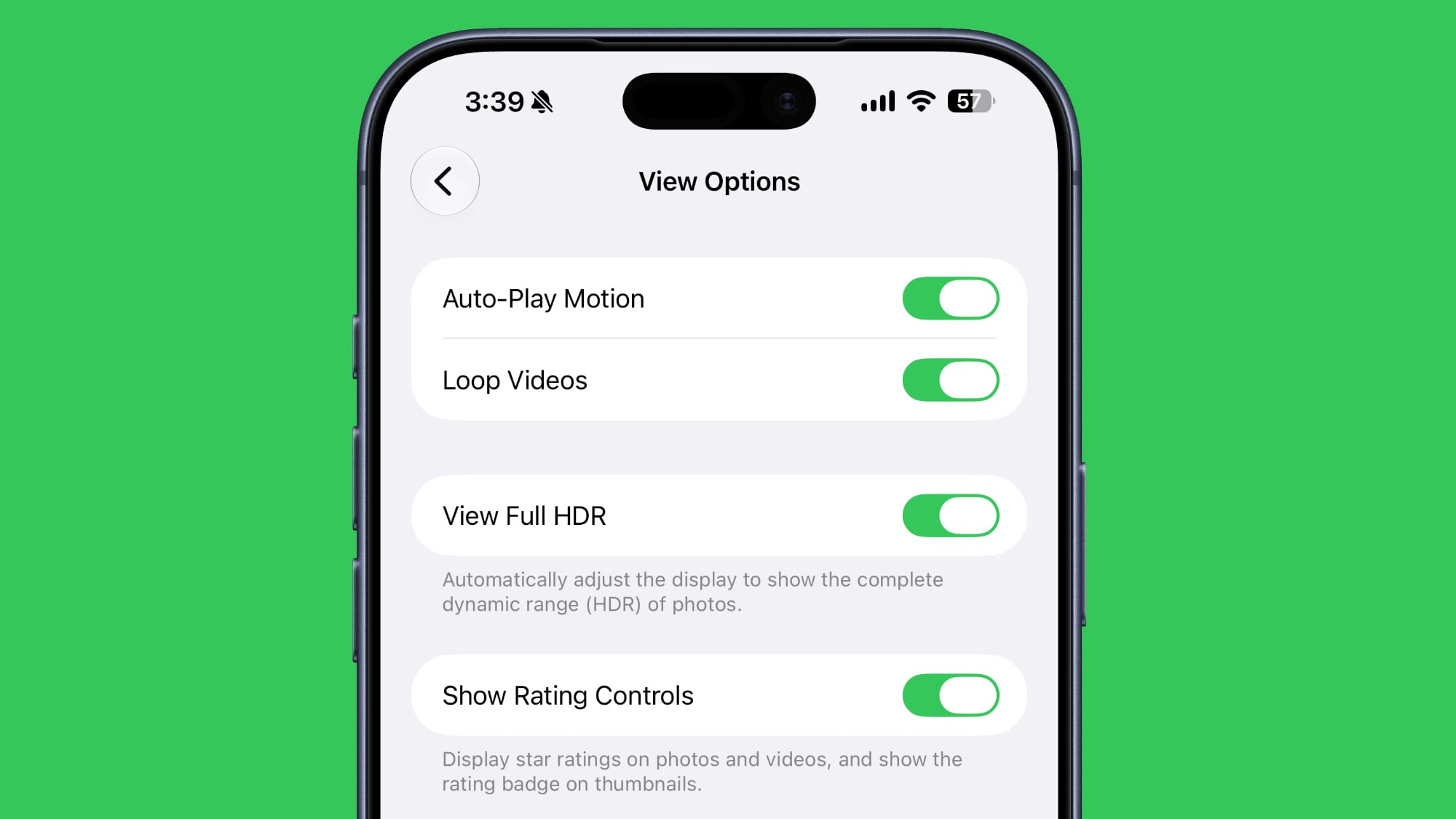
For anyone who loves photography or simply has a vast collection of memories stored on their iPhone, the new "Show Rating Controls" toggle in the Photos section of the Settings app will be a welcome addition. This feature allows users to display star ratings on their photos and videos, and critically, it shows a rating badge directly on thumbnails. This seemingly simple inclusion marks a significant step towards bringing more robust organization and curation tools right into the palm of your hand.
Previously, managing a large photo library could be challenging. While albums and search functions offered some degree of organization, a quick, intuitive way to highlight your best shots or those needing further attention was missing. Star ratings solve this problem elegantly. With this toggle enabled, you can assign 1 to 5 stars to any photo or video, instantly categorizing your content by importance, quality, or personal preference. This is incredibly useful for:
- Identifying Favorites: Easily mark your absolute best shots, making them simple to find later for sharing or printing.
- Culling and Editing: Rate photos during an initial pass, quickly identifying which ones are keepers and which can be deleted, or which ones require more editing.
- Creating Smart Albums: While not explicitly mentioned, it’s highly probable that these ratings will integrate with Smart Albums (if they don't already), allowing you to create automatically updating albums of, for instance, all your 5-star photos.
- Streamlining Sharing: When sharing photos from a recent trip or event, you can filter by rating to quickly select only the highest-quality or most memorable images.
The inclusion of a rating badge directly on thumbnails in the Photos app's main view is particularly clever. This means you don't have to open each photo to see its rating; a quick glance at your library immediately tells you which images you've deemed most important. This visual cue significantly speeds up the browsing and selection process, saving valuable time and reducing frustration.
This feature aligns the Photos app more closely with professional photo management software, offering a tool that serious photographers have long relied upon. By integrating such a powerful organizational mechanism, Apple makes the Photos app not just a repository for your memories, but a sophisticated tool for managing them effectively. It empowers users to be better curators of their own digital lives, ensuring that their most cherished moments are always front and center and easily accessible.
Control Center: Smarter Network Monitoring at Your Fingertips
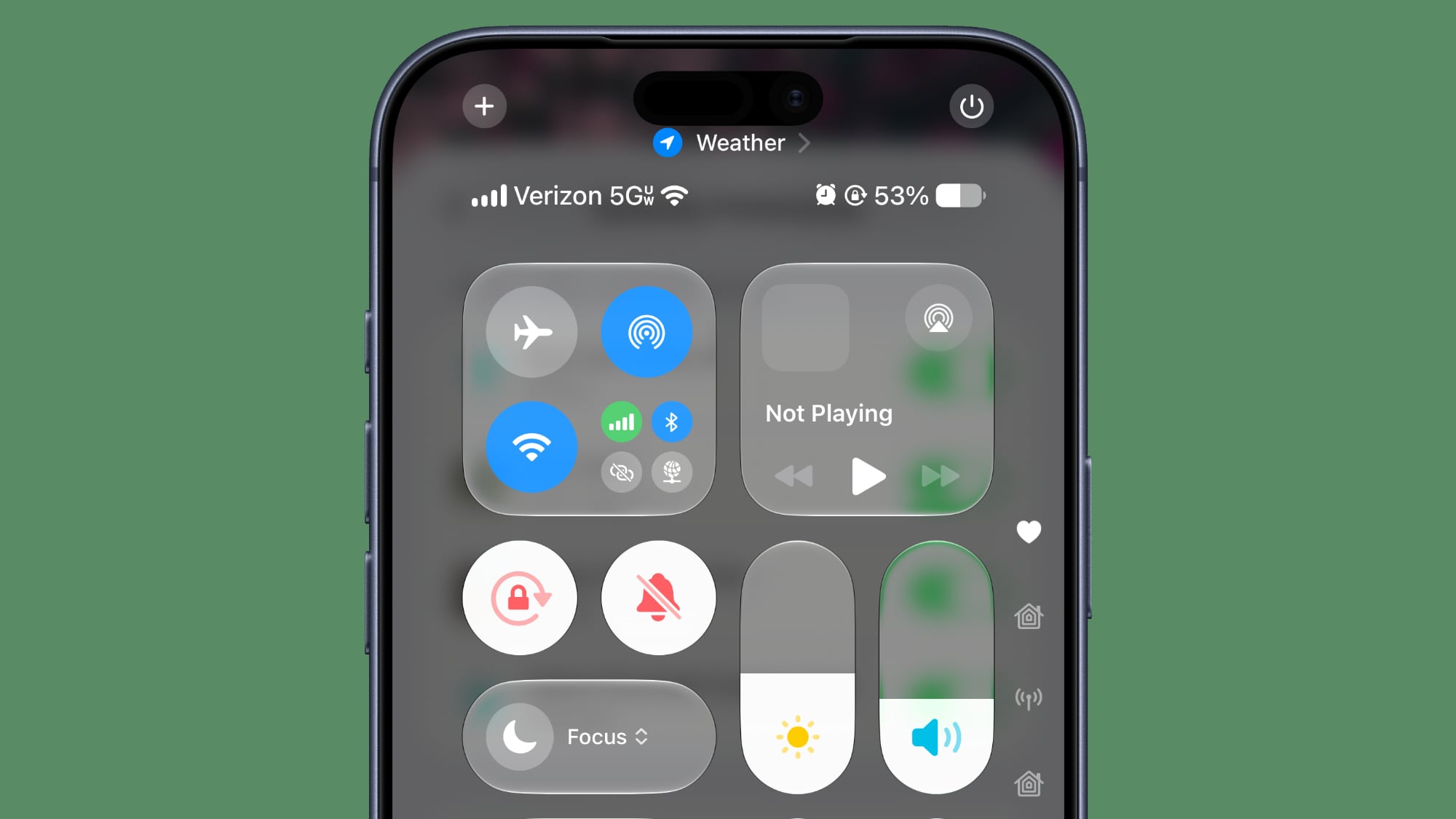
The Control Center on your iPhone is designed for quick access to essential settings, and iOS 27 Beta 3 introduces a subtle yet highly practical enhancement: the ability to see detailed information about your cellular connection, even when your device is connected to Wi-Fi. This update means you can now view your signal strength and confirm whether you’re connected to LTE or 5G, regardless of your current Wi-Fi status.
While it might seem like a minor detail, this feature addresses several common user scenarios and troubleshooting needs. Previously, if you were connected to Wi-Fi, the cellular indicator in the status bar would typically show your Wi-Fi signal, obscuring the cellular network details. This new Control Center functionality bypasses that limitation, providing crucial information at a glance.
Consider these practical applications:
- Troubleshooting Wi-Fi Issues: If your Wi-Fi network is slow or unreliable, you might want to quickly check if your cellular backup (LTE or 5G) is strong enough to switch to. This allows you to make an informed decision without having to disconnect from Wi-Fi first.
- Understanding Coverage: You might be in an area with poor Wi-Fi but want to know if you're still getting a decent cellular signal for calls or messages if your Wi-Fi fails.
- Monitoring Data Usage: For users with limited cellular data plans, knowing the type of cellular connection (LTE vs. 5G) even when on Wi-Fi can give them a better sense of network conditions should they need to switch off Wi-Fi temporarily for high-bandwidth tasks.
- Preparing for Departure: If you're about to leave a Wi-Fi zone, a quick glance at Control Center can tell you what kind of cellular connection to expect when you step outside, helping you anticipate network performance.
This enhancement makes your iPhone a more transparent and manageable device, giving you immediate access to vital network information without navigating through multiple settings menus. It’s a testament to Apple’s continuous effort to refine the user interface and provide more control and insight into the underlying functions of the device, making network management simpler and more intuitive for everyone.
Shortcuts: Tailoring Your Automation Creation Process
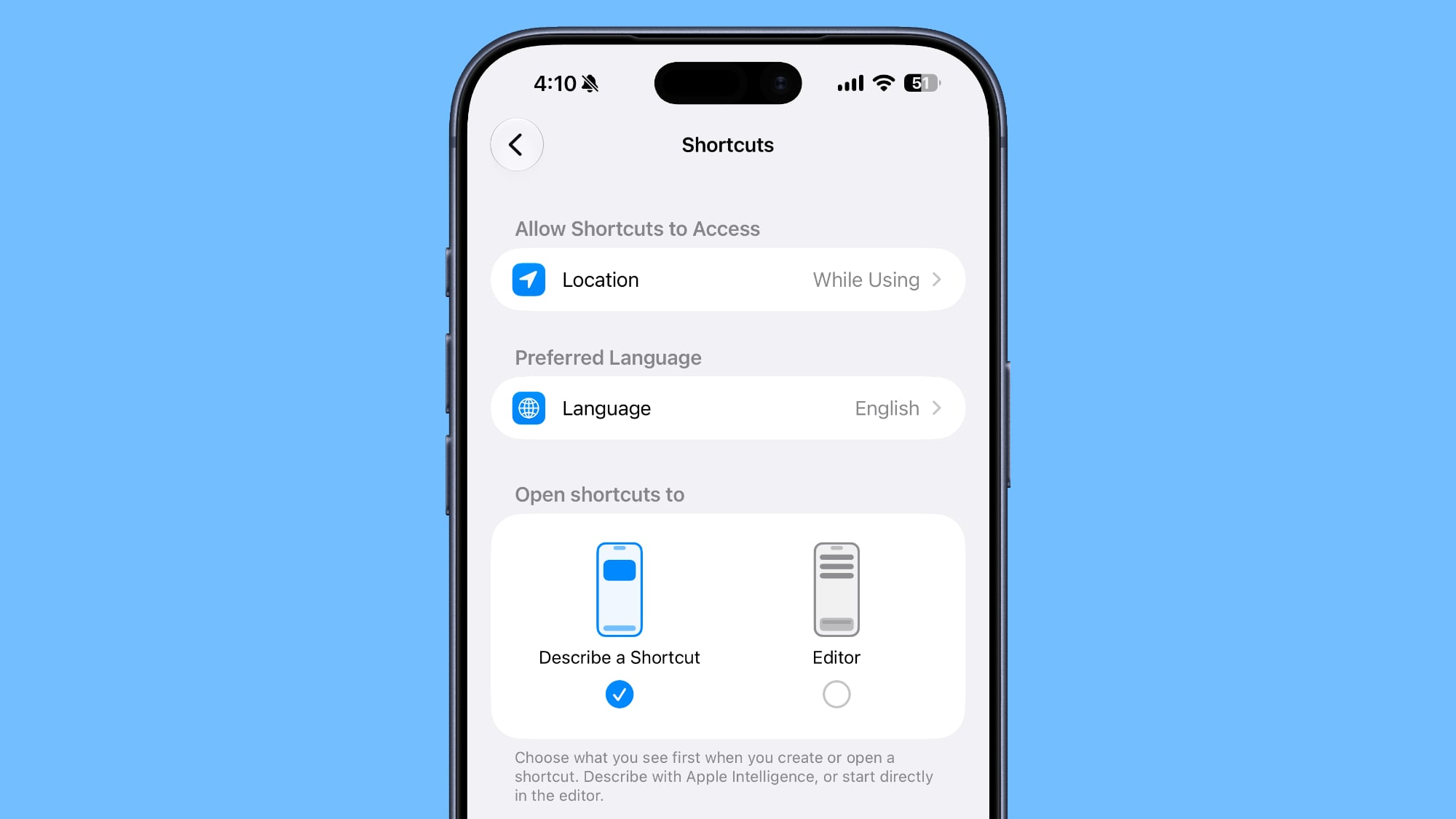
The Shortcuts app is a powerhouse for automating tasks on your iPhone, allowing users to create custom workflows that simplify complex actions. With iOS 27 Beta 3, Apple has made the process of creating new shortcuts even more flexible by letting you choose your preferred starting point: either the "Describe a Shortcut" interface or the manual Shortcuts editor. This thoughtful addition caters to both novice and advanced users, making the app more approachable for everyone.
The "Describe a Shortcut" interface is a fantastic entry point for beginners or those who prefer a more natural language approach to automation. Instead of dragging and dropping individual action blocks, users can simply describe what they want the shortcut to do in plain English. For example, you might type, "When I get home, turn off Wi-Fi and send a message to my partner." The system then attempts to understand your intent and suggest or build the shortcut for you. This significantly lowers the barrier to entry for automation, allowing more users to harness the power of Shortcuts without needing to understand the technical intricacies of each action. It's an intuitive, user-friendly way to jumpstart your automation journey.
On the other hand, the manual Shortcuts editor is where advanced users and those who enjoy precise control truly shine. This interface provides a visual canvas where you can meticulously select, arrange, and configure individual actions, logic flows, and variables. It allows for highly customized and complex automations, offering granular control over every step of the process. For users who know exactly which actions they need and how they should interact, or for those debugging existing shortcuts, starting directly in the manual editor saves time and provides the direct access they prefer.
By offering this choice, Apple acknowledges that users have different levels of comfort and expertise when it comes to automation. A new user might want to start with a natural language description to get a feel for what's possible, while a seasoned power user might always want to dive straight into the block-based editor. This flexibility enhances the overall user experience, making the Shortcuts app more versatile and efficient for a wider audience. It ensures that whether you're taking your first steps into automation or crafting intricate multi-step workflows, the process of creating a new shortcut is optimized for your personal workflow and skill level.
Wallpaper: A Dynamic Touch to Your Notifications
Apple continues to find creative ways to make your iPhone's interface more dynamic and personal, and iOS 27 Beta 3 introduces a delightful new animation related to your wallpaper. When you swipe down to access the notification center, a "cutout" of the main subject from your chosen wallpaper now gracefully appears first, layered over your Home Screen or the app you're currently using.
This subtle yet impactful visual effect adds a new layer of depth and personality to your iPhone experience. Instead of the notification center simply sliding down over a static background, the key element of your wallpaper — perhaps a person, a pet, or a prominent object — pops forward briefly, creating a playful and engaging transition. It's a small detail, but it contributes significantly to the overall polish and premium feel of iOS.
This feature builds upon Apple's recent efforts to leverage advanced image segmentation technology, which allows the system to intelligently recognize and separate subjects from backgrounds in photos. This technology has been seen in features like creating stickers from images or using depth effects on the Lock Screen. Now, it's being integrated into a core system animation, transforming a routine interaction into a moment of visual delight.
The new wallpaper action highlights Apple's ongoing commitment to personalization and user interface fluidity. It makes the act of checking notifications or accessing Control Center feel more integrated and visually interesting, reinforcing the idea that your iPhone is a deeply personal device that responds with charm and intelligence. It's a testament to how refined animations and thoughtful design can elevate even the most everyday interactions, adding a touch of magic to your digital life.
iOS 27 beta 3 adds a new wallpaper animation which is so smooth pic.twitter.com/8LzBOx3HMD
— Aaron (@aaronp613) July 6, 2026
AirPods: Fine-Tuned Adaptive Audio Control
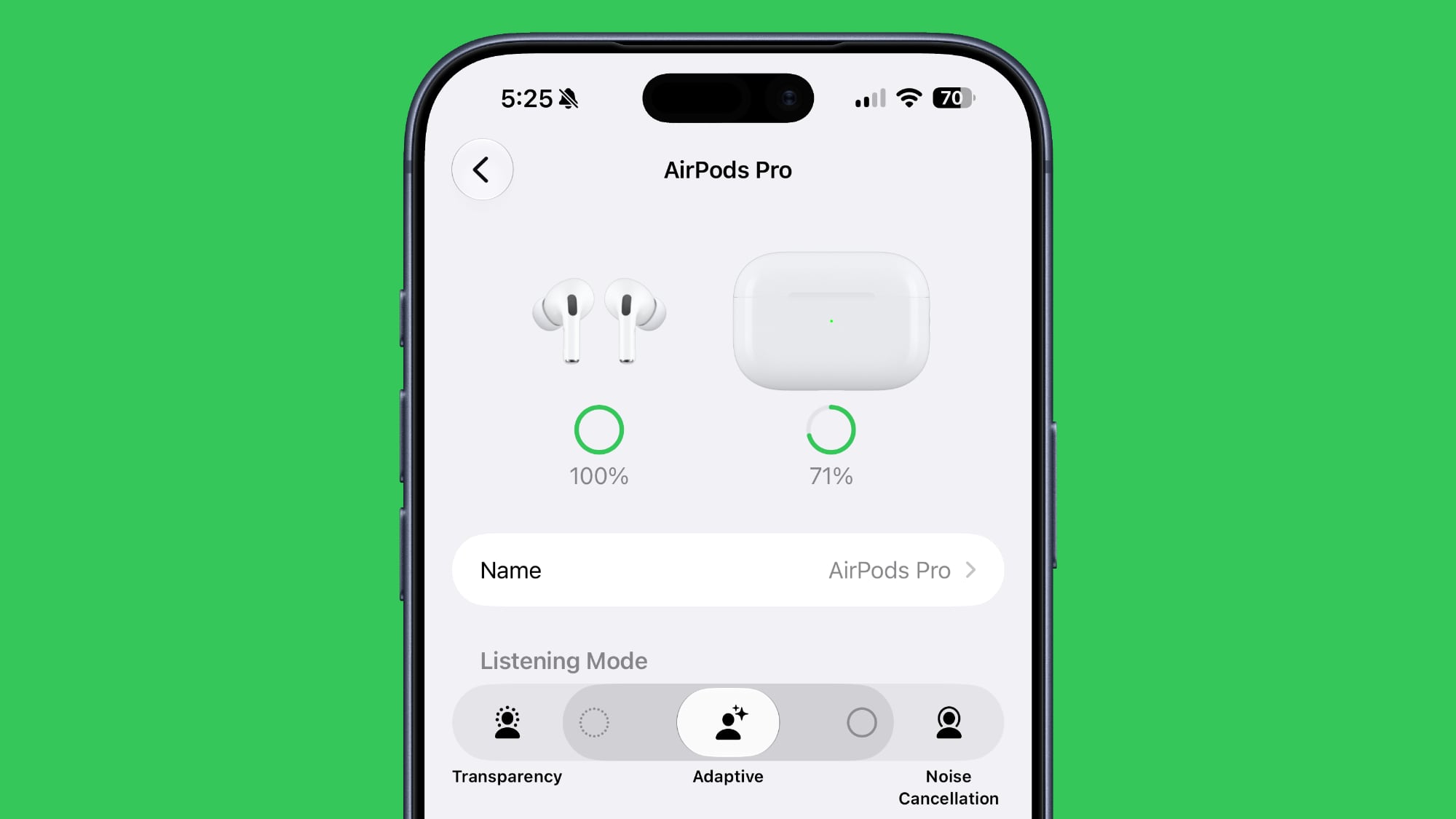
Apple's AirPods, particularly the Pro models, have revolutionized personal audio with features like Active Noise Cancellation and Transparency mode. The introduction of Adaptive Audio took this a step further, intelligently blending these modes based on your environment. In iOS 27 Beta 3, Apple enhances this experience by adding a new slider to the Adaptive setting on AirPods, giving you even more granular control over your listening environment.
Previously, Adaptive Audio aimed to strike a balance between letting in important sounds and blocking out distractions automatically. While incredibly smart, there might be situations where you want to lean more heavily into one extreme or the other without fully switching modes. This new slider addresses precisely that need. You can now manually adjust the balance, choosing to prioritize "more transparency" or "more noise cancellation" within the Adaptive Audio framework.
Consider these scenarios where this fine-tuning would be invaluable:
- Subtle Background Noise: You're working in a moderately noisy office. Adaptive Audio might let in a bit too much chatter. By sliding towards "more noise cancellation," you can gently increase the isolation without completely muting your surroundings, allowing you to remain aware of a colleague calling your name.
- Walking in a City: When navigating busy streets, you want to hear traffic for safety but also reduce harsh environmental noise. Sliding towards "more transparency" while still benefiting from some noise reduction offers a safer and more comfortable listening experience than full Transparency mode alone.
- Social but Focused: At a coffee shop, you want to hear your companions but reduce the general hum of the cafe. This slider lets you find that perfect sweet spot between engagement and focus.
This added control makes Adaptive Audio even more personal and responsive to your specific needs and preferences in various situations. It empowers users to be more active participants in shaping their audio world, rather than relying solely on the AirPods' automatic adjustments. This update signifies Apple's commitment to making its audio devices not just smart, but also highly customizable, ensuring a premium and tailored listening experience for every user. It truly pushes the boundaries of personalized spatial audio, making your AirPods an even more integral part of your daily soundscape.
Home App: Unlocking Advanced Features with iCloud+
The Home app is at the heart of Apple's smart home ecosystem, allowing you to control and automate your connected devices. With iOS 27 Beta 3, Apple has clarified an important detail regarding certain Apple Intelligence features within the Home app: they will require a 2TB iCloud+ plan. This clarifies that some of the more advanced, AI-driven functionalities for your smart home will come with a subscription requirement.
While Apple hasn't fully detailed what these specific "Apple Intelligence features" will entail, we can speculate based on current trends in smart home technology and AI. These could include:
- Proactive Automation: More intelligent, context-aware automations that learn your habits and preferences, such as automatically adjusting lighting based on your schedule, presence, and even external factors like weather, without explicit manual setup.
- Enhanced Security and Monitoring: Advanced video analysis for HomeKit Secure Video, potentially offering more sophisticated object detection (e.g., distinguishing between pets, packages, and people with greater accuracy), longer video history storage, or more nuanced activity zone monitoring.
- Predictive Maintenance: AI-driven insights that could alert you to potential issues with smart home devices before they fail, or suggest optimal energy usage patterns to save costs.
- Cross-Device Learning: Deeper integration and learning across all your Apple devices and HomeKit accessories, allowing the entire ecosystem to behave more cohesively and intelligently.
The requirement for a 2TB iCloud+ plan suggests that these advanced features will likely involve significant data storage, extensive processing, or long-term analytical capabilities that go beyond the basic free iCloud storage tiers. Such AI models often benefit from large datasets to learn and provide accurate insights, and this data would need to be stored securely and privately in iCloud.
For existing iCloud+ subscribers, particularly those already on the 2TB plan, this might be a seamless upgrade. However, for others, it represents an additional cost to unlock the full potential of Apple's smart home intelligence. This strategy allows Apple to offer premium, resource-intensive features while ensuring the infrastructure and privacy mechanisms are robustly supported. It also indicates Apple's ambition to position its Home app as a leading, intelligent hub for the smart home, leveraging its powerful AI capabilities. Users will need to weigh the benefits of these advanced features against the cost of the iCloud+ subscription, but it promises a future where your home becomes even smarter and more responsive to your needs.
Maps: Making Route Preferences Clearer Than Ever
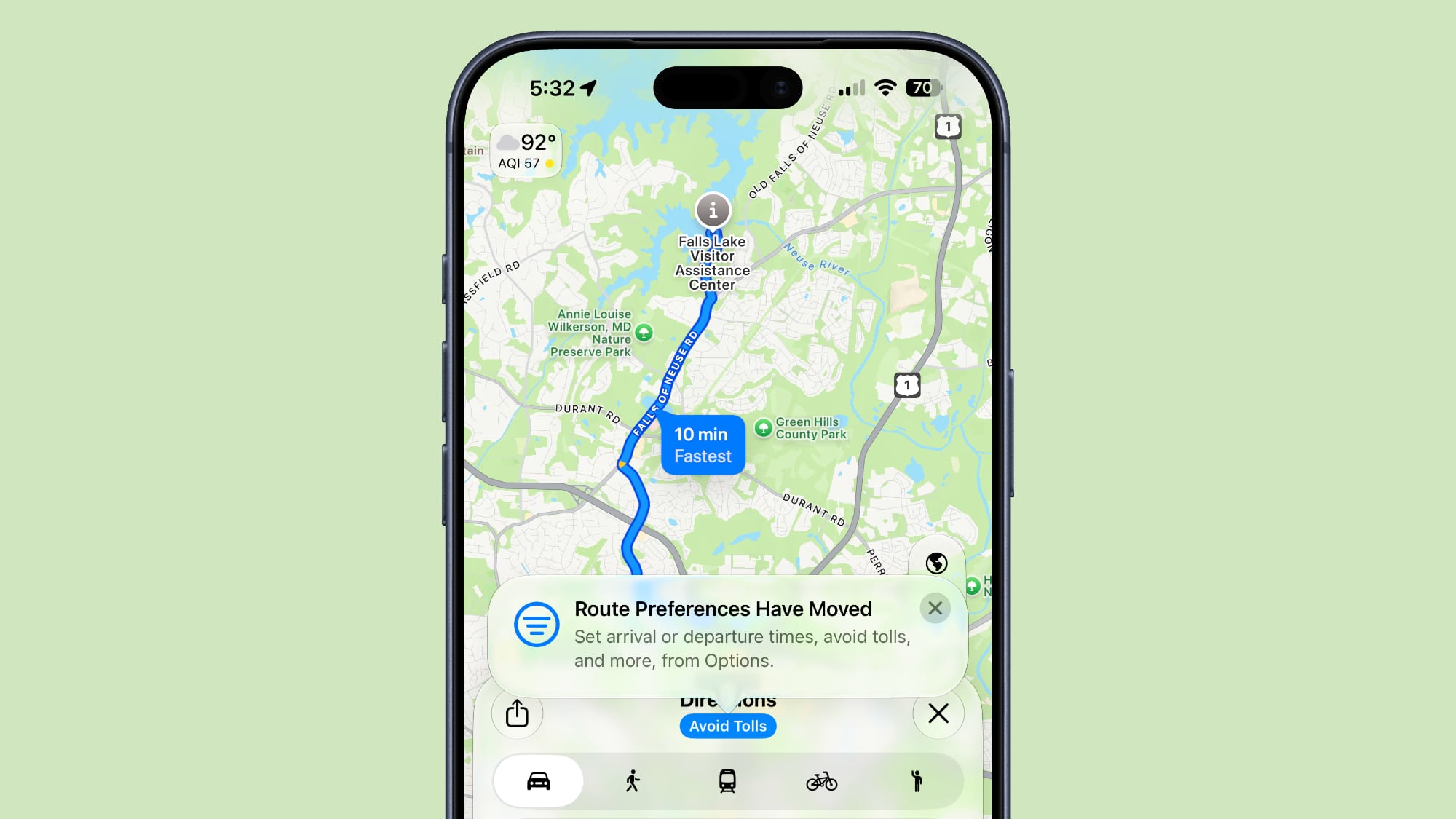
Apple Maps is a crucial tool for navigation, and while it's packed with features, sometimes important options can be overlooked due in part to subtle user interface design. In iOS 27 Beta 3, Apple has addressed a point of potential confusion by adding a helpful tooltip to make it clearer that route preferences have not been removed and are easily accessible. This tooltip appears by tapping under the options interface when you're getting directions, guiding users to where they can customize their routes.
Route preferences are essential for many drivers and commuters. These options allow you to:
- Avoid Tolls: Crucial for saving money on long journeys or avoiding specific toll roads.
- Avoid Highways: Useful for scenic drives, avoiding heavy traffic, or for drivers who prefer local roads.
- Avoid Ferries: Important for those who wish to bypass water crossings that require a ferry, due to cost, time, or personal preference.
The fact that a tooltip was added suggests that some users might have previously struggled to find these options, perhaps assuming they had been removed or were simply difficult to locate. By adding this clear visual cue, Apple is ensuring that users are aware of the full range of customization available to them for their navigation needs.
This small but significant user interface refinement demonstrates Apple's commitment to improving usability and reducing user frustration. It ensures that powerful features remain discoverable and accessible, even for those who might not dive deep into every menu. Such attention to detail in user experience design can make a big difference in how efficiently and comfortably people use everyday apps like Maps. It solidifies Apple's dedication to providing a mapping experience that is not only accurate but also intuitive and user-friendly, allowing you to tailor your journey precisely to your liking.
Lock Screen: A Refined Look for Control Center Icons
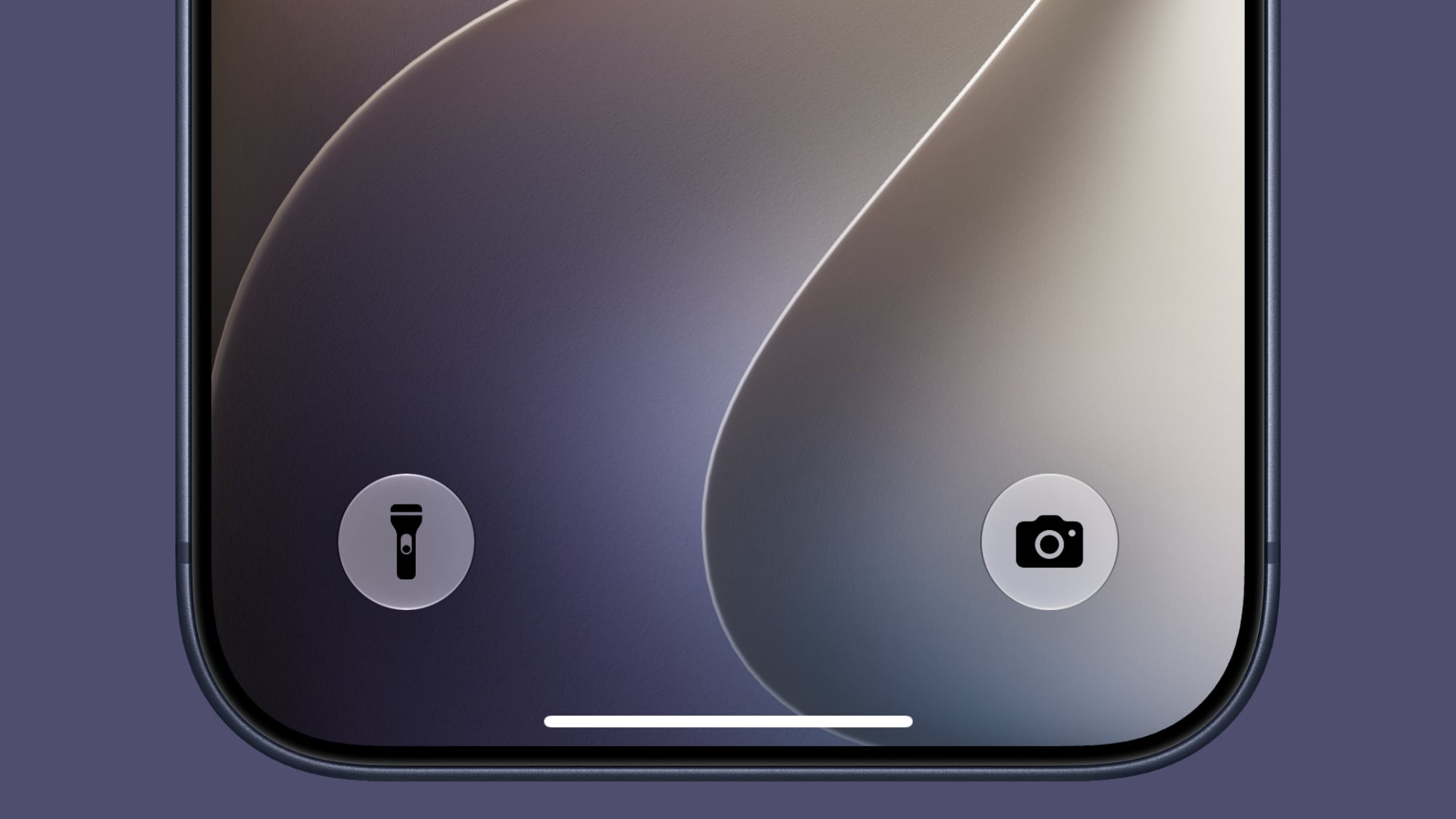
The Lock Screen is the first thing you see when you pick up your iPhone, and Apple continuously refines its appearance to ensure it's both functional and aesthetically pleasing. In iOS 27 Beta 3, a subtle design change has been implemented for the Control Center buttons on the Lock Screen: they now feature black icons instead of white icons, specifically with certain wallpapers.
This might seem like a minor cosmetic tweak, but design choices like these are crucial for maintaining visual harmony and ensuring readability across a diverse range of user-selected wallpapers. With an increasing variety of dynamic and colorful wallpapers available, white icons could sometimes blend into lighter backgrounds, making them harder to discern at a glance. By switching to black icons in specific contexts, Apple ensures better contrast and visibility against brighter or more complex wallpaper designs.
The goal here is consistency in user experience. No matter what vibrant photo or abstract design you choose for your Lock Screen, the critical shortcuts to Control Center remain clear, crisp, and easily identifiable. This change prevents situations where functionality is inadvertently obscured by design, reinforcing Apple's meticulous attention to user interface details. It’s a testament to how even the smallest adjustments can contribute to a more polished, readable, and visually appealing operating system, making your iPhone both beautiful and highly functional from the moment you glance at it.
5G in India: Expanding High-Speed Connectivity
Beyond individual feature enhancements, iOS 27 Beta 3 also brings an important regional network expansion: 5G+ is now officially available in India on supported carriers. This announcement signifies a major step forward for iPhone users in India, allowing them to fully leverage the next generation of mobile connectivity.
"5G+" typically refers to the enhanced versions of 5G, which often include faster speeds, lower latency, and greater capacity compared to standard 5G. This could involve the deployment of millimeter-wave (mmWave) technology or more advanced sub-6GHz spectrum utilization, leading to significantly improved mobile internet experiences. For users, this means:
- Blazing Fast Downloads: Downloading large files, streaming high-definition content, and gaming on the go will be dramatically faster and smoother.
- Lower Latency: Improved responsiveness for online gaming, real-time communication, and cloud-based applications.
- Enhanced Reliability: A more stable and consistent internet connection, even in crowded areas.
The activation of 5G+ in India underscores Apple's commitment to supporting regional markets and ensuring that iPhone users worldwide have access to the latest and fastest network technologies. As 5G networks continue to roll out globally, Apple works closely with carriers to enable these features on its devices, allowing millions of users to experience the full potential of their iPhones. This is a crucial development for India, a rapidly growing market, ensuring that iPhone users there can enjoy premium connectivity that keeps pace with technological advancements.
This article, "Everything New in iOS 27 Beta 3" first appeared on MacRumors.com
Discuss this article in our forums
Conclusion: A Polished Preview of iOS 27's Potential
iOS 27 Beta 3 is far more than just another incremental update; it’s a clear indication of Apple's ongoing commitment to delivering a polished, intelligent, and deeply personal mobile operating system. From the nuanced voice customization of Siri to the groundbreaking accessibility provided by Live Recognition, and the many subtle yet impactful refinements across apps like Photos, Shortcuts, and Reminders, this beta showcases a mature and thoughtful approach to software development.
What stands out in this release is the consistent theme of empowering users with more control and personalization. Whether it’s fine-tuning your AirPods’ adaptive audio, choosing your preferred method for creating Shortcuts, or simply enjoying a more dynamic Lock Screen animation, iOS 27 is shaping up to be an update that truly puts the user experience first. The focus on on-device intelligence for features like Siri and Live Recognition also underscores Apple’s dedication to privacy and performance, ensuring that advanced capabilities are both secure and instantaneous.
As we move closer to the official September launch of iOS 27, these beta releases serve as exciting previews of the innovations that will soon be available to millions of iPhone users worldwide. Each new feature, no matter how small, contributes to an ecosystem that feels more cohesive, intuitive, and responsive to individual needs. This beta 3 iteration, in particular, suggests that the final version of iOS 27 will be a well-rounded and impactful update, poised to enhance how we interact with our most personal technology every single day. We eagerly anticipate the full release and the opportunity for everyone to experience these exciting enhancements firsthand.
from MacRumors
-via DynaSage
