
iOS 27 Weather App: All the New Features
In the ever-evolving world of mobile technology, few apps are as universally essential as the humble weather application. It’s the first thing many of us check in the morning and a constant companion throughout the day, helping us decide what to wear, how to commute, or whether to plan outdoor activities. With the introduction of iOS 27, Apple has once again turned its attention to refining this crucial tool, not by introducing flashy new AI features, but by enhancing its fundamental usability. The focus is squarely on clarity, simplicity, and providing vital weather information at a glance, making your daily interactions with the elements more intuitive than ever before.
This update to the Apple Weather app in iOS 27 is a testament to Apple's commitment to user-centric design. Rather than complicating the experience with unnecessary additions, the company has chosen to streamline the interface, making it easier and faster to absorb the most important weather conditions. Imagine opening your app and instantly grasping the day's forecast without a moment's hesitation or a single extra tap. That's the promise of the redesigned Weather app, where every element has been thoughtfully placed to serve your need for immediate, actionable weather insights.
While artificial intelligence continues to make waves across various applications, Apple’s approach here is refreshingly grounded. It’s about perfecting the basics, ensuring that the core function of a weather app – delivering accurate and easily digestible information – is executed flawlessly. From subtle tweaks to the overall layout to significant improvements in how specific conditions are presented, iOS 27’s Weather app is engineered to be a more efficient and pleasant daily companion. Let's delve into the specific enhancements that are set to redefine how you experience the weather on your iPhone.

Highlights: Your Daily Weather Briefing at a Glance
One of the most impactful new additions to the Weather app in iOS 27 is the introduction of the "Highlights" section. Positioned prominently at the top of the app, this new feature is designed to cut through the noise and deliver the most critical weather information you need for the day, right when you open the app. Think of it as your personalized daily weather briefing, curated to give you essential insights without requiring you to scroll or search.
In our busy lives, every second counts. Before the Highlights section, users often had to scan different parts of the app to piece together the most relevant information: "Is it going to rain during my commute?", "How cold will it get tonight?", or "When is the best time for a walk today?" The Highlights section addresses these common questions directly. It intelligently identifies and displays "need-to-know" weather information that is most pertinent to your current location and time of day.
For instance, on a typical morning, the Highlights might tell you: "Light rain expected between 8 AM and 9 AM," or "Temperature will drop significantly after sunset, dress warmly." If there's a severe weather alert, it would be front and center. This proactive approach ensures you’re immediately aware of any weather-related conditions that could impact your plans, helping you make informed decisions effortlessly. Whether you're planning your outfit, deciding if you need an umbrella, or scheduling an outdoor activity, the Highlights section provides that instant clarity.
This feature isn't just about presenting data; it's about providing context and actionable advice. It understands that knowing the temperature is one thing, but knowing that the temperature will *feel* much colder due to wind chill, or that there's a specific window of clear weather for your afternoon run, is far more valuable. By consolidating these crucial tidbits, Apple enhances the app's utility, transforming it from a mere data display into a truly intelligent weather assistant. It's a subtle yet powerful improvement that embodies the "at-a-glance" philosophy Apple is aiming for with the iOS 27 Weather app, ensuring you're always one step ahead of Mother Nature.

Enhanced Conditions View: Diving Deeper, Smarter, and Faster
The "Conditions" section of the main Weather app interface has received a significant overhaul in iOS 27, bringing new views that drastically improve how you interact with hourly weather data. While the traditional view for temperature and current conditions remains a core component, Apple has introduced intuitive toggles for precipitation and wind, allowing you to switch between these critical metrics with unprecedented ease. This makes the Weather app far more dynamic and responsive to your specific information needs throughout the day.
Hourly Temperature and Current Conditions: The Foundation
The standard hourly view, showing temperature fluctuations and general conditions like "sunny," "cloudy," or "partly clear," is still prominently featured. This tried-and-true display provides a familiar and essential timeline of how the weather is expected to evolve hour by hour. It's perfect for quickly checking if the afternoon will warm up, or if that evening outdoor event will require a jacket. However, Apple recognized that temperature alone doesn't tell the whole story, especially when planning for specific activities or anticipating particular environmental impacts.
Introducing the Precipitation View: Pinpointing When and How Much
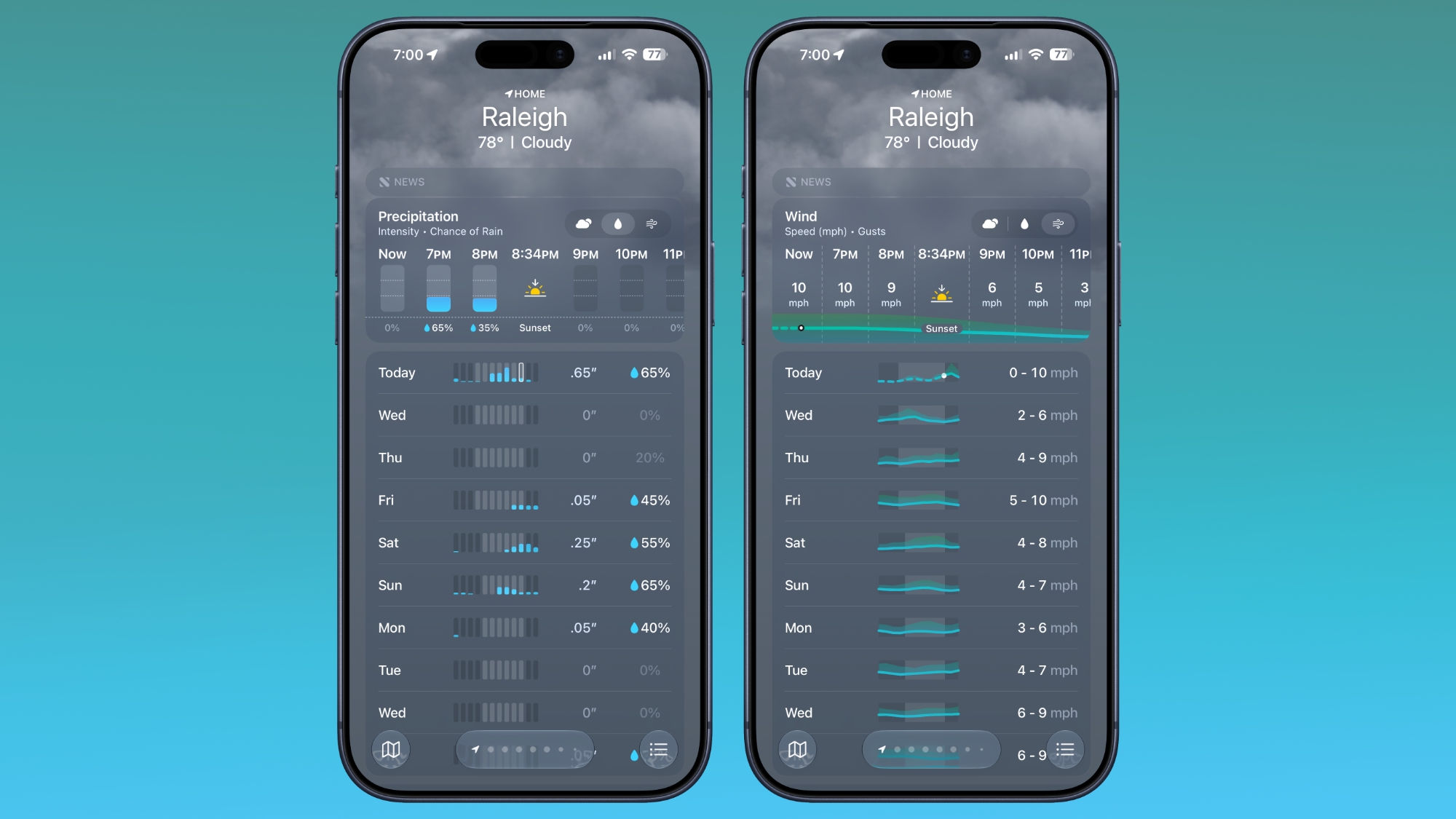
One of the most anticipated enhancements is the dedicated precipitation view. With a simple tap or swipe, you can now toggle from the temperature view to an hour-by-hour forecast of the chance of rain, snow, or other forms of precipitation. This isn't just a general percentage; it often includes visual cues or more specific breakdowns that help you understand the intensity and duration of expected rainfall. For example, it might show a high chance of light rain from 2 PM to 4 PM, followed by a period of heavy showers from 5 PM to 6 PM. This level of detail is invaluable for a multitude of scenarios:
- Commuting: Knowing precisely when rain is most likely helps you decide when to leave, which route to take, or if you need to pack an umbrella.
- Outdoor Activities: Planning a run, a bike ride, or a picnic becomes much easier when you can identify rain-free windows.
- Gardening: Gardeners can optimize watering schedules, knowing when natural rainfall is expected.
- Event Planning: For outdoor events, this view can be critical for making contingency plans or informing attendees.
The visual representation is designed for clarity, often using charts or graphs that make it easy to see peaks and troughs in precipitation probability. This immediate visual feedback helps you process complex information quickly, reducing the mental effort required to interpret the forecast.
Exploring the Wind View: Understanding the Unseen Force
Equally significant is the new wind view, which provides an hour-by-hour breakdown of wind speed. Wind is often an overlooked element in weather forecasts, yet it can drastically impact how a temperature feels, affect travel, and influence various outdoor pursuits. The wind view in iOS 27 aims to bring this crucial data to the forefront, making it as accessible as temperature or precipitation.
Imagine planning a day at the beach, flying a drone, or simply enjoying a walk. High winds can make a pleasant day uncomfortable, disrupt outdoor equipment, or even pose safety risks. The wind view typically displays wind speed in understandable units (e.g., miles per hour or kilometers per hour) and may also include gust speeds, giving you a comprehensive understanding of the air currents. This detailed breakdown is incredibly useful for:
- Outdoor Sports: Cyclists, runners, and golfers can plan routes or times to avoid strong headwinds.
- Boating and Water Sports: Sailors, paddleboarders, and kayakers need precise wind data for safety and planning.
- Gardening and Home Maintenance: Knowing about strong winds can help you secure outdoor furniture or decide when it’s safe to prune trees.
- Comfort: Even if the temperature is mild, a high wind speed can make it feel much colder, making this view essential for dressing appropriately.
The ability to toggle between these views empowers users to customize their hourly weather analysis based on what matters most to them at any given moment. This intelligent design ensures that the Weather app is not just a source of information but a practical tool that adapts to your daily needs and helps you make better decisions, saving you time and enhancing your overall comfort and safety.
The Intelligent 10-Day View: Long-Term Planning Simplified
Building upon the enhanced "Conditions" section, the 10-day view in the iOS 27 Weather app also receives a significant upgrade, making long-term weather planning more intuitive and insightful than ever before. In previous versions, the 10-day forecast primarily focused on temperature ranges and general icons for each day, requiring users to tap into individual days for more specific details like precipitation chance or wind speed. With iOS 27, this is no longer the case.
Now, when you swap between the different condition options—temperature, precipitation, or wind—in the hourly view, the 10-day forecast dynamically adjusts to reflect your chosen focus. This means you can get an immediate, week-and-a-half-long overview of specific weather elements without needing to drill down into each day. This change profoundly impacts how users can plan and prepare for future events and activities.
Visualizing Long-Term Precipitation Trends
Consider the scenario of planning a weekend getaway or a significant outdoor project that spans several days. Instead of just seeing "rain" icons for certain days and then having to tap into each one to gauge the likelihood or intensity, you can now switch to the precipitation overview for the next 10 days. This view might graphically display the daily chance of rain, perhaps using bars or shaded areas, making it instantly clear which days are most likely to be wet and which are expected to be dry. This quick visual assessment helps you decide on the best days for gardening, painting, or any activity where dry weather is crucial, saving you time and effort.
Gauging Future Wind Patterns
Similarly, for activities highly dependent on wind conditions, such as sailing, kite flying, or even planning a rooftop dinner, the ability to see a 10-day wind overview is incredibly beneficial. This view could show average daily wind speeds, potential gust forecasts, or even general wind direction trends over the coming days. You can quickly identify periods of high winds that might necessitate rescheduling or extra precautions, or conversely, spot calmer days perfect for certain outdoor pursuits. This integrated approach means you no longer have to guess about future wind impacts; you have a clear, easily accessible forecast right on the main screen.
Streamlined Decision-Making
This intelligent adaptation of the 10-day view aligns perfectly with the "at-a-glance" philosophy of iOS 27's Weather app. It reduces the number of taps and interactions required to get comprehensive, long-range forecasts for specific conditions. By making these detailed overviews immediately accessible, Apple empowers users to make more informed decisions about everything from packing for a trip to scheduling major outdoor work, all with a quick glance at their iPhone. It represents a thoughtful evolution in how weather data is presented, moving towards a more efficient and user-friendly experience for everyone.
Revolutionizing Your Home Screen: Extra Large Weather Widgets
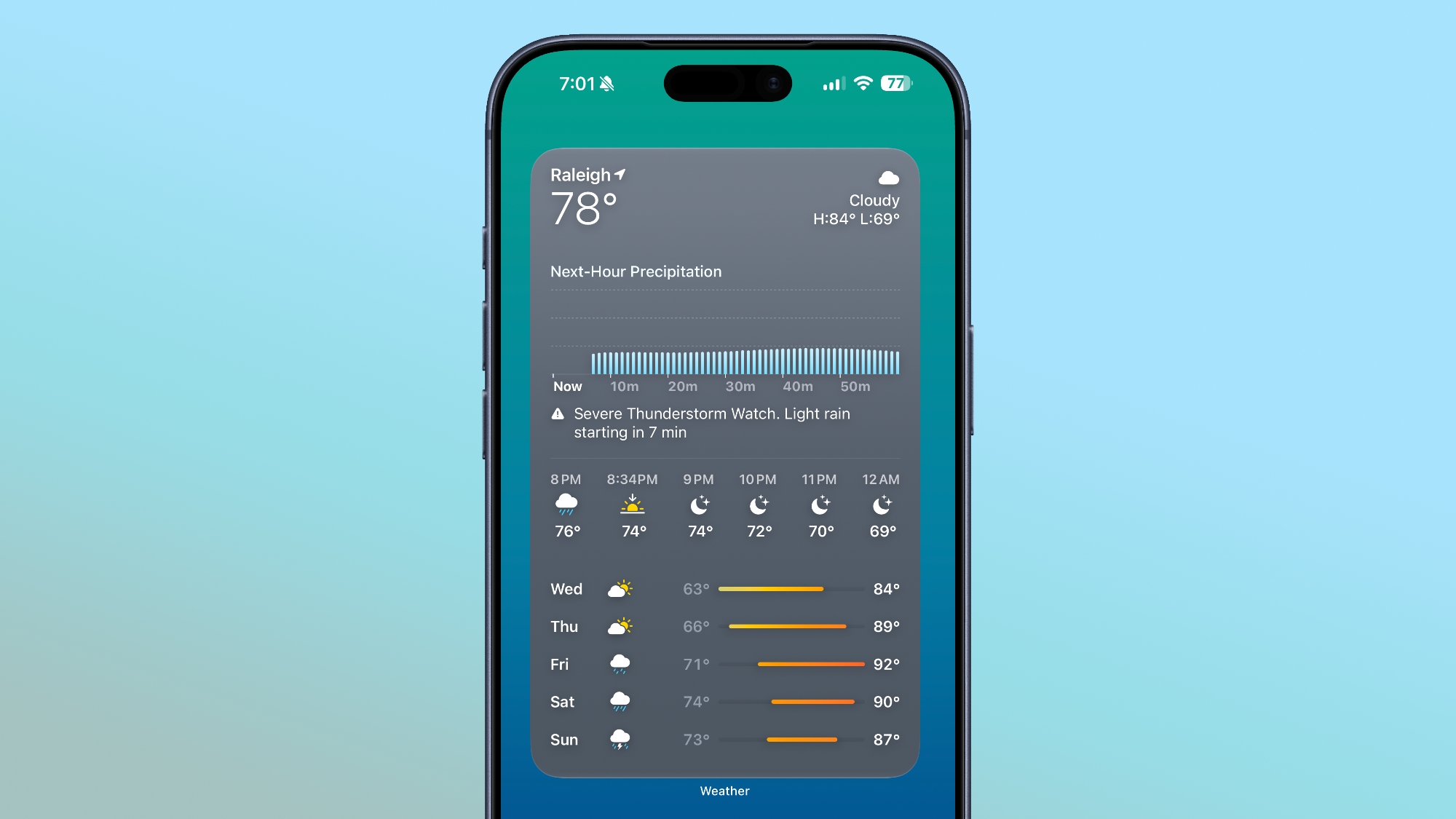
Widgets have become an indispensable part of the iOS experience, transforming the Home Screen from a static grid of app icons into a dynamic, information-rich dashboard. With iOS 27, Apple takes this customization to a new level by introducing an extra-large size option for Home Screen widgets, and the Weather app is among the first to fully leverage this expansive new format. This isn't just about making things bigger; it's about providing an unprecedented amount of weather information directly on your Home Screen, often eliminating the need to even open the app.
The Power of More Real Estate
Imagine dedicating an entire app page on your Home Screen solely to the weather. This extra-large widget isn't just a stretched-out version of its smaller counterparts. Instead, it intelligently aggregates and displays a comprehensive suite of weather data. While smaller widgets might show the current temperature and a brief forecast, this new colossal widget can combine elements from various sections of the Weather app:
- Current Conditions: Prominently displayed with temperature, "feels like" temperature, and descriptive icons.
- Highlights: Those critical "need-to-know" alerts and summaries for the day could be integrated here.
- Hourly Forecast: A condensed hourly timeline, perhaps for the next 6-12 hours, showing temperature, precipitation chance, or wind speed trends.
- 10-Day Overview: A summary of the upcoming week's weather, potentially with the daily high/low temperatures and a dominant condition icon.
- Additional Data: Information like UV index, humidity, air quality, or sunrise/sunset times might also find a place in this expansive view.
The beauty of this extra-large widget is its ability to provide a holistic view of the weather for your chosen location without requiring any interaction beyond unlocking your phone. It truly embodies the "at-a-glance" principle, delivering a rich, detailed forecast directly to you, proactively.
Customization and Personalization
This new widget size offers incredible opportunities for personalization. Users who prioritize weather information can now make it the central focus of their daily digital environment. For instance, a keen gardener might dedicate an entire page to the weather, with the extra-large widget showcasing detailed precipitation forecasts, humidity levels, and UV index, alongside other relevant apps. A traveler might use it to quickly compare weather across multiple saved locations for their upcoming journey. The flexibility allows you to tailor your Home Screen to genuinely reflect your needs and interests.
Enhancing the User Experience
The extra-large weather widget is more than just a visual upgrade; it's a significant improvement to the overall user experience. It reduces friction, saves time, and provides immediate access to critical information, making your iPhone an even more powerful tool for managing your day. By bringing the depth of the Weather app directly to the Home Screen, Apple ensures that crucial weather data is always just a swipe away, making it easier than ever to stay informed and prepared for whatever the day (or week) might bring.
Beyond Weather: Exploring the Full Spectrum of iOS 27 Innovations
While the refinements to the Weather app in iOS 27 are significant and highly impactful for daily usability, they represent just one facet of a much broader update to Apple's mobile operating system. iOS 27 brings a wealth of new features and improvements across the entire platform, touching upon everything from communication and productivity to privacy and accessibility. Apple's ongoing commitment to enhancing the user experience is evident in every corner of this new release.
From potential advancements in core applications like Messages and Photos to system-wide enhancements that boost performance and security, iOS 27 aims to make your iPhone more powerful, intuitive, and personal than ever before. The careful attention given to an app as fundamental as Weather speaks volumes about Apple's philosophy: even the smallest details matter when crafting a seamless and enjoyable technological experience.
To truly understand the scope of these innovations and how they might transform your daily interactions with your iPhone, we highly recommend diving deeper into all the new features available in iOS 27. You can find comprehensive details available in our iOS 27 roundup, which covers everything you need to know about the latest and greatest from Apple's software engineering team. Explore the full list of updates and discover how iOS 27 is set to elevate your iPhone experience.
This article, "iOS 27 Weather App: All the New Features" first appeared on MacRumors.com
Discuss this article in our forums
from MacRumors
-via DynaSage
