
iOS 27 Wallet App Gets 'Create a Pass' Feature
Unlock Your Digital Wallet: How iOS 27 Lets You Create Your Own Passes
Get ready to transform your physical tickets and membership cards into convenient digital passes! The new Wallet app in iOS 27 introduces an exciting "Create a Pass" feature. This innovative tool uses something called "Visual Intelligence" to help you easily add all kinds of passes to your iPhone, from event tickets to loyalty cards and much more.
What is "Create a Pass" and How Does It Work?
Imagine you have a paper ticket for a concert, a plastic membership card for your gym, or a coupon for your favorite store. In the past, if there wasn't a ready-made digital version available through an app, you were out of luck. But with iOS 27, those days are over!
The "Create a Pass" option lets you take any physical pass you own and turn it into a digital one that lives right inside your Wallet app. No more fumbling through your physical wallet – everything will be neatly organized on your iPhone.
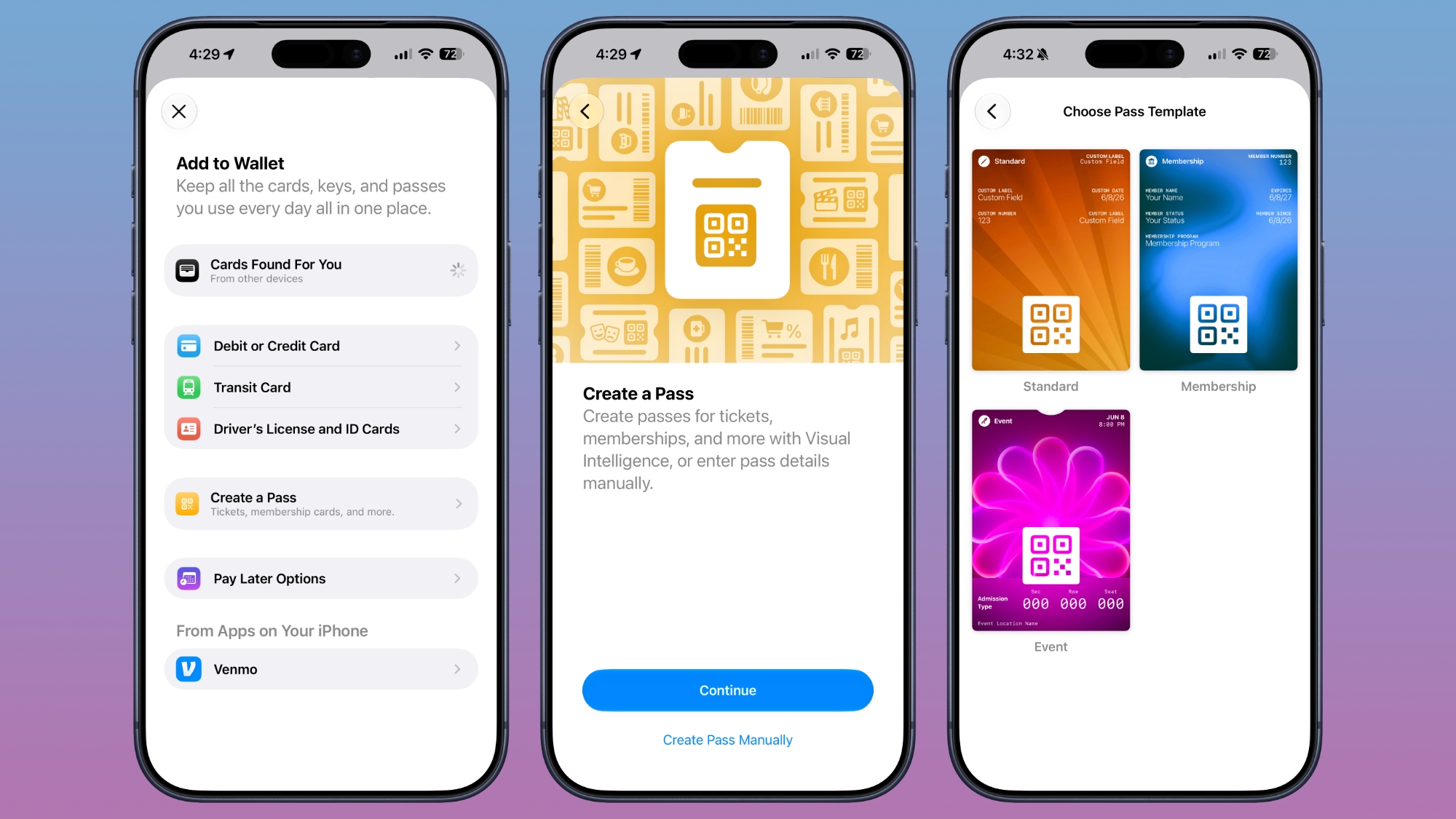
Using Visual Intelligence for Easy Scanning
The core of this new feature is "Visual Intelligence." This advanced technology allows your iPhone to "see" and understand the information on your physical pass. When you choose to create a new pass, the Wallet app will automatically use Visual Intelligence to scan the physical card or ticket. It will then extract the important details and prepare them for your digital pass.
Manual Option for More Control
While the automatic scanning is super convenient, iOS 27 also gives you flexibility. If for any reason the automatic scan doesn't quite capture everything, or if you prefer to build your pass step-by-step, there's a "Create Pass Manually" option. This ensures you have full control over the information that goes into your digital pass.
Templates for Every Need
To make the process even simpler, the Wallet app offers various pass templates. These templates are designed to fit different types of passes, ensuring you include all the necessary information without missing a beat. The available templates include:
- Standard: A general template for various uses.
- Membership: Perfect for gym memberships, library cards, or loyalty programs.
- Event: Tailored for concert tickets, movie passes, sports events, and more.
What Information Can Be Included?
Each template guides you to enter relevant information. For example, an Event pass might ask for the event name, location, and admission type. A Membership pass would focus on your membership ID and expiry date. The beauty of this system is that it's designed to be comprehensive.
Crucially, the app can draw a scannable code directly from your physical pass. Whether it's a traditional barcode or a modern QR code, you can simply take a photo of it, and the Wallet app will incorporate it into your digital pass. This means when you present your phone, the scanner will read your digital pass just as it would the physical one.
Personalize Your Passes with Colors and Backgrounds
Who says digital passes have to be boring? iOS 27 lets you add a personal touch to your new digital cards. You can choose from 12 different background colors to match your style or the pass's branding. Even better, there are seven custom backgrounds specifically designed for popular categories like theater, music, sports, and movies. This way, your digital concert ticket can look just as vibrant and exciting on your phone as the original physical one.
Customization: Add or Remove Fields
The "Create a Pass" feature is incredibly versatile. When you're making a custom pass, you have the power to add or remove various fields as needed. This flexibility ensures that almost any physical card you own can be accurately represented digitally. Some of the available options for fields include:
- Label: A general descriptor for any piece of information.
- Date: Important for expiry dates, event dates, or booking times.
- Membership: For membership numbers or tiers.
- Contact: Perhaps a customer service number or website.
- Coupon Code: For discount codes on loyalty passes.
- VIN: Useful for vehicle-related documents or insurance cards.
- Insurance: For policy numbers and other key insurance details.
- And many more options, ensuring comprehensive digital storage.
This extensive list of customizable fields means that whether you're trying to digitize a store loyalty card, an airline boarding pass, a warranty document, or even certain types of personal identification that you want to keep handy and secure, iOS 27's Wallet app has you covered. The goal is to make your physical wallet lighter and your digital life more streamlined.
In essence, this new feature in iOS 27 is a significant step towards making your iPhone an even more powerful and centralized hub for all your important cards and tickets. Say goodbye to forgotten loyalty cards and crumpled paper tickets – your digital wallet is about to get a whole lot smarter and more capable!
This article, "iOS 27 Wallet App Gets 'Create a Pass' Feature" first appeared on MacRumors.com
Discuss this article in our forums
from MacRumors
-via DynaSage
