
Apple Seeds New watchOS 27 Beta for Apple Watch Ultra 3
Unveiling the Future on Your Wrist: A Deep Dive into watchOS 27 Beta for Apple Watch Ultra 3
Excitement is building in the world of wearable technology as Apple continues to push the boundaries of what a smartwatch can do. Today, we're taking a closer look at the latest advancements with the release of a new beta for watchOS 27, specifically designed for the Apple Watch Ultra 3. This significant update, arriving just over two weeks after the initial beta launch, promises to redefine how we interact with our most personal device, bringing a host of intelligent features and performance enhancements right to our wrists.
This particular beta release is a special one, exclusively tailored for the Apple Watch Ultra 3. Unlike other models that might have received a second beta update earlier in the week, the Ultra 3 is getting dedicated attention to optimize the new software for its robust capabilities and advanced hardware. This focused approach ensures that the most demanding Apple Watch users will experience `watchOS 27` at its very best, leveraging every ounce of power from their premium device.
Getting Started: How to Install the watchOS 27 Beta
For eager developers and tech enthusiasts who want to be among the first to experience these groundbreaking features, installing the `watchOS 27` beta is a straightforward process, though it does require a few specific conditions to be met. Access to this beta is available through the Watch app on your paired iPhone, provided you have a free developer account. This beta program allows developers to test their applications against the new operating system, ensuring compatibility and taking advantage of new APIs before the public release.
Once you’re ready to proceed with the installation, make sure your Apple Watch Ultra 3 meets the necessary prerequisites for a smooth update. The watch must be securely placed on its charger, ensuring a stable power supply throughout the download and installation process. Furthermore, it needs to be connected to a reliable Wi-Fi network, as the update files can be substantial. Finally, and crucially, your Apple Watch must have a battery level of 50 percent or above. These conditions are in place to prevent any interruptions during the update, which could potentially lead to software corruption or other issues, ensuring the integrity of your device’s operating system.
The Dawn of Siri AI: A Smarter Assistant on Your Wrist
Perhaps the most significant and transformative feature arriving with watchOS 27 is the integration of Siri AI. This isn't just an incremental update to Apple’s virtual assistant; it’s a complete reimagining of its capabilities, making Siri smarter, more intuitive, and remarkably more capable. Gone are the days of rigid, command-response interactions. With Siri AI, your Apple Watch gains an assistant that can truly hold back-and-forth conversations, understanding context and nuance in a way that feels incredibly natural.
Imagine asking Siri a question, receiving an answer, and then following up with another query that builds on the previous one, without needing to repeat information or start over. This conversational fluidity marks a monumental leap forward in personal assistance. Siri AI on your Apple Watch Ultra 3 is designed to understand your intentions better, anticipate your needs, and provide more relevant responses, making your daily interactions smoother and more efficient. Whether you're jogging, in a meeting, or simply have your hands full, accessing information and controlling your devices becomes effortless through natural dialogue.
Beyond its enhanced conversational abilities, Siri AI also boasts unparalleled access to both general world knowledge and your personal data. This powerful combination allows it to answer a vast array of questions, from trivial facts to complex inquiries, and find information that is specifically tailored to you. For instance, Siri can tell you about historical events, current news, or the weather in a far-off city. Simultaneously, it can provide information relevant to your personal life, such as your upcoming calendar appointments, the estimated time to your next destination based on your habits, or even remind you of an important task you discussed earlier. The intelligent fusion of global data with your individual context makes Siri AI an indispensable tool, learning and adapting to your unique patterns and preferences over time.
It's important to note the underlying technology that powers this incredible leap forward. Siri AI on Apple Watch requires an iPhone that supports Apple Intelligence. This cutting-edge framework, which encompasses advanced on-device processing and cloud-based AI models, is currently supported by the iPhone 15 Pro and later models. This requirement ensures that the complex computational demands of Siri AI are met, providing a seamless and highly responsive experience. For users with the latest iPhone models, this means their Apple Watch Ultra 3 will truly become an extension of their intelligence, offering unparalleled convenience and capability.
Enhanced User Experience: Dynamic App Grid and Smart Stack Suggestions
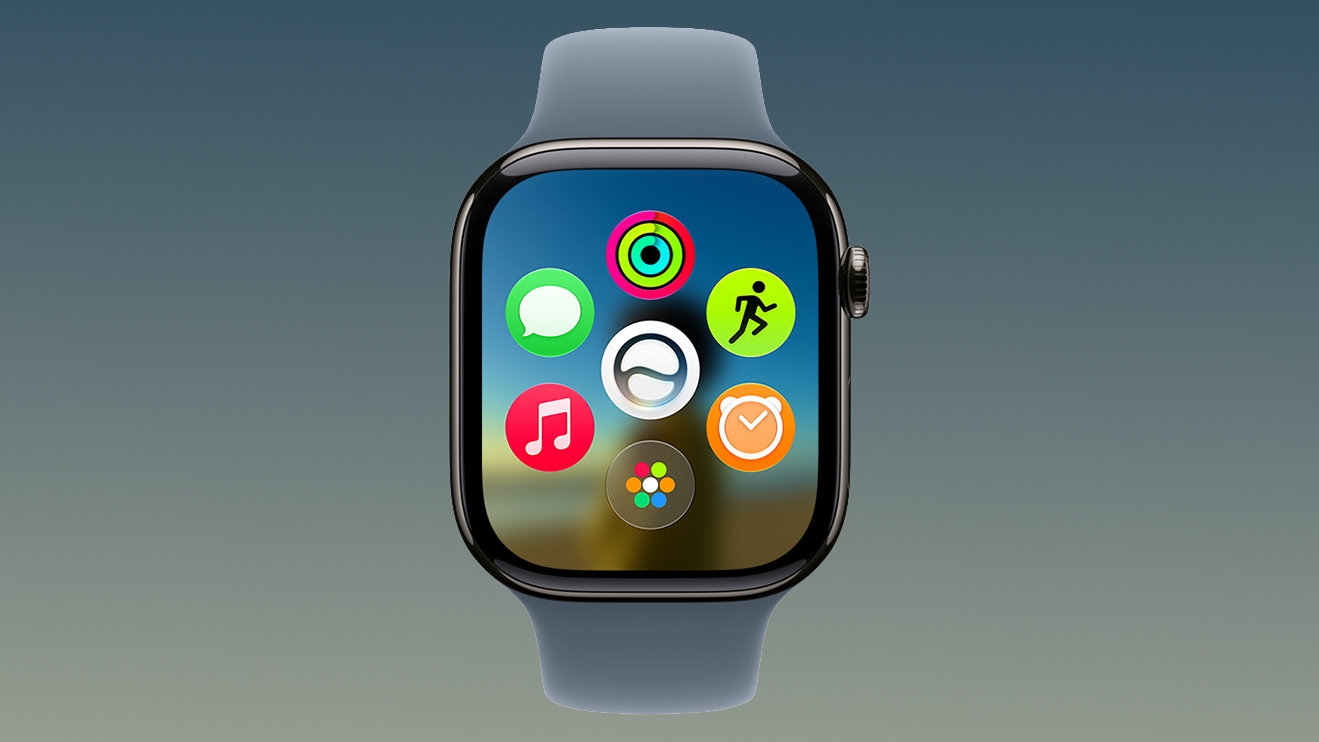
Beyond the impressive advancements in Siri AI, watchOS 27 brings thoughtful improvements to the user interface and overall experience on the Apple Watch Ultra 3. One notable change is the introduction of a new Dynamic app grid. This isn't just a visual refresh; it's a functional enhancement that intuitively highlights Siri suggested apps. Instead of manually searching through a static grid of icons, your Apple Watch will intelligently predict which apps you might need at a given moment, bringing them to the forefront. For example, if you’re heading out for a run, the Workout app might be prominently displayed. If it’s time for your commute, your Maps or Transit app might appear. This proactive approach saves time and streamlines access to essential functions, making your watch feel even more responsive to your daily routine.
Complementing the Dynamic app grid are more intuitive Smart Stack Suggestions. The Smart Stack, a popular feature on `watchOS`, allows users to scroll through a personalized collection of widgets that provide timely information. With watchOS 27, these suggestions become even smarter, leveraging Siri AI to offer more contextually relevant information precisely when you need it. Imagine your Smart Stack proactively showing you your boarding pass as you approach the airport, or your favorite coffee shop's loyalty card when you're nearby. This predictive intelligence transforms your watch from a reactive device into a proactive companion, anticipating your needs before you even realize them.
New Everyday Utilities and Safety Features
The latest `watchOS 27` beta also packs a suite of new functionalities designed to enhance convenience, safety, and personal organization. These features integrate seamlessly into your daily life, making the Apple Watch Ultra 3 an even more indispensable tool:
-
Find Your Parked Car
Never again wander aimlessly through a crowded parking lot trying to remember where you left your vehicle. With watchOS 27, your Apple Watch can help you find your parked car directly from your wrist. Utilizing location data and sophisticated algorithms, the watch provides clear directions and an estimated distance to your car, saving you time and frustration. This feature is particularly useful in unfamiliar areas or large venues, providing peace of mind and reducing stress.
-
See Pinned Messages
For those who rely on Messages for important conversations, watchOS 27 introduces the ability to see pinned messages directly on your watch. Pinned messages are crucial conversations that you’ve marked for quick access on your iPhone. Now, that convenience extends to your wrist, allowing you to quickly review important details, addresses, or instructions without needing to pull out your phone. This ensures that vital information is always just a glance away, enhancing communication efficiency.
-
Get Noise Alerts
Protecting your hearing is paramount, and watchOS 27 takes this seriously with enhanced noise alerts. Your Apple Watch Ultra 3 can now proactively monitor ambient sound levels in your environment and notify you if they reach potentially damaging decibel levels. These alerts empower you to take action, whether it's moving away from the source of noise or using hearing protection. This health-focused feature highlights Apple's commitment to user well-being, making your watch a vigilant guardian of your long-term health.
-
View Identity and Transit Cards
The convenience of Apple Wallet takes another step forward with the ability to view identity and transit cards directly on your Apple Watch. In regions where digital identity cards are supported, you can securely present them from your wrist. Similarly, for public transport, your transit cards become accessible, allowing for quick and seamless tap-to-pay experiences without ever reaching for your physical wallet or phone. This streamlines travel and everyday transactions, emphasizing security and ease of use.
Visual Clarity and Enhanced Fitness Tracking
The visual experience on the Apple Watch Ultra 3 also receives a significant upgrade with watchOS 27 through improvements to Liquid Glass. This update is designed to improve legibility across the watch interface. By enhancing font rendering, contrast, and overall display clarity, text and graphical elements become easier to read, even in challenging lighting conditions or for users with visual impairments. This commitment to accessibility ensures that everyone can enjoy a clear and comfortable viewing experience on their Apple Watch, making information quicker to digest and reducing eye strain.
For fitness enthusiasts and athletes, watchOS 27 introduces powerful enhancements to Workout Buddy. The most exciting update is that Workout Buddy now works seamlessly on the Apple Watch even when an iPhone isn't nearby. This untethered experience is a game-changer for those who prefer to leave their phone at home during workouts, offering complete freedom without sacrificing data tracking. Whether you're going for a run, swim, or hike, your Ultra 3 can now autonomously track your progress with greater accuracy and detail.
Furthermore, Workout Buddy gains new, advanced metrics designed to help you push your limits and track meaningful progress. These include progressive increases to distance, pace, or duration. Instead of just logging a workout, the app can now help you follow a structured training plan by showing your incremental improvements over time. For example, if your goal is to increase your running distance by 10% each week, Workout Buddy can track this progression, provide insights, and celebrate your milestones. This deeper level of data empowers users to train smarter, achieve their fitness goals more effectively, and gain a clearer understanding of their athletic performance.
Introducing the All-in-One Find My App with Precision Finding
Losing track of your belongings can be a significant source of stress, but watchOS 27 addresses this with a new all-in-one Find My app directly on your Apple Watch Ultra 3. This integrated application centralizes all your Find My capabilities, making it easier than ever to locate misplaced Apple devices, AirTags, and even friends or family members who have shared their location with you. The convenience of having this powerful tracking tool on your wrist means you can initiate a search for a lost item instantly, without needing to reach for your iPhone.
A standout feature of the new Find My app is its support for Precision Finding. Leveraging the Ultra 3’s advanced hardware, including its Ultra Wideband (UWB) chip, Precision Finding allows you to pinpoint the exact location of compatible items (like AirTags or other UWB-equipped Apple devices) with remarkable accuracy. Instead of just a general direction, your watch can guide you with visual, haptic, and audio feedback, indicating exactly how many feet or inches you are from your item. This sophisticated technology eliminates the guesswork, transforming the frustrating experience of searching for a misplaced wallet or keys into a quick and efficient recovery mission. The peace of mind offered by knowing you can accurately locate your valuables from your wrist is invaluable, making the Ultra 3 an even more essential device for everyday life.
Performance Optimizations and Battery Life
Underneath all the exciting new features, `watchOS 27` for the Apple Watch Ultra 3 also includes critical performance optimizations. Apple is constantly working to make its operating systems run more efficiently, and this beta is no exception. These optimizations translate into a smoother, more responsive user experience across the board, with apps launching faster, transitions feeling more fluid, and overall system performance feeling snappier. This continuous refinement ensures that even with the addition of complex new AI capabilities, the watch maintains its high standard of speed and reliability.
Crucially for any portable device, especially a smartwatch that's worn all day, these performance enhancements also contribute to improved battery life. By optimizing how the watch’s processor and various components consume power, watchOS 27 aims to extend the time you can go between charges. For the Apple Watch Ultra 3, which is already known for its impressive battery longevity, these improvements mean even more freedom and less anxiety about your watch dying mid-day. Whether you’re tracking a multi-hour endurance workout, navigating a new city, or simply going about your daily routine, you can rely on your Ultra 3 to keep going longer, ensuring that you stay connected and informed throughout your busiest days.
The Importance of Beta Testing and What Comes Next
The release of this `watchOS 27` beta is a critical step in Apple's development cycle. Beta programs allow Apple to gather extensive feedback from developers and dedicated testers in real-world environments. This feedback is invaluable for identifying and fixing bugs, refining features, and ensuring that the final public release is as stable and polished as possible. Developers test the compatibility of their apps, ensuring that the entire ecosystem is ready for the new operating system. This collaborative effort helps to shape the future of `watchOS`, making it better for everyone.
While this beta is exclusively for the Apple Watch Ultra 3 and requires a developer account, it offers a tantalizing glimpse into the future of wearable technology. The features introduced in watchOS 27, particularly the advancements in Siri AI, represent a significant leap forward in personal computing on the wrist. Users can anticipate a watch that is more intelligent, more intuitive, and more deeply integrated into their lives than ever before.
For a comprehensive look at everything new in watchOS 27, including all the smaller refinements and under-the-hood changes not covered here, our dedicated watchOS 27 roundup is an invaluable resource. As Apple continues to refine and develop this operating system, the anticipation for its full public release will only grow. The Apple Watch Ultra 3 with watchOS 27 is poised to deliver an unparalleled experience, blending cutting-edge technology with seamless everyday utility, truly making it an indispensable companion on your wrist.
This article, "Apple Seeds New watchOS 27 Beta for Apple Watch Ultra 3" first appeared on MacRumors.com
Discuss this article in our forums
from MacRumors
-via DynaSage
