
Apple's All-New Home Hub Will Be Revealed October 13: What to Expect
Apple Smart Home Hub Announcement: What We Know About the October 13 Launch
Technology enthusiasts and Apple fans have plenty to look forward to this autumn. According to recent reports, Apple plans to officially unveil an all-new dedicated smart home command center as part of its upcoming event schedule. The reveal is tied directly to the special "Welcome home" product launch event scheduled for Tuesday, October 13.
Unlike traditional, high-profile keynotes streamed live from Apple Park, this announcement is expected to take a more direct digital approach. The new device will likely be unveiled through an official press release published on the Apple Newsroom website. Industry watchers expect the news to drop at approximately 9 a.m. Eastern Time on Tuesday morning.
This timing coincides directly with a private "Welcome home" hands-on experience taking place in New York. At this exclusive event, invited journalists, reporters, and tech content creators will gather to get their first actual hands-on time with the physical device. This private gathering will allow press members to test out the hardware, explore the software interface, and evaluate how the device operates in real time.
The anticipation surrounding this reveal has been building for months across the smart home sector. By introducing dedicated central hardware, Apple appears ready to compete directly in the tabletop and wall-mounted smart display category. The October 13 launch event marks a major milestone in the company's broader expansion into home automation and ambient computing.
Conceptual Design and Visual Expectations
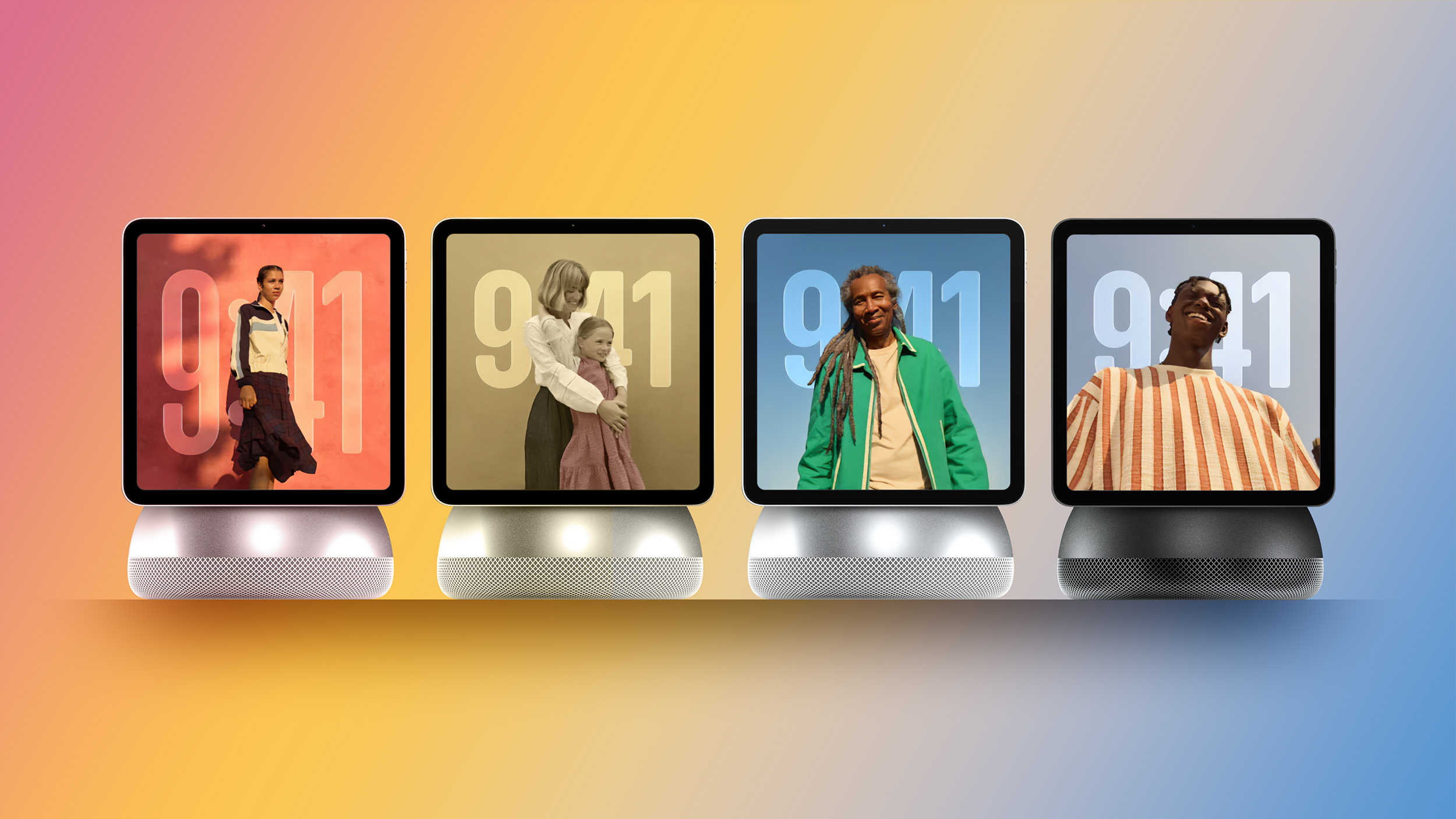
Our image above provides a rough concept based on rumored design details that have circulated throughout the supply chain. Because this visual is purely a concept rendering, you should be prepared for the actual physical appearance of the device to differ when Apple officially reveals the final product.
Industrial design has always been a key differentiator for Apple hardware releases. Early renders suggest a clean, minimalist aesthetic designed to blend seamlessly into modern home decor. However, official colors, materials, bezels, and exact structural details remain under wraps until the formal announcement.
Whether you plan to place the device on a kitchen counter or mount it on a hallway wall, visual appeal will be central to its design. Apple is known for focusing heavily on build quality, using premium materials that elevate the look of consumer electronics. Expect a sleek form factor that feels right at home in any room.
What Does the Apple Smart Home Hub Do? Core Features Explained
The primary purpose of this new device is to serve as a central command station for your entire living space. Rather than relying solely on an iPhone or iPad to manage connected accessories, household members will have a dedicated, always-accessible station. It aims to simplify home automation by putting control elements into one central location.
The **Apple smart home hub** is designed to handle a broad range of daily activities, household management tasks, and entertainment functions. Key built-in capabilities reported for the device include:
- Smart Home Accessory Management: Direct, intuitive control of HomeKit and Matter-enabled smart lights, thermostats, locks, blinds, and switches using the Apple Home app interface.
- Home Security Monitoring: Live video streaming from connected security cameras, doorbells, and real-time security alerts displayed directly on the screen.
- Digital Photo Galleries: Serving as an interactive digital picture frame that cycles through favorite family photos and memories stored in your iCloud library.
- Calendar and Schedule Organization: Clear visual displays of upcoming family appointments, shared schedules, reminders, and daily task lists.
- Music and Audio Playback: Direct streaming integration with popular audio services for room-filling sound and easy playback control.
- FaceTime Video Calling: Hands-free video chats with friends and family members directly from the counter or wall display.
By bringing all of these tools together into a single dedicated interface, the hub simplifies daily routines. Every family member can check the schedule, adjust room lighting, or stream audio without needing to unlock a personal smartphone.
Proximity Sensing and an Adaptive User Interface
One of the most intriguing software features reported for the new platform is its dynamic, distance-aware display interface. Rather than keeping a static layout at all times, the screen dynamically adapts based on where you are located relative to the hardware.
As a user approaches the hub, the built-in sensors detect the person moving closer. In response, the interface elements automatically adjust their size and detail levels. Text may shrink slightly to reveal more detailed information, interactive buttons appear, and precise controls become available for touch input.
Conversely, when you move further away from the device, the screen adjusts its presentation for long-distance viewing. On-screen text, clock faces, and notification widgets scale up significantly so that key information remains easily readable from across the room. This ensures that essential details like time, weather, or security updates stay visible even when standing several feet away.
This adaptive approach creates an effortless user experience. It eliminates the need to manually zoom or tap to read information from a distance. The software intelligent shifts between an ambient information display and an interactive touch interface depending on your exact physical location.
Ideal Household Placement and Multi-User Family Support
Unlike personal devices like iPhones or iPads, which are tied to individual user accounts, this hardware is engineered specifically for shared spaces. It is designed to be ideal for placement in high-traffic areas across the home, including:
- The Kitchen: Perfect for viewing recipes, setting cooking timers, listening to music, checking shared grocery lists, or managing lighting while preparing meals.
- The Bedroom: Functioning as a high-tech nightstand clock, alarm manager, ambient photo frame, and quick control point for bedtime lighting routines.
- The Living Room: Serving as the main smart home management center for the entire family, offering video monitoring, media controls, and shared calendar visibility.
To support shared usage across shared spaces, the platform reportedly features robust multi-user support for families. This feature allows the software to customize its output based on which family member is currently interacting with the screen. Personal schedules, custom reminders, and specific media preferences can automatically adapt depending on who is using the device at any given moment.
Multi-user integration ensures that everyone in the home gets a personalized experience without compromising privacy or mixing up individual accounts. It transforms the hardware from a simple control panel into a truly cooperative family assistant.
Hardware Specifications: Display, Base Options, and the A18 Chip
Under the hood, Apple has equipped this new hardware with modern components capable of supporting advanced on-device intelligence and responsive graphics performance. While compact, the physical specifications reflect a powerful smart display setup built for long-term daily use.
Reports indicate that the hub features a compact 6-inch square display panel. This unique square aspect ratio offers a balanced layout suitable for showing widgets, video feeds, photo collections, and control panels without taking up excessive counter or wall space. The display panel is paired with high-quality built-in sensors to facilitate proximity detection and visual tracking.
To power the experience, Apple is reportedly utilizing an A18 chip or newer. Incorporating this high-performance silicon ensures that the hardware can comfortably support intensive local machine learning tasks and processing required for **Apple Intelligence**. Having a modern processor built into the device ensures smooth animations, rapid application launching, and instant voice recognition processing.
Advanced artificial intelligence is expected to be a central tentpole feature of the entire experience. Apple's next-generation Siri AI capabilities will play a leading role in how users control hardware, ask questions, and trigger complex smart home automations hands-free.
Form Factor Choices: Tabletop Speaker Base vs. Wall-Mounted Options
Flexibility is essential when designing hardware meant to fit into diverse residential environments. To accommodate different home layouts and user preferences, Apple has reportedly developed two distinct mounting and installation options for the system.
First, there is a tabletop version equipped with an integrated speaker base. This setup features a weighted, acoustic dome or cylindrical base that allows the display to sit comfortably on flat surfaces like kitchen countertops, desks, side tables, or nightstands. The built-in speaker delivers rich audio performance, making it well-suited for streaming music, listening to podcasts, and taking FaceTime calls.
Second, Apple is offering a wall-mounted version designed for clean, permanent placement on vertical surfaces. This option allows homeowners to mount the panel directly on walls in hallways, entryways, or living rooms. The wall-mounted configuration creates an integrated control center aesthetic similar to high-end home automation panels, keeping countertops completely free of clutter and cords.
Offering both tabletop and wall-mount options ensures that users can choose the exact setup that best fits their living space. Whether you prefer a mobile, plug-and-play desktop display or a built-in wall controller, the platform adapts to your architectural preference.
Inside homeOS: Clock Faces, Widgets, and System Design
Alongside the physical hardware, Apple is set to introduce an all-new software ecosystem tailored specifically for ambient home displays. Reports suggest this new operating system may officially be named "homeOS."
The user interface of homeOS is designed to be highly customizable, visually intuitive, and readable at a glance. Central to the software experience are customizable clock faces and interactive widgets. Users can configure the main display screen to highlight the exact information they care about most, such as:
- Digital and analog clock styles with custom color palettes and backgrounds.
- Live weather updates, forecast trends, and environmental condition readouts.
- Interactive home security status indicators and quick-camera launch tiles.
- Dynamic family calendar feeds and scheduled task lists.
- Quick-launch media control cards for active audio playback.
The layout philosophy of homeOS focuses heavily on accessibility and low-friction interactions. Because the device is meant to be used while walking past or multitasking around the house, information is presented in clean, modular cards that require minimal taps to navigate.
Preinstalled Apple Applications and Siri AI Integration
When you unbox and set up the new display, it will come preloaded with a curated suite of essential Apple software tools. These preinstalled apps are optimized specifically for the 6-inch square screen and ambient home display environment.
The core software suite expected to be available directly on the platform includes:
- Calendar: For tracking family events, shared schedules, and upcoming appointments.
- Camera: Facilitating live video calls and potential smart security monitoring functions.
- Apple Music: Offering full access to personal music libraries, curated playlists, and live radio channels.
- Apple Podcasts: Streaming news shows, audio talk shows, and episodic podcasts directly through the built-in speaker.
- Apple News: Delivering headline news updates, trending stories, and brief digest summaries across the day.
- Reminders: Managing shared household task lists, shopping lists, and quick reminders.
- Notes: Storing household memos, quick family messages, recipes, and helpful references.
- New Siri App: Featuring advanced Siri AI capabilities alongside full conversation history logs.
The newly redesigned Siri app represents a major shift in how users interact with voice assistants in the home. With full conversation history support, users can review past queries, track multi-step voice requests, and manage complex home automations effortlessly. Powered by local hardware processing, voice interactions are designed to be fast, accurate, and highly responsive.
Software Ecosystem Limits: No App Store at Launch
While the hardware and preinstalled application suite sound feature-rich, early adopters should keep their initial software expectations grounded. According to internal reports, buyers should not expect third-party apps to be available when the device first ships to customers.
The initial launch of the platform reportedly lacks a dedicated App Store ecosystem. This means users will be restricted strictly to Apple's preinstalled first-party applications and built-in system tools during the initial release period. Third-party developer integration, custom app downloads, and external utility tools will not be supported right out of the box.
This controlled approach allows Apple to refine the core stability, performance, and security of homeOS before opening the platform up to outside developers. While this approach limits third-party software variety at launch, it helps ensure that core smart home controls, Siri features, and system performance remain rock-solid from day one.
Naming Predictions: HomePad, Apple Home, or HomeView?
Until Apple officially publishes its press release on October 13, the official product branding remains open to speculation. Within industry rumors and leak reports, the device is frequently referred to as a "HomePad." This informal nickname stems from expectations that the hardware will act as a structural hybrid between a HomePod speaker and an iPad screen.
However, Apple may choose a more straightforward, streamlined branding strategy for the final retail release. Simple titles like "Apple Home" would fit neatly alongside existing branding conventions like Apple TV and Apple Watch, making the product category instantly recognizable to average consumers.
Another strong possibility involves recent legal activity tied to Apple's intellectual property team. Based on recent trademark filings that are potentially linked to the company, Apple could officially name the device HomeView. This name clearly highlights the visual, screen-centric nature of the hardware while emphasizing its role as a window into your smart home environment. We will find out for certain which name Apple chooses once the announcement goes live on Tuesday morning.
What to Expect on October 13
The upcoming announcement marks a major step forward for Apple's long-term smart home strategy. By combining powerful silicon, advanced Siri AI processing, dynamic proximity sensing, and robust multi-user home management features into a single dedicated device, Apple is positioning itself to define the modern home hub category.
Whether you are looking for a wall-mounted security station or a desktop kitchen assistant with high-quality speaker performance, this new hardware platform promises to deliver a cohesive home automation experience. Stay tuned for the official reveal on Tuesday, October 13 at 9 a.m. Eastern Time as the official details, final design, pricing, and availability are formally announced.
This article, "Apple's All-New Home Hub Will Be Revealed October 13: What to Expect" first appeared on MacRumors.com
Discuss this article in our forums
from MacRumors
-via DynaSage
