
Apple Now Pushing iPhone Users Still on iOS 26 to Install iOS 27
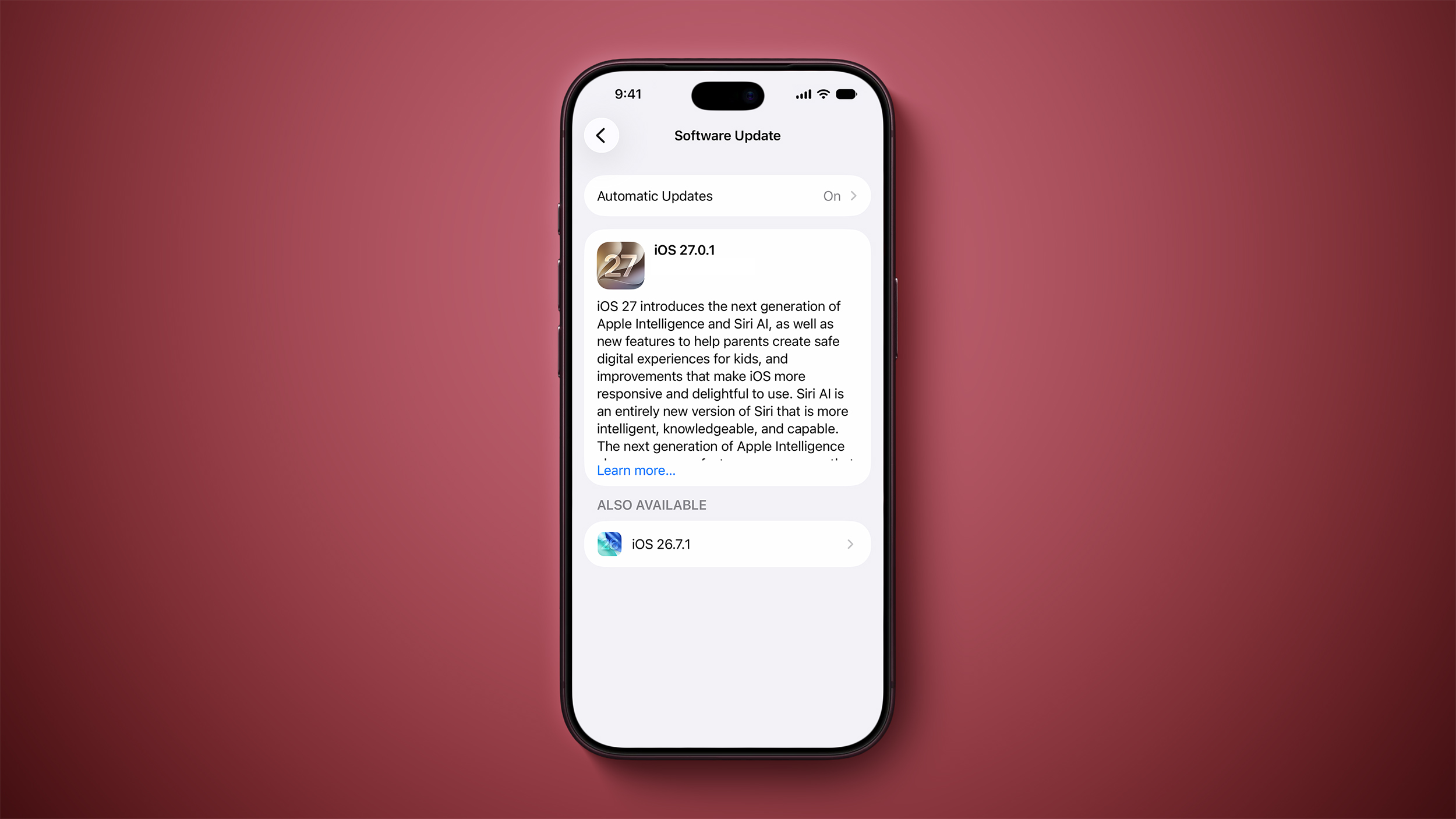
If you are an iPhone user currently running iOS 26, opening your Settings app today will present a brand new layout, as Apple is now actively encouraging users to install iOS 27 by placing iOS 27.0.1 in the main spotlight of the Software Update screen. While upgrading to this major release remains completely optional, installing at least iOS 26.7.1 is recommended to ensure your device stays protected with essential security updates.
What Changed When You Check for Updates to Install iOS 27?
Starting today, iPhone users who have remained on the iOS 26 platform will see a distinct change in how software updates are displayed on their devices. When you open the Settings application, tap on General, and then select Software Update, the top prominent update featured at the head of the menu is now iOS 27.0.1.
This layout swap represents a major shift in how system updates are presented to iPhone owners. In previous weeks, major platform upgrades were held in a secondary location for users who chose to stay on the previous software generation.
With today's update, iOS 27.0.1 takes the top primary spot on the screen. Meanwhile, the latest maintenance update for the previous operating system generation, iOS 26.7.1, has been moved down to a smaller section titled "Also Available" located near the bottom of the page.
When you open your Software Update interface today, the contrast is immediately apparent. Where iOS 26 updates previously dominated the primary viewable area, iOS 27.0.1 now commands immediate visual attention as soon as the screen loads.
The Timeline: From the September 14 Release to Today
To fully understand why this interface change matters, it helps to look back at how software update options were organized over the past few weeks. Apple officially released iOS 27 on September 14. However, following that initial launch date, Apple did not immediately make the new operating system the default main option for every existing iPhone user.
Instead, from September 14 until today, both the original launch of iOS 27 and the subsequent release of iOS 27.0.1 were listed inside the secondary "Also Available" section at the bottom of the Software Update screen. During that same time window, users who remained on iOS 26 were presented with iOS 26.7 and later iOS 26.7.1 as the main prominent update at the top of their screen.
By completely reversing the display order today, Apple has altered its presentation approach. By putting iOS 27.0.1 front and center, Apple is taking a much more active stance in prompting iPhone owners who are still on iOS 26 to proceed with the upgrade and install iOS 27 on their handheld devices.
This systematic reversal of display options reflects Apple's standard transition strategy following a major operating system launch. By shifting the display hierarchy, Apple gently guides the majority of its user base toward the newer software platform over time.
Are iPhone Users Required to Install iOS 27 Right Away?
When a new operating system release suddenly moves into the primary slot on your iPhone, you might naturally wonder if you are being required to make the switch. It is important to clarify that Apple is not forcing iPhone users to install iOS 27 against their preference.
If you prefer to keep your phone on iOS 26 for the time being, your device will continue operating as normal. Apple does not trigger an automatic mandatory upgrade to iOS 27.0.1, giving users complete control over when they decide to move to a new platform generation.
Apple respects user preference when it comes to major platform transitions. You can continue using your iPhone on the iOS 26 software branch for as long as you wish, provided you understand the software update choices available to you.
Understanding that you are not forced to upgrade gives you the flexibility to choose the exact timing that works best for your personal workflow and device setup. You can take your time evaluating the update while continuing to use your iPhone with complete peace of mind.
The Critical Importance of Installing iOS 26.7.1 for Security
While moving to a new major platform generation is optional, maintaining strong digital security on your iPhone is essential. If you choose not to upgrade to iOS 27 at this time, installing iOS 26.7.1 is strongly recommended by Apple to protect your personal data.
Software security threats evolve constantly, and Apple regularly releases updates like iOS 26.7.1 to patch discovered vulnerabilities. These security maintenance releases ensure that users who stay on older platform versions do not leave their devices exposed to potential exploits.
By making iOS 26.7.1 available in the lower "Also Available" section, Apple gives users a safe path to keep their software secure without requiring them to install new operating system features before they are ready to do so.
Choosing to stay on iOS 26 does not mean abandoning device protection. Applying iOS 26.7.1 delivers the necessary security fixes while preserving your existing operating system environment exactly as it is.
Comparing Your iPhone Settings Software Update Paths
When you navigate into the Software Update menu on an iPhone running iOS 26 today, you will see two clear choices. Understanding how these two options compare will help you decide which path makes the most sense for your device today.
Path 1: Upgrading Prominently to iOS 27.0.1
The first option is the primary featured update located right at the top of the screen. Selecting iOS 27.0.1 transitions your iPhone from the iOS 26 platform generation to the brand new iOS 27 platform. This path gives you instant access to all new software capabilities, design updates, and system features included in the major iOS 27 update.
This primary path is ideal for users who enjoy having the absolute latest features and software advancements on their devices. It represents the full upgrade route recommended by Apple for all compatible iPhone models.
Path 2: Remaining on iOS 26 with iOS 26.7.1
The second option is located inside the smaller "Also Available" section at the bottom of the screen. Choosing iOS 26.7.1 allows you to stay on the familiar iOS 26 software environment while applying critical security fixes. This path is ideal for users who prioritize software stability and familiarity over new platform features.
By opting for this secondary path, you maintain full operational consistency on your device while receiving essential background protections. It offers an excellent middle ground for users who want security without immediate platform changes.
Summary Breakdown of Available Software Update Choices
Here is a quick reference list summarizing how software updates are organized in your iPhone settings today:
- Main Display (Top of Screen): iOS 27.0.1 — Featured as the primary choice to encourage users to install iOS 27.
- Secondary Display (Bottom of Screen): iOS 26.7.1 — Located under "Also Available" for users choosing to stay on iOS 26.
- Mandatory Status: Neither update is forced, but applying at least iOS 26.7.1 is recommended for security protection.
- Initial iOS 27 Launch: September 14, with the Settings update hierarchy officially swapping today.
Official iOS 27 Adoption Numbers Still Pending
Industry observers, technology journalists, and Apple fans frequently monitor platform adoption rates to track how rapidly the user base migrates to new operating system versions. At present, Apple has yet to share official iOS 27 adoption numbers.
Apple regularly tracks software adoption metrics across active devices connected to its services, periodically releasing public statistics. However, official numbers regarding how many users have upgraded to iOS 27 since its September 14 release have not yet been published.
Reversing the layout order in the Settings app is a proven method for driving higher adoption across millions of iPhone users. As casual users check for system updates and see iOS 27.0.1 featured at the top, adoption figures are expected to rise significantly in the coming weeks.
Until Apple publishes official adoption data, observers will continue watching how layout adjustments like today's Settings update influence overall migration rates across the global iPhone population.
How to Find and Navigate Your iPhone Software Update Menu
Checking your software update status on an iPhone takes only a few simple steps. Here is how you can access your Settings menu to see which updates are currently offered on your device:
- Unlock your iPhone and open the native Settings app from your Home Screen or App Library.
- Scroll down the main list of options and tap on General.
- Tap on Software Update near the top of the General menu.
- Allow your iPhone a few seconds to connect to Apple servers and check for available updates.
- Look at the top of the display to view the prominent prompt to install iOS 27.0.1.
- Scroll down to the bottom of the screen to view the Also Available section if you wish to select iOS 26.7.1 instead.
Navigating this menu gives you direct visibility into your device's current update status. You can check back at any time to review available releases and manage your software installation preferences.
Explore Community Resources, Roundups, and Forum Threads
If you want to read deeper breakdowns of operating system updates or connect with other iPhone users discussing software performance, explore the following community resources:
- Explore detailed roundups covering iOS 26 and iPadOS 26.
- Learn more about feature additions in iOS 27 and iPadOS 27.
- Join active community conversations on the iOS 26 forum and the iOS 27 forum.
- Read the original news article titled Apple Now Pushing iPhone Users Still on iOS 26 to Install iOS 27 directly on MacRumors.com.
- Share your experiences and Discuss this article with fellow readers in the forums.
These resources offer valuable context and user feedback regarding software stability, new capabilities, and performance across various device models. Visiting these forum threads lets you hear directly from other users before making your software decision.
Conclusion: Choosing Whether to Install iOS 27 Today
By reversing the order of updates in Settings under General and Software Update, Apple has made it clear that it wants iPhone users to install iOS 27 and experience the newest platform generation. While you are not forced to make the leap right away, keeping your iPhone secure should remain a priority. Check your settings today and choose between upgrading to iOS 27.0.1 or installing iOS 26.7.1 from the "Also Available" section to keep your phone protected.
from MacRumors
-via DynaSage
