
How to Check Your Mac's Manufacture Date in macOS 27
If you want to check your Mac manufacture date, the latest operating system update makes finding this information easier than ever. With macOS 27 Golden Gate, Apple has restored access to manufacturing details that were previously hidden from users.
Determining the exact age of your computer is essential when buying a used device, checking warranty coverage, or simply understanding your hardware history. For several years, finding this information required decoding complex serial numbers. However, Apple changed that system, leaving many users wondering when their machines were actually built.
Thankfully, macOS 27 Golden Gate introduces a straightforward built-in method to view this data directly inside your system menus. You no longer need third-party tools or online serial decoders to get accurate manufacturing details.
How to Check Your Mac Manufacture Date in macOS 27
Locating the manufacturing information on your computer only takes a few seconds once you know where to look. Apple placed this information inside the system settings, right under the regulatory information section.
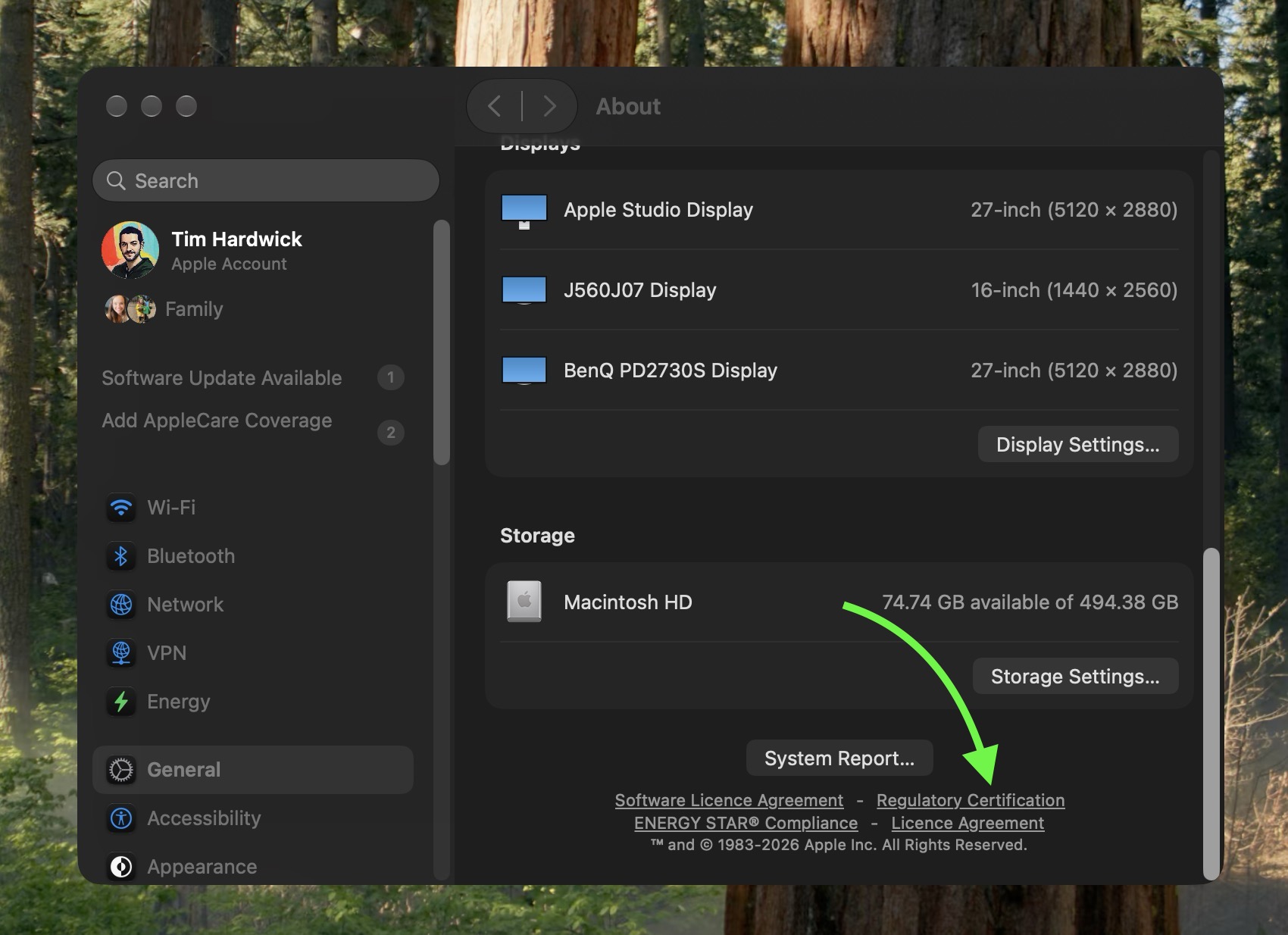
To view your production details, follow these simple steps on your updated machine:
- Click on the Apple menu in the top left corner of your screen and select System Settings.
- Navigate to the General tab in the left sidebar.
- Select About from the main panel on the right side.
- Scroll down past the main specifications and locate the System Report button.
- Click on Regulatory Certification underneath the System Report button.
- Look at the bottom of the certificate window to find the new Date of Manufacture field.
By following these steps, you can immediately see the exact production timing listed on the official regulatory certificate.
The History of Apple Serial Numbers and Production Tracking
To understand why this new feature in macOS Golden Gate is so notable, it helps to look at how Apple handled hardware identification in the past. Historically, every Apple product featured a structured serial number that contained encoded data.
By analyzing specific characters within those old serial numbers, owners could decipher the exact factory where the device was built, the year of production, and even the specific week it rolled off the assembly line. Websites and database tools made it simple to paste a serial number and instantly retrieve manufacturing information.
The Shift to Randomized Serial Numbers
Everything changed in 2021, when Apple began transitioning its entire product line to randomized serial numbers. This change started appearing across new devices like the purple iPhone 12 and quickly expanded to include new Mac models.
These new randomized strings consisted of alphanumeric characters that no longer contained coded details about factory locations or production schedules. Apple made this change to improve security and prevent fraudulent activities tied to serial format predictions.
While randomized alphanumeric strings improved security, they created a challenge for consumers. Mac owners who bought newer devices had no native way to check your Mac manufacture date or verify when their hardware was actually assembled.
Community Discovery and How the Date Works
The addition of the production date in macOS 27 was not officially advertised during product keynotes or press releases. Instead, it was discovered by attentive users in the Mac community.
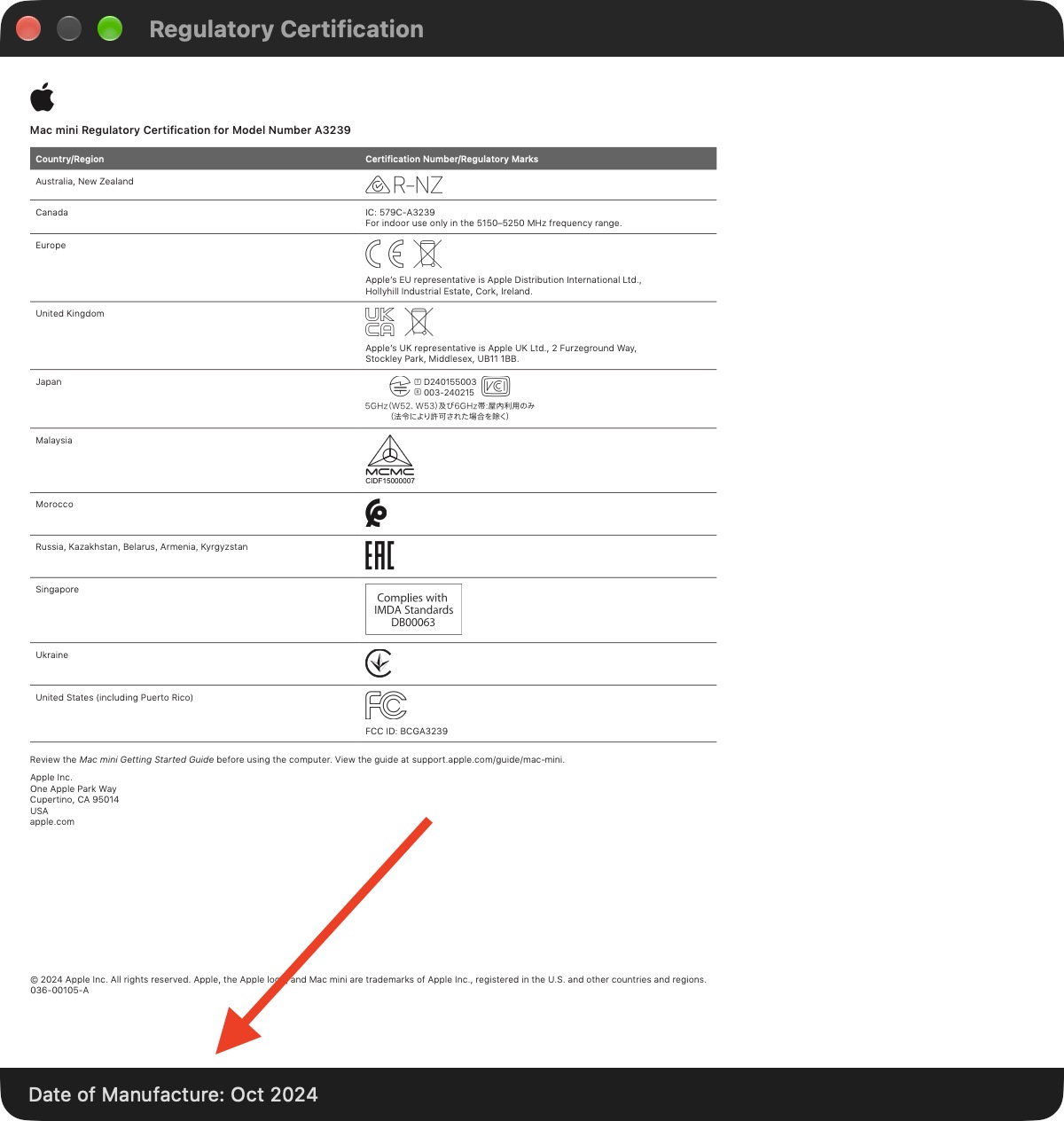
The discovery was highlighted by MacRumors forum member pdfu, who noticed the new regulatory layout while exploring software updates. Tech enthusiasts quickly began verifying the field across different Mac models.
Logic Board vs. Final Assembly Date
As community members investigated the new certificate details, an interesting detail emerged regarding what the date actually represents. Another forum member noted that the date displayed on their certificate matched the manufacturing period of their logic board rather than the complete machine's final assembly date.
This conclusion was supported by the fact that the user had previously had their logic board replaced during a hardware repair. Because the displayed manufacture date reflected the replacement component rather than the original chassis build date, evidence suggests that this timestamp is stored directly on the logic board firmware.
Here is a summary of what this means for your computer:
- Original Machines: If your Mac has never been repaired, the date generally reflects when the core components were produced.
- Repaired Machines: If your machine received a swapped mainboard, the listed date will show when the replacement board was manufactured.
- Firmware Storage: The software reads the production record directly from internal hardware components rather than cloud lookup services.
Silent Additions in macOS 27 Golden Gate Updates
The regulatory certification menu first appeared during the beta testing cycle for macOS Golden Gate. Apple frequently introduces small system utility updates and regulatory updates quietly during operating system updates.
Because Apple did not explicitly highlight this feature during software presentations, many users were unaware that their system settings now contain this detailed certificate. Checking your Mac manufacture date is now a simple native option built into macOS.
For more community discussion regarding operating system features and hardware tracking, check out the macOS Golden Gate forum or read the original article How to Check Your Mac's Manufacture Date in macOS 27 on MacRumors.com. You can also Discuss this article directly with other Mac users.
Conclusion
Knowing how to check your Mac manufacture date gives you full transparency into your hardware history without relying on third-party decoders. Whether you want to verify component age or inspect a second-hand machine, macOS 27 Golden Gate brings back this valuable information directly inside System Settings.
from MacRumors
-via DynaSage
