Apple Tests Bringing Back a Softer Side of Liquid Glass
How the Softer Style Changes iPhone Navigation Bars
When you scroll through a list inside an app on your smartphone, the top header bar acts as a persistent anchor for menu buttons and screen titles. On standard software configurations, content passing under the top header meets a distinct, solid boundary line. This visual divider separates the top navigation area from the active list underneath.
According to a recent finding shared by pdfu on X (Twitter), Apple is actively testing a gentler alternative for **iPhone navigation bars**. Instead of relying on a sharp visual edge, the test interface applies a soft blur gradient at the bottom of the header. This creates an elegant fade effect whenever content glides beneath the header area.
This experimental look draws inspiration from visual styles previously utilized in iOS 26. By removing the harsh stopping point, text, photos, and list items fade away gradually rather than ending abruptly at a rigid line.
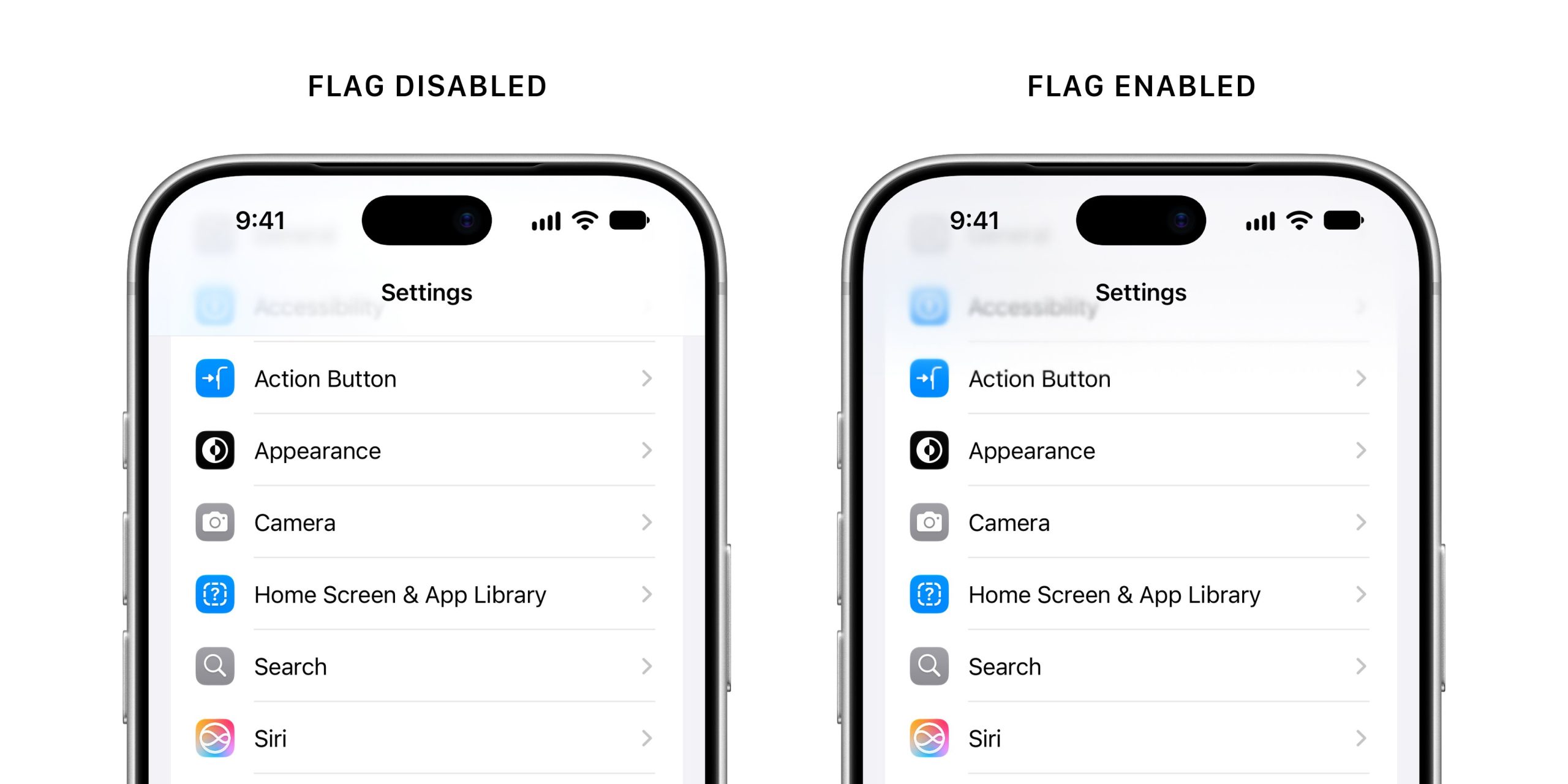
Side-by-Side Visual Comparison: Hard Boundary vs. Gradual Blur
The visual difference between these two design choices becomes obvious when examining a side-by-side comparison. In the image shared by pdfu, the left panel demonstrates how app screens look with the test feature turned off. The navigation bar displays a clear, hard edge separating the top navigation area from the items listed below it.
In contrast, the right panel illustrates what happens when the gradual fade feature is toggled on. The sharp lower line disappears completely. In its place, a soft visual blur transitions smoothly between the scrolling list and the top app controls.
This gentle blur gives screen elements room to breathe. Instead of colliding with a hard line, scrolling text gradually dissolves into the semi-transparent background of the header as it moves upward.
How Liquid Glass Transparency and Tint Settings Work
This softer transition effect does not display automatically in all app view configurations. According to details published by pdfu, the gradual blur effect triggers under specific visual parameter requirements.
First, the soft fade appears when the Liquid Glass tint level is set to 25 percent or lower. Second, the visual update only applies to system navigation elements that use the default style preset. Custom navigation headers styled independently by third-party app developers may not display this exact gradient blur.
Apple previously reworked Liquid Glass in iOS 27 to resolve readability issues reported by users. That initial redesign established a more uniform background plane behind top content to ensure screen text remained legible regardless of wallpaper colors.
Additionally, Apple replaced its older fixed Clear and Tinted choices with an adjustable continuous transparency slider. This adjustment feature grants users finer control over screen transparency, allowing everyone to balance glass-like depth against clear text contrast.
Understanding Internal Feature Flags in iOS Betas
If you are currently running the latest test software on your personal mobile phone, you will not find a toggle switch for this feature in your Settings menu. The softer gradient look remains hidden within system code.
The gentler fade is currently disabled behind an internal feature flag inside the iOS 27.3 developer beta software build. Feature flags are internal switches that software engineers use to test unreleased interface changes without enabling them for the public.
Because this code is gated behind an internal developer flag, general users cannot turn on the change through standard software options. Apple frequently tests visual tweaks in early beta versions to measure system performance and visual appeal before decide whether to include them in official releases.
Key Takeaways: Experimental iPhone Navigation Bars Design
Understanding these subtle user interface changes helps highlight how modern mobile operating systems evolve over time. Here is a summary of what this experimental update entails:
- Gentle Boundary Blur: Scrolling content fades away smoothly instead of meeting a hard lower edge line.
- Specific Tint Threshold: The visual effect activates when **Liquid Glass transparency** tint is set at 25 percent or lower.
- Default Style Constraint: The fade effect specifically targets default system navigation headers across compatible apps.
- Hidden Developer Flag: The feature is disabled by default in the iOS 27.3 developer beta release.
- Design Heritage: The aesthetic tweak revives a popular visual transition style originally introduced during iOS 26.
The Evolution of User Interface Design in iOS
Visual interface design requires a careful balance between eye-catching depth and effortless functional clarity. When navigation elements feel too translucent or lack defined boundaries, screen content can blur together, making text harder to skim.
Conversely, when boundary lines are made overly dark or thick, the operating system can feel heavy and boxy. By reintroducing a softer edge gradient, Apple appears to be refining how depth and blur interact during active screen scrolling.
Fine-tuning these scrolling boundaries ensures that **iPhone navigation bars** maintain structural clarity without distracting users from the main app content below. Smooth visual gradients reduce eye strain when quickly flicking through long message threads, news headlines, or photo galleries.
Will Apple Make the Softer Look Permanent?
Whether Apple will bring back the softer look for **iPhone navigation bars** or make it an optional setting in a future update remains to be seen. Test features hidden behind developer flags are routinely tweaked, redesigned, or discarded entirely based on engineering feedback.
If tester feedback proves positive, Apple may enable the softer visual blur as the new standard design in an upcoming public software update. Alternatively, the feature could be added to accessibility or display settings as a toggleable customization choice.
For more detailed information regarding ongoing software research, visit the dedicated tag for pdfu. This article, "Apple Tests Bringing Back a Softer Side of Liquid Glass" first appeared on MacRumors.com.
Discuss this article in our community forums to share your personal thoughts on these visual tweaks to **iPhone navigation bars**.
from MacRumors
-via DynaSage

Post a Comment