iOS 27 Tweaks Apple Wallet's U.S. Passport Feature
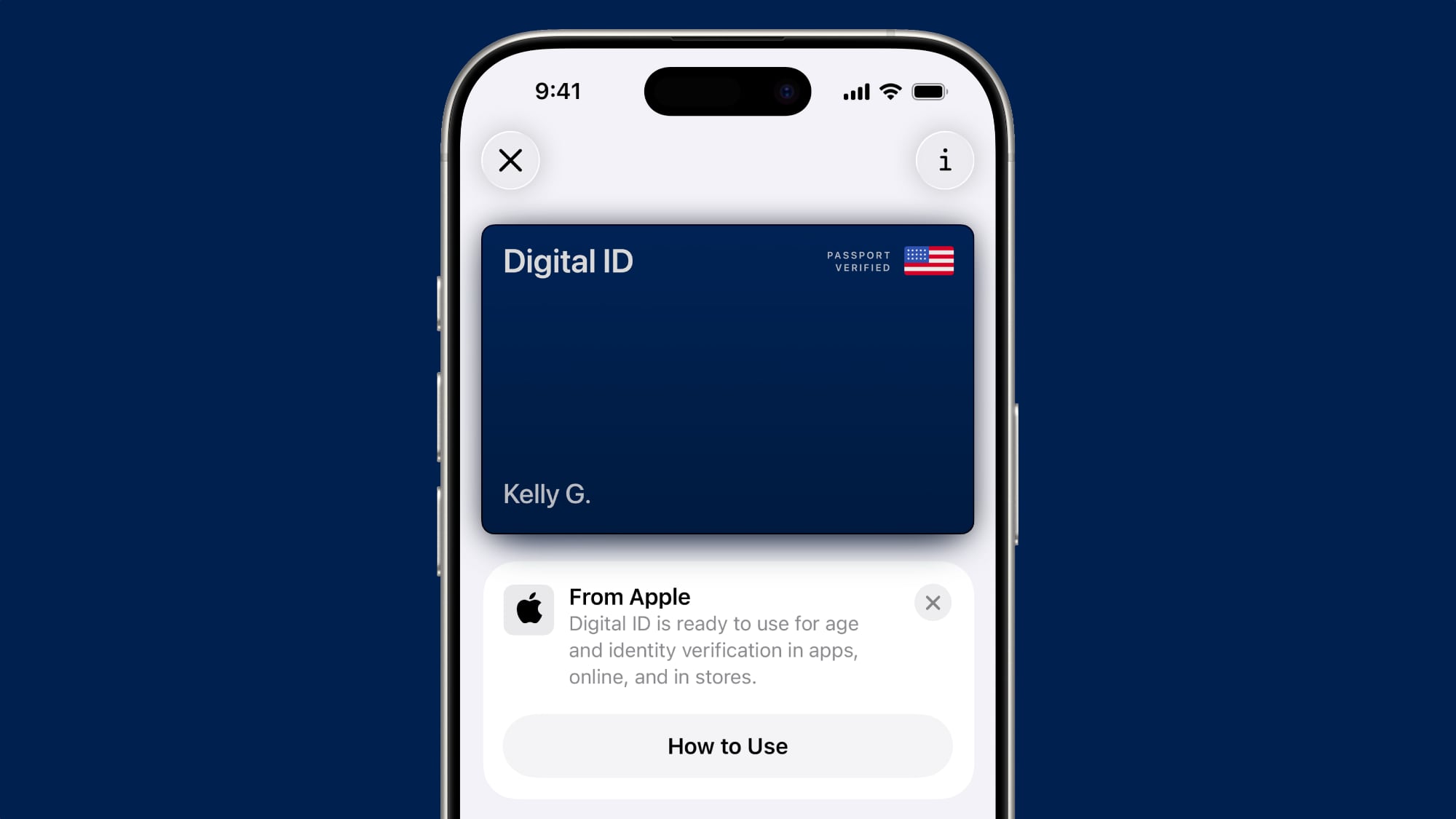
Unpacking iOS 27's Digital ID Feature and a Recent Glitch in Apple Wallet
The landscape of digital identification continues to evolve rapidly, and Apple is at the forefront of integrating these advancements into our everyday lives. With the release of iOS 27, Apple is refining the way we manage our personal identification documents, specifically with the Digital ID passport feature within the powerful Apple Wallet app. This groundbreaking functionality aims to streamline travel and identity verification processes, moving us closer to a future where physical documents are no longer the sole standard.
However, the path to innovation is rarely without its bumps. Recent beta versions of iOS 27 have introduced some noteworthy changes to the information and menus associated with the Digital ID feature. While these "tweaks" are likely intended to enhance the user experience and bolster security, they have inadvertently led to a temporary deactivation issue for some iPhone users. This article delves into the latest updates, the reported bug, and Apple's recommended solution, providing a comprehensive look at what this means for users of the Digital ID passport feature.
The Promise of Digital ID in Apple Wallet
The concept of a Digital ID or a digital passport within a smartphone application like Apple Wallet represents a significant leap forward in personal identification. For years, our wallets have been crammed with physical cards – driver's licenses, passports, credit cards, and more. Apple Wallet has already revolutionized payment methods and loyalty programs, and extending its capabilities to official government-issued identification marks a natural, yet ambitious, progression.
Imagine a future where boarding a flight, verifying your age, or even opening a bank account could be done securely and efficiently with just your iPhone. This isn't just about convenience; it's also about enhancing security. Physical documents can be lost, stolen, or tampered with. A digital ID, protected by the advanced biometric security of an iPhone (Face ID or Touch ID) and Apple's robust privacy framework, offers a new layer of protection against fraud and identity theft. The data is encrypted and stored securely within the device's Secure Element, designed to keep sensitive information isolated and protected.
The integration of passports into this system is particularly exciting for international travel. While full global adoption will take time and widespread government cooperation, the initial steps taken by countries partnering with Apple pave the way for a more seamless travel experience. Less fumbling for documents, quicker processing times, and enhanced verification methods could redefine how we move across borders. It reflects a growing global trend towards digital government services and the recognition of smartphones as secure personal data carriers.
How Digital ID Works: A Glimpse into the Future
When you add a Digital ID, such as a passport, to Apple Wallet, a secure and encrypted representation of your physical document is created on your device. This process typically involves a multi-step verification, often requiring you to scan your physical document and use your iPhone's camera for a secure facial scan, ensuring that you are indeed the rightful owner. Once verified, your digital ID is ready for use in approved locations.
When presented for verification, instead of handing over your physical passport, you would simply present your iPhone. The authorized reader, such as an airport kiosk or a TSA agent's device, would communicate with your iPhone using technologies like NFC (Near Field Communication). You would then authorize the sharing of specific, required data using Face ID or Touch ID, giving you complete control over what information is shared and when. This selective sharing of data is a key privacy advantage over traditional physical documents, which often expose more information than necessary.
Apple's design philosophy prioritizes user privacy and security above all else. Your full personal data isn't stored on Apple's servers, nor is your usage tracked. The system is designed so that only the necessary information is transmitted for verification, and only with your explicit biometric authorization. This intricate balance of convenience, security, and privacy is what makes the Digital ID in Apple Wallet a truly transformative feature.
iOS 27's Refinements to the Digital ID Experience
With iOS 27, Apple is not just maintaining the status quo; it's actively seeking to enhance the utility and user-friendliness of its features. The release notes mention that iOS 27 "tweaks some of the information and menus shown alongside the Digital ID passport feature in the Apple Wallet app." While specific details about these tweaks are often refined throughout the beta cycle, we can infer their likely intent.
These refinements could range from subtle UI changes to significant backend improvements. For instance, Apple might be optimizing the visual presentation of your digital passport, making it clearer and easier to understand what information is being displayed or shared. They might be refining the instructions for use, making the verification process more intuitive for both the user and the verifying authority. Another possibility is the reorganization of menus to make options like "Remove Card" or "View Details" more accessible, or to add new options related to privacy settings or usage history.
Beyond the visual aspect, these tweaks could also involve underlying security protocols. With ongoing advancements in encryption and authentication, Apple continuously updates its systems to counteract new threats and ensure the highest level of data protection. These "tweaks" could represent upgrades to the cryptographic methods used to secure your digital ID, or improvements in how the iPhone communicates with external readers to prevent unauthorized access. The goal is always to make the Digital ID feature more robust, more reliable, and ultimately, more widely accepted.
The Importance of Iteration in Software Development
Software development, especially for complex and sensitive features like Digital IDs, is an iterative process. Each iOS update, particularly during the beta phase, is an opportunity for Apple to gather feedback, identify areas for improvement, and fine-tune features before their public release. The "tweaks" in iOS 27 are a testament to this continuous refinement cycle. They demonstrate Apple's commitment to perfecting the user experience and ensuring that such a critical feature is as secure and seamless as possible.
These changes are often based on real-world usage data, feedback from early adopters, and collaboration with government agencies that are adopting the Digital ID standard. What might seem like a minor change to a menu or a piece of displayed information could have significant implications for compliance, user understanding, or operational efficiency in an airport security line. Thus, every update, even those simply described as "tweaks," contributes to the overall maturity and reliability of the Digital ID system.
The iOS 27 Digital ID Deactivation Bug: What Happened?
Despite the best intentions behind these refinements, the beta nature of iOS 27 means that unforeseen issues can arise. Recently, some iPhone users running recent beta versions of iOS 27 have reported a specific bug: their Digital ID has been deactivated. This means that without warning, the digital representation of their passport or other identification in Apple Wallet became unusable, preventing them from leveraging the feature when needed.
This deactivation issue appears to be directly related to the "changes and/or a related bug" stemming from the iOS 27 tweaks. While the exact technical root cause isn't publicly detailed, it's common for software updates, especially those affecting core system functionalities and secure elements, to inadvertently trigger such glitches. It could be a timing issue, a conflict with a specific device configuration, or an error in how the updated system re-validates existing Digital ID entries.
The impact of such a bug, especially for a feature intended to be reliable for critical uses like travel, can be significant. Imagine arriving at an airport expecting to use your digital passport, only to find it deactivated. This underscores the importance of exercising caution with beta software, particularly for features you rely on daily. Apple's transparency in acknowledging the issue and providing a solution is crucial for maintaining user trust in these emerging technologies.
Troubleshooting the Deactivation Issue: Apple's Solution
Fortunately, Apple has swiftly acknowledged the deactivation bug and provided a straightforward solution for affected users. According to Apple, users experiencing this issue "must remove the card and re-add it to the Apple Wallet app in order to use it again." This process effectively refreshes the digital ID's registration with the system, resolving the underlying conflict that caused its deactivation.
Here's a step-by-step guide on how to perform this fix:
- Open the Apple Wallet app: Locate and tap the Wallet app icon on your iPhone's home screen.
- Select your Digital ID: Find the deactivated Digital ID (e.g., your passport) within Wallet.
- Access Card Details: Tap on the card to open its details. You might see a message indicating its deactivated status.
- Remove the Card: Scroll down and look for an option like "Remove Card" or "Delete Card." Tap it and confirm your choice. This will securely erase the digital representation from your device.
- Restart your iPhone (Optional but Recommended): A quick restart can sometimes help clear any lingering software glitches.
- Re-add the Digital ID: Open the Wallet app again. Tap the "+" button in the top right corner (or similar prompt to add a new card). Follow the on-screen instructions to add your Digital ID again. This will typically involve scanning your physical document and possibly performing a facial verification.
- Verify Activation: Once re-added, ensure the Digital ID appears as active and ready for use in your Wallet.
This solution, while simple, temporarily requires users to go through the initial setup process again. It highlights the dynamic nature of beta software development and the importance of having backup physical identification, especially when using experimental features for critical functions.
The Broader Implications of Digital Identity
The incident with the iOS 27 Digital ID bug, while a minor setback in the beta phase, serves as a valuable learning experience and underscores the complexities involved in integrating digital identity solutions. It also prompts us to consider the broader implications of this technology for privacy, accessibility, and the future of identity verification.
Digital IDs hold immense potential to enhance convenience and security. No longer will we have to carry multiple physical cards, constantly fearing loss or theft. The ability to control precisely what information is shared, authenticated by biometric data, offers a level of privacy often absent with traditional physical documents. This shift could reduce friction in numerous daily interactions, from checking into a hotel to collecting a package.
However, challenges remain. Widespread adoption requires universal acceptance by various institutions, from government agencies to private businesses. There's also the question of accessibility for individuals who may not own a smartphone or who prefer traditional methods. Ensuring that the digital divide doesn't widen is a critical consideration for policymakers and technology providers alike.
Security and Privacy: Cornerstones of Digital ID
At the heart of the Digital ID feature in Apple Wallet are robust security and privacy measures. Apple understands that for users to trust this technology, their personal data must be impeccably protected.
- Secure Element: Your digital ID is stored in the iPhone's Secure Element, a certified, industry-standard, hardware-based security chip designed to store sensitive data like payment information and cryptographic keys. This isolates your ID from the rest of the operating system, making it extremely difficult for malware or unauthorized access to compromise it.
- Biometric Authentication: Every interaction with your Digital ID requires your explicit authorization via Face ID or Touch ID. This ensures that only you can present your ID or share its information, even if your iPhone falls into the wrong hands.
- Selective Data Sharing: Unlike a physical passport that exposes all your information, Digital ID allows you to share only the specific data points required for a transaction (e.g., just your age for alcohol purchase, or only your identity for a check-in).
- No Apple Tracking: Apple states it does not track when or where you use your Digital ID. Your privacy is paramount, and the system is designed to decentralize control back to the user.
- Encryption: All data transmitted between your iPhone and a verifying reader is encrypted, preventing eavesdropping and ensuring secure communication.
These measures are vital for fostering public trust and ensuring that the convenience of digital identification doesn't come at the cost of personal security or privacy.
Beyond iOS 27: The Future Landscape of Digital IDs
The current iteration of Digital ID and its refinements in iOS 27 are just the beginning. The vision extends far beyond just passports. We can anticipate a future where a wider range of identity documents – from national ID cards and health insurance cards to professional licenses – could be securely digitized and managed within Apple Wallet.
International collaboration will be key to unlocking the full potential of digital passports. As more countries adopt compatible standards and verification technologies, the dream of seamless global travel powered by a smartphone will become a reality. This could drastically reduce processing times at airports and border crossings, making international journeys less stressful and more efficient.
Furthermore, the underlying technology used for secure identity verification could also be adapted for other innovative applications. Imagine a secure voting system, streamlined access to government services, or even enhanced security for smart home devices, all leveraging the robust framework of a digital identity platform. The possibilities are vast, and Apple's continued investment in this area signals a clear commitment to shaping this future.
The Road Ahead: Adoption and Development
While the technology is advancing rapidly, widespread adoption of Digital IDs requires significant effort on multiple fronts. Governments need to establish clear legal frameworks and invest in the necessary infrastructure for verification. Businesses need to integrate compatible readers and update their policies to accept digital forms of identification. And critically, public trust must be earned through consistent reliability, robust security, and transparent privacy practices.
The beta phase of iOS 27, with its occasional glitches like the deactivation bug, is an essential part of this development process. It allows Apple to stress-test the system in real-world scenarios, identify vulnerabilities, and refine the user experience before the feature rolls out to millions worldwide. Each bug fixed and each tweak implemented brings us closer to a truly seamless and secure digital identity ecosystem.
The success of Digital ID in Apple Wallet won't just be measured by its technological sophistication but by its ability to simplify and secure our lives without compromising our privacy. As iOS 27 continues its development cycle, we can expect further refinements and enhancements, moving us ever closer to this transformative vision.
Conclusion: Navigating Innovation with Caution
iOS 27 Tweaks Apple Wallet's U.S. Passport Feature, introducing refinements aimed at improving the digital ID experience. While these updates represent Apple's continued commitment to innovative and secure personal identification, the recent deactivation bug serves as a timely reminder of the nature of beta software. For those embracing the cutting edge of technology, encountering such issues is part of the journey.
Apple's prompt identification of the problem and provision of a clear solution—removing and re-adding the digital card—demonstrates their dedication to resolving user-facing issues swiftly. As the Digital ID feature in Apple Wallet matures, it promises to bring unprecedented convenience and enhanced security to our daily lives and travel experiences. We're witnessing the early stages of a fundamental shift in how we manage and present our identity in an increasingly digital world.
Users participating in the iOS 27 beta should remain mindful of the potential for bugs and always keep physical backups of their critical identification documents. As Apple refines iOS 27 and its groundbreaking features, the future of digital identity looks promising, paving the way for a more integrated and secure personal data experience.
This article, "iOS 27 Tweaks Apple Wallet's U.S. Passport Feature" first appeared on MacRumors.com
Discuss this article in our forums
from MacRumors
-via DynaSage

Post a Comment