iOS 27 Shared Albums Go Full Res at the Cost of Your iCloud Storage
iOS 27: Understanding the Big Changes to Shared Albums and Your iCloud Storage
Get ready for a significant shift in how you share photos and videos with friends and family on your Apple devices. With the upcoming release of iOS 27, Apple is introducing some major changes to Shared Albums within the Photos app. While these updates bring a highly requested feature – full-resolution quality for your shared memories – they also come with a crucial trade-off: new Shared Albums will now count against your iCloud storage limits. This article will delve deep into these changes, explaining what they mean for you, your storage, and how you interact with your digital photos.

The Evolution of Shared Albums: From Compressed to Full-Resolution
For many years, Apple's Shared Albums have been a convenient and free way to share collections of photos and videos with specific groups of people. Whether it was for a family vacation, a birthday party, or a collaborative project, Shared Albums made it simple to keep everyone in the loop without resorting to sending individual files or relying on third-party services. However, there was always a catch that many users quietly accepted: the quality of the media was reduced.
Shared Albums Before iOS 27: A Compromise for Convenience
Prior to iOS 27, any photos uploaded to a Shared Album were automatically downsized by Apple. Specifically, images were scaled down to a maximum of 2,048 pixels on their longest edge. This meant if you had a high-resolution photo taken with your latest iPhone, say a 4000x3000 pixel image, it would be compressed and reduced in size when added to a Shared Album. Panoramic photos were a slight exception, capable of going up to 5,400 pixels wide, but still not their original full glory.
This reduction in quality had a clear purpose: to save space. By compressing and downsizing images, Apple could offer Shared Albums as a completely free service, not counting towards your personal iCloud storage allowance. You could store up to 5,000 photos and videos in Shared Albums across all your shared collections without impacting your iCloud storage limit whatsoever. This was a fantastic deal for many, providing an "unlimited" (within the 5000-item cap) storage solution for shared memories, albeit at a slightly lower quality. For casual viewing on a phone or tablet screen, this quality was generally perfectly acceptable, and most users barely noticed the difference. However, for those who wanted to print large photos, zoom in on details, or maintain the highest fidelity for archival purposes, the reduced resolution was a limitation.
The iOS 27 Upgrade: Full-Resolution at a Cost
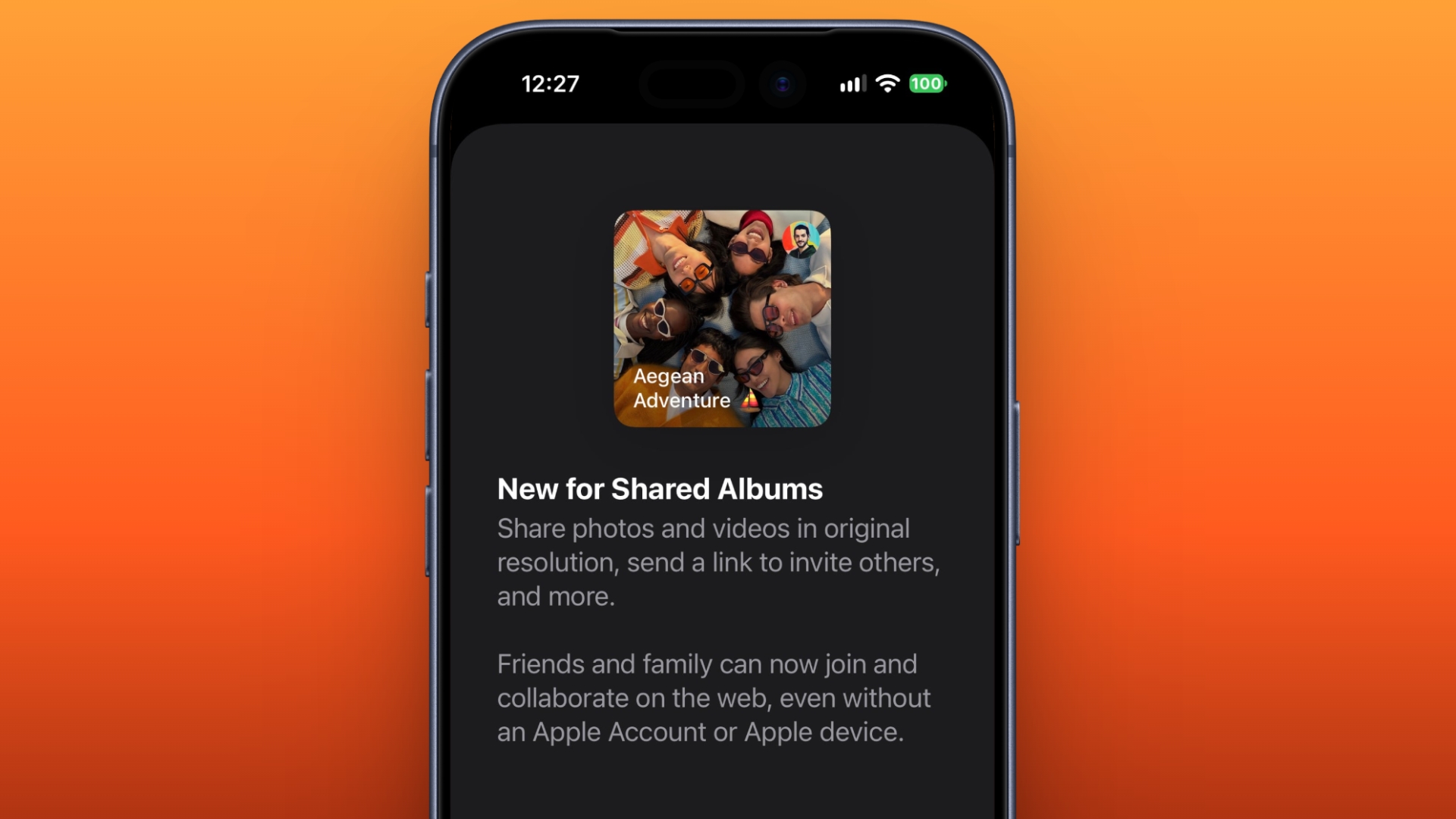
With iOS 27, Apple is removing that quality compromise for *newly created* Shared Albums. Now, photos and videos added to these new albums will retain their original, full-resolution quality. This is a massive improvement for users who value image fidelity. Full resolution means your photos will look sharper, retain more detail, and be better suited for printing, editing, or viewing on larger displays without pixelation.
Imagine capturing a breathtaking landscape with your iPhone's advanced camera, or a precious family moment. In the past, sharing this through a Shared Album meant a slight degradation in quality. With iOS 27, those vibrant colors, intricate details, and sharp edges will remain intact, just as you captured them. This enhancement aligns Shared Albums more closely with other Apple photo features, like iCloud Photos, which always strive to maintain original quality.
However, this significant quality upgrade comes with an equally significant change in policy: these full-resolution Shared Albums will now consume your personal iCloud storage. This means that every photo and video you or others add to a new Shared Album will directly contribute to your overall iCloud storage usage. This is the major trade-off that users need to be acutely aware of as they transition to iOS 27.
Understanding iCloud Storage and Its New Role in Shared Albums
To fully grasp the implications of these changes, it's essential to understand what iCloud storage is and how it typically works. iCloud storage is Apple's cloud-based storage service that helps keep your photos, videos, documents, app data, and device backups safe, updated, and available across all your Apple devices. Every Apple ID comes with 5GB of free iCloud storage. While this 5GB is a great starting point for basic backups and syncing contacts or calendars, it can quickly fill up, especially for users who take a lot of photos and videos, or backup multiple devices.
The Impact on Your Storage Plan
For years, the exemption of Shared Albums from iCloud storage limits was a hidden perk for many. Users could create numerous albums, inviting family and friends, accumulating thousands of photos without ever touching their precious 5GB free tier. With iOS 27, that era ends for new Shared Albums. If you create a new Shared Album, and you and your collaborators upload full-resolution content, it will directly reduce the available space in your iCloud plan.
For users already struggling to manage their 5GB free storage, or those on smaller paid plans (like the 50GB or 200GB tiers), this change could quickly lead to storage warnings and the need to upgrade their iCloud plan. High-resolution photos and especially videos consume significant amounts of data. A single minute of 4K video can be hundreds of megabytes, and even high-quality photos can be several megabytes each. A Shared Album with a few hundred photos and a handful of videos could easily consume gigabytes of your storage.
The Owner's Burden: Your Storage, Everyone's Contributions
Perhaps the most critical aspect of this new policy is the "owner responsibility." If you are the person who *creates* a new Shared Album in iOS 27 and invites others to contribute, then *your* iCloud storage limit is the one that will be impacted by *all* content added to that album, regardless of who uploads it. This is a significant shift.
Consider this scenario: You create a Shared Album for a family reunion. You invite your siblings, cousins, and parents. Everyone starts uploading their photos and videos of the event. While they are contributing, all that data will count against *your* iCloud storage. If Uncle Bob uploads 20 high-resolution videos, those gigabytes will be deducted from your plan, not Uncle Bob's. This means that as the album owner, you need to be mindful not just of your own uploads but also of the potential contributions from everyone you invite.
This dynamic introduces a new level of management and communication that wasn't previously necessary. You might need to have conversations with your collaborators about the size of their uploads or even set some ground rules for contributions to avoid unexpectedly running out of iCloud storage. This makes the choice of who you invite to a Shared Album even more important.
Enhanced Collaboration: A Double-Edged Sword
Another major enhancement in iOS 27 is the expanded accessibility for Shared Albums. Apple has made it significantly easier for people to join and collaborate on these albums. Previously, participating in a Shared Album largely required an Apple ID and an Apple device. Now, friends and family can join and contribute directly on the web via iCloud.com, even if they don't have an Apple Account or an Apple device. This is a game-changer for cross-platform sharing.
Opening Doors to Android and Windows Users
This new capability means that Android phone users, Windows PC users, or anyone with a web browser can participate in a Shared Album. They can view, upload, and comment on photos and videos without needing to buy an iPhone or create an Apple ID. This is a fantastic step towards inclusivity and makes sharing memories across different ecosystems much smoother.
For instance, if you're planning a trip with friends who primarily use Android phones, you can now seamlessly create a Shared Album where everyone can contribute their photos and videos from the journey, all in one central place. This eliminates the need for workarounds like using third-party cloud services or constantly emailing files back and forth.
The Increased Risk of Storage Consumption
However, this increased ease of collaboration, especially with users from other platforms, directly amplifies the risk of consuming your iCloud storage. Since it's easier for more people to contribute, and those people might be less familiar with Apple's storage policies or simply upload indiscriminately, the inclination for participants to add a large volume of photos and videos is only likely to increase. This brings us back to the crucial warning: "Be careful who you invite..."
Consider inviting a large group of people to an event's Shared Album. Each person, regardless of their device, can now upload their entire camera roll of that event. If you're the owner, all of those collective contributions will accumulate against your iCloud storage. This means you could quickly find your storage unexpectedly maxed out by contributions from people you might not have expected to be heavy uploaders. It underscores the importance of understanding the new rules and perhaps being more selective or communicative about expectations when inviting collaborators.
A Free Alternative: Temporary Shared Albums
Recognizing the potential storage implications of full-resolution Shared Albums, Apple has also introduced a thoughtful alternative in iOS 27: Temporary Shared Albums. This new feature provides a way for users to collaborate on short-term projects or events without impacting your iCloud storage limit. It's a clever solution designed to offer flexibility and address common sharing needs.
How Temporary Shared Albums Work
Temporary Shared Albums are ideal for situations where you need to collect photos and videos for a limited period. Think of a weekend trip, a specific party, a school project, or a short-term work collaboration. The key characteristic of these albums is their time limit: after 30 days, any photos and videos within the Temporary Shared Album that have not been saved to a participant's personal photo library are automatically deleted. This ensures that the albums don't become long-term storage hogs, and critically, they do not consume any iCloud storage for the owner or the contributors during their active period.
This feature offers the best of both worlds for specific use cases. You get the convenience of shared photo collection without the storage anxiety. However, the 30-day expiry means that any valuable memories collected in such an album must be proactively saved by individual participants to their own photo libraries (or iCloud Photos) before the deadline. If not, they will be permanently lost when the album expires.
Who Benefits from Temporary Shared Albums?
This feature is a boon for:
- Event Organizers: Quickly collect photos from wedding guests, partygoers, or attendees of a conference without worrying about your storage.
- Travelers: Create an album for a short trip, allowing everyone to contribute their pictures and then save their favorites afterwards.
- Students/Teams: Collaborate on visual projects that have a defined end date.
- Casual Sharing: Share a quick batch of photos with friends for immediate viewing and selection, rather than long-term archiving.
It's important to educate all participants about the 30-day limit so they know to save anything they wish to keep permanently.
Managing Your Existing Shared Albums
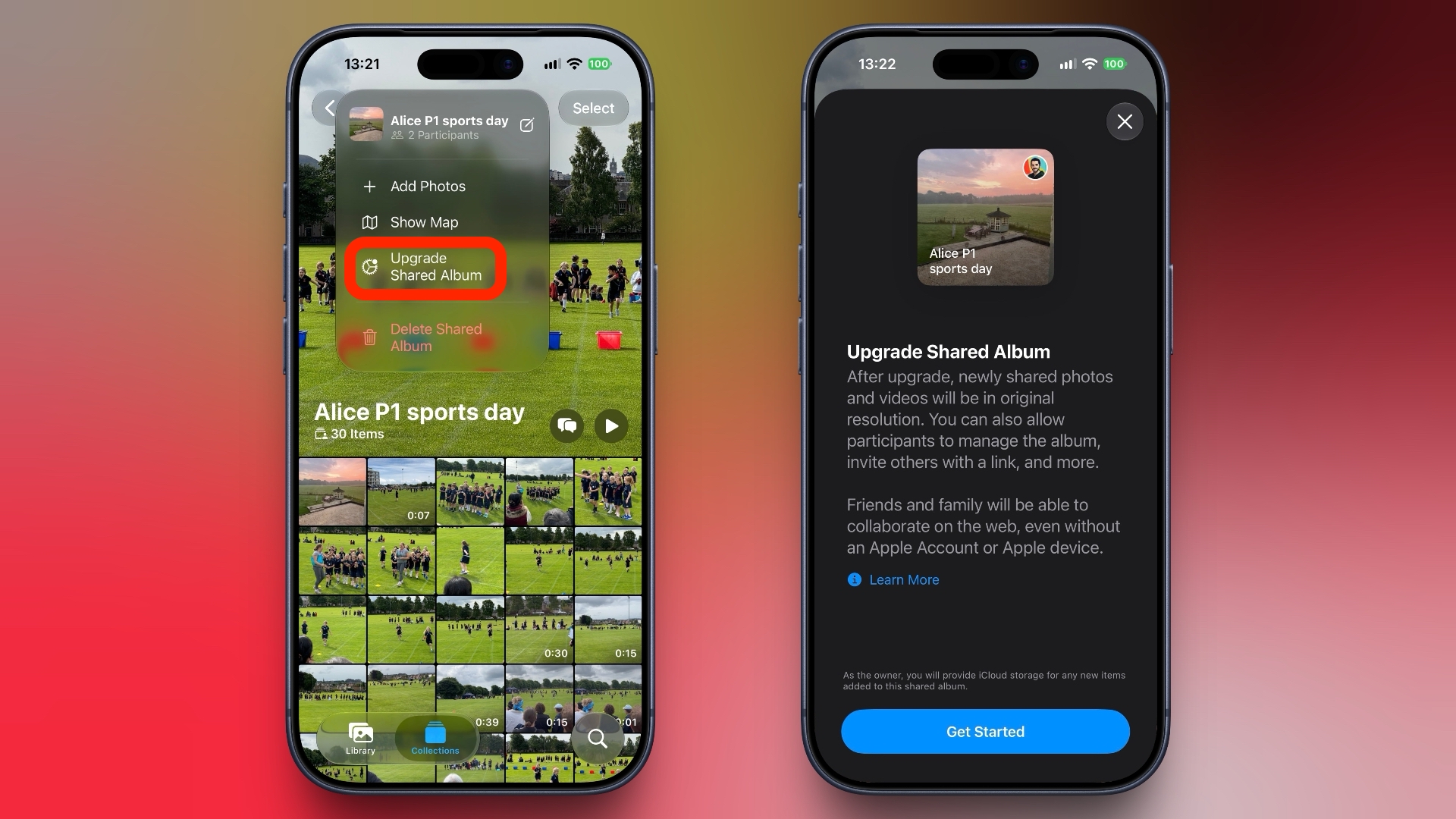
One piece of good news amidst these changes is that your existing Shared Albums, created before the iOS 27 update, are not automatically affected by these new policies. By default, they will continue to function as they always have: offering reduced-resolution photos and videos that do not consume your iCloud storage. This means your long-standing family albums, vacation collections, or project archives will remain free and untethered to your storage plan.
The "Upgrade Shared Album" Option
However, Apple understands that some users might want to enhance the quality of their older, cherished Shared Albums. For this reason, the Photos app in iOS 27 includes an "Upgrade Shared Album" option. This feature allows you to convert an existing Shared Album to the new full-resolution format. If you choose this option, all the photos and videos within that album will be upgraded to their original quality (if available), and from that point forward, the album's contents (and any future additions) will begin to count against your iCloud storage. Any new contributions after the upgrade will also be in full resolution and impact your storage.
When to Consider Upgrading an Existing Album:
- Archival Quality: If an existing album contains particularly precious memories that you wish to preserve in the highest possible quality, and you are willing to dedicate iCloud storage to it.
- Printing Needs: If you plan to print large-format photos from an older Shared Album and require the original resolution for the best results.
- Future-Proofing: If you want all your Shared Albums to be uniformly high quality going forward, even older ones.
Before hitting that "Upgrade" button, carefully consider the storage implications. Review the album's contents and estimate the potential storage usage. This is especially important for albums with hundreds or thousands of items, as upgrading them could consume several gigabytes of your iCloud space very quickly.
Navigating iOS 27: Strategies for iCloud Storage Management
With these significant updates, effective iCloud storage management becomes even more crucial for iPhone and iPad users. Here are some strategies to help you navigate the new landscape:
1. Monitor Your iCloud Storage Regularly
Make it a habit to check your current iCloud storage usage. Go to Settings > [Your Name] > iCloud. This will show you a breakdown of what's using your storage. Understanding your current consumption will help you anticipate how new Shared Albums might impact your available space.
2. Be Selective with New Shared Albums
Before creating a new Shared Album, consider its purpose. Is it a long-term archive of high-quality memories, or a temporary collection for an event? Use Temporary Shared Albums for short-term needs to avoid storage consumption.
3. Communicate with Collaborators
If you create a full-resolution Shared Album and invite others, make sure they understand that their contributions will count against *your* storage. You might politely ask them to be mindful of uploading excessively large files, especially lengthy 4K videos, unless that's explicitly the album's purpose and you've accounted for the storage.
4. Consider Upgrading Your iCloud Plan
If you're a heavy photo and video user, or if you anticipate collaborating extensively with full-resolution Shared Albums, it might be time to consider upgrading your iCloud storage plan. Apple offers various tiers (e.g., 50GB, 200GB, 2TB) at reasonable monthly prices. The 200GB plan is often a sweet spot for families, providing ample space for photos, backups, and now, Shared Albums.
5. Utilize Temporary Shared Albums Effectively
Leverage the 30-day free Temporary Shared Albums for events, short trips, or one-off collaborations. Just remember to download any desired content before the album expires to ensure you don't lose precious memories.
6. Periodically Review and Curate Your Albums
Whether new or upgraded, regularly review the contents of your full-resolution Shared Albums. Remove duplicate photos, blurry shots, or irrelevant videos to free up space. This is good practice for all your photo libraries, not just shared ones.
7. Explore Alternative Sharing Methods for Specific Needs
While Shared Albums are convenient, they aren't the only option. For truly massive file transfers or specific archival needs where iCloud storage is a concern, consider alternatives like AirDrop (for nearby Apple devices), third-party cloud storage services (Google Photos, Dropbox, etc.), or even physical drives for long-term backups.
Apple's Rationale and the Broader Picture
Why would Apple make such a significant change now, after years of offering free, albeit reduced-quality, Shared Albums? There are several likely reasons:
- Enhanced User Experience: Users consistently request higher quality. Providing full-resolution photos and videos aligns with the capabilities of modern iPhone cameras and enhances the overall visual experience.
- Consistency Across Services: Bringing Shared Albums in line with iCloud Photos, which always preserves original quality, creates a more consistent user experience within Apple's photo ecosystem.
- Monetization of Cloud Services: While Apple offers a generous free tier, encouraging more users to upgrade their iCloud storage plans is a logical business strategy for a company heavily invested in services.
- Increased Collaboration: The new cross-platform compatibility will undoubtedly lead to more usage. By making it easier for everyone to contribute, Apple is betting on increased engagement, which, in turn, will drive storage consumption.
The introduction of 5GB of free iCloud storage with new iPhone models (as mentioned in the context of iOS 27's release) is a small gesture, but it's important to note that this is the standard free tier. While helpful for new users, it's unlikely to fully offset the increased storage demands for heavy users of full-resolution Shared Albums.
Preparing for iOS 27: A Checklist
As iOS 27 moves from public beta to its general release, likely in September alongside new iPhone models, here’s a quick checklist to help you prepare:
- Update Your Devices: Ensure your iPhone and iPad are updated to iOS 27 (or iPadOS 27) when it becomes officially available.
- Check Current iCloud Storage: Go to Settings > [Your Name] > iCloud > Manage Account Storage to see your current usage.
- Review Existing Shared Albums: Decide if any of your existing albums are worth upgrading to full resolution, weighing the quality benefits against the storage cost.
- Understand Temporary Albums: Familiarize yourself with how Temporary Shared Albums work and their 30-day expiry.
- Communicate with Sharing Groups: If you plan to create new full-resolution Shared Albums, inform your collaborators about the storage implications.
Conclusion: A New Era for Shared Memories
iOS 27 marks a significant evolution for Shared Albums, moving them towards a higher-quality experience that many users have long desired. The ability to share full-resolution photos and videos, coupled with enhanced cross-platform collaboration, makes Shared Albums more powerful and inclusive than ever before. However, this power comes with a price: the consumption of your iCloud storage. The era of "free" shared photo storage for new albums is effectively over.
Users will need to be more mindful and proactive in managing their iCloud storage, understanding that every contribution to a new full-resolution Shared Album counts. Fortunately, the introduction of Temporary Shared Albums offers a smart, storage-free alternative for short-term collaborations, and existing albums remain unaffected by default. By understanding these changes and adopting smart storage management practices, you can fully enjoy the benefits of iOS 27's enhanced Shared Albums without any unpleasant surprises.
This article, "iOS 27 Shared Albums Go Full Res at the Cost of Your iCloud Storage" first appeared on MacRumors.com
Discuss this article in our forums
from MacRumors
-via DynaSage

Post a Comment