iOS 27: All the New Safari Features
Safari, Apple's powerful web browser, has always been a core part of the iPhone and iPad experience. With the introduction of iOS 27, Safari takes a monumental leap forward, integrating deeply with Apple's groundbreaking Apple Intelligence system. This isn't just a minor update; it's a complete reimagining of what a browser can do, offering a suite of intelligent features designed to make your online life easier, more organized, and more secure. From automatically sorting your open tabs to letting you create custom tools with just a few words, Safari in iOS 27 is set to transform how you interact with the internet. Imagine a browser that understands your context, anticipates your needs, and helps you achieve your goals with unparalleled efficiency. That's the promise of Safari's new capabilities, powered by the intelligence baked right into the heart of Apple's ecosystem.
In today's fast-paced digital world, managing information and staying productive online can be a challenge. We often find ourselves juggling countless tabs, trying to keep track of various research topics, shopping lists, or planning details. Safari's latest enhancements directly address these common pain points, leveraging advanced artificial intelligence to bring a new level of order and personalization to your browsing sessions. Whether you're a student, a professional, a casual browser, or someone who simply wants a more streamlined online experience, these new features are designed to empower you. Let's dive into the exciting changes that await you in Safari on iOS 27, and discover how Apple Intelligence is making your browser smarter than ever before.

Automatic Tab Organization: Your Browsing, Simplified
One of the most immediate and impactful changes you'll notice in Safari on iOS 27 is the revolutionary Automatic Tab Organization. If you've ever found yourself overwhelmed by a sea of open tabs, each vying for your attention, this feature is for you. Safari now intelligently uses Apple Intelligence to understand the content of your open tabs and group them together by relevant topics. This means your browser no longer just holds tabs; it organizes them into logical categories, making it incredibly easy to navigate and manage your online research or activities.
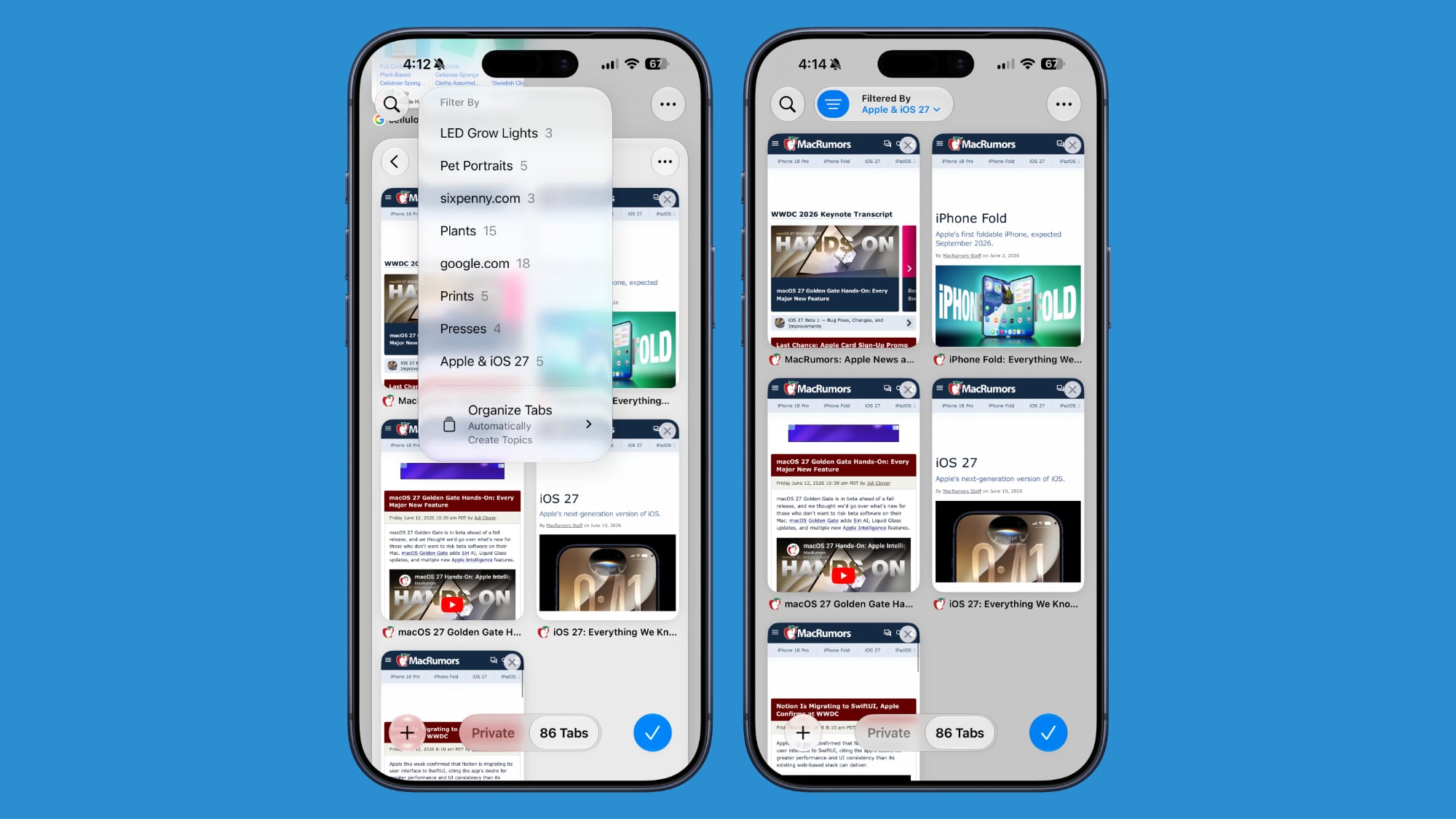
Imagine a scenario where you're simultaneously planning a dream vacation and researching a new gadget for your home. In the past, all the websites related to flights, hotels, tourist attractions, and reviews for that gadget would be mixed together in one long list of tabs. With Automatic Tab Organization, Safari will intuitively recognize these distinct subjects. All your travel-related tabs will be grouped under a "Vacation Planning" topic, while your gadget research will fall under "Tech Gadget Research." This smart grouping happens automatically in the background, freeing you from the mental burden of manually sorting and labeling. It transforms a cluttered browsing experience into a structured, efficient one.
Enabling this powerful feature is straightforward. When you're in the tab view, simply tap on the icon with three lines located in the upper right corner of your display. This will bring up a menu where you'll find the "Automatically Create Topics" setting. Toggle this on, and Safari will immediately begin its intelligent organization process. You'll see your tabs neatly arranged into topic-based groups, making it effortless to switch between different projects or interests without losing your place.
But the intelligence doesn't stop at automatic grouping. This same Safari menu also provides you with comprehensive control over your organized tabs. You can view all the created groups at a glance and even filter your tabs by topic. This means if you only want to focus on your "Vacation Planning" tabs, you can select that topic, and Safari will hide all other irrelevant tabs, allowing you to dive deep into your research without distractions. This level of focus is a game-changer for productivity, helping you maintain concentration and reduce cognitive overload.
Furthermore, Safari on iOS 27 introduces a brand new "Resume Browsing" section on your Start Page. This feature is a testament to the continuity and seamless experience Apple aims to provide. It allows you to quickly pick up where you left off, whether it's a topic you recently closed or, even more impressively, topics you have open on other Apple devices. This means if you started researching that new gadget on your iPad, you can effortlessly continue that session on your iPhone without missing a beat, ensuring your workflow is always fluid and uninterrupted across your Apple ecosystem.
The organizational power of Apple Intelligence extends beyond just active tabs. You can now also group pages you've saved to your Bookmarks and Reading List by topic. This is incredibly useful for long-term reference and knowledge management. Imagine having all your recipe bookmarks grouped under "Cooking Ideas," or all your important articles for a research paper neatly categorized under "Project X." This holistic approach to organization ensures that all your web-based information, whether actively being browsed or saved for later, remains structured and easily accessible, enhancing both your short-term efficiency and long-term information retrieval.
Custom Extensions: Tailor Your Browser with AI
Browser extensions have long been a way to personalize and enhance the web experience, but they typically require users to download pre-made tools from an app store. Safari in iOS 27 revolutionizes this concept by allowing you to create your own custom Safari Extensions using the power of Apple Intelligence. This groundbreaking feature, aptly named "Create an Extension," opens up a world of possibilities, empowering users to tailor their browsing experience to their exact needs with unprecedented ease.
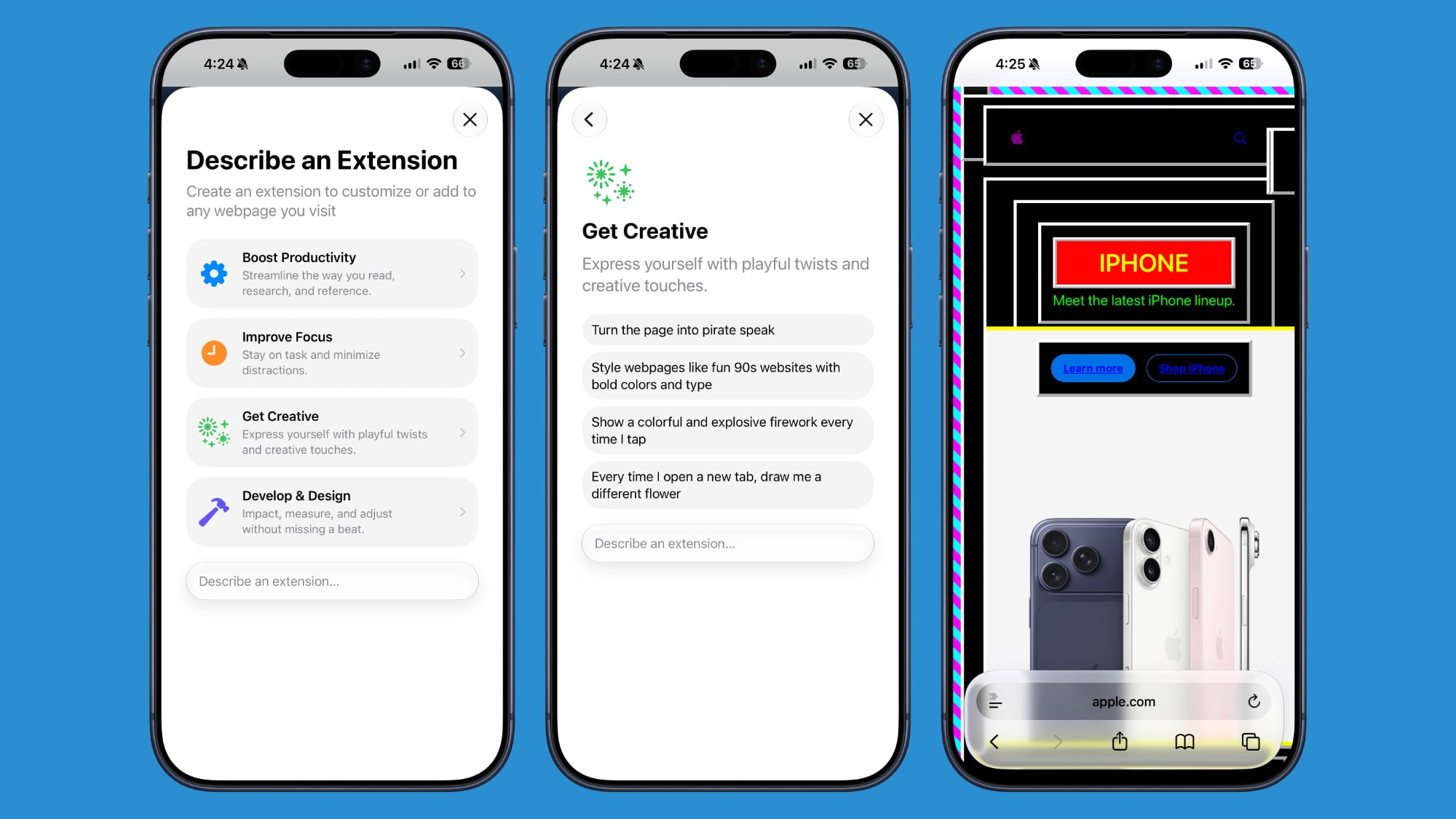
The premise is simple yet profound: instead of searching for an extension, you describe what you want it to do in plain language, and Apple Intelligence brings it to life. To access this feature, navigate to any webpage in Safari. Tap on the settings icon located to the left of the URL bar – this is where you typically find options like Reader View or Website Settings. Within this menu, you'll discover the "Create an Extension" option. Tapping on it will open an intuitive interface where you can type in your desired functionality, much like you would chat with an AI assistant.
Apple hasn't left you without inspiration; the interface thoughtfully includes a variety of suggestions categorized to spark your creativity. These categories include "Boost Productivity," "Improve Focus," "Get Creative," and "Develop and Design," each hinting at the diverse applications of custom extensions. Let's explore some of these intriguing possibilities:
- **"Create a citation for the current webpage and copy it to my clipboard"**: For students, researchers, or anyone needing to properly source information, this extension is a godsend. Instead of manually formatting citations, a quick tap could generate a perfectly formatted citation in your preferred style (e.g., APA, MLA, Chicago) and place it directly on your clipboard, ready to paste into your document. This dramatically streamlines the research and writing process, saving valuable time and ensuring accuracy.
- **"Create a 3-minute focus timer for the page"**: In an age of constant digital distractions, maintaining focus is key. This extension allows you to set a short, dedicated timer for a specific webpage. During this time, the extension could potentially block other notifications or even dim irrelevant parts of the page, helping you concentrate on the task at hand. It's a personalized tool for cultivating deep work sessions and managing your attention effectively.
- **"Set the minimum font size to 14pt"**: Accessibility and comfort are paramount for a good browsing experience. For users who prefer larger text for easier reading, this extension ensures that all websites, regardless of their original design, adhere to a minimum font size. This eliminates eye strain and makes the web a more inclusive place for everyone, especially those with visual impairments or simply those who prefer a more comfortable reading experience.
- **"Turn the page into pirate speak"**: This is where the "Get Creative" category truly shines, demonstrating the playful and customizable nature of Apple Intelligence. Imagine browsing your favorite news site or social media feed, but every word is translated into whimsical pirate slang. While not directly productivity-focused, it highlights the AI's ability to understand and manipulate text in creative ways, offering a fun and unique browsing novelty. This kind of extension showcases the AI's versatility beyond purely utilitarian tasks.
- **"Style websites like 90s websites with bold colors and type"**: For a touch of nostalgia or just to break the monotony, this extension can instantly transform the aesthetic of any modern webpage into the distinctive, often quirky, style of the 1990s internet. Think bright, clashing colors, pixelated graphics, and chunky fonts. It's a fantastic example of how Apple Intelligence can alter the visual presentation of web content based on a descriptive prompt, offering a unique visual experience that is both entertaining and reminiscent of an earlier digital era.
- **"Every time I open a new tab, draw me a different flower"**: This charming and delightful extension falls squarely into the "Get Creative" category. Instead of a blank or generic start page, each new tab would greet you with a unique, AI-generated illustration of a flower. This adds a touch of beauty and personalization to your browsing routine, transforming a mundane action into a moment of simple artistic appreciation. It's a small detail that can significantly enhance the user experience, making daily web interactions more pleasant.
- **"Highlight and show the dimensions of webpage elements when I tap on them"**: For web developers, designers, or anyone involved in creating and maintaining websites, this extension is incredibly practical. It allows for quick inspection of page elements, providing immediate feedback on their size and position. This streamlines the debugging and design refinement process, making it easier to ensure precise layouts and responsive designs. It eliminates the need for complex browser developer tools for simple inspections, offering an immediate and intuitive way to understand page structure.
- **"Enter the design mode for a website so that I can edit the contents"**: This powerful extension could allow developers or content creators to directly manipulate the text, images, or even CSS of a webpage in real-time within Safari. While such changes would typically be for local testing and wouldn't be saved permanently to the live site, it offers an incredibly fast way to visualize changes, experiment with different layouts, or quickly mock up content edits without needing to access a full content management system or development environment. This capability would significantly accelerate the iteration process for web professionals.
The ability to describe an extension and have Apple Intelligence create it on the fly is a paradigm shift. It democratizes the power of customization, putting sophisticated tools into the hands of every user, regardless of their technical expertise. This means your Safari experience can be truly unique, tailored precisely to your workflow, your preferences, and even your whims. It represents a future where your browser adapts to you, rather than the other way around, fostering a more personal, efficient, and enjoyable journey through the vast landscape of the internet.
Notify Me: Stay Informed, Effortlessly
In our increasingly connected world, staying on top of important information online often requires constant vigilance. Whether you're waiting for concert tickets to drop, a popular product to be restocked, or a crucial news update to break, manually refreshing pages can be tedious and time-consuming. Safari in iOS 27 introduces "Notify Me," a smart feature powered by Apple Intelligence that monitors websites for changes and alerts you when new information is detected, freeing you from the need for endless manual checks.
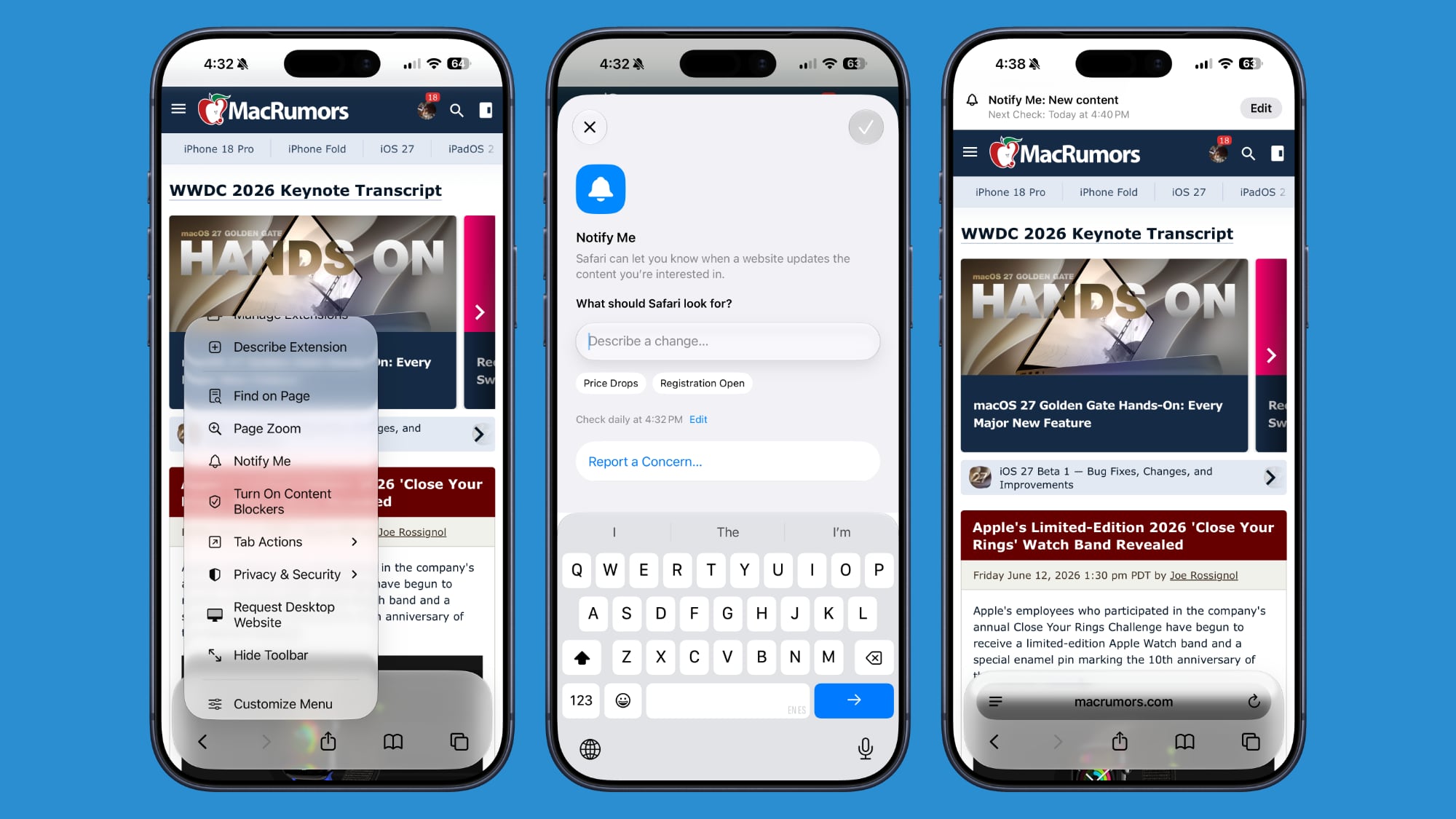
The "Notify Me" feature is incredibly versatile and can be applied to a wide range of scenarios. For instance, if you're a fan eagerly anticipating tickets for your favorite band, you can set Safari to watch the ticketing website and alert you the moment tickets go on sale. Similarly, for that popular gadget that's always out of stock, "Notify Me" can monitor the product page and send you an alert as soon as it becomes available again, giving you an edge in securing your purchase before it sells out.
Beyond shopping and entertainment, this feature has immense practical applications. Imagine monitoring a specific news source for updates on a developing story, tracking the price of a flight or hotel for your upcoming trip, or even keeping an eye on a job board for new postings that match your criteria. "Notify Me" acts as your personal web assistant, diligently watching the web on your behalf and only interrupting you when something relevant changes, ensuring you're always in the loop without constant effort.
Using "Notify Me" is designed to be intuitive. When you're on the website you wish to monitor, simply tap on the settings icon located to the left of the URL bar (the same icon you use for Reader View or custom extensions). From the options that appear, choose "Notify Me." Safari will then present you with an interface where you can precisely define what you want it to watch for. You can type in specific keywords or phrases (e.g., "tickets available," "in stock," "new article published"). This intelligent parsing of your request allows Safari to understand the context of the change you're interested in, making the notifications highly relevant.
Crucially, you can also set the frequency for Safari to check the website. This allows you to balance immediacy with battery life and data usage. Safari offers several options: at most, it will check websites once per hour, providing a good balance for time-sensitive alerts. For less urgent updates, daily, weekly, and even monthly checks are also available. This granular control ensures that you receive notifications at a pace that suits your needs, whether you need near real-time updates or simply a periodic summary of changes.
By empowering you to set up these intelligent watchdogs, "Notify Me" transforms Safari into a proactive information gathering tool. It helps you stay informed and take timely action on opportunities or critical updates without the constant manual grind. This feature truly embodies the spirit of Apple Intelligence, working quietly and effectively in the background to make your digital life more convenient and less demanding.
Passwords: Smarter Security, Effortless Protection
In today's digital landscape, strong and unique passwords are your first line of defense against cyber threats. However, managing countless complex passwords across various websites can be a daunting task, often leading people to reuse simple passwords, which significantly compromises their security. With iOS 27, Apple takes a monumental step forward in making online security both robust and effortless through an intelligent integration between the Passwords app and Safari. This new capability allows Safari, powered by Apple Intelligence, to automatically change flagged weak and compromised passwords, transforming them into strong, unique ones with minimal user intervention.
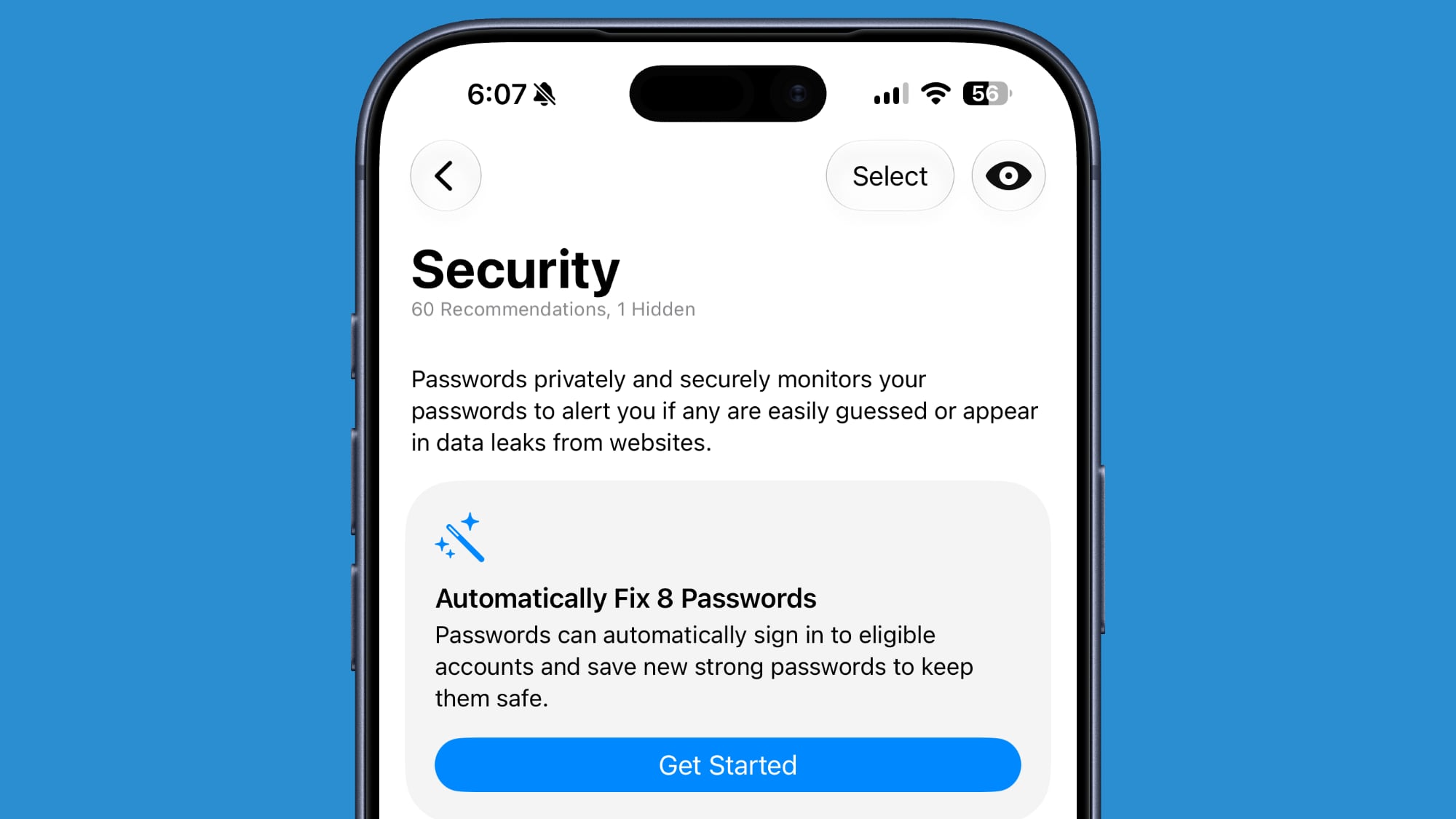
The Passwords app has long been a secure vault for your credentials, identifying weak passwords, reused passwords, and those exposed in data breaches. Previously, addressing these issues required you to manually navigate to each website, go through the "forgot password" process, and then create a new, strong password. This was often a tedious and time-consuming chore, discouraging many from taking the necessary steps to improve their security posture.
Now, thanks to Apple Intelligence, that arduous process is streamlined into a simple, secure, and automatic function. When the Passwords app flags a password as weak, reused, or compromised, it can proactively use Safari to address the issue. The feature intelligently navigates to the eligible website's password change page, logs you in securely using your existing (even if compromised) credentials, and then guides you through the process of creating a new, strong, and unique password. Crucially, in many cases, this entire complex sequence can be completed with just a single tap from you.
Apple Intelligence plays a pivotal role here by understanding the specific password change workflows of different websites. It knows where to click, what fields to fill, and how to successfully update your credentials, making the experience seamless across a vast array of online services. Once the new password is set, it's automatically saved and updated in your Passwords app, ensuring that you always have access to your latest, most secure credentials. This feature not only protects you from potential security breaches but also removes the friction associated with maintaining good password hygiene, making it easier than ever to keep your online accounts safe.
This integration exemplifies Apple's commitment to user privacy and security, leveraging on-device intelligence to empower you without compromising your data. By automating this critical security task, Apple helps users significantly reduce their risk of identity theft and data compromise, ensuring that their digital lives are built on a foundation of robust protection. It's a testament to how intelligent software can simplify complex security challenges, making the internet a safer place for everyone.
Ask to Browse: Empowering Parental Controls
As children increasingly navigate the digital world, parents face the challenging task of ensuring their online safety and guiding them towards responsible internet usage. Recognizing this vital need, Apple has continuously enhanced its parental control features, and iOS 27 introduces a significant addition to this suite: "Ask to Browse." This new feature provides parents with granular control over their children's web access, requiring parental approval before a child can visit a new website.
The "Ask to Browse" feature is designed to integrate seamlessly with Apple's existing Family Sharing and Screen Time functionalities. Once enabled for a child's device, Safari on that device will present a prompt whenever the child attempts to visit a website that hasn't been previously approved. Instead of instantly accessing the site, the child will be prompted to "Ask" a parent for permission. This request is then sent directly to the parent's device, typically through the Family Sharing system or Screen Time notifications.
Upon receiving a request, the parent can review the website link and decide whether to approve or deny access. If approved, the child can then proceed to browse the site, and that website will be added to a list of approved sites, meaning future visits won't require repeated approval. If denied, the child will be blocked from accessing that specific site. This intelligent system ensures that parents are always aware of their children's browsing habits and can intervene when necessary, fostering a safer online environment.
The benefits of "Ask to Browse" are multifaceted. For parents, it offers peace of mind, knowing that their children are not inadvertently exposed to inappropriate or potentially harmful content. It empowers them to have conversations with their children about online safety, discussing why certain websites might be off-limits or why others are perfectly fine. For children, it instills a sense of accountability and encourages them to think before clicking, promoting digital literacy and responsible decision-making from an early age. It also reduces the need for overly restrictive blanket blocks, allowing children to explore the internet more freely within defined, parent-approved boundaries.
This feature is a testament to Apple's ongoing commitment to family safety and digital well-being. By providing parents with intuitive and effective tools like "Ask to Browse," Apple helps families navigate the complexities of the internet together, fostering a secure and enriching online experience for children while giving parents the control they need. It's a thoughtful approach to parental controls, balancing protection with the encouragement of healthy digital exploration, all integrated into the core Safari experience in iOS 27.
Performance Improvements: A Faster, Smoother Safari
While the intelligent new features of Safari in iOS 27 are undeniably exciting, Apple has also focused on enhancing the fundamental browsing experience with significant under-the-hood performance improvements. A fast, responsive, and efficient browser is crucial for a satisfying online experience, and these optimizations ensure that Safari continues to lead the pack in speed, fluidity, and battery efficiency. These enhancements translate directly into a more enjoyable and productive time spent on the web, making every interaction feel snappier and more seamless.
One of the most welcome improvements is Safari's enhanced **power efficiency**. Apple has engineered Safari to drain less battery from your device, meaning you can browse for longer periods without needing to reach for your charger. This is particularly beneficial for users who spend a significant portion of their day online, whether for work, research, or entertainment. A more power-efficient browser contributes directly to the overall endurance of your iPhone or iPad, allowing you to maximize your device's usage throughout the day without compromise.
Beyond battery life, Safari in iOS 27 delivers **faster loading times** for web apps and Start Page content. Web applications, which increasingly resemble native apps, will now launch and operate with greater immediacy, bridging the gap between traditional websites and dedicated applications. Similarly, your Safari Start Page – often the first thing you see when opening the browser – will populate with content like frequently visited sites, Reading List articles, and now, your "Resume Browsing" topics, more quickly than ever before. This instant access to information and tools sets a high standard for responsiveness.
The engine powering modern web interactions has also received a significant boost, with **faster JavaScript handling**. JavaScript is the backbone of dynamic and interactive websites, from complex web applications to animated elements and real-time updates. By optimizing JavaScript execution, Safari ensures that these interactive components load and respond more quickly. This results in a smoother user experience, where forms submit faster, interactive maps render with less delay, and dynamic content updates without lag, making the entire web feel more alive and immediate.
Finally, users will notice **smoother animations and graphics**. The visual aspects of modern websites and web applications are crucial for a polished and engaging experience. Safari's improvements in graphics rendering mean that transitions, scrolling, and any animated elements on webpages will appear more fluid and natural, free from stuttering or choppiness. This attention to visual detail contributes to a more premium and enjoyable browsing experience, making the web feel more polished and integrated with the overall Apple aesthetic. Collectively, these performance improvements underscore Apple's commitment to not just adding new features, but also refining the core functionality of Safari, ensuring it remains the fastest, most efficient, and most delightful way to experience the internet on your Apple devices.
Compatibility: The Power of Apple Intelligence
The advanced, intelligent features introduced in Safari on iOS 27 are powered by Apple's revolutionary Apple Intelligence system. This means that certain capabilities, specifically those that leverage on-device AI for complex processing, have particular hardware requirements. Features like the automatic tab grouping, the ability to create custom extensions, and the custom notifications through "Notify Me" rely heavily on the sophisticated computational power and dedicated neural engine found in more recent Apple silicon.
To fully experience these groundbreaking Apple Intelligence-driven Safari features, you will need an iPhone 15 Pro or a later model. The iPhone 15 Pro and subsequent generations are equipped with the necessary A-series chips that incorporate a powerful Neural Engine capable of handling the intricate on-device AI computations required for these intelligent functions to operate efficiently and privately. This ensures that the AI processing happens directly on your device, enhancing both performance and user privacy, as your data doesn't need to be sent to the cloud for processing.
While some core Safari improvements, like general performance enhancements and the "Ask to Browse" parental control feature, may be available more broadly, the truly transformative AI-centric capabilities are exclusive to devices that can support Apple Intelligence. This reflects Apple's strategy of pushing the boundaries of what's possible with on-device AI, delivering cutting-edge features while maintaining a focus on performance and privacy that newer hardware enables.
Availability: Experience Safari in iOS 27 Now (or Soon!)
The future of web browsing with Safari in iOS 27 is not just a distant promise; it's available for exploration right now. Apple has made iOS 27 accessible to both developers and eager public beta testers. This means that if you have a compatible device (iPhone 15 Pro or later for the full Apple Intelligence experience) and are comfortable with running beta software, you can install the public beta today and begin experimenting with all the exciting new Safari features discussed in this post.
Participating in the public beta program offers a unique opportunity to get a first look at these innovations, provide feedback to Apple, and help shape the final release. However, it's always worth remembering that beta software can sometimes have bugs or performance issues, so it's generally recommended for secondary devices or for users who are comfortable with potential instability.
For those who prefer a more stable and polished experience, the official launch of iOS 27 is scheduled for this fall. The update will be released alongside Apple's new iPhone models, making it widely available to millions of users. This highly anticipated general release will bring all the powerful, intelligent enhancements to Safari to a broader audience, ensuring that everyone with a compatible device can benefit from a smarter, more efficient, and more secure web browsing experience.
Whether you choose to dive into the beta now or wait for the official fall release, one thing is clear: Safari in iOS 27 is poised to redefine your relationship with the internet. Powered by Apple Intelligence, it's a browser that understands, adapts, and empowers you like never before, making every click, every search, and every online interaction more intuitive and productive. Get ready to experience the next generation of web browsing.
This article, "iOS 27: All the New Safari Features" first appeared on MacRumors.com
Discuss this article in our forums
from MacRumors
-via DynaSage

Post a Comment