
watchOS 27 Features Dynamic App Grid, New Gesture Control, and More
Apple Unveils watchOS 27: A New Era of Smartwatch Interaction and Efficiency
Apple has just pulled back the curtain on watchOS 27, the latest major software update for the Apple Watch. This isn't just a minor refresh; it's a significant evolution designed to make your smartwatch even more intuitive, powerful, and seamlessly integrated into your daily life. From a completely reimagined way to access your apps to innovative new gesture controls and a host of under-the-hood enhancements, watchOS 27 promises to transform how you interact with your wrist-worn companion.
At the heart of this update are several groundbreaking features aimed at improving usability, extending battery life, and offering unprecedented convenience. Whether you're a fitness enthusiast, a busy professional, or someone who simply appreciates cutting-edge technology, watchOS 27 brings advancements that will resonate deeply. Let's dive into the details of what makes this update so exciting and how it will redefine your Apple Watch experience.
The Dynamic App Grid: Smarter, Faster App Access
One of the most visually striking and functionally impactful changes in watchOS 27 is the introduction of the redesigned dynamic app grid. For years, Apple Watch users have navigated a honeycomb-style app layout, which, while visually distinct, could sometimes feel overwhelming, especially with a growing number of installed applications. watchOS 27 addresses this directly by introducing a smarter, more context-aware system for displaying your apps.
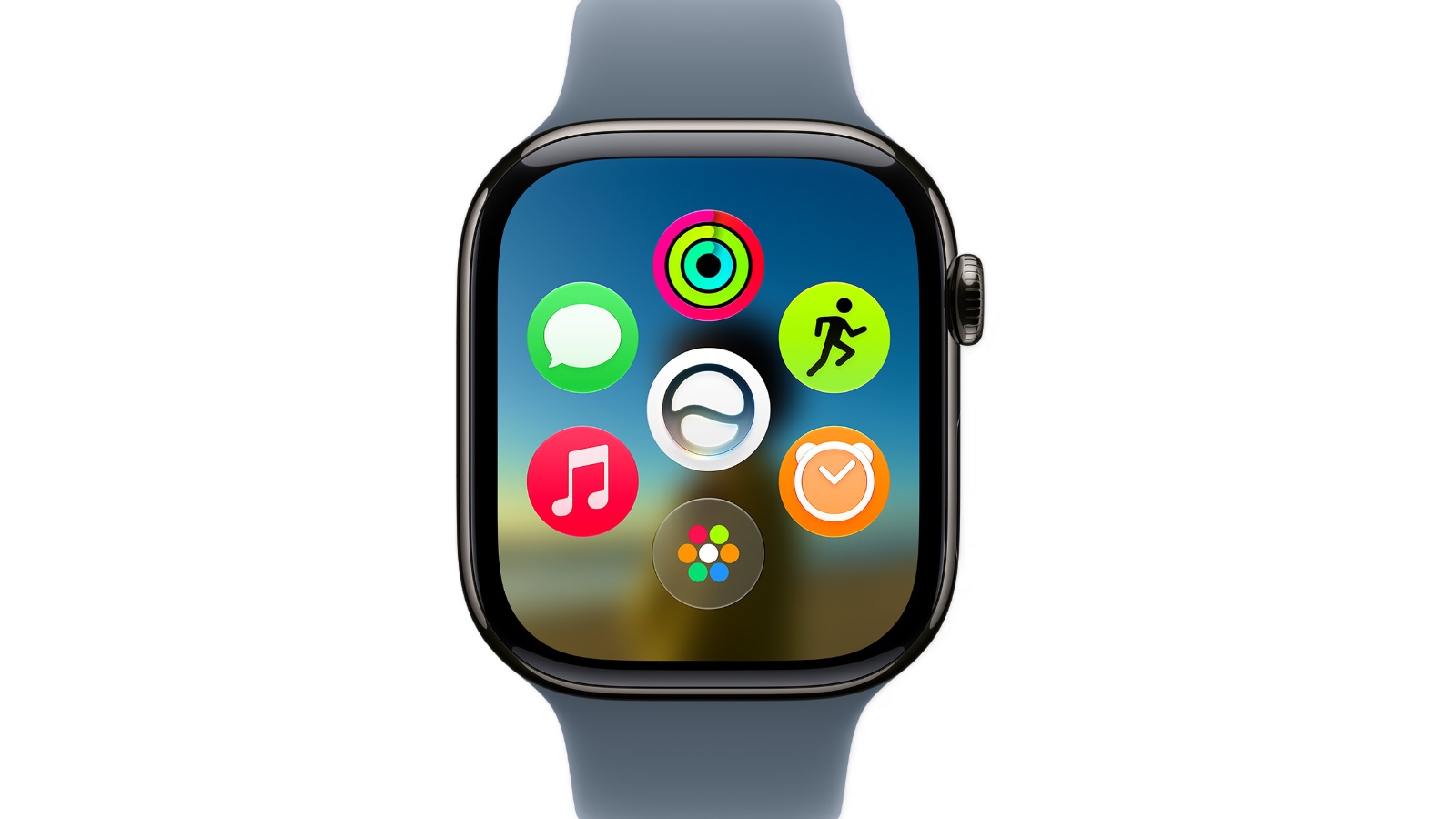
The new dynamic app grid doesn't just shuffle your apps around randomly; it intelligently surfaces and rearranges up to five of your most relevant applications based on your current context and usage patterns. Imagine this: if you're at the gym, your Workout app, Music, and perhaps a hydration tracker might instantly appear front and center. If it's morning and you're getting ready for work, your Calendar, Mail, and Transit apps could be prioritized. This intelligent prediction dramatically reduces the time and effort needed to find the app you need, precisely when you need it.
The system learns from your habits over time, becoming more accurate and personalized with each interaction. Instead of manually scrolling through dozens of tiny icons, you'll find your most-used apps subtly presented, ready for a quick tap. This approach is a significant step towards a more proactive and intuitive user interface, anticipating your needs rather than simply reacting to your commands.
But what if the app you're looking for isn't among the top five dynamically displayed? Apple has thoughtfully addressed this. Users can simply tap a dedicated icon located at the bottom center of the screen to instantly access the rest of their installed applications. This ensures that while the dynamic grid offers immediate access to key apps, the full breadth of your Apple Watch ecosystem is still just a tap away, maintaining flexibility and control.
The dynamic app grid is more than just a cosmetic change; it's a fundamental shift in how we interact with our smartwatches. It aims to reduce cognitive load, minimize distractions, and make the Apple Watch an even more efficient tool for managing your day. By bringing the most relevant information and tools to the forefront, watchOS 27 makes every interaction quicker and more meaningful, turning the digital clutter into a streamlined, personalized experience.
Revolutionary Gesture Controls: Tap Your Way to Seamless Interaction
One of the most innovative and anticipated features in watchOS 27 is the introduction of new gesture controls, particularly a groundbreaking new tap gesture. Apple has always sought to make its devices accessible and intuitive, and this new gesture is a testament to that philosophy, offering a completely new way to interact with your Apple Watch, even when your hands are full.
The new tap gesture allows users to select a widget within the Smart Stack simply by tapping their index finger and thumb together once. This subtle, almost imperceptible motion is a game-changer for one-handed operation. Think about moments when your other hand is occupied – perhaps you're carrying groceries, holding a child, walking a pet, or stirring a pot in the kitchen. In these scenarios, navigating your Apple Watch with a free hand can be cumbersome or even impossible. This new gesture eliminates that friction entirely.
Imagine you're trying to quickly check the weather widget in your Smart Stack while holding an umbrella or pushing a stroller. Instead of awkwardly trying to use your other hand or risk dropping what you're holding, a simple tap of your index finger and thumb on your watch hand is all it takes. This level of convenience opens up new possibilities for how and when you can interact with your device, making the Apple Watch truly an extension of yourself rather than a separate gadget requiring dedicated attention.
Beyond convenience, this gesture control also enhances accessibility. For individuals with limited mobility or those who find traditional touch interactions challenging, a simple, consistent tap gesture can provide a more reliable and less strenuous way to engage with their device. It's a thoughtful design choice that underscores Apple's commitment to making technology work for everyone.
This gesture is designed for selecting widgets in the Smart Stack, allowing you to quickly cycle through or activate the displayed information without needing to touch the screen directly. It feels natural, almost like a subtle flick or click of your fingers, and yet it translates into a powerful command for your watch. This innovation hints at a future where our devices understand us not just through touch and voice, but through even more subtle, intuitive physical cues, further blurring the lines between user and technology.
Enhanced Smart Stack and Custom Wallet Passes: Your Information, Smarter and More Accessible
The Smart Stack, introduced in earlier watchOS versions, transformed how users could access timely information on their Apple Watch, bringing relevant widgets to the forefront based on time, location, and activity. With watchOS 27, Apple is significantly expanding the intelligence and utility of the Smart Stack, making it even more proactive and helpful. Complementing this, the ability to create custom passes for the Wallet app adds a layer of personalization and convenience that users have long desired.
Smart Stack Gets Smarter
Apple is expanding Smart Stack suggestions to surface even more contextually relevant widgets, ensuring that the information you need is literally at your wrist before you even think to look for it. These new suggestions are incredibly thoughtful and practical:
- Birthday Reminders for Close Contacts: Never forget a loved one's birthday again. As the special day approaches, a widget will appear, reminding you to send your best wishes. This integrates seamlessly with your contacts and calendar, making thoughtful gestures easier than ever.
- Parked Car Location Card: For those moments when you've parked in a sprawling lot or a new city and can't quite remember where your car is, the Smart Stack will proactively display a card with your parked car's location. This leverages the Apple Watch's connection to your iPhone's location services, turning a potential moment of stress into a quick glance at your wrist.
- Sleep Alarm Adjustments Ahead of Select Holidays: Preparing for a holiday weekend often means adjusting your schedule, including your wake-up times. The Smart Stack can now intelligently suggest modifications to your sleep alarms ahead of recognized holidays, helping you transition smoothly into relaxation or travel modes without manual intervention.
- Transit Card Balance Checks: If you use transit cards linked to your Wallet, the Smart Stack will now offer quick access to your current balance. This is incredibly useful for ensuring you have enough funds for your next journey, preventing delays at the turnstile, and providing peace of mind as you commute.
These enhancements transform the Smart Stack from a useful feature into an indispensable personal assistant, anticipating your needs and delivering critical information precisely when it’s most beneficial. It’s about reducing the mental load of remembering small details, allowing you to focus on what matters most.
Custom Passes for Wallet: Your Cards, Your Way
Beyond the intelligent suggestions, watchOS 27 introduces a highly requested feature: the ability to create custom passes for any membership or card that uses a QR code or barcode. This is a monumental step towards truly digitizing your entire wallet, extending beyond just credit cards and official transit passes.
Here’s how it works: Using your iPhone, you can now capture or input the details of any card that features a QR code or barcode. Think about your gym membership card, a loyalty card for your favorite coffee shop, your library card, or even tickets to an event. Once scanned and created on your iPhone, these custom passes become instantly accessible directly from your Apple Watch's Wallet app. Even better, you can pin these frequently used custom passes directly to your Smart Stack, making them available with just a glance and a tap of the new gesture control.
This functionality liberates you from carrying a physical wallet for many everyday transactions and interactions. No more fumbling through your bag for a library card, or holding up a line while searching for your gym ID. Your Apple Watch becomes the central hub for all your essential passes, always ready on your wrist. Furthermore, existing transit cards and digital IDs will also benefit from this enhanced integration, appearing within the Smart Stack when contextually relevant, such as when you’re near a transit station or need to present identification.
The combination of a smarter Smart Stack and customizable Wallet passes makes the Apple Watch an even more powerful and versatile companion. It’s about consolidating information, streamlining access, and providing a truly personalized experience that adapts to your unique lifestyle and needs, making everyday tasks simpler and more efficient.
Performance, Readability, and Connectivity: Refinements That Matter
While headline features often grab the most attention, Apple consistently invests in fundamental improvements that enhance the overall user experience. watchOS 27 is no exception, bringing a raft of enhancements to performance, readability, and connectivity that make the Apple Watch faster, clearer, and more reliable than ever before. These "under-the-hood" refinements are crucial for a smooth and satisfying interaction with your device throughout the day.
Crystal Clear Readability with Liquid Glass
Apple says it has significantly improved "Liquid Glass" in watchOS 27. While "Liquid Glass" isn't a term typically associated with screen material itself, it likely refers to proprietary display technology or optimization that enhances the visual quality and durability of the Apple Watch screen. In watchOS 27, these improvements focus on two key areas: more uniform refraction and better contrast.
- More Uniform Refraction: Refraction is how light bends as it passes through a medium. Uniform refraction means light passes through the screen layers more consistently, reducing distortion and making text and images appear sharper and clearer from various viewing angles. This is particularly beneficial on a small screen worn on the wrist, where viewing angles can change frequently.
- Better Contrast: Improved contrast means the difference between the lightest and darkest parts of the display is more pronounced. This results in deeper blacks and brighter whites, making everything from app icons to notification text stand out more vividly. Enhanced contrast significantly improves readability, especially in challenging lighting conditions like bright sunlight or dimly lit environments.
Together, these Liquid Glass improvements ensure that your Apple Watch display is always crisp, vibrant, and easy to read, no matter the context, making every interaction a pleasure for your eyes.
Speed and Efficiency Throughout
Beyond visual clarity, watchOS 27 also delivers noticeable boosts in speed and efficiency across various core functions:
- Faster Music Playback Startup: For many, the Apple Watch is an essential music companion during workouts or commutes. watchOS 27 reduces the delay between pressing play and hearing your music, ensuring your soundtrack starts almost instantaneously. This seemingly small improvement makes a big difference when you're eager to get going.
- Faster App Extension Launches: Apps on the Apple Watch often rely on extensions to deliver their functionality. These extensions will now launch more quickly, meaning that third-party apps will feel snappier and more responsive. This leads to a smoother, less frustrating experience when checking headlines, hailing a ride, or tracking a package.
- Improved Wi-Fi Connectivity: A stable and fast Wi-Fi connection is crucial for the Apple Watch, especially for models without cellular capabilities. watchOS 27 brings optimizations that enhance Wi-Fi reliability and speed, leading to quicker data synchronization, faster app updates, and more consistent communication when your iPhone isn't nearby.
- More Efficient Water Detection: The Apple Watch is renowned for its water resistance and features like Water Lock. watchOS 27 refines the water detection algorithms, making them more efficient and accurate. This means less false positives and more reliable activation of water-related features when you're swimming or getting wet, protecting your device and enhancing its utility in aquatic environments.
- Better Battery Efficiency with Suggested Optimizations: Battery life is always a top concern for wearable devices. watchOS 27 introduces smarter algorithms that not only conserve power more effectively but also offer suggested optimizations. Your watch might now intelligently recommend adjustments to settings or usage patterns to extend battery life when it anticipates you'll need it most, empowering you to make informed choices about power consumption.
- Guest Key Support: Expanding on the Apple Watch's ability to act as a digital key, watchOS 27 adds Guest Key support. This feature allows you to securely share digital keys for compatible homes, cars, or hotel rooms with others, directly from your watch. It's a convenient and secure way to grant temporary access without physical keys, ideal for visitors or family members.
- Ability to View Card Balances in the Wallet App: Building on the Wallet's enhanced capabilities, users can now view the balances of supported cards directly within the Wallet app on their Apple Watch. This is incredibly useful for transit cards, gift cards, or loyalty programs where knowing your current balance is important before making a purchase or journey.
Redesigned Settings Interface on iPhone
Finally, the settings interface for the Apple Watch app on your iPhone also receives a fresh new design. This redesign aims to make managing your watch's settings, complications, and app layout more intuitive and visually appealing. A cleaner, more organized interface means you can customize your Apple Watch with greater ease and efficiency, ensuring it always feels tailored to your preferences.
These refinements, though sometimes subtle, collectively contribute to a significantly more polished, responsive, and enjoyable Apple Watch experience. They underscore Apple's commitment to continuous improvement, ensuring that the foundational elements of the device keep pace with its groundbreaking new features.
A Unified Find My Experience and Intelligent Call Context
Two additional powerful features arriving with watchOS 27 further solidify the Apple Watch's role as an essential daily companion: a completely redesigned Find My experience and an innovative Call Context feature. These updates enhance security, convenience, and efficiency, addressing common pain points for users.
Redesigned Find My: All Your Locational Needs in One Place
The Find My app on Apple Watch has been completely redesigned in watchOS 27, moving towards a more streamlined and map-centric layout. Previously, users might have navigated between separate apps like Find Devices, Find People, and Find Items to locate different things. This fragmented approach could sometimes lead to confusion or slower retrieval of information.
The new watchOS 27 Find My consolidates these three essential functions – finding your Apple devices, locating friends and family, and tracking AirTag-enabled items – into a single, unified view. This means you no longer have to switch between applications; everything is presented on an intuitive, interactive map. Whether you're trying to locate your AirPods that slipped between couch cushions, check if your child has arrived safely at school, or pinpoint the location of your keys, all this information is now accessible from one central hub on your wrist.
The map-centric layout puts your current location and the locations of your items and contacts front and center, making it incredibly easy to visualize and navigate. This unified experience significantly improves the efficiency of locating lost items or keeping tabs on loved ones, providing peace of mind directly from your Apple Watch. It’s about making your devices work smarter together, creating a cohesive network that keeps you connected to what matters most.
Call Context: Proactive Information When You Need It Most
The new Call Context feature is a brilliant example of Apple's commitment to intelligent, proactive assistance. This feature can proactively surface relevant information from other apps during a phone call to a business, saving you time and reducing stress during potentially frustrating interactions.
Imagine this scenario: you're calling an airline about a flight booking. Typically, you might have to scramble to find your confirmation code, often located in an email, while simultaneously trying to navigate automated phone menus. With Call Context, as soon as your Apple Watch detects you're calling a recognized airline, it could automatically display your flight confirmation code pulled directly from your Mail app or a travel app, right on your wrist. This means you have the crucial information instantly available without fumbling through your phone or paper documents.
Consider another example: you're calling your doctor's office to discuss an upcoming appointment. The Call Context feature might surface details about your last visit or your appointment time from your Calendar or Health app. Or perhaps you're calling a customer service line for an online order; the feature could display your order number directly from a shopping app or email.
This intelligent integration significantly streamlines interactions with businesses. It’s about anticipating the information you’ll need for a specific call and delivering it proactively, transforming potentially stressful phone calls into more efficient and less anxious experiences. The Call Context feature leverages the interconnectedness of your Apple ecosystem, ensuring that your Apple Watch is not just a communication device, but an intelligent assistant that makes your life easier and more organized.
Fitness, Workout, and Sleep Tracking Improvements: A Healthier You
The Apple Watch has long been revered as a powerful tool for health and fitness, and watchOS 27 continues this tradition by introducing a large number of fitness, workout, and sleep tracking improvements. While the initial announcement provides a broad stroke, these enhancements typically delve into greater precision, new workout types, deeper insights, and more personalized coaching to help users achieve their health goals.
Elevated Fitness and Workout Tracking
For fitness enthusiasts, watchOS 27 promises a more refined and comprehensive workout experience. This could involve:
- Enhanced Accuracy: Improvements in sensor fusion and algorithms can lead to even more precise tracking of metrics like distance, pace, calories burned, and heart rate, especially for specific activities like running, cycling, or swimming. This means more reliable data to inform your training.
- New Workout Types: Apple often introduces new workout categories to cater to a wider range of physical activities. watchOS 27 might include specialized tracking for niche sports or popular new fitness trends, providing tailored metrics and motivation.
- Advanced Workout Metrics: Beyond basic tracking, expect deeper insights into your performance. This could include advanced running dynamics, new cycling power metrics, or more detailed analysis of strength training sessions, helping athletes fine-tune their routines.
- Personalized Coaching and Guidance: The Activity rings are a great motivator, but watchOS 27 could build upon this with more personalized coaching, offering suggestions for varying intensity, recovery periods, or new challenges based on your historical performance and current fitness levels. Imagine your watch suggesting a specific active recovery workout after a strenuous day.
- Workout Buddy Upgrades: Social motivation plays a huge role in fitness. Improvements could make sharing workouts, competing with friends, and celebrating achievements even more engaging and seamless, fostering a supportive fitness community.
These fitness enhancements are designed not just to track your activity, but to actively support and motivate you towards a healthier, more active lifestyle, turning raw data into actionable insights.
Deeper Sleep Tracking Insights
Recognizing the critical role of sleep in overall health, watchOS 27 also brings significant improvements to sleep tracking. Good sleep is foundational to well-being, and the Apple Watch aims to provide even more meaningful data to help you understand and improve your sleep habits. These improvements might include:
- More Granular Sleep Stage Analysis: Beyond just tracking total sleep, watchOS 27 could offer more detailed breakdowns of sleep stages (REM, Core, Deep), helping users understand the quality of their sleep cycles. This level of detail can be crucial for identifying potential sleep issues.
- Environmental Sleep Factors: Integration with other smart home devices or enhanced internal sensors could allow the watch to track environmental factors like room temperature, noise levels, or light exposure, and correlate them with sleep quality, offering holistic recommendations for a better sleep environment.
- Personalized Sleep Recommendations: Based on your individual sleep patterns and goals, the Apple Watch could offer more tailored advice – from ideal bedtimes and wake-up windows to suggestions for wind-down routines or relaxation techniques that promote better rest.
- Long-Term Trend Analysis: Deeper insights into long-term sleep trends can help users identify patterns related to lifestyle choices, stress, or even potential health concerns, allowing for proactive adjustments to improve sleep health over time.
- Smart Alarm Integration: While the Smart Stack already suggests alarm adjustments, the sleep tracking improvements could lead to more intelligent wake-up alarms that gently rouse you during a lighter sleep stage, making mornings feel less jarring and more refreshing.
By providing more comprehensive and actionable sleep data, watchOS 27 empowers users to take a more proactive approach to their rest, recognizing that a well-slept body and mind are key to overall health and productivity. The integration of these advanced health features cements the Apple Watch's position not just as a wearable, but as a crucial component of a holistic personal wellness strategy.
The Future on Your Wrist: Conclusion on watchOS 27
watchOS 27 represents a significant leap forward for the Apple Watch, transforming it into an even more indispensable companion for daily life. From the intelligent, context-aware dynamic app grid that anticipates your needs, to the revolutionary one-handed gesture controls that enhance convenience and accessibility, this update is packed with features designed to make interaction seamless and intuitive. The expanded Smart Stack, with its proactive suggestions and custom pass support, further personalizes your experience, bringing critical information and utilities directly to your wrist.
Beyond these headline features, the myriad of performance enhancements – including faster app launches, improved connectivity, superior display readability, and smarter battery management – ensure that the watchOS 27 experience is not just feature-rich, but also incredibly smooth and responsive. The unified Find My app simplifies locating everything and everyone important to you, while the intelligent Call Context feature redefines efficiency during business interactions, saving you time and hassle. Lastly, the continued advancements in fitness, workout, and sleep tracking underscore Apple's commitment to empowering users on their journey to a healthier lifestyle.
watchOS 27 is more than just a software update; it’s a vision for the future of wearable technology. It emphasizes intelligence, personalization, and seamless integration, making your Apple Watch a more powerful, intuitive, and truly indispensable device that adapts to your unique rhythm of life. Get ready to experience your Apple Watch like never before.
This article, "watchOS 27 Features Dynamic App Grid, New Gesture Control, and More" first appeared on MacRumors.com
Discuss this article in our forums
from MacRumors
-via DynaSage
