iOS 27 Lets You Dismiss the 'Now Playing' Lock Screen Widget
The Small Change with a Big Impact: iOS 27 and Your iPhone's Lock Screen
Our smartphones have become extensions of ourselves, deeply integrated into every aspect of our daily lives. And for iPhone users, the Lock Screen serves as the very first gateway to this digital world. It's the place we glance at for notifications, check the time, or quickly access a widget. In the constant pursuit of a more intuitive and personalized user experience, Apple consistently refines even the smallest interactions within iOS. With the upcoming iOS 27, a seemingly minor adjustment to the "Now Playing" widget on the Lock Screen is set to deliver a significant quality-of-life improvement that many users have quietly wished for.
Imagine finishing a podcast or stopping your music, only to have the playback controls stubbornly remain on your Lock Screen, taking up valuable space. Until now, this was a familiar scenario for iPhone users. But with iOS 27, Apple is finally handing over more control, allowing you to dismiss this persistent widget with a simple swipe. This article will delve into this new feature, exploring how it works, why it matters, and what it signals about Apple's ongoing commitment to user-centric design.
Understanding the "Now Playing" Widget: A Constant Companion, Until Now
The "Now Playing" widget is a staple of the iPhone Lock Screen, appearing automatically whenever you're listening to music, a podcast, an audiobook, or even watching a video. Its primary purpose is convenience: it provides quick access to playback controls like play/pause, skip forward/backward, and often displays album art or podcast artwork along with the title of the media. For many, it's an indispensable feature, allowing them to manage their audio experience without fully unlocking their device.
Over the years, the "Now Playing" interface has evolved, migrating from a dedicated section in Control Center to a more prominent, integrated position directly on the Lock Screen. This shift was largely welcomed, as it made media controls even more accessible at a glance. However, despite its utility, a persistent pain point emerged: once media playback stopped, the widget often lingered. It wouldn't always disappear immediately, sometimes remaining on the Lock Screen for minutes, or even indefinitely, until the app was fully closed or another media source was initiated.
This persistence, while perhaps intended to offer quick resumption of playback, often led to a cluttered Lock Screen. For users who value a clean interface, or who frequently switch between different audio sources, the inability to manually dismiss the widget became a minor, yet recurring, source of frustration. It took up prime visual real estate, sometimes obscuring notifications or wallpaper, and generally felt like an element that lacked a necessary "off" switch. In an ecosystem where user control is increasingly paramount, this small oversight felt out of place.
The iOS 27 Breakthrough: Swiping Away the Clutter
With the release of the first developer build of iOS 27, Apple has introduced a simple yet profound change that addresses this long-standing user request. The new functionality allows users to manually dismiss the "Now Playing" widget from their Lock Screen, bringing a new level of control and personalization to the iPhone experience.
How It Works: A Simple Gesture, a Clearer View
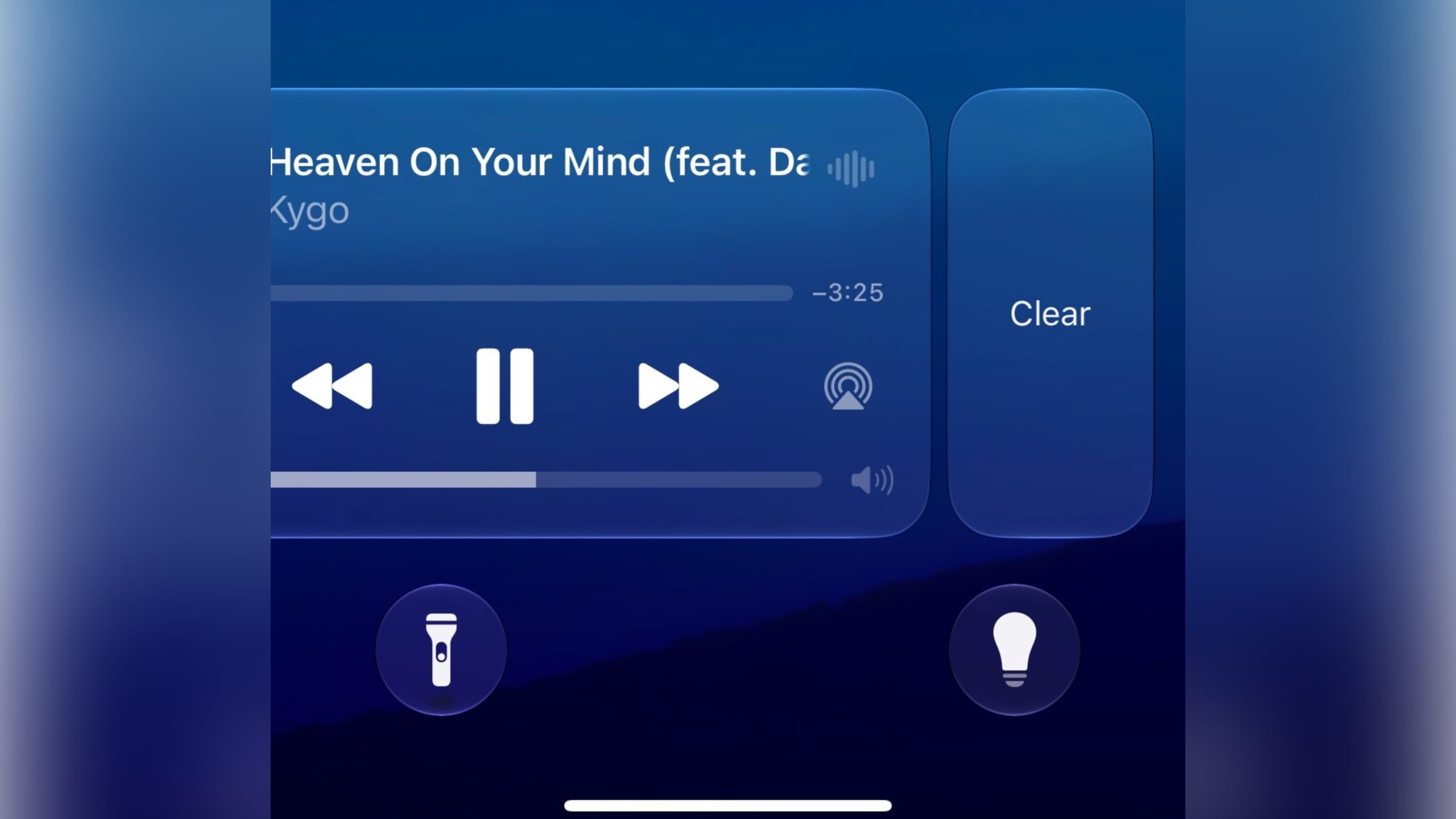
The method for dismissing the "Now Playing" widget is remarkably intuitive, fitting seamlessly with existing iOS gestures. When the widget is active on your Lock Screen, simply perform a leftward swipe gesture across the playback controls. As you swipe, a "Clear" button will fluidly slide in from the right side of the screen. Tapping this button will instantly make the entire "Now Playing" interface vanish from your Lock Screen.
This gesture is consistent with how many other interactive elements and notifications are managed within iOS, making it feel immediately familiar to long-time iPhone users. The visual feedback, with the "Clear" button appearing dynamically, reinforces the sense of direct interaction and control. Once cleared, your Lock Screen returns to its pristine state, displaying only your chosen wallpaper, clock, and any other persistent widgets you've opted to keep.
Before iOS 27: The Frustration of Persistence
Prior to this update, the Lock Screen's "Now Playing" widget was designed with a certain level of permanence. Even after pausing or stopping media, the widget would often remain visible. This was particularly noticeable when using apps that don't explicitly "end" a playback session quickly, or if you simply stopped listening to music for a few minutes. The widget would stubbornly occupy the top half of your screen, showcasing the last played track or podcast, whether you wanted it there or not.
Users often found themselves in situations where they wanted to show someone their wallpaper, or simply wanted a minimalist Lock Screen, but were prevented from doing so by the ever-present media controls. There was no button, no hidden gesture, no setting to make it go away short of force-quitting the playing app or waiting for an indeterminate amount of time for iOS to finally decide it was no longer relevant. This minor inconvenience accumulated into a significant frustration for a segment of the user base, highlighting how even small design choices can impact daily interactions.
The Dynamic Island Connection: A Unified Experience
For users with iPhone models featuring the Dynamic Island, the "Now Playing" experience is even more integrated into the device's interface. The Dynamic Island intelligently expands and contracts to display active background tasks, and media playback is one of its core functions. When media is playing, a small, unobtrusive Now Playing widget often appears within the Dynamic Island, providing a miniature visual representation of the album art and a quick tap to open the full controls.
A crucial aspect of this new iOS 27 feature is its consistency across the user interface. When you dismiss the "Now Playing" widget from your Lock Screen using the new swipe and clear gesture, it also simultaneously removes the smaller Now Playing widget from the Dynamic Island. This unified approach is a testament to Apple's design philosophy, ensuring that user actions have predictable and consistent outcomes across different parts of the operating system. It means that once you've decided you're done with media playback and want to clear its presence, it will be gone from both your Lock Screen and the Dynamic Island, providing a truly clean slate.
Bringing it Back: The Current Puzzle
While the ability to dismiss the "Now Playing" widget is a highly welcome addition, the initial developer build of iOS 27 presents a slight puzzle regarding its re-invocation. As noted by 9to5Mac, and echoed by early testers, there isn't yet an immediately obvious way to bring the widget back to the Lock Screen once it has been dismissed. This is a common characteristic of early beta software, where features are still under active development and refinement.
Currently, the workarounds appear to be somewhat indirect. One method involves pausing whatever media is playing, waiting a few minutes (perhaps for iOS to reset its "Now Playing" state), and then resuming playback. Another observed workaround involves switching between different types of media or applications. For instance, if you were listening to a podcast and dismissed the widget, starting a video in a different app might re-invoke the Lock Screen widget for the new media, and then subsequently playing the podcast again could bring back its controls.
New in iOS 27: You can now swipe away the now playing controls on the lock screen.
— Aaron (@aaronp613) June 8, 2026
Unclear how to get it back at the moment pic.twitter.com/NuEbyiHgok
It's important to remember that this is an early developer build. It's highly probable that Apple will refine this behavior before the public release. Future versions of iOS 27, especially as it moves through public beta phases, might introduce a more straightforward method for restoring the widget, perhaps a small button on the Lock Screen itself that appears when no media is actively displaying its controls, or a more intelligent re-appearance mechanism. The feedback from developers and early testers during this beta period will be crucial in shaping the final implementation.
Why This "Small" Tweak is Actually a Big Deal
On the surface, being able to swipe away a widget might seem like a trivial addition to a major operating system update. However, for a product as mature and widely used as iOS, these subtle refinements often have a disproportionately large impact on daily user satisfaction. This particular change touches on several key aspects of good user experience design.
User Control and Personalization
At its core, this feature empowers the user. It gives them agency over their device's interface, allowing them to decide what information is displayed and when. Modern smartphones are highly personal devices, and the ability to customize and declutter the Lock Screen aligns perfectly with user expectations for personalization. Whether you prefer a minimalist look, or simply want to remove the visual noise after your listening session has ended, this new control caters to diverse preferences.
It acknowledges that users don't always want their last activity prominently displayed, even if it's benign. This small tweak is a nod to the growing demand for more granular control over notification and widget visibility, enhancing the overall sense of ownership and adaptability that users seek in their digital tools. It's about respecting the user's preference for a clean, intentional interface.
Privacy Considerations
While often overlooked, there's a subtle privacy benefit to being able to dismiss the "Now Playing" widget. Imagine you've been listening to a specific podcast or a particular music genre that you might not want immediately visible to others who might glance at your phone. While not a critical security flaw, the persistent display of media information on a Lock Screen can be a minor privacy intrusion. The ability to clear it ensures that your last media activity isn't always broadcast to anyone within viewing distance of your device, offering a greater sense of discretion.
This aligns with Apple's broader commitment to user privacy, extending it even to the seemingly innocuous details of what you're listening to. It’s a subtle but important detail for those who are conscious about the information their device displays without explicit interaction.
A Sign of Apple's Responsiveness
This update, despite its size, underscores Apple's continuous effort to refine the iOS user experience and address common user frustrations. It demonstrates that the company is listening to feedback, even for minor annoyances that don't make headlines. In a world where operating systems can feel rigid, these small acts of responsiveness build user trust and loyalty. It shows that Apple is committed to polishing the day-to-day interactions that define the iPhone experience, ensuring that even the most mature features continue to evolve and adapt to user needs.
Such changes are often the result of extensive user testing and feedback loops, where subtle friction points are identified and systematically addressed. It reinforces the idea that no detail is too small when it comes to crafting a world-class user interface, ultimately contributing to a more seamless and enjoyable ownership experience for millions of iPhone users.
The Broader Context: iOS 27 and User Experience
The introduction of the "Now Playing" widget dismissal feature in iOS 27 should be viewed within the larger context of Apple's ongoing focus on enhancing user experience. While major tentpole features often grab the headlines during annual WWDC keynotes, it's these smaller, more nuanced improvements that truly flesh out a modern operating system and make it a pleasure to use day in and day out.
iOS 27, like its predecessors, is expected to bring a host of new functionalities, but the refinement of existing interactions is equally vital. An operating system as sophisticated as iOS benefits immensely from continuous iteration, ensuring that even fundamental elements like the Lock Screen remain fresh, functional, and user-friendly. The ability to manage your media presence is part of a broader trend towards giving users more control over what their device displays, reducing cognitive load, and creating a more personalized digital environment.
These seemingly minor interactions accumulate. A smoother Lock Screen interaction here, a clearer notification management there, and together they contribute to an overall feeling of an operating system that is responsive, intelligent, and designed with the user's practical needs and aesthetic preferences in mind. It's a testament to the fact that innovation isn't always about revolutionary new features, but often about perfecting the everyday gestures and controls that define our interaction with technology.
Getting Ready for iOS 27: Beta and Release Timeline
For those eager to experience this new level of control and other upcoming features, iOS 27 will soon be available. Apple typically follows a structured release schedule for its major iOS updates.
The first developer build, which includes this "Now Playing" widget dismissal feature, was released yesterday. For the general public, Apple plans to make iOS 27 available in a public beta program next month. This allows a broader range of users to test the new software, provide feedback, and help identify any remaining bugs or areas for improvement before the final release.
The general public release of iOS 27 is expected in the fall. This is typically when new iPhone models are announced, and the new operating system becomes available as a free software update for compatible devices. If you're considering trying the public beta, remember that beta software can sometimes be less stable than a final release and may have bugs or compatibility issues. It's always advisable to back up your device before installing any beta software, and perhaps install it on a secondary device if possible.
Staying informed through reliable sources like MacRumors.com or 9to5Mac will ensure you're up-to-date on all the latest developments, beta releases, and official announcements regarding iOS 27.
Beyond the Lock Screen: Future Possibilities
The introduction of dismissible "Now Playing" controls opens up interesting questions about the future evolution of the iOS Lock Screen and widget management. Could this be the first step towards a more flexible and customizable Lock Screen experience for all widgets?
Imagine a future where you can choose to dismiss other Lock Screen widgets, such as weather, battery levels, or activity rings, on demand. This could provide even greater control over the visual information presented without having to delve into deep settings menus. Furthermore, deeper integration with Focus Modes could allow for automatic dismissal or appearance of widgets based on your current activity or location. For example, a "Work" Focus Mode might automatically hide all non-essential widgets, including media controls, to minimize distractions.
Such advancements would align with the ongoing trend of empowering users with more adaptive and intelligent ways to interact with their devices, moving beyond static configurations to a truly dynamic and personalized digital environment. The "Now Playing" dismissal, while small, could be a foundational element for more expansive Lock Screen customization in future iOS versions.
Conclusion: A Clearer Future for Your iPhone's Lock Screen
The ability to swipe away the "Now Playing" widget on the iPhone Lock Screen in iOS 27 is a prime example of how Apple continues to refine and enhance the user experience, even with seemingly minor updates. It’s a testament to the importance of user feedback and the continuous pursuit of intuitive design. This small tweak directly addresses a long-standing point of friction for many users, offering greater control, reducing visual clutter, and contributing to a more personalized and private iPhone experience.
As we anticipate the public beta next month and the general release in the fall, this feature reminds us that innovation in software isn't always about revolutionary new capabilities, but often about perfecting the everyday interactions that make our devices a true pleasure to use. A cleaner Lock Screen is just one swipe away, promising a clearer, more controlled view of your digital world.
What are your thoughts on this new feature? Will it significantly improve your daily iPhone usage? Share your opinions in the discussion forums!
This article, "iOS 27 Lets You Dismiss the 'Now Playing' Lock Screen Widget" first appeared on MacRumors.com
Discuss this article in our forums
from MacRumors
-via DynaSage

Post a Comment