iOS 27: All the New Health and Fitness Features
Unlocking a Healthier You: Diving Deep into iOS 27's Groundbreaking Health and Fitness Features
Apple has consistently pushed the boundaries of personal technology, evolving from mere communication devices to indispensable tools for managing our well-being. With the impending release of iOS 27, the company is once again demonstrating its unwavering commitment to health and fitness. While rumors of an ambitious AI health service were ultimately put on hold before the developer beta, the current update delivers a robust suite of enhancements that promise to make managing your health more intuitive, insightful, and integrated than ever before. This article will explore each of these significant changes, explaining how they empower users to take greater control over their health journey.

A Fresh Look: The Health App's Redesigned Interface
The Health app has long been the central hub for all your health data, from activity levels to sleep patterns. However, with iOS 27, Apple has reimagined the user experience, particularly within the crucial Browse section. Gone is the traditional list-based interface, replaced by a vibrant, engaging, and highly functional card-style layout. This isn't just a cosmetic change; it's a fundamental improvement designed to enhance usability and encourage deeper interaction with your health information.
Imagine opening your Health app and immediately being greeted by a visually appealing array of cards, each representing a distinct health category like Activity, Heart, Nutrition, or Sleep. These cards are not only more colorful but also present information in a more digestible and scannable format. Instead of scrolling through an endless list, users can quickly identify the category they wish to explore, making the discovery of new health insights or the tracking of existing metrics far more efficient. This card-style approach makes the app feel less like a data repository and more like a personalized health dashboard, inviting users to engage with their data rather than simply observe it.
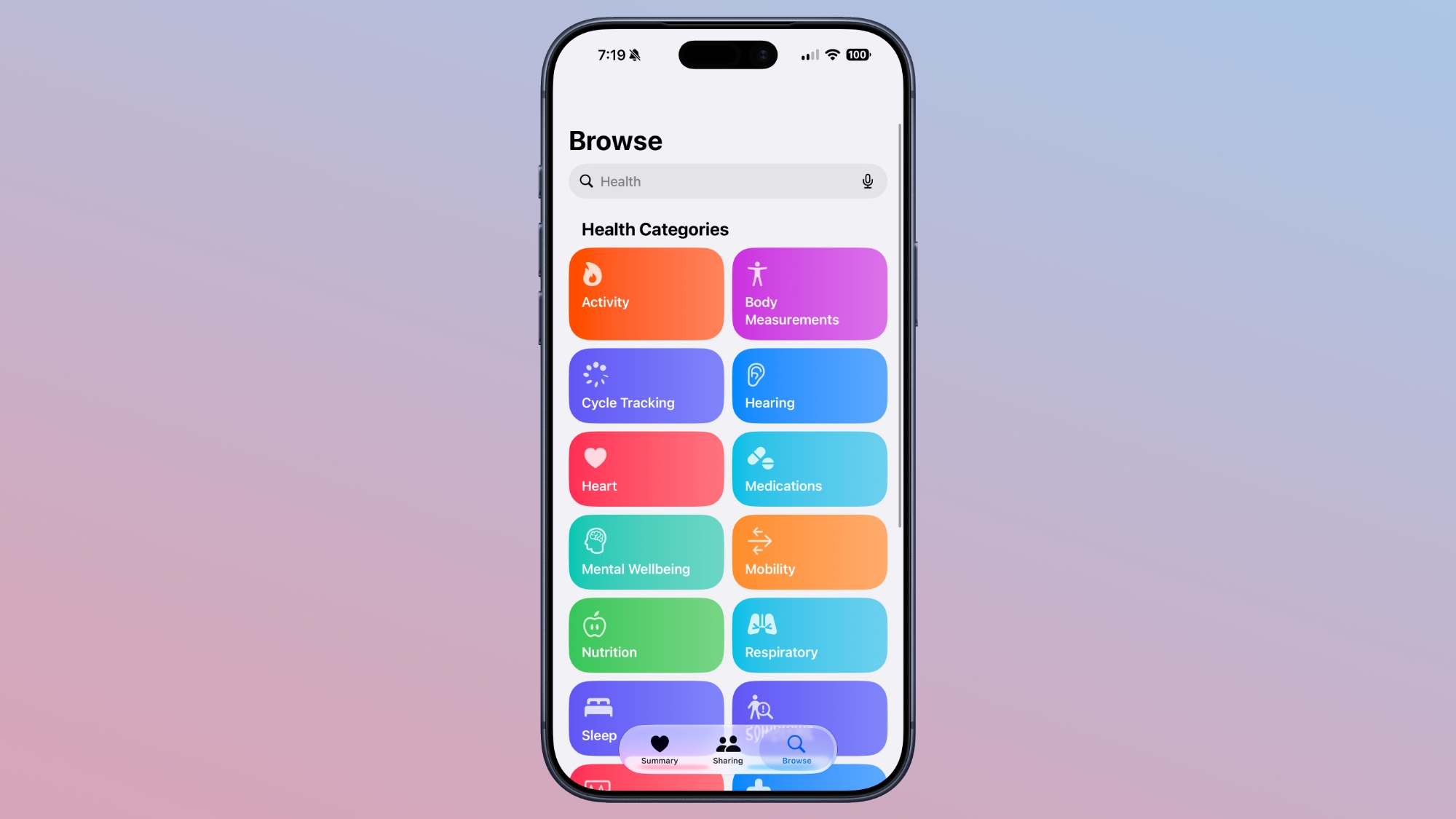
Further streamlining the user experience, Apple has integrated a single, intuitive bottom navigation bar. This unified bar now houses a combined search and browse button, doing away with the need for separate controls. This seemingly small alteration has a significant impact on navigation. By consolidating these functions, the app feels cleaner and less cluttered, allowing users to move seamlessly between exploring health categories and quickly searching for specific data points. The new design principles in iOS 27's Health app are all about accessibility and clarity, ensuring that users can effortlessly find and understand the vital health information that matters most to them.
Smart Nutrition: Understanding What You Eat with Visual Intelligence
One of the most exciting and innovative features arriving with iOS 27 is a brand new nutrition capability powered by Visual Intelligence. This feature brings a new level of convenience and insight to understanding the nutritional value of your meals, directly through your iPhone's camera. For many, tracking diet can be a cumbersome process involving manual entry or barcode scanning. Apple's new approach simplifies this dramatically, making healthier eating choices more accessible to everyone.
Here's how it works: you can now open the Camera app and switch to a dedicated Siri mode. With a simple tap, you can take a photo of a food item, and Visual Intelligence goes to work. Leveraging advanced image recognition and machine learning, your iPhone can analyze the food in the image and provide instant, insightful feedback about its nutritional profile. This means no more guessing games or struggling to remember ingredients; the information is at your fingertips.
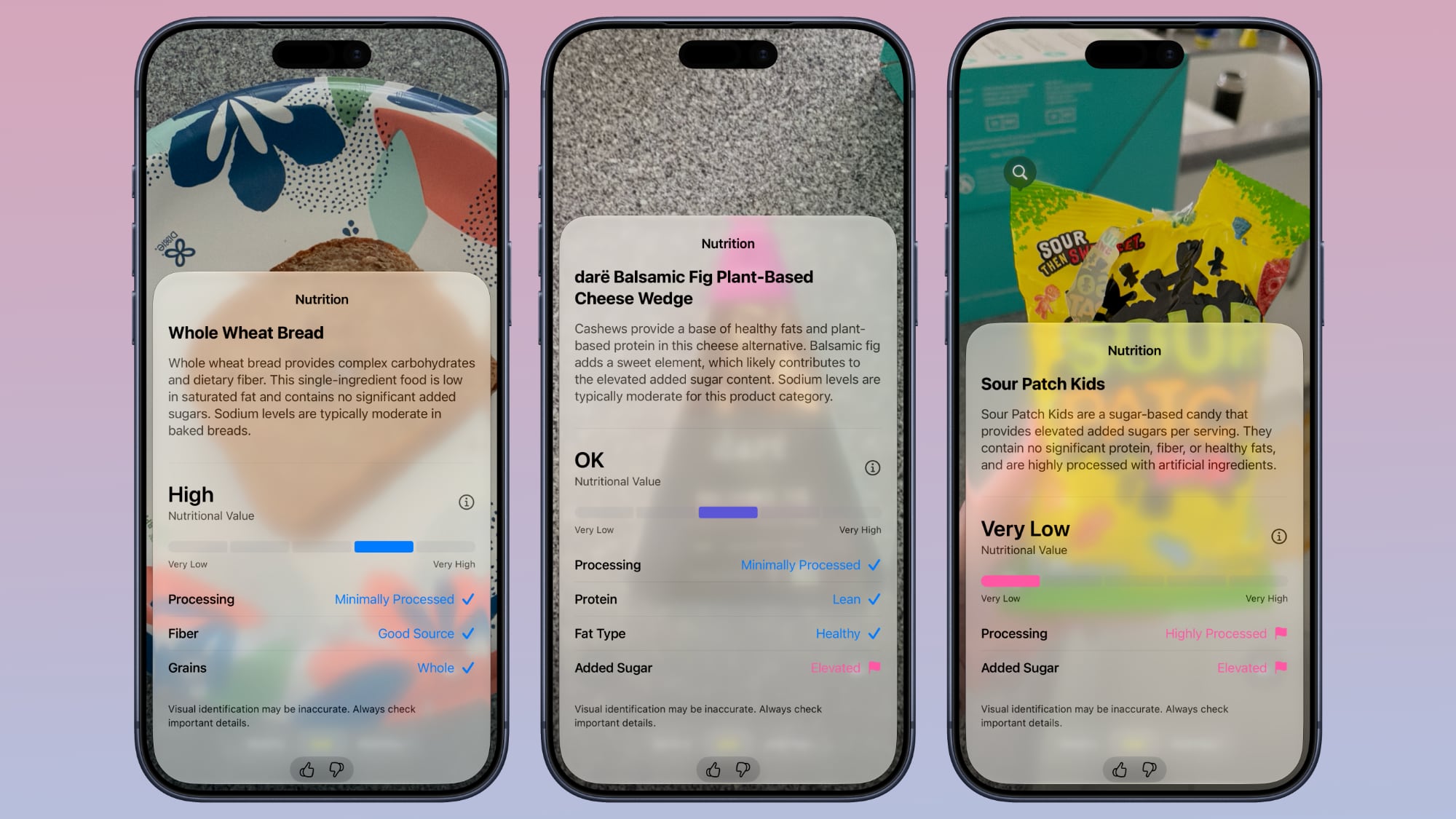
Crucially, this feature doesn't aim to provide exact calorie counts, which can often be a source of obsession or inaccuracy due to portion variations. Instead, it focuses on qualitative nutritional insights that are arguably more valuable for making informed daily food choices. Visual Intelligence will let you know if a food is heavily processed, a key indicator for overall health. It can also identify if a food is a good source of protein, essential for muscle health and satiety, or if it's high in sugar, a common concern for many. Beyond these specific indicators, it provides a general nutritional value ranking, ranging from "very low" to "very high," giving you a quick snapshot of how healthy a particular item might be.
While the data from Visual Intelligence doesn't currently sync directly to the Health app, its utility remains immense. It acts as a powerful educational tool, helping users develop a more intuitive understanding of food composition and its impact on their bodies. Over time, consistent use of this feature can foster healthier eating habits by making users more aware of their dietary choices in real-time. It empowers individuals to make better decisions on the fly, whether they're grocery shopping, dining out, or preparing meals at home. It's an intelligent companion that guides you toward more nutritious options without requiring meticulous manual tracking.
It's important to note that the advanced processing power required for Visual Intelligence means this feature will be available on iPhone 15 Pro models and later. This ensures that the analysis is fast, accurate, and seamless, providing a truly intelligent experience for users.
Empowering Women's Health: Enhanced Cycle Tracking with Perimenopause Support
Apple has consistently demonstrated a deep understanding of women's health needs, and with iOS 27, the Cycle Tracking feature receives a significant and much-needed expansion: comprehensive support for perimenopause and menopause. This enhancement addresses a critical life stage that impacts a vast number of women, providing valuable insights and support during what can often be a confusing and challenging transition.
Perimenopause is the transitional period leading up to menopause, during which a woman's body begins to make its natural shift toward permanent infertility. This phase can last for several years, sometimes even a decade or more, and is characterized by fluctuating hormone levels that can cause a wide range of symptoms and irregular menstrual patterns. Previously, Cycle Tracking primarily focused on regular cycles and fertility windows. Now, the Health app is equipped to recognize and respond to the unique patterns associated with perimenopause.
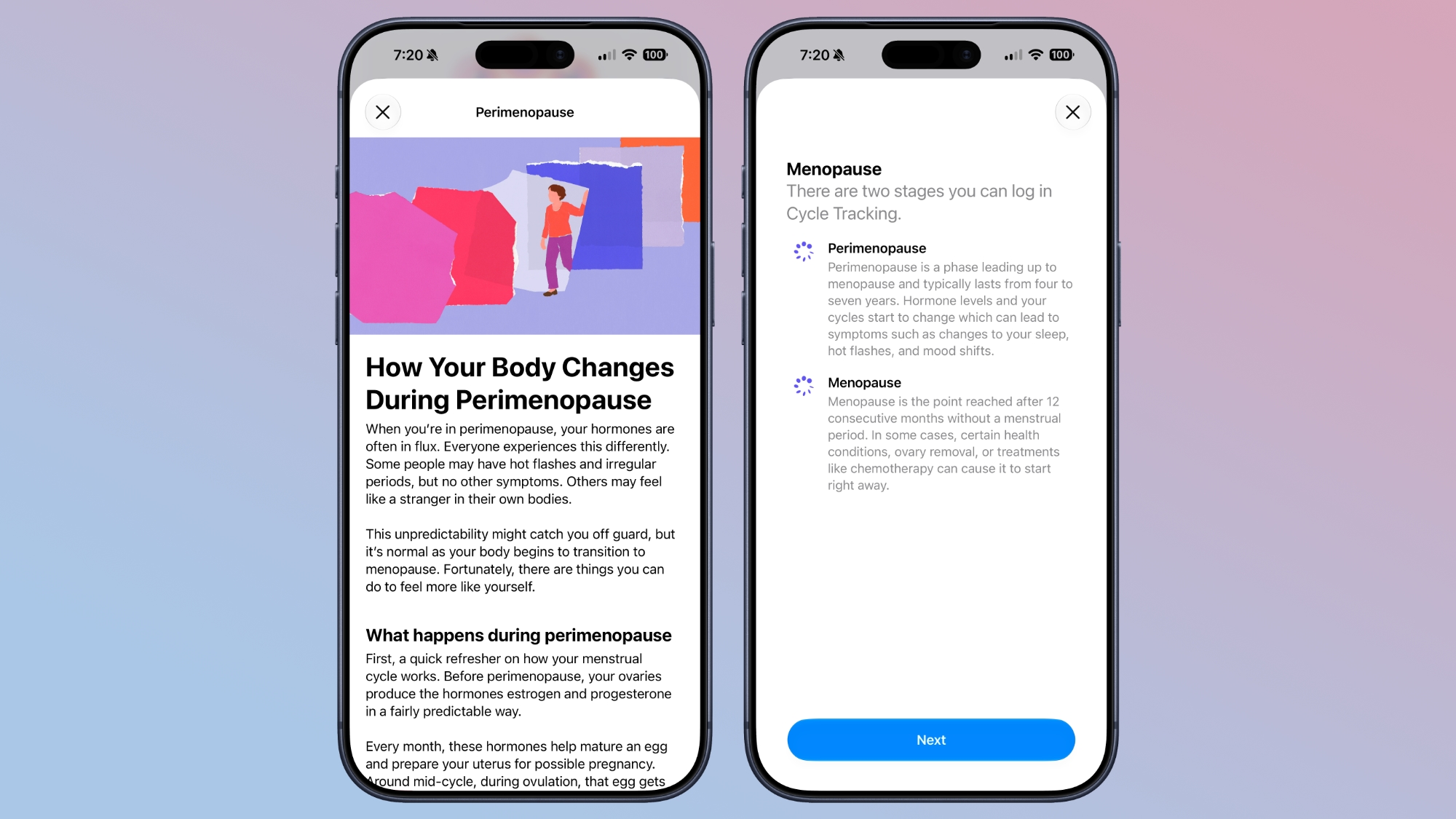
A standout aspect of this update is the Health app's ability to send intelligent notifications when a user's logged cycle patterns are suggestive of perimenopause. This is a game-changer for many women who might be experiencing symptoms but are unsure about their cause. The feature uses an individual's long-term cycle data, combined with advanced algorithms, to identify the subtle shifts and irregularities that characterize this hormonal transition. To ensure relevance and accuracy, these cycle deviation alerts are specifically tailored for users aged 40 and above, aligning with the typical age range for perimenopause onset.
Beyond these proactive notifications, the enhanced Cycle Tracking empowers users to keep a detailed log of perimenopause and menopause-related symptoms. This can include hot flashes, night sweats, mood changes, sleep disturbances, and more. By consistently tracking these symptoms alongside their cycle data, women can gain a clearer understanding of their own bodies, identify triggers, and communicate more effectively with their healthcare providers. This granular data can be invaluable for personalized treatment plans and symptom management strategies.
To further support women during this period, Apple has integrated access to educational resources directly within the Health app. These resources offer guidance, explanations, and support, helping users understand what they are experiencing and how to navigate it. This comprehensive approach ensures that women not only track their health but also have the knowledge and tools to manage this significant life transition with greater confidence and informed decision-making.
Complementing these app features, Apple has also introduced new Fitness+ workouts specifically designed for perimenopause and menopause. These tailored exercise routines acknowledge the unique physiological changes and challenges women face during this time, providing appropriate and beneficial fitness options. From gentle stretching to strength training, these workouts aim to help alleviate symptoms, maintain bone density, and improve overall well-being, further cementing Apple's commitment to holistic women's health.
Real-Time Insights: Faster Data Updates in the Health App
In the realm of personal health tracking, timely and accurate data is paramount. Whether you're monitoring your heart rate after a run, reviewing your sleep quality from the previous night, or checking your daily activity goals, having the most current information available instantly makes a significant difference. With iOS 27, Apple has implemented crucial performance improvements that result in data syncing to the Health app quicker than ever before.
Previously, users might have experienced slight delays between data being recorded by their Apple Watch or other connected devices and its appearance within the Health app. While these delays were often minor, they could sometimes lead to a fragmented or less immediate view of one's health status. Imagine finishing an intense workout and wanting to immediately review your metrics, only to find the data isn't fully updated. This can be frustrating and diminish the immediate feedback loop that motivates many to track their fitness.
The performance enhancements in iOS 27 address this directly. By optimizing the data transfer and processing mechanisms, Apple ensures that your health and fitness information is pushed to the Health app with minimal latency. This means more real-time insights, whether you're glancing at your iPhone right after a brisk walk or checking your latest sleep analysis first thing in the morning. Faster data updates translate to a more seamless and reliable tracking experience, fostering greater trust in the information displayed and making the Health app an even more responsive and indispensable tool for daily wellness management. For users who rely on their health data to make immediate decisions or simply to stay informed, this improvement offers a significant boost in usability and satisfaction.
Protecting the Next Generation: Enhanced Child Safety Features
Navigating the digital world with children presents unique challenges for parents, particularly concerning the content their kids encounter. Recognizing this critical need, iOS 27 introduces several new Child Safety features designed to give parents more robust control and peace of mind. These enhancements go beyond simple content filters, incorporating expert guidance to help families foster a safer and healthier digital environment.
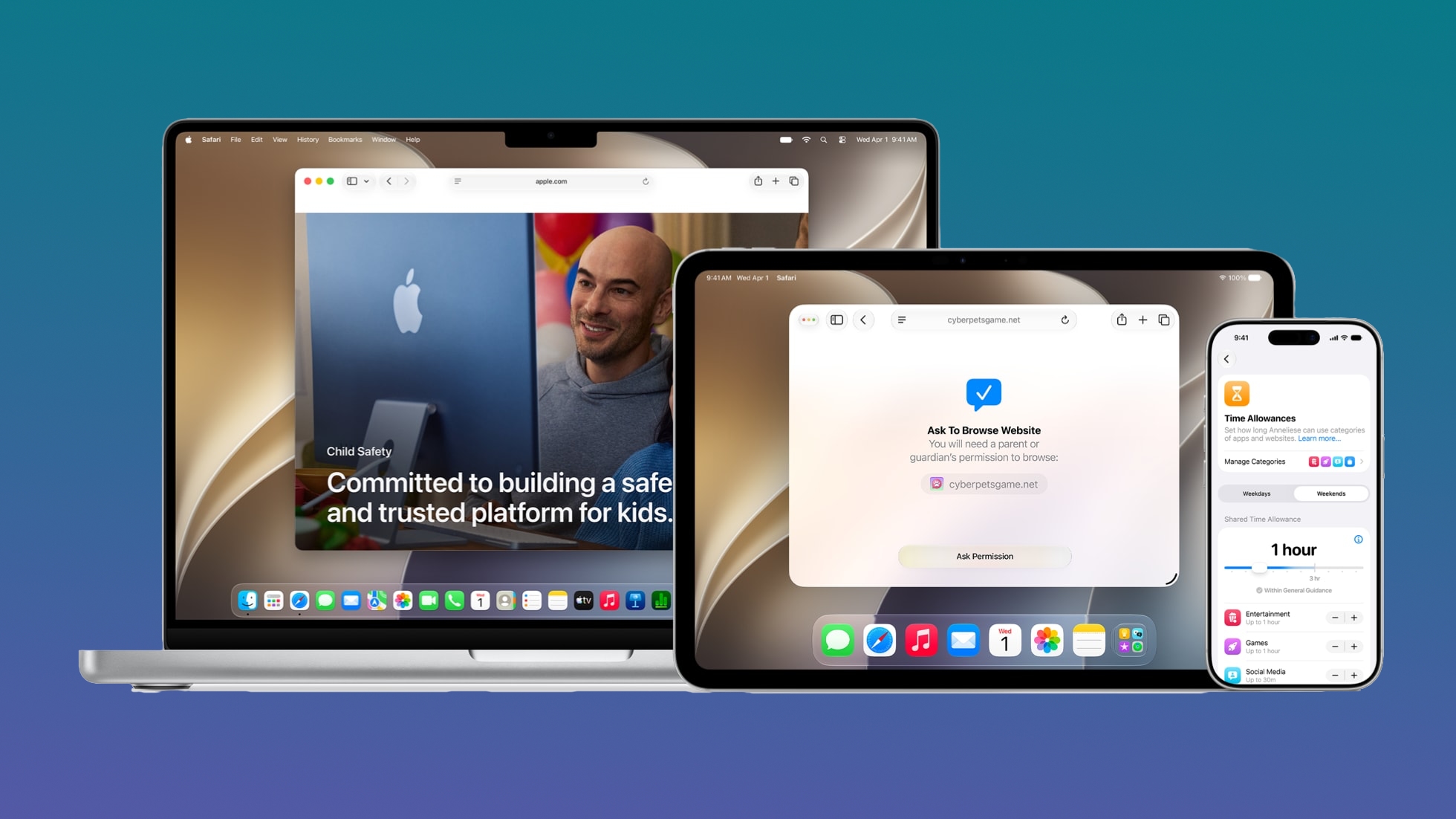
The core of these new features lies in empowering parents with greater oversight over the content their children are exposed to across various apps and services. This includes not just explicit material, but also potentially harmful or inappropriate themes that can affect a child's development and well-being. Apple is taking a thoughtful approach by integrating guidance based on expert health research. This means that the recommendations and tools provided to parents aren't arbitrary; they are informed by pediatricians, child psychologists, and online safety specialists. This expert-backed guidance helps parents make informed decisions about managing their child's accounts, setting appropriate boundaries, and understanding the potential impacts of digital content.
These new parental controls allow for more granular customization, enabling parents to tailor settings to their child's age, maturity level, and individual needs. Whether it's limiting screen time, restricting access to certain apps, or monitoring communications, the tools are designed to be flexible yet effective. The emphasis on guidance derived from health research is particularly significant. It helps parents move beyond a reactive approach to digital safety, instead adopting a proactive strategy that educates them on best practices and supports healthy digital habits from a young age. By providing these comprehensive and research-backed tools, Apple aims to assist families in creating a safe, balanced, and enriching online experience for children, promoting their overall development and protecting them from the potential harms of the digital world.
Precision in Every Stride: Enhanced Route and Distance Accuracy
For fitness enthusiasts, athletes, and even casual exercisers, accurate tracking of workouts is fundamental. Knowing the precise distance you've covered or the exact route you've taken is not just satisfying; it's essential for monitoring progress, setting goals, and optimizing training. With iOS 27, Apple has introduced significant improvements to route and distance accuracy, making your Fitness app data more reliable than ever before.
One of the most welcomed changes will be evident in the route maps that populate the Fitness app after outdoor workouts. Previously, GPS data could sometimes be inconsistent, leading to routes that appeared jagged, incomplete, or slightly off the actual path taken. These inaccuracies, while minor to some, could be frustrating for those meticulously tracking their runs, cycles, or walks. In iOS 27, these route maps are rendered with greater precision, providing a truer representation of your physical journey. This enhanced accuracy means you can review your workout routes with confidence, knowing that the map reflects your actual path with remarkable detail, whether you're exploring new trails or sticking to familiar streets.
Beyond outdoor activities, Apple has also focused on improving accuracy for indoor workouts, specifically on treadmills. Measuring distance on a treadmill can be notoriously tricky, with many fitness trackers struggling to provide consistent or precise readings. The sensors in an iPhone, combined with improved algorithms in iOS 27, now reflect treadmill distances more accurately than before. This is a significant benefit for anyone who frequently uses gym equipment, as it ensures that your indoor running or walking sessions contribute more reliably to your overall fitness goals and daily activity rings. The improved accuracy across both outdoor and indoor activities underscores Apple's commitment to providing comprehensive and trustworthy fitness data, empowering users to train smarter and track their progress with greater confidence.
Seamless Tracking: Step Count Sync Across Apps
In the digital age, simplicity and consistency in data tracking are highly valued. Nothing is more frustrating than having conflicting information across different apps that are supposed to be working together. With iOS 27, Apple addresses a common minor inconvenience by ensuring that step counts will now sync seamlessly and consistently between the Health and Fitness apps.
While both apps draw from the same core data sources (your iPhone's motion sensors or a paired Apple Watch), there could sometimes be slight discrepancies or delays in how step counts were displayed or updated across the two. This could lead to confusion for users trying to get a quick, accurate overview of their daily activity. For instance, you might check your Fitness app to see your progress toward your move goal, then open the Health app and see a slightly different total for steps. Although often minor, these inconsistencies could undermine confidence in the data and require users to mentally reconcile the figures.
The update in iOS 27 eliminates this friction. By ensuring perfect synchronization, your step count will always be identical whether you're viewing it in the comprehensive Health app or the activity-focused Fitness app. This simple yet effective improvement enhances the overall user experience by providing a single, consistent source of truth for your daily steps. It means less mental effort for users, greater clarity in tracking daily movement, and a more unified approach to personal health data within the Apple ecosystem. This small change contributes significantly to the feeling of a cohesive and reliable health tracking platform.
Unleashing GymKit for Everyone: iPhone Compatibility
GymKit has been a groundbreaking feature for fitness enthusiasts, seamlessly connecting Apple Watch with compatible gym equipment to provide incredibly accurate and rich workout data. However, its exclusivity to the Apple Watch meant that iPhone-only users couldn't take advantage of this integration. With iOS 27, Apple is breaking down that barrier, significantly expanding GymKit's reach by bringing its capabilities directly to the iPhone.
Previously, if you wanted to sync your workout data (like heart rate, calories burned, or distance) from a treadmill, elliptical, or indoor bike directly to your health apps, you needed an Apple Watch. The Watch would pair with GymKit-enabled equipment, ensuring that the machine's precise metrics were captured alongside your personal biometric data. This created a highly accurate and integrated workout log.
Now, with iOS 27, your iPhone can perform the same function. This is a monumental change for a vast segment of users who prefer to work out with just their iPhone or who simply don't own an Apple Watch. The process is intuitive: you can now pair your iPhone with compatible treadmills, indoor bikes, stair steppers, and other exercise equipment that support GymKit. This pairing typically involves a quick tap or scan, similar to how an Apple Watch would connect.
Once connected, your iPhone acts as the central hub, syncing a comprehensive array of workout data directly from the machine. This includes vital metrics such as calories burned, distance covered, speed, incline, and pace. Imagine stepping onto a treadmill, quickly pairing your iPhone, and then seeing your workout stats not only on the machine's display but also simultaneously being recorded with precision on your iPhone's Fitness and Health apps. This eliminates the need for manual data entry, reduces the risk of errors, and provides a much more accurate and complete picture of your gym sessions.
The expansion of GymKit to the iPhone significantly broadens its appeal, making advanced workout tracking accessible to a wider audience. It means a more seamless, integrated, and motivating experience for anyone who regularly uses gym equipment, ensuring that every drop of sweat contributes to an accurate and detailed health record, regardless of whether they wear an Apple Watch. This move truly democratizes advanced fitness data tracking, making it easier for more people to stay informed and motivated on their fitness journeys.
When Can You Get It? iOS 27's Release Schedule
For those eager to experience these new health and fitness features, Apple follows a familiar release schedule. iOS 27 is currently available to developers, allowing them to adapt their apps and test compatibility with the new operating system. A public beta is planned for July, which will give a broader audience of enthusiastic users the chance to try out the new features and provide feedback to Apple.
The official launch to the public for all compatible iPhones is scheduled for this fall. Typically, this aligns with the release of new iPhone models, bringing a fresh set of software and hardware innovations together. Keep an eye out for official announcements from Apple regarding the exact public release date, and prepare to elevate your health and fitness tracking experience with iOS 27.
In summary, iOS 27 represents a substantial leap forward in Apple's dedication to personal health and wellness. From the redesigned Health app offering a more intuitive user experience to the groundbreaking Visual Intelligence for nutritional insights, and the crucial perimenopause support in Cycle Tracking, these updates are designed to empower users with more control, clearer information, and a more integrated approach to their well-being. Coupled with enhanced accuracy in fitness tracking, expanded GymKit compatibility, and vital child safety features, iOS 27 positions the iPhone as an even more powerful ally in your journey toward a healthier and more informed life. Apple continues to demonstrate that technology can indeed be a profound force for good, making health management not just accessible, but genuinely intelligent and user-friendly for everyone.
This article, "iOS 27: All the New Health and Fitness Features" first appeared on MacRumors.com
Discuss this article in our forums
from MacRumors
-via DynaSage

Post a Comment