Apple Now Requires UNiDAYS Verification for Education Discounts in U.S. and Canada, Adds Apple Watch
Apple Revolutionizes Education Discounts: UNiDAYS Verification Now Required in U.S., Canada, and Chile, Plus Apple Watch Joins the Savings!
For students and educators who rely on Apple technology to power their learning and teaching, getting a discount can make a huge difference. Apple has long supported the educational community with special pricing on its powerful devices. However, starting today, a significant change is rolling out that aims to streamline and secure these valuable educational benefits across the U.S., Canada, and Chile.
In a move towards greater fairness and consistency, Apple is now requiring customers in these key regions to officially verify their status as a student or educator to qualify for educational discounts. This marks an important shift from previous policies and introduces a standardized verification process through UNiDAYS, a system already familiar to Apple customers in many other parts of the world. What’s even more exciting is the expansion of the Education Store's offerings to include the popular Apple Watch lineup, making it more accessible for those dedicated to education.
This comprehensive update not only brings a robust verification system but also ensures that the discounts are truly reaching the intended audience. For many, this will mean a clearer path to saving on essential Apple products. Let's dive into all the details of these new changes, how they will affect you, and what exciting new products you can now get at a discounted price.
A New Era for Education Discounts: Introducing UNiDAYS Verification
The biggest news for students and educators in the United States, Canada, and Chile is the official adoption of the UNiDAYS verification system. This move brings these countries in line with many other international markets where Apple already uses UNiDAYS to confirm eligibility for its educational pricing. The goal is simple: to ensure that only legitimate students and educators are able to access these special rates, thereby protecting the integrity of the program and ensuring fair access for everyone who truly qualifies.
UNiDAYS is a widely recognized and trusted platform that specializes in verifying student and educator status for various brands and services worldwide. It acts as a reliable third party, connecting academic institutions with companies offering student and educator benefits. By partnering with UNiDAYS, Apple is leveraging an established, secure, and efficient system designed specifically for this purpose. This means less ambiguity, reduced potential for misuse, and a more structured approach to claiming your discounts on Apple's powerful technology.
Previously, in the U.S. and Canada, Apple did not have a firmly established, mandatory academic status verification system in place. While Apple's sales policies always stated that they routinely audited customer purchases to verify eligibility, the system largely operated on an honor basis. This approach, while convenient for some, also left room for misuse, where individuals who were not genuinely eligible might have taken advantage of the educational pricing. The implementation of UNiDAYS closes this loophole, fostering a fairer environment for everyone who contributes to or participates in the education sector.
This isn't Apple's first dance with UNiDAYS in the U.S. Back in 2022, Apple briefly introduced UNiDAYS verification for student status, but that initial rollout was short-lived. It was quickly removed after just a few days following widespread complaints about issues with the verification process itself. Users reported difficulties with document submission, delays, or general confusion about the new requirements, leading to frustration. It appears Apple has learned valuable lessons from that experience, refined the integration, and is now ready to roll out a more robust and user-friendly system, hopefully avoiding the past pitfalls and providing a seamless experience for legitimate users.
Expanded Horizons: Apple Watch Joins the Education Store!
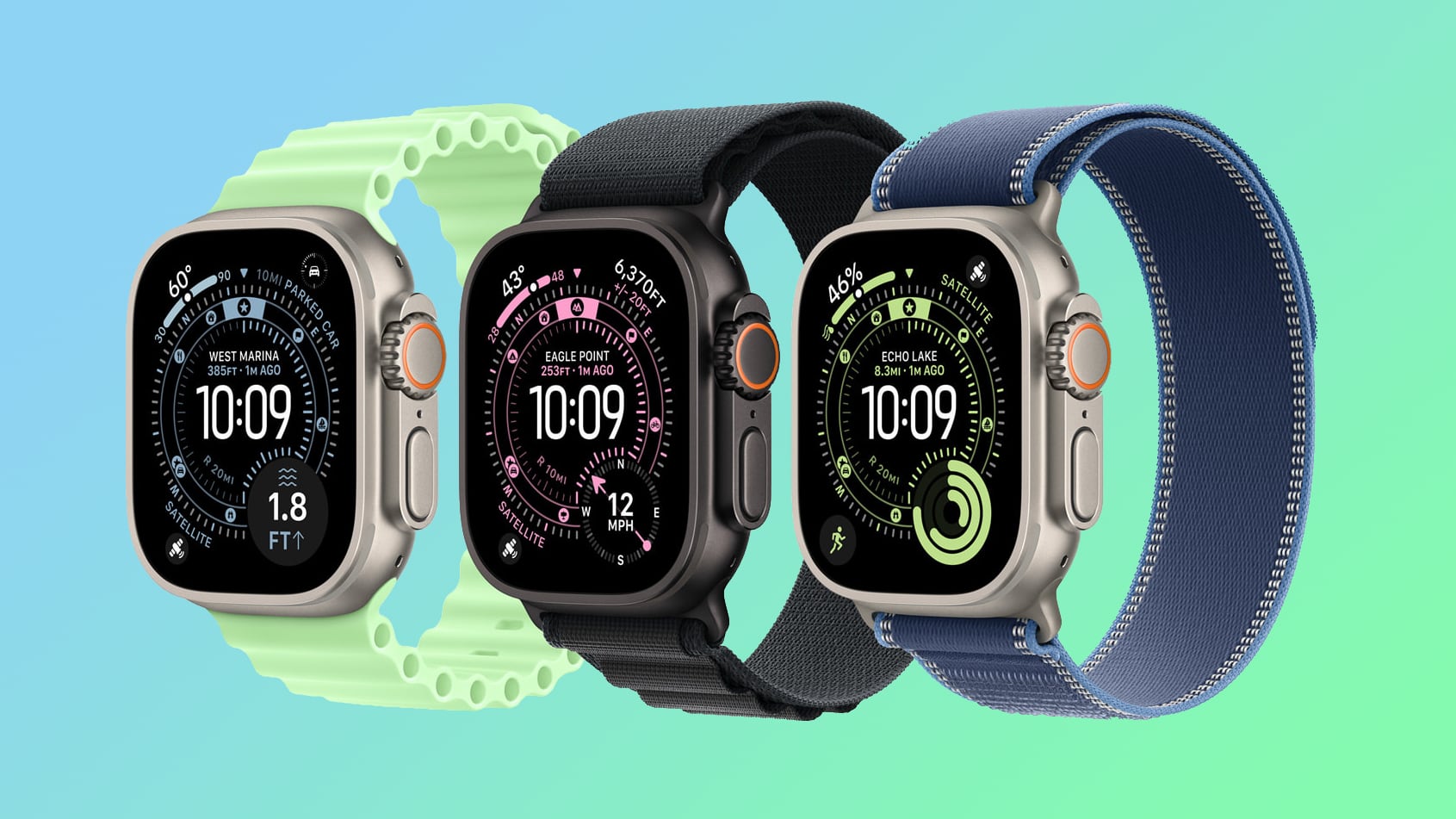
Beyond the verification changes, there’s fantastic news for tech-savvy students and educators: the Apple Watch is now officially available on Apple’s Education Store in the U.S., Canada, and Chile! This means you can now get up to a 10 percent discount on Apple's most popular wearable devices. This is a significant addition, as the Apple Watch has become an indispensable tool for many, blending health, communication, and productivity features seamlessly into daily life. For those constantly on the go, managing busy schedules, or focusing on well-being, this discount makes these powerful devices even more accessible.
The models now eligible for this special pricing include:
- Apple Watch Series 11: As Apple's flagship smartwatch, the Series 11 offers advanced health sensors, robust performance, and a comprehensive suite of features. These might include enhanced activity tracking, precise GPS for outdoor adventures, more sophisticated heart health monitoring, and improved connectivity options. For students juggling classes, assignments, and social lives, or educators managing packed teaching schedules, the Series 11 provides unparalleled convenience. It allows for quick checks of notifications, setting timely reminders for lectures or meetings, and even managing smart home devices from the wrist.
- Apple Watch SE: A more budget-friendly option, the Apple Watch SE still delivers core Apple Watch experiences. It typically includes essential features like activity tracking, emergency SOS, fall detection, and crucial health insights, such as irregular heart rhythm notifications. It’s an excellent choice for those who want the key benefits of a smartwatch without the premium price tag of the flagship model, making it an even more accessible and practical tool for students on a tighter budget or educators looking for a reliable, everyday companion.
- Apple Watch Ultra 3: Designed for adventurers, extreme athletes, and anyone needing exceptional durability and advanced features in demanding environments. With its rugged titanium casing, larger, brighter display, extended battery life, and specialized sensors for deep-sea diving, challenging hikes, or intense training, the Ultra 3 is built to withstand the elements. It’s perfect for outdoor enthusiasts, sports science students, or educators who need a watch that can keep up with a rigorous lifestyle, whether in the classroom, on a research trip, or exploring the wilderness.
The inclusion of the Apple Watch in the Education Store opens up new possibilities for personal and academic efficiency. Imagine students using their Apple Watch to quickly check notifications for class schedules, receive alerts for upcoming deadlines, set silent alarms for study breaks, track their fitness during campus walks, or even make contactless payments at the university cafeteria. For educators, it can be a discreet way to manage time during lectures, receive important alerts without interrupting a class, monitor their activity levels throughout a busy teaching day, and stay connected with colleagues and family members without constantly pulling out their phone. The comprehensive health benefits, from activity tracking to heart rate monitoring and sleep insights, also contribute to overall well-being, which is crucial for managing the demands of academic and professional lives.
How to Verify Your Status with UNiDAYS: A Step-by-Step Guide
Getting your educational discount is now a straightforward process thanks to UNiDAYS. Whether you're a university student, a K-12 teacher, or part of a homeschooling family, the system is designed to accommodate various scenarios. Here’s a detailed look at how to get verified and unlock your savings on Apple products:
General Student and Educator Verification
The primary method for most students and educators involves a few simple, user-friendly steps. Before you begin, ensure you have stable internet access and access to your official educational credentials.
- Visit the UNiDAYS Website or App: Start by going to the official UNiDAYS website (myunidays.com) or downloading the UNiDAYS app on your smartphone or tablet from your device’s app store. The app often provides a more integrated experience.
- Create an Account: If you don't already have one, you'll need to create a UNiDAYS account. This typically involves providing your personal details such as your full name, a personal email address (different from your educational one, for account recovery), and creating a secure password.
- Select Your Institution: Once your UNiDAYS account is set up, you'll be prompted to search for and select your educational institution. UNiDAYS has a vast database of recognized universities, colleges, and K-12 schools worldwide. Type in the full name of your institution and select it from the dropdown list.
- Provide Verification Details: This is the crucial step where you prove your eligibility. UNiDAYS offers several secure and convenient ways to do this:
- Official Educational Email Address: This is often the quickest and most straightforward method. You'll be asked to provide your official email address that is assigned by your educational institution (e.g., yourname@university.edu or teacher@school.k12.ca.us). UNiDAYS will send a verification link to this email. Once you open the email and click the link, your status is usually confirmed instantly. Make sure you have access to this email account.
- Student or Staff Photo ID: If an official educational email isn't available, doesn't work, or your institution isn't directly integrated for email verification, you can upload a clear, legible photo of your current student or staff ID card. Ensure the ID clearly shows your full name, the name of your institution, a recent photograph, and an expiration date or an indication of the current academic year.
- Other Valid Educational Document: In some cases, or if your ID doesn't suffice, UNiDAYS may accept other official documents. This could include a recent acceptance letter from your university, an official transcript showing current enrollment, a tuition bill from the current academic period, or a formal letter from your institution's registrar or HR department confirming your enrollment or employment status. Always ensure the document is recent, dated, and clearly displays your name and institution details.
- Review and Submit: Before finalizing, double-check all the information and documents you've provided for accuracy and clarity. Once you're confident everything is correct, submit your verification request.
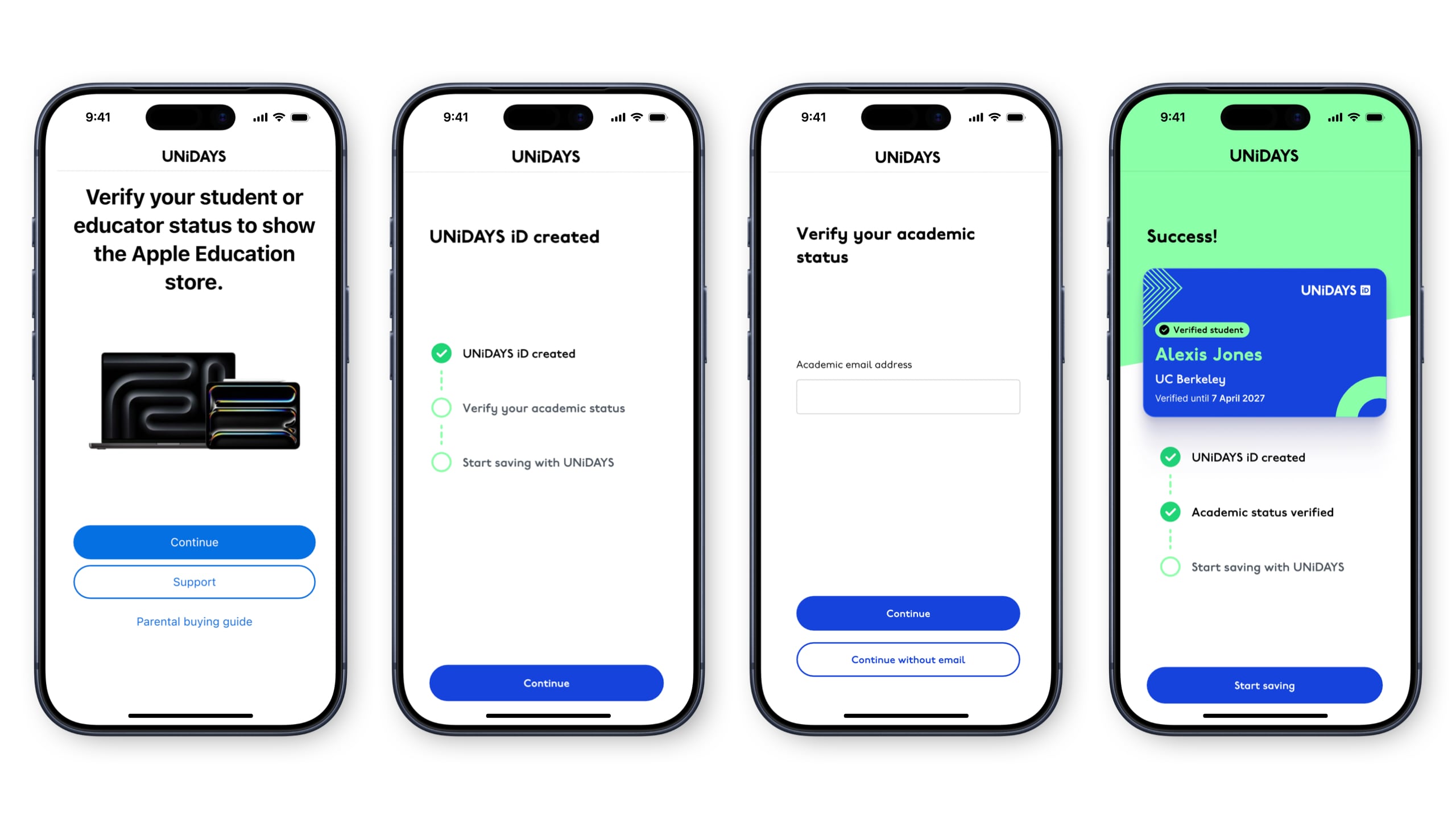
Most customers who use their official educational email address will experience instant verification, allowing them immediate access to discounts. In cases where manual review is required (e.g., when uploading ID or other documents), UNiDAYS typically provides a decision within 24 hours. It's always a good idea to initiate this process a bit in advance if you plan to make a time-sensitive purchase, such as during back-to-school sales or before a new product launch.
Special Verification Process for Homeschool Families
Apple has made a commendable effort to accommodate homeschool families, recognizing the growing trend and importance of alternative education methods. This is a thoughtful and inclusive provision that ensures homeschoolers are not left out of the educational discount program. The verification process for eligible customers who homeschool is tailored to their unique circumstances and requires specific documentation to confirm both identity and homeschooling status:
- Identity Document: You will first need to provide a standard identity document to confirm your personal identity as the parent or legal guardian in charge of the homeschooling. This can be:
- A valid, government-issued driver's license.
- A current, valid passport.
- Another form of official, government-issued photo identification that clearly shows your name and photo.
- Homeschool Document: To confirm your official status as a homeschooling family for the current academic year, you'll need to submit one of the following official documents. These documents typically originate from your local or state education authority and confirm compliance with homeschooling regulations:
- Letter of Intent to Homeschool: This is a formal letter you file with your local or state education authority (e.g., school district, state department of education) declaring your intention to homeschool your child/children for the current academic year. It demonstrates your active engagement in providing education outside of a traditional school setting.
- Letter of Acknowledgement or Approval: This is an official response or confirmation from your local or state education authority acknowledging receipt of your Letter of Intent or otherwise formally approving or confirming your homeschooling status for the current academic period. This document serves as official proof that your homeschooling program is recognized by the relevant educational authorities.
- Other Official Homeschooling Documentation: Depending on your state or province's specific legal requirements for homeschooling, other official documents might be accepted. This could include a homeschool registration certificate, an affidavit of instruction, or a document confirming enrollment in an accredited online homeschooling program. It's crucial that whatever document you provide clearly indicates your current homeschooling status and the relevant academic period, and that it is issued by a recognized authority.
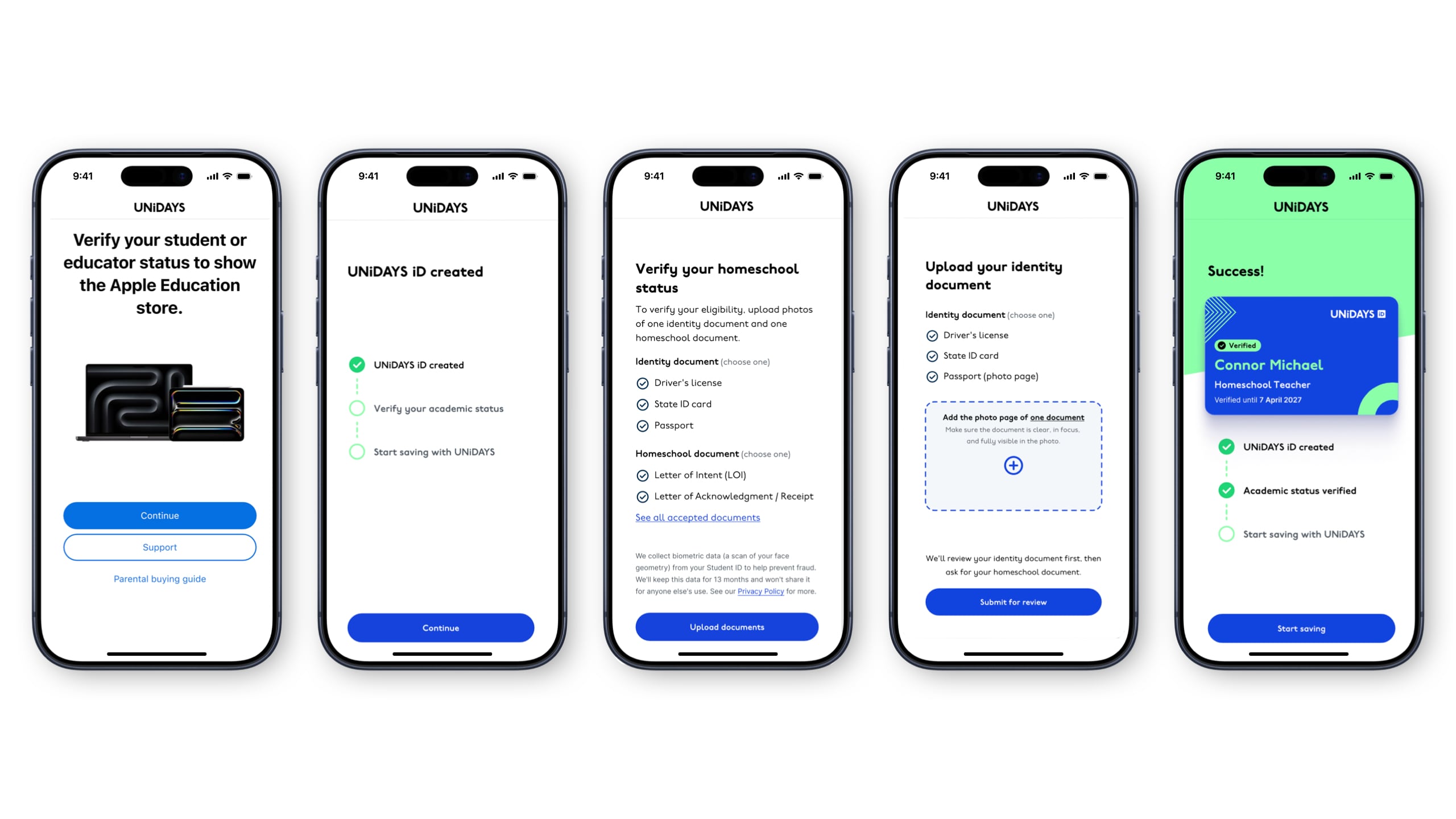
Just like with general verification, UNiDAYS aims for instant verification for homeschool families, particularly if the submitted documents are clear and directly verifiable. However, a manual review might be necessary if the documents require closer inspection or if there are any discrepancies. This process shows Apple’s commitment to making their discounts accessible to a broader educational community while maintaining proper verification standards for all recognized educational paths.
What You Can Save On: Beyond the Apple Watch
Once you’re successfully confirmed through UNiDAYS, a world of discounted Apple products opens up to you. While the Apple Watch is a fantastic new addition, the Education Store continues to offer special pricing on a wide range of essential Apple devices and accessories that are vital for learning, creativity, and productivity. These discounts can represent significant savings, making high-quality technology more attainable for students and educators who often operate on limited budgets.
Here’s a reminder of some of the key products typically available with education discounts:
- Macs: This includes the entire lineup of Apple's powerful computers, which are indispensable tools for academic and creative work. You'll often find discounts on:
- The ultra-portable MacBook Air, perfect for note-taking, research, writing essays, and light creative projects, offering excellent battery life for a full day of classes.
- The robust MacBook Pro, designed for demanding creative tasks, scientific computing, coding, video editing, and graphic design, providing professional-grade performance for advanced students and faculty.
- Desktop Macs like the Mac mini and iMac, which offer powerful solutions for dorm rooms, home study setups, or institutional labs, providing incredible performance for a variety of tasks.
- iPads: A versatile and intuitive tool for learning and teaching, iPads offer a unique blend of portability, touch interaction, and access to a vast ecosystem of educational apps. Discounts usually apply to various models, catering to different needs and budgets within the educational sphere:
- The standard iPad, ideal for everyday tasks like reading, note-taking, and video calls.
- The more powerful iPad Air, offering a balance of performance and portability for more demanding academic work.
- The professional-grade iPad Pro, designed for serious creative work, digital art, and advanced productivity, especially when paired with the Apple Pencil.
- Studio Display: For those who need a high-quality external monitor to complement their Mac, the Studio Display offers a stunning visual experience with its Retina resolution, crucial for graphic design, video editing, photography, or simply having more screen real estate for multitasking during intensive study sessions or research work.
- Accessories: Complementing the main devices, essential accessories that enhance productivity and creativity are also often available with discounts. This includes:
- Magic Keyboard: Enhance your iPad's functionality or your Mac's desktop setup with Apple's premium keyboards, offering a comfortable and precise typing experience essential for writing papers and reports.
- Apple Pencil: Indispensable for iPad users, the Apple Pencil transforms the tablet into a powerful tool for handwritten note-taking, sketching diagrams, annotating documents, marking up assignments, and artistic creation, making it a must-have for many students and educators in visual or design-heavy fields.
These education discounts are thoughtfully designed to equip students and educators with the best tools to foster innovation, creativity, and critical thinking. Whether it's writing essays, conducting scientific research, creating engaging presentations, learning to code, designing digital prototypes, or collaborating on group projects, Apple products offer a robust ecosystem of hardware and software that can significantly enhance the educational experience. The ability to save on these vital tools makes them more accessible, ensuring that financial constraints are less of a barrier to accessing top-tier technology that can truly elevate academic performance and teaching effectiveness.
The Evolution of Apple's Education Store Policy: Learning from the Past
As mentioned earlier, Apple’s journey with educational discounts in the U.S. and Canada hasn't always involved a strict, upfront verification system. For a significant period, the Education Store operated largely on an honor system. While Apple’s official sales policies did state that it would routinely audit customer purchases to verify that purchase conditions were followed, this was often a post-purchase process and, by its very nature, difficult to enforce universally. This meant that, technically, anyone could place an order from the Education Store, potentially leading to situations where individuals who weren't genuinely eligible could benefit from the educational pricing. This undermined the purpose of the program, which is to specifically support the academic community.
The absence of a robust, real-time, and mandatory verification system created vulnerabilities. It placed the onus on Apple to retroactively check eligibility, which is resource-intensive and could lead to awkward situations if a purchase was audited and found to be non-compliant. More importantly, it meant that the special pricing intended for dedicated students and educators might not always be reaching its rightful recipients, thus diluting the program's impact and fairness. This system relied heavily on good faith, which, unfortunately, isn't always sufficient to prevent all forms of exploitation.
Apple did attempt to introduce UNiDAYS verification in the U.S. back in 2022. However, that initial rollout was short-lived and faced significant hurdles. It was quickly removed after just a few days following widespread complaints about issues with the verification process. Users reported difficulties with document submission, extended delays in receiving verification, technical glitches on the platform, or general confusion about the new requirements. This experience likely served as a crucial learning curve for Apple, prompting them to take a step back, refine their approach, and ensure a smoother, more reliable integration before a broader re-launch.
The reintroduction of UNiDAYS verification now, with expanded capabilities for homeschool families and apparently improved backend systems, signals Apple's firm commitment to creating a more equitable, efficient, and globally consistent discount program. It’s a move that prioritizes fairness for the legitimate academic community while standardizing the process worldwide. This ensures that the generous discounts offered by Apple are reserved for those actively engaged in learning and teaching, reinforcing the company's long-standing support for education and its mission to empower students and educators with cutting-edge technology.
Who is Eligible? A Clearer Picture of Apple's Education Discounts
With the new UNiDAYS verification system in place, it’s more important than ever to understand who exactly qualifies for Apple's Education Store discounts. Apple maintains specific, well-defined criteria to establish eligibility, ensuring that the benefits are directed towards individuals directly involved in the educational ecosystem. The categories are quite broad to encompass various roles within education, from primary school staff to university students and professors:
- Employees of K–12 Institutions: This comprehensive category includes a wide range of staff working at publicly funded or private K-12 schools. This means teachers, teaching assistants, administrators, school librarians, counselors, IT support staff, and other personnel directly employed by these institutions are eligible. This acknowledges their vital role in shaping the foundational education of young learners, from kindergarten through high school.
- Faculty and Staff of Higher Education Institutions: Individuals working at accredited colleges and universities are also fully qualified. This includes professors, lecturers, researchers, academic advisors, administrative staff, and other faculty members involved in the operations or instruction at a higher education institution. Their work in advanced education, research, and institutional management is highly valued and supported through this program.
- Students Attending or Accepted to Higher Education Institutions: This is a broad and crucial category covering current university and college students. If you are currently enrolled in a higher education program (e.g., pursuing a bachelor's degree, master's degree, doctoral degree, or associate's degree at a community college) or have been formally accepted and are about to begin your studies at an accredited institution, you are eligible. This ensures that even prospective students can get the tools they need before classes begin.
- Parents Purchasing on Behalf of Children Attending or Accepted to a Higher Education Institution: This is a critically important provision for families. Parents, legal guardians, or even stepparents can purchase discounted Apple products for their children who meet the higher education student criteria (i.e., currently attending or accepted to a college or university). This allows families to invest in essential technology for their college-bound students without the full financial burden. In this scenario, the child's eligibility, not the parent's own academic status, is the determining factor, and the parent would typically need to verify their child's student status through UNiDAYS.
It's important to note that these categories are quite specific. For instance, while high school students are learners, they typically do not directly qualify for higher education discounts unless they are also concurrently enrolled in, or formally accepted into, a higher education institution (e.g., a dual enrollment program). Similarly, while professional development is crucial, individuals simply taking a course for personal enrichment or professional licensure without being formally enrolled in an accredited degree program at a qualifying institution might not qualify. The UNiDAYS system is designed to assess these specific criteria, linking directly to recognized institutions and official documentation to ensure precise eligibility.
The goal is to provide a clear and equitable framework, preventing ambiguity and ensuring that the discounts are utilized as intended: to empower the current and future generations of learners and the dedicated professionals who guide them in their educational journeys.
Global Expansion: Apple Watch and UNiDAYS Beyond North America
The changes in the U.S., Canada, and Chile are part of a broader, global strategy by Apple to standardize and expand its education offerings. The inclusion of the Apple Watch in the Education Store isn't just limited to these three countries; Apple has simultaneously added the Apple Watch to the Education Store in a long list of other nations around the world. This truly makes the Apple Watch a globally discounted education product, reflecting its increasing importance as an academic, productivity, and health management tool in various educational contexts.
The extensive list of additional countries where the Apple Watch is now available with education discounts includes:
- Australia
- China (including mainland China)
- Hong Kong
- Japan
- Malaysia
- Singapore
- South Korea
- Taiwan
- Thailand
- Vietnam
- France
- Germany
- India
- Italy
- Saudi Arabia
- Spain
- Turkey
- The United Kingdom (UK)
This comprehensive list demonstrates Apple's strong commitment to making its innovative wearable technology accessible to a vast global educational audience. It's a clear recognition of the Apple Watch's growing utility in diverse learning environments—from helping students manage their daily schedules in bustling Asian cities, to aiding outdoor education and research in Europe, or tracking health and well-being for busy academics in Australia. This global rollout ensures that students and educators worldwide can benefit from these powerful tools at a more affordable price.
Furthermore, Apple's commitment to standardized verification isn't stopping with the U.S., Canada, and Chile. Just yesterday, Apple also expanded UNiDAYS verification requirements to Australia, Hong Kong, and Turkey. This phased rollout of UNiDAYS verification suggests a strategic and deliberate move by Apple to implement a consistent, reliable, and fair verification process across its major international markets. This ensures that the integrity of the education discount program is maintained worldwide, preventing misuse and ensuring the benefits reach their intended recipients across different continents and regulatory landscapes.
This global harmonization benefits everyone. It creates a clearer, more predictable, and fairer experience for eligible customers no matter where they are, eliminating regional inconsistencies in discount access. Moreover, it strengthens Apple's ability to offer these valuable programs sustainably in the long term. It also signals Apple's increasing confidence in the UNiDAYS system to effectively handle the complexities of international verification standards and manage a vast network of educational institutions globally.
Tips for Maximizing Your Apple Education Discount
Navigating new policies and making the most of your education discounts requires a bit of planning and attention to detail. Here are some practical tips to ensure a smooth verification experience and help you maximize your savings on essential Apple products:
- Verify Early: Do not wait until the last minute to verify your status, especially if you have a specific purchase in mind, such as for a new academic year or a major project deadline. While UNiDAYS aims for instant verification using an educational email, manual reviews for document uploads can take up to 24 hours. Getting verified in advance means your eligibility is confirmed, and you’re ready to go when you find the perfect device or when a new Apple product is released.
- Have All Your Documents Ready: Before you even start the UNiDAYS verification process, gather all necessary documents in a clear and accessible format. This includes your educational institution's official email address, a clear photo or scan of your current student or staff ID, or any relevant official academic documents for general verification. For homeschoolers, ensure you have your government-issued ID and the official Letter of Intent or Letter of Acknowledgement readily available. High-quality, clear scans or photos of these documents will significantly speed up the verification process and reduce the likelihood of needing a manual review.
- Understand Eligibility Criteria Thoroughly: Before attempting to verify, carefully review Apple's specific eligibility requirements (e.g., K-12 employees, higher education faculty/staff, currently enrolled or accepted higher education students, or parents purchasing for eligible higher education children). Ensure you fall squarely into one of these defined categories. If you're unsure, consulting the Apple Education Store's official terms and conditions or the UNiDAYS FAQ can clarify your situation.
- Explore the Entire Education Store: While you might be focused on acquiring a new Apple Watch or MacBook, remember to thoroughly browse the entire Apple Education Store. You might discover discounts on a wider range of products, including essential accessories like the Apple Pencil or Magic Keyboard, which can significantly complement your main purchase and further enhance your educational setup. Bundling these items with a discount can lead to even greater overall savings.
- Stay Informed About Updates: Policies and product offerings can change. It's a good practice to periodically check Apple's Education Store page and the UNiDAYS website for any official updates or new announcements regarding eligibility, available products, or the verification process. Subscribing to relevant tech news sources or educational tech blogs can also help you stay abreast of the latest changes.
- Compare Savings (When Applicable): While education discounts are usually among the best deals Apple offers, it's always a good practice to quickly compare them with other ongoing promotions Apple might have (though education discounts typically can't be combined with other offers), or even consider refurbished products directly from Apple, just to ensure you're getting the best possible deal. However, for brand-new products, the education discount is usually the most competitive option available to eligible individuals.
- Utilize Apple's or UNiDAYS' Support: If you encounter any issues during the UNiDAYS verification process, have questions about specific Education Store products, or experience technical difficulties, do not hesitate to reach out to UNiDAYS support directly or contact Apple's customer service. They are there to assist you in successfully navigating the process and making your purchases.
By diligently following these tips, you can ensure that you efficiently navigate the new verification system and fully take advantage of the generous discounts Apple offers to the education community. This new system is designed to be a gatekeeper, ensuring that benefits go to the right people, not a barrier, ultimately benefiting those for whom these discounts are truly intended.
Conclusion: A Smarter, Fairer System for Education
Apple's latest updates to its Education Store mark a significant and positive evolution in how it supports the academic community worldwide. By implementing mandatory UNiDAYS verification in the U.S., Canada, and Chile, Apple is moving towards a more standardized, fair, and secure system. This ensures that the valuable discounts on essential products like Macs, iPads, and a wide range of accessories are genuinely reserved for eligible students and educators, fostering an environment of trust and equity across its educational programs.
The exciting addition of the Apple Watch family—including the cutting-edge Apple Watch Series 11, the accessible Apple Watch SE, and the rugged Apple Watch Ultra 3—to the Education Store in these regions, as well as many others globally, further enhances the utility and appeal of Apple’s offerings for academic pursuits. These devices are more than just gadgets; they are powerful and versatile tools for organization, seamless communication, proactive health monitoring, and boosted productivity, all of which are crucial for success in today’s demanding educational landscape. Their inclusion at a discounted rate makes them even more accessible to those who need them most.
While the initial transition to a mandatory, upfront verification system might require a small extra step for some users, the long-term benefits of a streamlined, globally consistent, and secure process far outweigh this minor effort. For homeschooling families, the thoughtful inclusion of a dedicated and clear verification path demonstrates Apple's strong commitment to inclusivity and its recognition of diverse educational environments.
Ultimately, these comprehensive changes underscore Apple's enduring dedication to education, equipping the next generation of innovators, thinkers, and creators, as well as the dedicated professionals who guide them, with the cutting-edge technology they need to thrive in a rapidly evolving world. If you are an eligible student, educator, or parent purchasing for an eligible child, now is the perfect time to explore the enhanced Apple Education Store, get verified through UNiDAYS, and unlock significant savings on world-class technology that can truly make a difference in your learning, teaching, or creative journey.
Take advantage of these opportunities and empower yourself with the best tools Apple has to offer for education!
Relevant Links & Resources:
This article, "Apple Now Requires UNiDAYS Verification for Education Discounts in U.S. and Canada, Adds Apple Watch" first appeared on MacRumors.com
Discuss this article in our forums
from MacRumors
-via DynaSage

Post a Comment